How to Build a Reset Password Screen with a Live Requirements Checklist in Flutter (Full Code + Preview)
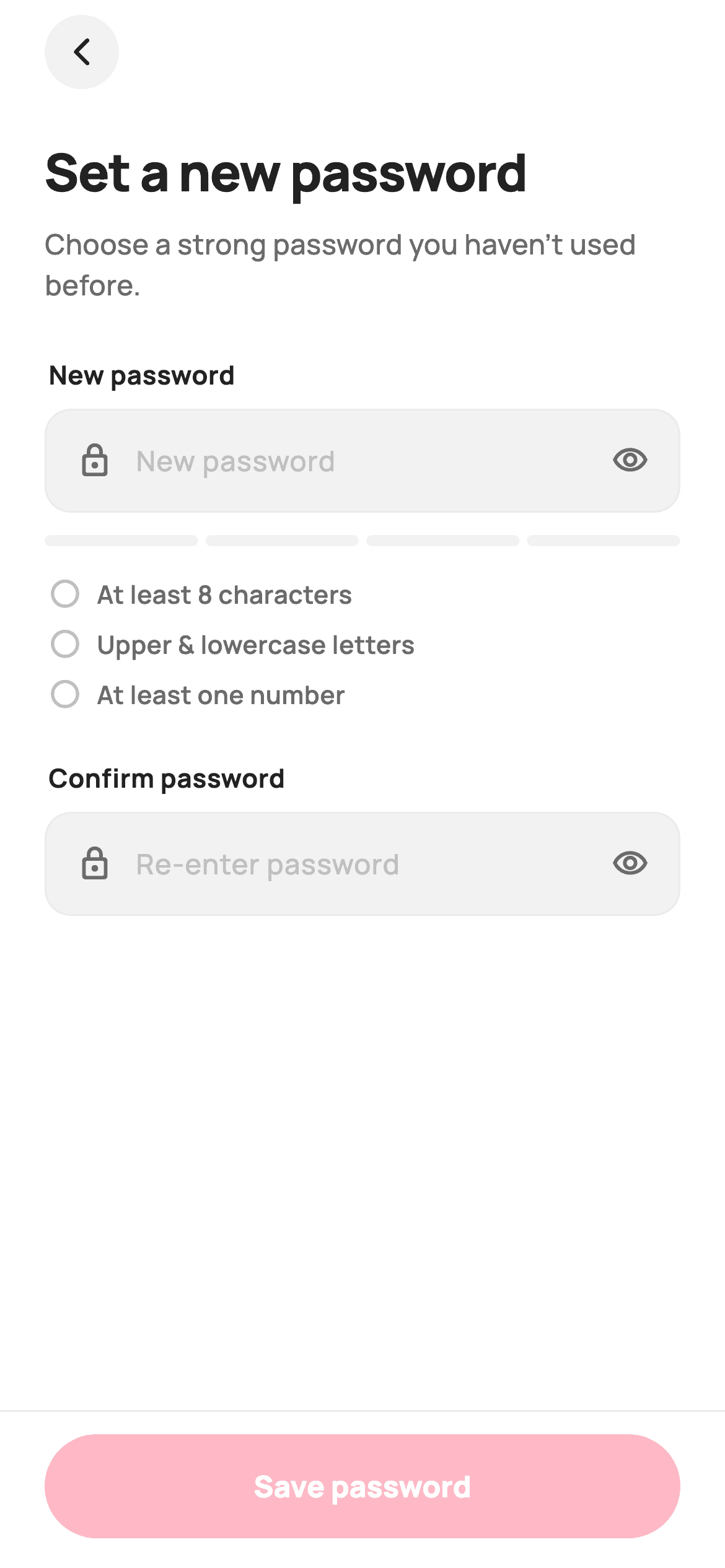
Password rules are frustrating when they're only revealed after you press Save. This tutorial builds a Flutter reset screen that shows them the whole time: three named getters — `_hasLength`, `_hasCase`, `_hasNumber` — feed a checklist that ticks green as you type, and those same getters compose into both the strength meter's score and the Save button's enabled state. A confirm field adds a match check that only complains once you've actually started typing in it.
Watch the Flutter UI walkthrough
A short screen recording of Reset Password running, if you'd rather see it before you read the code. The written tutorial below covers everything in it.
Can't see the video? Watch it on YouTube.
What you'll build
- ✓Named boolean getters that drive the checklist, the meter and validity at once
- ✓A requirements checklist that ticks green live, per rule, as the user types
- ✓A four-segment painted strength meter with no charting or password package
- ✓A mismatch warning suppressed until the confirm field has content
- ✓One obscure toggle shared by both password fields, so they reveal together
- ✓A Save button gated on all three rules plus a confirmed match
Step-by-step build
Create the file
Add a new file at lib/ecom_auth_reset/ecom_auth_reset_screen.dart in your Flutter project.
Register the bundled fonts
No external packages — this is pure Flutter. It does bundle its design font (Manrope), so drop the font file into fonts/ and declare it in pubspec.yaml:
flutter:
  fonts:
    - family: Manrope
      fonts:
- asset: fonts/Manrope-Regular.ttfBuild it, piece by piece
Here's how the screen goes together. Each block below is a real slice of the code with a plain-English explanation — paste them in order, or grab the whole file from the next section.
Two controllers, both rebuilding on change
class _EcomAuthResetScreenState extends State<EcomAuthResetScreen> {
  static const String _font = 'Manrope';
  static const Color _canvas = Color(0xFFFFFFFF);
  static const Color _ink = Color(0xFF222222);
  static const Color _muted = Color(0xFF6A6A6A);
  static const Color _faint = Color(0xFFC1C1C1);
  static const Color _brand = Color(0xFFFF385C);
  static const Color _surface = Color(0xFFF2F2F2);
  static const Color _hairline = Color(0xFFEBEBEB);
  static const Color _success = Color(0xFF2E9E5B);
  static const Color _warn = Color(0xFFF5A623);
  static const Color _danger = Color(0xFFE5484D);

  final TextEditingController _password = TextEditingController();
  final TextEditingController _confirm = TextEditingController();
  bool _obscure = true;

  @override
  void initState() {
    super.initState();
    _password.addListener(() => setState(() {}));
    _confirm.addListener(() => setState(() {}));
  }

  @override
  void dispose() {
    _password.dispose();
    _confirm.dispose();
    super.dispose();
  }
Unlike a sign-up form where only the password needs live feedback, *both* controllers here get `addListener(() => setState(() {}))` in `initState` — the new password drives the checklist and meter, and the confirm field drives the match warning, so both must trigger rebuilds on every keystroke. `dispose()` releases both. `bool _obscure` is a single field shared by the two fields rather than one each, which is deliberate: when you're re-typing a password to confirm it, you want to see both or neither.
One getter per rule, composed three ways
  String get _p => _password.text;
  bool get _hasLength => _p.length >= 8;
  bool get _hasCase =>
      RegExp(r'[A-Z]').hasMatch(_p) && RegExp(r'[a-z]').hasMatch(_p);
  bool get _hasNumber => RegExp(r'[0-9]').hasMatch(_p);
  bool get _matches => _confirm.text.isNotEmpty && _confirm.text == _p;

  int get _strength {
    if (_p.isEmpty) return 0;
    int s = 0;
    if (_hasLength) s++;
    if (_hasCase) s++;
    if (_hasNumber) s++;
    if (RegExp(r'[^A-Za-z0-9]').hasMatch(_p)) s++;
    return s;
  }

  bool get _valid => _hasLength && _hasCase && _hasNumber && _matches;
This is the structural idea of the screen. `_hasLength`, `_hasCase` and `_hasNumber` each express exactly one rule, and `_matches` checks the confirm field is both non-empty and equal. `_strength` then *reuses* those three (plus a symbol test) to build its 0–4 score, and `_valid` reuses them again for the button. Because each rule is defined once, the checklist can never say a rule is satisfied while the button disagrees. The `_p` getter is just shorthand for `_password.text`, keeping the rules readable.
Header and the new-password field
  @override
  Widget build(BuildContext context) {
    final int s = _strength;
    final Color barColor = s <= 1 ? _danger : (s == 2 ? _warn : _success);

    return Theme(
      data: ThemeData.light(useMaterial3: true),
      child: Scaffold(
        backgroundColor: _canvas,
        body: SafeArea(
          child: Column(
            children: <Widget>[
              Expanded(
                child: SingleChildScrollView(
                  padding: const EdgeInsets.fromLTRB(24, 8, 24, 24),
                  child: Column(
                    crossAxisAlignment: CrossAxisAlignment.stretch,
                    children: <Widget>[
                      Align(
                        alignment: Alignment.centerLeft,
                        child: GestureDetector(
                          onTap: () => Navigator.maybePop(context),
                          child: Container(
                            width: 40,
                            height: 40,
                            decoration: const BoxDecoration(
                              color: _surface,
                              shape: BoxShape.circle,
                            ),
                            child: const Icon(Icons.arrow_back_ios_new_rounded,
                                size: 18, color: _ink),
                          ),
                        ),
                      ),
                      const SizedBox(height: 24),
                      const Text(
                        'Set a new password',
                        style: TextStyle(
                          fontFamily: _font,
                          fontSize: 28,
                          fontWeight: FontWeight.w800,
                          letterSpacing: -0.6,
                          color: _ink,
                        ),
                      ),
                      const SizedBox(height: 8),
                      const Text(
                        'Choose a strong password you haven’t used before.',
                        style: TextStyle(
                          fontFamily: _font,
                          fontSize: 15,
                          height: 1.45,
                          fontWeight: FontWeight.w500,
                          color: _muted,
                        ),
                      ),
                      const SizedBox(height: 28),
                      const _Label('New password'),
                      _PwField(
                        controller: _password,
                        hint: 'New password',
                        obscure: _obscure,
                        onToggle: () => setState(() => _obscure = !_obscure),
                      ),
                      const SizedBox(height: 12),
                      Row(
                        children: <Widget>[
                          Expanded(
                            child: ClipRRect(
                              borderRadius: BorderRadius.circular(99),
                              child: SizedBox(
                                height: 6,
                                child: CustomPaint(
                                  painter: _StrengthPainter(
                                    score: s,
                                    color: barColor,
                                    track: _surface,
                                  ),
                                ),
                              ),
                            ),
                          ),
                        ],
                      ),
`barColor` is derived from the score at the top of `build`, stepping danger → warn → success at the 1/2/3 boundaries. The back button is a 40px `_surface` circle rather than an `IconButton`, giving the flat page a tap target with visible edges. Below the field, the meter is an `Expanded` `ClipRRect(99)` around a 6px `CustomPaint` — the painter draws square-ish rounded rects and the clip rounds the outer ends. Note there's no verdict word beside the bar as you'd find on a sign-up form; here the checklist below carries that job in more detail.
The live requirements checklist
                      const SizedBox(height: 16),
                      _Req(text: 'At least 8 characters', met: _hasLength),
                      _Req(text: 'Upper & lowercase letters', met: _hasCase),
                      _Req(text: 'At least one number', met: _hasNumber),
                      const SizedBox(height: 18),
Three `_Req` widgets, each handed its rule's current boolean: `_hasLength`, `_hasCase`, `_hasNumber`. Because they take the value rather than computing it, the rules stay in one place and the widget stays a pure render function. The 8px gap between them and the checklist's position *directly under* the meter is what makes the pairing work — the bar shows how far along you are, the list says exactly what's still missing.
Confirm field and a warning that waits its turn
                      const _Label('Confirm password'),
                      _PwField(
                        controller: _confirm,
                        hint: 'Re-enter password',
                        obscure: _obscure,
                        onToggle: () => setState(() => _obscure = !_obscure),
                      ),
                      if (_confirm.text.isNotEmpty && !_matches) ...<Widget>[
                        const SizedBox(height: 8),
                        const Padding(
                          padding: EdgeInsets.only(left: 2),
                          child: Text(
                            'Passwords don’t match yet',
                            style: TextStyle(
                              fontFamily: _font,
                              fontSize: 13,
                              fontWeight: FontWeight.w700,
                              color: _danger,
                            ),
                          ),
                        ),
                      ],
The confirm field reuses `_PwField` and shares the same `_obscure` and `onToggle`, so tapping either eye reveals both. The mismatch warning is spliced in with `if (_confirm.text.isNotEmpty && !_matches) ...<Widget>[…]` — that first condition is what makes the screen feel civil: an empty confirm field is *incomplete*, not *wrong*, so no error appears until the user has typed something. The copy reinforces it — 'Passwords don't match yet' rather than 'Passwords don't match'.
The gated Save button
              Container(
                padding: const EdgeInsets.fromLTRB(24, 12, 24, 16),
                decoration: const BoxDecoration(
                  color: _canvas,
                  border: Border(top: BorderSide(color: _hairline)),
                ),
                child: SizedBox(
                  height: 56,
                  width: double.infinity,
                  child: FilledButton(
                    onPressed: _valid ? widget.onSave : null,
                    style: FilledButton.styleFrom(
                      backgroundColor: _brand,
                      foregroundColor: _canvas,
                      disabledBackgroundColor: _brand.withValues(alpha: 0.35),
                      disabledForegroundColor: _canvas,
                      shape: const StadiumBorder(),
                      textStyle: const TextStyle(
                        fontFamily: _font,
                        fontSize: 16,
                        fontWeight: FontWeight.w800,
                      ),
                    ),
                    child: const Text('Save password'),
                  ),
                ),
              ),
The footer sits outside the `Expanded` scroll area with a top hairline border, so it stays put while the form scrolls. `onPressed: _valid ? widget.onSave : null` — passing literal `null` is what disables a `FilledButton`, ripple included. `disabledBackgroundColor: _brand.withValues(alpha: 0.35)` keeps it visibly brand-coloured while disabled, so it reads as 'not yet' rather than broken; paired with the checklist above, the user can always see exactly which rule is holding them up.
The requirement row and the meter painter
class _Req extends StatelessWidget {
  const _Req({required this.text, required this.met});
  final String text;
  final bool met;

  @override
  Widget build(BuildContext context) {
    final Color c = met
        ? _EcomAuthResetScreenState._success
        : _EcomAuthResetScreenState._faint;
    return Padding(
      padding: const EdgeInsets.only(bottom: 8, left: 2),
      child: Row(
        children: <Widget>[
          Icon(
            met ? Icons.check_circle_rounded : Icons.circle_outlined,
            size: 18,
            color: c,
          ),
          const SizedBox(width: 8),
          Text(
            text,
            style: TextStyle(
              fontFamily: _EcomAuthResetScreenState._font,
              fontSize: 13.5,
              fontWeight: FontWeight.w600,
              color: met
                  ? _EcomAuthResetScreenState._ink
                  : _EcomAuthResetScreenState._muted,
            ),
          ),
        ],
      ),
    );
  }
}

/// Paints a 4-segment password-strength meter — filled segments use [color].
class _StrengthPainter extends CustomPainter {
  const _StrengthPainter({
    required this.score,
    required this.color,
    required this.track,
  });

  final int score;
  final Color color;
  final Color track;

  @override
  void paint(Canvas c, Size size) {
    const int segments = 4;
    const double gap = 4;
    final double segW = (size.width - gap * (segments - 1)) / segments;
    for (int i = 0; i < segments; i++) {
      final double x = i * (segW + gap);
      final Paint p = Paint()..color = i < score ? color : track;
      c.drawRRect(
        RRect.fromRectAndRadius(
          Rect.fromLTWH(x, 0, segW, size.height),
          const Radius.circular(3),
        ),
        p,
      );
    }
  }

  @override
  bool shouldRepaint(_StrengthPainter oldDelegate) =>
      oldDelegate.score != score || oldDelegate.color != color;
}
`_Req` swaps two things on `met`: the icon goes from `circle_outlined` to `check_circle_rounded`, and the text colour lifts from `_muted` to `_ink` while the icon turns `_success` green. Darkening the *text* as well as ticking the icon is what makes a satisfied rule recede as completed rather than just decorated. `_StrengthPainter` divides its width into four segments with 4px gaps — `(size.width - gap * (segments - 1)) / segments` subtracts the three gaps before dividing, so the segments are equal and the row ends flush — and fills segment `i` with the live colour when `i < score`.
Full code
The complete, ready-to-paste source. Free to use in your projects — one click copies it all.
import 'package:flutter/material.dart';

/// StyleCart — Reset Password.
///
/// New + confirm password with a painted strength meter, a live requirements
/// checklist and match validation gating the save CTA. Self-contained per
/// CONVENTIONS.md: pure Flutter, bundled Manrope, inline Airbnb-style tokens, own
/// light theme + SafeArea. The strength meter is a CustomPainter (no asset, no
/// emoji glyph). Exposes callbacks only — the gallery wires navigation.
class EcomAuthResetScreen extends StatefulWidget {
  const EcomAuthResetScreen({super.key, this.onSave});

  /// Submitted a valid, matching new password.
  final VoidCallback? onSave;

  @override
  State<EcomAuthResetScreen> createState() => _EcomAuthResetScreenState();
}

class _EcomAuthResetScreenState extends State<EcomAuthResetScreen> {
  static const String _font = 'Manrope';
  static const Color _canvas = Color(0xFFFFFFFF);
  static const Color _ink = Color(0xFF222222);
  static const Color _muted = Color(0xFF6A6A6A);
  static const Color _faint = Color(0xFFC1C1C1);
  static const Color _brand = Color(0xFFFF385C);
  static const Color _surface = Color(0xFFF2F2F2);
  static const Color _hairline = Color(0xFFEBEBEB);
  static const Color _success = Color(0xFF2E9E5B);
  static const Color _warn = Color(0xFFF5A623);
  static const Color _danger = Color(0xFFE5484D);

  final TextEditingController _password = TextEditingController();
  final TextEditingController _confirm = TextEditingController();
  bool _obscure = true;

  @override
  void initState() {
    super.initState();
    _password.addListener(() => setState(() {}));
    _confirm.addListener(() => setState(() {}));
  }

  @override
  void dispose() {
    _password.dispose();
    _confirm.dispose();
    super.dispose();
  }

  String get _p => _password.text;
  bool get _hasLength => _p.length >= 8;
  bool get _hasCase =>
      RegExp(r'[A-Z]').hasMatch(_p) && RegExp(r'[a-z]').hasMatch(_p);
  bool get _hasNumber => RegExp(r'[0-9]').hasMatch(_p);
  bool get _matches => _confirm.text.isNotEmpty && _confirm.text == _p;

  int get _strength {
    if (_p.isEmpty) return 0;
    int s = 0;
    if (_hasLength) s++;
    if (_hasCase) s++;
    if (_hasNumber) s++;
    if (RegExp(r'[^A-Za-z0-9]').hasMatch(_p)) s++;
    return s;
  }

  bool get _valid => _hasLength && _hasCase && _hasNumber && _matches;

  @override
  Widget build(BuildContext context) {
    final int s = _strength;
    final Color barColor = s <= 1 ? _danger : (s == 2 ? _warn : _success);

    return Theme(
      data: ThemeData.light(useMaterial3: true),
      child: Scaffold(
        backgroundColor: _canvas,
        body: SafeArea(
          child: Column(
            children: <Widget>[
              Expanded(
                child: SingleChildScrollView(
                  padding: const EdgeInsets.fromLTRB(24, 8, 24, 24),
                  child: Column(
                    crossAxisAlignment: CrossAxisAlignment.stretch,
                    children: <Widget>[
                      Align(
                        alignment: Alignment.centerLeft,
                        child: GestureDetector(
                          onTap: () => Navigator.maybePop(context),
                          child: Container(
                            width: 40,
                            height: 40,
                            decoration: const BoxDecoration(
                              color: _surface,
                              shape: BoxShape.circle,
                            ),
                            child: const Icon(Icons.arrow_back_ios_new_rounded,
                                size: 18, color: _ink),
                          ),
                        ),
                      ),
                      const SizedBox(height: 24),
                      const Text(
                        'Set a new password',
                        style: TextStyle(
                          fontFamily: _font,
                          fontSize: 28,
                          fontWeight: FontWeight.w800,
                          letterSpacing: -0.6,
                          color: _ink,
                        ),
                      ),
                      const SizedBox(height: 8),
                      const Text(
                        'Choose a strong password you haven’t used before.',
                        style: TextStyle(
                          fontFamily: _font,
                          fontSize: 15,
                          height: 1.45,
                          fontWeight: FontWeight.w500,
                          color: _muted,
                        ),
                      ),
                      const SizedBox(height: 28),
                      const _Label('New password'),
                      _PwField(
                        controller: _password,
                        hint: 'New password',
                        obscure: _obscure,
                        onToggle: () => setState(() => _obscure = !_obscure),
                      ),
                      const SizedBox(height: 12),
                      Row(
                        children: <Widget>[
                          Expanded(
                            child: ClipRRect(
                              borderRadius: BorderRadius.circular(99),
                              child: SizedBox(
                                height: 6,
                                child: CustomPaint(
                                  painter: _StrengthPainter(
                                    score: s,
                                    color: barColor,
                                    track: _surface,
                                  ),
                                ),
                              ),
                            ),
                          ),
                        ],
                      ),
                      const SizedBox(height: 16),
                      _Req(text: 'At least 8 characters', met: _hasLength),
                      _Req(text: 'Upper & lowercase letters', met: _hasCase),
                      _Req(text: 'At least one number', met: _hasNumber),
                      const SizedBox(height: 18),
                      const _Label('Confirm password'),
                      _PwField(
                        controller: _confirm,
                        hint: 'Re-enter password',
                        obscure: _obscure,
                        onToggle: () => setState(() => _obscure = !_obscure),
                      ),
                      if (_confirm.text.isNotEmpty && !_matches) ...<Widget>[
                        const SizedBox(height: 8),
                        const Padding(
                          padding: EdgeInsets.only(left: 2),
                          child: Text(
                            'Passwords don’t match yet',
                            style: TextStyle(
                              fontFamily: _font,
                              fontSize: 13,
                              fontWeight: FontWeight.w700,
                              color: _danger,
                            ),
                          ),
                        ),
                      ],
                    ],
                  ),
                ),
              ),
              Container(
                padding: const EdgeInsets.fromLTRB(24, 12, 24, 16),
                decoration: const BoxDecoration(
                  color: _canvas,
                  border: Border(top: BorderSide(color: _hairline)),
                ),
                child: SizedBox(
                  height: 56,
                  width: double.infinity,
                  child: FilledButton(
                    onPressed: _valid ? widget.onSave : null,
                    style: FilledButton.styleFrom(
                      backgroundColor: _brand,
                      foregroundColor: _canvas,
                      disabledBackgroundColor: _brand.withValues(alpha: 0.35),
                      disabledForegroundColor: _canvas,
                      shape: const StadiumBorder(),
                      textStyle: const TextStyle(
                        fontFamily: _font,
                        fontSize: 16,
                        fontWeight: FontWeight.w800,
                      ),
                    ),
                    child: const Text('Save password'),
                  ),
                ),
              ),
            ],
          ),
        ),
      ),
    );
  }
}

class _Label extends StatelessWidget {
  const _Label(this.text);
  final String text;

  @override
  Widget build(BuildContext context) {
    return Padding(
      padding: const EdgeInsets.only(bottom: 8, left: 2),
      child: Text(
        text,
        style: const TextStyle(
          fontFamily: _EcomAuthResetScreenState._font,
          fontSize: 14,
          fontWeight: FontWeight.w700,
          color: _EcomAuthResetScreenState._ink,
        ),
      ),
    );
  }
}

class _PwField extends StatelessWidget {
  const _PwField({
    required this.controller,
    required this.hint,
    required this.obscure,
    required this.onToggle,
  });

  final TextEditingController controller;
  final String hint;
  final bool obscure;
  final VoidCallback onToggle;

  @override
  Widget build(BuildContext context) {
    return Container(
      height: 56,
      padding: const EdgeInsets.symmetric(horizontal: 16),
      decoration: BoxDecoration(
        color: _EcomAuthResetScreenState._surface,
        borderRadius: BorderRadius.circular(14),
        border: Border.all(color: _EcomAuthResetScreenState._hairline),
      ),
      child: Row(
        children: <Widget>[
          const Icon(Icons.lock_outline_rounded,
              size: 20, color: _EcomAuthResetScreenState._muted),
          const SizedBox(width: 12),
          Expanded(
            child: TextField(
              controller: controller,
              obscureText: obscure,
              style: const TextStyle(
                fontFamily: _EcomAuthResetScreenState._font,
                fontSize: 15,
                fontWeight: FontWeight.w600,
                color: _EcomAuthResetScreenState._ink,
              ),
              cursorColor: _EcomAuthResetScreenState._brand,
              decoration: InputDecoration(
                isCollapsed: true,
                border: InputBorder.none,
                hintText: hint,
                hintStyle: const TextStyle(
                  fontFamily: _EcomAuthResetScreenState._font,
                  fontSize: 15,
                  fontWeight: FontWeight.w500,
                  color: _EcomAuthResetScreenState._faint,
                ),
              ),
            ),
          ),
          const SizedBox(width: 8),
          GestureDetector(
            onTap: onToggle,
            child: Icon(
              obscure
                  ? Icons.visibility_outlined
                  : Icons.visibility_off_outlined,
              size: 20,
              color: _EcomAuthResetScreenState._muted,
            ),
          ),
        ],
      ),
    );
  }
}

class _Req extends StatelessWidget {
  const _Req({required this.text, required this.met});
  final String text;
  final bool met;

  @override
  Widget build(BuildContext context) {
    final Color c = met
        ? _EcomAuthResetScreenState._success
        : _EcomAuthResetScreenState._faint;
    return Padding(
      padding: const EdgeInsets.only(bottom: 8, left: 2),
      child: Row(
        children: <Widget>[
          Icon(
            met ? Icons.check_circle_rounded : Icons.circle_outlined,
            size: 18,
            color: c,
          ),
          const SizedBox(width: 8),
          Text(
            text,
            style: TextStyle(
              fontFamily: _EcomAuthResetScreenState._font,
              fontSize: 13.5,
              fontWeight: FontWeight.w600,
              color: met
                  ? _EcomAuthResetScreenState._ink
                  : _EcomAuthResetScreenState._muted,
            ),
          ),
        ],
      ),
    );
  }
}

/// Paints a 4-segment password-strength meter — filled segments use [color].
class _StrengthPainter extends CustomPainter {
  const _StrengthPainter({
    required this.score,
    required this.color,
    required this.track,
  });

  final int score;
  final Color color;
  final Color track;

  @override
  void paint(Canvas c, Size size) {
    const int segments = 4;
    const double gap = 4;
    final double segW = (size.width - gap * (segments - 1)) / segments;
    for (int i = 0; i < segments; i++) {
      final double x = i * (segW + gap);
      final Paint p = Paint()..color = i < score ? color : track;
      c.drawRRect(
        RRect.fromRectAndRadius(
          Rect.fromLTWH(x, 0, segW, size.height),
          const Radius.circular(3),
        ),
        p,
      );
    }
  }

  @override
  bool shouldRepaint(_StrengthPainter oldDelegate) =>
      oldDelegate.score != score || oldDelegate.color != color;
}
Plus bundled 5 binary assets (fonts/images). The CLI and MCP install those for you automatically.
Two faster ways to add it
Copy-paste works, but you can skip it entirely.
1. FlutterKit CLI
One command drops this screen — and its fonts — straight into your project.
$ flutterkit add ecom-auth-reset2. AI agent (MCP)
Connect FlutterKit's MCP server in Claude or Cursor and just ask your agent to install ecom-auth-reset — it fetches and writes the files for you.
FAQ
Is this reset password screen free to use?
Yes. The complete Dart source on this page is free for personal and commercial apps. Copy it from the code block, install it with the FlutterKit CLI (flutterkit add ecom-auth-reset), or add it through an AI agent over MCP.
How do I change the password rules?
Edit the getters — _hasLength, _hasCase, _hasNumber — and add a matching _Req row for any new one. Because _strength and _valid both compose those same getters, the meter, checklist and button all update together with no other changes.
Why doesn't the mismatch warning show immediately?
The condition is _confirm.text.isNotEmpty && !_matches. An untouched confirm field is incomplete rather than wrong, so warning about it before the user has typed would be noise. The wording ('don't match yet') carries the same intent.
Does it need any packages?
No. It's pure Flutter on the material library — the strength meter is a small CustomPainter and the rules are plain RegExp tests. The only asset is the bundled Manrope font, which the CLI and MCP install for you.
Which Flutter version does it target?
Target Flutter 3.27+ with Dart 3. Only one line depends on a recent SDK — the disabled button's withValues(alpha: 0.35) — so swapping it for withOpacity(0.35) is enough to build on older versions. The RegExp rules, the getters and the painter all work unchanged much further back.


