How to Build a SaaS Dashboard App Shell in Flutter (Full Code + Preview)
An app shell is the persistent chrome every screen of a SaaS dashboard lives inside — the left sidebar, top bar, and content region that never change as you navigate. This tutorial builds a complete desktop-first shell in Flutter: a collapsible sidebar with grouped navigation and an active-item indicator, a top bar with a ⌘K search field, an environment pill, and a notification bell, and a scrollable content area with a sticky page header over a live demo dashboard of KPI tiles and hand-painted charts. It's responsive across three breakpoints and pure Flutter — no packages, just one bundled font.
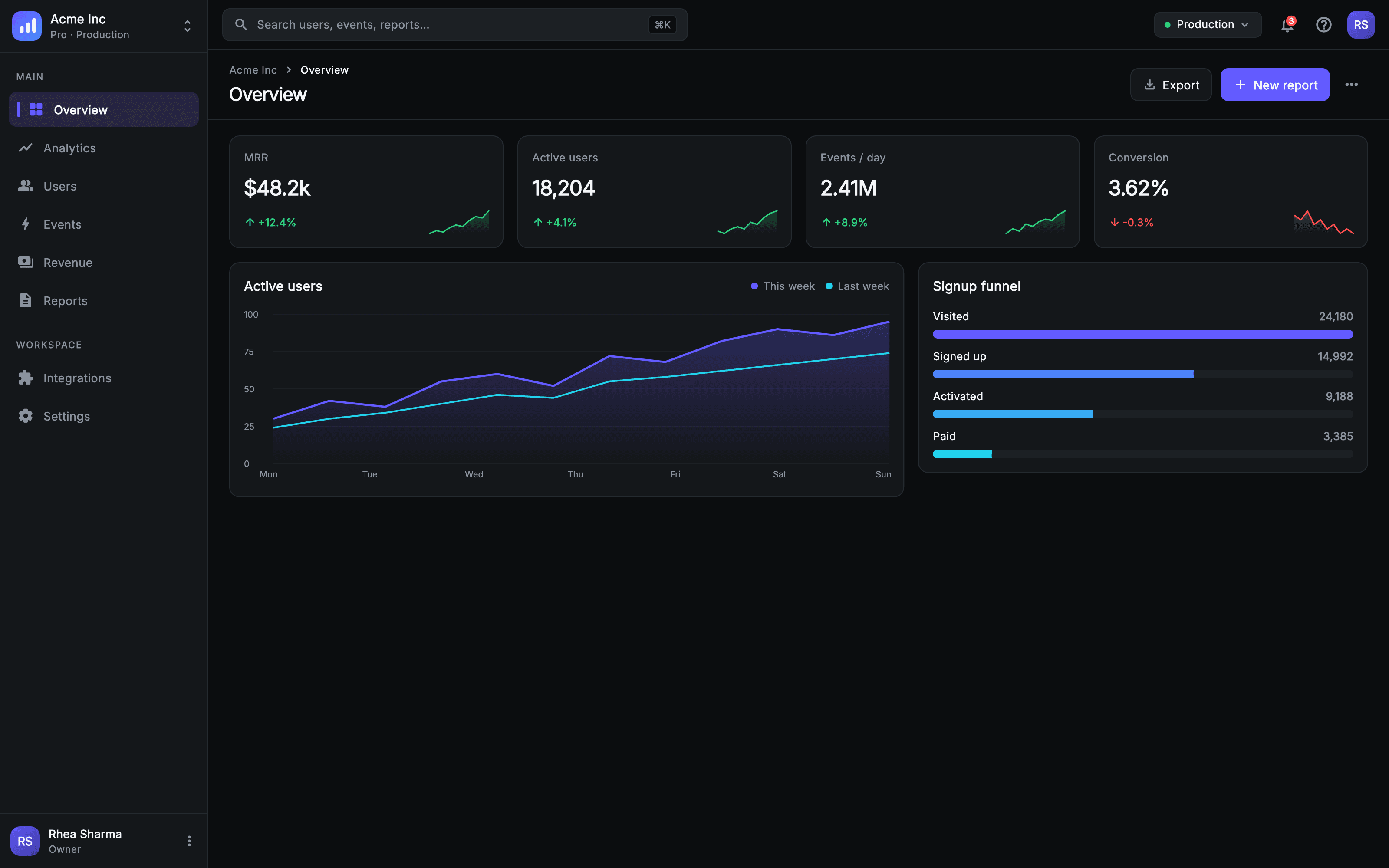
What you'll build
- ✓A responsive desktop-first layout that expands, collapses to an icon rail, or hides behind a drawer at three breakpoints
- ✓A left sidebar with a workspace switcher, grouped nav (Main + Workspace), an active-item highlight and accent bar, and a user footer
- ✓A top bar with a ⌘K search field, a green 'Production' environment pill, and a notification bell with a painted count badge
- ✓A sticky page header with a breadcrumb, title, and Export / New report buttons
- ✓A demo dashboard of KPI tiles with sparklines, a two-series trend chart, and a signup funnel — all hand-painted with CustomPainter
Step-by-step build
Create the file
Add a new file at lib/console_shell_appframe/console_shell_appframe_screen.dart in your Flutter project.
Register the bundled fonts
No external packages — this is pure Flutter. It does bundle its design font (Inter), so drop the font file into fonts/ and declare it in pubspec.yaml:
flutter:
  fonts:
    - family: Inter
      fonts:
- asset: fonts/Inter-Regular.ttfBuild it, piece by piece
Here's how the screen goes together. Each block below is a real slice of the code with a plain-English explanation — paste them in order, or grab the whole file from the next section.
Doc contract, callbacks, and the dark token palette
import 'dart:math' as math;

import 'package:flutter/material.dart';

/// Console — App Shell (canonical `AppShell`).
///
/// The flagship desktop-first SaaS chrome the whole Console kit (and, as a
/// pattern, the other nine web products) reuses: a persistent left sidebar
/// (painted logo mark, workspace switcher, grouped nav with an active-item
/// indicator, user + plan footer), a top bar (⌘K search field, environment
/// pill, notifications bell with a painted count badge, help, avatar menu), and
/// a content region with a sticky page header over a live demo dashboard.
///
/// Responsive contract (desktop-first):
///   • ≥ 1024  — full expanded sidebar (240), multi-column body.
///   • 768–1023 — sidebar collapses to a 72px icon rail; body narrows.
///   • < 768   — sidebar hidden behind a hamburger drawer; KPI grid → 1 col.
///
/// Self-contained per CONVENTIONS.md: pure Flutter + `dart:` only, bundled
/// static-weight Inter, own dark theme + tokens, `SafeArea`, overflow-proof at
/// every width. Every chart, mark, and avatar is hand-painted — no packages, no
/// network. Nav is via callbacks only.
class ConsoleShellAppframeScreen extends StatefulWidget {
  const ConsoleShellAppframeScreen({
    super.key,
    this.onNavSection,
    this.onSearch,
    this.onWorkspace,
    this.onNotifications,
    this.onPrimaryAction,
    this.onProfile,
  });

  /// Fired with the tapped sidebar section id (e.g. `overview`, `analytics`).
  final ValueChanged<String>? onNavSection;

  /// Fired when the top-bar ⌘K search field is tapped (opens command palette).
  final VoidCallback? onSearch;

  /// Fired when the workspace switcher at the top of the rail is tapped.
  final VoidCallback? onWorkspace;

  /// Fired when the notifications bell is tapped.
  final VoidCallback? onNotifications;

  /// Fired by the sticky page header's primary action button.
  final VoidCallback? onPrimaryAction;

  /// Fired by the avatar menu in the top bar / sidebar footer.
  final VoidCallback? onProfile;

  // ── Design tokens (declared inline, no shared theme) ──────────────────────
  static const String _font = 'Inter';
  static const Color _bg = Color(0xFF0B0D0F);
  static const Color _surface = Color(0xFF14171A);
  static const Color _surfaceAlt = Color(0xFF1C2024);
  static const Color _brand = Color(0xFF635BFF);
  static const Color _accent = Color(0xFF22D3EE);
  static const Color _success = Color(0xFF2FD27C);
  static const Color _danger = Color(0xFFFF4D4D);
  static const Color _muted = Color(0xFF8A929E);
  static const Color _ink = Color(0xFFF4F6F8);
  static const Color _hairline = Color(0xFF242A30);
  static const Color _gridline = Color(0xFF1B2127);
  static const Color _selection = Color(0xFF2A2540);

  @override
  State<ConsoleShellAppframeScreen> createState() =>
      _ConsoleShellAppframeScreenState();
}
The file imports only dart:math (for min/max in the sparklines) and material — no packages. The long doc comment spells out the responsive contract you'll see enforced later: full 240px sidebar at ≥1024, a 72px icon rail at 768–1023, and a hamburger drawer below 768. ConsoleShellAppframeScreen is a StatefulWidget exposing six nav callbacks (onNavSection, onSearch, onWorkspace, onNotifications, onPrimaryAction, onProfile) so the shell stays presentation-only and the parent decides what each tap does. Instead of a shared theme, the whole design is a block of private const Color tokens: _bg is near-black (0xFF0B0D0F), _surface / _surfaceAlt are the panel fills, _brand is the indigo 0xFF635BFF, _accent a cyan, _success green and _danger red for deltas, plus _muted, _ink, _hairline, _gridline, and _selection.
State and the responsive shell
class _ConsoleShellAppframeScreenState
    extends State<ConsoleShellAppframeScreen> {
  String _active = 'overview';
  final GlobalKey<ScaffoldState> _scaffoldKey = GlobalKey<ScaffoldState>();

  void _select(String id) {
    setState(() => _active = id);
    widget.onNavSection?.call(id);
    if (_scaffoldKey.currentState?.isDrawerOpen ?? false) {
      Navigator.of(context).pop();
    }
  }

  @override
  Widget build(BuildContext context) {
    return Theme(
      data: ThemeData.dark(useMaterial3: true),
      child: LayoutBuilder(
        builder: (BuildContext context, BoxConstraints c) {
          final double w = c.maxWidth;
          final bool mobile = w < 768;
          final bool rail = w >= 768 && w < 1024;
          return Scaffold(
            key: _scaffoldKey,
            backgroundColor: ConsoleShellAppframeScreen._bg,
            drawer: mobile
                ? Drawer(
                    width: 264,
                    backgroundColor: ConsoleShellAppframeScreen._surface,
                    child: _Sidebar(
                      collapsed: false,
                      active: _active,
                      onSelect: _select,
                      onWorkspace: widget.onWorkspace,
                      onProfile: widget.onProfile,
                    ),
                  )
                : null,
            body: SafeArea(
              child: Row(
                children: <Widget>[
                  if (!mobile)
                    _Sidebar(
                      collapsed: rail,
                      active: _active,
                      onSelect: _select,
                      onWorkspace: widget.onWorkspace,
                      onProfile: widget.onProfile,
                    ),
                  Expanded(
                    child: Column(
                      children: <Widget>[
                        _TopBar(
                          mobile: mobile,
                          onMenu: () => _scaffoldKey.currentState?.openDrawer(),
                          onSearch: widget.onSearch,
                          onNotifications: widget.onNotifications,
                          onProfile: widget.onProfile,
                        ),
                        Expanded(
                          child: _Content(
                            mobile: mobile,
                            onPrimaryAction: widget.onPrimaryAction,
                          ),
                        ),
                      ],
                    ),
                  ),
                ],
              ),
            ),
          );
        },
      ),
    );
  }
}
The state holds just two things: _active (the selected section id, starting at 'overview') and a _scaffoldKey so the drawer can be opened and closed programmatically. _select() calls setState to move the highlight, fires onNavSection, and pops the drawer if it's open — so tapping a nav item on mobile also closes the menu. build() wraps everything in a dark Theme(ThemeData.dark), then a LayoutBuilder reads the width and computes the mobile (<768) and rail (768–1024) booleans. The Scaffold attaches a 264px Drawer only on mobile; otherwise a Row places the _Sidebar (collapsed when in rail mode) beside an Expanded Column of _TopBar over _Content. SafeArea keeps it clear of system insets.
The sidebar: nav data, groups, active indicator, and footer
// ═══════════════════════════════════════════════════════════════════════════
// Sidebar
// ═══════════════════════════════════════════════════════════════════════════

class _NavItem {
  const _NavItem(this.id, this.label, this.icon);
  final String id;
  final String label;
  final IconData icon;
}

const List<_NavItem> _mainNav = <_NavItem>[
  _NavItem('overview', 'Overview', Icons.grid_view_rounded),
  _NavItem('analytics', 'Analytics', Icons.show_chart_rounded),
  _NavItem('users', 'Users', Icons.people_alt_rounded),
  _NavItem('events', 'Events', Icons.bolt_rounded),
  _NavItem('revenue', 'Revenue', Icons.payments_rounded),
  _NavItem('reports', 'Reports', Icons.description_rounded),
];

const List<_NavItem> _workspaceNav = <_NavItem>[
  _NavItem('integrations', 'Integrations', Icons.extension_rounded),
  _NavItem('settings', 'Settings', Icons.settings_rounded),
];

class _Sidebar extends StatelessWidget {
  const _Sidebar({
    required this.collapsed,
    required this.active,
    required this.onSelect,
    this.onWorkspace,
    this.onProfile,
  });

  final bool collapsed;
  final String active;
  final ValueChanged<String> onSelect;
  final VoidCallback? onWorkspace;
  final VoidCallback? onProfile;

  @override
  Widget build(BuildContext context) {
    return Container(
      width: collapsed ? 72 : 240,
      decoration: const BoxDecoration(
        color: ConsoleShellAppframeScreen._surface,
        border: Border(
          right: BorderSide(color: ConsoleShellAppframeScreen._hairline),
        ),
      ),
      child: Column(
        crossAxisAlignment: CrossAxisAlignment.stretch,
        children: <Widget>[
          _WorkspaceSwitcher(collapsed: collapsed, onTap: onWorkspace),
          const Divider(
            height: 1,
            thickness: 1,
            color: ConsoleShellAppframeScreen._hairline,
          ),
          Expanded(
            child: ListView(
              padding: const EdgeInsets.symmetric(vertical: 12),
              children: <Widget>[
                if (!collapsed) const _GroupLabel('MAIN'),
                for (final _NavItem it in _mainNav)
                  _NavRow(
                    item: it,
                    active: active == it.id,
                    collapsed: collapsed,
                    onTap: () => onSelect(it.id),
                  ),
                const SizedBox(height: 14),
                if (!collapsed) const _GroupLabel('WORKSPACE'),
                for (final _NavItem it in _workspaceNav)
                  _NavRow(
                    item: it,
                    active: active == it.id,
                    collapsed: collapsed,
                    onTap: () => onSelect(it.id),
                  ),
              ],
            ),
          ),
          const Divider(
            height: 1,
            thickness: 1,
            color: ConsoleShellAppframeScreen._hairline,
          ),
          _UserFooter(collapsed: collapsed, onTap: onProfile),
        ],
      ),
    );
  }
}

class _WorkspaceSwitcher extends StatelessWidget {
  const _WorkspaceSwitcher({required this.collapsed, this.onTap});
  final bool collapsed;
  final VoidCallback? onTap;

  @override
  Widget build(BuildContext context) {
    return InkWell(
      onTap: onTap,
      child: Container(
        height: 60,
        padding: EdgeInsets.symmetric(horizontal: collapsed ? 0 : 14),
        alignment: collapsed ? Alignment.center : Alignment.centerLeft,
        child: collapsed
            ? const SizedBox(
                width: 34,
                height: 34,
                child: CustomPaint(painter: _LogoMarkPainter()),
              )
            : Row(
                children: <Widget>[
                  const SizedBox(
                    width: 34,
                    height: 34,
                    child: CustomPaint(painter: _LogoMarkPainter()),
                  ),
                  const SizedBox(width: 10),
                  Expanded(
                    child: Column(
                      mainAxisAlignment: MainAxisAlignment.center,
                      crossAxisAlignment: CrossAxisAlignment.start,
                      children: const <Widget>[
                        Text(
                          'Acme Inc',
                          maxLines: 1,
                          overflow: TextOverflow.ellipsis,
                          style: TextStyle(
                            fontFamily: ConsoleShellAppframeScreen._font,
                            fontSize: 14,
                            fontWeight: FontWeight.w600,
                            color: ConsoleShellAppframeScreen._ink,
                          ),
                        ),
                        Text(
                          'Pro · Production',
                          maxLines: 1,
                          overflow: TextOverflow.ellipsis,
                          style: TextStyle(
                            fontFamily: ConsoleShellAppframeScreen._font,
                            fontSize: 11.5,
                            fontWeight: FontWeight.w500,
                            color: ConsoleShellAppframeScreen._muted,
                          ),
                        ),
                      ],
                    ),
                  ),
                  const Icon(
                    Icons.unfold_more_rounded,
                    size: 18,
                    color: ConsoleShellAppframeScreen._muted,
                  ),
                ],
              ),
      ),
    );
  }
}

class _GroupLabel extends StatelessWidget {
  const _GroupLabel(this.text);
  final String text;

  @override
  Widget build(BuildContext context) {
    return Padding(
      padding: const EdgeInsets.fromLTRB(18, 8, 16, 8),
      child: Text(
        text,
        style: const TextStyle(
          fontFamily: ConsoleShellAppframeScreen._font,
          fontSize: 10.5,
          fontWeight: FontWeight.w600,
          letterSpacing: 1.2,
          color: ConsoleShellAppframeScreen._muted,
        ),
      ),
    );
  }
}

class _NavRow extends StatelessWidget {
  const _NavRow({
    required this.item,
    required this.active,
    required this.collapsed,
    required this.onTap,
  });

  final _NavItem item;
  final bool active;
  final bool collapsed;
  final VoidCallback onTap;

  @override
  Widget build(BuildContext context) {
    final Color fg = active
        ? ConsoleShellAppframeScreen._ink
        : ConsoleShellAppframeScreen._muted;
    return Padding(
      padding: EdgeInsets.symmetric(horizontal: collapsed ? 12 : 10, vertical: 2),
      child: InkWell(
        borderRadius: BorderRadius.circular(9),
        onTap: onTap,
        child: Container(
          height: 40,
          padding: EdgeInsets.symmetric(horizontal: collapsed ? 0 : 10),
          decoration: BoxDecoration(
            color: active
                ? ConsoleShellAppframeScreen._selection
                : Colors.transparent,
            borderRadius: BorderRadius.circular(9),
          ),
          child: Row(
            mainAxisAlignment:
                collapsed ? MainAxisAlignment.center : MainAxisAlignment.start,
            children: <Widget>[
              if (active && !collapsed)
                Container(
                  width: 3,
                  height: 18,
                  margin: const EdgeInsets.only(right: 9),
                  decoration: BoxDecoration(
                    color: ConsoleShellAppframeScreen._brand,
                    borderRadius: BorderRadius.circular(2),
                  ),
                ),
              Icon(
                item.icon,
                size: 19,
                color: active ? ConsoleShellAppframeScreen._brand : fg,
              ),
              if (!collapsed) ...<Widget>[
                const SizedBox(width: 11),
                Expanded(
                  child: Text(
                    item.label,
                    maxLines: 1,
                    overflow: TextOverflow.ellipsis,
                    style: TextStyle(
                      fontFamily: ConsoleShellAppframeScreen._font,
                      fontSize: 13.5,
                      fontWeight: active ? FontWeight.w600 : FontWeight.w500,
                      color: fg,
                    ),
                  ),
                ),
              ],
            ],
          ),
        ),
      ),
    );
  }
}

class _UserFooter extends StatelessWidget {
  const _UserFooter({required this.collapsed, this.onTap});
  final bool collapsed;
  final VoidCallback? onTap;

  @override
  Widget build(BuildContext context) {
    return InkWell(
      onTap: onTap,
      child: Container(
        height: 62,
        padding: EdgeInsets.symmetric(horizontal: collapsed ? 0 : 12),
        alignment: collapsed ? Alignment.center : Alignment.centerLeft,
        child: collapsed
            ? const _Avatar(initials: 'RS', size: 34, color: _brandTint)
            : Row(
                children: <Widget>[
                  const _Avatar(initials: 'RS', size: 34, color: _brandTint),
                  const SizedBox(width: 10),
                  Expanded(
                    child: Column(
                      mainAxisAlignment: MainAxisAlignment.center,
                      crossAxisAlignment: CrossAxisAlignment.start,
                      children: const <Widget>[
                        Text(
                          'Rhea Sharma',
                          maxLines: 1,
                          overflow: TextOverflow.ellipsis,
                          style: TextStyle(
                            fontFamily: ConsoleShellAppframeScreen._font,
                            fontSize: 13,
                            fontWeight: FontWeight.w600,
                            color: ConsoleShellAppframeScreen._ink,
                          ),
                        ),
                        Text(
                          'Owner',
                          style: TextStyle(
                            fontFamily: ConsoleShellAppframeScreen._font,
                            fontSize: 11.5,
                            fontWeight: FontWeight.w500,
                            color: ConsoleShellAppframeScreen._muted,
                          ),
                        ),
                      ],
                    ),
                  ),
                  const Icon(
                    Icons.more_vert_rounded,
                    size: 18,
                    color: ConsoleShellAppframeScreen._muted,
                  ),
                ],
              ),
      ),
    );
  }
}
Navigation is modeled as data: an immutable _NavItem (id, label, icon) and two const lists — _mainNav (Overview, Analytics, Users, Events, Revenue, Reports) and _workspaceNav (Integrations, Settings). _Sidebar is a Container that swaps its width between 72 and 240 based on collapsed, stacking a _WorkspaceSwitcher (the painted logo plus 'Acme Inc / Pro · Production'), a divider, a scrolling ListView built with collection-for over each nav list under uppercased _GroupLabel headers, another divider, and a _UserFooter. _NavRow is the workhorse: when active it fills with _selection, shows a 3px rounded _brand accent bar on the left, and tints its icon and label to _brand/_ink — collapsing to a centered icon-only row when the rail is narrow. The footer shows an 'RS' monogram avatar with 'Rhea Sharma / Owner'.
The top bar: ⌘K search, environment pill, and notifications
const Color _brandTint = Color(0xFF635BFF);

// ═══════════════════════════════════════════════════════════════════════════
// Top bar
// ═══════════════════════════════════════════════════════════════════════════

class _TopBar extends StatelessWidget {
  const _TopBar({
    required this.mobile,
    required this.onMenu,
    this.onSearch,
    this.onNotifications,
    this.onProfile,
  });

  final bool mobile;
  final VoidCallback onMenu;
  final VoidCallback? onSearch;
  final VoidCallback? onNotifications;
  final VoidCallback? onProfile;

  @override
  Widget build(BuildContext context) {
    return Container(
      height: 58,
      padding: const EdgeInsets.symmetric(horizontal: 16),
      decoration: const BoxDecoration(
        color: ConsoleShellAppframeScreen._bg,
        border: Border(
          bottom: BorderSide(color: ConsoleShellAppframeScreen._hairline),
        ),
      ),
      child: Row(
        children: <Widget>[
          if (mobile) ...<Widget>[
            _IconButton(icon: Icons.menu_rounded, onTap: onMenu),
            const SizedBox(width: 8),
          ],
          Expanded(
            child: ConstrainedBox(
              constraints: const BoxConstraints(maxWidth: 440),
              child: _SearchField(onTap: onSearch),
            ),
          ),
          const Spacer(),
          if (!mobile) ...<Widget>[
            const _EnvPill(),
            const SizedBox(width: 10),
          ],
          _NotifBell(onTap: onNotifications),
          const SizedBox(width: 4),
          if (!mobile)
            _IconButton(icon: Icons.help_outline_rounded, onTap: () {}),
          const SizedBox(width: 8),
          InkWell(
            onTap: onProfile,
            borderRadius: BorderRadius.circular(18),
            child: const _Avatar(initials: 'RS', size: 32, color: _brandTint),
          ),
        ],
      ),
    );
  }
}

class _SearchField extends StatelessWidget {
  const _SearchField({this.onTap});
  final VoidCallback? onTap;

  @override
  Widget build(BuildContext context) {
    return InkWell(
      onTap: onTap,
      borderRadius: BorderRadius.circular(9),
      child: Container(
        height: 38,
        padding: const EdgeInsets.symmetric(horizontal: 12),
        decoration: BoxDecoration(
          color: ConsoleShellAppframeScreen._surfaceAlt,
          borderRadius: BorderRadius.circular(9),
          border: Border.all(color: ConsoleShellAppframeScreen._hairline),
        ),
        child: Row(
          children: <Widget>[
            const Icon(
              Icons.search_rounded,
              size: 18,
              color: ConsoleShellAppframeScreen._muted,
            ),
            const SizedBox(width: 9),
            const Expanded(
              child: Text(
                'Search users, events, reports…',
                maxLines: 1,
                overflow: TextOverflow.ellipsis,
                style: TextStyle(
                  fontFamily: ConsoleShellAppframeScreen._font,
                  fontSize: 13,
                  fontWeight: FontWeight.w400,
                  color: ConsoleShellAppframeScreen._muted,
                ),
              ),
            ),
            const _Kbd('⌘K'),
          ],
        ),
      ),
    );
  }
}

class _Kbd extends StatelessWidget {
  const _Kbd(this.text);
  final String text;

  @override
  Widget build(BuildContext context) {
    return Container(
      padding: const EdgeInsets.symmetric(horizontal: 6, vertical: 2),
      decoration: BoxDecoration(
        color: ConsoleShellAppframeScreen._bg,
        borderRadius: BorderRadius.circular(5),
        border: Border.all(color: ConsoleShellAppframeScreen._hairline),
      ),
      child: Text(
        text,
        style: const TextStyle(
          fontFamily: ConsoleShellAppframeScreen._font,
          fontSize: 11,
          fontWeight: FontWeight.w600,
          color: ConsoleShellAppframeScreen._muted,
        ),
      ),
    );
  }
}

class _EnvPill extends StatelessWidget {
  const _EnvPill();

  @override
  Widget build(BuildContext context) {
    return Container(
      height: 30,
      padding: const EdgeInsets.symmetric(horizontal: 11),
      decoration: BoxDecoration(
        color: ConsoleShellAppframeScreen._surfaceAlt,
        borderRadius: BorderRadius.circular(8),
        border: Border.all(color: ConsoleShellAppframeScreen._hairline),
      ),
      child: Row(
        children: <Widget>[
          Container(
            width: 7,
            height: 7,
            decoration: const BoxDecoration(
              color: ConsoleShellAppframeScreen._success,
              shape: BoxShape.circle,
            ),
          ),
          const SizedBox(width: 7),
          const Text(
            'Production',
            style: TextStyle(
              fontFamily: ConsoleShellAppframeScreen._font,
              fontSize: 12.5,
              fontWeight: FontWeight.w500,
              color: ConsoleShellAppframeScreen._ink,
            ),
          ),
          const SizedBox(width: 4),
          const Icon(
            Icons.expand_more_rounded,
            size: 16,
            color: ConsoleShellAppframeScreen._muted,
          ),
        ],
      ),
    );
  }
}

class _NotifBell extends StatelessWidget {
  const _NotifBell({this.onTap});
  final VoidCallback? onTap;

  @override
  Widget build(BuildContext context) {
    return InkWell(
      onTap: onTap,
      borderRadius: BorderRadius.circular(8),
      child: SizedBox(
        width: 38,
        height: 38,
        child: Stack(
          alignment: Alignment.center,
          children: <Widget>[
            const Icon(
              Icons.notifications_none_rounded,
              size: 21,
              color: ConsoleShellAppframeScreen._muted,
            ),
            Positioned(
              top: 7,
              right: 7,
              child: SizedBox(
                width: 15,
                height: 15,
                child: CustomPaint(painter: _CountBadgePainter(3)),
              ),
            ),
          ],
        ),
      ),
    );
  }
}

class _IconButton extends StatelessWidget {
  const _IconButton({required this.icon, required this.onTap});
  final IconData icon;
  final VoidCallback onTap;

  @override
  Widget build(BuildContext context) {
    return InkWell(
      onTap: onTap,
      borderRadius: BorderRadius.circular(8),
      child: SizedBox(
        width: 38,
        height: 38,
        child: Icon(icon, size: 21, color: ConsoleShellAppframeScreen._muted),
      ),
    );
  }
}
_TopBar is a 58px Container with a hairline bottom border. On mobile it leads with a hamburger _IconButton that opens the drawer; then an Expanded, 440px-capped _SearchField shows a search icon, the muted 'Search users, events, reports…' placeholder, and a _Kbd chip rendering the '⌘K' keycap. A Spacer pushes the right cluster: on wider screens an _EnvPill (a 7px green _success dot next to 'Production'), then a _NotifBell that stacks the bell icon with a Positioned 15px badge painted by _CountBadgePainter(3), an optional help button, and a tappable 32px avatar. Because the search is a tapped InkWell rather than a live TextField, onSearch is meant to open a command palette overlay.
The content region: sticky page header and action buttons
// ═══════════════════════════════════════════════════════════════════════════
// Content region — sticky page header + demo dashboard
// ═══════════════════════════════════════════════════════════════════════════

class _Content extends StatelessWidget {
  const _Content({required this.mobile, this.onPrimaryAction});
  final bool mobile;
  final VoidCallback? onPrimaryAction;

  @override
  Widget build(BuildContext context) {
    return Column(
      children: <Widget>[
        _PageHeader(mobile: mobile, onPrimaryAction: onPrimaryAction),
        Expanded(
          child: SingleChildScrollView(
            child: Center(
              child: ConstrainedBox(
                constraints: const BoxConstraints(maxWidth: 1440),
                child: Padding(
                  padding: EdgeInsets.fromLTRB(
                    mobile ? 16 : 24,
                    18,
                    mobile ? 16 : 24,
                    28,
                  ),
                  child: _DashboardBody(mobile: mobile),
                ),
              ),
            ),
          ),
        ),
      ],
    );
  }
}

class _PageHeader extends StatelessWidget {
  const _PageHeader({required this.mobile, this.onPrimaryAction});
  final bool mobile;
  final VoidCallback? onPrimaryAction;

  @override
  Widget build(BuildContext context) {
    return Container(
      padding: EdgeInsets.fromLTRB(mobile ? 16 : 24, 14, mobile ? 16 : 24, 14),
      decoration: const BoxDecoration(
        color: ConsoleShellAppframeScreen._bg,
        border: Border(
          bottom: BorderSide(color: ConsoleShellAppframeScreen._hairline),
        ),
      ),
      child: Row(
        crossAxisAlignment: CrossAxisAlignment.center,
        children: <Widget>[
          Expanded(
            child: Column(
              crossAxisAlignment: CrossAxisAlignment.start,
              mainAxisSize: MainAxisSize.min,
              children: <Widget>[
                Row(
                  children: const <Widget>[
                    Flexible(
                      child: Text(
                        'Acme Inc',
                        maxLines: 1,
                        overflow: TextOverflow.ellipsis,
                        style: TextStyle(
                          fontFamily: ConsoleShellAppframeScreen._font,
                          fontSize: 12,
                          fontWeight: FontWeight.w500,
                          color: ConsoleShellAppframeScreen._muted,
                        ),
                      ),
                    ),
                    Padding(
                      padding: EdgeInsets.symmetric(horizontal: 6),
                      child: Icon(
                        Icons.chevron_right_rounded,
                        size: 15,
                        color: ConsoleShellAppframeScreen._muted,
                      ),
                    ),
                    Flexible(
                      child: Text(
                        'Overview',
                        maxLines: 1,
                        overflow: TextOverflow.ellipsis,
                        style: TextStyle(
                          fontFamily: ConsoleShellAppframeScreen._font,
                          fontSize: 12,
                          fontWeight: FontWeight.w500,
                          color: ConsoleShellAppframeScreen._ink,
                        ),
                      ),
                    ),
                  ],
                ),
                const SizedBox(height: 4),
                const Text(
                  'Overview',
                  style: TextStyle(
                    fontFamily: ConsoleShellAppframeScreen._font,
                    fontSize: 21,
                    fontWeight: FontWeight.w700,
                    letterSpacing: -0.5,
                    color: ConsoleShellAppframeScreen._ink,
                  ),
                ),
              ],
            ),
          ),
          if (!mobile) ...<Widget>[
            _GhostButton(icon: Icons.file_download_outlined, label: 'Export'),
            const SizedBox(width: 10),
          ],
          _PrimaryButton(
            icon: Icons.add_rounded,
            label: mobile ? 'New' : 'New report',
            onTap: onPrimaryAction,
          ),
          const SizedBox(width: 6),
          _IconButton(icon: Icons.more_horiz_rounded, onTap: () {}),
        ],
      ),
    );
  }
}

class _PrimaryButton extends StatelessWidget {
  const _PrimaryButton({required this.icon, required this.label, this.onTap});
  final IconData icon;
  final String label;
  final VoidCallback? onTap;

  @override
  Widget build(BuildContext context) {
    return InkWell(
      onTap: onTap,
      borderRadius: BorderRadius.circular(9),
      child: Container(
        height: 38,
        padding: const EdgeInsets.symmetric(horizontal: 14),
        decoration: BoxDecoration(
          color: ConsoleShellAppframeScreen._brand,
          borderRadius: BorderRadius.circular(9),
        ),
        child: Row(
          mainAxisSize: MainAxisSize.min,
          children: <Widget>[
            Icon(icon, size: 18, color: Colors.white),
            const SizedBox(width: 6),
            Text(
              label,
              style: const TextStyle(
                fontFamily: ConsoleShellAppframeScreen._font,
                fontSize: 13.5,
                fontWeight: FontWeight.w600,
                color: Colors.white,
              ),
            ),
          ],
        ),
      ),
    );
  }
}

class _GhostButton extends StatelessWidget {
  const _GhostButton({required this.icon, required this.label});
  final IconData icon;
  final String label;

  @override
  Widget build(BuildContext context) {
    return Container(
      height: 38,
      padding: const EdgeInsets.symmetric(horizontal: 13),
      decoration: BoxDecoration(
        color: ConsoleShellAppframeScreen._surface,
        borderRadius: BorderRadius.circular(9),
        border: Border.all(color: ConsoleShellAppframeScreen._hairline),
      ),
      child: Row(
        mainAxisSize: MainAxisSize.min,
        children: <Widget>[
          Icon(icon, size: 17, color: ConsoleShellAppframeScreen._muted),
          const SizedBox(width: 6),
          Text(
            label,
            style: const TextStyle(
              fontFamily: ConsoleShellAppframeScreen._font,
              fontSize: 13.5,
              fontWeight: FontWeight.w500,
              color: ConsoleShellAppframeScreen._ink,
            ),
          ),
        ],
      ),
    );
  }
}
_Content is a Column: the _PageHeader stays pinned at the top while everything below scrolls inside a SingleChildScrollView, centered and capped at 1440px so the dashboard never stretches too wide on large monitors. _PageHeader draws a breadcrumb Row ('Acme Inc' › 'Overview' with a chevron), a 21px bold title, and a right-aligned action cluster. That cluster is a _GhostButton ('Export', shown only on wider screens) and a _PrimaryButton whose label collapses from 'New report' to 'New' on mobile. _PrimaryButton is the filled _brand pill wiring onPrimaryAction; _GhostButton is its outlined _surface counterpart with a hairline border — the standard secondary/primary button pairing.
The demo dashboard: KPI tiles, charts, and hand-painted marks
// ── KPI / chart demo body ──────────────────────────────────────────────────

class _Kpi {
  const _Kpi(this.label, this.value, this.delta, this.up, this.spark);
  final String label;
  final String value;
  final String delta;
  final bool up;
  final List<double> spark;
}

const List<_Kpi> _kpis = <_Kpi>[
  _Kpi('MRR', r'$48.2k', '+12.4%', true,
      <double>[10, 12, 11, 14, 16, 15, 19, 22, 21, 26]),
  _Kpi('Active users', '18,204', '+4.1%', true,
      <double>[14, 13, 15, 16, 15, 18, 17, 20, 22, 23]),
  _Kpi('Events / day', '2.41M', '+8.9%', true,
      <double>[8, 12, 10, 16, 14, 18, 20, 19, 24, 27]),
  _Kpi('Conversion', '3.62%', '-0.3%', false,
      <double>[20, 19, 21, 18, 19, 17, 18, 16, 17, 16]),
];

class _DashboardBody extends StatelessWidget {
  const _DashboardBody({required this.mobile});
  final bool mobile;

  @override
  Widget build(BuildContext context) {
    return LayoutBuilder(
      builder: (BuildContext context, BoxConstraints c) {
        final double w = c.maxWidth;
        final int cols = w >= 900 ? 4 : (w >= 560 ? 2 : 1);
        const double gap = 16;
        final double tileW = (w - gap * (cols - 1)) / cols;
        return Column(
          crossAxisAlignment: CrossAxisAlignment.stretch,
          children: <Widget>[
            Wrap(
              spacing: gap,
              runSpacing: gap,
              children: <Widget>[
                for (final _Kpi k in _kpis)
                  SizedBox(width: tileW, child: _KpiTile(kpi: k)),
              ],
            ),
            const SizedBox(height: 16),
            if (w >= 900)
              Row(
                crossAxisAlignment: CrossAxisAlignment.start,
                children: <Widget>[
                  Expanded(flex: 3, child: _TrendCard()),
                  const SizedBox(width: 16),
                  Expanded(flex: 2, child: _FunnelCard()),
                ],
              )
            else ...<Widget>[
              _TrendCard(),
              const SizedBox(height: 16),
              _FunnelCard(),
            ],
          ],
        );
      },
    );
  }
}

class _Card extends StatelessWidget {
  const _Card({required this.child});
  final Widget child;

  @override
  Widget build(BuildContext context) {
    return Container(
      padding: const EdgeInsets.all(16),
      decoration: BoxDecoration(
        color: ConsoleShellAppframeScreen._surface,
        borderRadius: BorderRadius.circular(12),
        border: Border.all(color: ConsoleShellAppframeScreen._hairline),
      ),
      child: child,
    );
  }
}

class _KpiTile extends StatelessWidget {
  const _KpiTile({required this.kpi});
  final _Kpi kpi;

  @override
  Widget build(BuildContext context) {
    final Color deltaColor = kpi.up
        ? ConsoleShellAppframeScreen._success
        : ConsoleShellAppframeScreen._danger;
    return _Card(
      child: Column(
        crossAxisAlignment: CrossAxisAlignment.start,
        mainAxisSize: MainAxisSize.min,
        children: <Widget>[
          Text(
            kpi.label,
            style: const TextStyle(
              fontFamily: ConsoleShellAppframeScreen._font,
              fontSize: 12.5,
              fontWeight: FontWeight.w500,
              color: ConsoleShellAppframeScreen._muted,
            ),
          ),
          const SizedBox(height: 8),
          Text(
            kpi.value,
            style: const TextStyle(
              fontFamily: ConsoleShellAppframeScreen._font,
              fontSize: 24,
              fontWeight: FontWeight.w700,
              letterSpacing: -0.6,
              color: ConsoleShellAppframeScreen._ink,
            ),
          ),
          const SizedBox(height: 10),
          Row(
            children: <Widget>[
              Icon(
                kpi.up
                    ? Icons.arrow_upward_rounded
                    : Icons.arrow_downward_rounded,
                size: 14,
                color: deltaColor,
              ),
              const SizedBox(width: 2),
              Text(
                kpi.delta,
                style: TextStyle(
                  fontFamily: ConsoleShellAppframeScreen._font,
                  fontSize: 12,
                  fontWeight: FontWeight.w600,
                  color: deltaColor,
                ),
              ),
              const Spacer(),
              SizedBox(
                width: 68,
                height: 26,
                child: CustomPaint(
                  painter: _SparklinePainter(
                    kpi.spark,
                    kpi.up
                        ? ConsoleShellAppframeScreen._success
                        : ConsoleShellAppframeScreen._danger,
                  ),
                ),
              ),
            ],
          ),
        ],
      ),
    );
  }
}

class _TrendCard extends StatelessWidget {
  @override
  Widget build(BuildContext context) {
    return _Card(
      child: Column(
        crossAxisAlignment: CrossAxisAlignment.start,
        children: <Widget>[
          Row(
            children: <Widget>[
              const Expanded(
                child: Text(
                  'Active users',
                  style: TextStyle(
                    fontFamily: ConsoleShellAppframeScreen._font,
                    fontSize: 15,
                    fontWeight: FontWeight.w600,
                    color: ConsoleShellAppframeScreen._ink,
                  ),
                ),
              ),
              _Legend('This week', ConsoleShellAppframeScreen._brand),
              const SizedBox(width: 12),
              _Legend('Last week', ConsoleShellAppframeScreen._accent),
            ],
          ),
          const SizedBox(height: 16),
          SizedBox(
            height: 200,
            child: CustomPaint(
              size: Size.infinite,
              painter: const _TrendChartPainter(),
            ),
          ),
        ],
      ),
    );
  }
}

class _Legend extends StatelessWidget {
  const _Legend(this.label, this.color);
  final String label;
  final Color color;

  @override
  Widget build(BuildContext context) {
    return Row(
      mainAxisSize: MainAxisSize.min,
      children: <Widget>[
        Container(
          width: 8,
          height: 8,
          decoration: BoxDecoration(color: color, shape: BoxShape.circle),
        ),
        const SizedBox(width: 6),
        Text(
          label,
          style: const TextStyle(
            fontFamily: ConsoleShellAppframeScreen._font,
            fontSize: 12,
            fontWeight: FontWeight.w500,
            color: ConsoleShellAppframeScreen._muted,
          ),
        ),
      ],
    );
  }
}

class _FunnelCard extends StatelessWidget {
  static const List<_FunnelStep> _steps = <_FunnelStep>[
    _FunnelStep('Visited', 1.0, '24,180'),
    _FunnelStep('Signed up', 0.62, '14,992'),
    _FunnelStep('Activated', 0.38, '9,188'),
    _FunnelStep('Paid', 0.14, '3,385'),
  ];

  @override
  Widget build(BuildContext context) {
    return _Card(
      child: Column(
        crossAxisAlignment: CrossAxisAlignment.start,
        children: <Widget>[
          const Text(
            'Signup funnel',
            style: TextStyle(
              fontFamily: ConsoleShellAppframeScreen._font,
              fontSize: 15,
              fontWeight: FontWeight.w600,
              color: ConsoleShellAppframeScreen._ink,
            ),
          ),
          const SizedBox(height: 16),
          for (int i = 0; i < _steps.length; i++) ...<Widget>[
            _FunnelRow(step: _steps[i], index: i),
            if (i != _steps.length - 1) const SizedBox(height: 12),
          ],
        ],
      ),
    );
  }
}

class _FunnelStep {
  const _FunnelStep(this.label, this.frac, this.count);
  final String label;
  final double frac;
  final String count;
}

class _FunnelRow extends StatelessWidget {
  const _FunnelRow({required this.step, required this.index});
  final _FunnelStep step;
  final int index;

  @override
  Widget build(BuildContext context) {
    return Column(
      crossAxisAlignment: CrossAxisAlignment.start,
      children: <Widget>[
        Row(
          children: <Widget>[
            Expanded(
              child: Text(
                step.label,
                style: const TextStyle(
                  fontFamily: ConsoleShellAppframeScreen._font,
                  fontSize: 12.5,
                  fontWeight: FontWeight.w500,
                  color: ConsoleShellAppframeScreen._ink,
                ),
              ),
            ),
            Text(
              step.count,
              style: const TextStyle(
                fontFamily: ConsoleShellAppframeScreen._font,
                fontSize: 12.5,
                fontWeight: FontWeight.w600,
                color: ConsoleShellAppframeScreen._muted,
              ),
            ),
          ],
        ),
        const SizedBox(height: 6),
        ClipRRect(
          borderRadius: BorderRadius.circular(5),
          child: SizedBox(
            height: 10,
            child: CustomPaint(
              size: Size.infinite,
              painter: _FunnelBarPainter(step.frac, index),
            ),
          ),
        ),
      ],
    );
  }
}

// ═══════════════════════════════════════════════════════════════════════════
// Shared painted marks & charts
// ═══════════════════════════════════════════════════════════════════════════

/// Painted product logo mark — indigo→cyan rounded square with an ascending
/// bar-chart glyph, used in the sidebar, auth headers, and loaders.
class _LogoMarkPainter extends CustomPainter {
  const _LogoMarkPainter();

  @override
  void paint(Canvas canvas, Size size) {
    final RRect r = RRect.fromRectAndRadius(
      Offset.zero & size,
      Radius.circular(size.width * 0.28),
    );
    canvas.drawRRect(
      r,
      Paint()
        ..shader = const LinearGradient(
          begin: Alignment.topLeft,
          end: Alignment.bottomRight,
          colors: <Color>[
            ConsoleShellAppframeScreen._brand,
            Color(0xFF4B8BFF),
          ],
        ).createShader(Offset.zero & size),
    );
    final Paint bar = Paint()..color = Colors.white.withValues(alpha: 0.95);
    final double u = size.width;
    final double bw = u * 0.13;
    final double baseY = u * 0.72;
    final List<double> heights = <double>[0.20, 0.34, 0.48];
    for (int i = 0; i < heights.length; i++) {
      final double x = u * 0.26 + i * (bw + u * 0.08);
      final double h = u * heights[i];
      canvas.drawRRect(
        RRect.fromRectAndRadius(
          Rect.fromLTWH(x, baseY - h, bw, h),
          Radius.circular(bw * 0.35),
        ),
        bar,
      );
    }
  }

  @override
  bool shouldRepaint(covariant _LogoMarkPainter oldDelegate) => false;
}

/// Painted monogram avatar — initials centered on a tinted rounded square.
class _Avatar extends StatelessWidget {
  const _Avatar({
    required this.initials,
    required this.size,
    required this.color,
  });
  final String initials;
  final double size;
  final Color color;

  @override
  Widget build(BuildContext context) {
    return SizedBox(
      width: size,
      height: size,
      child: CustomPaint(painter: _AvatarMonogramPainter(initials, color)),
    );
  }
}

class _AvatarMonogramPainter extends CustomPainter {
  _AvatarMonogramPainter(this.initials, this.color);
  final String initials;
  final Color color;

  @override
  void paint(Canvas canvas, Size size) {
    final RRect r = RRect.fromRectAndRadius(
      Offset.zero & size,
      Radius.circular(size.width * 0.32),
    );
    canvas.drawRRect(
      r,
      Paint()
        ..shader = LinearGradient(
          begin: Alignment.topLeft,
          end: Alignment.bottomRight,
          colors: <Color>[
            color.withValues(alpha: 0.95),
            Color.lerp(color, Colors.black, 0.35)!,
          ],
        ).createShader(Offset.zero & size),
    );
    final TextPainter tp = TextPainter(
      text: TextSpan(
        text: initials,
        style: TextStyle(
          fontFamily: ConsoleShellAppframeScreen._font,
          fontSize: size.width * 0.4,
          fontWeight: FontWeight.w600,
          color: Colors.white,
        ),
      ),
      textDirection: TextDirection.ltr,
    )..layout();
    tp.paint(
      canvas,
      Offset((size.width - tp.width) / 2, (size.height - tp.height) / 2),
    );
  }

  @override
  bool shouldRepaint(covariant _AvatarMonogramPainter old) =>
      old.initials != initials || old.color != color;
}

/// Painted count badge — danger circle with a centered number.
class _CountBadgePainter extends CustomPainter {
  _CountBadgePainter(this.count);
  final int count;

  @override
  void paint(Canvas canvas, Size size) {
    final Offset c = size.center(Offset.zero);
    canvas.drawCircle(
      c,
      size.width / 2,
      Paint()..color = ConsoleShellAppframeScreen._bg,
    );
    canvas.drawCircle(
      c,
      size.width / 2 - 1.4,
      Paint()..color = ConsoleShellAppframeScreen._danger,
    );
    final TextPainter tp = TextPainter(
      text: TextSpan(
        text: '$count',
        style: const TextStyle(
          fontFamily: ConsoleShellAppframeScreen._font,
          fontSize: 9.5,
          fontWeight: FontWeight.w700,
          color: Colors.white,
        ),
      ),
      textDirection: TextDirection.ltr,
    )..layout();
    tp.paint(canvas, Offset(c.dx - tp.width / 2, c.dy - tp.height / 2));
  }

  @override
  bool shouldRepaint(covariant _CountBadgePainter old) => old.count != count;
}

/// Tiny sparkline for KPI tiles.
class _SparklinePainter extends CustomPainter {
  _SparklinePainter(this.data, this.color);
  final List<double> data;
  final Color color;

  @override
  void paint(Canvas canvas, Size size) {
    if (data.length < 2) {
      return;
    }
    final double lo = data.reduce(math.min);
    final double hi = data.reduce(math.max);
    final double span = (hi - lo).abs() < 1e-6 ? 1 : hi - lo;
    final Path path = Path();
    for (int i = 0; i < data.length; i++) {
      final double x = size.width * i / (data.length - 1);
      final double y = size.height * (1 - (data[i] - lo) / span);
      if (i == 0) {
        path.moveTo(x, y);
      } else {
        path.lineTo(x, y);
      }
    }
    final Path fill = Path.from(path)
      ..lineTo(size.width, size.height)
      ..lineTo(0, size.height)
      ..close();
    canvas.drawPath(
      fill,
      Paint()
        ..shader = LinearGradient(
          begin: Alignment.topCenter,
          end: Alignment.bottomCenter,
          colors: <Color>[
            color.withValues(alpha: 0.28),
            color.withValues(alpha: 0.0),
          ],
        ).createShader(Offset.zero & size),
    );
    canvas.drawPath(
      path,
      Paint()
        ..color = color
        ..style = PaintingStyle.stroke
        ..strokeWidth = 1.6
        ..strokeJoin = StrokeJoin.round
        ..strokeCap = StrokeCap.round,
    );
  }

  @override
  bool shouldRepaint(covariant _SparklinePainter old) =>
      old.data != data || old.color != color;
}

/// Two-series area+line trend chart with gridlines and axis labels.
class _TrendChartPainter extends CustomPainter {
  const _TrendChartPainter();

  static const List<double> _s1 = <double>[
    0.30, 0.42, 0.38, 0.55, 0.60, 0.52, 0.72, 0.68, 0.82, 0.90, 0.86, 0.95,
  ];
  static const List<double> _s2 = <double>[
    0.24, 0.30, 0.34, 0.40, 0.46, 0.44, 0.55, 0.58, 0.62, 0.66, 0.70, 0.74,
  ];
  static const List<String> _xLabels = <String>[
    'Mon', 'Tue', 'Wed', 'Thu', 'Fri', 'Sat', 'Sun',
  ];

  @override
  void paint(Canvas canvas, Size size) {
    const double padL = 34;
    const double padB = 22;
    final Rect plot = Rect.fromLTRB(padL, 6, size.width, size.height - padB);

    // horizontal gridlines + y labels (0,25,50,75,100%)
    final Paint grid = Paint()
      ..color = ConsoleShellAppframeScreen._gridline
      ..strokeWidth = 1;
    for (int i = 0; i <= 4; i++) {
      final double y = plot.top + plot.height * i / 4;
      canvas.drawLine(Offset(plot.left, y), Offset(plot.right, y), grid);
      _label(
        canvas,
        '${100 - i * 25}',
        Offset(0, y - 6),
        align: TextAlign.left,
        width: padL - 6,
      );
    }

    Path linePath(List<double> s) {
      final Path p = Path();
      for (int i = 0; i < s.length; i++) {
        final double x = plot.left + plot.width * i / (s.length - 1);
        final double y = plot.bottom - plot.height * s[i];
        if (i == 0) {
          p.moveTo(x, y);
        } else {
          p.lineTo(x, y);
        }
      }
      return p;
    }

    // series 1 area
    final Path p1 = linePath(_s1);
    final Path a1 = Path.from(p1)
      ..lineTo(plot.right, plot.bottom)
      ..lineTo(plot.left, plot.bottom)
      ..close();
    canvas.drawPath(
      a1,
      Paint()
        ..shader = LinearGradient(
          begin: Alignment.topCenter,
          end: Alignment.bottomCenter,
          colors: <Color>[
            ConsoleShellAppframeScreen._brand.withValues(alpha: 0.30),
            ConsoleShellAppframeScreen._brand.withValues(alpha: 0.0),
          ],
        ).createShader(plot),
    );
    canvas.drawPath(
      linePath(_s2),
      Paint()
        ..color = ConsoleShellAppframeScreen._accent
        ..style = PaintingStyle.stroke
        ..strokeWidth = 2
        ..strokeJoin = StrokeJoin.round,
    );
    canvas.drawPath(
      p1,
      Paint()
        ..color = ConsoleShellAppframeScreen._brand
        ..style = PaintingStyle.stroke
        ..strokeWidth = 2.4
        ..strokeJoin = StrokeJoin.round,
    );

    // x labels
    for (int i = 0; i < _xLabels.length; i++) {
      final double x = plot.left + plot.width * i / (_xLabels.length - 1);
      _label(
        canvas,
        _xLabels[i],
        Offset(x - 16, plot.bottom + 6),
        width: 32,
        align: TextAlign.center,
      );
    }
  }

  void _label(
    Canvas canvas,
    String text,
    Offset at, {
    double width = 40,
    TextAlign align = TextAlign.right,
  }) {
    final TextPainter tp = TextPainter(
      text: TextSpan(
        text: text,
        style: const TextStyle(
          fontFamily: ConsoleShellAppframeScreen._font,
          fontSize: 10,
          fontWeight: FontWeight.w500,
          color: ConsoleShellAppframeScreen._muted,
        ),
      ),
      textAlign: align,
      textDirection: TextDirection.ltr,
    )..layout(maxWidth: width);
    tp.paint(canvas, at);
  }

  @override
  bool shouldRepaint(covariant _TrendChartPainter oldDelegate) => false;
}

/// One horizontal funnel bar — gradient fill sized to [frac], darkening per step.
class _FunnelBarPainter extends CustomPainter {
  _FunnelBarPainter(this.frac, this.index);
  final double frac;
  final int index;

  @override
  void paint(Canvas canvas, Size size) {
    canvas.drawRect(
      Offset.zero & size,
      Paint()..color = ConsoleShellAppframeScreen._surfaceAlt,
    );
    final double t = index / 3.0;
    final Color c = Color.lerp(
      ConsoleShellAppframeScreen._brand,
      ConsoleShellAppframeScreen._accent,
      t,
    )!;
    canvas.drawRect(
      Rect.fromLTWH(0, 0, size.width * frac.clamp(0.0, 1.0), size.height),
      Paint()..color = c,
    );
  }

  @override
  bool shouldRepaint(covariant _FunnelBarPainter old) =>
      old.frac != frac || old.index != index;
}
The body proves the shell works with real content. A _Kpi model plus the _kpis list (MRR, Active users, Events/day, Conversion, each with a delta and a spark series) feed _DashboardBody, whose own LayoutBuilder lays the tiles in a Wrap of 4, 2, or 1 columns by width, then places a wide _TrendCard (flex 3) beside a _FunnelCard (flex 2) — stacking them when narrow. Every visual is a CustomPainter, no chart package: _KpiTile embeds a _SparklinePainter (a gradient-filled area line that colors green or red by trend), _TrendChartPainter draws a two-series area+line chart with gridlines and Mon–Sun axis labels, and _FunnelBarPainter fills each signup-funnel bar to its fraction, lerping _brand→_accent per step. _LogoMarkPainter, _AvatarMonogramPainter, and _CountBadgePainter render the logo, avatars, and badge you saw earlier — so the whole screen ships with zero image assets.
Full code
The complete, ready-to-paste source. Free to use in your projects — one click copies it all.
import 'dart:math' as math;
import 'package:flutter/material.dart';
/// Console — App Shell (canonical `AppShell`).
///
/// The flagship desktop-first SaaS chrome the whole Console kit (and, as a
/// pattern, the other nine web products) reuses: a persistent left sidebar
/// (painted logo mark, workspace switcher, grouped nav with an active-item
/// indicator, user + plan footer), a top bar (⌘K search field, environment
/// pill, notifications bell with a painted count badge, help, avatar menu), and
/// a content region with a sticky page header over a live demo dashboard.
///
/// Responsive contract (desktop-first):
/// • ≥ 1024 — full expanded sidebar (240), multi-column body.
/// • 768–1023 — sidebar collapses to a 72px icon rail; body narrows.
/// • < 768 — sidebar hidden behind a hamburger drawer; KPI grid → 1 col.
///
/// Self-contained per CONVENTIONS.md: pure Flutter + `dart:` only, bundled
/// static-weight Inter, own dark theme + tokens, `SafeArea`, overflow-proof at
/// every width. Every chart, mark, and avatar is hand-painted — no packages, no
/// network. Nav is via callbacks only.
class ConsoleShellAppframeScreen extends StatefulWidget {
const ConsoleShellAppframeScreen({
super.key,
this.onNavSection,
this.onSearch,
this.onWorkspace,
this.onNotifications,
this.onPrimaryAction,
this.onProfile,
});
/// Fired with the tapped sidebar section id (e.g. `overview`, `analytics`).
final ValueChanged<String>? onNavSection;
/// Fired when the top-bar ⌘K search field is tapped (opens command palette).
final VoidCallback? onSearch;
/// Fired when the workspace switcher at the top of the rail is tapped.
final VoidCallback? onWorkspace;
/// Fired when the notifications bell is tapped.
final VoidCallback? onNotifications;
/// Fired by the sticky page header's primary action button.
final VoidCallback? onPrimaryAction;
/// Fired by the avatar menu in the top bar / sidebar footer.
final VoidCallback? onProfile;
// ── Design tokens (declared inline, no shared theme) ──────────────────────
static const String _font = 'Inter';
static const Color _bg = Color(0xFF0B0D0F);
static const Color _surface = Color(0xFF14171A);
static const Color _surfaceAlt = Color(0xFF1C2024);
static const Color _brand = Color(0xFF635BFF);
static const Color _accent = Color(0xFF22D3EE);
static const Color _success = Color(0xFF2FD27C);
static const Color _danger = Color(0xFFFF4D4D);
static const Color _muted = Color(0xFF8A929E);
static const Color _ink = Color(0xFFF4F6F8);
static const Color _hairline = Color(0xFF242A30);
static const Color _gridline = Color(0xFF1B2127);
static const Color _selection = Color(0xFF2A2540);
@override
State<ConsoleShellAppframeScreen> createState() =>
_ConsoleShellAppframeScreenState();
}
class _ConsoleShellAppframeScreenState
extends State<ConsoleShellAppframeScreen> {
String _active = 'overview';
final GlobalKey<ScaffoldState> _scaffoldKey = GlobalKey<ScaffoldState>();
void _select(String id) {
setState(() => _active = id);
widget.onNavSection?.call(id);
if (_scaffoldKey.currentState?.isDrawerOpen ?? false) {
Navigator.of(context).pop();
}
}
@override
Widget build(BuildContext context) {
return Theme(
data: ThemeData.dark(useMaterial3: true),
child: LayoutBuilder(
builder: (BuildContext context, BoxConstraints c) {
final double w = c.maxWidth;
final bool mobile = w < 768;
final bool rail = w >= 768 && w < 1024;
return Scaffold(
key: _scaffoldKey,
backgroundColor: ConsoleShellAppframeScreen._bg,
drawer: mobile
? Drawer(
width: 264,
backgroundColor: ConsoleShellAppframeScreen._surface,
child: _Sidebar(
collapsed: false,
active: _active,
onSelect: _select,
onWorkspace: widget.onWorkspace,
onProfile: widget.onProfile,
),
)
: null,
body: SafeArea(
child: Row(
children: <Widget>[
if (!mobile)
_Sidebar(
collapsed: rail,
active: _active,
onSelect: _select,
onWorkspace: widget.onWorkspace,
onProfile: widget.onProfile,
),
Expanded(
child: Column(
children: <Widget>[
_TopBar(
mobile: mobile,
onMenu: () => _scaffoldKey.currentState?.openDrawer(),
onSearch: widget.onSearch,
onNotifications: widget.onNotifications,
onProfile: widget.onProfile,
),
Expanded(
child: _Content(
mobile: mobile,
onPrimaryAction: widget.onPrimaryAction,
),
),
],
),
),
],
),
),
);
},
),
);
}
}
// ═══════════════════════════════════════════════════════════════════════════
// Sidebar
// ═══════════════════════════════════════════════════════════════════════════
class _NavItem {
const _NavItem(this.id, this.label, this.icon);
final String id;
final String label;
final IconData icon;
}
const List<_NavItem> _mainNav = <_NavItem>[
_NavItem('overview', 'Overview', Icons.grid_view_rounded),
_NavItem('analytics', 'Analytics', Icons.show_chart_rounded),
_NavItem('users', 'Users', Icons.people_alt_rounded),
_NavItem('events', 'Events', Icons.bolt_rounded),
_NavItem('revenue', 'Revenue', Icons.payments_rounded),
_NavItem('reports', 'Reports', Icons.description_rounded),
];
const List<_NavItem> _workspaceNav = <_NavItem>[
_NavItem('integrations', 'Integrations', Icons.extension_rounded),
_NavItem('settings', 'Settings', Icons.settings_rounded),
];
class _Sidebar extends StatelessWidget {
const _Sidebar({
required this.collapsed,
required this.active,
required this.onSelect,
this.onWorkspace,
this.onProfile,
});
final bool collapsed;
final String active;
final ValueChanged<String> onSelect;
final VoidCallback? onWorkspace;
final VoidCallback? onProfile;
@override
Widget build(BuildContext context) {
return Container(
width: collapsed ? 72 : 240,
decoration: const BoxDecoration(
color: ConsoleShellAppframeScreen._surface,
border: Border(
right: BorderSide(color: ConsoleShellAppframeScreen._hairline),
),
),
child: Column(
crossAxisAlignment: CrossAxisAlignment.stretch,
children: <Widget>[
_WorkspaceSwitcher(collapsed: collapsed, onTap: onWorkspace),
const Divider(
height: 1,
thickness: 1,
color: ConsoleShellAppframeScreen._hairline,
),
Expanded(
child: ListView(
padding: const EdgeInsets.symmetric(vertical: 12),
children: <Widget>[
if (!collapsed) const _GroupLabel('MAIN'),
for (final _NavItem it in _mainNav)
_NavRow(
item: it,
active: active == it.id,
collapsed: collapsed,
onTap: () => onSelect(it.id),
),
const SizedBox(height: 14),
if (!collapsed) const _GroupLabel('WORKSPACE'),
for (final _NavItem it in _workspaceNav)
_NavRow(
item: it,
active: active == it.id,
collapsed: collapsed,
onTap: () => onSelect(it.id),
),
],
),
),
const Divider(
height: 1,
thickness: 1,
color: ConsoleShellAppframeScreen._hairline,
),
_UserFooter(collapsed: collapsed, onTap: onProfile),
],
),
);
}
}
class _WorkspaceSwitcher extends StatelessWidget {
const _WorkspaceSwitcher({required this.collapsed, this.onTap});
final bool collapsed;
final VoidCallback? onTap;
@override
Widget build(BuildContext context) {
return InkWell(
onTap: onTap,
child: Container(
height: 60,
padding: EdgeInsets.symmetric(horizontal: collapsed ? 0 : 14),
alignment: collapsed ? Alignment.center : Alignment.centerLeft,
child: collapsed
? const SizedBox(
width: 34,
height: 34,
child: CustomPaint(painter: _LogoMarkPainter()),
)
: Row(
children: <Widget>[
const SizedBox(
width: 34,
height: 34,
child: CustomPaint(painter: _LogoMarkPainter()),
),
const SizedBox(width: 10),
Expanded(
child: Column(
mainAxisAlignment: MainAxisAlignment.center,
crossAxisAlignment: CrossAxisAlignment.start,
children: const <Widget>[
Text(
'Acme Inc',
maxLines: 1,
overflow: TextOverflow.ellipsis,
style: TextStyle(
fontFamily: ConsoleShellAppframeScreen._font,
fontSize: 14,
fontWeight: FontWeight.w600,
color: ConsoleShellAppframeScreen._ink,
),
),
Text(
'Pro · Production',
maxLines: 1,
overflow: TextOverflow.ellipsis,
style: TextStyle(
fontFamily: ConsoleShellAppframeScreen._font,
fontSize: 11.5,
fontWeight: FontWeight.w500,
color: ConsoleShellAppframeScreen._muted,
),
),
],
),
),
const Icon(
Icons.unfold_more_rounded,
size: 18,
color: ConsoleShellAppframeScreen._muted,
),
],
),
),
);
}
}
class _GroupLabel extends StatelessWidget {
const _GroupLabel(this.text);
final String text;
@override
Widget build(BuildContext context) {
return Padding(
padding: const EdgeInsets.fromLTRB(18, 8, 16, 8),
child: Text(
text,
style: const TextStyle(
fontFamily: ConsoleShellAppframeScreen._font,
fontSize: 10.5,
fontWeight: FontWeight.w600,
letterSpacing: 1.2,
color: ConsoleShellAppframeScreen._muted,
),
),
);
}
}
class _NavRow extends StatelessWidget {
const _NavRow({
required this.item,
required this.active,
required this.collapsed,
required this.onTap,
});
final _NavItem item;
final bool active;
final bool collapsed;
final VoidCallback onTap;
@override
Widget build(BuildContext context) {
final Color fg = active
? ConsoleShellAppframeScreen._ink
: ConsoleShellAppframeScreen._muted;
return Padding(
padding: EdgeInsets.symmetric(horizontal: collapsed ? 12 : 10, vertical: 2),
child: InkWell(
borderRadius: BorderRadius.circular(9),
onTap: onTap,
child: Container(
height: 40,
padding: EdgeInsets.symmetric(horizontal: collapsed ? 0 : 10),
decoration: BoxDecoration(
color: active
? ConsoleShellAppframeScreen._selection
: Colors.transparent,
borderRadius: BorderRadius.circular(9),
),
child: Row(
mainAxisAlignment:
collapsed ? MainAxisAlignment.center : MainAxisAlignment.start,
children: <Widget>[
if (active && !collapsed)
Container(
width: 3,
height: 18,
margin: const EdgeInsets.only(right: 9),
decoration: BoxDecoration(
color: ConsoleShellAppframeScreen._brand,
borderRadius: BorderRadius.circular(2),
),
),
Icon(
item.icon,
size: 19,
color: active ? ConsoleShellAppframeScreen._brand : fg,
),
if (!collapsed) ...<Widget>[
const SizedBox(width: 11),
Expanded(
child: Text(
item.label,
maxLines: 1,
overflow: TextOverflow.ellipsis,
style: TextStyle(
fontFamily: ConsoleShellAppframeScreen._font,
fontSize: 13.5,
fontWeight: active ? FontWeight.w600 : FontWeight.w500,
color: fg,
),
),
),
],
],
),
),
),
);
}
}
class _UserFooter extends StatelessWidget {
const _UserFooter({required this.collapsed, this.onTap});
final bool collapsed;
final VoidCallback? onTap;
@override
Widget build(BuildContext context) {
return InkWell(
onTap: onTap,
child: Container(
height: 62,
padding: EdgeInsets.symmetric(horizontal: collapsed ? 0 : 12),
alignment: collapsed ? Alignment.center : Alignment.centerLeft,
child: collapsed
? const _Avatar(initials: 'RS', size: 34, color: _brandTint)
: Row(
children: <Widget>[
const _Avatar(initials: 'RS', size: 34, color: _brandTint),
const SizedBox(width: 10),
Expanded(
child: Column(
mainAxisAlignment: MainAxisAlignment.center,
crossAxisAlignment: CrossAxisAlignment.start,
children: const <Widget>[
Text(
'Rhea Sharma',
maxLines: 1,
overflow: TextOverflow.ellipsis,
style: TextStyle(
fontFamily: ConsoleShellAppframeScreen._font,
fontSize: 13,
fontWeight: FontWeight.w600,
color: ConsoleShellAppframeScreen._ink,
),
),
Text(
'Owner',
style: TextStyle(
fontFamily: ConsoleShellAppframeScreen._font,
fontSize: 11.5,
fontWeight: FontWeight.w500,
color: ConsoleShellAppframeScreen._muted,
),
),
],
),
),
const Icon(
Icons.more_vert_rounded,
size: 18,
color: ConsoleShellAppframeScreen._muted,
),
],
),
),
);
}
}
const Color _brandTint = Color(0xFF635BFF);
// ═══════════════════════════════════════════════════════════════════════════
// Top bar
// ═══════════════════════════════════════════════════════════════════════════
class _TopBar extends StatelessWidget {
const _TopBar({
required this.mobile,
required this.onMenu,
this.onSearch,
this.onNotifications,
this.onProfile,
});
final bool mobile;
final VoidCallback onMenu;
final VoidCallback? onSearch;
final VoidCallback? onNotifications;
final VoidCallback? onProfile;
@override
Widget build(BuildContext context) {
return Container(
height: 58,
padding: const EdgeInsets.symmetric(horizontal: 16),
decoration: const BoxDecoration(
color: ConsoleShellAppframeScreen._bg,
border: Border(
bottom: BorderSide(color: ConsoleShellAppframeScreen._hairline),
),
),
child: Row(
children: <Widget>[
if (mobile) ...<Widget>[
_IconButton(icon: Icons.menu_rounded, onTap: onMenu),
const SizedBox(width: 8),
],
Expanded(
child: ConstrainedBox(
constraints: const BoxConstraints(maxWidth: 440),
child: _SearchField(onTap: onSearch),
),
),
const Spacer(),
if (!mobile) ...<Widget>[
const _EnvPill(),
const SizedBox(width: 10),
],
_NotifBell(onTap: onNotifications),
const SizedBox(width: 4),
if (!mobile)
_IconButton(icon: Icons.help_outline_rounded, onTap: () {}),
const SizedBox(width: 8),
InkWell(
onTap: onProfile,
borderRadius: BorderRadius.circular(18),
child: const _Avatar(initials: 'RS', size: 32, color: _brandTint),
),
],
),
);
}
}
class _SearchField extends StatelessWidget {
const _SearchField({this.onTap});
final VoidCallback? onTap;
@override
Widget build(BuildContext context) {
return InkWell(
onTap: onTap,
borderRadius: BorderRadius.circular(9),
child: Container(
height: 38,
padding: const EdgeInsets.symmetric(horizontal: 12),
decoration: BoxDecoration(
color: ConsoleShellAppframeScreen._surfaceAlt,
borderRadius: BorderRadius.circular(9),
border: Border.all(color: ConsoleShellAppframeScreen._hairline),
),
child: Row(
children: <Widget>[
const Icon(
Icons.search_rounded,
size: 18,
color: ConsoleShellAppframeScreen._muted,
),
const SizedBox(width: 9),
const Expanded(
child: Text(
'Search users, events, reports…',
maxLines: 1,
overflow: TextOverflow.ellipsis,
style: TextStyle(
fontFamily: ConsoleShellAppframeScreen._font,
fontSize: 13,
fontWeight: FontWeight.w400,
color: ConsoleShellAppframeScreen._muted,
),
),
),
const _Kbd('⌘K'),
],
),
),
);
}
}
class _Kbd extends StatelessWidget {
const _Kbd(this.text);
final String text;
@override
Widget build(BuildContext context) {
return Container(
padding: const EdgeInsets.symmetric(horizontal: 6, vertical: 2),
decoration: BoxDecoration(
color: ConsoleShellAppframeScreen._bg,
borderRadius: BorderRadius.circular(5),
border: Border.all(color: ConsoleShellAppframeScreen._hairline),
),
child: Text(
text,
style: const TextStyle(
fontFamily: ConsoleShellAppframeScreen._font,
fontSize: 11,
fontWeight: FontWeight.w600,
color: ConsoleShellAppframeScreen._muted,
),
),
);
}
}
class _EnvPill extends StatelessWidget {
const _EnvPill();
@override
Widget build(BuildContext context) {
return Container(
height: 30,
padding: const EdgeInsets.symmetric(horizontal: 11),
decoration: BoxDecoration(
color: ConsoleShellAppframeScreen._surfaceAlt,
borderRadius: BorderRadius.circular(8),
border: Border.all(color: ConsoleShellAppframeScreen._hairline),
),
child: Row(
children: <Widget>[
Container(
width: 7,
height: 7,
decoration: const BoxDecoration(
color: ConsoleShellAppframeScreen._success,
shape: BoxShape.circle,
),
),
const SizedBox(width: 7),
const Text(
'Production',
style: TextStyle(
fontFamily: ConsoleShellAppframeScreen._font,
fontSize: 12.5,
fontWeight: FontWeight.w500,
color: ConsoleShellAppframeScreen._ink,
),
),
const SizedBox(width: 4),
const Icon(
Icons.expand_more_rounded,
size: 16,
color: ConsoleShellAppframeScreen._muted,
),
],
),
);
}
}
class _NotifBell extends StatelessWidget {
const _NotifBell({this.onTap});
final VoidCallback? onTap;
@override
Widget build(BuildContext context) {
return InkWell(
onTap: onTap,
borderRadius: BorderRadius.circular(8),
child: SizedBox(
width: 38,
height: 38,
child: Stack(
alignment: Alignment.center,
children: <Widget>[
const Icon(
Icons.notifications_none_rounded,
size: 21,
color: ConsoleShellAppframeScreen._muted,
),
Positioned(
top: 7,
right: 7,
child: SizedBox(
width: 15,
height: 15,
child: CustomPaint(painter: _CountBadgePainter(3)),
),
),
],
),
),
);
}
}
class _IconButton extends StatelessWidget {
const _IconButton({required this.icon, required this.onTap});
final IconData icon;
final VoidCallback onTap;
@override
Widget build(BuildContext context) {
return InkWell(
onTap: onTap,
borderRadius: BorderRadius.circular(8),
child: SizedBox(
width: 38,
height: 38,
child: Icon(icon, size: 21, color: ConsoleShellAppframeScreen._muted),
),
);
}
}
// ═══════════════════════════════════════════════════════════════════════════
// Content region — sticky page header + demo dashboard
// ═══════════════════════════════════════════════════════════════════════════
class _Content extends StatelessWidget {
const _Content({required this.mobile, this.onPrimaryAction});
final bool mobile;
final VoidCallback? onPrimaryAction;
@override
Widget build(BuildContext context) {
return Column(
children: <Widget>[
_PageHeader(mobile: mobile, onPrimaryAction: onPrimaryAction),
Expanded(
child: SingleChildScrollView(
child: Center(
child: ConstrainedBox(
constraints: const BoxConstraints(maxWidth: 1440),
child: Padding(
padding: EdgeInsets.fromLTRB(
mobile ? 16 : 24,
18,
mobile ? 16 : 24,
28,
),
child: _DashboardBody(mobile: mobile),
),
),
),
),
),
],
);
}
}
class _PageHeader extends StatelessWidget {
const _PageHeader({required this.mobile, this.onPrimaryAction});
final bool mobile;
final VoidCallback? onPrimaryAction;
@override
Widget build(BuildContext context) {
return Container(
padding: EdgeInsets.fromLTRB(mobile ? 16 : 24, 14, mobile ? 16 : 24, 14),
decoration: const BoxDecoration(
color: ConsoleShellAppframeScreen._bg,
border: Border(
bottom: BorderSide(color: ConsoleShellAppframeScreen._hairline),
),
),
child: Row(
crossAxisAlignment: CrossAxisAlignment.center,
children: <Widget>[
Expanded(
child: Column(
crossAxisAlignment: CrossAxisAlignment.start,
mainAxisSize: MainAxisSize.min,
children: <Widget>[
Row(
children: const <Widget>[
Flexible(
child: Text(
'Acme Inc',
maxLines: 1,
overflow: TextOverflow.ellipsis,
style: TextStyle(
fontFamily: ConsoleShellAppframeScreen._font,
fontSize: 12,
fontWeight: FontWeight.w500,
color: ConsoleShellAppframeScreen._muted,
),
),
),
Padding(
padding: EdgeInsets.symmetric(horizontal: 6),
child: Icon(
Icons.chevron_right_rounded,
size: 15,
color: ConsoleShellAppframeScreen._muted,
),
),
Flexible(
child: Text(
'Overview',
maxLines: 1,
overflow: TextOverflow.ellipsis,
style: TextStyle(
fontFamily: ConsoleShellAppframeScreen._font,
fontSize: 12,
fontWeight: FontWeight.w500,
color: ConsoleShellAppframeScreen._ink,
),
),
),
],
),
const SizedBox(height: 4),
const Text(
'Overview',
style: TextStyle(
fontFamily: ConsoleShellAppframeScreen._font,
fontSize: 21,
fontWeight: FontWeight.w700,
letterSpacing: -0.5,
color: ConsoleShellAppframeScreen._ink,
),
),
],
),
),
if (!mobile) ...<Widget>[
_GhostButton(icon: Icons.file_download_outlined, label: 'Export'),
const SizedBox(width: 10),
],
_PrimaryButton(
icon: Icons.add_rounded,
label: mobile ? 'New' : 'New report',
onTap: onPrimaryAction,
),
const SizedBox(width: 6),
_IconButton(icon: Icons.more_horiz_rounded, onTap: () {}),
],
),
);
}
}
class _PrimaryButton extends StatelessWidget {
const _PrimaryButton({required this.icon, required this.label, this.onTap});
final IconData icon;
final String label;
final VoidCallback? onTap;
@override
Widget build(BuildContext context) {
return InkWell(
onTap: onTap,
borderRadius: BorderRadius.circular(9),
child: Container(
height: 38,
padding: const EdgeInsets.symmetric(horizontal: 14),
decoration: BoxDecoration(
color: ConsoleShellAppframeScreen._brand,
borderRadius: BorderRadius.circular(9),
),
child: Row(
mainAxisSize: MainAxisSize.min,
children: <Widget>[
Icon(icon, size: 18, color: Colors.white),
const SizedBox(width: 6),
Text(
label,
style: const TextStyle(
fontFamily: ConsoleShellAppframeScreen._font,
fontSize: 13.5,
fontWeight: FontWeight.w600,
color: Colors.white,
),
),
],
),
),
);
}
}
class _GhostButton extends StatelessWidget {
const _GhostButton({required this.icon, required this.label});
final IconData icon;
final String label;
@override
Widget build(BuildContext context) {
return Container(
height: 38,
padding: const EdgeInsets.symmetric(horizontal: 13),
decoration: BoxDecoration(
color: ConsoleShellAppframeScreen._surface,
borderRadius: BorderRadius.circular(9),
border: Border.all(color: ConsoleShellAppframeScreen._hairline),
),
child: Row(
mainAxisSize: MainAxisSize.min,
children: <Widget>[
Icon(icon, size: 17, color: ConsoleShellAppframeScreen._muted),
const SizedBox(width: 6),
Text(
label,
style: const TextStyle(
fontFamily: ConsoleShellAppframeScreen._font,
fontSize: 13.5,
fontWeight: FontWeight.w500,
color: ConsoleShellAppframeScreen._ink,
),
),
],
),
);
}
}
// ── KPI / chart demo body ──────────────────────────────────────────────────
class _Kpi {
const _Kpi(this.label, this.value, this.delta, this.up, this.spark);
final String label;
final String value;
final String delta;
final bool up;
final List<double> spark;
}
const List<_Kpi> _kpis = <_Kpi>[
_Kpi('MRR', r'$48.2k', '+12.4%', true,
<double>[10, 12, 11, 14, 16, 15, 19, 22, 21, 26]),
_Kpi('Active users', '18,204', '+4.1%', true,
<double>[14, 13, 15, 16, 15, 18, 17, 20, 22, 23]),
_Kpi('Events / day', '2.41M', '+8.9%', true,
<double>[8, 12, 10, 16, 14, 18, 20, 19, 24, 27]),
_Kpi('Conversion', '3.62%', '-0.3%', false,
<double>[20, 19, 21, 18, 19, 17, 18, 16, 17, 16]),
];
class _DashboardBody extends StatelessWidget {
const _DashboardBody({required this.mobile});
final bool mobile;
@override
Widget build(BuildContext context) {
return LayoutBuilder(
builder: (BuildContext context, BoxConstraints c) {
final double w = c.maxWidth;
final int cols = w >= 900 ? 4 : (w >= 560 ? 2 : 1);
const double gap = 16;
final double tileW = (w - gap * (cols - 1)) / cols;
return Column(
crossAxisAlignment: CrossAxisAlignment.stretch,
children: <Widget>[
Wrap(
spacing: gap,
runSpacing: gap,
children: <Widget>[
for (final _Kpi k in _kpis)
SizedBox(width: tileW, child: _KpiTile(kpi: k)),
],
),
const SizedBox(height: 16),
if (w >= 900)
Row(
crossAxisAlignment: CrossAxisAlignment.start,
children: <Widget>[
Expanded(flex: 3, child: _TrendCard()),
const SizedBox(width: 16),
Expanded(flex: 2, child: _FunnelCard()),
],
)
else ...<Widget>[
_TrendCard(),
const SizedBox(height: 16),
_FunnelCard(),
],
],
);
},
);
}
}
class _Card extends StatelessWidget {
const _Card({required this.child});
final Widget child;
@override
Widget build(BuildContext context) {
return Container(
padding: const EdgeInsets.all(16),
decoration: BoxDecoration(
color: ConsoleShellAppframeScreen._surface,
borderRadius: BorderRadius.circular(12),
border: Border.all(color: ConsoleShellAppframeScreen._hairline),
),
child: child,
);
}
}
class _KpiTile extends StatelessWidget {
const _KpiTile({required this.kpi});
final _Kpi kpi;
@override
Widget build(BuildContext context) {
final Color deltaColor = kpi.up
? ConsoleShellAppframeScreen._success
: ConsoleShellAppframeScreen._danger;
return _Card(
child: Column(
crossAxisAlignment: CrossAxisAlignment.start,
mainAxisSize: MainAxisSize.min,
children: <Widget>[
Text(
kpi.label,
style: const TextStyle(
fontFamily: ConsoleShellAppframeScreen._font,
fontSize: 12.5,
fontWeight: FontWeight.w500,
color: ConsoleShellAppframeScreen._muted,
),
),
const SizedBox(height: 8),
Text(
kpi.value,
style: const TextStyle(
fontFamily: ConsoleShellAppframeScreen._font,
fontSize: 24,
fontWeight: FontWeight.w700,
letterSpacing: -0.6,
color: ConsoleShellAppframeScreen._ink,
),
),
const SizedBox(height: 10),
Row(
children: <Widget>[
Icon(
kpi.up
? Icons.arrow_upward_rounded
: Icons.arrow_downward_rounded,
size: 14,
color: deltaColor,
),
const SizedBox(width: 2),
Text(
kpi.delta,
style: TextStyle(
fontFamily: ConsoleShellAppframeScreen._font,
fontSize: 12,
fontWeight: FontWeight.w600,
color: deltaColor,
),
),
const Spacer(),
SizedBox(
width: 68,
height: 26,
child: CustomPaint(
painter: _SparklinePainter(
kpi.spark,
kpi.up
? ConsoleShellAppframeScreen._success
: ConsoleShellAppframeScreen._danger,
),
),
),
],
),
],
),
);
}
}
class _TrendCard extends StatelessWidget {
@override
Widget build(BuildContext context) {
return _Card(
child: Column(
crossAxisAlignment: CrossAxisAlignment.start,
children: <Widget>[
Row(
children: <Widget>[
const Expanded(
child: Text(
'Active users',
style: TextStyle(
fontFamily: ConsoleShellAppframeScreen._font,
fontSize: 15,
fontWeight: FontWeight.w600,
color: ConsoleShellAppframeScreen._ink,
),
),
),
_Legend('This week', ConsoleShellAppframeScreen._brand),
const SizedBox(width: 12),
_Legend('Last week', ConsoleShellAppframeScreen._accent),
],
),
const SizedBox(height: 16),
SizedBox(
height: 200,
child: CustomPaint(
size: Size.infinite,
painter: const _TrendChartPainter(),
),
),
],
),
);
}
}
class _Legend extends StatelessWidget {
const _Legend(this.label, this.color);
final String label;
final Color color;
@override
Widget build(BuildContext context) {
return Row(
mainAxisSize: MainAxisSize.min,
children: <Widget>[
Container(
width: 8,
height: 8,
decoration: BoxDecoration(color: color, shape: BoxShape.circle),
),
const SizedBox(width: 6),
Text(
label,
style: const TextStyle(
fontFamily: ConsoleShellAppframeScreen._font,
fontSize: 12,
fontWeight: FontWeight.w500,
color: ConsoleShellAppframeScreen._muted,
),
),
],
);
}
}
class _FunnelCard extends StatelessWidget {
static const List<_FunnelStep> _steps = <_FunnelStep>[
_FunnelStep('Visited', 1.0, '24,180'),
_FunnelStep('Signed up', 0.62, '14,992'),
_FunnelStep('Activated', 0.38, '9,188'),
_FunnelStep('Paid', 0.14, '3,385'),
];
@override
Widget build(BuildContext context) {
return _Card(
child: Column(
crossAxisAlignment: CrossAxisAlignment.start,
children: <Widget>[
const Text(
'Signup funnel',
style: TextStyle(
fontFamily: ConsoleShellAppframeScreen._font,
fontSize: 15,
fontWeight: FontWeight.w600,
color: ConsoleShellAppframeScreen._ink,
),
),
const SizedBox(height: 16),
for (int i = 0; i < _steps.length; i++) ...<Widget>[
_FunnelRow(step: _steps[i], index: i),
if (i != _steps.length - 1) const SizedBox(height: 12),
],
],
),
);
}
}
class _FunnelStep {
const _FunnelStep(this.label, this.frac, this.count);
final String label;
final double frac;
final String count;
}
class _FunnelRow extends StatelessWidget {
const _FunnelRow({required this.step, required this.index});
final _FunnelStep step;
final int index;
@override
Widget build(BuildContext context) {
return Column(
crossAxisAlignment: CrossAxisAlignment.start,
children: <Widget>[
Row(
children: <Widget>[
Expanded(
child: Text(
step.label,
style: const TextStyle(
fontFamily: ConsoleShellAppframeScreen._font,
fontSize: 12.5,
fontWeight: FontWeight.w500,
color: ConsoleShellAppframeScreen._ink,
),
),
),
Text(
step.count,
style: const TextStyle(
fontFamily: ConsoleShellAppframeScreen._font,
fontSize: 12.5,
fontWeight: FontWeight.w600,
color: ConsoleShellAppframeScreen._muted,
),
),
],
),
const SizedBox(height: 6),
ClipRRect(
borderRadius: BorderRadius.circular(5),
child: SizedBox(
height: 10,
child: CustomPaint(
size: Size.infinite,
painter: _FunnelBarPainter(step.frac, index),
),
),
),
],
);
}
}
// ═══════════════════════════════════════════════════════════════════════════
// Shared painted marks & charts
// ═══════════════════════════════════════════════════════════════════════════
/// Painted product logo mark — indigo→cyan rounded square with an ascending
/// bar-chart glyph, used in the sidebar, auth headers, and loaders.
class _LogoMarkPainter extends CustomPainter {
const _LogoMarkPainter();
@override
void paint(Canvas canvas, Size size) {
final RRect r = RRect.fromRectAndRadius(
Offset.zero & size,
Radius.circular(size.width * 0.28),
);
canvas.drawRRect(
r,
Paint()
..shader = const LinearGradient(
begin: Alignment.topLeft,
end: Alignment.bottomRight,
colors: <Color>[
ConsoleShellAppframeScreen._brand,
Color(0xFF4B8BFF),
],
).createShader(Offset.zero & size),
);
final Paint bar = Paint()..color = Colors.white.withValues(alpha: 0.95);
final double u = size.width;
final double bw = u * 0.13;
final double baseY = u * 0.72;
final List<double> heights = <double>[0.20, 0.34, 0.48];
for (int i = 0; i < heights.length; i++) {
final double x = u * 0.26 + i * (bw + u * 0.08);
final double h = u * heights[i];
canvas.drawRRect(
RRect.fromRectAndRadius(
Rect.fromLTWH(x, baseY - h, bw, h),
Radius.circular(bw * 0.35),
),
bar,
);
}
}
@override
bool shouldRepaint(covariant _LogoMarkPainter oldDelegate) => false;
}
/// Painted monogram avatar — initials centered on a tinted rounded square.
class _Avatar extends StatelessWidget {
const _Avatar({
required this.initials,
required this.size,
required this.color,
});
final String initials;
final double size;
final Color color;
@override
Widget build(BuildContext context) {
return SizedBox(
width: size,
height: size,
child: CustomPaint(painter: _AvatarMonogramPainter(initials, color)),
);
}
}
class _AvatarMonogramPainter extends CustomPainter {
_AvatarMonogramPainter(this.initials, this.color);
final String initials;
final Color color;
@override
void paint(Canvas canvas, Size size) {
final RRect r = RRect.fromRectAndRadius(
Offset.zero & size,
Radius.circular(size.width * 0.32),
);
canvas.drawRRect(
r,
Paint()
..shader = LinearGradient(
begin: Alignment.topLeft,
end: Alignment.bottomRight,
colors: <Color>[
color.withValues(alpha: 0.95),
Color.lerp(color, Colors.black, 0.35)!,
],
).createShader(Offset.zero & size),
);
final TextPainter tp = TextPainter(
text: TextSpan(
text: initials,
style: TextStyle(
fontFamily: ConsoleShellAppframeScreen._font,
fontSize: size.width * 0.4,
fontWeight: FontWeight.w600,
color: Colors.white,
),
),
textDirection: TextDirection.ltr,
)..layout();
tp.paint(
canvas,
Offset((size.width - tp.width) / 2, (size.height - tp.height) / 2),
);
}
@override
bool shouldRepaint(covariant _AvatarMonogramPainter old) =>
old.initials != initials || old.color != color;
}
/// Painted count badge — danger circle with a centered number.
class _CountBadgePainter extends CustomPainter {
_CountBadgePainter(this.count);
final int count;
@override
void paint(Canvas canvas, Size size) {
final Offset c = size.center(Offset.zero);
canvas.drawCircle(
c,
size.width / 2,
Paint()..color = ConsoleShellAppframeScreen._bg,
);
canvas.drawCircle(
c,
size.width / 2 - 1.4,
Paint()..color = ConsoleShellAppframeScreen._danger,
);
final TextPainter tp = TextPainter(
text: TextSpan(
text: '$count',
style: const TextStyle(
fontFamily: ConsoleShellAppframeScreen._font,
fontSize: 9.5,
fontWeight: FontWeight.w700,
color: Colors.white,
),
),
textDirection: TextDirection.ltr,
)..layout();
tp.paint(canvas, Offset(c.dx - tp.width / 2, c.dy - tp.height / 2));
}
@override
bool shouldRepaint(covariant _CountBadgePainter old) => old.count != count;
}
/// Tiny sparkline for KPI tiles.
class _SparklinePainter extends CustomPainter {
_SparklinePainter(this.data, this.color);
final List<double> data;
final Color color;
@override
void paint(Canvas canvas, Size size) {
if (data.length < 2) {
return;
}
final double lo = data.reduce(math.min);
final double hi = data.reduce(math.max);
final double span = (hi - lo).abs() < 1e-6 ? 1 : hi - lo;
final Path path = Path();
for (int i = 0; i < data.length; i++) {
final double x = size.width * i / (data.length - 1);
final double y = size.height * (1 - (data[i] - lo) / span);
if (i == 0) {
path.moveTo(x, y);
} else {
path.lineTo(x, y);
}
}
final Path fill = Path.from(path)
..lineTo(size.width, size.height)
..lineTo(0, size.height)
..close();
canvas.drawPath(
fill,
Paint()
..shader = LinearGradient(
begin: Alignment.topCenter,
end: Alignment.bottomCenter,
colors: <Color>[
color.withValues(alpha: 0.28),
color.withValues(alpha: 0.0),
],
).createShader(Offset.zero & size),
);
canvas.drawPath(
path,
Paint()
..color = color
..style = PaintingStyle.stroke
..strokeWidth = 1.6
..strokeJoin = StrokeJoin.round
..strokeCap = StrokeCap.round,
);
}
@override
bool shouldRepaint(covariant _SparklinePainter old) =>
old.data != data || old.color != color;
}
/// Two-series area+line trend chart with gridlines and axis labels.
class _TrendChartPainter extends CustomPainter {
const _TrendChartPainter();
static const List<double> _s1 = <double>[
0.30, 0.42, 0.38, 0.55, 0.60, 0.52, 0.72, 0.68, 0.82, 0.90, 0.86, 0.95,
];
static const List<double> _s2 = <double>[
0.24, 0.30, 0.34, 0.40, 0.46, 0.44, 0.55, 0.58, 0.62, 0.66, 0.70, 0.74,
];
static const List<String> _xLabels = <String>[
'Mon', 'Tue', 'Wed', 'Thu', 'Fri', 'Sat', 'Sun',
];
@override
void paint(Canvas canvas, Size size) {
const double padL = 34;
const double padB = 22;
final Rect plot = Rect.fromLTRB(padL, 6, size.width, size.height - padB);
// horizontal gridlines + y labels (0,25,50,75,100%)
final Paint grid = Paint()
..color = ConsoleShellAppframeScreen._gridline
..strokeWidth = 1;
for (int i = 0; i <= 4; i++) {
final double y = plot.top + plot.height * i / 4;
canvas.drawLine(Offset(plot.left, y), Offset(plot.right, y), grid);
_label(
canvas,
'${100 - i * 25}',
Offset(0, y - 6),
align: TextAlign.left,
width: padL - 6,
);
}
Path linePath(List<double> s) {
final Path p = Path();
for (int i = 0; i < s.length; i++) {
final double x = plot.left + plot.width * i / (s.length - 1);
final double y = plot.bottom - plot.height * s[i];
if (i == 0) {
p.moveTo(x, y);
} else {
p.lineTo(x, y);
}
}
return p;
}
// series 1 area
final Path p1 = linePath(_s1);
final Path a1 = Path.from(p1)
..lineTo(plot.right, plot.bottom)
..lineTo(plot.left, plot.bottom)
..close();
canvas.drawPath(
a1,
Paint()
..shader = LinearGradient(
begin: Alignment.topCenter,
end: Alignment.bottomCenter,
colors: <Color>[
ConsoleShellAppframeScreen._brand.withValues(alpha: 0.30),
ConsoleShellAppframeScreen._brand.withValues(alpha: 0.0),
],
).createShader(plot),
);
canvas.drawPath(
linePath(_s2),
Paint()
..color = ConsoleShellAppframeScreen._accent
..style = PaintingStyle.stroke
..strokeWidth = 2
..strokeJoin = StrokeJoin.round,
);
canvas.drawPath(
p1,
Paint()
..color = ConsoleShellAppframeScreen._brand
..style = PaintingStyle.stroke
..strokeWidth = 2.4
..strokeJoin = StrokeJoin.round,
);
// x labels
for (int i = 0; i < _xLabels.length; i++) {
final double x = plot.left + plot.width * i / (_xLabels.length - 1);
_label(
canvas,
_xLabels[i],
Offset(x - 16, plot.bottom + 6),
width: 32,
align: TextAlign.center,
);
}
}
void _label(
Canvas canvas,
String text,
Offset at, {
double width = 40,
TextAlign align = TextAlign.right,
}) {
final TextPainter tp = TextPainter(
text: TextSpan(
text: text,
style: const TextStyle(
fontFamily: ConsoleShellAppframeScreen._font,
fontSize: 10,
fontWeight: FontWeight.w500,
color: ConsoleShellAppframeScreen._muted,
),
),
textAlign: align,
textDirection: TextDirection.ltr,
)..layout(maxWidth: width);
tp.paint(canvas, at);
}
@override
bool shouldRepaint(covariant _TrendChartPainter oldDelegate) => false;
}
/// One horizontal funnel bar — gradient fill sized to [frac], darkening per step.
class _FunnelBarPainter extends CustomPainter {
_FunnelBarPainter(this.frac, this.index);
final double frac;
final int index;
@override
void paint(Canvas canvas, Size size) {
canvas.drawRect(
Offset.zero & size,
Paint()..color = ConsoleShellAppframeScreen._surfaceAlt,
);
final double t = index / 3.0;
final Color c = Color.lerp(
ConsoleShellAppframeScreen._brand,
ConsoleShellAppframeScreen._accent,
t,
)!;
canvas.drawRect(
Rect.fromLTWH(0, 0, size.width * frac.clamp(0.0, 1.0), size.height),
Paint()..color = c,
);
}
@override
bool shouldRepaint(covariant _FunnelBarPainter old) =>
old.frac != frac || old.index != index;
}
Plus bundled 4 binary assets (fonts/images). The CLI and MCP install those for you automatically.
Two faster ways to add it
Copy-paste works, but you can skip it entirely.
1. FlutterKit CLI
One command drops this screen — and its fonts — straight into your project.
$ flutterkit add con-shell-appframe2. AI agent (MCP)
Connect FlutterKit's MCP server in Claude or Cursor and just ask your agent to install con-shell-appframe — it fetches and writes the files for you.
FAQ
Is this app shell free to use?
Yes — the full Dart on this page is free to copy into your own apps, personal or commercial. Paste it directly, run 'flutterkit add con-shell-appframe' with the CLI, or install it via MCP.
Does it need any external packages?
No — it's pure Flutter, importing only dart:math and the material library. Every chart, logo, avatar, and badge is hand-painted with CustomPainter, so there are no charting or icon packages and no network calls. The one asset is the bundled Inter font (Regular through Bold), which you register in pubspec.yaml as shown in step 2; the CLI and MCP install it for you.
Is it built for web and desktop?
Yes — it's a desktop-first landscape console shell. A LayoutBuilder drives three breakpoints: a full 240px sidebar at ≥1024, a 72px icon rail at 768–1023, and a hamburger drawer below 768, with the KPI grid collapsing from four columns to one. It still compiles and runs on any Flutter target — mobile just gets the drawer layout.


