Console · Workspace Switcher
Console · Workspace Switcher is a production-ready Console Flutter Web screen from FlutterKit — free, with full source code.
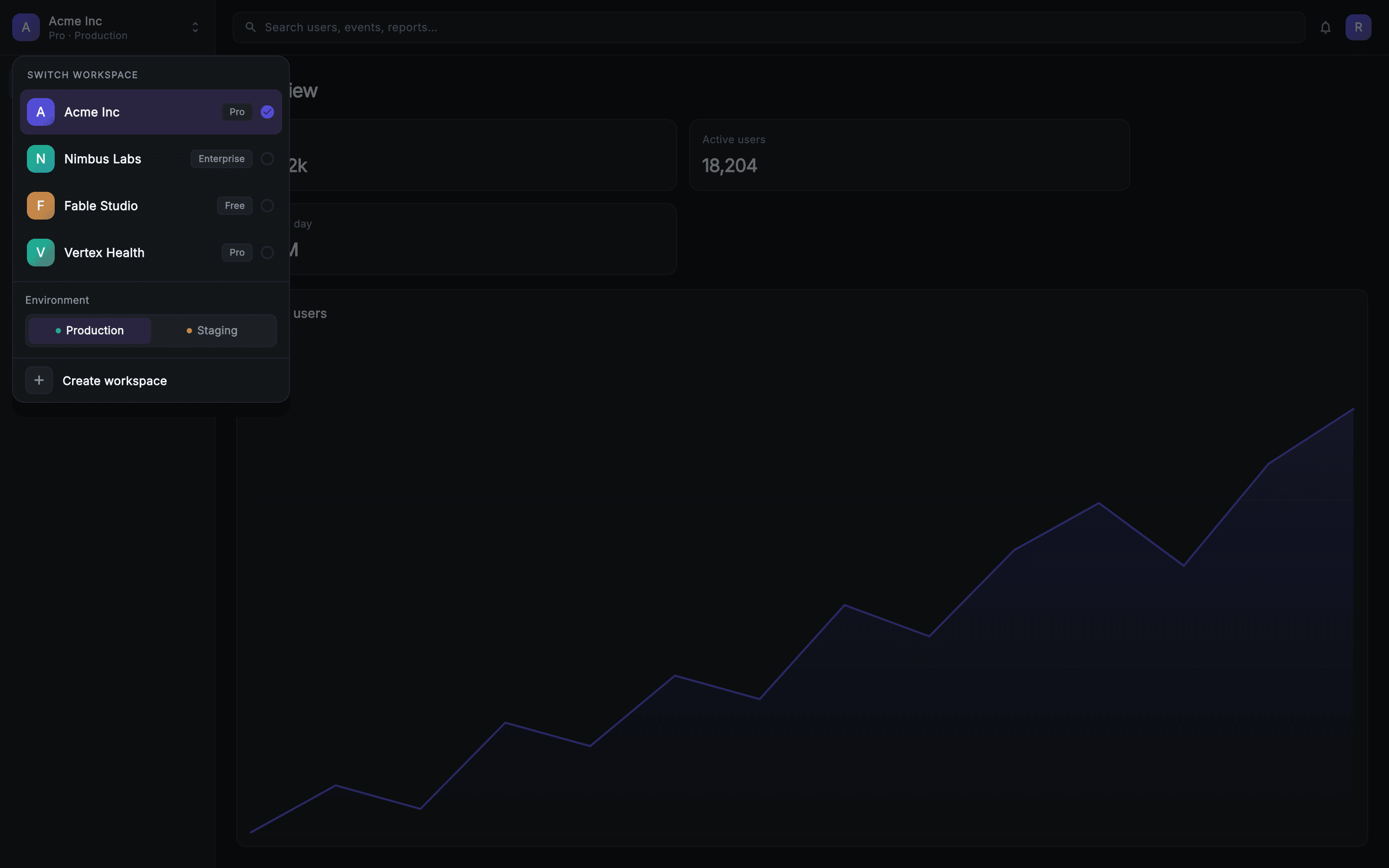
Workspace Switcher is the org-switching overlay for Console, a dark developer-tool-styled SaaS admin. It renders the way it does in the real product: a full console shell — sidebar with workspace button and grouped nav, top bar with search field and avatar, and a dashboard body of KPI tiles and an area chart — stays visible behind a #99050708 scrim, so the popover reads as anchored to the sidebar's workspace button rather than floating in an empty frame. Tapping the scrim fires onDismiss; tapping the panel does not. The panel is capped at 320px, anchored 64px down the left edge, and its height is bounded by the viewport so the workspace list scrolls rather than overflowing on short screens. Under a SWITCH WORKSPACE header it lists four orgs — Acme Inc (Pro), Nimbus Labs (Enterprise), Fable Studio (Free) and Vertex Health (Pro) — each row pairing a _MonogramPainter rounded-square mark in the workspace's own accent colour with the name, a _PlanPill tier badge, and either a filled indigo check or an empty ring; selecting one updates state and calls onSelect. Below a divider, an Environment section offers a segmented Production / Staging toggle with green and amber status dots, and a final row is a create-workspace action with a plus tile wired to onCreate. Pure Flutter and self-contained: bundled static-weight Inter, its own dark theme, SafeArea, no packages and no network images.
Full tutorial coming soon.
The step-by-step walkthrough and complete Dart source for this screen haven't been published yet. They'll be free when they are — no sign-up, no payment. In the meantime, browse the screens that already have their tutorial.
What's included
- ✓A static console-shell backdrop (sidebar, top bar, KPI tiles, painted area chart) behind a scrim so the popover is visually anchored
- ✓A 320px popover with a viewport-bounded height, so the workspace list scrolls instead of overflowing on short screens
- ✓_MonogramPainter — painted rounded-square workspace marks in per-org accent colours
- ✓_PlanPill plan badges (Pro / Enterprise / Free) and an active row with a filled indigo check versus an empty ring
- ✓A segmented Production / Staging environment toggle with green and amber status dots
- ✓Injected onDismiss, onSelect and onCreate callbacks with bundled Inter and a self-contained dark theme
Use cases
- ✓An org or tenant switcher for a multi-workspace B2B SaaS console
- ✓A environment switch letting a team flip a console between production and staging data
- ✓A plan-aware workspace list that surfaces each org's tier next to its name
- ✓The create-workspace entry point for onboarding a user's second and subsequent teams


