How to Build a Command Palette (⌘K) in Flutter (Full Code + Preview)
A command palette — the ⌘K overlay popularized by Linear, Raycast, and VS Code — lets power users jump anywhere or fire any action without leaving the keyboard. This tutorial builds one in Flutter for a web/desktop console: a dim full-screen backdrop, a centered floating panel with a search row, grouped and scrollable command rows with icon tiles and keyboard-hint chips, a selected-row highlight, and a footer of navigation hints. You'll see how to model the commands as plain data, dismiss on an outside tap, and keep the panel a fixed max width. Pure Flutter, dark-themed, no packages.
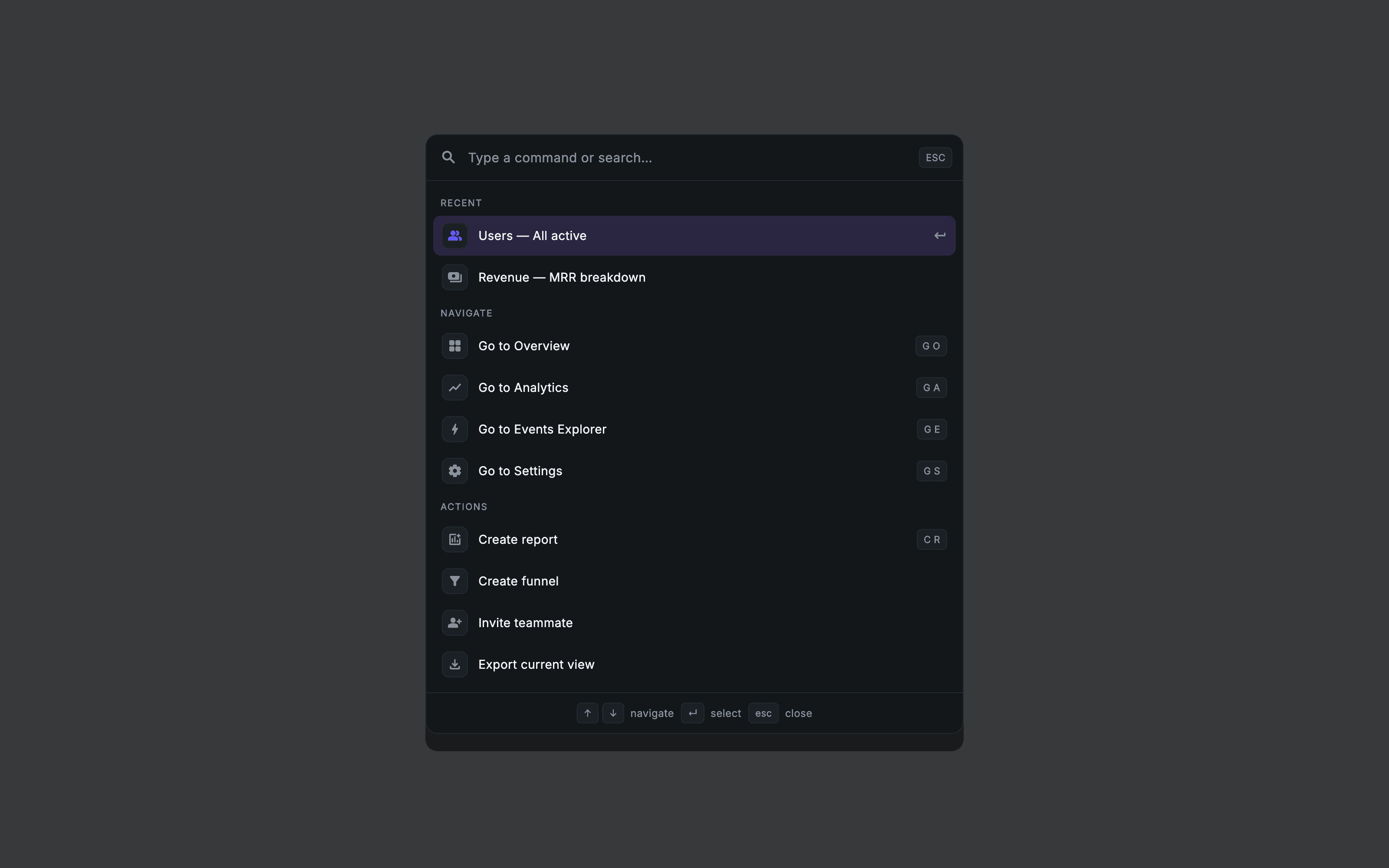
What you'll build
- ✓A dim full-screen overlay that dismisses when you tap outside the panel
- ✓A centered, max-width floating panel with a soft shadow and hairline border
- ✓A search row with a placeholder and an ESC chip
- ✓Grouped, scrollable command rows with icon tiles, labels, and keyboard-hint chips
- ✓A selected-row highlight and a footer of navigation key hints
Step-by-step build
Create the file
Add a new file at lib/console_nav_command_palette/console_nav_command_palette_screen.dart in your Flutter project.
Register the bundled fonts
No external packages — this is pure Flutter. It does bundle its design font (Inter), so drop the font file into fonts/ and declare it in pubspec.yaml:
flutter:
  fonts:
    - family: Inter
      fonts:
- asset: fonts/Inter-Regular.ttfBuild it, piece by piece
Here's how the screen goes together. Each block below is a real slice of the code with a plain-English explanation — paste them in order, or grab the whole file from the next section.
The overlay widget and its dark token palette
import 'package:flutter/material.dart';

/// Console — Command Palette (⌘K).
///
/// A full-screen dim overlay with a search field and grouped, navigable
/// action/screen rows (painted leading icon tiles), per-row keyboard-hint
/// chips, and a recent-actions list. Opens over any screen in the shell.
///
/// Self-contained per CONVENTIONS.md: pure Flutter, bundled static-weight
/// Inter, own dark theme + inline tokens, `SafeArea`, overflow-proof.
/// Navigation is via callbacks only.
class ConsoleNavCommandPaletteScreen extends StatelessWidget {
  const ConsoleNavCommandPaletteScreen({
    super.key,
    this.onDismiss,
    this.onSelect,
  });

  /// Fired when the dim backdrop / close affordance is tapped.
  final VoidCallback? onDismiss;

  /// Fired with the selected command/route id.
  final ValueChanged<String>? onSelect;

  static const String _font = 'Inter';
  static const Color _scrim = Color(0xCC05070A);
  static const Color _surface = Color(0xFF14171A);
  static const Color _surfaceAlt = Color(0xFF1C2024);
  static const Color _brand = Color(0xFF635BFF);
  static const Color _muted = Color(0xFF8A929E);
  static const Color _ink = Color(0xFFF4F6F8);
  static const Color _hairline = Color(0xFF242A30);
  static const Color _selection = Color(0xFF2A2540);
ConsoleNavCommandPaletteScreen is a StatelessWidget — the palette shows a fixed set of commands, and navigation happens through two callbacks: onDismiss (backdrop tapped) and onSelect (a command chosen), which hands the selected id back to the parent. Everything below is styled from a block of private const Color tokens instead of a global theme: _scrim is the translucent black backdrop (0xCC = 80% alpha), _surface / _surfaceAlt are the panel and tile fills, _brand is the indigo used for the active icon, and _ink / _muted are the text colors. Defining the palette inline keeps the screen self-contained.
Modeling the commands as data
  static const List<_Group> _groups = <_Group>[
    _Group('Recent', <_Cmd>[
      _Cmd('recent-users', 'Users — All active', Icons.people_alt_rounded),
      _Cmd('recent-mrr', 'Revenue — MRR breakdown', Icons.payments_rounded),
    ]),
    _Group('Navigate', <_Cmd>[
      _Cmd('overview', 'Go to Overview', Icons.grid_view_rounded, kbd: 'G O'),
      _Cmd('analytics', 'Go to Analytics', Icons.show_chart_rounded, kbd: 'G A'),
      _Cmd('events', 'Go to Events Explorer', Icons.bolt_rounded, kbd: 'G E'),
      _Cmd('settings', 'Go to Settings', Icons.settings_rounded, kbd: 'G S'),
    ]),
    _Group('Actions', <_Cmd>[
      _Cmd('new-report', 'Create report', Icons.add_chart_rounded, kbd: 'C R'),
      _Cmd('new-funnel', 'Create funnel', Icons.filter_alt_rounded),
      _Cmd('invite', 'Invite teammate', Icons.person_add_alt_rounded),
      _Cmd('export', 'Export current view', Icons.file_download_outlined),
    ]),
  ];
The commands are modeled as data, not hard-coded widgets: a static _groups list holds three _Group objects (Recent, Navigate, Actions), each with a label and a list of _Cmd entries. Every _Cmd carries an id, a label, an icon, and an optional kbd shortcut string like 'G O'. Separating the data from the rendering means adding a command is a one-line list edit, and a single row widget can render all of them.
A dim, tap-to-dismiss overlay
  @override
  Widget build(BuildContext context) {
    return Theme(
      data: ThemeData.dark(useMaterial3: true),
      child: Scaffold(
        backgroundColor: _scrim,
        body: GestureDetector(
          behavior: HitTestBehavior.opaque,
          onTap: onDismiss,
          child: SafeArea(
            child: Center(
              child: GestureDetector(
                onTap: () {},
                child: Padding(
                  padding: const EdgeInsets.all(20),
                  child: ConstrainedBox(
                    constraints: const BoxConstraints(maxWidth: 620),
                    child: _Panel(onSelect: onSelect, onDismiss: onDismiss),
                  ),
                ),
              ),
            ),
          ),
        ),
      ),
    );
  }
}
build() wraps the screen in a dark Theme so any Material widgets inside adopt dark defaults, then a Scaffold painted with the translucent _scrim. The dismiss behavior is a classic two-GestureDetector trick: the outer detector (behavior: opaque) fires onDismiss when you tap the backdrop, while an inner GestureDetector with an empty onTap sits under the panel to swallow taps so clicking the panel itself doesn't close it. A ConstrainedBox caps the panel at 620px and Center places it — exactly right for a wide desktop/web canvas.
The floating panel: search, list, and footer
class _Panel extends StatelessWidget {
  const _Panel({this.onSelect, this.onDismiss});
  final ValueChanged<String>? onSelect;
  final VoidCallback? onDismiss;

  @override
  Widget build(BuildContext context) {
    return Container(
      decoration: BoxDecoration(
        color: ConsoleNavCommandPaletteScreen._surface,
        borderRadius: BorderRadius.circular(14),
        border: Border.all(color: ConsoleNavCommandPaletteScreen._hairline),
        boxShadow: <BoxShadow>[
          BoxShadow(
            color: Colors.black.withValues(alpha: 0.5),
            blurRadius: 40,
            offset: const Offset(0, 20),
          ),
        ],
      ),
      child: Column(
        mainAxisSize: MainAxisSize.min,
        children: <Widget>[
          _SearchRow(onDismiss: onDismiss),
          const Divider(
            height: 1,
            thickness: 1,
            color: ConsoleNavCommandPaletteScreen._hairline,
          ),
          Flexible(
            child: ListView(
              shrinkWrap: true,
              padding: const EdgeInsets.symmetric(vertical: 8),
              children: <Widget>[
                for (final _Group g in ConsoleNavCommandPaletteScreen._groups)
                  ...<Widget>[
                    _GroupHeader(g.label),
                    for (int i = 0; i < g.cmds.length; i++)
                      _CmdRow(
                        cmd: g.cmds[i],
                        selected: g.label == 'Recent' && i == 0,
                        onTap: () => onSelect?.call(g.cmds[i].id),
                      ),
                  ],
              ],
            ),
          ),
          const Divider(
            height: 1,
            thickness: 1,
            color: ConsoleNavCommandPaletteScreen._hairline,
          ),
          const _FooterHints(),
        ],
      ),
    );
  }
}
_Panel is the floating card: a Container with the _surface fill, a 14px radius, a hairline border, and a large soft drop shadow, using mainAxisSize.min so it hugs its content. Its Column stacks the _SearchRow, a divider, then a Flexible ListView (shrinkWrap: true) that builds the body with a collection-for — for each group it emits a _GroupHeader followed by one _CmdRow per command. The first Recent row is marked selected to demonstrate the highlighted state. A second divider and the _FooterHints close the card.
Search row, group headers, and command rows
class _SearchRow extends StatelessWidget {
  const _SearchRow({this.onDismiss});
  final VoidCallback? onDismiss;

  @override
  Widget build(BuildContext context) {
    return Padding(
      padding: const EdgeInsets.fromLTRB(16, 14, 12, 14),
      child: Row(
        children: <Widget>[
          const Icon(
            Icons.search_rounded,
            size: 20,
            color: ConsoleNavCommandPaletteScreen._muted,
          ),
          const SizedBox(width: 12),
          const Expanded(
            child: Text(
              'Type a command or search…',
              style: TextStyle(
                fontFamily: ConsoleNavCommandPaletteScreen._font,
                fontSize: 15,
                fontWeight: FontWeight.w400,
                color: ConsoleNavCommandPaletteScreen._muted,
              ),
            ),
          ),
          InkWell(
            onTap: onDismiss,
            borderRadius: BorderRadius.circular(6),
            child: const _KbdChip('ESC'),
          ),
        ],
      ),
    );
  }
}

class _GroupHeader extends StatelessWidget {
  const _GroupHeader(this.text);
  final String text;

  @override
  Widget build(BuildContext context) {
    return Padding(
      padding: const EdgeInsets.fromLTRB(16, 10, 16, 6),
      child: Text(
        text.toUpperCase(),
        style: const TextStyle(
          fontFamily: ConsoleNavCommandPaletteScreen._font,
          fontSize: 10.5,
          fontWeight: FontWeight.w600,
          letterSpacing: 1.1,
          color: ConsoleNavCommandPaletteScreen._muted,
        ),
      ),
    );
  }
}

class _CmdRow extends StatelessWidget {
  const _CmdRow({required this.cmd, required this.selected, required this.onTap});
  final _Cmd cmd;
  final bool selected;
  final VoidCallback onTap;

  @override
  Widget build(BuildContext context) {
    return Padding(
      padding: const EdgeInsets.symmetric(horizontal: 8, vertical: 1),
      child: InkWell(
        borderRadius: BorderRadius.circular(9),
        onTap: onTap,
        child: Container(
          height: 46,
          padding: const EdgeInsets.symmetric(horizontal: 10),
          decoration: BoxDecoration(
            color: selected
                ? ConsoleNavCommandPaletteScreen._selection
                : Colors.transparent,
            borderRadius: BorderRadius.circular(9),
          ),
          child: Row(
            children: <Widget>[
              Container(
                width: 30,
                height: 30,
                decoration: BoxDecoration(
                  color: ConsoleNavCommandPaletteScreen._surfaceAlt,
                  borderRadius: BorderRadius.circular(8),
                  border: Border.all(
                    color: ConsoleNavCommandPaletteScreen._hairline,
                  ),
                ),
                child: Icon(
                  cmd.icon,
                  size: 17,
                  color: selected
                      ? ConsoleNavCommandPaletteScreen._brand
                      : ConsoleNavCommandPaletteScreen._muted,
                ),
              ),
              const SizedBox(width: 12),
              Expanded(
                child: Text(
                  cmd.label,
                  maxLines: 1,
                  overflow: TextOverflow.ellipsis,
                  style: const TextStyle(
                    fontFamily: ConsoleNavCommandPaletteScreen._font,
                    fontSize: 14,
                    fontWeight: FontWeight.w500,
                    color: ConsoleNavCommandPaletteScreen._ink,
                  ),
                ),
              ),
              if (cmd.kbd != null) _KbdChip(cmd.kbd!),
              if (selected)
                const Padding(
                  padding: EdgeInsets.only(left: 8),
                  child: Icon(
                    Icons.keyboard_return_rounded,
                    size: 16,
                    color: ConsoleNavCommandPaletteScreen._muted,
                  ),
                ),
            ],
          ),
        ),
      ),
    );
  }
}
_SearchRow lays out a search icon, a muted 'Type a command or search…' placeholder in an Expanded, and an ESC _KbdChip on the right. _GroupHeader is a small uppercased, letter-spaced label. _CmdRow is the workhorse: an InkWell over a 46px Container whose background switches to _selection when selected. Inside sits a rounded 30px icon tile (its icon turns _brand when selected), the command label with ellipsis overflow, an optional keyboard-hint chip when cmd.kbd is set, and a return arrow that appears only on the selected row.
Footer hints, keyboard chips, and the data model
class _FooterHints extends StatelessWidget {
  const _FooterHints();

  @override
  Widget build(BuildContext context) {
    return Padding(
      padding: const EdgeInsets.symmetric(horizontal: 16, vertical: 11),
      child: Wrap(
        spacing: 8,
        runSpacing: 8,
        crossAxisAlignment: WrapCrossAlignment.center,
        alignment: WrapAlignment.start,
        children: const <Widget>[
          _HintCluster(keys: <String>['↑', '↓'], label: 'navigate'),
          _HintCluster(keys: <String>['↵'], label: 'select'),
          _HintCluster(keys: <String>['esc'], label: 'close'),
        ],
      ),
    );
  }
}

class _HintCluster extends StatelessWidget {
  const _HintCluster({required this.keys, required this.label});
  final List<String> keys;
  final String label;

  @override
  Widget build(BuildContext context) {
    return Row(
      mainAxisSize: MainAxisSize.min,
      children: <Widget>[
        for (int i = 0; i < keys.length; i++) ...<Widget>[
          _KbdChip(keys[i]),
          if (i != keys.length - 1) const SizedBox(width: 4),
        ],
        const SizedBox(width: 7),
        Text(
          label,
          style: const TextStyle(
            fontFamily: ConsoleNavCommandPaletteScreen._font,
            fontSize: 12,
            color: ConsoleNavCommandPaletteScreen._muted,
          ),
        ),
      ],
    );
  }
}

class _KbdChip extends StatelessWidget {
  const _KbdChip(this.text);
  final String text;

  @override
  Widget build(BuildContext context) {
    return Container(
      padding: const EdgeInsets.symmetric(horizontal: 7, vertical: 3),
      decoration: BoxDecoration(
        color: ConsoleNavCommandPaletteScreen._surfaceAlt,
        borderRadius: BorderRadius.circular(5),
        border: Border.all(color: ConsoleNavCommandPaletteScreen._hairline),
      ),
      child: Text(
        text,
        style: const TextStyle(
          fontFamily: ConsoleNavCommandPaletteScreen._font,
          fontSize: 11,
          fontWeight: FontWeight.w600,
          color: ConsoleNavCommandPaletteScreen._muted,
        ),
      ),
    );
  }
}

class _Group {
  const _Group(this.label, this.cmds);
  final String label;
  final List<_Cmd> cmds;
}

class _Cmd {
  const _Cmd(this.id, this.label, this.icon, {this.kbd});
  final String id;
  final String label;
  final IconData icon;
  final String? kbd;
}
The footer completes the keyboard-first feel. _FooterHints is a Wrap (so it reflows on narrow widths) of _HintCluster items pairing keys with a label — ↑↓ navigate, ↵ select, esc close. _HintCluster simply rows its keys with small gaps. _KbdChip is the reusable little keycap: a padded Container with the _surfaceAlt fill, a 5px radius, and a hairline border. Finally, the plain _Group and _Cmd classes are the immutable data model the entire palette is built from.
Full code
The complete, ready-to-paste source. Free to use in your projects — one click copies it all.
import 'package:flutter/material.dart';

/// Console — Command Palette (⌘K).
///
/// A full-screen dim overlay with a search field and grouped, navigable
/// action/screen rows (painted leading icon tiles), per-row keyboard-hint
/// chips, and a recent-actions list. Opens over any screen in the shell.
///
/// Self-contained per CONVENTIONS.md: pure Flutter, bundled static-weight
/// Inter, own dark theme + inline tokens, `SafeArea`, overflow-proof.
/// Navigation is via callbacks only.
class ConsoleNavCommandPaletteScreen extends StatelessWidget {
  const ConsoleNavCommandPaletteScreen({
    super.key,
    this.onDismiss,
    this.onSelect,
  });

  /// Fired when the dim backdrop / close affordance is tapped.
  final VoidCallback? onDismiss;

  /// Fired with the selected command/route id.
  final ValueChanged<String>? onSelect;

  static const String _font = 'Inter';
  static const Color _scrim = Color(0xCC05070A);
  static const Color _surface = Color(0xFF14171A);
  static const Color _surfaceAlt = Color(0xFF1C2024);
  static const Color _brand = Color(0xFF635BFF);
  static const Color _muted = Color(0xFF8A929E);
  static const Color _ink = Color(0xFFF4F6F8);
  static const Color _hairline = Color(0xFF242A30);
  static const Color _selection = Color(0xFF2A2540);

  static const List<_Group> _groups = <_Group>[
    _Group('Recent', <_Cmd>[
      _Cmd('recent-users', 'Users — All active', Icons.people_alt_rounded),
      _Cmd('recent-mrr', 'Revenue — MRR breakdown', Icons.payments_rounded),
    ]),
    _Group('Navigate', <_Cmd>[
      _Cmd('overview', 'Go to Overview', Icons.grid_view_rounded, kbd: 'G O'),
      _Cmd('analytics', 'Go to Analytics', Icons.show_chart_rounded, kbd: 'G A'),
      _Cmd('events', 'Go to Events Explorer', Icons.bolt_rounded, kbd: 'G E'),
      _Cmd('settings', 'Go to Settings', Icons.settings_rounded, kbd: 'G S'),
    ]),
    _Group('Actions', <_Cmd>[
      _Cmd('new-report', 'Create report', Icons.add_chart_rounded, kbd: 'C R'),
      _Cmd('new-funnel', 'Create funnel', Icons.filter_alt_rounded),
      _Cmd('invite', 'Invite teammate', Icons.person_add_alt_rounded),
      _Cmd('export', 'Export current view', Icons.file_download_outlined),
    ]),
  ];

  @override
  Widget build(BuildContext context) {
    return Theme(
      data: ThemeData.dark(useMaterial3: true),
      child: Scaffold(
        backgroundColor: _scrim,
        body: GestureDetector(
          behavior: HitTestBehavior.opaque,
          onTap: onDismiss,
          child: SafeArea(
            child: Center(
              child: GestureDetector(
                onTap: () {},
                child: Padding(
                  padding: const EdgeInsets.all(20),
                  child: ConstrainedBox(
                    constraints: const BoxConstraints(maxWidth: 620),
                    child: _Panel(onSelect: onSelect, onDismiss: onDismiss),
                  ),
                ),
              ),
            ),
          ),
        ),
      ),
    );
  }
}

class _Panel extends StatelessWidget {
  const _Panel({this.onSelect, this.onDismiss});
  final ValueChanged<String>? onSelect;
  final VoidCallback? onDismiss;

  @override
  Widget build(BuildContext context) {
    return Container(
      decoration: BoxDecoration(
        color: ConsoleNavCommandPaletteScreen._surface,
        borderRadius: BorderRadius.circular(14),
        border: Border.all(color: ConsoleNavCommandPaletteScreen._hairline),
        boxShadow: <BoxShadow>[
          BoxShadow(
            color: Colors.black.withValues(alpha: 0.5),
            blurRadius: 40,
            offset: const Offset(0, 20),
          ),
        ],
      ),
      child: Column(
        mainAxisSize: MainAxisSize.min,
        children: <Widget>[
          _SearchRow(onDismiss: onDismiss),
          const Divider(
            height: 1,
            thickness: 1,
            color: ConsoleNavCommandPaletteScreen._hairline,
          ),
          Flexible(
            child: ListView(
              shrinkWrap: true,
              padding: const EdgeInsets.symmetric(vertical: 8),
              children: <Widget>[
                for (final _Group g in ConsoleNavCommandPaletteScreen._groups)
                  ...<Widget>[
                    _GroupHeader(g.label),
                    for (int i = 0; i < g.cmds.length; i++)
                      _CmdRow(
                        cmd: g.cmds[i],
                        selected: g.label == 'Recent' && i == 0,
                        onTap: () => onSelect?.call(g.cmds[i].id),
                      ),
                  ],
              ],
            ),
          ),
          const Divider(
            height: 1,
            thickness: 1,
            color: ConsoleNavCommandPaletteScreen._hairline,
          ),
          const _FooterHints(),
        ],
      ),
    );
  }
}

class _SearchRow extends StatelessWidget {
  const _SearchRow({this.onDismiss});
  final VoidCallback? onDismiss;

  @override
  Widget build(BuildContext context) {
    return Padding(
      padding: const EdgeInsets.fromLTRB(16, 14, 12, 14),
      child: Row(
        children: <Widget>[
          const Icon(
            Icons.search_rounded,
            size: 20,
            color: ConsoleNavCommandPaletteScreen._muted,
          ),
          const SizedBox(width: 12),
          const Expanded(
            child: Text(
              'Type a command or search…',
              style: TextStyle(
                fontFamily: ConsoleNavCommandPaletteScreen._font,
                fontSize: 15,
                fontWeight: FontWeight.w400,
                color: ConsoleNavCommandPaletteScreen._muted,
              ),
            ),
          ),
          InkWell(
            onTap: onDismiss,
            borderRadius: BorderRadius.circular(6),
            child: const _KbdChip('ESC'),
          ),
        ],
      ),
    );
  }
}

class _GroupHeader extends StatelessWidget {
  const _GroupHeader(this.text);
  final String text;

  @override
  Widget build(BuildContext context) {
    return Padding(
      padding: const EdgeInsets.fromLTRB(16, 10, 16, 6),
      child: Text(
        text.toUpperCase(),
        style: const TextStyle(
          fontFamily: ConsoleNavCommandPaletteScreen._font,
          fontSize: 10.5,
          fontWeight: FontWeight.w600,
          letterSpacing: 1.1,
          color: ConsoleNavCommandPaletteScreen._muted,
        ),
      ),
    );
  }
}

class _CmdRow extends StatelessWidget {
  const _CmdRow({required this.cmd, required this.selected, required this.onTap});
  final _Cmd cmd;
  final bool selected;
  final VoidCallback onTap;

  @override
  Widget build(BuildContext context) {
    return Padding(
      padding: const EdgeInsets.symmetric(horizontal: 8, vertical: 1),
      child: InkWell(
        borderRadius: BorderRadius.circular(9),
        onTap: onTap,
        child: Container(
          height: 46,
          padding: const EdgeInsets.symmetric(horizontal: 10),
          decoration: BoxDecoration(
            color: selected
                ? ConsoleNavCommandPaletteScreen._selection
                : Colors.transparent,
            borderRadius: BorderRadius.circular(9),
          ),
          child: Row(
            children: <Widget>[
              Container(
                width: 30,
                height: 30,
                decoration: BoxDecoration(
                  color: ConsoleNavCommandPaletteScreen._surfaceAlt,
                  borderRadius: BorderRadius.circular(8),
                  border: Border.all(
                    color: ConsoleNavCommandPaletteScreen._hairline,
                  ),
                ),
                child: Icon(
                  cmd.icon,
                  size: 17,
                  color: selected
                      ? ConsoleNavCommandPaletteScreen._brand
                      : ConsoleNavCommandPaletteScreen._muted,
                ),
              ),
              const SizedBox(width: 12),
              Expanded(
                child: Text(
                  cmd.label,
                  maxLines: 1,
                  overflow: TextOverflow.ellipsis,
                  style: const TextStyle(
                    fontFamily: ConsoleNavCommandPaletteScreen._font,
                    fontSize: 14,
                    fontWeight: FontWeight.w500,
                    color: ConsoleNavCommandPaletteScreen._ink,
                  ),
                ),
              ),
              if (cmd.kbd != null) _KbdChip(cmd.kbd!),
              if (selected)
                const Padding(
                  padding: EdgeInsets.only(left: 8),
                  child: Icon(
                    Icons.keyboard_return_rounded,
                    size: 16,
                    color: ConsoleNavCommandPaletteScreen._muted,
                  ),
                ),
            ],
          ),
        ),
      ),
    );
  }
}

class _FooterHints extends StatelessWidget {
  const _FooterHints();

  @override
  Widget build(BuildContext context) {
    return Padding(
      padding: const EdgeInsets.symmetric(horizontal: 16, vertical: 11),
      child: Wrap(
        spacing: 8,
        runSpacing: 8,
        crossAxisAlignment: WrapCrossAlignment.center,
        alignment: WrapAlignment.start,
        children: const <Widget>[
          _HintCluster(keys: <String>['↑', '↓'], label: 'navigate'),
          _HintCluster(keys: <String>['↵'], label: 'select'),
          _HintCluster(keys: <String>['esc'], label: 'close'),
        ],
      ),
    );
  }
}

class _HintCluster extends StatelessWidget {
  const _HintCluster({required this.keys, required this.label});
  final List<String> keys;
  final String label;

  @override
  Widget build(BuildContext context) {
    return Row(
      mainAxisSize: MainAxisSize.min,
      children: <Widget>[
        for (int i = 0; i < keys.length; i++) ...<Widget>[
          _KbdChip(keys[i]),
          if (i != keys.length - 1) const SizedBox(width: 4),
        ],
        const SizedBox(width: 7),
        Text(
          label,
          style: const TextStyle(
            fontFamily: ConsoleNavCommandPaletteScreen._font,
            fontSize: 12,
            color: ConsoleNavCommandPaletteScreen._muted,
          ),
        ),
      ],
    );
  }
}

class _KbdChip extends StatelessWidget {
  const _KbdChip(this.text);
  final String text;

  @override
  Widget build(BuildContext context) {
    return Container(
      padding: const EdgeInsets.symmetric(horizontal: 7, vertical: 3),
      decoration: BoxDecoration(
        color: ConsoleNavCommandPaletteScreen._surfaceAlt,
        borderRadius: BorderRadius.circular(5),
        border: Border.all(color: ConsoleNavCommandPaletteScreen._hairline),
      ),
      child: Text(
        text,
        style: const TextStyle(
          fontFamily: ConsoleNavCommandPaletteScreen._font,
          fontSize: 11,
          fontWeight: FontWeight.w600,
          color: ConsoleNavCommandPaletteScreen._muted,
        ),
      ),
    );
  }
}

class _Group {
  const _Group(this.label, this.cmds);
  final String label;
  final List<_Cmd> cmds;
}

class _Cmd {
  const _Cmd(this.id, this.label, this.icon, {this.kbd});
  final String id;
  final String label;
  final IconData icon;
  final String? kbd;
}
Plus bundled 4 binary assets (fonts/images). The CLI and MCP install those for you automatically.
Two faster ways to add it
Copy-paste works, but you can skip it entirely.
1. FlutterKit CLI
One command drops this screen — and its fonts — straight into your project.
$ flutterkit add con-nav-command-palette2. AI agent (MCP)
Connect FlutterKit's MCP server in Claude or Cursor and just ask your agent to install con-nav-command-palette — it fetches and writes the files for you.
FAQ
Is this command palette free to use?
Yes — the full Dart on this page is free to use in your own projects, personal or commercial. Copy it here, run 'flutterkit add con-nav-command-palette' with the CLI, or install it via MCP.
Does the search field actually filter results?
This screen is the polished UI shell — the search row is a styled placeholder and selection is shown statically on the first Recent row. To make it live, swap the placeholder for a TextField, hold the query and selected index in a StatefulWidget, and filter the _groups list as the user types.
Is it built for web and desktop?
Yes — it's a landscape console screen: the panel is capped at 620px and centered, the theme is dark, and the interactions (a ⌘K overlay, ESC to close, arrow-key hints) are desktop conventions. It still compiles and runs on any Flutter target.


