How to Build a Crypto Cash-Out Screen with a Max Button in Flutter (Full Code + Preview)
Selling crypto starts from what you already hold, not from what you want to spend, so the input has to be typed in the coin and checked against a balance. This tutorial builds Aurum's Sell screen in Flutter: a BTC amount that turns red the moment it passes 0.184213 BTC, a gold Max pill that fills the whole holding, a live dollar estimate of what the sale returns, a Bitcoin chip, and a red Review sell button gated on two conditions at once.
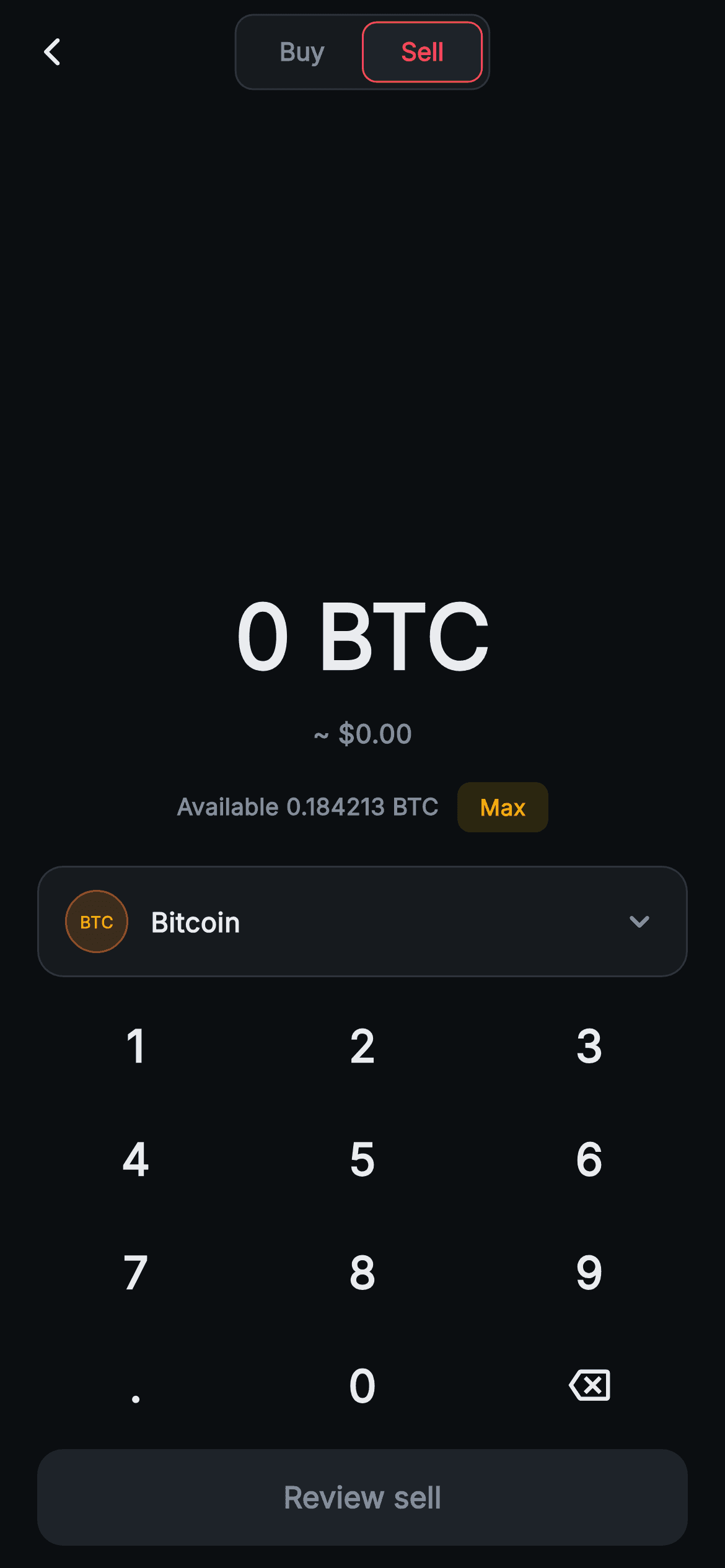
What you'll build
- ✓A BTC-denominated amount capped at six decimals to match how the balance is printed, scaled down by FittedBox instead of overflowing
- ✓An over-balance state from one `_over` getter that recolours the amount red and swaps 'Available' for 'Exceeds balance' in place
- ✓A gold Max pill that writes the full 0.184213 BTC holding into the field in a single setState
- ✓A '~ $' proceeds line that multiplies the coin amount by a fixed USD rate on every keypress
- ✓A red Review sell button that enables only when the amount is above zero and within the balance
Step-by-step build
Create the file
Add a new file at lib/web3_trade_simple_sell/web3_trade_simple_sell_screen.dart in your Flutter project.
Register the bundled fonts
No external packages — this is pure Flutter. It does bundle its design font (Inter), so drop the font file into fonts/ and declare it in pubspec.yaml:
flutter:
  fonts:
    - family: Inter
      fonts:
- asset: fonts/Inter-Regular.ttfBuild it, piece by piece
Here's how the screen goes together. Each block below is a real slice of the code with a plain-English explanation — paste them in order, or grab the whole file from the next section.
A balance constant beside the rate
import 'package:flutter/material.dart';

/// Web3 trade — Simple Sell. A big crypto-amount display driven by a painted
/// numpad, a "Max" pill, an estimated-fiat line, a coin-selector chip and a
/// review bar. Mirrors the Buy screen with a sell accent. Self-contained per
/// CONVENTIONS.md: pure Flutter, bundled Inter font, custom numpad + painted
/// ticker badge (no glyphs / no network image), forced dark theme.
class Web3TradeSimpleSellScreen extends StatefulWidget {
  const Web3TradeSimpleSellScreen({
    super.key,
    this.onBack,
    this.onToggleBuy,
    this.onSelectCoin,
    this.onReview,
  });

  final VoidCallback? onBack;
  final VoidCallback? onToggleBuy;
  final VoidCallback? onSelectCoin;
  final VoidCallback? onReview;

  @override
  State<Web3TradeSimpleSellScreen> createState() =>
      _Web3TradeSimpleSellScreenState();
}

class _Web3TradeSimpleSellScreenState extends State<Web3TradeSimpleSellScreen> {
  static const String _font = 'Inter';
  static const Color _bg = Color(0xFF0B0E11);
  static const Color _surface = Color(0xFF161A1E);
  static const Color _surfaceAlt = Color(0xFF1E2329);
  static const Color _brand = Color(0xFFF0B90B);
  static const Color _down = Color(0xFFF6465D);
  static const Color _text = Color(0xFFEAECEF);
  static const Color _muted = Color(0xFF848E9C);
  static const Color _hairline = Color(0xFF2B3139);

  static const double _rate = 64120.42;
  static const double _balance = 0.184213; // BTC available

  String _amount = '0';
`Web3TradeSimpleSellScreen` exposes `onBack`, `onToggleBuy`, `onSelectCoin` and `onReview`. The presence of `onBack` is telling: this screen expects to be pushed as a route, and there is no bottom navigation anywhere in the file. Colours are the shared Aurum set, but the one doing the work here is `_down = #F6465D`, the exchange's loss red, repurposed as the sell accent. Below the colours sit the two numbers the screen reasons with: `_rate = 64120.42` dollars per BTC and `_balance = 0.184213`, the coins the user can actually part with. A sell form with no known balance has nothing to validate against, so that second constant is what makes this a cash-out flow. The only mutable field is `String _amount = '0'`.
Coin precision and the three derived getters
  void _tap(String k) {
    setState(() {
      if (k == '<') {
        _amount = _amount.length <= 1
            ? '0'
            : _amount.substring(0, _amount.length - 1);
      } else if (k == '.') {
        if (!_amount.contains('.')) _amount = '$_amount.';
      } else {
        if (_amount == '0') {
          _amount = k;
        } else {
          final int dot = _amount.indexOf('.');
          if (dot != -1 && _amount.length - dot > 6) return;
          if (_amount.replaceAll('.', '').length >= 9) return;
          _amount = '$_amount$k';
        }
      }
    });
  }

  double get _value => double.tryParse(_amount) ?? 0;
  double get _fiat => _value * _rate;
  bool get _over => _value > _balance;
`_tap` keeps the usual backspace-to-'0' and single-dot rules, so the line worth reading is the precision guard: `if (dot != -1 && _amount.length - dot > 6) return;` refuses a digit once six already follow the decimal point. Six is chosen to match `_balance.toStringAsFixed(6)`, so a user can type exactly as finely as the Available line displays and no finer. Real BTC goes to eight places; widen both together if you need satoshis. The nine-digit ceiling stays as a width safety net. Then three getters: `_value` parses the text, `_fiat` multiplies it by `_rate` to turn coins into dollars, and `_over` asks `_value > _balance`. That one boolean later drives the amount colour, the balance label and the button, so there is no error flag to keep in sync.
A pushed route with a red-marked Sell segment
  @override
  Widget build(BuildContext context) {
    return Theme(
      data: ThemeData.dark(useMaterial3: true),
      child: Scaffold(
        backgroundColor: _bg,
        appBar: AppBar(
          backgroundColor: _bg,
          elevation: 0,
          centerTitle: true,
          leading: IconButton(
            onPressed: widget.onBack,
            icon: const Icon(Icons.arrow_back_ios_new_rounded,
                size: 18, color: _text),
          ),
          title: Container(
            padding: const EdgeInsets.all(3),
            decoration: BoxDecoration(
              color: _surface,
              borderRadius: BorderRadius.circular(10),
              border: Border.all(color: _hairline),
            ),
            child: Row(
              mainAxisSize: MainAxisSize.min,
              children: <Widget>[
                GestureDetector(
                  onTap: widget.onToggleBuy,
                  behavior: HitTestBehavior.opaque,
                  child: const Padding(
                    padding: EdgeInsets.symmetric(horizontal: 20, vertical: 7),
                    child: Text(
                      'Buy',
                      style: TextStyle(
                        fontFamily: _font,
                        fontSize: 13.5,
                        fontWeight: FontWeight.w700,
                        color: _muted,
                      ),
                    ),
                  ),
                ),
                Container(
                  padding:
                      const EdgeInsets.symmetric(horizontal: 20, vertical: 7),
                  decoration: BoxDecoration(
                    color: _surfaceAlt,
                    borderRadius: BorderRadius.circular(8),
                    border: Border.all(color: _down),
                  ),
                  child: const Text(
                    'Sell',
                    style: TextStyle(
                      fontFamily: _font,
                      fontSize: 13.5,
                      fontWeight: FontWeight.w700,
                      color: _down,
                    ),
                  ),
                ),
              ],
            ),
          ),
        ),
The `Theme(data: ThemeData.dark(useMaterial3: true))` wrapper keeps ripples and icon defaults dark whatever the host app uses. The `AppBar` is set up for a pushed page: `leading` is a real `IconButton` with an 18px `arrow_back_ios_new_rounded` calling `widget.onBack`. The segmented title is the mirror image of a buy form. 'Buy' is the muted side, wrapped in a `GestureDetector` with `HitTestBehavior.opaque` so the whole 20-by-7 padded area fires `onToggleBuy`, not just the glyphs. 'Sell' is a static `Container` filled `_surfaceAlt` with a 1px `_down` border and red 13.5px text, and it has no tap handler because you are already on it. What toggling means is left to the parent, typically a `pushReplacement` to the buy screen.
The amount in BTC, the proceeds in dollars
        body: SafeArea(
          top: false,
          child: Column(
            children: <Widget>[
              const Spacer(),
              Column(
                children: <Widget>[
                  FittedBox(
                    child: Text(
                      '$_amount BTC',
                      style: TextStyle(
                        fontFamily: _font,
                        fontSize: 48,
                        fontWeight: FontWeight.w800,
                        fontFeatures: const <FontFeature>[
                          FontFeature.tabularFigures(),
                        ],
                        color: _over ? _down : _text,
                      ),
                    ),
                  ),
                  const SizedBox(height: 8),
                  Text(
                    '~ \$${_fiat.toStringAsFixed(2)}',
                    style: const TextStyle(
                      fontFamily: _font,
                      fontSize: 14,
                      fontWeight: FontWeight.w600,
                      color: _muted,
                    ),
                  ),
                ],
              ),
The body opens with a single `const Spacer()` and nothing below to balance it, so every widget that follows (amount, balance row, chip, keypad, button) packs against the bottom edge within thumb reach, and the free space collects above. The headline renders `'$_amount BTC'` at 48px `w800` with tabular figures, inside a `FittedBox`. That wrapper earns its place on a sell screen: coin amounts carry six decimals plus a ticker, so '0.184213 BTC' is twelve characters, and `FittedBox` shrinks the text to the available width instead of overflowing. Its colour is `_over ? _down : _text`. Underneath, `_fiat.toStringAsFixed(2)` prints the estimated proceeds after a '~ $'. It is a gross figure with no fee or spread deducted and no thousands separator, so a full balance reads '~ $11811.81'.
Available versus Exceeds, plus the Max shortcut
              const SizedBox(height: 16),
              Row(
                mainAxisAlignment: MainAxisAlignment.center,
                children: <Widget>[
                  Text(
                    _over
                        ? 'Exceeds balance'
                        : 'Available ${_balance.toStringAsFixed(6)} BTC',
                    style: TextStyle(
                      fontFamily: _font,
                      fontSize: 12.5,
                      fontWeight: FontWeight.w600,
                      color: _over ? _down : _muted,
                    ),
                  ),
                  const SizedBox(width: 10),
                  GestureDetector(
                    onTap: () => setState(
                        () => _amount = _balance.toStringAsFixed(6)),
                    behavior: HitTestBehavior.opaque,
                    child: Container(
                      padding: const EdgeInsets.symmetric(
                          horizontal: 12, vertical: 5),
                      decoration: BoxDecoration(
                        color: _brand.withValues(alpha: 0.14),
                        borderRadius: BorderRadius.circular(7),
                      ),
                      child: const Text(
                        'Max',
                        style: TextStyle(
                          fontFamily: _font,
                          fontSize: 12,
                          fontWeight: FontWeight.w700,
                          color: _brand,
                        ),
                      ),
                    ),
                  ),
                ],
              ),
Instead of adding an error line under the amount, the balance row rewrites itself: `_over ? 'Exceeds balance' : 'Available ${_balance.toStringAsFixed(6)} BTC'`, with the colour switching from `_muted` to `_down` on the same condition. Nothing below shifts, because the warning takes the slot the balance already occupied. The trade-off is that the exact holding disappears while you are over it, which is why the remedy sits right beside it. The Max pill is a `GestureDetector` around a container tinted `_brand.withValues(alpha: 0.14)` at radius 7 with 12px gold text, and its tap runs `setState(() => _amount = _balance.toStringAsFixed(6))`, replacing whatever was typed with the whole position. It stays gold rather than red because it is a helper, not the commitment.
A one-line coin chip with a text badge
              const SizedBox(height: 18),
              GestureDetector(
                onTap: widget.onSelectCoin,
                behavior: HitTestBehavior.opaque,
                child: Container(
                  margin: const EdgeInsets.symmetric(horizontal: 20),
                  padding:
                      const EdgeInsets.symmetric(horizontal: 14, vertical: 12),
                  decoration: BoxDecoration(
                    color: _surface,
                    borderRadius: BorderRadius.circular(14),
                    border: Border.all(color: _hairline),
                  ),
                  child: Row(
                    children: <Widget>[
                      Container(
                        width: 34,
                        height: 34,
                        decoration: BoxDecoration(
                          color:
                              const Color(0xFFF7931A).withValues(alpha: 0.16),
                          shape: BoxShape.circle,
                          border: Border.all(
                              color: const Color(0xFFF7931A)
                                  .withValues(alpha: 0.5)),
                        ),
                        alignment: Alignment.center,
                        child: const Text(
                          'BTC',
                          style: TextStyle(
                            fontFamily: _font,
                            fontSize: 9,
                            fontWeight: FontWeight.w700,
                            color: Color(0xFFF7931A),
                          ),
                        ),
                      ),
                      const SizedBox(width: 12),
                      const Expanded(
                        child: Text(
                          'Bitcoin',
                          style: TextStyle(
                            fontFamily: _font,
                            fontSize: 14.5,
                            fontWeight: FontWeight.w700,
                            color: _text,
                          ),
                        ),
                      ),
                      const Icon(Icons.keyboard_arrow_down_rounded,
                          size: 22, color: _muted),
                    ],
                  ),
                ),
              ),
`onSelectCoin` hangs off a `GestureDetector` wrapping the whole chip: a `_surface` box with a hairline border, 14px radius and 20px side margins so its edges line up with the button below. Despite the registry wording, the ticker badge is not painted. It is a 34px circular `Container` filled `#F7931A` at 16% alpha with a 50%-alpha ring, centring the letters 'BTC' at 9px in solid Bitcoin orange. 'Bitcoin' sits in an `Expanded`, which pushes the `keyboard_arrow_down_rounded` chevron to the far edge. There is no market price or 24h change under the name. On a sell screen the figure that matters is how much you hold, already shown above, so the chip stays one line tall and leaves more height for the keypad.
Review sell: two conditions, one red button
              const SizedBox(height: 6),
              _Numpad(onKey: _tap),
              Padding(
                padding: const EdgeInsets.fromLTRB(20, 4, 20, 12),
                child: SizedBox(
                  width: double.infinity,
                  height: 52,
                  child: FilledButton(
                    onPressed: (_value > 0 && !_over) ? widget.onReview : null,
                    style: FilledButton.styleFrom(
                      backgroundColor: _down,
                      disabledBackgroundColor: _surfaceAlt,
                      shape: RoundedRectangleBorder(
                        borderRadius: BorderRadius.circular(14),
                      ),
                    ),
                    child: Text(
                      'Review sell',
                      style: TextStyle(
                        fontFamily: _font,
                        fontSize: 16,
                        fontWeight: FontWeight.w700,
                        color: (_value > 0 && !_over) ? _bg : _muted,
                      ),
                    ),
                  ),
                ),
              ),
            ],
          ),
        ),
      ),
    );
  }
}
`_Numpad(onKey: _tap)` sits between the chip and the button; the pad only reports keys, so every sell-specific rule stays in the state class. The `FilledButton` takes `onPressed: (_value > 0 && !_over) ? widget.onReview : null`. It needs a non-zero amount and one within the balance, so both an empty field and an oversell leave it grey through `disabledBackgroundColor: _surfaceAlt`. When enabled it fills `_down`, the same red as the oversell warning, and the two never clash because a warning and an enabled button cannot appear together. The label repeats the identical condition to choose `_bg` near-black on red or `_muted` grey. It is 52px tall inside 20px gutters. Note that `onReview` is a plain `VoidCallback`, so it hands the parent no amount.
The keypad as a plain key emitter
class _Numpad extends StatelessWidget {
  const _Numpad({required this.onKey});

  final ValueChanged<String> onKey;

  static const List<String> _keys = <String>[
    '1', '2', '3', '4', '5', '6', '7', '8', '9', '.', '0', '<',
  ];

  @override
  Widget build(BuildContext context) {
    return Padding(
      padding: const EdgeInsets.symmetric(horizontal: 12),
      child: GridView.builder(
        shrinkWrap: true,
        physics: const NeverScrollableScrollPhysics(),
        padding: EdgeInsets.zero,
        itemCount: _keys.length,
        gridDelegate: const SliverGridDelegateWithFixedCrossAxisCount(
          crossAxisCount: 3,
          childAspectRatio: 2.0,
        ),
        itemBuilder: (BuildContext context, int i) {
          final String k = _keys[i];
          return InkWell(
            borderRadius: BorderRadius.circular(12),
            onTap: () => onKey(k),
            child: Center(
              child: k == '<'
                  ? const Icon(Icons.backspace_outlined,
                      size: 22, color: _Web3TradeSimpleSellScreenState._text)
                  : Text(
                      k,
                      style: const TextStyle(
                        fontFamily: _Web3TradeSimpleSellScreenState._font,
                        fontSize: 24,
                        fontWeight: FontWeight.w600,
                        color: _Web3TradeSimpleSellScreenState._text,
                      ),
                    ),
            ),
          );
        },
      ),
    );
  }
}
`_Numpad` is a `StatelessWidget` whose entire contract is `ValueChanged<String> onKey`. Its twelve labels live in one const list, with `'<'` acting as a sentinel that the item builder turns into `Icons.backspace_outlined` instead of text. On this screen the '.' key earns its slot: most sells are a fraction of a coin, so nearly every real amount begins '0.'. Height comes from `childAspectRatio: 2.0` across three columns. On a 390-point-wide phone, minus the 12px side padding, each key is about 122 by 61 points, so four rows take roughly 244 points. `shrinkWrap: true` and `NeverScrollableScrollPhysics` let the grid sit in the Column at that natural height, and its text styles read the state class's private statics, which is legal because both classes share one library.
Full code
The complete, ready-to-paste source. Free to use in your projects — one click copies it all.
import 'package:flutter/material.dart';

/// Web3 trade — Simple Sell. A big crypto-amount display driven by a painted
/// numpad, a "Max" pill, an estimated-fiat line, a coin-selector chip and a
/// review bar. Mirrors the Buy screen with a sell accent. Self-contained per
/// CONVENTIONS.md: pure Flutter, bundled Inter font, custom numpad + painted
/// ticker badge (no glyphs / no network image), forced dark theme.
class Web3TradeSimpleSellScreen extends StatefulWidget {
  const Web3TradeSimpleSellScreen({
    super.key,
    this.onBack,
    this.onToggleBuy,
    this.onSelectCoin,
    this.onReview,
  });

  final VoidCallback? onBack;
  final VoidCallback? onToggleBuy;
  final VoidCallback? onSelectCoin;
  final VoidCallback? onReview;

  @override
  State<Web3TradeSimpleSellScreen> createState() =>
      _Web3TradeSimpleSellScreenState();
}

class _Web3TradeSimpleSellScreenState extends State<Web3TradeSimpleSellScreen> {
  static const String _font = 'Inter';
  static const Color _bg = Color(0xFF0B0E11);
  static const Color _surface = Color(0xFF161A1E);
  static const Color _surfaceAlt = Color(0xFF1E2329);
  static const Color _brand = Color(0xFFF0B90B);
  static const Color _down = Color(0xFFF6465D);
  static const Color _text = Color(0xFFEAECEF);
  static const Color _muted = Color(0xFF848E9C);
  static const Color _hairline = Color(0xFF2B3139);

  static const double _rate = 64120.42;
  static const double _balance = 0.184213; // BTC available

  String _amount = '0';

  void _tap(String k) {
    setState(() {
      if (k == '<') {
        _amount = _amount.length <= 1
            ? '0'
            : _amount.substring(0, _amount.length - 1);
      } else if (k == '.') {
        if (!_amount.contains('.')) _amount = '$_amount.';
      } else {
        if (_amount == '0') {
          _amount = k;
        } else {
          final int dot = _amount.indexOf('.');
          if (dot != -1 && _amount.length - dot > 6) return;
          if (_amount.replaceAll('.', '').length >= 9) return;
          _amount = '$_amount$k';
        }
      }
    });
  }

  double get _value => double.tryParse(_amount) ?? 0;
  double get _fiat => _value * _rate;
  bool get _over => _value > _balance;

  @override
  Widget build(BuildContext context) {
    return Theme(
      data: ThemeData.dark(useMaterial3: true),
      child: Scaffold(
        backgroundColor: _bg,
        appBar: AppBar(
          backgroundColor: _bg,
          elevation: 0,
          centerTitle: true,
          leading: IconButton(
            onPressed: widget.onBack,
            icon: const Icon(Icons.arrow_back_ios_new_rounded,
                size: 18, color: _text),
          ),
          title: Container(
            padding: const EdgeInsets.all(3),
            decoration: BoxDecoration(
              color: _surface,
              borderRadius: BorderRadius.circular(10),
              border: Border.all(color: _hairline),
            ),
            child: Row(
              mainAxisSize: MainAxisSize.min,
              children: <Widget>[
                GestureDetector(
                  onTap: widget.onToggleBuy,
                  behavior: HitTestBehavior.opaque,
                  child: const Padding(
                    padding: EdgeInsets.symmetric(horizontal: 20, vertical: 7),
                    child: Text(
                      'Buy',
                      style: TextStyle(
                        fontFamily: _font,
                        fontSize: 13.5,
                        fontWeight: FontWeight.w700,
                        color: _muted,
                      ),
                    ),
                  ),
                ),
                Container(
                  padding:
                      const EdgeInsets.symmetric(horizontal: 20, vertical: 7),
                  decoration: BoxDecoration(
                    color: _surfaceAlt,
                    borderRadius: BorderRadius.circular(8),
                    border: Border.all(color: _down),
                  ),
                  child: const Text(
                    'Sell',
                    style: TextStyle(
                      fontFamily: _font,
                      fontSize: 13.5,
                      fontWeight: FontWeight.w700,
                      color: _down,
                    ),
                  ),
                ),
              ],
            ),
          ),
        ),
        body: SafeArea(
          top: false,
          child: Column(
            children: <Widget>[
              const Spacer(),
              Column(
                children: <Widget>[
                  FittedBox(
                    child: Text(
                      '$_amount BTC',
                      style: TextStyle(
                        fontFamily: _font,
                        fontSize: 48,
                        fontWeight: FontWeight.w800,
                        fontFeatures: const <FontFeature>[
                          FontFeature.tabularFigures(),
                        ],
                        color: _over ? _down : _text,
                      ),
                    ),
                  ),
                  const SizedBox(height: 8),
                  Text(
                    '~ \$${_fiat.toStringAsFixed(2)}',
                    style: const TextStyle(
                      fontFamily: _font,
                      fontSize: 14,
                      fontWeight: FontWeight.w600,
                      color: _muted,
                    ),
                  ),
                ],
              ),
              const SizedBox(height: 16),
              Row(
                mainAxisAlignment: MainAxisAlignment.center,
                children: <Widget>[
                  Text(
                    _over
                        ? 'Exceeds balance'
                        : 'Available ${_balance.toStringAsFixed(6)} BTC',
                    style: TextStyle(
                      fontFamily: _font,
                      fontSize: 12.5,
                      fontWeight: FontWeight.w600,
                      color: _over ? _down : _muted,
                    ),
                  ),
                  const SizedBox(width: 10),
                  GestureDetector(
                    onTap: () => setState(
                        () => _amount = _balance.toStringAsFixed(6)),
                    behavior: HitTestBehavior.opaque,
                    child: Container(
                      padding: const EdgeInsets.symmetric(
                          horizontal: 12, vertical: 5),
                      decoration: BoxDecoration(
                        color: _brand.withValues(alpha: 0.14),
                        borderRadius: BorderRadius.circular(7),
                      ),
                      child: const Text(
                        'Max',
                        style: TextStyle(
                          fontFamily: _font,
                          fontSize: 12,
                          fontWeight: FontWeight.w700,
                          color: _brand,
                        ),
                      ),
                    ),
                  ),
                ],
              ),
              const SizedBox(height: 18),
              GestureDetector(
                onTap: widget.onSelectCoin,
                behavior: HitTestBehavior.opaque,
                child: Container(
                  margin: const EdgeInsets.symmetric(horizontal: 20),
                  padding:
                      const EdgeInsets.symmetric(horizontal: 14, vertical: 12),
                  decoration: BoxDecoration(
                    color: _surface,
                    borderRadius: BorderRadius.circular(14),
                    border: Border.all(color: _hairline),
                  ),
                  child: Row(
                    children: <Widget>[
                      Container(
                        width: 34,
                        height: 34,
                        decoration: BoxDecoration(
                          color:
                              const Color(0xFFF7931A).withValues(alpha: 0.16),
                          shape: BoxShape.circle,
                          border: Border.all(
                              color: const Color(0xFFF7931A)
                                  .withValues(alpha: 0.5)),
                        ),
                        alignment: Alignment.center,
                        child: const Text(
                          'BTC',
                          style: TextStyle(
                            fontFamily: _font,
                            fontSize: 9,
                            fontWeight: FontWeight.w700,
                            color: Color(0xFFF7931A),
                          ),
                        ),
                      ),
                      const SizedBox(width: 12),
                      const Expanded(
                        child: Text(
                          'Bitcoin',
                          style: TextStyle(
                            fontFamily: _font,
                            fontSize: 14.5,
                            fontWeight: FontWeight.w700,
                            color: _text,
                          ),
                        ),
                      ),
                      const Icon(Icons.keyboard_arrow_down_rounded,
                          size: 22, color: _muted),
                    ],
                  ),
                ),
              ),
              const SizedBox(height: 6),
              _Numpad(onKey: _tap),
              Padding(
                padding: const EdgeInsets.fromLTRB(20, 4, 20, 12),
                child: SizedBox(
                  width: double.infinity,
                  height: 52,
                  child: FilledButton(
                    onPressed: (_value > 0 && !_over) ? widget.onReview : null,
                    style: FilledButton.styleFrom(
                      backgroundColor: _down,
                      disabledBackgroundColor: _surfaceAlt,
                      shape: RoundedRectangleBorder(
                        borderRadius: BorderRadius.circular(14),
                      ),
                    ),
                    child: Text(
                      'Review sell',
                      style: TextStyle(
                        fontFamily: _font,
                        fontSize: 16,
                        fontWeight: FontWeight.w700,
                        color: (_value > 0 && !_over) ? _bg : _muted,
                      ),
                    ),
                  ),
                ),
              ),
            ],
          ),
        ),
      ),
    );
  }
}

class _Numpad extends StatelessWidget {
  const _Numpad({required this.onKey});

  final ValueChanged<String> onKey;

  static const List<String> _keys = <String>[
    '1', '2', '3', '4', '5', '6', '7', '8', '9', '.', '0', '<',
  ];

  @override
  Widget build(BuildContext context) {
    return Padding(
      padding: const EdgeInsets.symmetric(horizontal: 12),
      child: GridView.builder(
        shrinkWrap: true,
        physics: const NeverScrollableScrollPhysics(),
        padding: EdgeInsets.zero,
        itemCount: _keys.length,
        gridDelegate: const SliverGridDelegateWithFixedCrossAxisCount(
          crossAxisCount: 3,
          childAspectRatio: 2.0,
        ),
        itemBuilder: (BuildContext context, int i) {
          final String k = _keys[i];
          return InkWell(
            borderRadius: BorderRadius.circular(12),
            onTap: () => onKey(k),
            child: Center(
              child: k == '<'
                  ? const Icon(Icons.backspace_outlined,
                      size: 22, color: _Web3TradeSimpleSellScreenState._text)
                  : Text(
                      k,
                      style: const TextStyle(
                        fontFamily: _Web3TradeSimpleSellScreenState._font,
                        fontSize: 24,
                        fontWeight: FontWeight.w600,
                        color: _Web3TradeSimpleSellScreenState._text,
                      ),
                    ),
            ),
          );
        },
      ),
    );
  }
}
Plus bundled 1 binary asset (fonts/images). The CLI and MCP install those for you automatically.
Two faster ways to add it
Copy-paste works, but you can skip it entirely.
1. FlutterKit CLI
One command drops this screen — and its fonts — straight into your project.
$ flutterkit add web3-trade-simple-sell2. AI agent (MCP)
Connect FlutterKit's MCP server in Claude or Cursor and just ask your agent to install web3-trade-simple-sell — it fetches and writes the files for you.
FAQ
Can I ship this sell screen in a commercial app?
Yes. The Dart on this page is free for personal and client work alike: copy it, add it with `flutterkit add web3-trade-simple-sell`, or fetch it over MCP. There is no licence key to enter and no credit line to include.
Does the sell screen depend on any packages?
Only Flutter's own material library. The ticker badge is a tinted Container, the keypad is a GridView of InkWells, and the steady digits come from `FontFeature.tabularFigures()`. The one asset is the Inter font named in `fontFamily: 'Inter'`, which is bundled with the screen rather than fetched through google_fonts.
What is the minimum Flutter version?
Flutter 3.22, because the Max pill and the BTC badge use `Color.withValues(alpha: ...)`. On an older SDK, replace each call with `withOpacity(...)` using the same values (0.14, 0.16 and 0.5), and rewrite `super.key` in the constructor as `{Key? key, ...} : super(key: key)`.
Why might Max show 'Exceeds balance' once I plug in a real wallet balance?
Because `toStringAsFixed(6)` rounds rather than truncates. The demo balance has exactly six decimals, so it round-trips cleanly, but a wallet holding 0.18421376 BTC would become '0.184214', slightly more than the user owns, and `_over` would switch on. Round down instead with `((balance * 1e6).floorToDouble() / 1e6).toStringAsFixed(6)`, or keep amounts as integer satoshis throughout.
How do I get the typed amount out when the user taps Review sell?
Change `onReview` from `VoidCallback?` to `ValueChanged<double>?` and pass `() => widget.onReview?.call(_value)` inside the same enable ternary. While you are there, make `_rate` and `_balance` constructor parameters fed by your price stream and wallet. `_fiat` and `_over` are getters, so the proceeds line, the red state and the button all follow on the next rebuild.


