How to Build a Simple Crypto Buy Screen in Flutter (Full Code + Preview)
Typing a dollar amount through the system keyboard is the clumsiest part of most crypto apps — it pops over the layout and never matches the theme. This tutorial builds Aurum's Buy screen in Flutter the way exchanges do it: a 52px tabular-figure amount fed by a custom numpad, a live BTC conversion line computed from a rate constant, preset amount pills, a tappable Bitcoin coin card, and a gold Review buy button that stays disabled until the amount is above zero. Every action is a callback, so it drops into any backend.
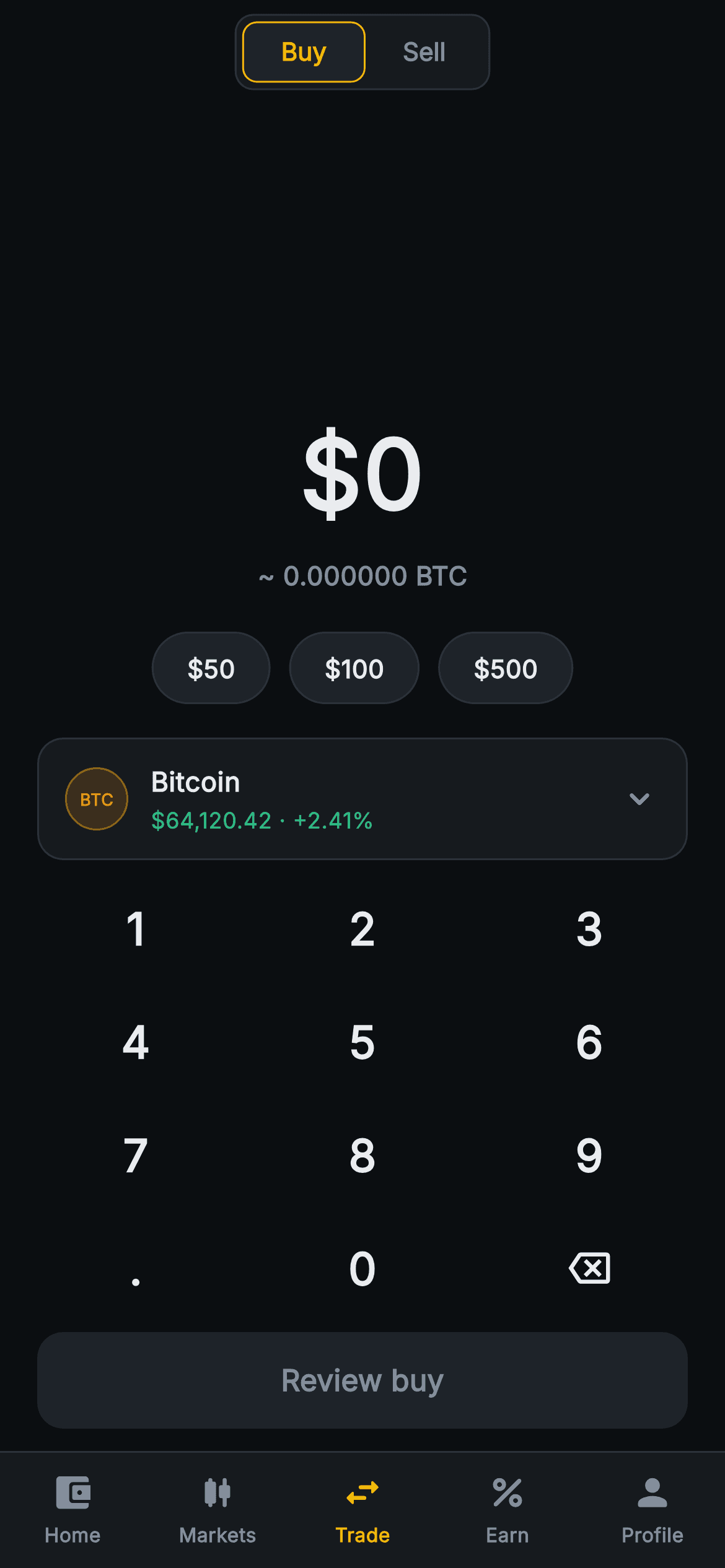
What you'll build
- ✓String-based amount entry that caps input at two decimals and nine digits, displayed at 52px with tabular figures so digits never jitter
- ✓A custom 3-column numpad built with GridView.builder — digits, decimal point, backspace icon — replacing the system keyboard entirely
- ✓Live fiat-to-BTC conversion driven by two getters and a const rate, shown as a six-decimal '~ BTC' line under the amount
- ✓One-tap $50 / $100 / $500 preset pills plus a tappable coin card with a tinted, text-only BTC ticker badge (no images)
- ✓A Review buy button that disables itself via a null onPressed until the parsed amount exceeds zero, over a five-tab exchange nav
Step-by-step build
Create the file
Add a new file at lib/web3_trade_simple_buy/web3_trade_simple_buy_screen.dart in your Flutter project.
Register the bundled fonts
No external packages — this is pure Flutter. It does bundle its design font (Inter), so drop the font file into fonts/ and declare it in pubspec.yaml:
flutter:
  fonts:
    - family: Inter
      fonts:
- asset: fonts/Inter-Regular.ttfBuild it, piece by piece
Here's how the screen goes together. Each block below is a real slice of the code with a plain-English explanation — paste them in order, or grab the whole file from the next section.
Four callbacks, a Binance-style palette, and one string of state
import 'package:flutter/material.dart';

/// Web3 trade — Simple Buy (bottom-nav Tab 3 shell). A big fiat-amount display
/// driven by a painted numpad, a coin-selector chip, preset amount pills, a
/// live quote line and a review bar. Self-contained per CONVENTIONS.md: pure
/// Flutter, bundled Inter font, custom numpad (no system keyboard), painted
/// ticker badge (no glyphs / no network image), forced dark theme.
class Web3TradeSimpleBuyScreen extends StatefulWidget {
  const Web3TradeSimpleBuyScreen({
    super.key,
    this.onTabSelected,
    this.onSelectCoin,
    this.onReview,
    this.onToggleSell,
  });

  final ValueChanged<int>? onTabSelected;
  final VoidCallback? onSelectCoin;
  final VoidCallback? onReview;
  final VoidCallback? onToggleSell;

  @override
  State<Web3TradeSimpleBuyScreen> createState() =>
      _Web3TradeSimpleBuyScreenState();
}

class _Web3TradeSimpleBuyScreenState extends State<Web3TradeSimpleBuyScreen> {
  static const String _font = 'Inter';
  static const Color _bg = Color(0xFF0B0E11);
  static const Color _surface = Color(0xFF161A1E);
  static const Color _surfaceAlt = Color(0xFF1E2329);
  static const Color _brand = Color(0xFFF0B90B);
  static const Color _up = Color(0xFF2EBD85);
  static const Color _text = Color(0xFFEAECEF);
  static const Color _muted = Color(0xFF848E9C);
  static const Color _hairline = Color(0xFF2B3139);

  static const double _rate = 64120.42; // 1 BTC in USD
  static const List<int> _presets = <int>[50, 100, 500];

  String _amount = '0';
`Web3TradeSimpleBuyScreen` is a `StatefulWidget` taking four optional callbacks — `onTabSelected`, `onSelectCoin`, `onReview`, `onToggleSell` — so every exit is wired by the parent and the screen stays backend-agnostic. The state class declares the whole palette as `static const`: near-black `#0B0E11` background, `#161A1E` and `#1E2329` surfaces, gold `#F0B90B` brand, `#2EBD85` gain green, `#848E9C` muted grey and a `#2B3139` hairline — the exact register of a dark exchange app. Alongside them sit `_rate = 64120.42` (one BTC in USD) and `_presets = [50, 100, 500]`. The only mutable state is `String _amount = '0'` — a string, not a double, because a double cannot represent in-progress input like `12.` or a trailing zero the user just typed.
The input rules: one dot, two decimals, nine digits
  void _tap(String k) {
    setState(() {
      if (k == '<') {
        _amount = _amount.length <= 1 ? '0' : _amount.substring(0, _amount.length - 1);
      } else if (k == '.') {
        if (!_amount.contains('.')) _amount = '$_amount.';
      } else {
        if (_amount == '0') {
          _amount = k;
        } else {
          final int dot = _amount.indexOf('.');
          if (dot != -1 && _amount.length - dot > 2) return; // 2 decimals max
          if (_amount.replaceAll('.', '').length >= 9) return;
          _amount = '$_amount$k';
        }
      }
    });
  }

  double get _value => double.tryParse(_amount) ?? 0;
  double get _crypto => _value / _rate;
`_tap` is the entire keyboard grammar in one `setState`. Backspace (`'<'`) trims the last character but collapses back to `'0'` once a single character remains, so the display never goes empty. The dot key is guarded by `contains('.')`, allowing exactly one decimal point. For digits, an amount of `'0'` gets replaced rather than appended — you can never type `07` — and two silent `return`s enforce the limits: `indexOf('.')` rejects a third decimal place, and `replaceAll('.', '').length >= 9` caps input at nine digits so the 52px display cannot overflow the phone's width. Below it, `_value` parses the string with `double.tryParse(_amount) ?? 0` and `_crypto` divides by `_rate` — the conversion is just a getter, so it recomputes on every keypress with no extra bookkeeping.
Forced dark theme and the Buy/Sell pill toggle
  @override
  Widget build(BuildContext context) {
    return Theme(
      data: ThemeData.dark(useMaterial3: true),
      child: Scaffold(
        backgroundColor: _bg,
        appBar: AppBar(
          backgroundColor: _bg,
          elevation: 0,
          centerTitle: true,
          automaticallyImplyLeading: false,
          title: Container(
            padding: const EdgeInsets.all(3),
            decoration: BoxDecoration(
              color: _surface,
              borderRadius: BorderRadius.circular(10),
              border: Border.all(color: _hairline),
            ),
            child: Row(
              mainAxisSize: MainAxisSize.min,
              children: <Widget>[
                Container(
                  padding:
                      const EdgeInsets.symmetric(horizontal: 20, vertical: 7),
                  decoration: BoxDecoration(
                    color: _surfaceAlt,
                    borderRadius: BorderRadius.circular(8),
                    border: Border.all(color: _brand),
                  ),
                  child: const Text(
                    'Buy',
                    style: TextStyle(
                      fontFamily: _font,
                      fontSize: 13.5,
                      fontWeight: FontWeight.w700,
                      color: _brand,
                    ),
                  ),
                ),
                GestureDetector(
                  onTap: widget.onToggleSell,
                  behavior: HitTestBehavior.opaque,
                  child: const Padding(
                    padding: EdgeInsets.symmetric(horizontal: 20, vertical: 7),
                    child: Text(
                      'Sell',
                      style: TextStyle(
                        fontFamily: _font,
                        fontSize: 13.5,
                        fontWeight: FontWeight.w700,
                        color: _muted,
                      ),
                    ),
                  ),
                ),
              ],
            ),
          ),
        ),
        bottomNavigationBar: _BottomNav(
          current: 2,
          onTabSelected: widget.onTabSelected,
        ),
The whole tree is wrapped in `Theme(data: ThemeData.dark(useMaterial3: true))`, so the screen renders dark even inside a light host app — necessary because the hardcoded near-black surfaces would clash with light defaults on ripples and icons. The `AppBar` sets `automaticallyImplyLeading: false` (this is a tab, not a pushed route) and its title is a hand-built segmented control: a hairline-bordered container at radius 10 with 3px padding, holding a Buy pill filled `_surfaceAlt` with a gold border and gold 13.5px `w700` text, and a plain muted Sell label. Note it is not a local toggle — Buy is permanently active here, and tapping Sell fires `widget.onToggleSell` so the parent swaps in the sell screen. `HitTestBehavior.opaque` makes Sell's full padded area tappable, and `_BottomNav(current: 2)` marks the Trade tab.
The amount display and preset pills
        body: SafeArea(
          top: false,
          child: Column(
            children: <Widget>[
              const Spacer(),
              Column(
                children: <Widget>[
                  Text(
                    '\$$_amount',
                    style: const TextStyle(
                      fontFamily: _font,
                      fontSize: 52,
                      fontWeight: FontWeight.w800,
                      fontFeatures: <FontFeature>[FontFeature.tabularFigures()],
                      color: _text,
                    ),
                  ),
                  const SizedBox(height: 8),
                  Text(
                    '~ ${_crypto.toStringAsFixed(6)} BTC',
                    style: const TextStyle(
                      fontFamily: _font,
                      fontSize: 14,
                      fontWeight: FontWeight.w600,
                      color: _muted,
                    ),
                  ),
                ],
              ),
              const SizedBox(height: 20),
              Row(
                mainAxisAlignment: MainAxisAlignment.center,
                children: <Widget>[
                  for (final int p in _presets)
                    Padding(
                      padding: const EdgeInsets.symmetric(horizontal: 5),
                      child: GestureDetector(
                        onTap: () => setState(() => _amount = '$p'),
                        behavior: HitTestBehavior.opaque,
                        child: Container(
                          padding: const EdgeInsets.symmetric(
                              horizontal: 18, vertical: 9),
                          decoration: BoxDecoration(
                            color: _surfaceAlt,
                            borderRadius: BorderRadius.circular(20),
                            border: Border.all(color: _hairline),
                          ),
                          child: Text(
                            '\$$p',
                            style: const TextStyle(
                              fontFamily: _font,
                              fontSize: 13.5,
                              fontWeight: FontWeight.w700,
                              color: _text,
                            ),
                          ),
                        ),
                      ),
                    ),
                ],
              ),
The body is a `Column` opening with `const Spacer()`, which pushes the amount block toward the vertical centre while the numpad and button pack against the bottom — the classic calculator layout without any measuring. The amount renders `'\$$_amount'` at 52px `w800` with `FontFeature.tabularFigures()`, the detail that matters most: with tabular figures every digit has equal width, so the number grows steadily as you type instead of jittering each time a 1 becomes a 4. Beneath it, `_crypto.toStringAsFixed(6)` prints the six-decimal BTC equivalent in muted 14px. The preset row is a collection-for over `_presets`, each pill a `_surfaceAlt` capsule (radius 20, hairline border) whose tap runs `setState(() => _amount = '$p')` — presets overwrite the amount rather than add to it, matching how every exchange treats quick-amount chips.
A coin card with a painted BTC ticker badge
              GestureDetector(
                onTap: widget.onSelectCoin,
                behavior: HitTestBehavior.opaque,
                child: Container(
                  margin: const EdgeInsets.symmetric(horizontal: 20),
                  padding:
                      const EdgeInsets.symmetric(horizontal: 14, vertical: 12),
                  decoration: BoxDecoration(
                    color: _surface,
                    borderRadius: BorderRadius.circular(14),
                    border: Border.all(color: _hairline),
                  ),
                  child: Row(
                    children: <Widget>[
                      Container(
                        width: 34,
                        height: 34,
                        decoration: BoxDecoration(
                          color: const Color(0xFFF7931A).withValues(alpha: 0.16),
                          shape: BoxShape.circle,
                          border: Border.all(
                              color: const Color(0xFFF7931A)
                                  .withValues(alpha: 0.5)),
                        ),
                        alignment: Alignment.center,
                        child: const Text(
                          'BTC',
                          style: TextStyle(
                            fontFamily: _font,
                            fontSize: 9,
                            fontWeight: FontWeight.w700,
                            color: Color(0xFFF7931A),
                          ),
                        ),
                      ),
                      const SizedBox(width: 12),
                      const Expanded(
                        child: Column(
                          crossAxisAlignment: CrossAxisAlignment.start,
                          children: <Widget>[
                            Text(
                              'Bitcoin',
                              style: TextStyle(
                                fontFamily: _font,
                                fontSize: 14.5,
                                fontWeight: FontWeight.w700,
                                color: _text,
                              ),
                            ),
                            SizedBox(height: 2),
                            Text(
                              '\$64,120.42 · +2.41%',
                              style: TextStyle(
                                fontFamily: _font,
                                fontSize: 12,
                                color: _up,
                              ),
                            ),
                          ],
                        ),
                      ),
                      const Icon(Icons.keyboard_arrow_down_rounded,
                          size: 22, color: _muted),
                    ],
                  ),
                ),
              ),
The coin selector is one `GestureDetector` around a `_surface` card, firing `widget.onSelectCoin` so the parent can push a picker. Its badge proves you don't need an image or icon font for a ticker: a 34px circle filled Bitcoin-orange `#F7931A` at `withValues(alpha: 0.16)` with a half-opacity border of the same colour, centring the text 'BTC' at 9px `w700` in full orange. The tint-plus-border-plus-label recipe works for any coin by swapping one colour and three letters. Next to it, 'Bitcoin' at 14.5px sits above the quote line '\$64,120.42 · +2.41%' rendered entirely in `_up` green — price and change share one string and one colour because the delta's direction is the message. A muted `keyboard_arrow_down_rounded` chevron signals the card opens a list.
The Review buy button that disables itself
              const SizedBox(height: 6),
              _Numpad(onKey: _tap),
              Padding(
                padding: const EdgeInsets.fromLTRB(20, 4, 20, 12),
                child: SizedBox(
                  width: double.infinity,
                  height: 52,
                  child: FilledButton(
                    onPressed: _value > 0 ? widget.onReview : null,
                    style: FilledButton.styleFrom(
                      backgroundColor: _brand,
                      disabledBackgroundColor: _surfaceAlt,
                      shape: RoundedRectangleBorder(
                        borderRadius: BorderRadius.circular(14),
                      ),
                    ),
                    child: Text(
                      'Review buy',
                      style: TextStyle(
                        fontFamily: _font,
                        fontSize: 16,
                        fontWeight: FontWeight.w700,
                        color: _value > 0 ? _bg : _muted,
                      ),
                    ),
                  ),
                ),
              ),
            ],
          ),
        ),
      ),
    );
  }
}
The numpad drops in as `_Numpad(onKey: _tap)` — a single line, because all the input rules live in the state class. Below it, the `FilledButton` uses the cleanest disabled pattern Flutter offers: `onPressed: _value > 0 ? widget.onReview : null`. Passing `null` is what disables a Material button, so no separate `enabled` flag exists anywhere. The style pairs `backgroundColor: _brand` with `disabledBackgroundColor: _surfaceAlt`, and the label colour mirrors the same ternary — `_bg` (dark text on gold, the Binance signature) when active, `_muted` when not. The result is a button that flips from grey to gold on the first keypress and back on the last backspace, with zero state management beyond `_amount` itself. The `SizedBox` fixes it at 52px tall and full width inside 20px gutters.
A 12-key numpad from a non-scrolling GridView
class _Numpad extends StatelessWidget {
  const _Numpad({required this.onKey});

  final ValueChanged<String> onKey;

  static const List<String> _keys = <String>[
    '1', '2', '3', '4', '5', '6', '7', '8', '9', '.', '0', '<',
  ];

  @override
  Widget build(BuildContext context) {
    return Padding(
      padding: const EdgeInsets.symmetric(horizontal: 12),
      child: GridView.builder(
        shrinkWrap: true,
        physics: const NeverScrollableScrollPhysics(),
        padding: EdgeInsets.zero,
        itemCount: _keys.length,
        gridDelegate: const SliverGridDelegateWithFixedCrossAxisCount(
          crossAxisCount: 3,
          childAspectRatio: 2.0,
        ),
        itemBuilder: (BuildContext context, int i) {
          final String k = _keys[i];
          return InkWell(
            borderRadius: BorderRadius.circular(12),
            onTap: () => onKey(k),
            child: Center(
              child: k == '<'
                  ? const Icon(Icons.backspace_outlined,
                      size: 22, color: _Web3TradeSimpleBuyScreenState._text)
                  : Text(
                      k,
                      style: const TextStyle(
                        fontFamily: _Web3TradeSimpleBuyScreenState._font,
                        fontSize: 24,
                        fontWeight: FontWeight.w600,
                        color: _Web3TradeSimpleBuyScreenState._text,
                      ),
                    ),
            ),
          );
        },
      ),
    );
  }
}
`_Numpad` keeps its keys as a flat `static const` list — `'1'` through `'9'`, then `'.'`, `'0'`, `'<'` — laid out by `GridView.builder` with `crossAxisCount: 3`, which lands the decimal point and backspace either side of zero exactly like a phone dialler. Two flags make a grid work inside a `Column`: `shrinkWrap: true` sizes it to its content, and `NeverScrollableScrollPhysics` stops it stealing drags from the page. `childAspectRatio: 2.0` produces wide, short keys, so twelve of them fit under the coin card without crowding the button. Each key is an `InkWell` with a 12px ripple radius; `'<'` renders `Icons.backspace_outlined` while the rest render 24px `w600` text. The widget's only output is `onKey(k)` — the pad stays deliberately dumb and the state class owns every rule.
The five-tab exchange nav shell
class _BottomNav extends StatelessWidget {
  const _BottomNav({required this.current, required this.onTabSelected});

  final int current;
  final ValueChanged<int>? onTabSelected;

  static const List<IconData> _icons = <IconData>[
    Icons.account_balance_wallet_rounded,
    Icons.candlestick_chart_rounded,
    Icons.swap_horiz_rounded,
    Icons.percent_rounded,
    Icons.person_rounded,
  ];
  static const List<String> _labels = <String>[
    'Home', 'Markets', 'Trade', 'Earn', 'Profile',
  ];

  @override
  Widget build(BuildContext context) {
    return Container(
      decoration: const BoxDecoration(
        color: _Web3TradeSimpleBuyScreenState._surface,
        border: Border(
          top: BorderSide(color: _Web3TradeSimpleBuyScreenState._hairline),
        ),
      ),
      child: SafeArea(
        top: false,
        child: SizedBox(
          height: 62,
          child: Row(
            children: <Widget>[
              for (int i = 0; i < _icons.length; i++)
                Expanded(
                  child: GestureDetector(
                    onTap: () => onTabSelected?.call(i),
                    behavior: HitTestBehavior.opaque,
                    child: Column(
                      mainAxisAlignment: MainAxisAlignment.center,
                      children: <Widget>[
                        Icon(
                          _icons[i],
                          size: 23,
                          color: i == current
                              ? _Web3TradeSimpleBuyScreenState._brand
                              : _Web3TradeSimpleBuyScreenState._muted,
                        ),
                        const SizedBox(height: 4),
                        Text(
                          _labels[i],
                          style: TextStyle(
                            fontFamily: _Web3TradeSimpleBuyScreenState._font,
                            fontSize: 10.5,
                            fontWeight: FontWeight.w600,
                            color: i == current
                                ? _Web3TradeSimpleBuyScreenState._brand
                                : _Web3TradeSimpleBuyScreenState._muted,
                          ),
                        ),
                      ],
                    ),
                  ),
                ),
            ],
          ),
        ),
      ),
    );
  }
}
`_BottomNav` builds the Home / Markets / Trade / Earn / Profile bar from two parallel `static const` lists of icons and labels, looped with a collection-for into five `Expanded` `GestureDetector`s so each tab claims exactly a fifth of the width. Selection is a plain `i == current` ternary painting icon and 10.5px label gold `_brand` or muted grey — no `BottomNavigationBar` widget, which would drag in theme defaults this design doesn't want. The bar's `Container` carries the `_surface` fill and a top hairline `BorderSide`, and crucially wraps `SafeArea(top: false)` inside itself, so the surface colour extends under the iPhone home indicator while the 62px `Row` stays above it. It reads the palette straight off `_Web3TradeSimpleBuyScreenState`'s private statics — legal in Dart because both classes share one file, and it keeps the colours defined once.
Full code
The complete, ready-to-paste source. Free to use in your projects — one click copies it all.
import 'package:flutter/material.dart';
/// Web3 trade — Simple Buy (bottom-nav Tab 3 shell). A big fiat-amount display
/// driven by a painted numpad, a coin-selector chip, preset amount pills, a
/// live quote line and a review bar. Self-contained per CONVENTIONS.md: pure
/// Flutter, bundled Inter font, custom numpad (no system keyboard), painted
/// ticker badge (no glyphs / no network image), forced dark theme.
class Web3TradeSimpleBuyScreen extends StatefulWidget {
const Web3TradeSimpleBuyScreen({
super.key,
this.onTabSelected,
this.onSelectCoin,
this.onReview,
this.onToggleSell,
});
final ValueChanged<int>? onTabSelected;
final VoidCallback? onSelectCoin;
final VoidCallback? onReview;
final VoidCallback? onToggleSell;
@override
State<Web3TradeSimpleBuyScreen> createState() =>
_Web3TradeSimpleBuyScreenState();
}
class _Web3TradeSimpleBuyScreenState extends State<Web3TradeSimpleBuyScreen> {
static const String _font = 'Inter';
static const Color _bg = Color(0xFF0B0E11);
static const Color _surface = Color(0xFF161A1E);
static const Color _surfaceAlt = Color(0xFF1E2329);
static const Color _brand = Color(0xFFF0B90B);
static const Color _up = Color(0xFF2EBD85);
static const Color _text = Color(0xFFEAECEF);
static const Color _muted = Color(0xFF848E9C);
static const Color _hairline = Color(0xFF2B3139);
static const double _rate = 64120.42; // 1 BTC in USD
static const List<int> _presets = <int>[50, 100, 500];
String _amount = '0';
void _tap(String k) {
setState(() {
if (k == '<') {
_amount = _amount.length <= 1 ? '0' : _amount.substring(0, _amount.length - 1);
} else if (k == '.') {
if (!_amount.contains('.')) _amount = '$_amount.';
} else {
if (_amount == '0') {
_amount = k;
} else {
final int dot = _amount.indexOf('.');
if (dot != -1 && _amount.length - dot > 2) return; // 2 decimals max
if (_amount.replaceAll('.', '').length >= 9) return;
_amount = '$_amount$k';
}
}
});
}
double get _value => double.tryParse(_amount) ?? 0;
double get _crypto => _value / _rate;
@override
Widget build(BuildContext context) {
return Theme(
data: ThemeData.dark(useMaterial3: true),
child: Scaffold(
backgroundColor: _bg,
appBar: AppBar(
backgroundColor: _bg,
elevation: 0,
centerTitle: true,
automaticallyImplyLeading: false,
title: Container(
padding: const EdgeInsets.all(3),
decoration: BoxDecoration(
color: _surface,
borderRadius: BorderRadius.circular(10),
border: Border.all(color: _hairline),
),
child: Row(
mainAxisSize: MainAxisSize.min,
children: <Widget>[
Container(
padding:
const EdgeInsets.symmetric(horizontal: 20, vertical: 7),
decoration: BoxDecoration(
color: _surfaceAlt,
borderRadius: BorderRadius.circular(8),
border: Border.all(color: _brand),
),
child: const Text(
'Buy',
style: TextStyle(
fontFamily: _font,
fontSize: 13.5,
fontWeight: FontWeight.w700,
color: _brand,
),
),
),
GestureDetector(
onTap: widget.onToggleSell,
behavior: HitTestBehavior.opaque,
child: const Padding(
padding: EdgeInsets.symmetric(horizontal: 20, vertical: 7),
child: Text(
'Sell',
style: TextStyle(
fontFamily: _font,
fontSize: 13.5,
fontWeight: FontWeight.w700,
color: _muted,
),
),
),
),
],
),
),
),
bottomNavigationBar: _BottomNav(
current: 2,
onTabSelected: widget.onTabSelected,
),
body: SafeArea(
top: false,
child: Column(
children: <Widget>[
const Spacer(),
Column(
children: <Widget>[
Text(
'\$$_amount',
style: const TextStyle(
fontFamily: _font,
fontSize: 52,
fontWeight: FontWeight.w800,
fontFeatures: <FontFeature>[FontFeature.tabularFigures()],
color: _text,
),
),
const SizedBox(height: 8),
Text(
'~ ${_crypto.toStringAsFixed(6)} BTC',
style: const TextStyle(
fontFamily: _font,
fontSize: 14,
fontWeight: FontWeight.w600,
color: _muted,
),
),
],
),
const SizedBox(height: 20),
Row(
mainAxisAlignment: MainAxisAlignment.center,
children: <Widget>[
for (final int p in _presets)
Padding(
padding: const EdgeInsets.symmetric(horizontal: 5),
child: GestureDetector(
onTap: () => setState(() => _amount = '$p'),
behavior: HitTestBehavior.opaque,
child: Container(
padding: const EdgeInsets.symmetric(
horizontal: 18, vertical: 9),
decoration: BoxDecoration(
color: _surfaceAlt,
borderRadius: BorderRadius.circular(20),
border: Border.all(color: _hairline),
),
child: Text(
'\$$p',
style: const TextStyle(
fontFamily: _font,
fontSize: 13.5,
fontWeight: FontWeight.w700,
color: _text,
),
),
),
),
),
],
),
const SizedBox(height: 18),
GestureDetector(
onTap: widget.onSelectCoin,
behavior: HitTestBehavior.opaque,
child: Container(
margin: const EdgeInsets.symmetric(horizontal: 20),
padding:
const EdgeInsets.symmetric(horizontal: 14, vertical: 12),
decoration: BoxDecoration(
color: _surface,
borderRadius: BorderRadius.circular(14),
border: Border.all(color: _hairline),
),
child: Row(
children: <Widget>[
Container(
width: 34,
height: 34,
decoration: BoxDecoration(
color: const Color(0xFFF7931A).withValues(alpha: 0.16),
shape: BoxShape.circle,
border: Border.all(
color: const Color(0xFFF7931A)
.withValues(alpha: 0.5)),
),
alignment: Alignment.center,
child: const Text(
'BTC',
style: TextStyle(
fontFamily: _font,
fontSize: 9,
fontWeight: FontWeight.w700,
color: Color(0xFFF7931A),
),
),
),
const SizedBox(width: 12),
const Expanded(
child: Column(
crossAxisAlignment: CrossAxisAlignment.start,
children: <Widget>[
Text(
'Bitcoin',
style: TextStyle(
fontFamily: _font,
fontSize: 14.5,
fontWeight: FontWeight.w700,
color: _text,
),
),
SizedBox(height: 2),
Text(
'\$64,120.42 · +2.41%',
style: TextStyle(
fontFamily: _font,
fontSize: 12,
color: _up,
),
),
],
),
),
const Icon(Icons.keyboard_arrow_down_rounded,
size: 22, color: _muted),
],
),
),
),
const SizedBox(height: 6),
_Numpad(onKey: _tap),
Padding(
padding: const EdgeInsets.fromLTRB(20, 4, 20, 12),
child: SizedBox(
width: double.infinity,
height: 52,
child: FilledButton(
onPressed: _value > 0 ? widget.onReview : null,
style: FilledButton.styleFrom(
backgroundColor: _brand,
disabledBackgroundColor: _surfaceAlt,
shape: RoundedRectangleBorder(
borderRadius: BorderRadius.circular(14),
),
),
child: Text(
'Review buy',
style: TextStyle(
fontFamily: _font,
fontSize: 16,
fontWeight: FontWeight.w700,
color: _value > 0 ? _bg : _muted,
),
),
),
),
),
],
),
),
),
);
}
}
class _Numpad extends StatelessWidget {
const _Numpad({required this.onKey});
final ValueChanged<String> onKey;
static const List<String> _keys = <String>[
'1', '2', '3', '4', '5', '6', '7', '8', '9', '.', '0', '<',
];
@override
Widget build(BuildContext context) {
return Padding(
padding: const EdgeInsets.symmetric(horizontal: 12),
child: GridView.builder(
shrinkWrap: true,
physics: const NeverScrollableScrollPhysics(),
padding: EdgeInsets.zero,
itemCount: _keys.length,
gridDelegate: const SliverGridDelegateWithFixedCrossAxisCount(
crossAxisCount: 3,
childAspectRatio: 2.0,
),
itemBuilder: (BuildContext context, int i) {
final String k = _keys[i];
return InkWell(
borderRadius: BorderRadius.circular(12),
onTap: () => onKey(k),
child: Center(
child: k == '<'
? const Icon(Icons.backspace_outlined,
size: 22, color: _Web3TradeSimpleBuyScreenState._text)
: Text(
k,
style: const TextStyle(
fontFamily: _Web3TradeSimpleBuyScreenState._font,
fontSize: 24,
fontWeight: FontWeight.w600,
color: _Web3TradeSimpleBuyScreenState._text,
),
),
),
);
},
),
);
}
}
class _BottomNav extends StatelessWidget {
const _BottomNav({required this.current, required this.onTabSelected});
final int current;
final ValueChanged<int>? onTabSelected;
static const List<IconData> _icons = <IconData>[
Icons.account_balance_wallet_rounded,
Icons.candlestick_chart_rounded,
Icons.swap_horiz_rounded,
Icons.percent_rounded,
Icons.person_rounded,
];
static const List<String> _labels = <String>[
'Home', 'Markets', 'Trade', 'Earn', 'Profile',
];
@override
Widget build(BuildContext context) {
return Container(
decoration: const BoxDecoration(
color: _Web3TradeSimpleBuyScreenState._surface,
border: Border(
top: BorderSide(color: _Web3TradeSimpleBuyScreenState._hairline),
),
),
child: SafeArea(
top: false,
child: SizedBox(
height: 62,
child: Row(
children: <Widget>[
for (int i = 0; i < _icons.length; i++)
Expanded(
child: GestureDetector(
onTap: () => onTabSelected?.call(i),
behavior: HitTestBehavior.opaque,
child: Column(
mainAxisAlignment: MainAxisAlignment.center,
children: <Widget>[
Icon(
_icons[i],
size: 23,
color: i == current
? _Web3TradeSimpleBuyScreenState._brand
: _Web3TradeSimpleBuyScreenState._muted,
),
const SizedBox(height: 4),
Text(
_labels[i],
style: TextStyle(
fontFamily: _Web3TradeSimpleBuyScreenState._font,
fontSize: 10.5,
fontWeight: FontWeight.w600,
color: i == current
? _Web3TradeSimpleBuyScreenState._brand
: _Web3TradeSimpleBuyScreenState._muted,
),
),
],
),
),
),
],
),
),
),
);
}
}
Plus bundled 1 binary asset (fonts/images). The CLI and MCP install those for you automatically.
Two faster ways to add it
Copy-paste works, but you can skip it entirely.
1. FlutterKit CLI
One command drops this screen — and its fonts — straight into your project.
$ flutterkit add web3-trade-simple-buy2. AI agent (MCP)
Connect FlutterKit's MCP server in Claude or Cursor and just ask your agent to install web3-trade-simple-buy — it fetches and writes the files for you.
FAQ
Is this crypto buy screen free to use commercially?
Yes — the full source on this page is free for personal and commercial projects alike. Copy it, install it via the CLI command, or pull it through MCP and ship it in a production app. No licence key, no sign-up, and no attribution required.
Why is the amount stored as a String instead of a double?
Because a double cannot represent input in progress. While someone types '12.', a double would collapse it to 12.0 and lose the pending decimal point; a trailing zero in '5.50' would vanish the same way. Keeping `_amount` as a string preserves exactly what was typed, and `double.tryParse` converts it only at the moments maths is needed — the BTC conversion and the button-enable check.
Does this need any packages or a font download?
No packages — it is pure Flutter: the numpad is a GridView, the BTC badge is a tinted circle with text, and the nav bar is hand-built from Rows and Columns. The Inter font ships bundled with the screen, so the install works offline with no google_fonts dependency.
How do I plug in a live price instead of the hardcoded rate?
Lift `_rate` out of the const and pass it in as a constructor parameter (or feed it from a stream in the parent and rebuild the screen when it ticks). The `_crypto` getter already recomputes on every build, so the '~ BTC' line updates automatically the moment the rate changes — no other code needs touching. The coin card's name, ticker and quote string can become parameters the same way.
Which Flutter version does this require?
Flutter 3.22 or newer, because the BTC badge tints its orange with `Color.withValues(alpha: 0.16)` and the constructor uses super parameters. On an older SDK, swap both `withValues(alpha: x)` calls for `withOpacity(x)` and expand the constructor to the `{Key? key} : super(key: key)` form.


