Aurum · Purchase Complete
Aurum · Purchase Complete is a production-ready Web3 Flutter screen from FlutterKit — free, with full source code.
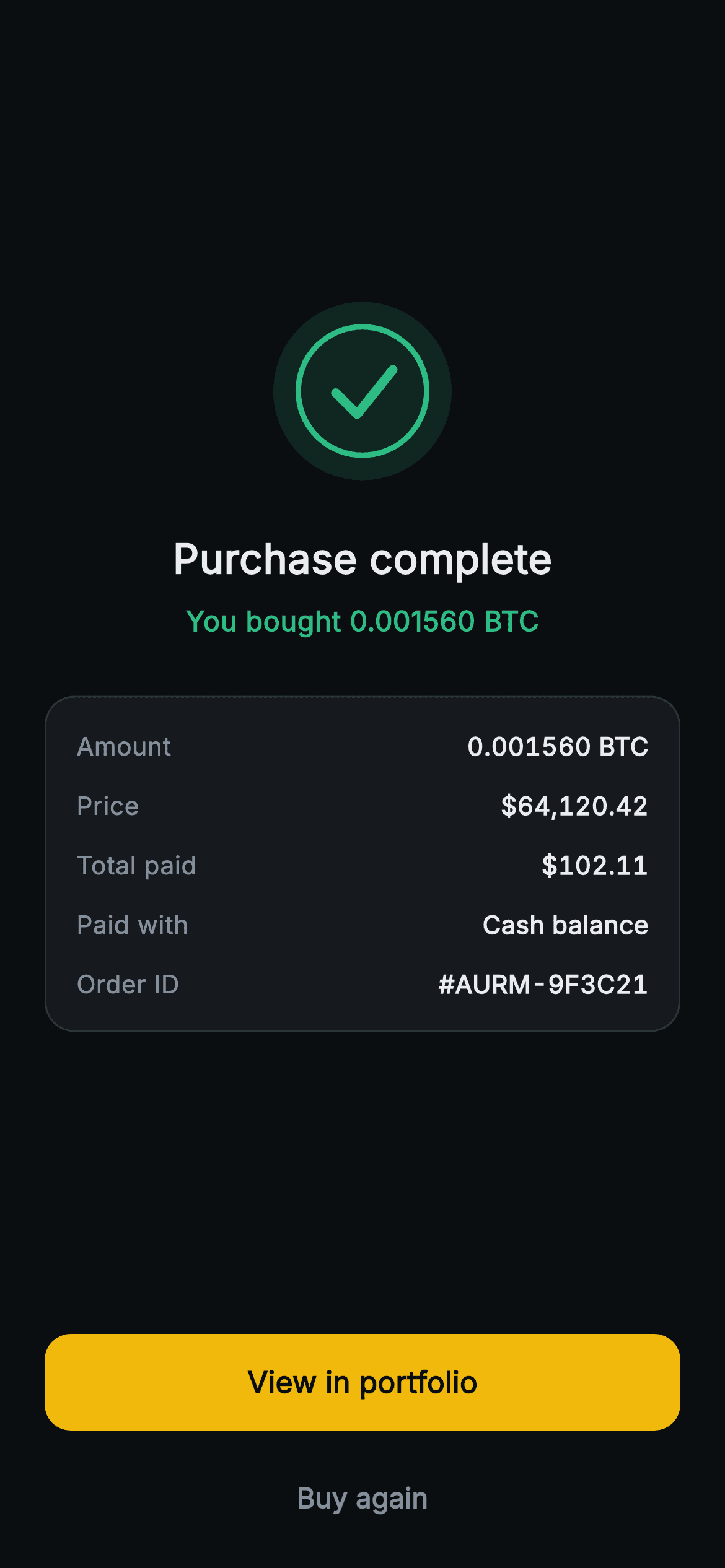
The Aurum Purchase Complete screen is the celebratory end of a crypto buy flow. On a near-black (#0B0E11) canvas it centers a 96x96 success badge — a tinted mint disc, a stroked ring, and a rounded checkmark, all drawn by a single CustomPainter (no glyph font, no network asset). Below sits the bold "Purchase complete" headline and a mint-green confirmation line, "You bought 0.001560 BTC". A rounded #161A1E receipt card with a hairline border lists five reconciliation rows — Amount, Price, Total paid, Paid with (Cash balance) and Order ID (#AURM-9F3C21) — each a label/Spacer/value Row whose figures use tabular-figure FontFeature so numbers align. A pinned action stack closes it: a full-width gold (#F0B90B) FilledButton "View in portfolio" and a muted "Buy again" TextButton, wired to onViewPortfolio and onBuyAgain callbacks so it's backend-agnostic. Pure Flutter (SDK + dart: only), bundled Inter font, forced dark Material 3 theme, Spacers keeping the layout vertically balanced as a standalone route.
Full tutorial coming soon.
The step-by-step walkthrough and complete Dart source for this screen haven't been published yet. They'll be free when they are — no sign-up, no payment. In the meantime, browse the screens that already have their tutorial.
What's included
- ✓CustomPainter success badge: tinted disc + stroked ring + rounded checkmark, zero glyphs or network images
- ✓Five-row receipt card (Amount, Price, Total paid, Paid with, Order ID) with hairline border and tabular-figure number alignment
- ✓Mint-green 'You bought 0.001560 BTC' confirmation line under a bold 'Purchase complete' headline
- ✓Gold full-width 'View in portfolio' FilledButton plus muted 'Buy again' TextButton, both 52px tall
- ✓onViewPortfolio and onBuyAgain VoidCallback hooks for backend-agnostic wiring
- ✓Forced dark Material 3 theme, bundled Inter font, Spacer-balanced standalone Scaffold
Use cases
- ✓Confirmation screen after a crypto/coin purchase in an exchange or wallet app
- ✓Order success state for an in-app buy or top-up flow
- ✓Generic payment/transaction completion screen with an itemized receipt
- ✓Post-checkout receipt with portfolio handoff and repeat-purchase shortcut


