Aurum · Review Order
Aurum · Review Order is a production-ready Web3 Flutter screen from FlutterKit — free, with full source code.
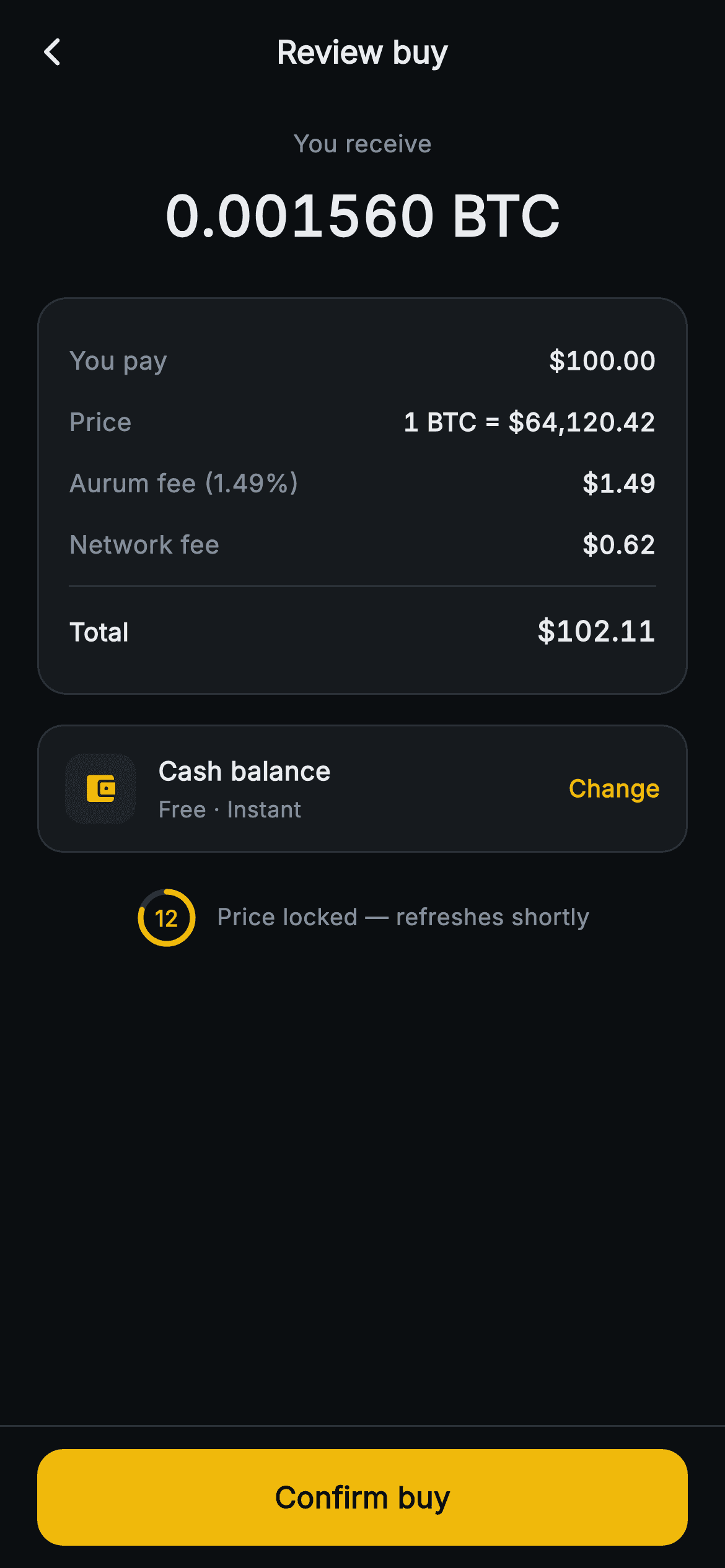
The final checkpoint before a crypto purchase confirms. A centered "You receive" header shows the exact 0.001560 BTC the buyer gets, then a bordered summary card breaks down the order line by line: You pay $100.00, Price 1 BTC = $64,120.42, Aurum fee (1.49%) $1.49, Network fee $0.62, a hairline divider, and a bold Total of $102.11 — all set in Inter with tabular figures so columns stay perfectly aligned. Below sits a tappable payment row (a wallet-glyph tile, "Cash balance · Free · Instant", and a yellow "Change" affordance) wired to onChangePayment. The standout detail is the rate-lock indicator: a 34px CustomPaint countdown ring that sweeps a brand-yellow arc over a grey track as the locked price expires, with the live seconds count centered inside and a "Price locked — refreshes shortly" caption. A pinned bottom bar holds the full-width yellow "Confirm buy" button. Built as a single self-contained StatelessWidget, forced dark theme, pure Flutter (dart: only), no network images — back/confirm/change-payment are all exposed callbacks, and secondsLeft drives the ring fraction.
Full tutorial coming soon.
The step-by-step walkthrough and complete Dart source for this screen haven't been published yet. They'll be free when they are — no sign-up, no payment. In the meantime, browse the screens that already have their tutorial.
What's included
- ✓_CountdownRing CustomPainter that strokes a grey track plus a brand-yellow arc from secondsLeft / 15, with the live count centered inside a 34px ring
- ✓Order-summary Container with reusable _Row widgets (You pay, Price, Aurum fee, Network fee) and a bold Total row above a _Divider hairline
- ✓Tabular-figure Inter typography (FontFeature.tabularFigures) on the BTC hero and every money value so amounts align cleanly
- ✓Tappable payment-method row with wallet-icon tile, 'Cash balance · Free · Instant' copy and a yellow Change affordance wired to onChangePayment
- ✓Pinned bottomNavigationBar with a SafeArea-aware full-width 'Confirm buy' FilledButton calling onConfirm
- ✓Backend-agnostic callbacks (onBack, onConfirm, onChangePayment) and a configurable secondsLeft, all pure Flutter with no network image dependency
Use cases
- ✓Final review step of a crypto-exchange buy flow where users verify amount, fees and total before committing
- ✓Fiat-to-crypto on-ramp checkout that must disclose spread, platform fee and network fee transparently
- ✓Any wallet app needing a rate-locked quote screen with a visible expiry countdown before confirmation
- ✓Brokerage or neobank in-app asset purchase confirmation with an itemized cost breakdown and payment-source switch


