Aurum · Swap Settings
Aurum · Swap Settings is a production-ready Web3 Flutter screen from FlutterKit — free, with full source code.
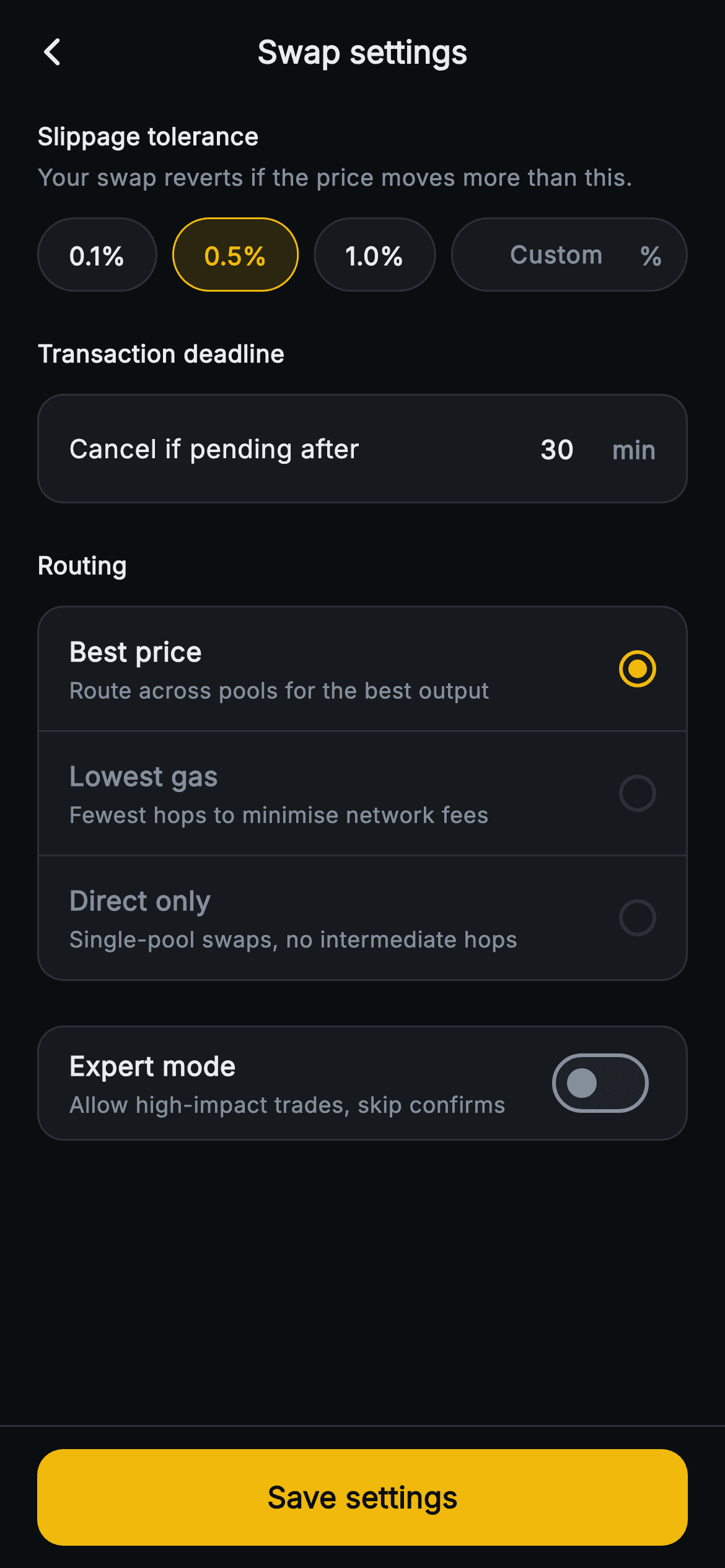
The Aurum Swap Settings screen is a dark, Binance-yellow panel buyers configure before a token swap. A centered "Swap settings" app bar with a back chevron sits above a scrolling ListView of four sections. "Slippage tolerance" shows three preset pills (0.1% / 0.5% / 1.0%) beside an inline "Custom %" TextField that only accepts digits and a decimal; picking a pill clears the field, and typing above 1.0% reveals an amber warning card about front-running. "Transaction deadline" is a rounded card with "Cancel if pending after" and a 56px minutes field (default 30). "Routing" is a three-row card — Best price, Lowest gas, Direct only — each with a subtitle and a yellow radio dot built from nested DecoratedBox circles. An "Expert mode" card pairs a description with a Material Switch, and a pinned bottom bar holds a full-width yellow "Save settings" FilledButton. Built in pure Flutter with the bundled Inter font, a forced dark Theme, StatefulWidget state, FilteringTextInputFormatter input guards, and onBack/onSave VoidCallback hooks so it stays backend-agnostic. No images, no glyphs.
Full tutorial coming soon.
The step-by-step walkthrough and complete Dart source for this screen haven't been published yet. They'll be free when they are — no sign-up, no payment. In the meantime, browse the screens that already have their tutorial.
What's included
- ✓StatefulWidget tracking selected slippage preset (-1 for custom), route index, deadline minutes and expert-mode bool
- ✓Slippage row: three reusable _Pill widgets plus an inline custom % TextField with a numeric/decimal FilteringTextInputFormatter
- ✓Conditional amber warning card that appears when a custom slippage above 1.0% is entered
- ✓Transaction-deadline card with a digits-only minutes field defaulting to 30
- ✓Three-option routing selector with painter-free radio dots (Best price / Lowest gas / Direct only)
- ✓Expert-mode Switch and pinned full-width Save settings FilledButton wired to onBack/onSave callbacks
Use cases
- ✓A Web3 DEX or token-swap aggregator letting traders tune slippage and routing
- ✓A self-custody crypto wallet exposing advanced swap preferences before signing
- ✓A DeFi portfolio app where users set transaction deadlines and gas-vs-price routing
- ✓An exchange onboarding flow teaching expert-mode and slippage risk to new traders


