How to Build a Crypto Send Amount Screen in Flutter (Full Code + Preview)
Most people think in dollars but a wallet sends ETH, so the amount step has to let someone type in either unit and still know whether they can afford it. This tutorial builds Aurum's send-amount screen in Flutter: a recipient chip carried over from the address step, a 40px figure that flips between ETH and USD entry, a balance line that turns into an error the moment you overshoot, a one-tap Max pill, and a Next button that only wakes up for a positive, affordable amount.
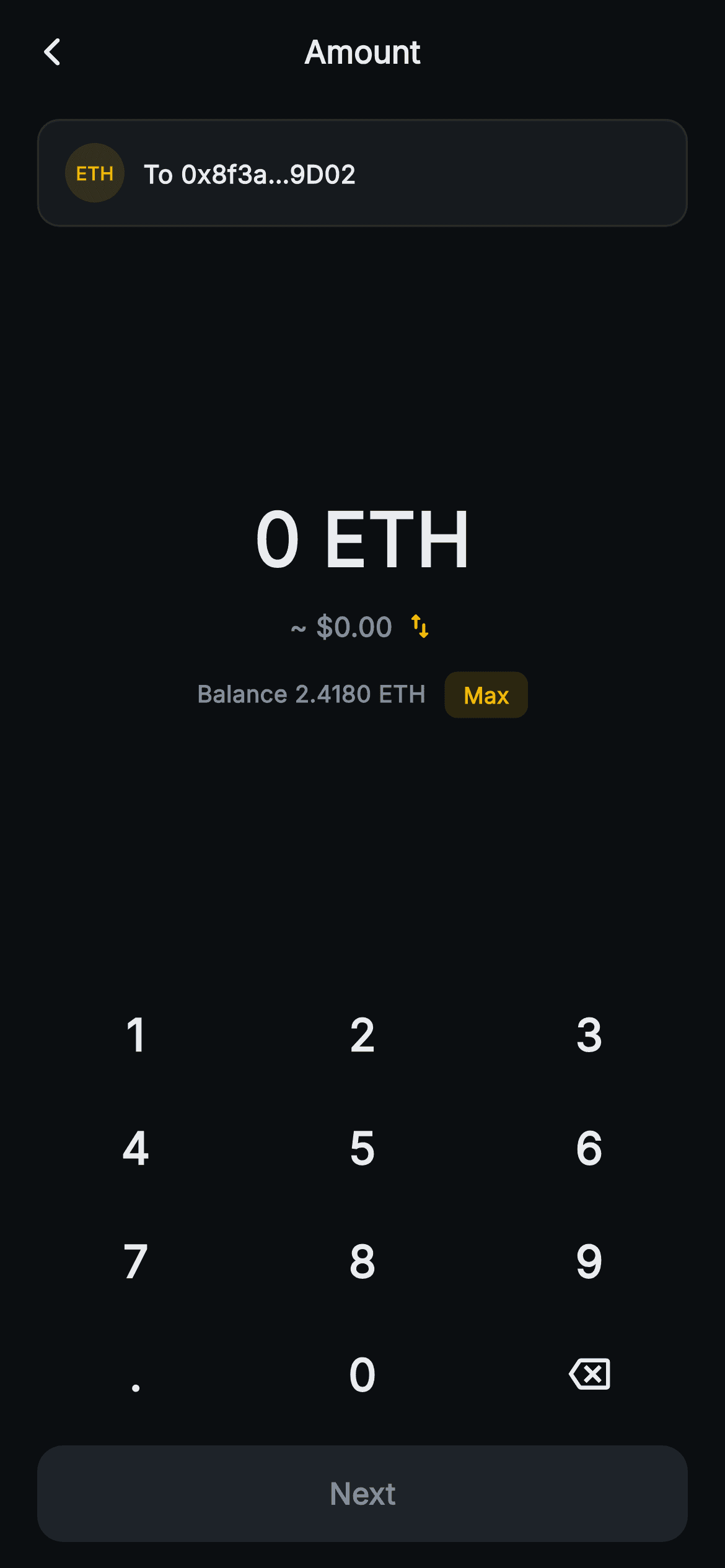
What you'll build
- ✓A dual-unit amount model where one string plus a _fiatMode flag yields both the ETH and USD values through getters
- ✓Mode-aware decimal limits: six places while typing ETH, two while typing dollars
- ✓A balance row that swaps itself for a red 'Exceeds balance' warning, with a Max pill that fills 2.4180 ETH
- ✓A recipient chip pinned under the app bar so the destination stays visible while you type
- ✓A Next button gated on two conditions at once: above zero and within balance
Step-by-step build
Create the file
Add a new file at lib/web3_send_amount/web3_send_amount_screen.dart in your Flutter project.
Register the bundled fonts
No external packages — this is pure Flutter. It does bundle its design font (Inter), so drop the font file into fonts/ and declare it in pubspec.yaml:
flutter:
  fonts:
    - family: Inter
      fonts:
- asset: fonts/Inter-Regular.ttfBuild it, piece by piece
Here's how the screen goes together. Each block below is a real slice of the code with a plain-English explanation — paste them in order, or grab the whole file from the next section.
One typed string, two currencies
import 'package:flutter/material.dart';

/// Web3 send — Send Amount. A large amount display with a fiat toggle, a max
/// pill, a balance row, and a painted on-screen numpad. Self-contained per
/// CONVENTIONS.md: pure Flutter, bundled Inter font, no glyphs / no network
/// image, forced dark theme so it renders standalone as a route.
class Web3SendAmountScreen extends StatefulWidget {
  const Web3SendAmountScreen({super.key, this.onBack, this.onNext});

  final VoidCallback? onBack;
  final VoidCallback? onNext;

  @override
  State<Web3SendAmountScreen> createState() => _Web3SendAmountScreenState();
}

class _Web3SendAmountScreenState extends State<Web3SendAmountScreen> {
  static const String _font = 'Inter';
  static const Color _bg = Color(0xFF0B0E11);
  static const Color _surface = Color(0xFF161A1E);
  static const Color _surfaceAlt = Color(0xFF1E2329);
  static const Color _brand = Color(0xFFF0B90B);
  static const Color _down = Color(0xFFF6465D);
  static const Color _text = Color(0xFFEAECEF);
  static const Color _muted = Color(0xFF848E9C);
  static const Color _hairline = Color(0xFF2B3139);

  static const double _ethUsd = 2748.10;
  static const double _balance = 2.4180; // ETH

  String _entry = '0';
  bool _fiatMode = false; // false: enter in ETH, true: enter in USD

  double get _typed => double.tryParse(_entry) ?? 0;
  double get _eth => _fiatMode ? (_typed / _ethUsd) : _typed;
  double get _usd => _fiatMode ? _typed : (_typed * _ethUsd);
  bool get _over => _eth > _balance;
  bool get _valid => _eth > 0 && !_over;
The state holds just two mutable fields: `_entry`, the raw keypad string, and `_fiatMode`, which says what unit that string is in. Everything else is derived. `_typed` parses the string once, then `_eth` and `_usd` each pick a branch: in fiat mode `_eth` divides by `_ethUsd = 2748.10` and `_usd` passes the number through, and in ETH mode it is the other way round. That gives `_over` a single comparison, `_eth > _balance`, whatever unit the user is typing in, so a $7,000 entry and a 2.6 ETH entry trip the same check against the 2.4180 ETH `_balance`. `_valid` is `_eth > 0 && !_over`. The palette is the usual Aurum dark set; the one colour that matters here is `_down` `#F6465D`, which this screen uses as its error colour rather than to show a falling price.
Decimal caps that follow the unit, plus Max and swap
  void _tap(String k) {
    setState(() {
      if (k == '<') {
        _entry = _entry.length <= 1 ? '0' : _entry.substring(0, _entry.length - 1);
      } else if (k == '.') {
        if (!_entry.contains('.')) _entry = '$_entry.';
      } else {
        if (_entry == '0') {
          _entry = k;
        } else {
          // cap decimals
          final int dot = _entry.indexOf('.');
          if (dot >= 0 && _entry.length - dot > (_fiatMode ? 2 : 6)) return;
          _entry = '$_entry$k';
        }
      }
    });
  }

  void _max() => setState(() {
        _fiatMode = false;
        _entry = _balance.toStringAsFixed(4);
      });

  void _swapUnit() => setState(() {
        _fiatMode = !_fiatMode;
        _entry = '0';
      });
The basic keypad rules in `_tap` are the familiar ones: backspace never leaves the string empty, there is only ever one dot, and a lone '0' gets replaced. What differs is the decimal cap. `_entry.length - dot` counts the dot plus the digits after it, and the guard returns once that exceeds `_fiatMode ? 2 : 6`, so dollars stop at cents and ETH stops at six places. Unlike the buy and swap screens there is no limit on whole-number digits, so a long entry wraps onto a second line rather than overflowing. `_max` sets `_fiatMode = false` before writing `_balance.toStringAsFixed(4)`, because the balance is an ETH number and would be wrong if shown with a dollar sign. `_swapUnit` resets `_entry` to '0' instead of converting it. That is simpler, but it throws away what the user typed, and the FAQ shows how to carry the value across instead.
Building both display strings before the tree
  @override
  Widget build(BuildContext context) {
    final String primary = _fiatMode
        ? '\$${_entry == '0' ? '0' : _entry}'
        : '$_entry ETH';
    final String secondary = _fiatMode
        ? '${_eth.toStringAsFixed(6)} ETH'
        : '~ \$${_usd.toStringAsFixed(2)}';

    return Theme(
      data: ThemeData.dark(useMaterial3: true),
      child: Scaffold(
        backgroundColor: _bg,
        appBar: AppBar(
          backgroundColor: _bg,
          elevation: 0,
          centerTitle: true,
          leading: IconButton(
            onPressed: widget.onBack,
            icon: const Icon(Icons.arrow_back_ios_new_rounded,
                size: 18, color: _text),
          ),
          title: const Text(
            'Amount',
            style: TextStyle(
              fontFamily: _font,
              fontSize: 17,
              fontWeight: FontWeight.w700,
              color: _text,
            ),
          ),
        ),
`build` starts by working out the two strings the user sees, so the widget tree never has to branch on the unit. In ETH mode `primary` is `'$_entry ETH'` and `secondary` is `'~ \$'` plus `_usd.toStringAsFixed(2)`. The tilde marks the dollar figure as an estimate, since it is the side that depends on the rate. In fiat mode `primary` gets a leading dollar sign and `secondary` shows `_eth.toStringAsFixed(6)` with no tilde, because that ETH figure is the amount that will actually be sent. One small oddity: `_entry == '0' ? '0' : _entry` returns the same text either way, so you can drop the ternary. The rest is the shared Aurum setup: a forced dark `Theme`, a flat `AppBar` on `_bg`, and a centred 17px 'Amount' title with the back arrow wired to `onBack`.
The recipient chip carried over from the previous step
        body: SafeArea(
          top: false,
          child: Column(
            children: <Widget>[
              const SizedBox(height: 8),
              Padding(
                padding: const EdgeInsets.symmetric(horizontal: 20),
                child: Container(
                  padding:
                      const EdgeInsets.symmetric(horizontal: 14, vertical: 12),
                  decoration: BoxDecoration(
                    color: _surface,
                    borderRadius: BorderRadius.circular(12),
                    border: Border.all(color: _hairline),
                  ),
                  child: Row(
                    children: <Widget>[
                      Container(
                        width: 32,
                        height: 32,
                        decoration: BoxDecoration(
                          color: _brand.withValues(alpha: 0.14),
                          shape: BoxShape.circle,
                        ),
                        alignment: Alignment.center,
                        child: const Text(
                          'ETH',
                          style: TextStyle(
                            fontFamily: _font,
                            fontSize: 10,
                            fontWeight: FontWeight.w800,
                            color: _brand,
                          ),
                        ),
                      ),
                      const SizedBox(width: 10),
                      const Text(
                        'To 0x8f3a…9D02',
                        style: TextStyle(
                          fontFamily: _font,
                          fontSize: 13.5,
                          fontWeight: FontWeight.w600,
                          color: _text,
                        ),
                      ),
                    ],
                  ),
                ),
              ),
Just below the app bar, a `_surface` row with a 12px radius and a `_hairline` border reminds the user where the money is going. Once the address is chosen, the destination is the one thing they cannot see while staring at a number, and a wrong recipient matters more than a wrong amount. The token badge is a 32px circle filled with `_brand.withValues(alpha: 0.14)` and the letters 'ETH' at 10px `w800` in full amber. It is a tinted `Container` with text, not a painting or an image. The label 'To 0x8f3a…9D02' is a hardcoded `const Text`, and the chip has no tap handler, so it is purely informational. To use it for real, add a `recipient` constructor parameter, pass the address the previous screen collected, and shorten it to the first six and last four characters.
The amount block: figure, unit toggle, balance and Max
              const Spacer(),
              Text(
                primary,
                style: TextStyle(
                  fontFamily: _font,
                  fontSize: 40,
                  fontWeight: FontWeight.w800,
                  fontFeatures: const <FontFeature>[FontFeature.tabularFigures()],
                  color: _over ? _down : _text,
                ),
              ),
              const SizedBox(height: 8),
              GestureDetector(
                onTap: _swapUnit,
                behavior: HitTestBehavior.opaque,
                child: Row(
                  mainAxisSize: MainAxisSize.min,
                  children: <Widget>[
                    Text(
                      secondary,
                      style: const TextStyle(
                        fontFamily: _font,
                        fontSize: 14.5,
                        fontWeight: FontWeight.w600,
                        color: _muted,
                      ),
                    ),
                    const SizedBox(width: 6),
                    const Icon(Icons.swap_vert_rounded, size: 17, color: _brand),
                  ],
                ),
              ),
              const SizedBox(height: 14),
              Row(
                mainAxisAlignment: MainAxisAlignment.center,
                children: <Widget>[
                  Text(
                    _over
                        ? 'Exceeds balance'
                        : 'Balance ${_balance.toStringAsFixed(4)} ETH',
                    style: TextStyle(
                      fontFamily: _font,
                      fontSize: 12.5,
                      fontWeight: FontWeight.w600,
                      color: _over ? _down : _muted,
                    ),
                  ),
                  const SizedBox(width: 10),
                  GestureDetector(
                    onTap: _max,
                    behavior: HitTestBehavior.opaque,
                    child: Container(
                      padding: const EdgeInsets.symmetric(
                          horizontal: 10, vertical: 4),
                      decoration: BoxDecoration(
                        color: _brand.withValues(alpha: 0.14),
                        borderRadius: BorderRadius.circular(7),
                      ),
                      child: const Text(
                        'Max',
                        style: TextStyle(
                          fontFamily: _font,
                          fontSize: 12,
                          fontWeight: FontWeight.w700,
                          color: _brand,
                        ),
                      ),
                    ),
                  ),
                ],
              ),
Two plain `Spacer()`s, one above and one below, centre this block in the space between the chip and the keypad, whatever the phone's height. The figure is 40px `w800` with `FontFeature.tabularFigures()`, and its colour is `_over ? _down : _text`, so overshooting turns the number itself red. Below it, the secondary line and a 17px amber `swap_vert_rounded` icon sit in a `mainAxisSize.min` Row inside an opaque `GestureDetector`, so tapping either the converted value or the arrow switches units. The balance row is where the error appears: when `_over` is true, 'Balance 2.4180 ETH' is replaced by 'Exceeds balance' in the same 12.5px slot, and that text turns red as well. The warning appears exactly where the limit was shown, so the layout never jumps. The Max pill (`_brand` at 0.14 alpha, radius 7) stays visible in the error state, since it is the quickest way back under the limit.
Next requires two conditions, not one
              const Spacer(),
              _Numpad(onTap: _tap),
              Padding(
                padding: const EdgeInsets.fromLTRB(20, 8, 20, 14),
                child: SizedBox(
                  width: double.infinity,
                  height: 52,
                  child: FilledButton(
                    onPressed: _valid ? widget.onNext : null,
                    style: FilledButton.styleFrom(
                      backgroundColor: _brand,
                      disabledBackgroundColor: _surfaceAlt,
                      shape: RoundedRectangleBorder(
                        borderRadius: BorderRadius.circular(14),
                      ),
                    ),
                    child: Text(
                      'Next',
                      style: TextStyle(
                        fontFamily: _font,
                        fontSize: 16,
                        fontWeight: FontWeight.w700,
                        color: _valid ? _bg : _muted,
                      ),
                    ),
                  ),
                ),
              ),
            ],
          ),
        ),
      ),
    );
  }
}
The keypad drops in as `_Numpad(onTap: _tap)`, then the 52px `FilledButton` uses `onPressed: _valid ? widget.onNext : null`. On the buy screen the gate is simply 'more than zero'. Here `_valid` combines two checks: '0.' still parses to zero and stays disabled, and an amount over the balance disables the button just as the figure turns red. The fill switches between `_brand` and `disabledBackgroundColor: _surfaceAlt`, and the label between `_bg` and `_muted`, all from the same `_valid` value. Be aware that `onNext` is a plain `VoidCallback`, so the button tells the parent that the user pressed Next but not how much they entered. The amount stays inside the state object. Before wiring up the next screen, change the callback's type so it passes the amount along (see the FAQ).
A keypad built with GridView.count
class _Numpad extends StatelessWidget {
  const _Numpad({required this.onTap});

  final ValueChanged<String> onTap;

  static const List<String> _keys = <String>[
    '1', '2', '3',
    '4', '5', '6',
    '7', '8', '9',
    '.', '0', '<',
  ];

  @override
  Widget build(BuildContext context) {
    return Padding(
      padding: const EdgeInsets.symmetric(horizontal: 12),
      child: GridView.count(
        crossAxisCount: 3,
        shrinkWrap: true,
        physics: const NeverScrollableScrollPhysics(),
        childAspectRatio: 2.0,
        children: _keys.map((String k) {
          return InkWell(
            onTap: () => onTap(k),
            borderRadius: BorderRadius.circular(12),
            child: Center(
              child: k == '<'
                  ? const Icon(Icons.backspace_outlined,
                      size: 22, color: _Web3SendAmountScreenState._text)
                  : Text(
                      k,
                      style: const TextStyle(
                        fontFamily: _Web3SendAmountScreenState._font,
                        fontSize: 24,
                        fontWeight: FontWeight.w700,
                        color: _Web3SendAmountScreenState._text,
                      ),
                    ),
            ),
          );
        }).toList(),
      ),
    );
  }
}
This `_Numpad` creates its twelve keys up front with `GridView.count` and `_keys.map(...).toList()`, whereas the buy and swap screens use a builder. For a fixed set of twelve keys that is fine, because there is nothing to load lazily. `childAspectRatio: 2.0` keeps the rows short enough to leave space for the two Spacers above. Digits use 24px `w700` text, and the '<' entry is not shown as text: it marks the key that displays `Icons.backspace_outlined`. The keypad does not know which unit is active, so the dot key works the same in both modes and the per-unit decimal rules live entirely in the parent's `_tap`. The screen's doc comment and listing call this a 'painted' numpad, but there is no `CustomPainter` anywhere in the file. Every key is an `InkWell` around a `Center`.
Full code
The complete, ready-to-paste source. Free to use in your projects — one click copies it all.
import 'package:flutter/material.dart';

/// Web3 send — Send Amount. A large amount display with a fiat toggle, a max
/// pill, a balance row, and a painted on-screen numpad. Self-contained per
/// CONVENTIONS.md: pure Flutter, bundled Inter font, no glyphs / no network
/// image, forced dark theme so it renders standalone as a route.
class Web3SendAmountScreen extends StatefulWidget {
  const Web3SendAmountScreen({super.key, this.onBack, this.onNext});

  final VoidCallback? onBack;
  final VoidCallback? onNext;

  @override
  State<Web3SendAmountScreen> createState() => _Web3SendAmountScreenState();
}

class _Web3SendAmountScreenState extends State<Web3SendAmountScreen> {
  static const String _font = 'Inter';
  static const Color _bg = Color(0xFF0B0E11);
  static const Color _surface = Color(0xFF161A1E);
  static const Color _surfaceAlt = Color(0xFF1E2329);
  static const Color _brand = Color(0xFFF0B90B);
  static const Color _down = Color(0xFFF6465D);
  static const Color _text = Color(0xFFEAECEF);
  static const Color _muted = Color(0xFF848E9C);
  static const Color _hairline = Color(0xFF2B3139);

  static const double _ethUsd = 2748.10;
  static const double _balance = 2.4180; // ETH

  String _entry = '0';
  bool _fiatMode = false; // false: enter in ETH, true: enter in USD

  double get _typed => double.tryParse(_entry) ?? 0;
  double get _eth => _fiatMode ? (_typed / _ethUsd) : _typed;
  double get _usd => _fiatMode ? _typed : (_typed * _ethUsd);
  bool get _over => _eth > _balance;
  bool get _valid => _eth > 0 && !_over;

  void _tap(String k) {
    setState(() {
      if (k == '<') {
        _entry = _entry.length <= 1 ? '0' : _entry.substring(0, _entry.length - 1);
      } else if (k == '.') {
        if (!_entry.contains('.')) _entry = '$_entry.';
      } else {
        if (_entry == '0') {
          _entry = k;
        } else {
          // cap decimals
          final int dot = _entry.indexOf('.');
          if (dot >= 0 && _entry.length - dot > (_fiatMode ? 2 : 6)) return;
          _entry = '$_entry$k';
        }
      }
    });
  }

  void _max() => setState(() {
        _fiatMode = false;
        _entry = _balance.toStringAsFixed(4);
      });

  void _swapUnit() => setState(() {
        _fiatMode = !_fiatMode;
        _entry = '0';
      });

  @override
  Widget build(BuildContext context) {
    final String primary = _fiatMode
        ? '\$${_entry == '0' ? '0' : _entry}'
        : '$_entry ETH';
    final String secondary = _fiatMode
        ? '${_eth.toStringAsFixed(6)} ETH'
        : '~ \$${_usd.toStringAsFixed(2)}';

    return Theme(
      data: ThemeData.dark(useMaterial3: true),
      child: Scaffold(
        backgroundColor: _bg,
        appBar: AppBar(
          backgroundColor: _bg,
          elevation: 0,
          centerTitle: true,
          leading: IconButton(
            onPressed: widget.onBack,
            icon: const Icon(Icons.arrow_back_ios_new_rounded,
                size: 18, color: _text),
          ),
          title: const Text(
            'Amount',
            style: TextStyle(
              fontFamily: _font,
              fontSize: 17,
              fontWeight: FontWeight.w700,
              color: _text,
            ),
          ),
        ),
        body: SafeArea(
          top: false,
          child: Column(
            children: <Widget>[
              const SizedBox(height: 8),
              Padding(
                padding: const EdgeInsets.symmetric(horizontal: 20),
                child: Container(
                  padding:
                      const EdgeInsets.symmetric(horizontal: 14, vertical: 12),
                  decoration: BoxDecoration(
                    color: _surface,
                    borderRadius: BorderRadius.circular(12),
                    border: Border.all(color: _hairline),
                  ),
                  child: Row(
                    children: <Widget>[
                      Container(
                        width: 32,
                        height: 32,
                        decoration: BoxDecoration(
                          color: _brand.withValues(alpha: 0.14),
                          shape: BoxShape.circle,
                        ),
                        alignment: Alignment.center,
                        child: const Text(
                          'ETH',
                          style: TextStyle(
                            fontFamily: _font,
                            fontSize: 10,
                            fontWeight: FontWeight.w800,
                            color: _brand,
                          ),
                        ),
                      ),
                      const SizedBox(width: 10),
                      const Text(
                        'To 0x8f3a…9D02',
                        style: TextStyle(
                          fontFamily: _font,
                          fontSize: 13.5,
                          fontWeight: FontWeight.w600,
                          color: _text,
                        ),
                      ),
                    ],
                  ),
                ),
              ),
              const Spacer(),
              Text(
                primary,
                style: TextStyle(
                  fontFamily: _font,
                  fontSize: 40,
                  fontWeight: FontWeight.w800,
                  fontFeatures: const <FontFeature>[FontFeature.tabularFigures()],
                  color: _over ? _down : _text,
                ),
              ),
              const SizedBox(height: 8),
              GestureDetector(
                onTap: _swapUnit,
                behavior: HitTestBehavior.opaque,
                child: Row(
                  mainAxisSize: MainAxisSize.min,
                  children: <Widget>[
                    Text(
                      secondary,
                      style: const TextStyle(
                        fontFamily: _font,
                        fontSize: 14.5,
                        fontWeight: FontWeight.w600,
                        color: _muted,
                      ),
                    ),
                    const SizedBox(width: 6),
                    const Icon(Icons.swap_vert_rounded, size: 17, color: _brand),
                  ],
                ),
              ),
              const SizedBox(height: 14),
              Row(
                mainAxisAlignment: MainAxisAlignment.center,
                children: <Widget>[
                  Text(
                    _over
                        ? 'Exceeds balance'
                        : 'Balance ${_balance.toStringAsFixed(4)} ETH',
                    style: TextStyle(
                      fontFamily: _font,
                      fontSize: 12.5,
                      fontWeight: FontWeight.w600,
                      color: _over ? _down : _muted,
                    ),
                  ),
                  const SizedBox(width: 10),
                  GestureDetector(
                    onTap: _max,
                    behavior: HitTestBehavior.opaque,
                    child: Container(
                      padding: const EdgeInsets.symmetric(
                          horizontal: 10, vertical: 4),
                      decoration: BoxDecoration(
                        color: _brand.withValues(alpha: 0.14),
                        borderRadius: BorderRadius.circular(7),
                      ),
                      child: const Text(
                        'Max',
                        style: TextStyle(
                          fontFamily: _font,
                          fontSize: 12,
                          fontWeight: FontWeight.w700,
                          color: _brand,
                        ),
                      ),
                    ),
                  ),
                ],
              ),
              const Spacer(),
              _Numpad(onTap: _tap),
              Padding(
                padding: const EdgeInsets.fromLTRB(20, 8, 20, 14),
                child: SizedBox(
                  width: double.infinity,
                  height: 52,
                  child: FilledButton(
                    onPressed: _valid ? widget.onNext : null,
                    style: FilledButton.styleFrom(
                      backgroundColor: _brand,
                      disabledBackgroundColor: _surfaceAlt,
                      shape: RoundedRectangleBorder(
                        borderRadius: BorderRadius.circular(14),
                      ),
                    ),
                    child: Text(
                      'Next',
                      style: TextStyle(
                        fontFamily: _font,
                        fontSize: 16,
                        fontWeight: FontWeight.w700,
                        color: _valid ? _bg : _muted,
                      ),
                    ),
                  ),
                ),
              ),
            ],
          ),
        ),
      ),
    );
  }
}

class _Numpad extends StatelessWidget {
  const _Numpad({required this.onTap});

  final ValueChanged<String> onTap;

  static const List<String> _keys = <String>[
    '1', '2', '3',
    '4', '5', '6',
    '7', '8', '9',
    '.', '0', '<',
  ];

  @override
  Widget build(BuildContext context) {
    return Padding(
      padding: const EdgeInsets.symmetric(horizontal: 12),
      child: GridView.count(
        crossAxisCount: 3,
        shrinkWrap: true,
        physics: const NeverScrollableScrollPhysics(),
        childAspectRatio: 2.0,
        children: _keys.map((String k) {
          return InkWell(
            onTap: () => onTap(k),
            borderRadius: BorderRadius.circular(12),
            child: Center(
              child: k == '<'
                  ? const Icon(Icons.backspace_outlined,
                      size: 22, color: _Web3SendAmountScreenState._text)
                  : Text(
                      k,
                      style: const TextStyle(
                        fontFamily: _Web3SendAmountScreenState._font,
                        fontSize: 24,
                        fontWeight: FontWeight.w700,
                        color: _Web3SendAmountScreenState._text,
                      ),
                    ),
            ),
          );
        }).toList(),
      ),
    );
  }
}
Plus bundled 1 binary asset (fonts/images). The CLI and MCP install those for you automatically.
Two faster ways to add it
Copy-paste works, but you can skip it entirely.
1. FlutterKit CLI
One command drops this screen — and its fonts — straight into your project.
$ flutterkit add web3-send-amount2. AI agent (MCP)
Connect FlutterKit's MCP server in Claude or Cursor and just ask your agent to install web3-send-amount — it fetches and writes the files for you.
FAQ
Can I ship this send-amount screen in a commercial wallet?
Yes. It is free for personal and commercial apps alike. Copy it from this page, add it with the CLI, or fetch it over MCP. No licence key or account is needed, and you do not have to credit anyone.
Does it rely on any packages or a downloaded font?
No. The file imports only `package:flutter/material.dart`. The ETH badge is a tinted circle with text and the keypad is a grid of `InkWell`s, so there are no images or icon packs. Text uses `fontFamily: 'Inter'`, which ships with the screen, so nothing is fetched at runtime.
How do I pass the entered amount to the next step?
Change `onNext` from a `VoidCallback?` to a `ValueChanged<double>?` and set the button's `onPressed` to `_valid ? () => widget.onNext?.call(_eth) : null`. Pass `_eth` rather than `_typed`, because `_typed` is in dollars when fiat mode is on. For real transfers, convert the ETH string to wei as a `BigInt` before signing; a `double` cannot represent 18 decimal places exactly.
If someone taps Max, will the send fail for lack of gas?
On a real chain it would. `_max` fills the entire 2.4180 ETH balance, and this screen never subtracts a network fee, so nothing is left to pay for gas. In production, compute Max as `balance - estimatedFee` from your fee estimator, or check the total on the fee step that comes next. Also consider converting the entry in `_swapUnit` (for example `_usd.toStringAsFixed(2)` when switching to dollars) so that toggling units doesn't erase a Max amount.
What Flutter version is required?
Flutter 3.22 or later, because the badge and the Max pill use `Color.withValues(alpha: 0.14)`. The constructors also use `super.key`, which needs Dart 2.17. On an older SDK, change both calls to `withOpacity(0.14)` and write the constructor as `{Key? key, this.onBack, this.onNext} : super(key: key)`.


