Aurum · Cloud Backup
Aurum · Cloud Backup is a production-ready Web3 Flutter screen from FlutterKit — free, with full source code.
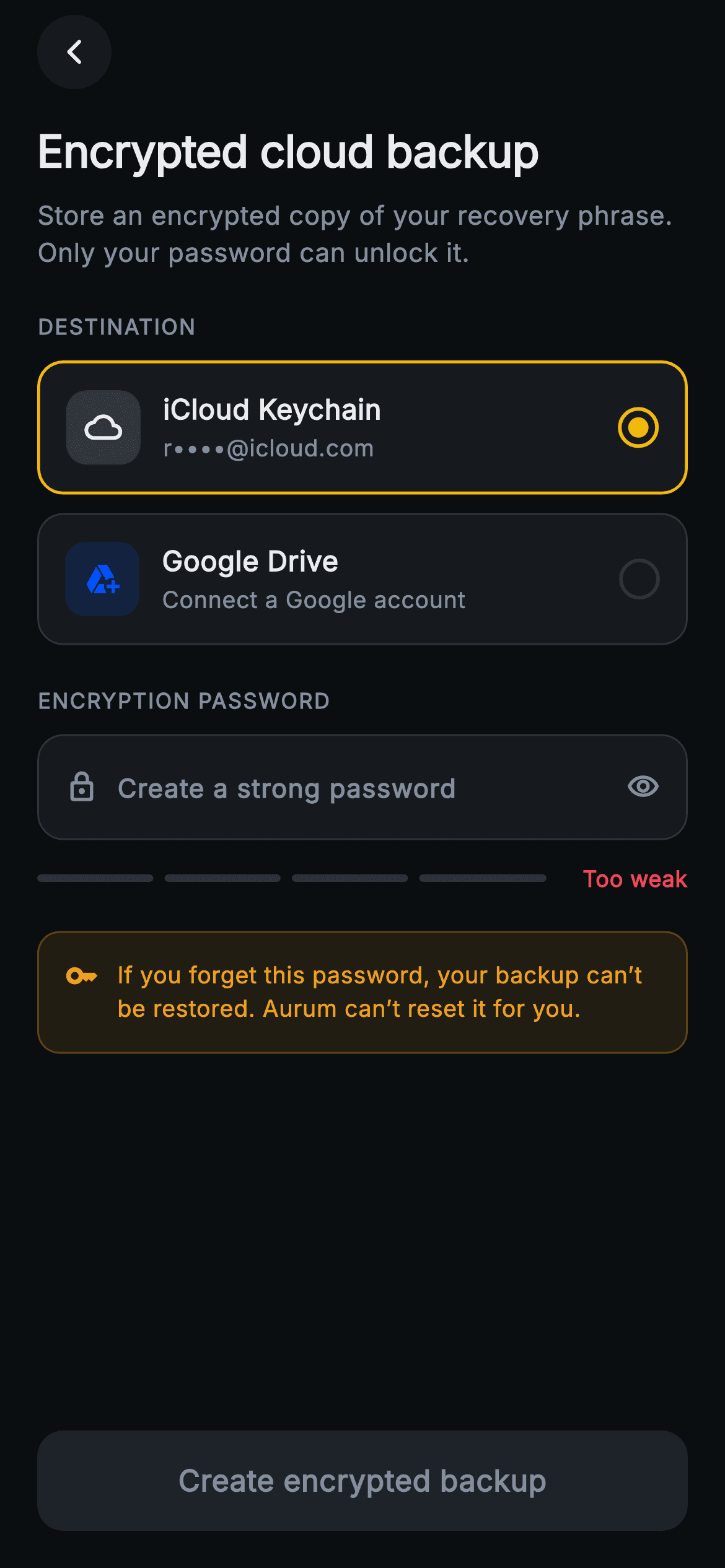
A dark, Binance-styled (amber #F0B90B on near-black) Web3 screen for storing an encrypted copy of a wallet's recovery phrase to the cloud. The header "Encrypted cloud backup" sits below a circular back button, with a subtitle noting only the user's password can unlock it. A "Destination" group offers two selectable tiles: iCloud Keychain (masked r****@icloud.com) and Google Drive ("Connect a Google account"), each with a tinted icon chip and custom radio, the active tile ringed amber. An "Encryption password" field has a lock icon and visibility toggle; typing drives a four-segment strength meter labelled Too weak / Weak / Fair / Strong / Excellent from length, mixed case, digits and symbols. An amber key-icon warning card states a forgotten password makes the backup unrecoverable, with no reset. The pinned "Create encrypted backup" CTA stays grey until strength hits at least 3. Pure Flutter: bundled Inter font, forced dark Theme, custom radio and meter widgets, no plugins; destination choice and backup creation are exposed via onBackUp and onBack callbacks for any backend.
Full tutorial coming soon.
The step-by-step walkthrough and complete Dart source for this screen haven't been published yet. They'll be free when they are — no sign-up, no payment. In the meantime, browse the screens that already have their tutorial.
What's included
- ✓Two tappable destination tiles (iCloud Keychain with masked email, Google Drive) with tinted icon chips and a custom amber-ringed radio selector
- ✓Obscured password TextField with lock icon and eye visibility toggle, autocorrect and suggestions disabled for secret entry
- ✓Live four-segment _StrengthMeter scoring length, mixed case, digits and symbols into Too weak through Excellent labels with red, amber and green colors
- ✓Amber key-icon warning card stating a forgotten password makes the backup unrecoverable and non-resettable by Aurum
- ✓Strength-gated pinned CTA Create encrypted backup that only enables once the password scores three of four checks
- ✓Self-contained dark theme with bundled Inter font, onBackUp and onBack callbacks, and zero plugin dependencies
Use cases
- ✓A crypto-wallet app letting users save an encrypted seed-phrase backup to iCloud or Google Drive
- ✓A Web3 security flow that enforces a strong encryption password before allowing a cloud backup
- ✓A DeFi or self-custody onboarding step that pairs key backup with a non-custodial no-reset warning
- ✓A blockchain app settings area offering recoverable, password-protected cloud key storage


