How to Build a Crypto Open Orders Screen in Flutter (Full Code + Preview)
On a crypto exchange, the open-orders tab is where a trader answers two questions at a glance: which side is each order on, and how much of it has filled? This tutorial builds Aurum's open-orders screen in Flutter — a dark list of resting limit and stop-limit orders, each card carrying a tinted BUY/SELL chip, tabular-figure price and amount columns, a slim fill bar built from two flex-weighted Containers, and a swipe-to-cancel gesture that removes the order and updates the header count live. The full Dart source sits below, chunk by chunk.
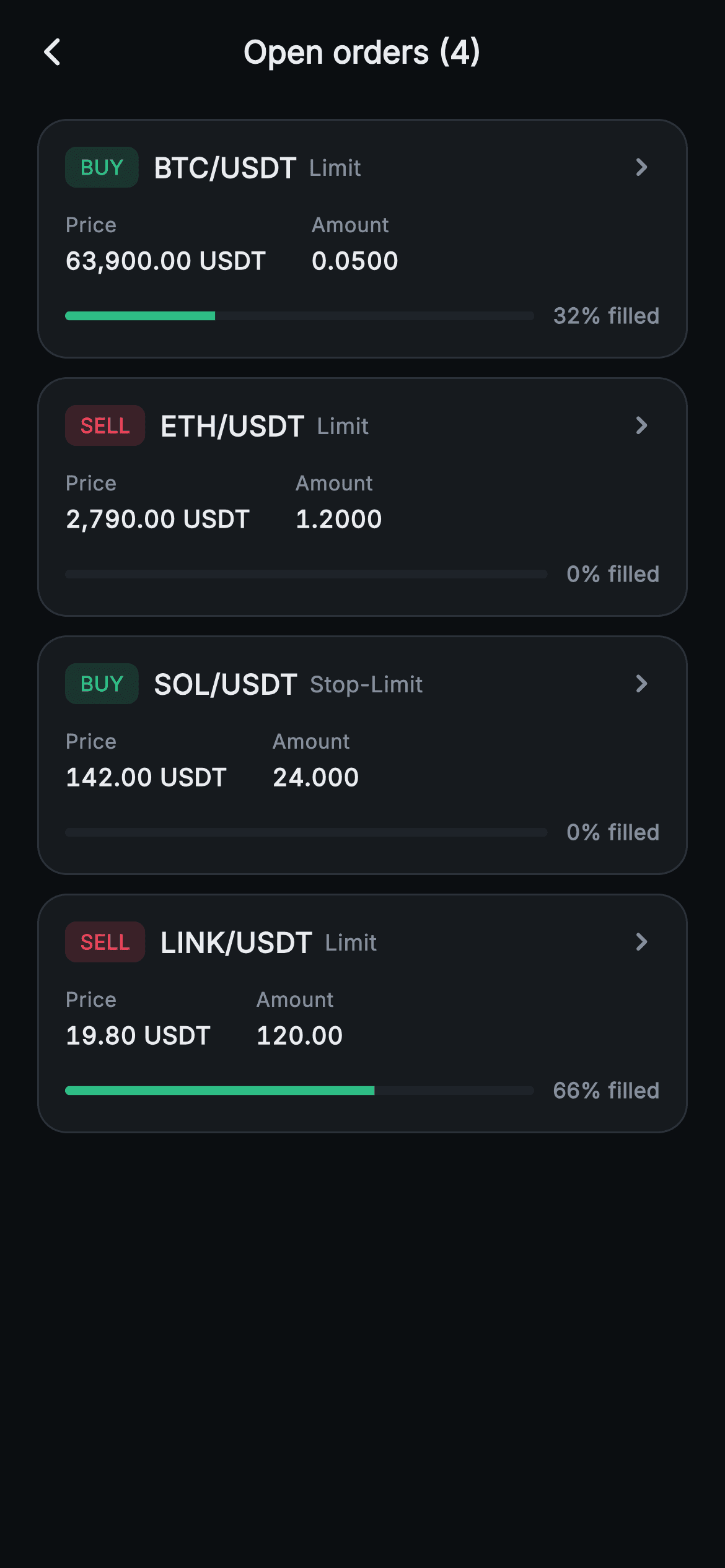
What you'll build
- ✓An order card pairing a tinted BUY/SELL chip (#2EBD85 green or #F6465D red) with the pair and a muted Limit / Stop-Limit label
- ✓A partial-fill progress bar made of two flex-weighted Containers in a ClipRRect — no CustomPainter, no image
- ✓Swipe-to-cancel rows via Dismissible, revealing a red Cancel background before removing the order with setState
- ✓Price and Amount columns locked to equal-width digits with FontFeature.tabularFigures
- ✓An AppBar count that reads 'Open orders (4)' and decrements live, plus an inbox empty state once the list drains
Step-by-step build
Create the file
Add a new file at lib/web3_orders_open/web3_orders_open_screen.dart in your Flutter project.
Register the bundled fonts
No external packages — this is pure Flutter. It does bundle its design font (Inter), so drop the font file into fonts/ and declare it in pubspec.yaml:
flutter:
  fonts:
    - family: Inter
      fonts:
- asset: fonts/Inter-Regular.ttfBuild it, piece by piece
Here's how the screen goes together. Each block below is a real slice of the code with a plain-English explanation — paste them in order, or grab the whole file from the next section.
Callbacks, an exchange palette, and orders as data
import 'package:flutter/material.dart';

/// Web3 orders — Open orders. A list of working orders with a side/type chip, a
/// filled-progress bar and a swipe-to-cancel action. Self-contained per
/// CONVENTIONS.md: pure Flutter, bundled Inter font, progress bars drawn with
/// layout widgets (no glyphs / no network image), forced dark theme so it
/// renders standalone as a route.
class Web3OrdersOpenScreen extends StatefulWidget {
  const Web3OrdersOpenScreen({super.key, this.onBack, this.onOrderTap});

  final VoidCallback? onBack;
  final ValueChanged<String>? onOrderTap;

  @override
  State<Web3OrdersOpenScreen> createState() => _Web3OrdersOpenScreenState();
}

class _Web3OrdersOpenScreenState extends State<Web3OrdersOpenScreen> {
  static const String _font = 'Inter';
  static const Color _bg = Color(0xFF0B0E11);
  static const Color _surface = Color(0xFF161A1E);
  static const Color _surfaceAlt = Color(0xFF1E2329);
  static const Color _up = Color(0xFF2EBD85);
  static const Color _down = Color(0xFFF6465D);
  static const Color _text = Color(0xFFEAECEF);
  static const Color _muted = Color(0xFF848E9C);
  static const Color _hairline = Color(0xFF2B3139);

  // pair, side(true=buy), type, price, amount, filledFraction
  final List<_Order> _orders = <_Order>[
    _Order('BTC/USDT', true, 'Limit', '63,900.00', '0.0500', 0.32),
    _Order('ETH/USDT', false, 'Limit', '2,790.00', '1.2000', 0.0),
    _Order('SOL/USDT', true, 'Stop-Limit', '142.00', '24.000', 0.0),
    _Order('LINK/USDT', false, 'Limit', '19.80', '120.00', 0.66),
  ];
`Web3OrdersOpenScreen` is a `StatefulWidget` because cancelling an order mutates the list; it exposes only `onBack` and `onOrderTap` (a `ValueChanged<String>` that receives the pair), so the screen stays backend-agnostic. The nine-colour palette is classic exchange dark: `_bg` at `#0B0E11`, cards at `#161A1E`, and — the pair everything hangs on — `_up` green `#2EBD85` and `_down` red `#F6465D`, one colour per market direction. Orders themselves are four `_Order` records: pair, a `bool isBuy`, a type string, preformatted price and amount strings, and a `filled` fraction (0.32, 0.0, 0.0, 0.66). Keeping fill as a 0–1 double rather than a percentage makes the flex maths in the progress bar a single multiplication later.
A forced dark theme and a live order count in the title
  @override
  Widget build(BuildContext context) {
    return Theme(
      data: ThemeData.dark(useMaterial3: true),
      child: Scaffold(
        backgroundColor: _bg,
        appBar: AppBar(
          backgroundColor: _bg,
          elevation: 0,
          centerTitle: true,
          leading: IconButton(
            onPressed: widget.onBack,
            icon: const Icon(Icons.arrow_back_ios_new_rounded,
                size: 18, color: _text),
          ),
          title: Text(
            'Open orders (${_orders.length})',
            style: const TextStyle(
              fontFamily: _font,
              fontSize: 17,
              fontWeight: FontWeight.w700,
              color: _text,
            ),
          ),
        ),
The whole build is wrapped in `Theme(data: ThemeData.dark(useMaterial3: true))`, so the screen renders correctly as a standalone route even inside a light-themed host app — nothing here inherits the caller's colours. The `AppBar` sets `backgroundColor: _bg` and `elevation: 0` so it dissolves into the canvas, with a small 18px `arrow_back_ios_new_rounded` chevron wired to `widget.onBack`. The title is the interesting part: `'Open orders (${_orders.length})'` interpolates the list length, so every swipe-cancel later in the file re-runs `build` via `setState` and the header count drops from (4) to (3) without any extra wiring. The count doubles as feedback that the cancel actually happened.
The list, and swipe-to-cancel with Dismissible
        body: SafeArea(
          top: false,
          child: _orders.isEmpty
              ? _buildEmpty()
              : ListView.separated(
                  padding: const EdgeInsets.fromLTRB(20, 8, 20, 20),
                  itemCount: _orders.length,
                  separatorBuilder: (BuildContext context, int i) =>
                      const SizedBox(height: 10),
                  itemBuilder: (BuildContext context, int i) {
                    final _Order o = _orders[i];
                    return Dismissible(
                      key: ValueKey<String>('${o.pair}-$i'),
                      direction: DismissDirection.endToStart,
                      onDismissed: (_) => setState(() => _orders.removeAt(i)),
                      background: Container(
                        alignment: Alignment.centerRight,
                        padding: const EdgeInsets.only(right: 20),
                        decoration: BoxDecoration(
                          color: _down.withValues(alpha: 0.16),
                          borderRadius: BorderRadius.circular(16),
                        ),
                        child: const Row(
                          mainAxisSize: MainAxisSize.min,
                          children: <Widget>[
                            Icon(Icons.close_rounded, size: 18, color: _down),
                            SizedBox(width: 6),
                            Text(
                              'Cancel',
                              style: TextStyle(
                                fontFamily: _font,
                                fontSize: 14,
                                fontWeight: FontWeight.w700,
                                color: _down,
                              ),
                            ),
                          ],
                        ),
                      ),
                      child: _OrderCard(
                        order: o,
                        onTap: () => widget.onOrderTap?.call(o.pair),
                      ),
                    );
                  },
                ),
        ),
      ),
    );
  }
`SafeArea(top: false)` lets the AppBar own the top inset while protecting the bottom. The body branches on `_orders.isEmpty` — the empty state is reachable at runtime, not decoration, because the user can swipe every row away. `ListView.separated` puts a 10px `SizedBox` between cards, and each card is wrapped in a `Dismissible` keyed by `'${o.pair}-$i'` so Flutter can tell rows apart as the list shrinks. `direction: DismissDirection.endToStart` restricts the gesture to a right-to-left drag — the conventional destructive direction — and the `background` revealed underneath is a right-aligned Container tinted `_down.withValues(alpha: 0.16)` with a close icon and a bold red 'Cancel' label, matching the card's own 16px corner radius. `onDismissed` simply runs `setState(() => _orders.removeAt(i))`; tapping the card instead forwards the pair string through `widget.onOrderTap?.call(o.pair)`.
The empty state the swipes can reach
  Widget _buildEmpty() {
    return Center(
      child: Column(
        mainAxisSize: MainAxisSize.min,
        children: const <Widget>[
          Icon(Icons.inbox_rounded, size: 42, color: _muted),
          SizedBox(height: 12),
          Text(
            'No open orders',
            style: TextStyle(
              fontFamily: _font,
              fontSize: 16,
              fontWeight: FontWeight.w700,
              color: _text,
            ),
          ),
          SizedBox(height: 4),
          Text(
            'Your working orders will appear here.',
            style: TextStyle(fontFamily: _font, fontSize: 13, color: _muted),
          ),
        ],
      ),
    );
  }
`_buildEmpty` is a centred, fully-`const` Column: a 42px `inbox_rounded` icon in `_muted` grey, 'No open orders' at 16px `w700`, and a 13px explainer — 'Your working orders will appear here.' The explainer matters because on this screen an empty list is usually good news (everything filled) or the result of the user's own cancels, so the copy frames the state as expected rather than as an error. Because the branch lives in `build`, cancelling the fourth and final order swaps the ListView for this state in the same frame, with no separate navigation or flag.
The order model
class _Order {
  _Order(this.pair, this.isBuy, this.type, this.price, this.amount,
      this.filled);

  final String pair;
  final bool isBuy;
  final String type;
  final String price;
  final String amount;
  final double filled;
}
`_Order` is a plain six-field class: `pair`, `isBuy`, `type`, `price`, `amount`, `filled`. Two choices are worth copying. Side is a `bool` rather than a string, which makes the buy/sell colour a single ternary and rules out typo states like 'Buy ' leaking into the UI. And price/amount are preformatted strings ('63,900.00', '0.0500') — formatting crypto quantities is exchange-specific (thousands separators, per-asset decimal places), so this screen treats it as the data layer's job and just renders what it is given.
Card header: side chip, pair, type, chevron
class _OrderCard extends StatelessWidget {
  const _OrderCard({required this.order, required this.onTap});

  final _Order order;
  final VoidCallback onTap;

  @override
  Widget build(BuildContext context) {
    final Color side = order.isBuy
        ? _Web3OrdersOpenScreenState._up
        : _Web3OrdersOpenScreenState._down;
    return GestureDetector(
      onTap: onTap,
      behavior: HitTestBehavior.opaque,
      child: Container(
        padding: const EdgeInsets.all(14),
        decoration: BoxDecoration(
          color: _Web3OrdersOpenScreenState._surface,
          borderRadius: BorderRadius.circular(16),
          border: Border.all(color: _Web3OrdersOpenScreenState._hairline),
        ),
        child: Column(
          crossAxisAlignment: CrossAxisAlignment.start,
          children: <Widget>[
            Row(
              children: <Widget>[
                Container(
                  padding:
                      const EdgeInsets.symmetric(horizontal: 8, vertical: 3),
                  decoration: BoxDecoration(
                    color: side.withValues(alpha: 0.16),
                    borderRadius: BorderRadius.circular(6),
                  ),
                  child: Text(
                    order.isBuy ? 'BUY' : 'SELL',
                    style: TextStyle(
                      fontFamily: _Web3OrdersOpenScreenState._font,
                      fontSize: 11,
                      fontWeight: FontWeight.w800,
                      color: side,
                    ),
                  ),
                ),
                const SizedBox(width: 8),
                Text(
                  order.pair,
                  style: const TextStyle(
                    fontFamily: _Web3OrdersOpenScreenState._font,
                    fontSize: 15,
                    fontWeight: FontWeight.w800,
                    color: _Web3OrdersOpenScreenState._text,
                  ),
                ),
                const SizedBox(width: 6),
                Text(
                  order.type,
                  style: const TextStyle(
                    fontFamily: _Web3OrdersOpenScreenState._font,
                    fontSize: 12,
                    color: _Web3OrdersOpenScreenState._muted,
                  ),
                ),
                const Spacer(),
                const Icon(Icons.keyboard_arrow_right_rounded,
                    size: 20, color: _Web3OrdersOpenScreenState._muted),
              ],
            ),
`_OrderCard` resolves one `side` colour up front — `_up` or `_down` from the state class's constants — and reuses it twice in the chip, which is how the tint and the label are guaranteed to always agree. The chip is a Container at `side.withValues(alpha: 0.16)` with a tight 6px radius, carrying 'BUY' or 'SELL' at 11px `w800` in full-strength `side`: a 16% tint of the same hue reads as a coloured badge on the dark surface without shouting. Next to it, the pair ('BTC/USDT') gets 15px `w800` white as the row's anchor, while the order type ('Limit', 'Stop-Limit') sits at 12px muted — a trader scans side and pair first, type second. `GestureDetector` uses `behavior: HitTestBehavior.opaque` so taps in the card's padding register too, and a trailing muted chevron signals the card opens a detail view.
Price/amount row and the flex-built fill bar
            const SizedBox(height: 12),
            Row(
              children: <Widget>[
                _kv('Price', '${order.price} USDT'),
                const SizedBox(width: 24),
                _kv('Amount', '${order.amount} '),
              ],
            ),
            const SizedBox(height: 12),
            Row(
              children: <Widget>[
                Expanded(
                  child: ClipRRect(
                    borderRadius: BorderRadius.circular(3),
                    child: Row(
                      children: <Widget>[
                        Expanded(
                          flex: (order.filled * 100).round().clamp(0, 100),
                          child: Container(
                              height: 5,
                              color: _Web3OrdersOpenScreenState._up),
                        ),
                        Expanded(
                          flex: (100 - order.filled * 100).round().clamp(0, 100),
                          child: Container(
                            height: 5,
                            color: _Web3OrdersOpenScreenState._surfaceAlt,
                          ),
                        ),
                      ],
                    ),
                  ),
                ),
                const SizedBox(width: 10),
                Text(
                  '${(order.filled * 100).round()}% filled',
                  style: const TextStyle(
                    fontFamily: _Web3OrdersOpenScreenState._font,
                    fontSize: 11.5,
                    fontWeight: FontWeight.w600,
                    color: _Web3OrdersOpenScreenState._muted,
                  ),
                ),
              ],
            ),
          ],
        ),
      ),
    );
  }
The middle row lays 'Price' and 'Amount' key-value pairs side by side with a fixed 24px gap. The bottom row is the screen's signature: a fill bar with no painter. Inside a `ClipRRect(borderRadius: 3)`, two `Expanded` Containers of height 5 split the width by flex — the filled part weighted `(order.filled * 100).round().clamp(0, 100)` in `_up` green, the remainder weighted `100 - that` in `_surfaceAlt` `#1E2329`. Because flex is relative, the pair divides any width the card gives it, and the `clamp(0, 100)` guards against a bad fraction producing a negative flex, which would throw. A 0% order still renders correctly: the green Expanded gets flex 0 and collapses. Beside the bar, `'${(order.filled * 100).round()}% filled'` gives the exact number at 11.5px, so the bar conveys magnitude and the text conveys precision.
Tabular figures for the key-value helper
  Widget _kv(String k, String v) {
    return Column(
      crossAxisAlignment: CrossAxisAlignment.start,
      children: <Widget>[
        Text(
          k,
          style: const TextStyle(
            fontFamily: _Web3OrdersOpenScreenState._font,
            fontSize: 11,
            color: _Web3OrdersOpenScreenState._muted,
          ),
        ),
        const SizedBox(height: 2),
        Text(
          v,
          style: const TextStyle(
            fontFamily: _Web3OrdersOpenScreenState._font,
            fontSize: 13,
            fontWeight: FontWeight.w600,
            fontFeatures: <FontFeature>[FontFeature.tabularFigures()],
            color: _Web3OrdersOpenScreenState._text,
          ),
        ),
      ],
    );
  }
}
`_kv` stacks an 11px muted label over a 13px `w600` value, but the load-bearing line is `fontFeatures: <FontFeature>[FontFeature.tabularFigures()]` on the value style. Inter's default digits are proportional — a 1 is narrower than a 9 — so without this, '19.80' and '63,900.00' in neighbouring cards would start at slightly different x-positions and the column would look ragged. Tabular figures force every digit to the same advance width, which is why real trading UIs never jitter as prices tick. It is a one-line OpenType feature, not a different font file, so the bundled Inter face covers it.
Full code
The complete, ready-to-paste source. Free to use in your projects — one click copies it all.
import 'package:flutter/material.dart';

/// Web3 orders — Open orders. A list of working orders with a side/type chip, a
/// filled-progress bar and a swipe-to-cancel action. Self-contained per
/// CONVENTIONS.md: pure Flutter, bundled Inter font, progress bars drawn with
/// layout widgets (no glyphs / no network image), forced dark theme so it
/// renders standalone as a route.
class Web3OrdersOpenScreen extends StatefulWidget {
  const Web3OrdersOpenScreen({super.key, this.onBack, this.onOrderTap});

  final VoidCallback? onBack;
  final ValueChanged<String>? onOrderTap;

  @override
  State<Web3OrdersOpenScreen> createState() => _Web3OrdersOpenScreenState();
}

class _Web3OrdersOpenScreenState extends State<Web3OrdersOpenScreen> {
  static const String _font = 'Inter';
  static const Color _bg = Color(0xFF0B0E11);
  static const Color _surface = Color(0xFF161A1E);
  static const Color _surfaceAlt = Color(0xFF1E2329);
  static const Color _up = Color(0xFF2EBD85);
  static const Color _down = Color(0xFFF6465D);
  static const Color _text = Color(0xFFEAECEF);
  static const Color _muted = Color(0xFF848E9C);
  static const Color _hairline = Color(0xFF2B3139);

  // pair, side(true=buy), type, price, amount, filledFraction
  final List<_Order> _orders = <_Order>[
    _Order('BTC/USDT', true, 'Limit', '63,900.00', '0.0500', 0.32),
    _Order('ETH/USDT', false, 'Limit', '2,790.00', '1.2000', 0.0),
    _Order('SOL/USDT', true, 'Stop-Limit', '142.00', '24.000', 0.0),
    _Order('LINK/USDT', false, 'Limit', '19.80', '120.00', 0.66),
  ];

  @override
  Widget build(BuildContext context) {
    return Theme(
      data: ThemeData.dark(useMaterial3: true),
      child: Scaffold(
        backgroundColor: _bg,
        appBar: AppBar(
          backgroundColor: _bg,
          elevation: 0,
          centerTitle: true,
          leading: IconButton(
            onPressed: widget.onBack,
            icon: const Icon(Icons.arrow_back_ios_new_rounded,
                size: 18, color: _text),
          ),
          title: Text(
            'Open orders (${_orders.length})',
            style: const TextStyle(
              fontFamily: _font,
              fontSize: 17,
              fontWeight: FontWeight.w700,
              color: _text,
            ),
          ),
        ),
        body: SafeArea(
          top: false,
          child: _orders.isEmpty
              ? _buildEmpty()
              : ListView.separated(
                  padding: const EdgeInsets.fromLTRB(20, 8, 20, 20),
                  itemCount: _orders.length,
                  separatorBuilder: (BuildContext context, int i) =>
                      const SizedBox(height: 10),
                  itemBuilder: (BuildContext context, int i) {
                    final _Order o = _orders[i];
                    return Dismissible(
                      key: ValueKey<String>('${o.pair}-$i'),
                      direction: DismissDirection.endToStart,
                      onDismissed: (_) => setState(() => _orders.removeAt(i)),
                      background: Container(
                        alignment: Alignment.centerRight,
                        padding: const EdgeInsets.only(right: 20),
                        decoration: BoxDecoration(
                          color: _down.withValues(alpha: 0.16),
                          borderRadius: BorderRadius.circular(16),
                        ),
                        child: const Row(
                          mainAxisSize: MainAxisSize.min,
                          children: <Widget>[
                            Icon(Icons.close_rounded, size: 18, color: _down),
                            SizedBox(width: 6),
                            Text(
                              'Cancel',
                              style: TextStyle(
                                fontFamily: _font,
                                fontSize: 14,
                                fontWeight: FontWeight.w700,
                                color: _down,
                              ),
                            ),
                          ],
                        ),
                      ),
                      child: _OrderCard(
                        order: o,
                        onTap: () => widget.onOrderTap?.call(o.pair),
                      ),
                    );
                  },
                ),
        ),
      ),
    );
  }

  Widget _buildEmpty() {
    return Center(
      child: Column(
        mainAxisSize: MainAxisSize.min,
        children: const <Widget>[
          Icon(Icons.inbox_rounded, size: 42, color: _muted),
          SizedBox(height: 12),
          Text(
            'No open orders',
            style: TextStyle(
              fontFamily: _font,
              fontSize: 16,
              fontWeight: FontWeight.w700,
              color: _text,
            ),
          ),
          SizedBox(height: 4),
          Text(
            'Your working orders will appear here.',
            style: TextStyle(fontFamily: _font, fontSize: 13, color: _muted),
          ),
        ],
      ),
    );
  }
}

class _Order {
  _Order(this.pair, this.isBuy, this.type, this.price, this.amount,
      this.filled);

  final String pair;
  final bool isBuy;
  final String type;
  final String price;
  final String amount;
  final double filled;
}

class _OrderCard extends StatelessWidget {
  const _OrderCard({required this.order, required this.onTap});

  final _Order order;
  final VoidCallback onTap;

  @override
  Widget build(BuildContext context) {
    final Color side = order.isBuy
        ? _Web3OrdersOpenScreenState._up
        : _Web3OrdersOpenScreenState._down;
    return GestureDetector(
      onTap: onTap,
      behavior: HitTestBehavior.opaque,
      child: Container(
        padding: const EdgeInsets.all(14),
        decoration: BoxDecoration(
          color: _Web3OrdersOpenScreenState._surface,
          borderRadius: BorderRadius.circular(16),
          border: Border.all(color: _Web3OrdersOpenScreenState._hairline),
        ),
        child: Column(
          crossAxisAlignment: CrossAxisAlignment.start,
          children: <Widget>[
            Row(
              children: <Widget>[
                Container(
                  padding:
                      const EdgeInsets.symmetric(horizontal: 8, vertical: 3),
                  decoration: BoxDecoration(
                    color: side.withValues(alpha: 0.16),
                    borderRadius: BorderRadius.circular(6),
                  ),
                  child: Text(
                    order.isBuy ? 'BUY' : 'SELL',
                    style: TextStyle(
                      fontFamily: _Web3OrdersOpenScreenState._font,
                      fontSize: 11,
                      fontWeight: FontWeight.w800,
                      color: side,
                    ),
                  ),
                ),
                const SizedBox(width: 8),
                Text(
                  order.pair,
                  style: const TextStyle(
                    fontFamily: _Web3OrdersOpenScreenState._font,
                    fontSize: 15,
                    fontWeight: FontWeight.w800,
                    color: _Web3OrdersOpenScreenState._text,
                  ),
                ),
                const SizedBox(width: 6),
                Text(
                  order.type,
                  style: const TextStyle(
                    fontFamily: _Web3OrdersOpenScreenState._font,
                    fontSize: 12,
                    color: _Web3OrdersOpenScreenState._muted,
                  ),
                ),
                const Spacer(),
                const Icon(Icons.keyboard_arrow_right_rounded,
                    size: 20, color: _Web3OrdersOpenScreenState._muted),
              ],
            ),
            const SizedBox(height: 12),
            Row(
              children: <Widget>[
                _kv('Price', '${order.price} USDT'),
                const SizedBox(width: 24),
                _kv('Amount', '${order.amount} '),
              ],
            ),
            const SizedBox(height: 12),
            Row(
              children: <Widget>[
                Expanded(
                  child: ClipRRect(
                    borderRadius: BorderRadius.circular(3),
                    child: Row(
                      children: <Widget>[
                        Expanded(
                          flex: (order.filled * 100).round().clamp(0, 100),
                          child: Container(
                              height: 5,
                              color: _Web3OrdersOpenScreenState._up),
                        ),
                        Expanded(
                          flex: (100 - order.filled * 100).round().clamp(0, 100),
                          child: Container(
                            height: 5,
                            color: _Web3OrdersOpenScreenState._surfaceAlt,
                          ),
                        ),
                      ],
                    ),
                  ),
                ),
                const SizedBox(width: 10),
                Text(
                  '${(order.filled * 100).round()}% filled',
                  style: const TextStyle(
                    fontFamily: _Web3OrdersOpenScreenState._font,
                    fontSize: 11.5,
                    fontWeight: FontWeight.w600,
                    color: _Web3OrdersOpenScreenState._muted,
                  ),
                ),
              ],
            ),
          ],
        ),
      ),
    );
  }

  Widget _kv(String k, String v) {
    return Column(
      crossAxisAlignment: CrossAxisAlignment.start,
      children: <Widget>[
        Text(
          k,
          style: const TextStyle(
            fontFamily: _Web3OrdersOpenScreenState._font,
            fontSize: 11,
            color: _Web3OrdersOpenScreenState._muted,
          ),
        ),
        const SizedBox(height: 2),
        Text(
          v,
          style: const TextStyle(
            fontFamily: _Web3OrdersOpenScreenState._font,
            fontSize: 13,
            fontWeight: FontWeight.w600,
            fontFeatures: <FontFeature>[FontFeature.tabularFigures()],
            color: _Web3OrdersOpenScreenState._text,
          ),
        ),
      ],
    );
  }
}
Plus bundled 1 binary asset (fonts/images). The CLI and MCP install those for you automatically.
Two faster ways to add it
Copy-paste works, but you can skip it entirely.
1. FlutterKit CLI
One command drops this screen — and its fonts — straight into your project.
$ flutterkit add web3-orders-open2. AI agent (MCP)
Connect FlutterKit's MCP server in Claude or Cursor and just ask your agent to install web3-orders-open — it fetches and writes the files for you.
FAQ
Can I use this open orders screen in a commercial app?
Yes. The screen is free, including commercial use — copy the code from this page, install it with the CLI command, or fetch it over MCP, and ship it in a paid app. No licence key, no sign-up, no attribution required.
Does the fill bar or the swipe gesture need any packages?
No — the file imports only `package:flutter/material.dart`. The progress bar is two flex-weighted Containers inside a ClipRRect, and swipe-to-cancel is Flutter's built-in Dismissible. The Inter font ships bundled with the screen (`lib/web3_orders_open/fonts/Inter.ttf`), so there is no google_fonts dependency either.
Which Flutter version does this screen require?
Flutter 3.22 or newer: the Dismissible background and the BUY/SELL chip both use `Color.withValues(alpha: 0.16)`, and the constructor uses `super.key`. On an older SDK, replace each `withValues(alpha: x)` with `withOpacity(x)` and expand the constructor to the `{Key? key} : super(key: key)` form.
How do I ask for confirmation before an order is cancelled?
Add a `confirmDismiss` callback to the Dismissible and return a `Future<bool>` — typically from `showDialog` with an AlertDialog asking 'Cancel this order?'. Returning false snaps the card back; returning true lets `onDismissed` run `_orders.removeAt(i)` as it does now. For a live exchange you would also await the cancel API call inside `confirmDismiss` so the row only disappears once the venue accepts it.
How do I feed real orders into the list instead of the sample data?
Replace the hard-coded `_orders` list with data from your order stream, mapping each working order into `_Order(pair, isBuy, type, price, amount, filled)`. Keep `filled` as a 0–1 fraction — the bar's flex maths and the '% filled' label both derive from it — and preformat price and amount as strings with the decimal places each market uses, since the widget renders them verbatim.


