How to Build a Crypto Order History Screen in Flutter (Full Code + Preview)
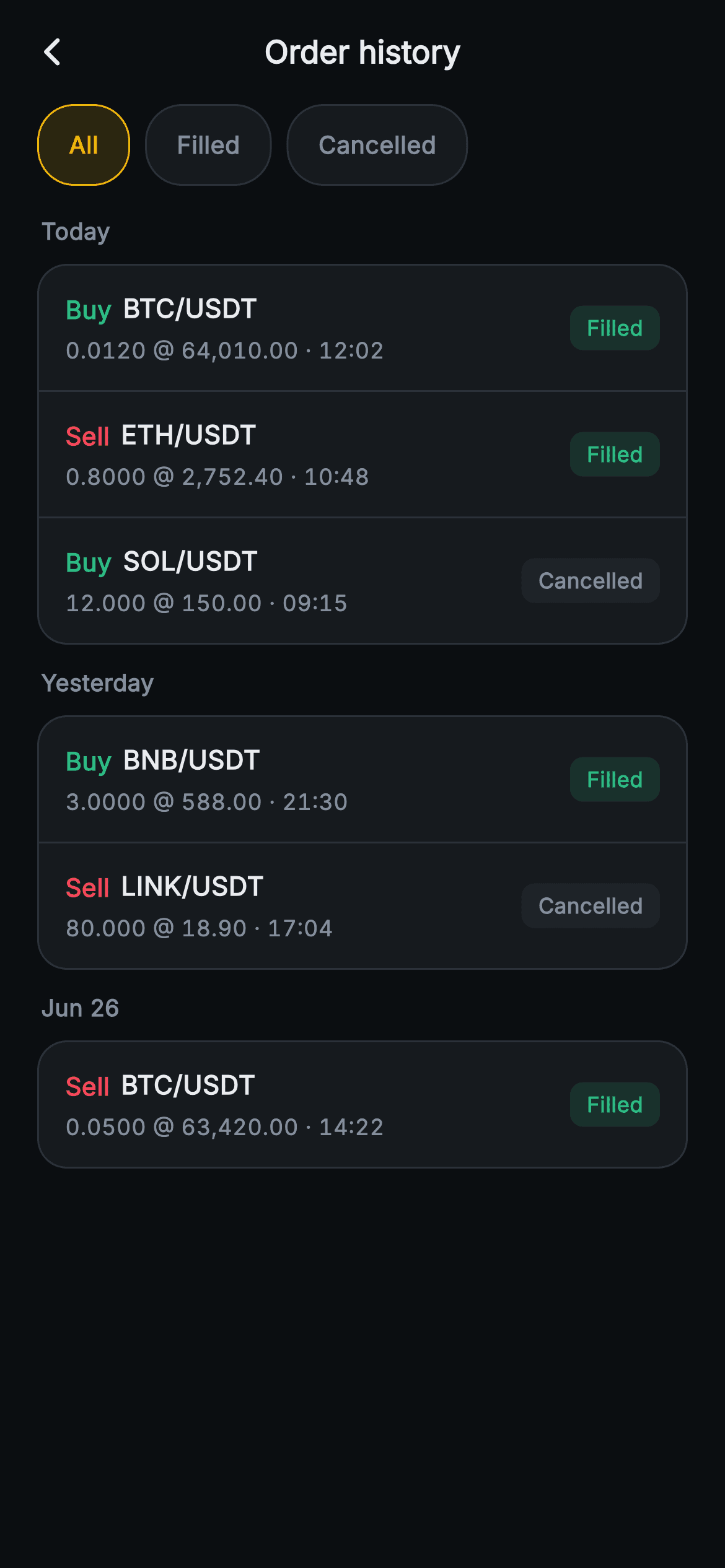
Once an order leaves the book, a trader only wants to confirm two things: did it execute, and at what price. This tutorial builds Aurum's order history screen in Flutter, an archive of settled trades rather than live ones. Three outline-style filter chips narrow the list to Filled or Cancelled, orders sit in one bordered card per day, each row compresses amount, price and time into a single tabular line, and a status pill separates executed trades from abandoned ones without borrowing the Sell red.
What you'll build
- ✓An All / Filled / Cancelled chip rail whose active chip is an amber outline over a 14% amber tint, not a solid fill
- ✓Date sections (Today, Yesterday, Jun 26) where each day is one rounded card with hairline dividers that skip the last row
- ✓A status-to-filter predicate that maps chip indexes onto integer status codes in three lines
- ✓Order rows with a coloured Buy/Sell word, the pair, and an 'amount @ price · time' meta line in tabular figures
- ✓A status pill that tints Filled green and leaves Cancelled on a neutral #1E2329 slab
Step-by-step build
Create the file
Add a new file at lib/web3_orders_history/web3_orders_history_screen.dart in your Flutter project.
Register the bundled fonts
No external packages — this is pure Flutter. It does bundle its design font (Inter), so drop the font file into fonts/ and declare it in pubspec.yaml:
flutter:
  fonts:
    - family: Inter
      fonts:
- asset: fonts/Inter-Regular.ttfBuild it, piece by piece
Here's how the screen goes together. Each block below is a real slice of the code with a plain-English explanation — paste them in order, or grab the whole file from the next section.
Two callbacks, the Aurum constants, and a single filter index
import 'package:flutter/material.dart';

/// Web3 orders — Order history. Closed / cancelled orders grouped by date with
/// status pills and filter chips. Self-contained per CONVENTIONS.md: pure
/// Flutter, bundled Inter font, no glyphs / no network image, forced dark theme
/// so it renders standalone as a route.
class Web3OrdersHistoryScreen extends StatefulWidget {
  const Web3OrdersHistoryScreen({super.key, this.onBack, this.onOrderTap});

  final VoidCallback? onBack;
  final ValueChanged<String>? onOrderTap;

  @override
  State<Web3OrdersHistoryScreen> createState() =>
      _Web3OrdersHistoryScreenState();
}

class _Web3OrdersHistoryScreenState extends State<Web3OrdersHistoryScreen> {
  static const String _font = 'Inter';
  static const Color _bg = Color(0xFF0B0E11);
  static const Color _surface = Color(0xFF161A1E);
  static const Color _surfaceAlt = Color(0xFF1E2329);
  static const Color _brand = Color(0xFFF0B90B);
  static const Color _up = Color(0xFF2EBD85);
  static const Color _down = Color(0xFFF6465D);
  static const Color _text = Color(0xFFEAECEF);
  static const Color _muted = Color(0xFF848E9C);
  static const Color _hairline = Color(0xFF2B3139);

  static const List<String> _filters = <String>['All', 'Filled', 'Cancelled'];
  int _filter = 0;
`Web3OrdersHistoryScreen` is stateful for exactly one reason: the chip selection. Everything it reports outward goes through `onBack` and `onOrderTap`, a `ValueChanged<String>`, so the widget never talks to an exchange itself. The colour constants are the shared Aurum set; the two that matter for this screen are `_surfaceAlt` (`#1E2329`), which becomes the cancelled-pill background later, and `_hairline` (`#2B3139`), used both for chip borders and for row dividers. The filter labels are a `static const` list of three strings, and the selection is stored as `int _filter = 0` — an index into that list, which the predicate further down depends on positionally.
Orders as positional lists, and the status predicate
  // group, [pair, side(buy), price, amount, status(0 filled,1 cancelled), time]
  static const List<List<dynamic>> _groups = <List<dynamic>>[
    <dynamic>['Today', <List<dynamic>>[
      <dynamic>['BTC/USDT', true, '64,010.00', '0.0120', 0, '12:02'],
      <dynamic>['ETH/USDT', false, '2,752.40', '0.8000', 0, '10:48'],
      <dynamic>['SOL/USDT', true, '150.00', '12.000', 1, '09:15'],
    ]],
    <dynamic>['Yesterday', <List<dynamic>>[
      <dynamic>['BNB/USDT', true, '588.00', '3.0000', 0, '21:30'],
      <dynamic>['LINK/USDT', false, '18.90', '80.000', 1, '17:04'],
    ]],
    <dynamic>['Jun 26', <List<dynamic>>[
      <dynamic>['BTC/USDT', false, '63,420.00', '0.0500', 0, '14:22'],
    ]],
  ];

  bool _show(int status) {
    if (_filter == 0) return true;
    if (_filter == 1) return status == 0;
    return status == 1;
  }
The sample data is the least conventional part of the file. `_groups` is a `List<List<dynamic>>`: each group is `[label, orders]`, and each order is a six-slot list — pair, a `bool` for buy, price string, amount string, an `int` status (0 filled, 1 cancelled) and a time string. The comment on line 33 is the only schema; the build code reads fields by index and casts them (`o[4] as int`). That keeps the demo compact, but a swapped slot fails at runtime, not compile time, so a real integration should replace it with a small class. `_show` translates the chip index into a status test: index 0 passes everything, index 1 ('Filled') accepts status 0, anything else accepts status 1. Reorder `_filters` and this mapping silently breaks.
App bar and the outline-style filter chips
  @override
  Widget build(BuildContext context) {
    return Theme(
      data: ThemeData.dark(useMaterial3: true),
      child: Scaffold(
        backgroundColor: _bg,
        appBar: AppBar(
          backgroundColor: _bg,
          elevation: 0,
          centerTitle: true,
          leading: IconButton(
            onPressed: widget.onBack,
            icon: const Icon(Icons.arrow_back_ios_new_rounded,
                size: 18, color: _text),
          ),
          title: const Text(
            'Order history',
            style: TextStyle(
              fontFamily: _font,
              fontSize: 17,
              fontWeight: FontWeight.w700,
              color: _text,
            ),
          ),
        ),
        body: SafeArea(
          top: false,
          child: Column(
            children: <Widget>[
              SizedBox(
                height: 44,
                child: ListView.separated(
                  scrollDirection: Axis.horizontal,
                  padding: const EdgeInsets.symmetric(horizontal: 20),
                  itemCount: _filters.length,
                  separatorBuilder: (BuildContext context, int i) =>
                      const SizedBox(width: 8),
                  itemBuilder: (BuildContext context, int i) {
                    final bool sel = _filter == i;
                    return GestureDetector(
                      onTap: () => setState(() => _filter = i),
                      behavior: HitTestBehavior.opaque,
                      child: Container(
                        alignment: Alignment.center,
                        padding: const EdgeInsets.symmetric(horizontal: 16),
                        decoration: BoxDecoration(
                          color: sel
                              ? _brand.withValues(alpha: 0.14)
                              : _surface,
                          borderRadius: BorderRadius.circular(20),
                          border: Border.all(
                            color: sel ? _brand : _hairline,
                          ),
                        ),
                        child: Text(
                          _filters[i],
                          style: TextStyle(
                            fontFamily: _font,
                            fontSize: 13,
                            fontWeight: FontWeight.w700,
                            color: sel ? _brand : _muted,
                          ),
                        ),
                      ),
                    );
                  },
                ),
              ),
Under the forced dark `Theme`, a flat `AppBar` centres 'Order history' at 17px `w700` with an 18px back chevron wired to `widget.onBack`. The chip rail is a 44px `SizedBox` around a horizontal `ListView.separated` with 20px side padding and 8px gaps. Because a horizontal list hands each child a tight 44px height, every chip is a full 44px touch target, and `alignment: Alignment.center` on the Container is what centres the label vertically inside it. Selection is drawn as an outline rather than a fill: the active chip gets `_brand.withValues(alpha: 0.14)` behind a 1px amber border and amber text, while idle chips sit on `_surface` with a `_hairline` border and `_muted` text. `onTap` is just `setState(() => _filter = i)`.
Filtering each day before it is built
              Expanded(
                child: ListView(
                  padding: const EdgeInsets.fromLTRB(20, 4, 20, 20),
                  children: <Widget>[
                    for (final List<dynamic> g in _groups)
                      ..._buildGroup(
                        g[0] as String,
                        (g[1] as List<List<dynamic>>)
                            .where((List<dynamic> o) => _show(o[4] as int))
                            .toList(),
                      ),
                  ],
                ),
              ),
            ],
          ),
        ),
      ),
    );
  }
The scrolling area is an `Expanded` `ListView` with `EdgeInsets.fromLTRB(20, 4, 20, 20)`, the 4px top keeping the first date label close to the chip rail. Its children come from a collection-for over `_groups` combined with the spread operator: for each day, the order list is cast, run through `.where((o) => _show(o[4] as int))`, materialised with `.toList()`, and handed to `_buildGroup`, whose returned widget list is spread in place with `...`. Doing the filtering here means `_buildGroup` only ever receives orders that should be visible, so it needs no knowledge of the chips. One gap worth knowing: if a filter empties every day, the list simply renders blank — there is no 'no orders' message.
One bordered card per day
  List<Widget> _buildGroup(String label, List<List<dynamic>> orders) {
    if (orders.isEmpty) return <Widget>[];
    return <Widget>[
      Padding(
        padding: const EdgeInsets.fromLTRB(2, 12, 0, 8),
        child: Text(
          label,
          style: const TextStyle(
            fontFamily: _font,
            fontSize: 12.5,
            fontWeight: FontWeight.w700,
            color: _muted,
          ),
        ),
      ),
      Container(
        decoration: BoxDecoration(
          color: _surface,
          borderRadius: BorderRadius.circular(16),
          border: Border.all(color: _hairline),
        ),
        child: Column(
          children: <Widget>[
            for (int i = 0; i < orders.length; i++)
              _row(orders[i], last: i == orders.length - 1),
          ],
        ),
      ),
    ];
  }
`_buildGroup` returns a `List<Widget>` rather than a single widget so the caller can spread a header and a card as siblings. Its first line, `if (orders.isEmpty) return <Widget>[];`, is what removes the 'Jun 26' label when you pick Cancelled, since that day holds only a filled sell. The header is a quiet 12.5px `w700` muted label padded `fromLTRB(2, 12, 0, 8)`. All of a day's orders then share one Container — `_surface` fill, 16px radius, `_hairline` border — instead of floating as separate tiles, so a day reads as a single block. Each row receives `last: i == orders.length - 1`, which lets the row decide whether to draw its own bottom divider.
The row: side word, pair, and a compressed meta line
  Widget _row(List<dynamic> o, {required bool last}) {
    final bool isBuy = o[1] as bool;
    final int status = o[4] as int;
    final Color side = isBuy ? _up : _down;
    final bool filled = status == 0;
    return GestureDetector(
      onTap: () => widget.onOrderTap?.call(o[0] as String),
      behavior: HitTestBehavior.opaque,
      child: Container(
        padding: const EdgeInsets.symmetric(horizontal: 14, vertical: 13),
        decoration: BoxDecoration(
          border: last
              ? null
              : const Border(bottom: BorderSide(color: _hairline)),
        ),
        child: Row(
          children: <Widget>[
            Column(
              crossAxisAlignment: CrossAxisAlignment.start,
              children: <Widget>[
                Row(
                  children: <Widget>[
                    Text(
                      isBuy ? 'Buy' : 'Sell',
                      style: TextStyle(
                        fontFamily: _font,
                        fontSize: 13.5,
                        fontWeight: FontWeight.w800,
                        color: side,
                      ),
                    ),
                    const SizedBox(width: 6),
                    Text(
                      o[0] as String,
                      style: const TextStyle(
                        fontFamily: _font,
                        fontSize: 14,
                        fontWeight: FontWeight.w700,
                        color: _text,
                      ),
                    ),
                  ],
                ),
                const SizedBox(height: 4),
                Text(
                  '${o[3]} @ ${o[2]} · ${o[5]}',
                  style: const TextStyle(
                    fontFamily: _font,
                    fontSize: 12,
                    fontFeatures: <FontFeature>[FontFeature.tabularFigures()],
                    color: _muted,
                  ),
                ),
              ],
            ),
`_row` decodes its slots once at the top: `isBuy`, `status`, a `side` colour (`_up` or `_down`) and a `filled` flag. The divider is a `Border(bottom: BorderSide(color: _hairline))` that is set to `null` on the last row, so the final hairline never doubles up against the card's own border. The side is a coloured word — 'Buy' or 'Sell' at 13.5px `w800` — rather than a tinted chip, keeping the row lighter than an open-orders card. Beside it the pair sits at 14px `w700`. The second line interpolates `'${o[3]} @ ${o[2]} · ${o[5]}'`, so amount comes first, then the execution price, then the time, set in 12px muted text with `FontFeature.tabularFigures()` so digits line up between rows. Tapping anywhere on the opaque `GestureDetector` calls `onOrderTap` with only the pair.
Filled versus Cancelled status pill
            const Spacer(),
            Container(
              padding: const EdgeInsets.symmetric(horizontal: 9, vertical: 4),
              decoration: BoxDecoration(
                color: filled
                    ? _up.withValues(alpha: 0.14)
                    : _surfaceAlt,
                borderRadius: BorderRadius.circular(7),
              ),
              child: Text(
                filled ? 'Filled' : 'Cancelled',
                style: TextStyle(
                  fontFamily: _font,
                  fontSize: 11.5,
                  fontWeight: FontWeight.w700,
                  color: filled ? _up : _muted,
                ),
              ),
            ),
          ],
        ),
      ),
    );
  }
}
A `Spacer` pushes the pill to the right edge, so the left column can stay as narrow as its text. The pill is a Container padded 9 by 4 with a 7px radius and an 11.5px `w700` label. The interesting choice is the cancelled styling. Filled gets `_up.withValues(alpha: 0.14)` with green text, but Cancelled is not red: it uses the solid `_surfaceAlt` slab with `_muted` text. Red already means Sell in the same row, so a red Cancelled pill next to a red 'Sell' would read as one message. A cancelled order also cost nothing, so grey presents it as a non-event. There are only two branches — any status other than 0 renders as Cancelled.
Full code
The complete, ready-to-paste source. Free to use in your projects — one click copies it all.
import 'package:flutter/material.dart';

/// Web3 orders — Order history. Closed / cancelled orders grouped by date with
/// status pills and filter chips. Self-contained per CONVENTIONS.md: pure
/// Flutter, bundled Inter font, no glyphs / no network image, forced dark theme
/// so it renders standalone as a route.
class Web3OrdersHistoryScreen extends StatefulWidget {
  const Web3OrdersHistoryScreen({super.key, this.onBack, this.onOrderTap});

  final VoidCallback? onBack;
  final ValueChanged<String>? onOrderTap;

  @override
  State<Web3OrdersHistoryScreen> createState() =>
      _Web3OrdersHistoryScreenState();
}

class _Web3OrdersHistoryScreenState extends State<Web3OrdersHistoryScreen> {
  static const String _font = 'Inter';
  static const Color _bg = Color(0xFF0B0E11);
  static const Color _surface = Color(0xFF161A1E);
  static const Color _surfaceAlt = Color(0xFF1E2329);
  static const Color _brand = Color(0xFFF0B90B);
  static const Color _up = Color(0xFF2EBD85);
  static const Color _down = Color(0xFFF6465D);
  static const Color _text = Color(0xFFEAECEF);
  static const Color _muted = Color(0xFF848E9C);
  static const Color _hairline = Color(0xFF2B3139);

  static const List<String> _filters = <String>['All', 'Filled', 'Cancelled'];
  int _filter = 0;

  // group, [pair, side(buy), price, amount, status(0 filled,1 cancelled), time]
  static const List<List<dynamic>> _groups = <List<dynamic>>[
    <dynamic>['Today', <List<dynamic>>[
      <dynamic>['BTC/USDT', true, '64,010.00', '0.0120', 0, '12:02'],
      <dynamic>['ETH/USDT', false, '2,752.40', '0.8000', 0, '10:48'],
      <dynamic>['SOL/USDT', true, '150.00', '12.000', 1, '09:15'],
    ]],
    <dynamic>['Yesterday', <List<dynamic>>[
      <dynamic>['BNB/USDT', true, '588.00', '3.0000', 0, '21:30'],
      <dynamic>['LINK/USDT', false, '18.90', '80.000', 1, '17:04'],
    ]],
    <dynamic>['Jun 26', <List<dynamic>>[
      <dynamic>['BTC/USDT', false, '63,420.00', '0.0500', 0, '14:22'],
    ]],
  ];

  bool _show(int status) {
    if (_filter == 0) return true;
    if (_filter == 1) return status == 0;
    return status == 1;
  }

  @override
  Widget build(BuildContext context) {
    return Theme(
      data: ThemeData.dark(useMaterial3: true),
      child: Scaffold(
        backgroundColor: _bg,
        appBar: AppBar(
          backgroundColor: _bg,
          elevation: 0,
          centerTitle: true,
          leading: IconButton(
            onPressed: widget.onBack,
            icon: const Icon(Icons.arrow_back_ios_new_rounded,
                size: 18, color: _text),
          ),
          title: const Text(
            'Order history',
            style: TextStyle(
              fontFamily: _font,
              fontSize: 17,
              fontWeight: FontWeight.w700,
              color: _text,
            ),
          ),
        ),
        body: SafeArea(
          top: false,
          child: Column(
            children: <Widget>[
              SizedBox(
                height: 44,
                child: ListView.separated(
                  scrollDirection: Axis.horizontal,
                  padding: const EdgeInsets.symmetric(horizontal: 20),
                  itemCount: _filters.length,
                  separatorBuilder: (BuildContext context, int i) =>
                      const SizedBox(width: 8),
                  itemBuilder: (BuildContext context, int i) {
                    final bool sel = _filter == i;
                    return GestureDetector(
                      onTap: () => setState(() => _filter = i),
                      behavior: HitTestBehavior.opaque,
                      child: Container(
                        alignment: Alignment.center,
                        padding: const EdgeInsets.symmetric(horizontal: 16),
                        decoration: BoxDecoration(
                          color: sel
                              ? _brand.withValues(alpha: 0.14)
                              : _surface,
                          borderRadius: BorderRadius.circular(20),
                          border: Border.all(
                            color: sel ? _brand : _hairline,
                          ),
                        ),
                        child: Text(
                          _filters[i],
                          style: TextStyle(
                            fontFamily: _font,
                            fontSize: 13,
                            fontWeight: FontWeight.w700,
                            color: sel ? _brand : _muted,
                          ),
                        ),
                      ),
                    );
                  },
                ),
              ),
              Expanded(
                child: ListView(
                  padding: const EdgeInsets.fromLTRB(20, 4, 20, 20),
                  children: <Widget>[
                    for (final List<dynamic> g in _groups)
                      ..._buildGroup(
                        g[0] as String,
                        (g[1] as List<List<dynamic>>)
                            .where((List<dynamic> o) => _show(o[4] as int))
                            .toList(),
                      ),
                  ],
                ),
              ),
            ],
          ),
        ),
      ),
    );
  }

  List<Widget> _buildGroup(String label, List<List<dynamic>> orders) {
    if (orders.isEmpty) return <Widget>[];
    return <Widget>[
      Padding(
        padding: const EdgeInsets.fromLTRB(2, 12, 0, 8),
        child: Text(
          label,
          style: const TextStyle(
            fontFamily: _font,
            fontSize: 12.5,
            fontWeight: FontWeight.w700,
            color: _muted,
          ),
        ),
      ),
      Container(
        decoration: BoxDecoration(
          color: _surface,
          borderRadius: BorderRadius.circular(16),
          border: Border.all(color: _hairline),
        ),
        child: Column(
          children: <Widget>[
            for (int i = 0; i < orders.length; i++)
              _row(orders[i], last: i == orders.length - 1),
          ],
        ),
      ),
    ];
  }

  Widget _row(List<dynamic> o, {required bool last}) {
    final bool isBuy = o[1] as bool;
    final int status = o[4] as int;
    final Color side = isBuy ? _up : _down;
    final bool filled = status == 0;
    return GestureDetector(
      onTap: () => widget.onOrderTap?.call(o[0] as String),
      behavior: HitTestBehavior.opaque,
      child: Container(
        padding: const EdgeInsets.symmetric(horizontal: 14, vertical: 13),
        decoration: BoxDecoration(
          border: last
              ? null
              : const Border(bottom: BorderSide(color: _hairline)),
        ),
        child: Row(
          children: <Widget>[
            Column(
              crossAxisAlignment: CrossAxisAlignment.start,
              children: <Widget>[
                Row(
                  children: <Widget>[
                    Text(
                      isBuy ? 'Buy' : 'Sell',
                      style: TextStyle(
                        fontFamily: _font,
                        fontSize: 13.5,
                        fontWeight: FontWeight.w800,
                        color: side,
                      ),
                    ),
                    const SizedBox(width: 6),
                    Text(
                      o[0] as String,
                      style: const TextStyle(
                        fontFamily: _font,
                        fontSize: 14,
                        fontWeight: FontWeight.w700,
                        color: _text,
                      ),
                    ),
                  ],
                ),
                const SizedBox(height: 4),
                Text(
                  '${o[3]} @ ${o[2]} · ${o[5]}',
                  style: const TextStyle(
                    fontFamily: _font,
                    fontSize: 12,
                    fontFeatures: <FontFeature>[FontFeature.tabularFigures()],
                    color: _muted,
                  ),
                ),
              ],
            ),
            const Spacer(),
            Container(
              padding: const EdgeInsets.symmetric(horizontal: 9, vertical: 4),
              decoration: BoxDecoration(
                color: filled
                    ? _up.withValues(alpha: 0.14)
                    : _surfaceAlt,
                borderRadius: BorderRadius.circular(7),
              ),
              child: Text(
                filled ? 'Filled' : 'Cancelled',
                style: TextStyle(
                  fontFamily: _font,
                  fontSize: 11.5,
                  fontWeight: FontWeight.w700,
                  color: filled ? _up : _muted,
                ),
              ),
            ),
          ],
        ),
      ),
    );
  }
}
Plus bundled 1 binary asset (fonts/images). The CLI and MCP install those for you automatically.
Two faster ways to add it
Copy-paste works, but you can skip it entirely.
1. FlutterKit CLI
One command drops this screen — and its fonts — straight into your project.
$ flutterkit add web3-orders-history2. AI agent (MCP)
Connect FlutterKit's MCP server in Claude or Cursor and just ask your agent to install web3-orders-history — it fetches and writes the files for you.
FAQ
Can I ship this order history screen in a commercial trading app?
Yes. It is free for personal and commercial projects alike. Copy the Dart from this page, add it with the CLI command, or fetch it through MCP, and use it in a released app. You do not need a licence key and you do not need to credit anyone.
Does it depend on any packages or a downloaded font?
No packages beyond `package:flutter/material.dart` — the chips, cards and pills are plain Containers and the arrow is a Material icon. The typeface is Inter, referenced through `fontFamily: 'Inter'` and bundled with the screen as a font asset, so nothing is fetched from Google Fonts at runtime.
What Flutter version is required?
Flutter 3.22 or later, because the active chip and the Filled pill use `Color.withValues(alpha: 0.14)`. On an older SDK, replace those calls with `withOpacity(0.14)`. The constructor also uses the `super.key` parameter, which needs Dart 2.17+; on older code rewrite it as `{Key? key, this.onBack, this.onOrderTap} : super(key: key)`.
How do I load real orders and add a partially filled status?
Replace the positional lists with a small class (pair, isBuy, price, amount, status, time, id) and group your exchange's closed orders by calendar day into date labels before building. The screen only knows statuses 0 and 1, and `_row` treats anything non-zero as Cancelled, so a partial fill needs a third code, a 'Partial' chip in `_filters`, a matching branch in `_show`, and its own pill colours — the amber `_brand` tint is the natural choice.
Is passing only the pair to onOrderTap enough to open an order?
Not with real data. The demo already has two BTC/USDT orders — a buy today and a sell on Jun 26 — and both report the same string, so a detail screen could not tell them apart. Add an order id to your model and change the callback to `ValueChanged<String>` carrying that id, or pass the whole order object instead.


