How to Build a Crypto Earn Hub Screen in Flutter (Full Code + Preview)
Earn tabs live or die on one comparison: which product pays what, and what you give up to get it. This tutorial builds Aurum's Earn hub in Flutter — a dark exchange-style screen with a gold gradient summary card showing total earnings, a painted APY ring, and four staking, savings and launchpool rows where each asset's yield ring fills in proportion to its APY. You'll see how the products live as plain data, how one CustomPainter serves both rings, and why the lock terms sit next to the rates. Pure Flutter, no packages, copy-paste ready.
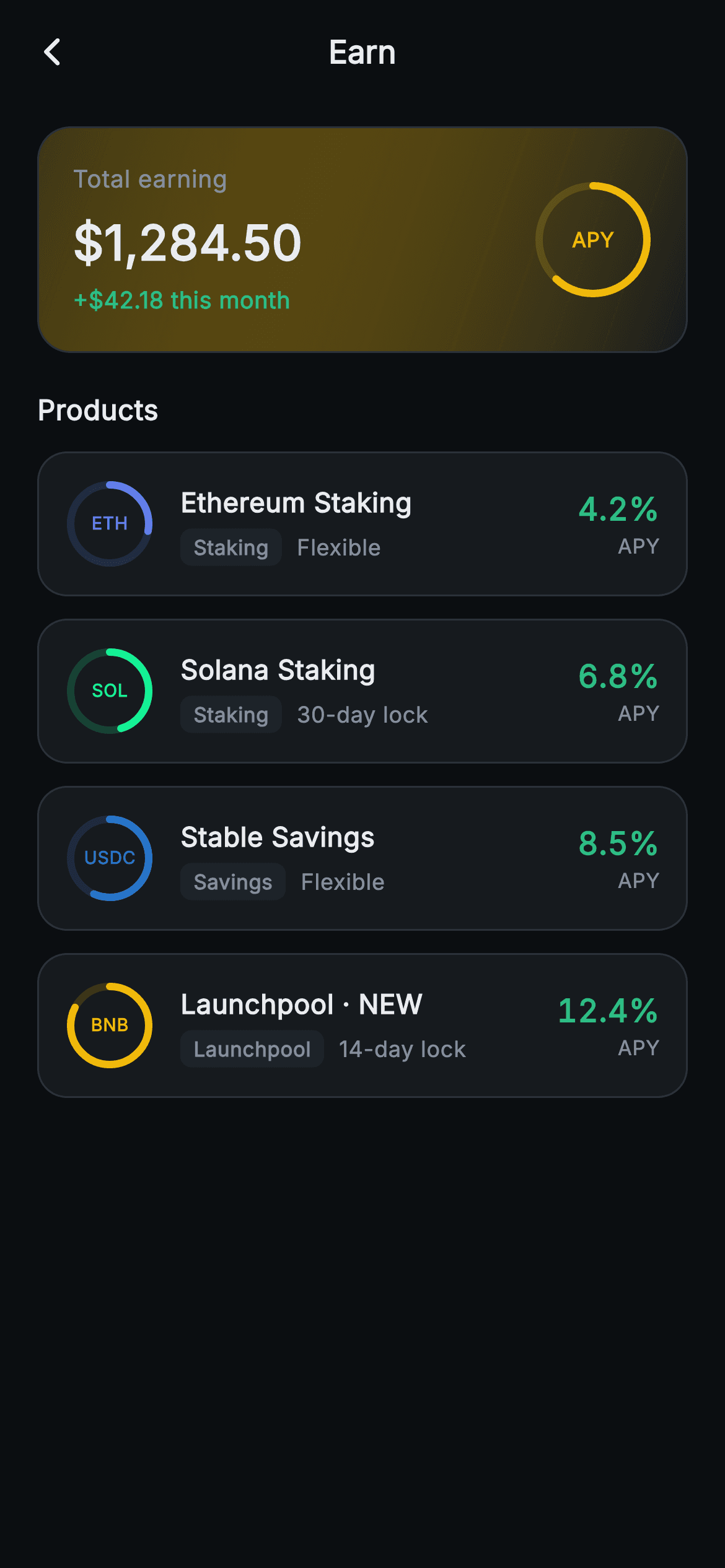
What you'll build
- ✓A gold-tinted gradient summary card pairing total earnings with a 64px painted APY ring
- ✓Four product rows — ETH, SOL, USDC and a BNB launchpool — driven by one static const list
- ✓A reusable _RingPainter whose arc length encodes each product's APY against a 15% ceiling
- ✓Kind badges (Staking / Savings / Launchpool) and flexible-vs-locked term labels on every row
- ✓Right-aligned APY figures set in tabular numerals so 4.2% and 12.4% line up digit for digit
Step-by-step build
Create the file
Add a new file at lib/web3_earn_hub/web3_earn_hub_screen.dart in your Flutter project.
Register the bundled fonts
No external packages — this is pure Flutter. It does bundle its design font (Inter), so drop the font file into fonts/ and declare it in pubspec.yaml:
flutter:
  fonts:
    - family: Inter
      fonts:
- asset: fonts/Inter-Regular.ttfBuild it, piece by piece
Here's how the screen goes together. Each block below is a real slice of the code with a plain-English explanation — paste them in order, or grab the whole file from the next section.
Palette and products as data
import 'dart:math' as math;

import 'package:flutter/material.dart';

/// Web3 — Earn. An APY product list (staking / savings / launchpool) with a
/// painted yield ring per product and an estimated-earnings summary. Self-
/// contained per CONVENTIONS.md: pure Flutter, bundled Inter font, ring
/// CustomPaint (no glyphs / no network image), forced dark theme so it renders
/// standalone as a route.
class Web3EarnHubScreen extends StatelessWidget {
  const Web3EarnHubScreen({super.key, this.onBack, this.onProductTap});

  final VoidCallback? onBack;
  final VoidCallback? onProductTap;

  static const String _font = 'Inter';
  static const Color _bg = Color(0xFF0B0E11);
  static const Color _surface = Color(0xFF161A1E);
  static const Color _surfaceAlt = Color(0xFF1E2329);
  static const Color _brand = Color(0xFFF0B90B);
  static const Color _up = Color(0xFF2EBD85);
  static const Color _text = Color(0xFFEAECEF);
  static const Color _muted = Color(0xFF848E9C);
  static const Color _hairline = Color(0xFF2B3139);

  static const List<_Product> _products = <_Product>[
    _Product('ETH', 'Ethereum Staking', 'Staking', 4.20, 'Flexible',
        Color(0xFF627EEA)),
    _Product('SOL', 'Solana Staking', 'Staking', 6.80, '30-day lock',
        Color(0xFF14F195)),
    _Product('USDC', 'Stable Savings', 'Savings', 8.50, 'Flexible',
        Color(0xFF2775CA)),
    _Product('BNB', 'Launchpool · NEW', 'Launchpool', 12.40, '14-day lock',
        Color(0xFFF0B90B)),
  ];
The screen is a `StatelessWidget` with two callbacks — `onBack` and `onProductTap` — because everything on it is a snapshot; nothing mutates, so there is no State class to manage. The palette is a full exchange dark theme declared as `static const Color` fields: near-black `#0B0E11` background, `#161A1E` card surface, `#1E2329` for the badge fill one step lighter, gold `#F0B90B` as the brand accent, and a dedicated `_up` green `#2EBD85` reserved for money going the right way. The four products live in a `static const List<_Product>`, each carrying a ticker, name, kind, APY, lock term and a tint — ETH gets Ethereum's `#627EEA`, SOL gets `#14F195`, USDC gets `#2775CA`, and the BNB launchpool reuses the gold. Keeping products as data means adding a fifth row is a one-line edit, and the build method below stays a pure mapping.
Forcing dark mode so the screen stands alone
  @override
  Widget build(BuildContext context) {
    return Theme(
      data: ThemeData.dark(useMaterial3: true),
      child: Scaffold(
        backgroundColor: _bg,
        appBar: AppBar(
          backgroundColor: _bg,
          elevation: 0,
          centerTitle: true,
          leading: IconButton(
            onPressed: onBack,
            icon: const Icon(Icons.arrow_back_ios_new_rounded,
                size: 18, color: _text),
          ),
          title: const Text(
            'Earn',
            style: TextStyle(
              fontFamily: _font,
              fontSize: 17,
              fontWeight: FontWeight.w700,
              color: _text,
            ),
          ),
        ),
`build` wraps the whole `Scaffold` in `Theme(data: ThemeData.dark(useMaterial3: true))` rather than trusting whatever theme the host app runs. An exchange Earn tab only makes sense dark — the gold accent and the hairline borders are tuned against `#0B0E11` — so the screen forces it and renders correctly even when dropped into a light app as a standalone route. The `AppBar` matches the background at zero elevation so it reads as part of the page, with an `arrow_back_ios_new_rounded` chevron at 18px wired to `onBack` and a centred 17px `w700` 'Earn' title. Every text style names `fontFamily: _font` ('Inter') explicitly, since the forced theme would otherwise fall back to the default typeface.
The earnings summary card and its 62% ring
        body: SafeArea(
          top: false,
          child: ListView(
            padding: const EdgeInsets.fromLTRB(20, 12, 20, 24),
            children: <Widget>[
              Container(
                padding: const EdgeInsets.all(18),
                decoration: BoxDecoration(
                  gradient: LinearGradient(
                    begin: Alignment.topLeft,
                    end: Alignment.bottomRight,
                    colors: <Color>[
                      _brand.withValues(alpha: 0.22),
                      _surface,
                    ],
                  ),
                  borderRadius: BorderRadius.circular(18),
                  border: Border.all(color: _hairline),
                ),
                child: Row(
                  children: <Widget>[
                    Expanded(
                      child: Column(
                        crossAxisAlignment: CrossAxisAlignment.start,
                        children: const <Widget>[
                          Text(
                            'Total earning',
                            style: TextStyle(
                              fontFamily: _font,
                              fontSize: 13,
                              color: _muted,
                            ),
                          ),
                          SizedBox(height: 6),
                          Text(
                            '\$1,284.50',
                            style: TextStyle(
                              fontFamily: _font,
                              fontSize: 26,
                              fontWeight: FontWeight.w800,
                              color: _text,
                            ),
                          ),
                          SizedBox(height: 4),
                          Text(
                            '+\$42.18 this month',
                            style: TextStyle(
                              fontFamily: _font,
                              fontSize: 12.5,
                              fontWeight: FontWeight.w600,
                              color: _up,
                            ),
                          ),
                        ],
                      ),
                    ),
                    SizedBox(
                      width: 64,
                      height: 64,
                      child: CustomPaint(
                        painter: _RingPainter(fraction: 0.62, color: _brand),
                        child: const Center(
                          child: Text(
                            'APY',
                            style: TextStyle(
                              fontFamily: _font,
                              fontSize: 11,
                              fontWeight: FontWeight.w800,
                              color: _brand,
                            ),
                          ),
                        ),
                      ),
                    ),
                  ],
                ),
              ),
The body is a single `ListView` with `SafeArea(top: false)` — the AppBar already handles the notch, and the list needs to scroll under the home indicator. The hero card gets a `LinearGradient` running top-left to bottom-right from `_brand.withValues(alpha: 0.22)` into plain `_surface`, so the gold glow sits in the corner nearest the number and fades out before it can tint the whole card; a `_hairline` border keeps the edge crisp against the near-black page. Inside, an `Expanded` column stacks the muted 'Total earning' label, the 26px `w800` '$1,284.50' figure, and a 12.5px '+$42.18 this month' delta in `_up` green — label, number, trend, in reading order. Opposite it, a fixed 64×64 `CustomPaint` runs `_RingPainter(fraction: 0.62, color: _brand)` with a tiny 'APY' caption centred in the hole, giving the card a visual anchor that is data, not decoration.
Product rows and the APY-proportional ring
              const SizedBox(height: 20),
              const Text(
                'Products',
                style: TextStyle(
                  fontFamily: _font,
                  fontSize: 15,
                  fontWeight: FontWeight.w700,
                  color: _text,
                ),
              ),
              const SizedBox(height: 12),
              ..._products.map((_Product p) {
                return Padding(
                  padding: const EdgeInsets.only(bottom: 12),
                  child: GestureDetector(
                    onTap: onProductTap,
                    behavior: HitTestBehavior.opaque,
                    child: Container(
                      padding: const EdgeInsets.all(14),
                      decoration: BoxDecoration(
                        color: _surface,
                        borderRadius: BorderRadius.circular(16),
                        border: Border.all(color: _hairline),
                      ),
                      child: Row(
                        children: <Widget>[
                          SizedBox(
                            width: 48,
                            height: 48,
                            child: CustomPaint(
                              painter: _RingPainter(
                                  fraction: (p.apy / 15).clamp(0.0, 1.0),
                                  color: p.tint),
                              child: Center(
                                child: Text(
                                  p.ticker,
                                  style: TextStyle(
                                    fontFamily: _font,
                                    fontSize: 9.5,
                                    fontWeight: FontWeight.w800,
                                    color: p.tint,
                                  ),
                                ),
                              ),
                            ),
                          ),
After a 15px `w700` 'Products' header, the rows come from `..._products.map(...)` spread straight into the ListView's children — no builder needed for four items. Each row is a `GestureDetector` with `behavior: HitTestBehavior.opaque`, which is the detail that makes the whole card tappable: without it, taps on the padding between texts would fall through to nothing. The leading element is a 48×48 `CustomPaint` reusing the same `_RingPainter`, but here the fraction is computed — `(p.apy / 15).clamp(0.0, 1.0)` — so the arc literally encodes the rate: ETH's 4.2% draws just over a quarter turn while the BNB pool's 12.4% sweeps nearly the full circle. Dividing by 15 sets an implicit ceiling a little above the best rate on offer, so the top product looks strong without maxing out. The ring and the 9.5px ticker inside it both take `p.tint`, so each asset's brand colour does the identifying work an icon pack would normally do.
Kind badge, lock term, and tabular APY
                          const SizedBox(width: 14),
                          Expanded(
                            child: Column(
                              crossAxisAlignment: CrossAxisAlignment.start,
                              children: <Widget>[
                                Text(
                                  p.name,
                                  style: const TextStyle(
                                    fontFamily: _font,
                                    fontSize: 14.5,
                                    fontWeight: FontWeight.w700,
                                    color: _text,
                                  ),
                                ),
                                const SizedBox(height: 4),
                                Row(
                                  children: <Widget>[
                                    Container(
                                      padding: const EdgeInsets.symmetric(
                                          horizontal: 7, vertical: 2),
                                      decoration: BoxDecoration(
                                        color: _surfaceAlt,
                                        borderRadius: BorderRadius.circular(6),
                                      ),
                                      child: Text(
                                        p.kind,
                                        style: const TextStyle(
                                          fontFamily: _font,
                                          fontSize: 11,
                                          fontWeight: FontWeight.w600,
                                          color: _muted,
                                        ),
                                      ),
                                    ),
                                    const SizedBox(width: 8),
                                    Text(
                                      p.lock,
                                      style: const TextStyle(
                                        fontFamily: _font,
                                        fontSize: 12,
                                        color: _muted,
                                      ),
                                    ),
                                  ],
                                ),
                              ],
                            ),
                          ),
                          Column(
                            crossAxisAlignment: CrossAxisAlignment.end,
                            children: <Widget>[
                              Text(
                                '${p.apy.toStringAsFixed(1)}%',
                                style: const TextStyle(
                                  fontFamily: _font,
                                  fontSize: 17,
                                  fontWeight: FontWeight.w800,
                                  fontFeatures: <FontFeature>[
                                    FontFeature.tabularFigures()
                                  ],
                                  color: _up,
                                ),
                              ),
                              const Text(
                                'APY',
                                style: TextStyle(
                                  fontFamily: _font,
                                  fontSize: 11,
                                  color: _muted,
                                ),
                              ),
                            ],
                          ),
                        ],
                      ),
                    ),
                  ),
                );
              }),
The middle of each row is an `Expanded` column: the product name at 14.5px `w700`, then a sub-row pairing a kind badge with the lock term. The badge is a tiny `Container` — 7px/2px padding, `_surfaceAlt` fill, 6px radius — holding 'Staking', 'Savings' or 'Launchpool' at 11px, and beside it `p.lock` prints 'Flexible' or '30-day lock' in plain muted text. Putting the commitment on the same line as the category is the honest layout: 12.4% APY next to '14-day lock' reads very differently from 12.4% alone. The trailing column right-aligns the rate itself — 17px `w800` in `_up` green with `FontFeature.tabularFigures()`, so every digit occupies the same width and the four percentages align into a scannable column instead of ragging left. A muted 11px 'APY' caption underneath keeps the unit off the big number.
The _Product value class
class _Product {
  const _Product(
      this.ticker, this.name, this.kind, this.apy, this.lock, this.tint);

  final String ticker;
  final String name;
  final String kind;
  final double apy;
  final String lock;
  final Color tint;
}
`_Product` is six final fields and a positional const constructor — ticker, name, kind, apy, lock, tint — and nothing else. No methods, no JSON parsing, no copyWith. Because both the class and the list are `const`, the entire product catalogue is baked in at compile time and the widgets built from it can be reconstructed for free on every rebuild. When you wire this to a real backend, this class is the seam: fetch your products, map them into `_Product` instances (dropping the `const`), and the whole build method keeps working untouched.
One painter for every ring
/// A staking yield ring: a faint full track plus an arc proportional to
/// [fraction], drawn from the top clockwise.
class _RingPainter extends CustomPainter {
  const _RingPainter({required this.fraction, required this.color});

  final double fraction;
  final Color color;

  @override
  void paint(Canvas canvas, Size size) {
    final Offset c = Offset(size.width / 2, size.height / 2);
    final double r = size.width / 2 - 3;
    canvas.drawCircle(
      c,
      r,
      Paint()
        ..style = PaintingStyle.stroke
        ..strokeWidth = 4
        ..color = color.withValues(alpha: 0.18),
    );
    canvas.drawArc(
      Rect.fromCircle(center: c, radius: r),
      -math.pi / 2,
      2 * math.pi * fraction.clamp(0.0, 1.0),
      false,
      Paint()
        ..style = PaintingStyle.stroke
        ..strokeWidth = 4
        ..strokeCap = StrokeCap.round
        ..color = color,
    );
  }

  @override
  bool shouldRepaint(_RingPainter old) =>
      old.fraction != fraction || old.color != color;
}
`_RingPainter` draws exactly two strokes. First a full `drawCircle` at `strokeWidth: 4` in `color.withValues(alpha: 0.18)` — the faint track that tells the eye a partial arc is a fraction of something. Then `drawArc` from `-math.pi / 2` (12 o'clock) sweeping `2 * math.pi * fraction` clockwise at full colour, with `StrokeCap.round` so the arc ends in soft dots instead of blunt chops. The radius is `size.width / 2 - 3`, insetting by a bit under half the stroke so the rounded caps never clip at the widget edge. Because centre and radius derive from `size`, the identical painter serves the 64px summary ring and the 48px row rings. `shouldRepaint` compares `fraction` and `color` — the honest implementation, since a parent could rebuild with new data even though nothing animates here.
Full code
The complete, ready-to-paste source. Free to use in your projects — one click copies it all.
import 'dart:math' as math;
import 'package:flutter/material.dart';
/// Web3 — Earn. An APY product list (staking / savings / launchpool) with a
/// painted yield ring per product and an estimated-earnings summary. Self-
/// contained per CONVENTIONS.md: pure Flutter, bundled Inter font, ring
/// CustomPaint (no glyphs / no network image), forced dark theme so it renders
/// standalone as a route.
class Web3EarnHubScreen extends StatelessWidget {
const Web3EarnHubScreen({super.key, this.onBack, this.onProductTap});
final VoidCallback? onBack;
final VoidCallback? onProductTap;
static const String _font = 'Inter';
static const Color _bg = Color(0xFF0B0E11);
static const Color _surface = Color(0xFF161A1E);
static const Color _surfaceAlt = Color(0xFF1E2329);
static const Color _brand = Color(0xFFF0B90B);
static const Color _up = Color(0xFF2EBD85);
static const Color _text = Color(0xFFEAECEF);
static const Color _muted = Color(0xFF848E9C);
static const Color _hairline = Color(0xFF2B3139);
static const List<_Product> _products = <_Product>[
_Product('ETH', 'Ethereum Staking', 'Staking', 4.20, 'Flexible',
Color(0xFF627EEA)),
_Product('SOL', 'Solana Staking', 'Staking', 6.80, '30-day lock',
Color(0xFF14F195)),
_Product('USDC', 'Stable Savings', 'Savings', 8.50, 'Flexible',
Color(0xFF2775CA)),
_Product('BNB', 'Launchpool · NEW', 'Launchpool', 12.40, '14-day lock',
Color(0xFFF0B90B)),
];
@override
Widget build(BuildContext context) {
return Theme(
data: ThemeData.dark(useMaterial3: true),
child: Scaffold(
backgroundColor: _bg,
appBar: AppBar(
backgroundColor: _bg,
elevation: 0,
centerTitle: true,
leading: IconButton(
onPressed: onBack,
icon: const Icon(Icons.arrow_back_ios_new_rounded,
size: 18, color: _text),
),
title: const Text(
'Earn',
style: TextStyle(
fontFamily: _font,
fontSize: 17,
fontWeight: FontWeight.w700,
color: _text,
),
),
),
body: SafeArea(
top: false,
child: ListView(
padding: const EdgeInsets.fromLTRB(20, 12, 20, 24),
children: <Widget>[
Container(
padding: const EdgeInsets.all(18),
decoration: BoxDecoration(
gradient: LinearGradient(
begin: Alignment.topLeft,
end: Alignment.bottomRight,
colors: <Color>[
_brand.withValues(alpha: 0.22),
_surface,
],
),
borderRadius: BorderRadius.circular(18),
border: Border.all(color: _hairline),
),
child: Row(
children: <Widget>[
Expanded(
child: Column(
crossAxisAlignment: CrossAxisAlignment.start,
children: const <Widget>[
Text(
'Total earning',
style: TextStyle(
fontFamily: _font,
fontSize: 13,
color: _muted,
),
),
SizedBox(height: 6),
Text(
'\$1,284.50',
style: TextStyle(
fontFamily: _font,
fontSize: 26,
fontWeight: FontWeight.w800,
color: _text,
),
),
SizedBox(height: 4),
Text(
'+\$42.18 this month',
style: TextStyle(
fontFamily: _font,
fontSize: 12.5,
fontWeight: FontWeight.w600,
color: _up,
),
),
],
),
),
SizedBox(
width: 64,
height: 64,
child: CustomPaint(
painter: _RingPainter(fraction: 0.62, color: _brand),
child: const Center(
child: Text(
'APY',
style: TextStyle(
fontFamily: _font,
fontSize: 11,
fontWeight: FontWeight.w800,
color: _brand,
),
),
),
),
),
],
),
),
const SizedBox(height: 20),
const Text(
'Products',
style: TextStyle(
fontFamily: _font,
fontSize: 15,
fontWeight: FontWeight.w700,
color: _text,
),
),
const SizedBox(height: 12),
..._products.map((_Product p) {
return Padding(
padding: const EdgeInsets.only(bottom: 12),
child: GestureDetector(
onTap: onProductTap,
behavior: HitTestBehavior.opaque,
child: Container(
padding: const EdgeInsets.all(14),
decoration: BoxDecoration(
color: _surface,
borderRadius: BorderRadius.circular(16),
border: Border.all(color: _hairline),
),
child: Row(
children: <Widget>[
SizedBox(
width: 48,
height: 48,
child: CustomPaint(
painter: _RingPainter(
fraction: (p.apy / 15).clamp(0.0, 1.0),
color: p.tint),
child: Center(
child: Text(
p.ticker,
style: TextStyle(
fontFamily: _font,
fontSize: 9.5,
fontWeight: FontWeight.w800,
color: p.tint,
),
),
),
),
),
const SizedBox(width: 14),
Expanded(
child: Column(
crossAxisAlignment: CrossAxisAlignment.start,
children: <Widget>[
Text(
p.name,
style: const TextStyle(
fontFamily: _font,
fontSize: 14.5,
fontWeight: FontWeight.w700,
color: _text,
),
),
const SizedBox(height: 4),
Row(
children: <Widget>[
Container(
padding: const EdgeInsets.symmetric(
horizontal: 7, vertical: 2),
decoration: BoxDecoration(
color: _surfaceAlt,
borderRadius: BorderRadius.circular(6),
),
child: Text(
p.kind,
style: const TextStyle(
fontFamily: _font,
fontSize: 11,
fontWeight: FontWeight.w600,
color: _muted,
),
),
),
const SizedBox(width: 8),
Text(
p.lock,
style: const TextStyle(
fontFamily: _font,
fontSize: 12,
color: _muted,
),
),
],
),
],
),
),
Column(
crossAxisAlignment: CrossAxisAlignment.end,
children: <Widget>[
Text(
'${p.apy.toStringAsFixed(1)}%',
style: const TextStyle(
fontFamily: _font,
fontSize: 17,
fontWeight: FontWeight.w800,
fontFeatures: <FontFeature>[
FontFeature.tabularFigures()
],
color: _up,
),
),
const Text(
'APY',
style: TextStyle(
fontFamily: _font,
fontSize: 11,
color: _muted,
),
),
],
),
],
),
),
),
);
}),
],
),
),
),
);
}
}
class _Product {
const _Product(
this.ticker, this.name, this.kind, this.apy, this.lock, this.tint);
final String ticker;
final String name;
final String kind;
final double apy;
final String lock;
final Color tint;
}
/// A staking yield ring: a faint full track plus an arc proportional to
/// [fraction], drawn from the top clockwise.
class _RingPainter extends CustomPainter {
const _RingPainter({required this.fraction, required this.color});
final double fraction;
final Color color;
@override
void paint(Canvas canvas, Size size) {
final Offset c = Offset(size.width / 2, size.height / 2);
final double r = size.width / 2 - 3;
canvas.drawCircle(
c,
r,
Paint()
..style = PaintingStyle.stroke
..strokeWidth = 4
..color = color.withValues(alpha: 0.18),
);
canvas.drawArc(
Rect.fromCircle(center: c, radius: r),
-math.pi / 2,
2 * math.pi * fraction.clamp(0.0, 1.0),
false,
Paint()
..style = PaintingStyle.stroke
..strokeWidth = 4
..strokeCap = StrokeCap.round
..color = color,
);
}
@override
bool shouldRepaint(_RingPainter old) =>
old.fraction != fraction || old.color != color;
}
Plus bundled 1 binary asset (fonts/images). The CLI and MCP install those for you automatically.
Two faster ways to add it
Copy-paste works, but you can skip it entirely.
1. FlutterKit CLI
One command drops this screen — and its fonts — straight into your project.
$ flutterkit add web3-earn-hub2. AI agent (MCP)
Connect FlutterKit's MCP server in Claude or Cursor and just ask your agent to install web3-earn-hub — it fetches and writes the files for you.
FAQ
Is this crypto earn hub screen free to use commercially?
Yes — free, including in commercial apps. Copy the code from this page, install it via the CLI, or pull it through MCP, and ship it in a real product. No licence key, no sign-up, and no attribution required.
Does it need any packages or icon fonts?
No. It is pure Flutter — the only imports are `dart:math` and `package:flutter/material.dart`. The rings are a CustomPainter rather than glyphs or SVGs, there are no network images, and the Inter font ships bundled with the screen, so it renders identically offline.
Which Flutter version does this require?
Flutter 3.22 or newer, because the gradient and the ring track use `Color.withValues(alpha: ...)` and the constructors use super parameters. On an older SDK, replace each `withValues(alpha: x)` with `withOpacity(x)` and expand `super.key` to the `{Key? key} : super(key: key)` form.
How do I plug in live APY rates instead of the hardcoded products?
Replace the `static const List<_Product>` with data mapped from your API — `_Product` is just six fields, so it maps cleanly from any staking endpoint. If your rates can exceed 15%, raise the divisor in `(p.apy / 15).clamp(0.0, 1.0)` to a ceiling above your best product, or the top rings will all pin at a full circle and stop being comparable.
Why are the APY figures green instead of the gold brand colour?
The screen keeps gold (`#F0B90B`) for brand surfaces — the summary gradient, the big ring, the BNB tint — and reserves `#2EBD85` green for money outcomes: the monthly delta and every rate. Traders read green as gain at a glance, and using tabular figures in that green makes the right-hand column the fastest thing on the screen to compare.


