How to Build a Wallet Lock Screen in Flutter (Full Code + Preview)
A wallet app cannot lean on the OS lock screen — once funds sit behind it, re-entry needs its own gate. This tutorial walks through Aurum's lock screen in Flutter: a gold-gradient hexagon logo painted on canvas, six passcode dots that fill as you type on a custom numpad, a Face ID shortcut key, and a wrong-code response that flips the dots red, shakes them with a damped sine wave, and clears the entry. You get one self-contained file with three callbacks and a configurable expected code, ready to sit in front of any wallet.
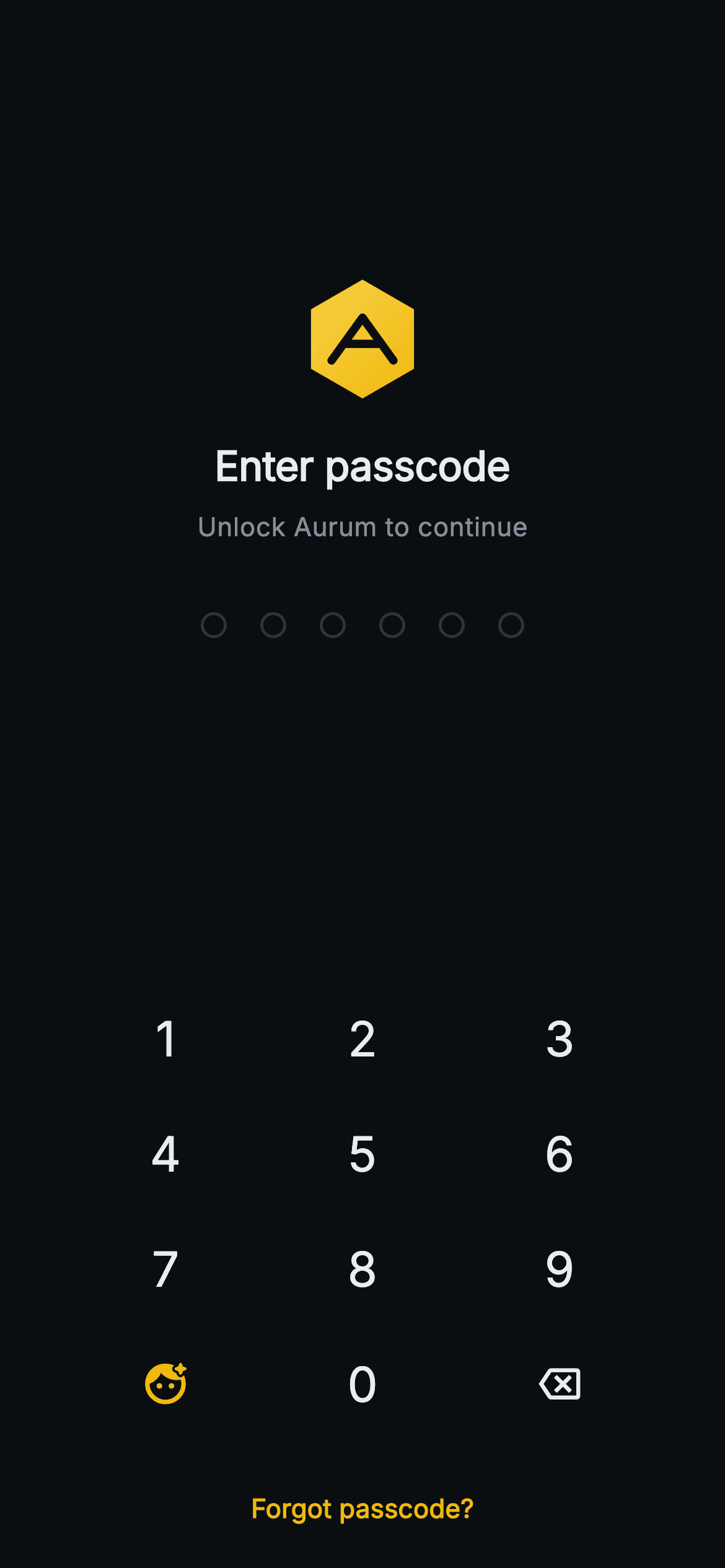
What you'll build
- ✓A six-dot passcode indicator that fills gold (#F0B90B) and recolours red (#F6465D) on a wrong code
- ✓A 4×3 numpad with digits, a Face ID key and backspace, built from Expanded InkWell circles with no pixel math
- ✓A damped sine-wave shake driven by a 420ms AnimationController and Transform.translate
- ✓A gold-gradient hexagon logo with a stencilled 'A', drawn by a CustomPainter with zero assets
- ✓A clean screen API — onUnlocked, onBiometric, onForgot, and a swappable expectedCode
Step-by-step build
Create the file
Add a new file at lib/web3_auth_lock/web3_auth_lock_screen.dart in your Flutter project.
Register the bundled fonts
No external packages — this is pure Flutter. It does bundle its design font (Inter), so drop the font file into fonts/ and declare it in pubspec.yaml:
flutter:
  fonts:
    - family: Inter
      fonts:
- asset: fonts/Inter-Regular.ttfBuild it, piece by piece
Here's how the screen goes together. Each block below is a real slice of the code with a plain-English explanation — paste them in order, or grab the whole file from the next section.
Three callbacks and a configurable code
import 'dart:math' as math;

import 'package:flutter/material.dart';

/// Web3 auth — Lock Screen. App logo, a 6-dot passcode driven by a painted
/// numpad, a "Use Face ID" shortcut and a forgot link; a wrong code shakes the
/// dots. Self-contained per CONVENTIONS.md: pure Flutter, bundled Inter font,
/// painted logo/numpad (no network image), forced dark theme so it renders
/// standalone as a route.
class Web3AuthLockScreen extends StatefulWidget {
  const Web3AuthLockScreen({
    super.key,
    this.onUnlocked,
    this.onBiometric,
    this.onForgot,
    this.expectedCode = '194726',
  });

  final VoidCallback? onUnlocked;
  final VoidCallback? onBiometric;
  final VoidCallback? onForgot;
  final String expectedCode;

  @override
  State<Web3AuthLockScreen> createState() => _Web3AuthLockScreenState();
}
`Web3AuthLockScreen` is a `StatefulWidget` because a lock screen accumulates input — the typed code and the error flag both live in state. Its public surface is three nullable callbacks plus one string: `onUnlocked` fires when six correct digits land, `onBiometric` when the Face ID key is tapped, `onForgot` from the bottom link, and `expectedCode` defaults to `'194726'` so the demo verifies out of the box. Keeping verification behind a plain string parameter means the widget never knows where the real code comes from — swap the literal for whatever your secure storage returns and nothing else changes. The `dart:math` import at the top is not decoration; it powers both the shake's sine wave and the hexagon's trigonometry later.
A Binance-flavoured palette and the shake controller
class _Web3AuthLockScreenState extends State<Web3AuthLockScreen>
    with SingleTickerProviderStateMixin {
  static const String _font = 'Inter';
  static const Color _bg = Color(0xFF0B0E11);
  static const Color _brand = Color(0xFFF0B90B);
  static const Color _down = Color(0xFFF6465D);
  static const Color _text = Color(0xFFEAECEF);
  static const Color _muted = Color(0xFF848E9C);

  String _code = '';
  bool _error = false;
  late final AnimationController _shake;

  @override
  void initState() {
    super.initState();
    _shake = AnimationController(
      vsync: this,
      duration: const Duration(milliseconds: 420),
    );
  }

  @override
  void dispose() {
    _shake.dispose();
    super.dispose();
  }
The state class mixes in `SingleTickerProviderStateMixin` for exactly one `AnimationController`: `_shake`, running 420ms — long enough to read as a head-shake, short enough not to delay the retry. The palette is five consts straight out of a trading app: near-black `#0B0E11` background, gold `#F0B90B` brand, `#EAECEF` text, `#848E9C` muted, and `_down` at `#F6465D` — named after the market's 'down' red rather than 'danger', which tells you the design system this screen belongs to. Mutable state is minimal: `_code` as a plain string that grows per keystroke, and `_error` as a flag the dots and message both read. The controller is disposed in `dispose`, the one cleanup a ticker mixin obliges you to do.
Digit handling: two guards and a post-frame unlock
  void _onDigit(String d) {
    if (_code.length >= 6 || _shake.isAnimating) return;
    setState(() {
      _error = false;
      _code += d;
    });
    if (_code.length == 6) {
      if (_code == widget.expectedCode) {
        WidgetsBinding.instance.addPostFrameCallback((_) {
          widget.onUnlocked?.call();
        });
      } else {
        setState(() => _error = true);
        _shake.forward(from: 0).then((_) {
          if (mounted) setState(() => _code = '');
        });
      }
    }
  }

  void _onBackspace() {
    if (_code.isEmpty) return;
    setState(() {
      _error = false;
      _code = _code.substring(0, _code.length - 1);
    });
  }
`_onDigit` opens with the line that makes the screen feel solid: `if (_code.length >= 6 || _shake.isAnimating) return;`. The second clause is the subtle one — while the shake is running the code is about to be wiped, so accepting keystrokes mid-shake would silently eat the first digits of the next attempt. Every accepted digit also clears `_error`, so the red state never lingers into fresh input. At six digits the comparison forks: a match calls `onUnlocked` inside `addPostFrameCallback`, deferring navigation until after the current build so a parent that pushes a route in that callback never triggers a mid-build error. A miss sets `_error`, runs `_shake.forward(from: 0)`, and only clears `_code` in the animation's `.then` — guarded by `mounted` — so the reader watches six red dots shake, then sees them empty. `_onBackspace` trims one character and clears the error, no-oping on an empty code.
The layout: spacers, a fixed error slot, and forced dark
  @override
  Widget build(BuildContext context) {
    return Theme(
      data: ThemeData.dark(useMaterial3: true),
      child: Scaffold(
        backgroundColor: _bg,
        body: SafeArea(
          child: Column(
            children: <Widget>[
              const Spacer(flex: 2),
              SizedBox(
                width: 64,
                height: 64,
                child: CustomPaint(painter: _LogoPainter()),
              ),
              const SizedBox(height: 20),
              const Text(
                'Enter passcode',
                style: TextStyle(
                  fontFamily: _font,
                  fontSize: 22,
                  fontWeight: FontWeight.w700,
                  letterSpacing: -0.2,
                  color: _text,
                ),
              ),
              const SizedBox(height: 8),
              const Text(
                'Unlock Aurum to continue',
                style: TextStyle(
                  fontFamily: _font,
                  fontSize: 14,
                  color: _muted,
                ),
              ),
              const SizedBox(height: 36),
              AnimatedBuilder(
                animation: _shake,
                builder: (BuildContext context, Widget? child) {
                  final double dx = _error
                      ? (1 - _shake.value) * 10 * math.sin(4 * 2 * math.pi * _shake.value)
                      : 0;
                  return Transform.translate(
                      offset: Offset(dx, 0), child: child);
                },
                child: _PasscodeDots(filled: _code.length, error: _error),
              ),
              const SizedBox(height: 14),
              SizedBox(
                height: 20,
                child: _error
                    ? const Text(
                        'Wrong passcode. Try again.',
                        style: TextStyle(
                          fontFamily: _font,
                          fontSize: 13,
                          fontWeight: FontWeight.w500,
                          color: _down,
                        ),
                      )
                    : null,
              ),
              const Spacer(flex: 2),
              _Numpad(
                onDigit: _onDigit,
                onBackspace: _onBackspace,
                onBiometric: widget.onBiometric,
              ),
              const SizedBox(height: 12),
              TextButton(
                onPressed: widget.onForgot,
                child: const Text(
                  'Forgot passcode?',
                  style: TextStyle(
                    fontFamily: _font,
                    fontSize: 14,
                    fontWeight: FontWeight.w600,
                    color: _brand,
                  ),
                ),
              ),
              const SizedBox(height: 8),
            ],
          ),
        ),
      ),
    );
  }
}
The whole screen is wrapped in `Theme(data: ThemeData.dark(useMaterial3: true))`, so it renders correctly as a standalone route even inside a light app — a lock screen should not inherit its host's theme. The column uses two `Spacer(flex: 2)` widgets to float the logo-and-dots group in the upper half while the numpad hugs the bottom where thumbs are. The 64px `CustomPaint` logo sits over 'Enter passcode' at 22px `w700` with `letterSpacing: -0.2` and the muted 'Unlock Aurum to continue' subline. The dots are wrapped in an `AnimatedBuilder` whose offset is `(1 - _shake.value) * 10 * math.sin(4 * 2 * math.pi * _shake.value)` — four full oscillations whose amplitude decays linearly from 10px to zero, a damped shake rather than a constant wobble, applied through `Transform.translate` so nothing relayouts. Below it, the error message lives inside a `SizedBox(height: 20)` that renders whether or not the text is showing: reserving the slot means 'Wrong passcode. Try again.' appears without shoving the numpad down. The gold 'Forgot passcode?' `TextButton` closes the column.
Six dots from one collection-for
class _PasscodeDots extends StatelessWidget {
  const _PasscodeDots({required this.filled, required this.error});

  final int filled;
  final bool error;

  static const Color _brand = Color(0xFFF0B90B);
  static const Color _down = Color(0xFFF6465D);
  static const Color _hairline = Color(0xFF2B3139);

  @override
  Widget build(BuildContext context) {
    final Color on = error ? _down : _brand;
    return Row(
      mainAxisAlignment: MainAxisAlignment.center,
      children: <Widget>[
        for (int i = 0; i < 6; i++)
          Container(
            margin: const EdgeInsets.symmetric(horizontal: 9),
            width: 14,
            height: 14,
            decoration: BoxDecoration(
              color: i < filled ? on : Colors.transparent,
              shape: BoxShape.circle,
              border: Border.all(
                color: i < filled ? on : _hairline,
                width: 1.6,
              ),
            ),
          ),
      ],
    );
  }
}
`_PasscodeDots` takes just `filled` and `error`, and resolves its active colour in one line: `final Color on = error ? _down : _brand;` — because the fill and the border both use `on`, flipping that single expression recolours the entire row red during a shake with no per-dot logic. Each of the six dots is a 14px `Container` circle with a 1.6px border and 9px horizontal margins: unfilled dots are transparent with a `#2B3139` hairline ring, filled ones paint the ring and the interior in the same colour so they read as solid. Driving `filled` from `_code.length` in the parent means the dots are pure output — they never touch the code itself.
The numpad is a table of strings
class _Numpad extends StatelessWidget {
  const _Numpad({
    required this.onDigit,
    required this.onBackspace,
    required this.onBiometric,
  });

  final ValueChanged<String> onDigit;
  final VoidCallback onBackspace;
  final VoidCallback? onBiometric;

  static const String _font = 'Inter';
  static const Color _text = Color(0xFFEAECEF);
  static const Color _brand = Color(0xFFF0B90B);

  @override
  Widget build(BuildContext context) {
    return Padding(
      padding: const EdgeInsets.symmetric(horizontal: 36),
      child: Column(
        mainAxisSize: MainAxisSize.min,
        children: <Widget>[
          for (final List<String> row in const <List<String>>[
            <String>['1', '2', '3'],
            <String>['4', '5', '6'],
            <String>['7', '8', '9'],
            <String>['face', '0', '<'],
          ])
            Row(
              children: <Widget>[
                for (final String k in row)
                  Expanded(
                    child: _Key(
                      label: k,
                      onTap: k == 'face'
                          ? onBiometric
                          : k == '<'
                              ? onBackspace
                              : () => onDigit(k),
                    ),
                  ),
              ],
            ),
        ],
      ),
    );
  }
}
`_Numpad` declares its layout as data — a `const List<List<String>>` of four rows, with `'face'` and `'<'` as sentinel labels sharing the grid with the digits. Two nested collection-fors turn that table into Rows of `Expanded` keys, so every key gets an equal third of the width and the pad scales to any phone without a single hard-coded key width; only the outer `EdgeInsets.symmetric(horizontal: 36)` shapes it. The routing lives in one nested ternary on `onTap`: `'face'` maps to `onBiometric`, `'<'` to `onBackspace`, anything else closes over its own digit with `() => onDigit(k)`. Because `onBiometric` is nullable, passing null simply gives the Face ID key a dead `InkWell` — the row renders identically whether or not biometrics are wired.
One key widget, three faces
class _Key extends StatelessWidget {
  const _Key({required this.label, required this.onTap});

  final String label;
  final VoidCallback? onTap;

  @override
  Widget build(BuildContext context) {
    return SizedBox(
      height: 62,
      child: Material(
        color: Colors.transparent,
        shape: const CircleBorder(),
        child: InkWell(
          customBorder: const CircleBorder(),
          onTap: onTap,
          child: Center(child: _content()),
        ),
      ),
    );
  }

  Widget _content() {
    switch (label) {
      case '<':
        return const Icon(Icons.backspace_outlined,
            size: 22, color: _Numpad._text);
      case 'face':
        return const Icon(Icons.face_retouching_natural_rounded,
            size: 26, color: _Numpad._brand);
      default:
        return Text(
          label,
          style: const TextStyle(
            fontFamily: _Numpad._font,
            fontSize: 26,
            fontWeight: FontWeight.w500,
            color: _Numpad._text,
          ),
        );
    }
  }
}
`_Key` is a 62px-tall `SizedBox` holding a transparent `Material` with `CircleBorder`, and an `InkWell` given the same `customBorder` — that pairing is what clips the ripple into a circle on an otherwise invisible key, the classic passcode-pad look without drawing any key background. `_content()` switches on the label string: `'<'` becomes `Icons.backspace_outlined` at 22px in the text colour, `'face'` becomes `Icons.face_retouching_natural_rounded` at 26px in brand gold — the only coloured key on the pad, which quietly marks it as the shortcut rather than an input — and digits render at 26px `w500` in Inter. Reusing one widget for all twelve keys keeps the tap target, ripple and sizing identical everywhere.
Painting the hexagon 'A' logo
class _LogoPainter extends CustomPainter {
  const _LogoPainter();

  Path _hex(Offset c, double r) {
    final Path p = Path();
    for (int i = 0; i < 6; i++) {
      final double a = (-90 + i * 60) * math.pi / 180;
      final double x = c.dx + r * math.cos(a);
      final double y = c.dy + r * math.sin(a);
      i == 0 ? p.moveTo(x, y) : p.lineTo(x, y);
    }
    return p..close();
  }

  @override
  void paint(Canvas canvas, Size size) {
    final Offset c = Offset(size.width / 2, size.height / 2);
    final double r = size.width / 2;
    canvas.drawPath(
      _hex(c, r),
      Paint()
        ..shader = const LinearGradient(
          begin: Alignment.topLeft,
          end: Alignment.bottomRight,
          colors: <Color>[Color(0xFFF7D14B), Color(0xFFF0B90B)],
        ).createShader(Rect.fromCircle(center: c, radius: r)),
    );
    final Paint mark = Paint()
      ..style = PaintingStyle.stroke
      ..strokeWidth = size.width * 0.07
      ..strokeCap = StrokeCap.round
      ..strokeJoin = StrokeJoin.round
      ..color = const Color(0xFF0B0E11);
    final double aw = size.width * 0.26;
    canvas.drawPath(
      Path()
        ..moveTo(c.dx - aw, c.dy + size.height * 0.18)
        ..lineTo(c.dx, c.dy - size.height * 0.18)
        ..lineTo(c.dx + aw, c.dy + size.height * 0.18),
      mark,
    );
    canvas.drawLine(
      Offset(c.dx - aw * 0.5, c.dy + size.height * 0.04),
      Offset(c.dx + aw * 0.5, c.dy + size.height * 0.04),
      mark,
    );
  }

  @override
  bool shouldRepaint(_LogoPainter oldDelegate) => false;
}
`_LogoPainter` builds the hexagon from trigonometry: `_hex` walks six points at `-90 + i * 60` degrees, the -90 offset rotating the shape so a vertex points straight up instead of a flat edge. The fill is a `LinearGradient` shader from `#F7D14B` to `#F0B90B`, top-left to bottom-right, so the gold catches light instead of sitting flat. The 'A' is not text — it is two stroked paths in the background colour `#0B0E11`, a chevron rising to 18% above centre plus a crossbar drawn 4% below centre at half the chevron's width, stroked at 7% of the widget's width with round caps and joins. Painting the mark in the page background makes it read as stencilled through the gold rather than printed on top. Every coordinate is a fraction of `size`, so the same painter is sharp at 64px or at an app-icon 1024px, and `shouldRepaint` returns `false` because nothing here ever changes.
Full code
The complete, ready-to-paste source. Free to use in your projects — one click copies it all.
import 'dart:math' as math;

import 'package:flutter/material.dart';

/// Web3 auth — Lock Screen. App logo, a 6-dot passcode driven by a painted
/// numpad, a "Use Face ID" shortcut and a forgot link; a wrong code shakes the
/// dots. Self-contained per CONVENTIONS.md: pure Flutter, bundled Inter font,
/// painted logo/numpad (no network image), forced dark theme so it renders
/// standalone as a route.
class Web3AuthLockScreen extends StatefulWidget {
  const Web3AuthLockScreen({
    super.key,
    this.onUnlocked,
    this.onBiometric,
    this.onForgot,
    this.expectedCode = '194726',
  });

  final VoidCallback? onUnlocked;
  final VoidCallback? onBiometric;
  final VoidCallback? onForgot;
  final String expectedCode;

  @override
  State<Web3AuthLockScreen> createState() => _Web3AuthLockScreenState();
}

class _Web3AuthLockScreenState extends State<Web3AuthLockScreen>
    with SingleTickerProviderStateMixin {
  static const String _font = 'Inter';
  static const Color _bg = Color(0xFF0B0E11);
  static const Color _brand = Color(0xFFF0B90B);
  static const Color _down = Color(0xFFF6465D);
  static const Color _text = Color(0xFFEAECEF);
  static const Color _muted = Color(0xFF848E9C);

  String _code = '';
  bool _error = false;
  late final AnimationController _shake;

  @override
  void initState() {
    super.initState();
    _shake = AnimationController(
      vsync: this,
      duration: const Duration(milliseconds: 420),
    );
  }

  @override
  void dispose() {
    _shake.dispose();
    super.dispose();
  }

  void _onDigit(String d) {
    if (_code.length >= 6 || _shake.isAnimating) return;
    setState(() {
      _error = false;
      _code += d;
    });
    if (_code.length == 6) {
      if (_code == widget.expectedCode) {
        WidgetsBinding.instance.addPostFrameCallback((_) {
          widget.onUnlocked?.call();
        });
      } else {
        setState(() => _error = true);
        _shake.forward(from: 0).then((_) {
          if (mounted) setState(() => _code = '');
        });
      }
    }
  }

  void _onBackspace() {
    if (_code.isEmpty) return;
    setState(() {
      _error = false;
      _code = _code.substring(0, _code.length - 1);
    });
  }

  @override
  Widget build(BuildContext context) {
    return Theme(
      data: ThemeData.dark(useMaterial3: true),
      child: Scaffold(
        backgroundColor: _bg,
        body: SafeArea(
          child: Column(
            children: <Widget>[
              const Spacer(flex: 2),
              SizedBox(
                width: 64,
                height: 64,
                child: CustomPaint(painter: _LogoPainter()),
              ),
              const SizedBox(height: 20),
              const Text(
                'Enter passcode',
                style: TextStyle(
                  fontFamily: _font,
                  fontSize: 22,
                  fontWeight: FontWeight.w700,
                  letterSpacing: -0.2,
                  color: _text,
                ),
              ),
              const SizedBox(height: 8),
              const Text(
                'Unlock Aurum to continue',
                style: TextStyle(
                  fontFamily: _font,
                  fontSize: 14,
                  color: _muted,
                ),
              ),
              const SizedBox(height: 36),
              AnimatedBuilder(
                animation: _shake,
                builder: (BuildContext context, Widget? child) {
                  final double dx = _error
                      ? (1 - _shake.value) * 10 * math.sin(4 * 2 * math.pi * _shake.value)
                      : 0;
                  return Transform.translate(
                      offset: Offset(dx, 0), child: child);
                },
                child: _PasscodeDots(filled: _code.length, error: _error),
              ),
              const SizedBox(height: 14),
              SizedBox(
                height: 20,
                child: _error
                    ? const Text(
                        'Wrong passcode. Try again.',
                        style: TextStyle(
                          fontFamily: _font,
                          fontSize: 13,
                          fontWeight: FontWeight.w500,
                          color: _down,
                        ),
                      )
                    : null,
              ),
              const Spacer(flex: 2),
              _Numpad(
                onDigit: _onDigit,
                onBackspace: _onBackspace,
                onBiometric: widget.onBiometric,
              ),
              const SizedBox(height: 12),
              TextButton(
                onPressed: widget.onForgot,
                child: const Text(
                  'Forgot passcode?',
                  style: TextStyle(
                    fontFamily: _font,
                    fontSize: 14,
                    fontWeight: FontWeight.w600,
                    color: _brand,
                  ),
                ),
              ),
              const SizedBox(height: 8),
            ],
          ),
        ),
      ),
    );
  }
}

class _PasscodeDots extends StatelessWidget {
  const _PasscodeDots({required this.filled, required this.error});

  final int filled;
  final bool error;

  static const Color _brand = Color(0xFFF0B90B);
  static const Color _down = Color(0xFFF6465D);
  static const Color _hairline = Color(0xFF2B3139);

  @override
  Widget build(BuildContext context) {
    final Color on = error ? _down : _brand;
    return Row(
      mainAxisAlignment: MainAxisAlignment.center,
      children: <Widget>[
        for (int i = 0; i < 6; i++)
          Container(
            margin: const EdgeInsets.symmetric(horizontal: 9),
            width: 14,
            height: 14,
            decoration: BoxDecoration(
              color: i < filled ? on : Colors.transparent,
              shape: BoxShape.circle,
              border: Border.all(
                color: i < filled ? on : _hairline,
                width: 1.6,
              ),
            ),
          ),
      ],
    );
  }
}

class _Numpad extends StatelessWidget {
  const _Numpad({
    required this.onDigit,
    required this.onBackspace,
    required this.onBiometric,
  });

  final ValueChanged<String> onDigit;
  final VoidCallback onBackspace;
  final VoidCallback? onBiometric;

  static const String _font = 'Inter';
  static const Color _text = Color(0xFFEAECEF);
  static const Color _brand = Color(0xFFF0B90B);

  @override
  Widget build(BuildContext context) {
    return Padding(
      padding: const EdgeInsets.symmetric(horizontal: 36),
      child: Column(
        mainAxisSize: MainAxisSize.min,
        children: <Widget>[
          for (final List<String> row in const <List<String>>[
            <String>['1', '2', '3'],
            <String>['4', '5', '6'],
            <String>['7', '8', '9'],
            <String>['face', '0', '<'],
          ])
            Row(
              children: <Widget>[
                for (final String k in row)
                  Expanded(
                    child: _Key(
                      label: k,
                      onTap: k == 'face'
                          ? onBiometric
                          : k == '<'
                              ? onBackspace
                              : () => onDigit(k),
                    ),
                  ),
              ],
            ),
        ],
      ),
    );
  }
}

class _Key extends StatelessWidget {
  const _Key({required this.label, required this.onTap});

  final String label;
  final VoidCallback? onTap;

  @override
  Widget build(BuildContext context) {
    return SizedBox(
      height: 62,
      child: Material(
        color: Colors.transparent,
        shape: const CircleBorder(),
        child: InkWell(
          customBorder: const CircleBorder(),
          onTap: onTap,
          child: Center(child: _content()),
        ),
      ),
    );
  }

  Widget _content() {
    switch (label) {
      case '<':
        return const Icon(Icons.backspace_outlined,
            size: 22, color: _Numpad._text);
      case 'face':
        return const Icon(Icons.face_retouching_natural_rounded,
            size: 26, color: _Numpad._brand);
      default:
        return Text(
          label,
          style: const TextStyle(
            fontFamily: _Numpad._font,
            fontSize: 26,
            fontWeight: FontWeight.w500,
            color: _Numpad._text,
          ),
        );
    }
  }
}

class _LogoPainter extends CustomPainter {
  const _LogoPainter();

  Path _hex(Offset c, double r) {
    final Path p = Path();
    for (int i = 0; i < 6; i++) {
      final double a = (-90 + i * 60) * math.pi / 180;
      final double x = c.dx + r * math.cos(a);
      final double y = c.dy + r * math.sin(a);
      i == 0 ? p.moveTo(x, y) : p.lineTo(x, y);
    }
    return p..close();
  }

  @override
  void paint(Canvas canvas, Size size) {
    final Offset c = Offset(size.width / 2, size.height / 2);
    final double r = size.width / 2;
    canvas.drawPath(
      _hex(c, r),
      Paint()
        ..shader = const LinearGradient(
          begin: Alignment.topLeft,
          end: Alignment.bottomRight,
          colors: <Color>[Color(0xFFF7D14B), Color(0xFFF0B90B)],
        ).createShader(Rect.fromCircle(center: c, radius: r)),
    );
    final Paint mark = Paint()
      ..style = PaintingStyle.stroke
      ..strokeWidth = size.width * 0.07
      ..strokeCap = StrokeCap.round
      ..strokeJoin = StrokeJoin.round
      ..color = const Color(0xFF0B0E11);
    final double aw = size.width * 0.26;
    canvas.drawPath(
      Path()
        ..moveTo(c.dx - aw, c.dy + size.height * 0.18)
        ..lineTo(c.dx, c.dy - size.height * 0.18)
        ..lineTo(c.dx + aw, c.dy + size.height * 0.18),
      mark,
    );
    canvas.drawLine(
      Offset(c.dx - aw * 0.5, c.dy + size.height * 0.04),
      Offset(c.dx + aw * 0.5, c.dy + size.height * 0.04),
      mark,
    );
  }

  @override
  bool shouldRepaint(_LogoPainter oldDelegate) => false;
}
Plus bundled 1 binary asset (fonts/images). The CLI and MCP install those for you automatically.
Two faster ways to add it
Copy-paste works, but you can skip it entirely.
1. FlutterKit CLI
One command drops this screen — and its fonts — straight into your project.
$ flutterkit add web3-auth-lock2. AI agent (MCP)
Connect FlutterKit's MCP server in Claude or Cursor and just ask your agent to install web3-auth-lock — it fetches and writes the files for you.
FAQ
Is this wallet lock screen free to use commercially?
Yes — completely free, including in commercial and client apps. Copy the code from this page, install it via the CLI command, or pull it through MCP; there is no licence key, no attribution requirement, and no paid tier behind it.
Does this screen need any packages or icon assets?
No. It is pure Flutter — `material.dart` plus `dart:math`, nothing from pub.dev. The hexagon logo and the numpad are drawn in code, and the typography uses the Inter font file that ships alongside the screen at `lib/web3_auth_lock/fonts/Inter.ttf`, so nothing is fetched at runtime.
Which Flutter version does this require?
It targets Flutter 3.22+, in line with the rest of the library, though the only modern syntax here is super parameters (`super.key`), which work from Flutter 3.0. There is no `Color.withValues` in this file, so no `withOpacity` swap is needed on older SDKs — at most, expand the constructors to the `{Key? key} : super(key: key)` form for very old projects.
How do I verify against a real stored passcode instead of the hard-coded one?
Pass the user's code into `expectedCode` — for example from `flutter_secure_storage` — and the comparison in `_onDigit` just works. For production, prefer storing a salted hash rather than the raw code: hash the six typed digits and compare hashes, which means changing one line (`_code == widget.expectedCode`) rather than the widget's structure. Rate-limiting after repeated failures also belongs in that branch.
How do I make the Face ID key actually trigger biometrics?
The gold face icon just invokes `onBiometric`, so wire that callback to the `local_auth` package: call `LocalAuthentication().authenticate(...)` and, on success, run the same routine you pass to `onUnlocked`. Because the callback is nullable, you can pass null on devices without biometrics and the key simply does nothing — or swap the key's label out of the `_Numpad` row data entirely.


