How to Build a Fingerprint Scan Unlock Screen in Flutter (Full Code + Preview)
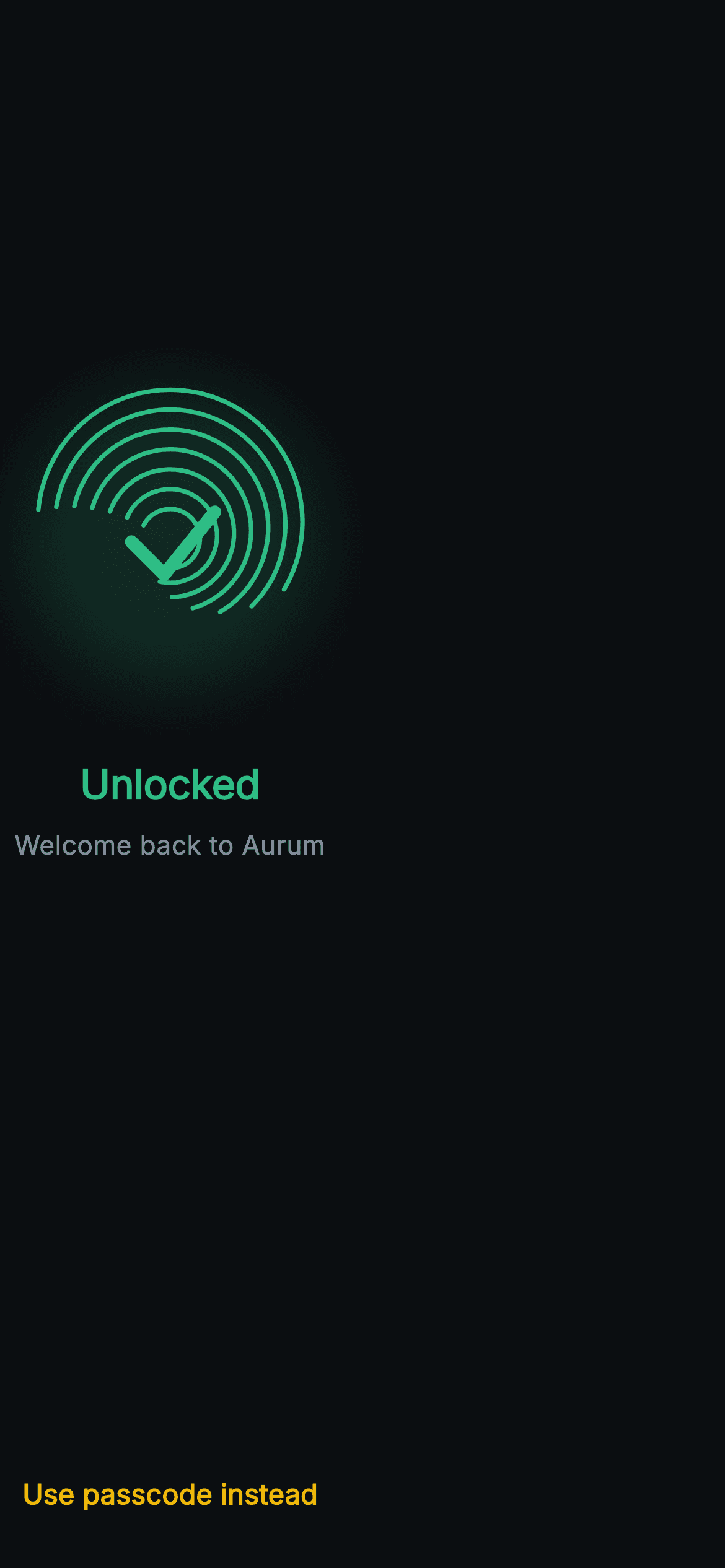
The second between touching the sensor and seeing your wallet feels long unless the screen shows something happening. This tutorial builds Aurum's fingerprint unlock screen in Flutter: seven painted ridge arcs that fill gold behind a rising scan line, a green halo and tick when the scan completes, copy that swaps from Scanning to Unlocked, and a passcode fallback that is always one tap away. One AnimationController, one cancellable Timer and one CustomPainter carry the whole thing.
What you'll build
- ✓A fingerprint drawn from seven offset arcs whose radius, start angle and sweep all change with the ring index
- ✓A bottom-to-top scan fill made by painting the ridges twice and clipping the gold copy below a moving line
- ✓A success state that swaps the gold fill for a blurred green halo, green ridges and a 7px rounded tick
- ✓A status listener that holds the tick on screen for 650ms before firing onUnlocked, with the Timer cancelled in dispose
- ✓A 'Use passcode instead' fallback that stays live during the scan so nobody is stuck waiting on the sensor
Step-by-step build
Create the file
Add a new file at lib/web3_auth_biometric_prompt/web3_auth_biometric_prompt_screen.dart in your Flutter project.
Register the bundled fonts
No external packages — this is pure Flutter. It does bundle its design font (Inter), so drop the font file into fonts/ and declare it in pubspec.yaml:
flutter:
  fonts:
    - family: Inter
      fonts:
- asset: fonts/Inter-Regular.ttfBuild it, piece by piece
Here's how the screen goes together. Each block below is a real slice of the code with a plain-English explanation — paste them in order, or grab the whole file from the next section.
Two exits and the three pieces of state
import 'dart:async';
import 'dart:math' as math;

import 'package:flutter/material.dart';

/// Web3 auth — Biometric Unlock. A full-screen painted fingerprint that fills
/// from the bottom as it "scans", flipping to a success tick before unlocking.
/// Self-contained per CONVENTIONS.md: pure Flutter, bundled Inter font, all
/// graphics custom-painted (no network image), forced dark theme so it renders
/// standalone as a route.
class Web3AuthBiometricPromptScreen extends StatefulWidget {
  const Web3AuthBiometricPromptScreen({
    super.key,
    this.onUnlocked,
    this.onUsePasscode,
  });

  final VoidCallback? onUnlocked;
  final VoidCallback? onUsePasscode;

  @override
  State<Web3AuthBiometricPromptScreen> createState() =>
      _Web3AuthBiometricPromptScreenState();
}

class _Web3AuthBiometricPromptScreenState
    extends State<Web3AuthBiometricPromptScreen>
    with SingleTickerProviderStateMixin {
  static const String _font = 'Inter';
  static const Color _bg = Color(0xFF0B0E11);
  static const Color _brand = Color(0xFFF0B90B);
  static const Color _up = Color(0xFF2EBD85);
  static const Color _text = Color(0xFFEAECEF);
  static const Color _muted = Color(0xFF848E9C);

  late final AnimationController _scan;
  Timer? _unlockTimer;
  bool _done = false;
The public API is just `onUnlocked` and `onUsePasscode`, both nullable `VoidCallback`s — the screen decides nothing about routing, it only reports which way the user left. `dart:async` is imported for `Timer` and `dart:math` for the painter's `math.pi`. The state mixes in `SingleTickerProviderStateMixin` because exactly one controller exists, `_scan`. Alongside it sit `_unlockTimer`, nullable so it can be cancelled before it is ever created, and `_done`, the single boolean that flips every visual on the page from scanning to success. Only five colours are declared; the important pairing here is gold `_brand` for in-progress and green `_up` for verified.
A status listener that pauses on success
  @override
  void initState() {
    super.initState();
    _scan = AnimationController(
      vsync: this,
      duration: const Duration(milliseconds: 1700),
    )..addStatusListener((AnimationStatus s) {
        if (s == AnimationStatus.completed) {
          setState(() => _done = true);
          _unlockTimer?.cancel();
          _unlockTimer = Timer(const Duration(milliseconds: 650), () {
            if (mounted) widget.onUnlocked?.call();
          });
        }
      });
    _start();
  }

  void _start() {
    setState(() => _done = false);
    _scan.forward(from: 0);
  }

  @override
  void dispose() {
    _unlockTimer?.cancel();
    _scan.dispose();
    super.dispose();
  }
`_scan` runs for 1700ms and has its listener attached with a cascade straight on the constructor. When the status hits `completed` it sets `_done`, then schedules a 650ms `Timer` before calling `widget.onUnlocked`. That delay is the point of the success state: navigating the instant the fill tops out would mean the green tick is never seen, and the user loses the confirmation that the scan worked. The callback is guarded with `if (mounted)` because the passcode button could have popped the route during those 650ms, and `_unlockTimer?.cancel()` runs both before rescheduling and in `dispose()`, so a stale timer can never fire into a dead screen. `_start()` resets `_done` and calls `forward(from: 0)`, making a re-scan a single call.
Layout and the tap guard on the print
  @override
  Widget build(BuildContext context) {
    return Theme(
      data: ThemeData.dark(useMaterial3: true),
      child: Scaffold(
        backgroundColor: _bg,
        body: SafeArea(
          child: Column(
            children: <Widget>[
              const Spacer(flex: 2),
              GestureDetector(
                onTap: _scan.isAnimating || _done ? null : _start,
                child: SizedBox(
                  width: 160,
                  height: 160,
                  child: AnimatedBuilder(
                    animation: _scan,
                    builder: (BuildContext context, Widget? child) {
                      return CustomPaint(
                        painter: _FingerprintPainter(
                          progress: _scan.value,
                          done: _done,
                        ),
                      );
                    },
                  ),
                ),
              ),
The column splits its free space with `Spacer(flex: 2)` above and `Spacer(flex: 3)` below, so the 160px print sits a little above centre, where the eye lands first. Only the `CustomPaint` lives inside `AnimatedBuilder`, so each animation tick repaints the fingerprint without rebuilding the text or button. The `GestureDetector` reads `onTap: _scan.isAnimating || _done ? null : _start`. Be aware of what that means in the shipped flow: the scan starts in `initState` and ends with `_done` true, so the guard keeps the tap disabled the whole time. Tap-to-rescan only becomes reachable once you add a failure path that stops the controller without setting `_done`.
Copy that follows _done, and the passcode fallback
              const SizedBox(height: 36),
              Text(
                _done ? 'Unlocked' : 'Scanning…',
                style: TextStyle(
                  fontFamily: _font,
                  fontSize: 22,
                  fontWeight: FontWeight.w700,
                  letterSpacing: -0.2,
                  color: _done ? _up : _text,
                ),
              ),
              const SizedBox(height: 8),
              Text(
                _done
                    ? 'Welcome back to Aurum'
                    : 'Hold still while we verify your fingerprint',
                textAlign: TextAlign.center,
                style: const TextStyle(
                  fontFamily: _font,
                  fontSize: 14,
                  color: _muted,
                ),
              ),
              const Spacer(flex: 3),
              SizedBox(
                height: 48,
                child: TextButton(
                  onPressed: widget.onUsePasscode,
                  child: const Text(
                    'Use passcode instead',
                    style: TextStyle(
                      fontFamily: _font,
                      fontSize: 15,
                      fontWeight: FontWeight.w600,
                      color: _brand,
                    ),
                  ),
                ),
              ),
              const SizedBox(height: 16),
            ],
          ),
        ),
      ),
    );
  }
}
Both text lines are ternaries on the same flag: 'Scanning…' over 'Hold still while we verify your fingerprint', then 'Unlocked' over 'Welcome back to Aurum'. The 22px `w700` title also changes colour from `_text` to `_up`, so the green tick and the green word confirm each other. The subtitle is `TextAlign.center` because the instruction wraps on narrow phones. The fallback is a plain `TextButton` in a 48px `SizedBox`, gold at 15px `w600`, and its `onPressed` ignores `_done` and the controller entirely. That is deliberate: someone wearing gloves or with a wet finger should be able to bail out mid-scan rather than wait for the animation. Pass null for `onUsePasscode` and Flutter renders it disabled.
The success frame: halo, green ridges and a tick
class _FingerprintPainter extends CustomPainter {
  const _FingerprintPainter({required this.progress, required this.done});

  final double progress;
  final bool done;

  static const Color _brand = Color(0xFFF0B90B);
  static const Color _up = Color(0xFF2EBD85);
  static const Color _idle = Color(0xFF2B3139);

  @override
  void paint(Canvas canvas, Size size) {
    final Offset c = Offset(size.width / 2, size.height / 2);
    final double maxR = size.width / 2;

    if (done) {
      // Filled disc + check.
      canvas.drawCircle(
        c,
        maxR,
        Paint()
          ..color = _up.withValues(alpha: 0.16)
          ..maskFilter = const MaskFilter.blur(BlurStyle.normal, 18),
      );
      _drawRidges(canvas, c, maxR, 1, _up);
      final Paint tick = Paint()
        ..style = PaintingStyle.stroke
        ..strokeWidth = 7
        ..strokeCap = StrokeCap.round
        ..strokeJoin = StrokeJoin.round
        ..color = _up;
      canvas.drawPath(
        Path()
          ..moveTo(c.dx - maxR * 0.26, c.dy + maxR * 0.02)
          ..lineTo(c.dx - maxR * 0.04, c.dy + maxR * 0.24)
          ..lineTo(c.dx + maxR * 0.30, c.dy - maxR * 0.18),
        tick,
      );
      return;
    }
`_FingerprintPainter` takes only `progress` and `done`, and checks `done` first so the success frame can return early without drawing the scan line. It paints a full-size disc in `_up.withValues(alpha: 0.16)` with `MaskFilter.blur(BlurStyle.normal, 18)`, which turns a hard circle into a soft green glow behind the print. The ridges are then redrawn in solid `_up`, and the tick is a three-point `Path` — down-left, bottom, up-right — with every coordinate a fraction of `maxR`, so it scales with the 160px box. A 7px stroke with round caps and joins makes it heavier than the 2.4px ridges, so it reads as the foreground mark rather than another line in the print.
The scan fill as a clip, not as maths
    // Idle ridges (full), then brand-coloured fill up to the scan line.
    _drawRidges(canvas, c, maxR, 1, _idle);

    final double lineY = c.dy + maxR - 2 * maxR * progress;
    canvas.save();
    canvas.clipRect(Rect.fromLTWH(0, lineY, size.width, size.height - lineY));
    _drawRidges(canvas, c, maxR, 1, _brand);
    canvas.restore();

    // Scan line.
    canvas.drawRect(
      Rect.fromLTWH(c.dx - maxR, lineY - 1, maxR * 2, 2),
      Paint()
        ..shader = const LinearGradient(
          colors: <Color>[Color(0x00F0B90B), _brand, Color(0x00F0B90B)],
        ).createShader(Rect.fromLTWH(c.dx - maxR, lineY, maxR * 2, 2)),
    );
  }
Filling arcs partially would mean computing where each one crosses a horizontal line. The painter avoids that: it draws all seven ridges in idle slate `#2B3139`, then `save()`, `clipRect` to everything below `lineY`, draws the ridges again in gold and `restore()`. The gold copy is visible only under the line, so the fill tracks it exactly. `lineY = c.dy + maxR - 2 * maxR * progress` moves from the bottom edge at 0 to the top edge at 1. The controller has no curve, so the line climbs at a constant rate like a hardware sensor. The line itself is a 2px rect with a horizontal gradient from transparent gold to `_brand` and back, so it fades out at both ends.
Seven arcs that read as a fingerprint
  /// A stylised fingerprint: concentric arcs of varying radius/sweep.
  void _drawRidges(Canvas canvas, Offset c, double maxR, double t, Color color) {
    final Paint p = Paint()
      ..style = PaintingStyle.stroke
      ..strokeWidth = 2.4
      ..strokeCap = StrokeCap.round
      ..color = color;
    for (int i = 0; i < 7; i++) {
      final double r = maxR * (0.2 + i * 0.115);
      final double start = -math.pi * (0.85 + i * 0.02);
      final double sweep = math.pi * (1.5 - i * 0.06);
      canvas.drawArc(
        Rect.fromCircle(center: c.translate(0, -i * 1.5), radius: r),
        start,
        sweep,
        false,
        p,
      );
    }
  }

  @override
  bool shouldRepaint(_FingerprintPainter oldDelegate) =>
      oldDelegate.progress != progress || oldDelegate.done != done;
}
`_drawRidges` loops seven times with one 2.4px round-capped stroke. Each ring's radius is `maxR * (0.2 + i * 0.115)`, from 20% to 89% of the half-width. The start angle drifts from `-0.85π` to `-0.97π` and the sweep shrinks from `1.5π` (270°) to `1.14π`, so inner rings almost close while outer ones leave a wide opening along the bottom, like the open base of a real print. Each centre is also nudged up by `i * 1.5` pixels, which breaks perfect concentricity into a whorl. The `t` parameter is passed as 1 everywhere and never read, so treat it as a leftover hook. `shouldRepaint` compares `progress` and `done`, the only two inputs.
Full code
The complete, ready-to-paste source. Free to use in your projects — one click copies it all.
import 'dart:async';
import 'dart:math' as math;

import 'package:flutter/material.dart';

/// Web3 auth — Biometric Unlock. A full-screen painted fingerprint that fills
/// from the bottom as it "scans", flipping to a success tick before unlocking.
/// Self-contained per CONVENTIONS.md: pure Flutter, bundled Inter font, all
/// graphics custom-painted (no network image), forced dark theme so it renders
/// standalone as a route.
class Web3AuthBiometricPromptScreen extends StatefulWidget {
  const Web3AuthBiometricPromptScreen({
    super.key,
    this.onUnlocked,
    this.onUsePasscode,
  });

  final VoidCallback? onUnlocked;
  final VoidCallback? onUsePasscode;

  @override
  State<Web3AuthBiometricPromptScreen> createState() =>
      _Web3AuthBiometricPromptScreenState();
}

class _Web3AuthBiometricPromptScreenState
    extends State<Web3AuthBiometricPromptScreen>
    with SingleTickerProviderStateMixin {
  static const String _font = 'Inter';
  static const Color _bg = Color(0xFF0B0E11);
  static const Color _brand = Color(0xFFF0B90B);
  static const Color _up = Color(0xFF2EBD85);
  static const Color _text = Color(0xFFEAECEF);
  static const Color _muted = Color(0xFF848E9C);

  late final AnimationController _scan;
  Timer? _unlockTimer;
  bool _done = false;

  @override
  void initState() {
    super.initState();
    _scan = AnimationController(
      vsync: this,
      duration: const Duration(milliseconds: 1700),
    )..addStatusListener((AnimationStatus s) {
        if (s == AnimationStatus.completed) {
          setState(() => _done = true);
          _unlockTimer?.cancel();
          _unlockTimer = Timer(const Duration(milliseconds: 650), () {
            if (mounted) widget.onUnlocked?.call();
          });
        }
      });
    _start();
  }

  void _start() {
    setState(() => _done = false);
    _scan.forward(from: 0);
  }

  @override
  void dispose() {
    _unlockTimer?.cancel();
    _scan.dispose();
    super.dispose();
  }

  @override
  Widget build(BuildContext context) {
    return Theme(
      data: ThemeData.dark(useMaterial3: true),
      child: Scaffold(
        backgroundColor: _bg,
        body: SafeArea(
          child: Column(
            children: <Widget>[
              const Spacer(flex: 2),
              GestureDetector(
                onTap: _scan.isAnimating || _done ? null : _start,
                child: SizedBox(
                  width: 160,
                  height: 160,
                  child: AnimatedBuilder(
                    animation: _scan,
                    builder: (BuildContext context, Widget? child) {
                      return CustomPaint(
                        painter: _FingerprintPainter(
                          progress: _scan.value,
                          done: _done,
                        ),
                      );
                    },
                  ),
                ),
              ),
              const SizedBox(height: 36),
              Text(
                _done ? 'Unlocked' : 'Scanning…',
                style: TextStyle(
                  fontFamily: _font,
                  fontSize: 22,
                  fontWeight: FontWeight.w700,
                  letterSpacing: -0.2,
                  color: _done ? _up : _text,
                ),
              ),
              const SizedBox(height: 8),
              Text(
                _done
                    ? 'Welcome back to Aurum'
                    : 'Hold still while we verify your fingerprint',
                textAlign: TextAlign.center,
                style: const TextStyle(
                  fontFamily: _font,
                  fontSize: 14,
                  color: _muted,
                ),
              ),
              const Spacer(flex: 3),
              SizedBox(
                height: 48,
                child: TextButton(
                  onPressed: widget.onUsePasscode,
                  child: const Text(
                    'Use passcode instead',
                    style: TextStyle(
                      fontFamily: _font,
                      fontSize: 15,
                      fontWeight: FontWeight.w600,
                      color: _brand,
                    ),
                  ),
                ),
              ),
              const SizedBox(height: 16),
            ],
          ),
        ),
      ),
    );
  }
}

class _FingerprintPainter extends CustomPainter {
  const _FingerprintPainter({required this.progress, required this.done});

  final double progress;
  final bool done;

  static const Color _brand = Color(0xFFF0B90B);
  static const Color _up = Color(0xFF2EBD85);
  static const Color _idle = Color(0xFF2B3139);

  @override
  void paint(Canvas canvas, Size size) {
    final Offset c = Offset(size.width / 2, size.height / 2);
    final double maxR = size.width / 2;

    if (done) {
      // Filled disc + check.
      canvas.drawCircle(
        c,
        maxR,
        Paint()
          ..color = _up.withValues(alpha: 0.16)
          ..maskFilter = const MaskFilter.blur(BlurStyle.normal, 18),
      );
      _drawRidges(canvas, c, maxR, 1, _up);
      final Paint tick = Paint()
        ..style = PaintingStyle.stroke
        ..strokeWidth = 7
        ..strokeCap = StrokeCap.round
        ..strokeJoin = StrokeJoin.round
        ..color = _up;
      canvas.drawPath(
        Path()
          ..moveTo(c.dx - maxR * 0.26, c.dy + maxR * 0.02)
          ..lineTo(c.dx - maxR * 0.04, c.dy + maxR * 0.24)
          ..lineTo(c.dx + maxR * 0.30, c.dy - maxR * 0.18),
        tick,
      );
      return;
    }

    // Idle ridges (full), then brand-coloured fill up to the scan line.
    _drawRidges(canvas, c, maxR, 1, _idle);

    final double lineY = c.dy + maxR - 2 * maxR * progress;
    canvas.save();
    canvas.clipRect(Rect.fromLTWH(0, lineY, size.width, size.height - lineY));
    _drawRidges(canvas, c, maxR, 1, _brand);
    canvas.restore();

    // Scan line.
    canvas.drawRect(
      Rect.fromLTWH(c.dx - maxR, lineY - 1, maxR * 2, 2),
      Paint()
        ..shader = const LinearGradient(
          colors: <Color>[Color(0x00F0B90B), _brand, Color(0x00F0B90B)],
        ).createShader(Rect.fromLTWH(c.dx - maxR, lineY, maxR * 2, 2)),
    );
  }

  /// A stylised fingerprint: concentric arcs of varying radius/sweep.
  void _drawRidges(Canvas canvas, Offset c, double maxR, double t, Color color) {
    final Paint p = Paint()
      ..style = PaintingStyle.stroke
      ..strokeWidth = 2.4
      ..strokeCap = StrokeCap.round
      ..color = color;
    for (int i = 0; i < 7; i++) {
      final double r = maxR * (0.2 + i * 0.115);
      final double start = -math.pi * (0.85 + i * 0.02);
      final double sweep = math.pi * (1.5 - i * 0.06);
      canvas.drawArc(
        Rect.fromCircle(center: c.translate(0, -i * 1.5), radius: r),
        start,
        sweep,
        false,
        p,
      );
    }
  }

  @override
  bool shouldRepaint(_FingerprintPainter oldDelegate) =>
      oldDelegate.progress != progress || oldDelegate.done != done;
}
Plus bundled 1 binary asset (fonts/images). The CLI and MCP install those for you automatically.
Two faster ways to add it
Copy-paste works, but you can skip it entirely.
1. FlutterKit CLI
One command drops this screen — and its fonts — straight into your project.
$ flutterkit add web3-auth-biometric-prompt2. AI agent (MCP)
Connect FlutterKit's MCP server in Claude or Cursor and just ask your agent to install web3-auth-biometric-prompt — it fetches and writes the files for you.
FAQ
Can I ship this fingerprint unlock screen in a paid or client app?
Yes. It is free for any project, commercial included. Copy the file from this page, add it with the CLI command, or fetch it over MCP. There is no licence key to enter and no credit line to add to your app.
Does this actually read the fingerprint sensor?
No. The scan is a fixed 1700ms animation that always ends in success; there is no biometric call and no failure state in the code. To make it real, call `LocalAuthentication().authenticate(...)` from the `local_auth` package in `initState`, run `_scan.repeat()` while you wait, and on success `forward()` to the tick. On failure, `stop()` and `reset()` the controller and show an error line. Because `_done` stays false, the tap guard then re-enables tap-to-rescan.
Why wait 650ms before calling onUnlocked instead of unlocking immediately?
So the success state is actually seen. Without the delay the route would change on the same frame the ridges turn green, and the tick and 'Unlocked' copy would never appear. 650ms is long enough to register the confirmation and short enough not to feel like a hold-up. The Timer is cancelled in `dispose()`, so leaving early through the passcode button never triggers a late unlock.
Which packages and fonts does it need?
None from pub.dev — just `material.dart`, `dart:async` and `dart:math`. The fingerprint, scan line, halo and tick are all drawn by one `CustomPainter`. Text uses Inter, referenced as `fontFamily: 'Inter'` and bundled at `lib/web3_auth_biometric_prompt/fonts/Inter.ttf`, so nothing loads over the network.
What Flutter version is required?
Flutter 3.22 or later, because the success halo uses `_up.withValues(alpha: 0.16)`. On an older SDK, replace it with `_up.withOpacity(0.16)`. The constructor uses `super.key`, which needs Dart 2.17; for anything older, write `{Key? key, this.onUnlocked, this.onUsePasscode}) : super(key: key)` instead.


