Aurum · Two-Factor
Aurum · Two-Factor is a production-ready Web3 Flutter screen from FlutterKit — free, with full source code.
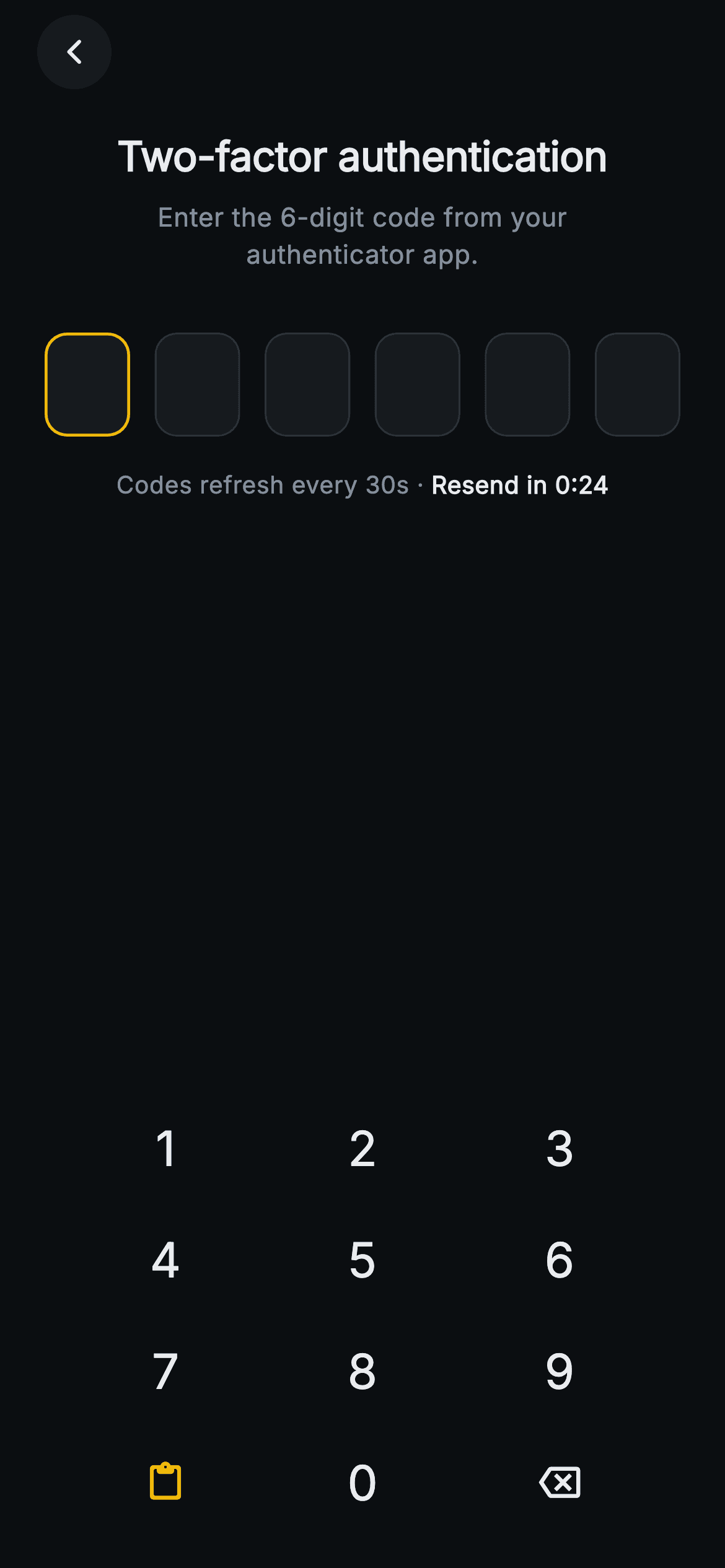
The Aurum Two-Factor screen verifies an authenticator-app code before unlocking the crypto wallet. On a near-black exchange-dark canvas (0xFF0B0E11) a circular back button sits top-left, then a bold "Two-factor authentication" title and a muted "Enter the 6-digit code from your authenticator app." subtitle. Below are six rounded OTP boxes spaced edge-to-edge; the next slot to fill glows amber (0xFFF0B90B), filled digits show a bullet mask, and the row turns green on a correct code or red on a wrong one. A status line reads "Codes refresh every 30s · Resend in 0:24", and on a mismatch it swaps to a red "Invalid code" message. The lower half is a fully custom on-screen numpad — 1-9, a brand-amber paste key, 0, and a backspace icon — each key an InkWell with a circular ripple. Pure Flutter, Inter font bundled, forced dark theme, no images. State tracks the typed code; verification, back, and the expected code are all exposed via onVerified, onBack and expectedCode callbacks so any backend (TOTP, SMS, push) can drive it.
Full tutorial coming soon.
The step-by-step walkthrough and complete Dart source for this screen haven't been published yet. They'll be free when they are — no sign-up, no payment. In the meantime, browse the screens that already have their tutorial.
What's included
- ✓web3_auth_2fa_screen.dart — a single self-contained StatefulWidget with no external dependencies beyond the Flutter SDK
- ✓Six _OtpBox slots that recolor per state: hairline (empty), amber (active), green (verified), red (error), with bullet-masked digits
- ✓A custom-built _Numpad widget (1-9, paste, 0, backspace) using InkWell circular ripples instead of the system keyboard
- ✓Brand-amber paste key that fills the full code in one tap, plus a backspace key that clears the last digit
- ✓Live status row showing 'Codes refresh every 30s · Resend in 0:24' that swaps to a red invalid-code error on mismatch
- ✓onVerified / onBack callbacks and an expectedCode parameter for backend-agnostic TOTP, SMS or push verification
Use cases
- ✓Gating a crypto-wallet login with authenticator-app (TOTP) verification before showing balances
- ✓Step-up confirmation before signing a transaction or approving a token allowance
- ✓Verifying a new device or browser session for an exchange account
- ✓Protecting sensitive settings such as withdrawal whitelists or seed-phrase reveal behind a second factor


