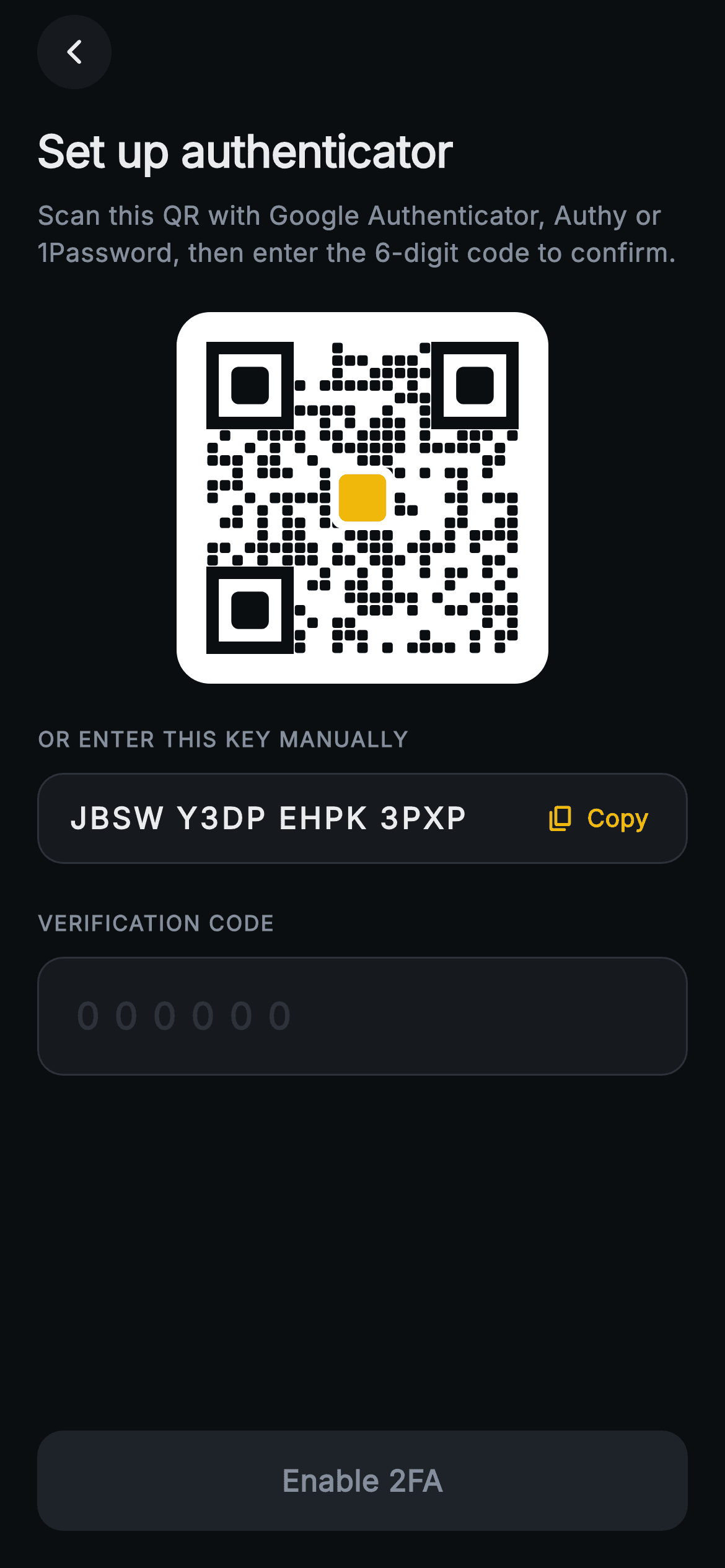
Aurum · Set Up 2FA
Aurum · Set Up 2FA is a production-ready Web3 Flutter screen from FlutterKit — free, with full source code.
This is the "Set up authenticator" screen for the Aurum Web3 wallet, rendered on a near-black (0xFF0B0E11) canvas with Binance-yellow (0xFFF0B90B) accents and the bundled Inter font. A circular back button sits top-left; below, a bold 24px title and muted instruction tell users to scan with Google Authenticator, Authy or 1Password. The centerpiece is a 168x168 QR on a white rounded card, drawn entirely by a `_SeededQrPainter` CustomPainter — a deterministic 25x25 FNV-hashed module matrix with three rounded finder squares and a yellow center emblem, so there is no QR package and no network image. A "Or enter this key manually" row reformats the secret into 4-char groups with tabular figures and a Copy chip that flips to "Copied". A 6-digit `TextField` with 8px letter-spacing and a "000000" hint sits under "Verification code"; once exactly six digits are entered, its border tints yellow and the pinned "Enable 2FA" bar activates. Everything is backend-agnostic via onVerify, onCopyKey and onBack callbacks; the screen forces a dark Material 3 theme so it renders standalone.
Full tutorial coming soon.
The step-by-step walkthrough and complete Dart source for this screen haven't been published yet. They'll be free when they are — no sign-up, no payment. In the meantime, browse the screens that already have their tutorial.
What's included
- ✓`Web3Auth2faSetupScreen` stateful widget with `onVerify`, `onCopyKey`, `onBack` callbacks and a configurable `secret` string
- ✓`_SeededQrPainter` CustomPainter that draws a deterministic 25x25 QR matrix (FNV hash seed, rounded finder squares, yellow center emblem) — no QR package, no network image
- ✓Manual-key row that regex-groups the secret into 4-char blocks with tabular figures and a `_CopyChip` toggling Copy/Copied
- ✓6-digit numeric `TextField` with 8px tracking, '000000' hint, and a border that tints yellow only when exactly six digits are present
- ✓Pinned 'Enable 2FA' bar that enables (yellow fill, dark label) solely when the code is complete via the `_ready` getter
- ✓Forced dark Material 3 theme, bundled Inter font, and `_CircleButton` back control — fully self-contained pure Flutter
Use cases
- ✓Onboarding 2FA enrollment for a crypto exchange or self-custody wallet app
- ✓Adding TOTP authenticator security to a fintech or trading account flow
- ✓Hardening login for any high-value account with an authenticator-app setup step
- ✓Security-settings screen where users bind Google Authenticator, Authy or 1Password


