How to Build an OTP Verification Screen in Flutter (Full Code + Preview)
An OTP screen looks trivial until you build one — then you discover it needs a countdown, an expiry message, a working resend, and a CTA that stays put when the keyboard opens. This tutorial builds the Finco kit's 'Verify Account!' screen with all of that: a real 4-digit code input, a live one-second Timer counting down from 60, a message that flips to 'Your code has expired.' at zero, a tappable Resend Code that restarts the countdown, and a Continue button pinned to the bottom of the screen rather than the bottom of the scrolling content.
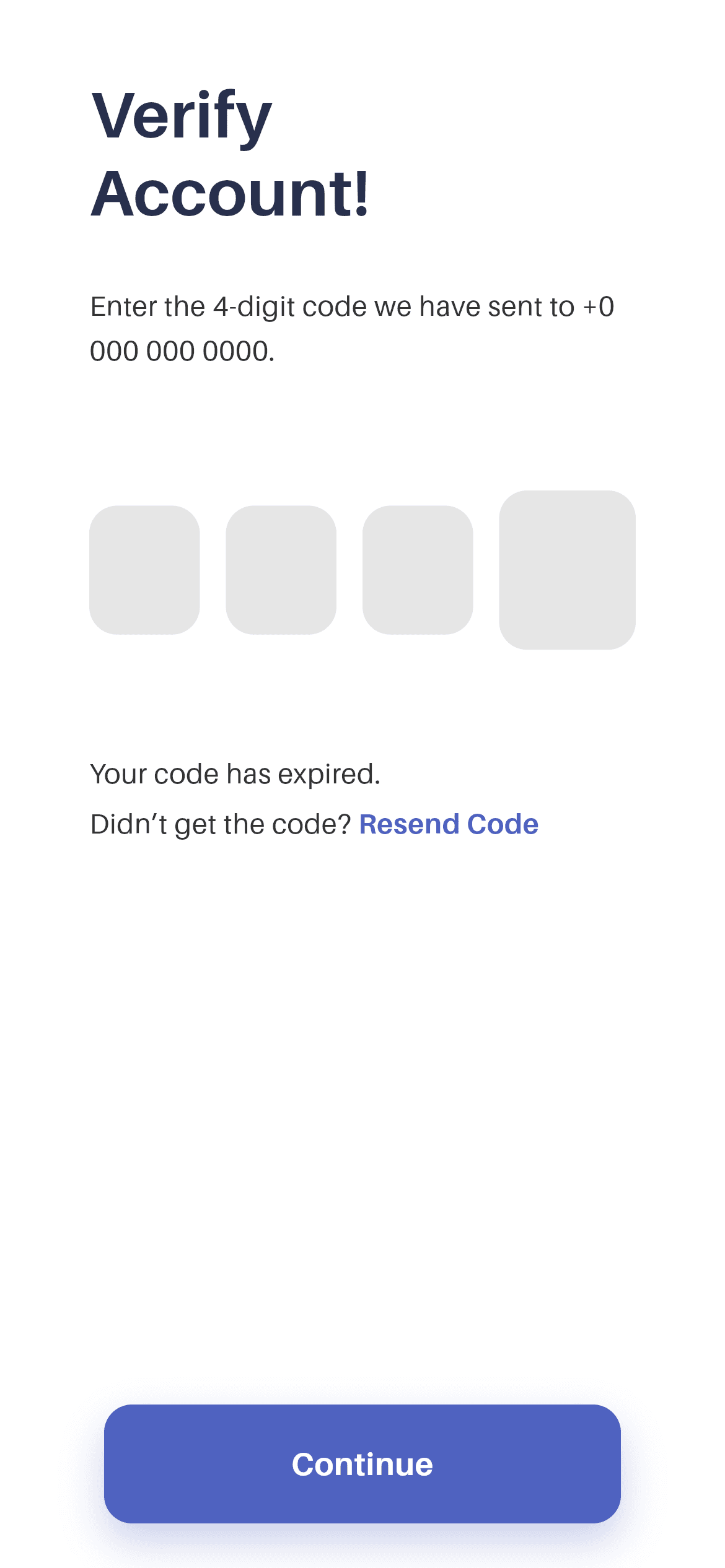
What you'll build
- ✓A live countdown driven by Timer.periodic that cancels itself at zero and is disposed correctly
- ✓A message that swaps between 'This session will end in N seconds.' and an expiry notice
- ✓A Resend Code link that restarts the timer through a single shared _startTimer() method
- ✓A bottom-pinned CTA using Expanded + a scroll view, so it doesn't scroll away with the content
- ✓The bundled Aileron font including the Black weight used for the code digits
Step-by-step build
Create the file
Add a new file at lib/wallet_verify_account/wallet_verify_account_screen.dart in your Flutter project.
Register the bundled fonts
No external packages — this is pure Flutter. It does bundle its design font (Aileron), so drop the font file into fonts/ and declare it in pubspec.yaml:
flutter:
  fonts:
    - family: Aileron
      fonts:
- asset: fonts/Aileron-Regular.ttfBuild it, piece by piece
Here's how the screen goes together. Each block below is a real slice of the code with a plain-English explanation — paste them in order, or grab the whole file from the next section.
State, tokens, and why this screen is stateful
import 'dart:async';

import 'package:flutter/material.dart';

import 'widgets/otp_input.dart';

/// "Verify Account!" OTP screen from the Wallet App UI Kit (Finco): a
/// left-aligned header, a real 4-digit code entry, a live countdown + resend
/// line, and a bottom-pinned blue "Continue" CTA.
///
/// Self-contained, pure Flutter. Bundles its exact design font (Aileron, incl.
/// Black for the digits). Fully responsive — scrolls and caps its width on
/// large screens. Renders standalone when pushed as a route.
class WalletVerifyAccountScreen extends StatefulWidget {
  const WalletVerifyAccountScreen({super.key});

  static const Color _ink = Color(0xFF29304D);
  static const Color _blue = Color(0xFF4F62C0);
  static const Color _muted = Color(0xFF323232);

  @override
  State<WalletVerifyAccountScreen> createState() =>
      _WalletVerifyAccountScreenState();
}

class _WalletVerifyAccountScreenState extends State<WalletVerifyAccountScreen> {
  static const int _start = 60;
  int _seconds = _start;
  Timer? _timer;
dart:async is imported for Timer — the one non-material import in the file. Unlike most screens in the kit this is a StatefulWidget, because the countdown changes every second. The colour tokens (_ink, _blue, _muted) live on the widget class as static consts rather than in the State, so child widgets further down can reference them as WalletVerifyAccountScreen._blue without needing a State instance. In the State class, _start is 60, _seconds is the live value, and Timer? _timer is nullable because it doesn't exist until initState runs.
Starting, ticking and disposing the timer
  @override
  void initState() {
    super.initState();
    _startTimer();
  }

  void _startTimer() {
    _timer?.cancel();
    setState(() => _seconds = _start);
    _timer = Timer.periodic(const Duration(seconds: 1), (Timer t) {
      if (_seconds <= 1) {
        t.cancel();
        setState(() => _seconds = 0);
      } else {
        setState(() => _seconds--);
      }
    });
  }

  @override
  void dispose() {
    _timer?.cancel();
    super.dispose();
  }
initState calls _startTimer(), and _startTimer begins by cancelling any existing timer — that single line is what makes Resend Code safe to tap repeatedly, since without it each tap would spawn another Timer and the counter would race downward. It then resets _seconds to 60 and starts a Timer.periodic ticking once a second. The tick checks _seconds <= 1 rather than == 0 so it cancels on the same frame it displays zero, avoiding a stray extra tick. dispose() cancels the timer before calling super.dispose(): skip this and the timer keeps firing setState on a widget that's gone, which throws.
A layout that pins the CTA to the bottom
  @override
  Widget build(BuildContext context) {
    return Scaffold(
      backgroundColor: Colors.white,
      body: SafeArea(
        child: Center(
          child: ConstrainedBox(
            constraints: const BoxConstraints(maxWidth: 460),
            child: Column(
              children: <Widget>[
                Expanded(
                  child: SingleChildScrollView(
                    physics: const ClampingScrollPhysics(),
                    padding: const EdgeInsets.fromLTRB(48, 40, 48, 24),
                    child: Column(
                      crossAxisAlignment: CrossAxisAlignment.start,
                      children: <Widget>[
The structure here is worth copying. Inside a Center and a ConstrainedBox(maxWidth: 460) — which caps the form on tablets — there is an outer Column with exactly two children: an Expanded wrapping the SingleChildScrollView, and the button. Expanded gives the scroll area all the leftover height, which means the Continue button always sits at the bottom edge of the screen and never scrolls up with the content. That's different from putting the button inside the scroll view, where it would drift off-screen the moment the keyboard appeared.
Header, code entry and the countdown line
                        const Text(
                          'Verify\nAccount!',
                          style: TextStyle(
                            fontFamily: 'Aileron',
                            fontWeight: FontWeight.w700,
                            fontSize: 35,
                            height: 1.2,
                            color: WalletVerifyAccountScreen._ink,
                          ),
                        ),
                        const SizedBox(height: 28),
                        const Text(
                          'Enter the 4-digit code we have sent to '
                          '+0 000 000 0000.',
                          style: TextStyle(
                            fontFamily: 'Aileron',
                            fontWeight: FontWeight.w400,
                            fontSize: 15,
                            height: 1.6,
                            color: WalletVerifyAccountScreen._muted,
                          ),
                        ),
                        const SizedBox(height: 64),
                        OtpInput(onCompleted: (_) {}),
                        const SizedBox(height: 56),
                        Text(
                          _seconds > 0
                              ? 'This session will end in $_seconds seconds.'
                              : 'Your code has expired.',
                          style: const TextStyle(
                            fontFamily: 'Aileron',
                            fontWeight: FontWeight.w400,
                            fontSize: 15,
                            color: WalletVerifyAccountScreen._muted,
                          ),
                        ),
                        const SizedBox(height: 6),
'Verify\nAccount!' breaks across two lines at 35px w700 Aileron, followed by the instruction line at 15px with height: 1.6 for airy leading. A 64px gap sets the OtpInput apart — it takes an onCompleted callback that fires with the assembled code once all four boxes are filled, which is where you'd call your verify endpoint. Then the countdown Text uses a ternary directly in the widget tree: while _seconds > 0 it interpolates the live value into 'This session will end in $_seconds seconds.', and at zero it renders 'Your code has expired.' instead. Because the whole Text is rebuilt by setState each tick, no animation controller or stream is needed.
The resend row and the pinned button
                        Wrap(
                          crossAxisAlignment: WrapCrossAlignment.center,
                          children: <Widget>[
                            const Text(
                              'Didn’t get the code? ',
                              style: TextStyle(
                                fontFamily: 'Aileron',
                                fontWeight: FontWeight.w400,
                                fontSize: 15,
                                color: WalletVerifyAccountScreen._muted,
                              ),
                            ),
                            GestureDetector(
                              behavior: HitTestBehavior.opaque,
                              onTap: _startTimer,
                              child: const Text(
                                'Resend Code',
                                style: TextStyle(
                                  fontFamily: 'Aileron',
                                  fontWeight: FontWeight.w700,
                                  fontSize: 15,
                                  color: WalletVerifyAccountScreen._blue,
                                ),
                              ),
                            ),
                          ],
                        ),
                      ],
                    ),
                  ),
                ),
                // Bottom-pinned CTA.
                Padding(
                  padding: const EdgeInsets.fromLTRB(56, 8, 56, 24),
                  child: _ContinueButton(onTap: () {}),
                ),
              ],
            ),
          ),
        ),
      ),
    );
  }
}
The resend line is a Wrap, not a Row — so if the user's font scale is large, 'Didn't get the code?' and 'Resend Code' flow onto separate lines instead of overflowing. WrapCrossAlignment.center keeps the two pieces aligned on the same baseline when they do fit. The tappable half is a GestureDetector with HitTestBehavior.opaque calling _startTimer directly, which both restarts the countdown and (in a real app) is where you'd re-request the SMS. Below the scroll area, the bottom-pinned _ContinueButton sits in a Padding of 56px left/right and 24px from the bottom.
The press-animated Continue button
class _ContinueButton extends StatefulWidget {
  const _ContinueButton({required this.onTap});

  final VoidCallback onTap;

  @override
  State<_ContinueButton> createState() => _ContinueButtonState();
}

class _ContinueButtonState extends State<_ContinueButton> {
  bool _pressed = false;

  @override
  Widget build(BuildContext context) {
    return GestureDetector(
      onTapDown: (_) => setState(() => _pressed = true),
      onTapUp: (_) => setState(() => _pressed = false),
      onTapCancel: () => setState(() => _pressed = false),
      onTap: widget.onTap,
      child: AnimatedScale(
        scale: _pressed ? 0.98 : 1,
        duration: const Duration(milliseconds: 150),
        child: Container(
          width: double.infinity,
          padding: const EdgeInsets.symmetric(vertical: 20),
          decoration: BoxDecoration(
            color: WalletVerifyAccountScreen._blue,
            borderRadius: BorderRadius.circular(15),
            boxShadow: <BoxShadow>[
              BoxShadow(
                color:
                    WalletVerifyAccountScreen._blue.withValues(alpha: 0.30),
                blurRadius: 18,
                offset: const Offset(0, 10),
              ),
            ],
          ),
          child: const Text(
            'Continue',
            textAlign: TextAlign.center,
            style: TextStyle(
              fontFamily: 'Aileron',
              fontWeight: FontWeight.w700,
              fontSize: 17,
              color: Colors.white,
            ),
          ),
        ),
      ),
    );
  }
}
The CTA is its own StatefulWidget so its press state never rebuilds the countdown above it — a small but real performance win when the parent is already rebuilding once a second. One _pressed boolean is toggled by onTapDown / onTapUp / onTapCancel, and AnimatedScale shrinks the button to 0.98 over 150ms. The Container is _blue with a 15px radius and a shadow in the same blue at 30% alpha, blurred 18px and pushed 10px down, giving the button a glow rather than a grey drop shadow. width: double.infinity makes it span whatever the 56px padding leaves.
Full code
The complete, ready-to-paste source (2 files). Free to use in your projects — one click copies it all.
import 'dart:async';

import 'package:flutter/material.dart';

import 'widgets/otp_input.dart';

/// "Verify Account!" OTP screen from the Wallet App UI Kit (Finco): a
/// left-aligned header, a real 4-digit code entry, a live countdown + resend
/// line, and a bottom-pinned blue "Continue" CTA.
///
/// Self-contained, pure Flutter. Bundles its exact design font (Aileron, incl.
/// Black for the digits). Fully responsive — scrolls and caps its width on
/// large screens. Renders standalone when pushed as a route.
class WalletVerifyAccountScreen extends StatefulWidget {
  const WalletVerifyAccountScreen({super.key});

  static const Color _ink = Color(0xFF29304D);
  static const Color _blue = Color(0xFF4F62C0);
  static const Color _muted = Color(0xFF323232);

  @override
  State<WalletVerifyAccountScreen> createState() =>
      _WalletVerifyAccountScreenState();
}

class _WalletVerifyAccountScreenState extends State<WalletVerifyAccountScreen> {
  static const int _start = 60;
  int _seconds = _start;
  Timer? _timer;

  @override
  void initState() {
    super.initState();
    _startTimer();
  }

  void _startTimer() {
    _timer?.cancel();
    setState(() => _seconds = _start);
    _timer = Timer.periodic(const Duration(seconds: 1), (Timer t) {
      if (_seconds <= 1) {
        t.cancel();
        setState(() => _seconds = 0);
      } else {
        setState(() => _seconds--);
      }
    });
  }

  @override
  void dispose() {
    _timer?.cancel();
    super.dispose();
  }

  @override
  Widget build(BuildContext context) {
    return Scaffold(
      backgroundColor: Colors.white,
      body: SafeArea(
        child: Center(
          child: ConstrainedBox(
            constraints: const BoxConstraints(maxWidth: 460),
            child: Column(
              children: <Widget>[
                Expanded(
                  child: SingleChildScrollView(
                    physics: const ClampingScrollPhysics(),
                    padding: const EdgeInsets.fromLTRB(48, 40, 48, 24),
                    child: Column(
                      crossAxisAlignment: CrossAxisAlignment.start,
                      children: <Widget>[
                        const Text(
                          'Verify\nAccount!',
                          style: TextStyle(
                            fontFamily: 'Aileron',
                            fontWeight: FontWeight.w700,
                            fontSize: 35,
                            height: 1.2,
                            color: WalletVerifyAccountScreen._ink,
                          ),
                        ),
                        const SizedBox(height: 28),
                        const Text(
                          'Enter the 4-digit code we have sent to '
                          '+0 000 000 0000.',
                          style: TextStyle(
                            fontFamily: 'Aileron',
                            fontWeight: FontWeight.w400,
                            fontSize: 15,
                            height: 1.6,
                            color: WalletVerifyAccountScreen._muted,
                          ),
                        ),
                        const SizedBox(height: 64),
                        OtpInput(onCompleted: (_) {}),
                        const SizedBox(height: 56),
                        Text(
                          _seconds > 0
                              ? 'This session will end in $_seconds seconds.'
                              : 'Your code has expired.',
                          style: const TextStyle(
                            fontFamily: 'Aileron',
                            fontWeight: FontWeight.w400,
                            fontSize: 15,
                            color: WalletVerifyAccountScreen._muted,
                          ),
                        ),
                        const SizedBox(height: 6),
                        Wrap(
                          crossAxisAlignment: WrapCrossAlignment.center,
                          children: <Widget>[
                            const Text(
                              'Didn’t get the code? ',
                              style: TextStyle(
                                fontFamily: 'Aileron',
                                fontWeight: FontWeight.w400,
                                fontSize: 15,
                                color: WalletVerifyAccountScreen._muted,
                              ),
                            ),
                            GestureDetector(
                              behavior: HitTestBehavior.opaque,
                              onTap: _startTimer,
                              child: const Text(
                                'Resend Code',
                                style: TextStyle(
                                  fontFamily: 'Aileron',
                                  fontWeight: FontWeight.w700,
                                  fontSize: 15,
                                  color: WalletVerifyAccountScreen._blue,
                                ),
                              ),
                            ),
                          ],
                        ),
                      ],
                    ),
                  ),
                ),
                // Bottom-pinned CTA.
                Padding(
                  padding: const EdgeInsets.fromLTRB(56, 8, 56, 24),
                  child: _ContinueButton(onTap: () {}),
                ),
              ],
            ),
          ),
        ),
      ),
    );
  }
}

class _ContinueButton extends StatefulWidget {
  const _ContinueButton({required this.onTap});

  final VoidCallback onTap;

  @override
  State<_ContinueButton> createState() => _ContinueButtonState();
}

class _ContinueButtonState extends State<_ContinueButton> {
  bool _pressed = false;

  @override
  Widget build(BuildContext context) {
    return GestureDetector(
      onTapDown: (_) => setState(() => _pressed = true),
      onTapUp: (_) => setState(() => _pressed = false),
      onTapCancel: () => setState(() => _pressed = false),
      onTap: widget.onTap,
      child: AnimatedScale(
        scale: _pressed ? 0.98 : 1,
        duration: const Duration(milliseconds: 150),
        child: Container(
          width: double.infinity,
          padding: const EdgeInsets.symmetric(vertical: 20),
          decoration: BoxDecoration(
            color: WalletVerifyAccountScreen._blue,
            borderRadius: BorderRadius.circular(15),
            boxShadow: <BoxShadow>[
              BoxShadow(
                color:
                    WalletVerifyAccountScreen._blue.withValues(alpha: 0.30),
                blurRadius: 18,
                offset: const Offset(0, 10),
              ),
            ],
          ),
          child: const Text(
            'Continue',
            textAlign: TextAlign.center,
            style: TextStyle(
              fontFamily: 'Aileron',
              fontWeight: FontWeight.w700,
              fontSize: 17,
              color: Colors.white,
            ),
          ),
        ),
      ),
    );
  }
}
Plus bundled 3 binary assets (fonts/images). The CLI and MCP install those for you automatically.
Two faster ways to add it
Copy-paste works, but you can skip it entirely.
1. FlutterKit CLI
One command drops this screen — and its fonts — straight into your project.
$ flutterkit add wallet-verify-account2. AI agent (MCP)
Connect FlutterKit's MCP server in Claude or Cursor and just ask your agent to install wallet-verify-account — it fetches and writes the files for you.
FAQ
Is this Flutter OTP screen free to use?
Yes. The full Dart source on this page is free for personal and commercial projects. Copy it from the page, install it with the FlutterKit CLI (flutterkit add wallet-verify-account), or have an AI agent add it via MCP.
Does the code entry actually work?
Yes. OtpInput is a real entry, built with a clever trick: one invisible full-width TextField captures everything, and the four visible boxes are just painted from its text — filled boxes go solid cyan, the next box gets a cyan outline, the rest stay grey. That means backspace and paste work for free, and onCompleted fires with the whole code when the fourth digit lands. What it doesn't do is verify anything; wire onCompleted to your backend or FirebaseAuth's credential check.
Does it need any external packages?
No. It's pure Flutter — dart:async's Timer is part of the SDK, not a package. The only bundled asset is the Aileron font family, including the Black weight used for the code digits, registered in pubspec.yaml as shown in step 2.
Which Flutter version does it target?
It uses Color.withValues() for the button shadow, so Flutter 3.22+ (Dart 3). On an older SDK, replace withValues(alpha: 0.30) with withOpacity(0.30).

