How to Build a Travel Search Screen in Flutter (Full Code + Preview)
A search screen with an empty result area is a wasted screen, so this one fills it: recent searches you can re-run, a two-column grid of gradient destination tiles, and a cloud of category chips. This tutorial builds the Travel Kit's search page — an active blue-outlined field with a clear button on top, then those three sections — using zero image assets, because the destination tiles are LinearGradients rather than photos. You'll also see a Wrap-based grid that reflows to any viewport without GridView's fixed aspect ratios.
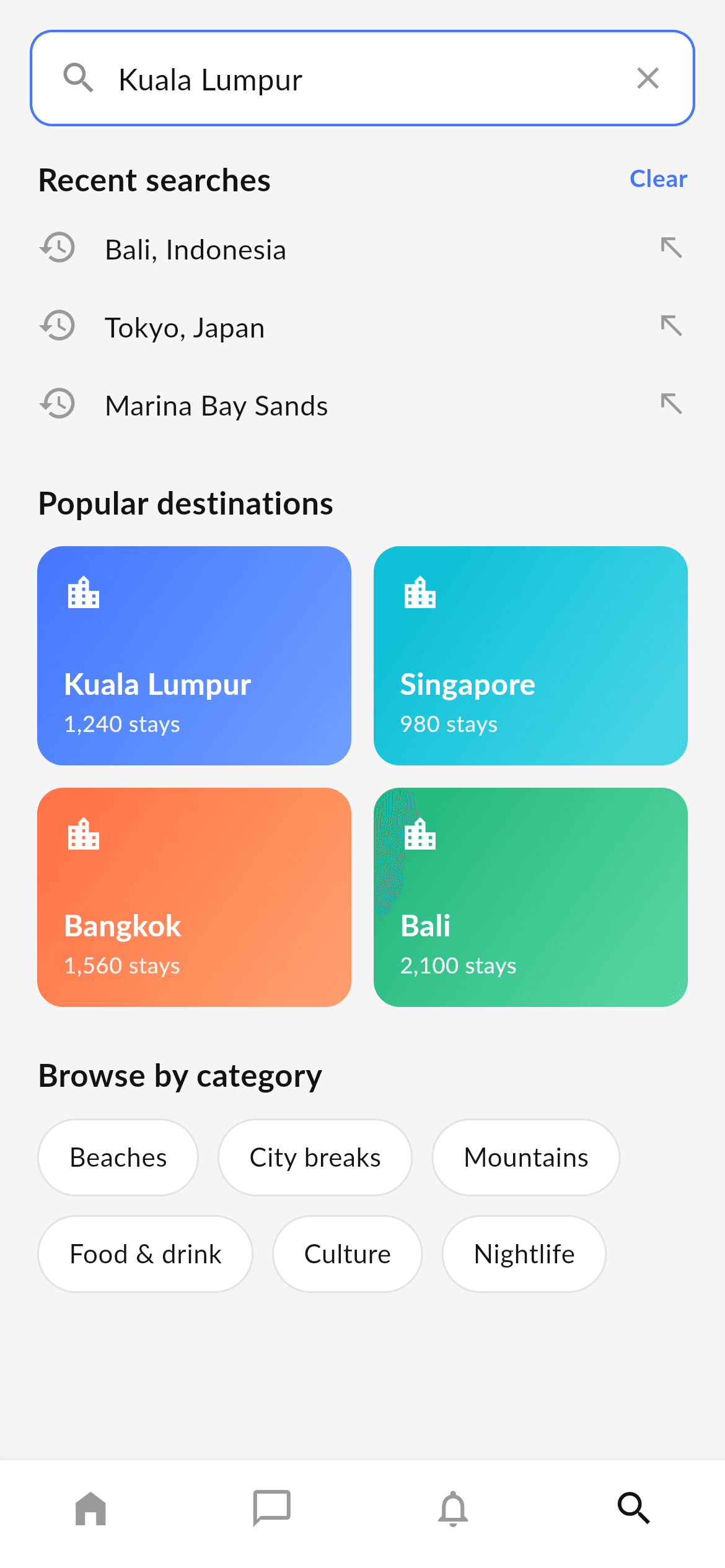
What you'll build
- ✓An 'active' search field styled with a 1.4px blue border, a leading magnifier and a trailing clear icon
- ✓Gradient destination tiles built from a colour pair per city — no photos to download or cache
- ✓A two-column grid built with LayoutBuilder + Wrap, so tile height follows content instead of a fixed ratio
- ✓A category chip cloud that wraps onto as many lines as it needs
- ✓A four-tab bottom nav with Search active, in the bundled Lato font
Step-by-step build
Create the file
Add a new file at lib/travel_search/travel_search_screen.dart in your Flutter project.
Register the bundled fonts
No external packages — this is pure Flutter. It does bundle its design font (Lato), so drop the font file into fonts/ and declare it in pubspec.yaml:
flutter:
  fonts:
    - family: Lato
      fonts:
- asset: fonts/Lato-Regular.ttfBuild it, piece by piece
Here's how the screen goes together. Each block below is a real slice of the code with a plain-English explanation — paste them in order, or grab the whole file from the next section.
Three data lists, one per section
import 'package:flutter/material.dart';

/// "Search" screen for the Travel Kit — a bottom-nav destination built in the
/// kit's visual language (Lato, light-grey canvas). An active search field with
/// recent searches, a popular-destinations grid (gradient tiles) and category
/// chips, plus the shared bottom navigation.
///
/// Self-contained, pure Flutter — no bundled images (destination tiles use
/// gradients). Fully responsive — the destination grid reflows to the viewport
/// width and the body scrolls. Renders standalone when pushed as a route.
///
/// [onTabSelected] fires with the tapped bottom-nav index; it defaults to a
/// no-op so the screen works on its own. The preview gallery wires it to switch
/// between the travel tabs.
class TravelSearchScreen extends StatelessWidget {
  const TravelSearchScreen({super.key, this.onTabSelected});

  /// Invoked with the bottom-nav index when a tab is tapped. No-op by default.
  final ValueChanged<int>? onTabSelected;

  static const Color _bg = Color(0xFFF5F5F5);
  static const Color _ink = Color(0xFF131314);
  static const Color _grey = Color(0xFF8F8F8F);
  static const Color _greyLow = Color(0xFF999999);
  static const String _font = 'Lato';

  static const List<String> _recent = <String>[
    'Bali, Indonesia',
    'Tokyo, Japan',
    'Marina Bay Sands',
  ];

  static const List<_Dest> _destinations = <_Dest>[
    _Dest('Kuala Lumpur', '1,240 stays',
        <Color>[Color(0xFF4476FF), Color(0xFF6FA0FF)]),
    _Dest('Singapore', '980 stays',
        <Color>[Color(0xFF00BCD4), Color(0xFF4ED7E8)]),
    _Dest('Bangkok', '1,560 stays',
        <Color>[Color(0xFFFF7043), Color(0xFFFFA270)]),
    _Dest('Bali', '2,100 stays',
        <Color>[Color(0xFF1FB57A), Color(0xFF5BD6A4)]),
  ];

  static const List<String> _categories = <String>[
    'Beaches',
    'City breaks',
    'Mountains',
    'Food & drink',
    'Culture',
    'Nightlife',
  ];
Only material.dart is imported — no packages and no images. The screen is stateless with an optional onTabSelected callback. Each section of the page has its own const list: _recent is three query strings, _destinations is four _Dest records each carrying a name, a stays count and a two-colour gradient, and _categories is six chip labels. Note that _Dest uses positional constructor parameters rather than named ones, which keeps a four-item table readable as rows of data instead of pages of labelled arguments.
The active search field
  @override
  Widget build(BuildContext context) {
    return Scaffold(
      backgroundColor: _bg,
      body: SafeArea(
        bottom: false,
        child: Column(
          crossAxisAlignment: CrossAxisAlignment.start,
          children: <Widget>[
            // Active search field.
            Padding(
              padding: const EdgeInsets.fromLTRB(16, 16, 16, 8),
              child: Container(
                height: 52,
                padding: const EdgeInsets.symmetric(horizontal: 14),
                decoration: BoxDecoration(
                  color: Colors.white,
                  borderRadius: BorderRadius.circular(12),
                  border: Border.all(color: const Color(0xFF4476FF), width: 1.4),
                ),
                child: Row(
                  children: <Widget>[
                    const Icon(Icons.search, color: _grey, size: 22),
                    const SizedBox(width: 10),
                    const Expanded(
                      child: Text(
                        'Kuala Lumpur',
                        style: TextStyle(
                          fontFamily: _font,
                          fontSize: 16,
                          color: _ink,
                        ),
                      ),
                    ),
                    Icon(Icons.close, color: _greyLow, size: 20),
                  ],
                ),
              ),
            ),
This isn't a TextField — it's a Container with a Text inside, representing the 'query already entered' state. That's a deliberate simplification for a design kit, and it also shows exactly how to style the real thing: 52px tall, white, a 12px radius and a 1.4px #4476FF border, which is what reads as focused. Inside, a grey magnifier, the query in an Expanded so it takes the free space, and a lighter clear icon at the trailing edge. Swap the Text for a TextField with border: InputBorder.none when you wire up real input and the box keeps its exact appearance.
Recent searches
            Expanded(
              child: ListView(
                physics: const ClampingScrollPhysics(),
                padding: const EdgeInsets.fromLTRB(20, 8, 20, 16),
                children: <Widget>[
                  // Recent searches.
                  Row(
                    children: <Widget>[
                      const Expanded(child: _SectionLabel('Recent searches')),
                      Text(
                        'Clear',
                        style: const TextStyle(
                          fontFamily: _font,
                          fontWeight: FontWeight.w700,
                          fontSize: 13,
                          color: Color(0xFF4476FF),
                        ),
                      ),
                    ],
                  ),
                  const SizedBox(height: 4),
                  for (final String r in _recent) _RecentRow(query: r),
                  const SizedBox(height: 20),
The scrolling body is a ListView padded 20px left/right. The first section header is a Row where _SectionLabel sits in an Expanded and a blue 'Clear' label sits at the end — Expanded pushes them apart with no Spacer needed. Then a collection-for loop emits one _RecentRow per query string. Building rows straight from a List<String> inside the children list, rather than assembling a separate widget list above build(), is the pattern that keeps this whole screen readable top to bottom.
The Wrap-based destination grid
                  // Popular destinations.
                  const _SectionLabel('Popular destinations'),
                  const SizedBox(height: 12),
                  LayoutBuilder(
                    builder: (BuildContext context, BoxConstraints c) {
                      const double gap = 12;
                      final double tileW = (c.maxWidth - gap) / 2;
                      return Wrap(
                        spacing: gap,
                        runSpacing: gap,
                        children: <Widget>[
                          for (final _Dest d in _destinations)
                            SizedBox(
                              width: tileW,
                              child: _DestTile(dest: d),
                            ),
                        ],
                      );
                    },
                  ),
                  const SizedBox(height: 24),
                  // Categories.
                  const _SectionLabel('Browse by category'),
                  const SizedBox(height: 12),
                  Wrap(
                    spacing: 10,
                    runSpacing: 10,
                    children: <Widget>[
                      for (final String c in _categories) _CategoryChip(label: c),
                    ],
                  ),
                ],
              ),
            ),
          ],
        ),
      ),
      bottomNavigationBar: _BottomNav(
        currentIndex: 3,
        onTap: onTabSelected,
      ),
    );
  }
}
Instead of GridView, this uses a LayoutBuilder and a Wrap. tileW is (c.maxWidth - gap) / 2 — the available width minus one 12px gutter, halved — and each tile is a SizedBox at that width. Wrap then places two per line and moves to the next row automatically, with runSpacing giving the vertical gutter. The advantage over GridView.count is that Wrap lets each tile be as tall as its content, so you never have to guess a childAspectRatio that breaks when a city name wraps. The categories below use the same Wrap with 10px spacing, which is what produces the chip cloud.
Recent rows and category chips
/// A recent-search row: history icon, query text and a remove action.
class _RecentRow extends StatelessWidget {
  const _RecentRow({required this.query});

  final String query;

  @override
  Widget build(BuildContext context) {
    return Padding(
      padding: const EdgeInsets.symmetric(vertical: 10),
      child: Row(
        children: <Widget>[
          const Icon(Icons.history, color: TravelSearchScreen._greyLow, size: 22),
          const SizedBox(width: 14),
          Expanded(
            child: Text(
              query,
              maxLines: 1,
              overflow: TextOverflow.ellipsis,
              style: const TextStyle(
                fontFamily: TravelSearchScreen._font,
                fontSize: 15,
                color: TravelSearchScreen._ink,
              ),
            ),
          ),
          const Icon(Icons.north_west,
              color: TravelSearchScreen._greyLow, size: 18),
        ],
      ),
    );
  }
}
_RecentRow is a 10px-padded Row of three parts: a grey Icons.history glyph, the query in an Expanded with maxLines: 1 and ellipsis so a long query truncates cleanly, and a trailing Icons.north_west arrow — the standard 'insert this into the search box' affordance users know from Google and iOS. The chips (further down the file) are white pill Containers with a 22px radius and a light #E3E3E6 border, sized by their padding rather than a fixed width, which is what lets 'Food & drink' and 'Culture' sit on the same row at different widths.
The gradient destination tile
/// A popular-destination tile: a gradient card with a location icon, name and a
/// stays count.
class _DestTile extends StatelessWidget {
  const _DestTile({required this.dest});

  final _Dest dest;

  @override
  Widget build(BuildContext context) {
    return Container(
      padding: const EdgeInsets.all(14),
      decoration: BoxDecoration(
        borderRadius: BorderRadius.circular(14),
        gradient: LinearGradient(
          begin: Alignment.topLeft,
          end: Alignment.bottomRight,
          colors: dest.gradient,
        ),
      ),
      child: Column(
        mainAxisSize: MainAxisSize.min,
        crossAxisAlignment: CrossAxisAlignment.start,
        children: <Widget>[
          const Icon(Icons.location_city, color: Colors.white, size: 22),
          const SizedBox(height: 26),
          Text(
            dest.name,
            maxLines: 1,
            overflow: TextOverflow.ellipsis,
            style: const TextStyle(
              fontFamily: TravelSearchScreen._font,
              fontWeight: FontWeight.w700,
              fontSize: 16,
              color: Colors.white,
            ),
          ),
          const SizedBox(height: 2),
          Text(
            dest.subtitle,
            style: const TextStyle(
              fontFamily: TravelSearchScreen._font,
              fontSize: 12,
              color: Color(0xE6FFFFFF),
            ),
          ),
        ],
      ),
    );
  }
}
_DestTile is a Container with a 14px radius and a LinearGradient running topLeft to bottomRight through the two colours the _Dest record carries — that diagonal is what gives a flat rectangle a sense of light. Inside, a white location_city icon, a deliberate 26px gap, then the city name at 16px bold white and the stays count at 12px in Color(0xE6FFFFFF) — white at 90% alpha written directly into the hex, so the subtitle recedes without introducing a second colour. mainAxisSize: MainAxisSize.min lets the tile height follow its content, which is exactly what the Wrap layout needs.
Full code
The complete, ready-to-paste source. Free to use in your projects — one click copies it all.
import 'package:flutter/material.dart';

/// "Search" screen for the Travel Kit — a bottom-nav destination built in the
/// kit's visual language (Lato, light-grey canvas). An active search field with
/// recent searches, a popular-destinations grid (gradient tiles) and category
/// chips, plus the shared bottom navigation.
///
/// Self-contained, pure Flutter — no bundled images (destination tiles use
/// gradients). Fully responsive — the destination grid reflows to the viewport
/// width and the body scrolls. Renders standalone when pushed as a route.
///
/// [onTabSelected] fires with the tapped bottom-nav index; it defaults to a
/// no-op so the screen works on its own. The preview gallery wires it to switch
/// between the travel tabs.
class TravelSearchScreen extends StatelessWidget {
  const TravelSearchScreen({super.key, this.onTabSelected});

  /// Invoked with the bottom-nav index when a tab is tapped. No-op by default.
  final ValueChanged<int>? onTabSelected;

  static const Color _bg = Color(0xFFF5F5F5);
  static const Color _ink = Color(0xFF131314);
  static const Color _grey = Color(0xFF8F8F8F);
  static const Color _greyLow = Color(0xFF999999);
  static const String _font = 'Lato';

  static const List<String> _recent = <String>[
    'Bali, Indonesia',
    'Tokyo, Japan',
    'Marina Bay Sands',
  ];

  static const List<_Dest> _destinations = <_Dest>[
    _Dest('Kuala Lumpur', '1,240 stays',
        <Color>[Color(0xFF4476FF), Color(0xFF6FA0FF)]),
    _Dest('Singapore', '980 stays',
        <Color>[Color(0xFF00BCD4), Color(0xFF4ED7E8)]),
    _Dest('Bangkok', '1,560 stays',
        <Color>[Color(0xFFFF7043), Color(0xFFFFA270)]),
    _Dest('Bali', '2,100 stays',
        <Color>[Color(0xFF1FB57A), Color(0xFF5BD6A4)]),
  ];

  static const List<String> _categories = <String>[
    'Beaches',
    'City breaks',
    'Mountains',
    'Food & drink',
    'Culture',
    'Nightlife',
  ];

  @override
  Widget build(BuildContext context) {
    return Scaffold(
      backgroundColor: _bg,
      body: SafeArea(
        bottom: false,
        child: Column(
          crossAxisAlignment: CrossAxisAlignment.start,
          children: <Widget>[
            // Active search field.
            Padding(
              padding: const EdgeInsets.fromLTRB(16, 16, 16, 8),
              child: Container(
                height: 52,
                padding: const EdgeInsets.symmetric(horizontal: 14),
                decoration: BoxDecoration(
                  color: Colors.white,
                  borderRadius: BorderRadius.circular(12),
                  border: Border.all(color: const Color(0xFF4476FF), width: 1.4),
                ),
                child: Row(
                  children: <Widget>[
                    const Icon(Icons.search, color: _grey, size: 22),
                    const SizedBox(width: 10),
                    const Expanded(
                      child: Text(
                        'Kuala Lumpur',
                        style: TextStyle(
                          fontFamily: _font,
                          fontSize: 16,
                          color: _ink,
                        ),
                      ),
                    ),
                    Icon(Icons.close, color: _greyLow, size: 20),
                  ],
                ),
              ),
            ),
            Expanded(
              child: ListView(
                physics: const ClampingScrollPhysics(),
                padding: const EdgeInsets.fromLTRB(20, 8, 20, 16),
                children: <Widget>[
                  // Recent searches.
                  Row(
                    children: <Widget>[
                      const Expanded(child: _SectionLabel('Recent searches')),
                      Text(
                        'Clear',
                        style: const TextStyle(
                          fontFamily: _font,
                          fontWeight: FontWeight.w700,
                          fontSize: 13,
                          color: Color(0xFF4476FF),
                        ),
                      ),
                    ],
                  ),
                  const SizedBox(height: 4),
                  for (final String r in _recent) _RecentRow(query: r),
                  const SizedBox(height: 20),
                  // Popular destinations.
                  const _SectionLabel('Popular destinations'),
                  const SizedBox(height: 12),
                  LayoutBuilder(
                    builder: (BuildContext context, BoxConstraints c) {
                      const double gap = 12;
                      final double tileW = (c.maxWidth - gap) / 2;
                      return Wrap(
                        spacing: gap,
                        runSpacing: gap,
                        children: <Widget>[
                          for (final _Dest d in _destinations)
                            SizedBox(
                              width: tileW,
                              child: _DestTile(dest: d),
                            ),
                        ],
                      );
                    },
                  ),
                  const SizedBox(height: 24),
                  // Categories.
                  const _SectionLabel('Browse by category'),
                  const SizedBox(height: 12),
                  Wrap(
                    spacing: 10,
                    runSpacing: 10,
                    children: <Widget>[
                      for (final String c in _categories) _CategoryChip(label: c),
                    ],
                  ),
                ],
              ),
            ),
          ],
        ),
      ),
      bottomNavigationBar: _BottomNav(
        currentIndex: 3,
        onTap: onTabSelected,
      ),
    );
  }
}

class _Dest {
  const _Dest(this.name, this.subtitle, this.gradient);

  final String name;
  final String subtitle;
  final List<Color> gradient;
}

class _SectionLabel extends StatelessWidget {
  const _SectionLabel(this.text);

  final String text;

  @override
  Widget build(BuildContext context) {
    return Text(
      text,
      style: const TextStyle(
        fontFamily: TravelSearchScreen._font,
        fontWeight: FontWeight.w700,
        fontSize: 17,
        color: TravelSearchScreen._ink,
      ),
    );
  }
}

/// A recent-search row: history icon, query text and a remove action.
class _RecentRow extends StatelessWidget {
  const _RecentRow({required this.query});

  final String query;

  @override
  Widget build(BuildContext context) {
    return Padding(
      padding: const EdgeInsets.symmetric(vertical: 10),
      child: Row(
        children: <Widget>[
          const Icon(Icons.history, color: TravelSearchScreen._greyLow, size: 22),
          const SizedBox(width: 14),
          Expanded(
            child: Text(
              query,
              maxLines: 1,
              overflow: TextOverflow.ellipsis,
              style: const TextStyle(
                fontFamily: TravelSearchScreen._font,
                fontSize: 15,
                color: TravelSearchScreen._ink,
              ),
            ),
          ),
          const Icon(Icons.north_west,
              color: TravelSearchScreen._greyLow, size: 18),
        ],
      ),
    );
  }
}

/// A popular-destination tile: a gradient card with a location icon, name and a
/// stays count.
class _DestTile extends StatelessWidget {
  const _DestTile({required this.dest});

  final _Dest dest;

  @override
  Widget build(BuildContext context) {
    return Container(
      padding: const EdgeInsets.all(14),
      decoration: BoxDecoration(
        borderRadius: BorderRadius.circular(14),
        gradient: LinearGradient(
          begin: Alignment.topLeft,
          end: Alignment.bottomRight,
          colors: dest.gradient,
        ),
      ),
      child: Column(
        mainAxisSize: MainAxisSize.min,
        crossAxisAlignment: CrossAxisAlignment.start,
        children: <Widget>[
          const Icon(Icons.location_city, color: Colors.white, size: 22),
          const SizedBox(height: 26),
          Text(
            dest.name,
            maxLines: 1,
            overflow: TextOverflow.ellipsis,
            style: const TextStyle(
              fontFamily: TravelSearchScreen._font,
              fontWeight: FontWeight.w700,
              fontSize: 16,
              color: Colors.white,
            ),
          ),
          const SizedBox(height: 2),
          Text(
            dest.subtitle,
            style: const TextStyle(
              fontFamily: TravelSearchScreen._font,
              fontSize: 12,
              color: Color(0xE6FFFFFF),
            ),
          ),
        ],
      ),
    );
  }
}

/// A rounded category chip.
class _CategoryChip extends StatelessWidget {
  const _CategoryChip({required this.label});

  final String label;

  @override
  Widget build(BuildContext context) {
    return Container(
      padding: const EdgeInsets.symmetric(horizontal: 16, vertical: 10),
      decoration: BoxDecoration(
        color: Colors.white,
        borderRadius: BorderRadius.circular(22),
        border: Border.all(color: const Color(0xFFE3E3E6)),
      ),
      child: Text(
        label,
        style: const TextStyle(
          fontFamily: TravelSearchScreen._font,
          fontSize: 14,
          color: TravelSearchScreen._ink,
        ),
      ),
    );
  }
}

/// Bottom navigation bar shared by the travel tab screens.
class _BottomNav extends StatelessWidget {
  const _BottomNav({required this.currentIndex, this.onTap});

  final int currentIndex;
  final ValueChanged<int>? onTap;

  @override
  Widget build(BuildContext context) {
    return BottomNavigationBar(
      currentIndex: currentIndex,
      onTap: onTap,
      type: BottomNavigationBarType.fixed,
      backgroundColor: Colors.white,
      selectedItemColor: TravelSearchScreen._ink,
      unselectedItemColor: TravelSearchScreen._greyLow,
      showSelectedLabels: false,
      showUnselectedLabels: false,
      elevation: 8,
      items: const <BottomNavigationBarItem>[
        BottomNavigationBarItem(icon: Icon(Icons.home_filled), label: 'Home'),
        BottomNavigationBarItem(
            icon: Icon(Icons.chat_bubble_outline), label: 'Message'),
        BottomNavigationBarItem(
            icon: Icon(Icons.notifications_none), label: 'Notification'),
        BottomNavigationBarItem(icon: Icon(Icons.search), label: 'Search'),
      ],
    );
  }
}
Plus bundled 2 binary assets (fonts/images). The CLI and MCP install those for you automatically.
Two faster ways to add it
Copy-paste works, but you can skip it entirely.
1. FlutterKit CLI
One command drops this screen — and its fonts — straight into your project.
$ flutterkit add travel-search2. AI agent (MCP)
Connect FlutterKit's MCP server in Claude or Cursor and just ask your agent to install travel-search — it fetches and writes the files for you.
FAQ
Is this Flutter search screen free to use?
Yes. The complete Dart source on this page is free for personal and commercial projects. Copy it here, install it with the FlutterKit CLI (flutterkit add travel-search), or have an AI agent add it via MCP.
How do I make the search field editable?
Replace the Expanded Text with a TextField using border: InputBorder.none and isDense: true, so the Container stays the only visible box. Then convert the screen to a StatefulWidget, hold the query, and wire the trailing close icon to clear the controller.
Does it need any external packages or images?
Neither. It's pure Flutter on the material library, and the destination tiles are gradients rather than photos — nothing to download, cache or ship. The only bundled asset is the Lato font, registered in pubspec.yaml as shown in step 2.
Which Flutter version does it target?
Super parameters and const collections put the floor at Dart 3 / Flutter 3.10+. There are no withValues() calls in this screen — the translucent subtitle uses a baked-in alpha hex instead — so it compiles unchanged on older SDKs too.

