How to Build a Chat Inbox Screen in Flutter (Full Code + Preview)
A conversation list has to answer one question at a glance: which of these needs me? This tutorial builds the Travel Kit's Messages inbox, where the answer is encoded three ways at once — unread rows bold their preview text, tint their timestamp blue, and carry a blue count badge. You'll build coloured initial avatars with no image assets, a ListView.separated whose dividers are indented to start under the text rather than the avatar, and a layout trick that stops rows jumping when a badge isn't there.
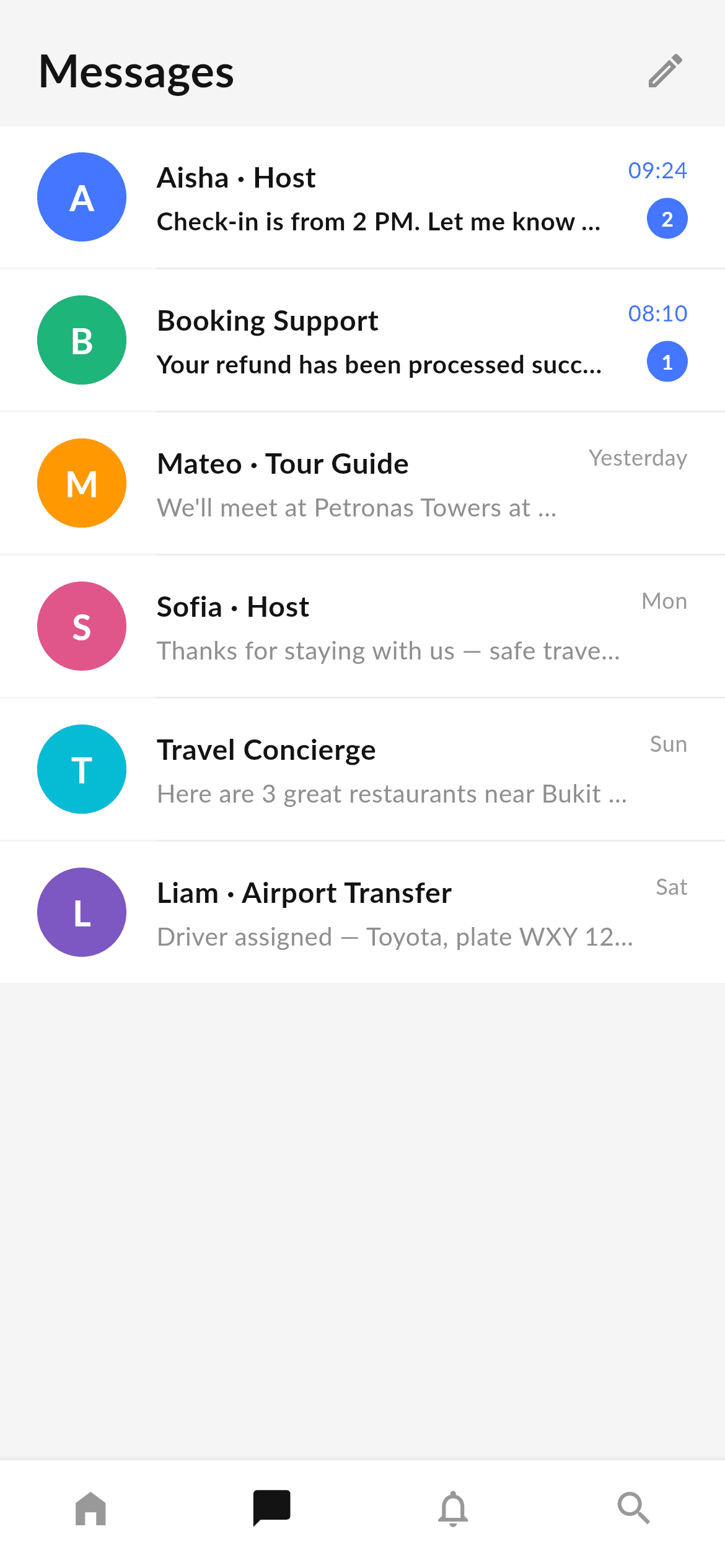
What you'll build
- ✓Coloured circular initial avatars derived from the contact name — no images, no network calls
- ✓A ListView.separated with indent: 84 so dividers begin where the text begins, not at the screen edge
- ✓Three simultaneous unread cues: bold preview, accent-coloured timestamp, and a count badge
- ✓A pill badge that stays circular for one digit and grows for two, via BoxConstraints(minWidth: 22)
- ✓A SizedBox placeholder that reserves the badge's height so read and unread rows are the same size
Step-by-step build
Create the file
Add a new file at lib/travel_messages/travel_messages_screen.dart in your Flutter project.
Register the bundled fonts
No external packages — this is pure Flutter. It does bundle its design font (Lato), so drop the font file into fonts/ and declare it in pubspec.yaml:
flutter:
  fonts:
    - family: Lato
      fonts:
- asset: fonts/Lato-Regular.ttfBuild it, piece by piece
Here's how the screen goes together. Each block below is a real slice of the code with a plain-English explanation — paste them in order, or grab the whole file from the next section.
Tokens and the conversation data
import 'package:flutter/material.dart';

/// "Messages" screen for the Travel Kit — a bottom-nav destination built in the
/// kit's visual language (Lato, light-grey canvas, white rows). A conversation
/// inbox with hosts, guides and support: coloured initial avatars, last-message
/// preview, timestamps and unread badges, plus the shared bottom navigation.
///
/// Self-contained, pure Flutter — no bundled images (avatars are coloured
/// initials). Fully responsive (the list scrolls). Renders standalone when
/// pushed as a route.
///
/// [onTabSelected] fires with the tapped bottom-nav index; it defaults to a
/// no-op so the screen works on its own. The preview gallery wires it to switch
/// between the travel tabs.
class TravelMessagesScreen extends StatelessWidget {
  const TravelMessagesScreen({super.key, this.onTabSelected});

  /// Invoked with the bottom-nav index when a tab is tapped. No-op by default.
  final ValueChanged<int>? onTabSelected;

  static const Color _bg = Color(0xFFF5F5F5);
  static const Color _ink = Color(0xFF131314);
  static const Color _grey = Color(0xFF8F8F8F);
  static const Color _greyLow = Color(0xFF999999);
  static const Color _accent = Color(0xFF4476FF);
  static const String _font = 'Lato';

  static const List<_Chat> _chats = <_Chat>[
    _Chat(
      name: 'Aisha · Host',
      message: 'Check-in is from 2 PM. Let me know your arrival time!',
      time: '09:24',
      unread: 2,
      color: Color(0xFF4476FF),
    ),
    _Chat(
      name: 'Booking Support',
      message: 'Your refund has been processed successfully.',
      time: '08:10',
      unread: 1,
      color: Color(0xFF1FB57A),
    ),
    _Chat(
      name: 'Mateo · Tour Guide',
      message: "We'll meet at Petronas Towers at 9 AM.",
      time: 'Yesterday',
      unread: 0,
      color: Color(0xFFFF9800),
    ),
    _Chat(
      name: 'Sofia · Host',
      message: 'Thanks for staying with us — safe travels!',
      time: 'Mon',
      unread: 0,
      color: Color(0xFFE0568A),
    ),
    _Chat(
      name: 'Travel Concierge',
      message: 'Here are 3 great restaurants near Bukit Bintang.',
      time: 'Sun',
      unread: 0,
      color: Color(0xFF00BCD4),
    ),
    _Chat(
      name: 'Liam · Airport Transfer',
      message: 'Driver assigned — Toyota, plate WXY 1234.',
      time: 'Sat',
      unread: 0,
      color: Color(0xFF7E57C2),
    ),
  ];
Only material.dart is imported. The screen is stateless and takes an optional onTabSelected callback so it can either stand alone or drive a tab shell. Five colour tokens and the Lato font name sit as static consts, then _chats: a const list of six _Chat records, each with a name, last message, timestamp, unread count and its own avatar colour. Storing unread as an int rather than a bool is what lets one field drive both the 'is unread' styling and the badge number. Note the names embed a role after a middle dot — 'Aisha · Host', 'Mateo · Tour Guide' — which gives the row context without a second line of text.
Header and the separated list
  @override
  Widget build(BuildContext context) {
    return Scaffold(
      backgroundColor: _bg,
      body: SafeArea(
        bottom: false,
        child: Column(
          crossAxisAlignment: CrossAxisAlignment.start,
          children: <Widget>[
            Padding(
              padding: const EdgeInsets.fromLTRB(20, 18, 12, 10),
              child: Row(
                children: <Widget>[
                  const Expanded(
                    child: Text(
                      'Messages',
                      style: TextStyle(
                        fontFamily: _font,
                        fontWeight: FontWeight.w700,
                        fontSize: 24,
                        color: _ink,
                      ),
                    ),
                  ),
                  IconButton(
                    onPressed: () {},
                    icon: const Icon(Icons.edit_outlined, color: _grey),
                  ),
                ],
              ),
            ),
            Expanded(
              child: ListView.separated(
                physics: const ClampingScrollPhysics(),
                padding: const EdgeInsets.only(bottom: 16),
                itemCount: _chats.length,
                separatorBuilder: (BuildContext context, int i) => const Divider(
                  height: 1,
                  thickness: 1,
                  indent: 84,
                  color: Color(0xFFECECEC),
                ),
                itemBuilder: (BuildContext context, int i) =>
                    _ChatTile(chat: _chats[i]),
              ),
            ),
          ],
        ),
      ),
      bottomNavigationBar: _BottomNav(
        currentIndex: 1,
        onTap: onTabSelected,
      ),
    );
  }
}
The header is a Row with the bold 24px 'Messages' title in an Expanded and an edit-pencil IconButton on the right; Expanded pushes them apart without a Spacer. Below it, an Expanded holds a ListView.separated. The separatorBuilder returns a 1px Divider with indent: 84 — that indent is the detail that makes the list look designed: 20px of page padding plus the 48px avatar plus the 16px gap equals 84, so the hairline starts exactly under the name instead of cutting across the avatars. currentIndex: 1 lights the Message tab in the shared nav.
The initial avatar
/// A single conversation row: initial avatar, name + last message, time and an
/// unread badge.
class _ChatTile extends StatelessWidget {
  const _ChatTile({required this.chat});

  final _Chat chat;

  @override
  Widget build(BuildContext context) {
    final bool hasUnread = chat.unread > 0;
    return Container(
      color: Colors.white,
      padding: const EdgeInsets.fromLTRB(20, 14, 20, 14),
      child: Row(
        children: <Widget>[
          Container(
            width: 48,
            height: 48,
            alignment: Alignment.center,
            decoration: BoxDecoration(color: chat.color, shape: BoxShape.circle),
            child: Text(
              chat.name.characters.first.toUpperCase(),
              style: const TextStyle(
                fontFamily: TravelMessagesScreen._font,
                fontWeight: FontWeight.w700,
                fontSize: 19,
                color: Colors.white,
              ),
            ),
          ),
          const SizedBox(width: 16),
hasUnread is computed once at the top of build as chat.unread > 0 and then reused for every styling decision below. The avatar is a 48px circle filled with the chat's own colour, and its letter comes from chat.name.characters.first.toUpperCase(). Using .characters rather than name[0] matters: .characters walks user-perceived grapheme clusters, so a name starting with an emoji or an accented multi-code-unit character yields a sensible glyph instead of half a symbol. It's a one-word change that makes the avatar safe for international names.
Three unread cues in the row body
          Expanded(
            child: Column(
              crossAxisAlignment: CrossAxisAlignment.start,
              children: <Widget>[
                Text(
                  chat.name,
                  maxLines: 1,
                  overflow: TextOverflow.ellipsis,
                  style: const TextStyle(
                    fontFamily: TravelMessagesScreen._font,
                    fontWeight: FontWeight.w700,
                    fontSize: 15.5,
                    color: TravelMessagesScreen._ink,
                  ),
                ),
                const SizedBox(height: 3),
                Text(
                  chat.message,
                  maxLines: 1,
                  overflow: TextOverflow.ellipsis,
                  style: TextStyle(
                    fontFamily: TravelMessagesScreen._font,
                    fontWeight: hasUnread ? FontWeight.w700 : FontWeight.w400,
                    fontSize: 13.5,
                    color: hasUnread
                        ? TravelMessagesScreen._ink
                        : TravelMessagesScreen._grey,
                  ),
                ),
              ],
            ),
          ),
          const SizedBox(width: 10),
          Column(
            crossAxisAlignment: CrossAxisAlignment.end,
            children: <Widget>[
              Text(
                chat.time,
                style: TextStyle(
                  fontFamily: TravelMessagesScreen._font,
                  fontSize: 12,
                  color: hasUnread
                      ? TravelMessagesScreen._accent
                      : TravelMessagesScreen._greyLow,
                ),
              ),
The middle Expanded holds the name at 15.5px bold and the preview below it, and the preview is where hasUnread does its work twice: fontWeight flips between w700 and w400, and colour flips between the near-black _ink and the softer _grey. Both texts use maxLines: 1 with TextOverflow.ellipsis, which is essential in an inbox — messages are arbitrary length and a two-line preview would break the rhythm of the list. In the trailing Column, the timestamp takes the blue _accent when unread and _greyLow otherwise, so even the time reads as a signal.
The badge, and reserving its space
              const SizedBox(height: 6),
              if (hasUnread)
                Container(
                  padding: const EdgeInsets.all(6),
                  constraints: const BoxConstraints(minWidth: 22),
                  decoration: const BoxDecoration(
                    color: TravelMessagesScreen._accent,
                    shape: BoxShape.circle,
                  ),
                  child: Text(
                    '${chat.unread}',
                    textAlign: TextAlign.center,
                    style: const TextStyle(
                      fontFamily: TravelMessagesScreen._font,
                      fontWeight: FontWeight.w700,
                      fontSize: 11,
                      height: 1,
                      color: Colors.white,
                    ),
                  ),
                )
              else
                const SizedBox(height: 22),
            ],
          ),
        ],
      ),
    );
  }
}
The badge is a circular Container with 6px padding and BoxConstraints(minWidth: 22), so a single digit stays a neat circle while a double-digit count expands it rather than clipping. height: 1 on the number's TextStyle removes the font's built-in leading, which is what keeps the digit optically centred in a small circle. The important line is the else branch: when there's no badge, a bare SizedBox(height: 22) takes its place, so a read row is exactly as tall as an unread one and the list doesn't visibly jitter as messages are marked read.
Full code
The complete, ready-to-paste source. Free to use in your projects — one click copies it all.
import 'package:flutter/material.dart';

/// "Messages" screen for the Travel Kit — a bottom-nav destination built in the
/// kit's visual language (Lato, light-grey canvas, white rows). A conversation
/// inbox with hosts, guides and support: coloured initial avatars, last-message
/// preview, timestamps and unread badges, plus the shared bottom navigation.
///
/// Self-contained, pure Flutter — no bundled images (avatars are coloured
/// initials). Fully responsive (the list scrolls). Renders standalone when
/// pushed as a route.
///
/// [onTabSelected] fires with the tapped bottom-nav index; it defaults to a
/// no-op so the screen works on its own. The preview gallery wires it to switch
/// between the travel tabs.
class TravelMessagesScreen extends StatelessWidget {
  const TravelMessagesScreen({super.key, this.onTabSelected});

  /// Invoked with the bottom-nav index when a tab is tapped. No-op by default.
  final ValueChanged<int>? onTabSelected;

  static const Color _bg = Color(0xFFF5F5F5);
  static const Color _ink = Color(0xFF131314);
  static const Color _grey = Color(0xFF8F8F8F);
  static const Color _greyLow = Color(0xFF999999);
  static const Color _accent = Color(0xFF4476FF);
  static const String _font = 'Lato';

  static const List<_Chat> _chats = <_Chat>[
    _Chat(
      name: 'Aisha · Host',
      message: 'Check-in is from 2 PM. Let me know your arrival time!',
      time: '09:24',
      unread: 2,
      color: Color(0xFF4476FF),
    ),
    _Chat(
      name: 'Booking Support',
      message: 'Your refund has been processed successfully.',
      time: '08:10',
      unread: 1,
      color: Color(0xFF1FB57A),
    ),
    _Chat(
      name: 'Mateo · Tour Guide',
      message: "We'll meet at Petronas Towers at 9 AM.",
      time: 'Yesterday',
      unread: 0,
      color: Color(0xFFFF9800),
    ),
    _Chat(
      name: 'Sofia · Host',
      message: 'Thanks for staying with us — safe travels!',
      time: 'Mon',
      unread: 0,
      color: Color(0xFFE0568A),
    ),
    _Chat(
      name: 'Travel Concierge',
      message: 'Here are 3 great restaurants near Bukit Bintang.',
      time: 'Sun',
      unread: 0,
      color: Color(0xFF00BCD4),
    ),
    _Chat(
      name: 'Liam · Airport Transfer',
      message: 'Driver assigned — Toyota, plate WXY 1234.',
      time: 'Sat',
      unread: 0,
      color: Color(0xFF7E57C2),
    ),
  ];

  @override
  Widget build(BuildContext context) {
    return Scaffold(
      backgroundColor: _bg,
      body: SafeArea(
        bottom: false,
        child: Column(
          crossAxisAlignment: CrossAxisAlignment.start,
          children: <Widget>[
            Padding(
              padding: const EdgeInsets.fromLTRB(20, 18, 12, 10),
              child: Row(
                children: <Widget>[
                  const Expanded(
                    child: Text(
                      'Messages',
                      style: TextStyle(
                        fontFamily: _font,
                        fontWeight: FontWeight.w700,
                        fontSize: 24,
                        color: _ink,
                      ),
                    ),
                  ),
                  IconButton(
                    onPressed: () {},
                    icon: const Icon(Icons.edit_outlined, color: _grey),
                  ),
                ],
              ),
            ),
            Expanded(
              child: ListView.separated(
                physics: const ClampingScrollPhysics(),
                padding: const EdgeInsets.only(bottom: 16),
                itemCount: _chats.length,
                separatorBuilder: (BuildContext context, int i) => const Divider(
                  height: 1,
                  thickness: 1,
                  indent: 84,
                  color: Color(0xFFECECEC),
                ),
                itemBuilder: (BuildContext context, int i) =>
                    _ChatTile(chat: _chats[i]),
              ),
            ),
          ],
        ),
      ),
      bottomNavigationBar: _BottomNav(
        currentIndex: 1,
        onTap: onTabSelected,
      ),
    );
  }
}

class _Chat {
  const _Chat({
    required this.name,
    required this.message,
    required this.time,
    required this.unread,
    required this.color,
  });

  final String name;
  final String message;
  final String time;
  final int unread;
  final Color color;
}

/// A single conversation row: initial avatar, name + last message, time and an
/// unread badge.
class _ChatTile extends StatelessWidget {
  const _ChatTile({required this.chat});

  final _Chat chat;

  @override
  Widget build(BuildContext context) {
    final bool hasUnread = chat.unread > 0;
    return Container(
      color: Colors.white,
      padding: const EdgeInsets.fromLTRB(20, 14, 20, 14),
      child: Row(
        children: <Widget>[
          Container(
            width: 48,
            height: 48,
            alignment: Alignment.center,
            decoration: BoxDecoration(color: chat.color, shape: BoxShape.circle),
            child: Text(
              chat.name.characters.first.toUpperCase(),
              style: const TextStyle(
                fontFamily: TravelMessagesScreen._font,
                fontWeight: FontWeight.w700,
                fontSize: 19,
                color: Colors.white,
              ),
            ),
          ),
          const SizedBox(width: 16),
          Expanded(
            child: Column(
              crossAxisAlignment: CrossAxisAlignment.start,
              children: <Widget>[
                Text(
                  chat.name,
                  maxLines: 1,
                  overflow: TextOverflow.ellipsis,
                  style: const TextStyle(
                    fontFamily: TravelMessagesScreen._font,
                    fontWeight: FontWeight.w700,
                    fontSize: 15.5,
                    color: TravelMessagesScreen._ink,
                  ),
                ),
                const SizedBox(height: 3),
                Text(
                  chat.message,
                  maxLines: 1,
                  overflow: TextOverflow.ellipsis,
                  style: TextStyle(
                    fontFamily: TravelMessagesScreen._font,
                    fontWeight: hasUnread ? FontWeight.w700 : FontWeight.w400,
                    fontSize: 13.5,
                    color: hasUnread
                        ? TravelMessagesScreen._ink
                        : TravelMessagesScreen._grey,
                  ),
                ),
              ],
            ),
          ),
          const SizedBox(width: 10),
          Column(
            crossAxisAlignment: CrossAxisAlignment.end,
            children: <Widget>[
              Text(
                chat.time,
                style: TextStyle(
                  fontFamily: TravelMessagesScreen._font,
                  fontSize: 12,
                  color: hasUnread
                      ? TravelMessagesScreen._accent
                      : TravelMessagesScreen._greyLow,
                ),
              ),
              const SizedBox(height: 6),
              if (hasUnread)
                Container(
                  padding: const EdgeInsets.all(6),
                  constraints: const BoxConstraints(minWidth: 22),
                  decoration: const BoxDecoration(
                    color: TravelMessagesScreen._accent,
                    shape: BoxShape.circle,
                  ),
                  child: Text(
                    '${chat.unread}',
                    textAlign: TextAlign.center,
                    style: const TextStyle(
                      fontFamily: TravelMessagesScreen._font,
                      fontWeight: FontWeight.w700,
                      fontSize: 11,
                      height: 1,
                      color: Colors.white,
                    ),
                  ),
                )
              else
                const SizedBox(height: 22),
            ],
          ),
        ],
      ),
    );
  }
}

/// Bottom navigation bar shared by the travel tab screens.
class _BottomNav extends StatelessWidget {
  const _BottomNav({required this.currentIndex, this.onTap});

  final int currentIndex;
  final ValueChanged<int>? onTap;

  @override
  Widget build(BuildContext context) {
    return BottomNavigationBar(
      currentIndex: currentIndex,
      onTap: onTap,
      type: BottomNavigationBarType.fixed,
      backgroundColor: Colors.white,
      selectedItemColor: TravelMessagesScreen._ink,
      unselectedItemColor: TravelMessagesScreen._greyLow,
      showSelectedLabels: false,
      showUnselectedLabels: false,
      elevation: 8,
      items: const <BottomNavigationBarItem>[
        BottomNavigationBarItem(icon: Icon(Icons.home_filled), label: 'Home'),
        BottomNavigationBarItem(
            icon: Icon(Icons.chat_bubble), label: 'Message'),
        BottomNavigationBarItem(
            icon: Icon(Icons.notifications_none), label: 'Notification'),
        BottomNavigationBarItem(icon: Icon(Icons.search), label: 'Search'),
      ],
    );
  }
}
Plus bundled 2 binary assets (fonts/images). The CLI and MCP install those for you automatically.
Two faster ways to add it
Copy-paste works, but you can skip it entirely.
1. FlutterKit CLI
One command drops this screen — and its fonts — straight into your project.
$ flutterkit add travel-messages2. AI agent (MCP)
Connect FlutterKit's MCP server in Claude or Cursor and just ask your agent to install travel-messages — it fetches and writes the files for you.
FAQ
Is this Flutter chat inbox free to use?
Yes. The full Dart source on this page is free for personal and commercial projects. Copy it, install it with the FlutterKit CLI (flutterkit add travel-messages), or have an AI agent add it via MCP.
How do I connect it to a real chat backend?
Swap the const _chats list for a StreamBuilder over your Firestore conversations collection (or your own API) and map each document to a _Chat. The tile takes a _Chat and reads nothing else, so the rendering layer needs no changes; add an onTap to _ChatTile to push the thread view.
Does it need any external packages or images?
Neither. It's pure Flutter on the material library, and the avatars are coloured initials rather than images — nothing to download or cache. The only bundled asset is the Lato font, registered in pubspec.yaml as shown in step 2.
Which Flutter version does it target?
It uses super parameters and String.characters (from the characters package, re-exported by the Flutter SDK), so Dart 3 / Flutter 3.10+ is enough. There are no withValues() calls in this screen, so it compiles on older SDKs without edits.

