How to Build a Post Comments Thread Screen in Flutter (Full Code + Preview)
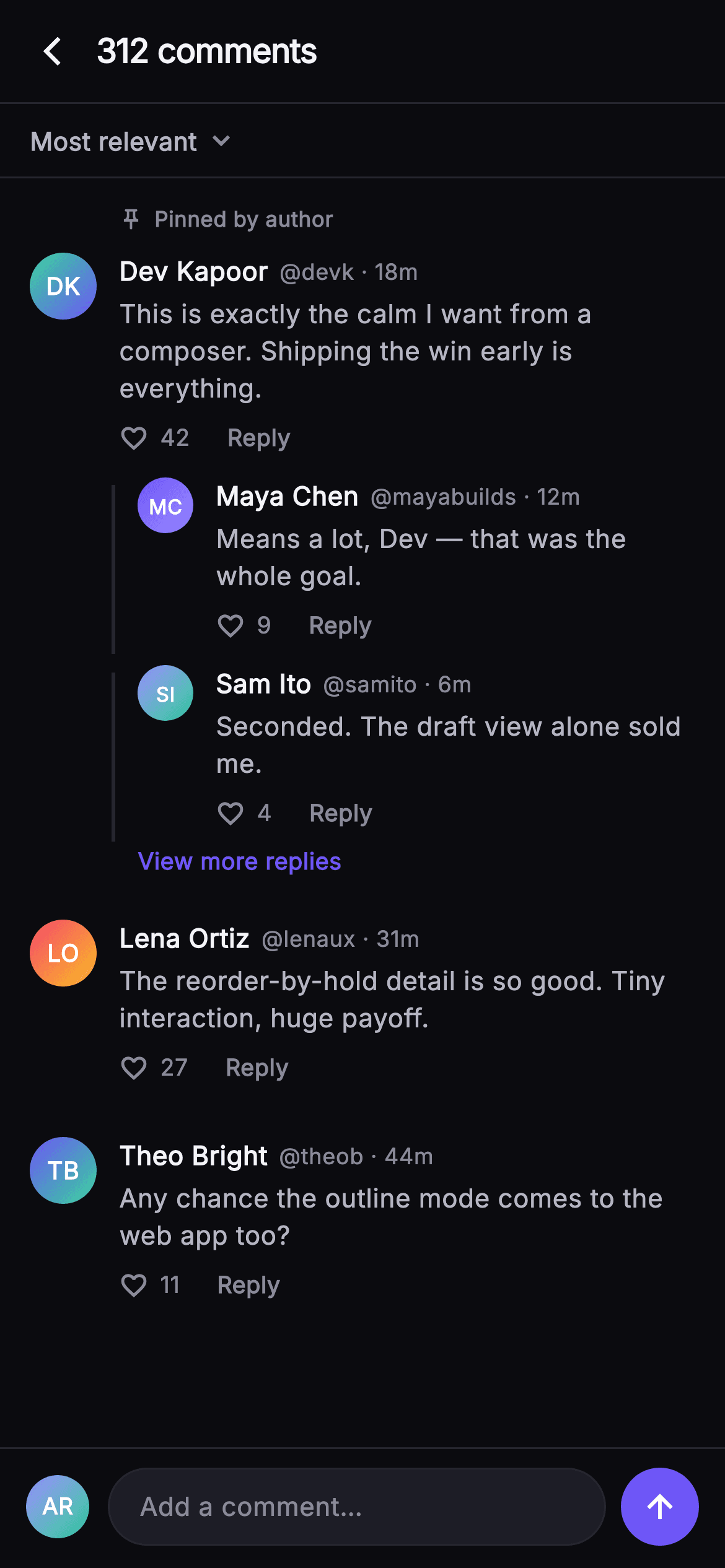
A comments thread lives or dies on hierarchy: a reader has to tell a top-level opinion from a reply to it at a glance, and always know where to type. This tutorial builds Pulse's Comments Thread in Flutter — a '312 comments' bar, a Most-relevant sort row, gradient monogram avatars whose initials are derived from the name string, a pinned author comment, replies indented 44px behind a 2px connector hairline, and a composer pinned under the scroll area rather than floating over it.
Watch the Flutter UI walkthrough
A short screen recording of Pulse · Comments Thread running, if you'd rather see it before you read the code. The written tutorial below covers everything in it.
Can't see the video? Watch it on YouTube.
What you'll build
- ✓A `_Monogram` avatar that derives initials from a name and paints them over a two-colour `LinearGradient`, at 36px for comments and 30px for replies
- ✓Reply children indented 44px behind a 2px connector hairline stretched by `IntrinsicHeight`
- ✓A 'Pinned by author' label that only renders for the comment whose `pinned` flag is true
- ✓A composer bar pinned as the last child of a Column, so it sits below an `Expanded` ListView instead of over it
- ✓Handle-aware actions — `onReply` is called with `c.handle`, so the caller knows who is being replied to
Step-by-step build
Create the file
Add a new file at lib/social_post_comments/social_post_comments_screen.dart in your Flutter project.
Register the bundled fonts
No external packages — this is pure Flutter. It does bundle its design font (Inter), so drop the font file into fonts/ and declare it in pubspec.yaml:
flutter:
  fonts:
    - family: Inter
      fonts:
- asset: fonts/Inter-Regular.ttfBuild it, piece by piece
Here's how the screen goes together. Each block below is a real slice of the code with a plain-English explanation — paste them in order, or grab the whole file from the next section.
Callbacks and the near-mono dark palette
import 'package:flutter/material.dart';

/// Comments Thread — the full comments view for a post. A sort control, a
/// scrolling thread of top-level comments each with painted monogram avatar,
/// like counts and reply pills, and indented reply children with a connector
/// hairline. A pinned composer sits at the bottom at fixed height.
/// Self-contained per CONVENTIONS.md: pure Flutter, bundled Inter font, own dark
/// theme, SafeArea, overflow-proof.
class SocialPostCommentsScreen extends StatelessWidget {
  const SocialPostCommentsScreen({
    super.key,
    this.onBack,
    this.onReply,
    this.onViewReplies,
    this.onAddComment,
  });

  final VoidCallback? onBack;
  final ValueChanged<String>? onReply;
  final VoidCallback? onViewReplies;
  final VoidCallback? onAddComment;

  static const String _font = 'Inter';
  static const Color _bg = Color(0xFF0B0B0F);
  static const Color _surfaceAlt = Color(0xFF1D1D26);
  static const Color _brand = Color(0xFF6E56F7);
  static const Color _hairline = Color(0xFF26262F);
  static const Color _textHi = Color(0xFFF4F4F7);
  static const Color _textLo = Color(0xFFB5B5C2);
  static const Color _muted = Color(0xFF8A8A99);
The whole screen is a `StatelessWidget` with four injected callbacks. Three are plain `VoidCallback?`, but `onReply` is a `ValueChanged<String>?` — replying is the one action that needs an argument, because the caller has to know which handle the draft is aimed at. The palette is deliberately low-contrast: `_bg` #0B0B0F, `_surfaceAlt` #1D1D26 for the composer pill, `_hairline` #26262F for every border and connector, then three text greys — `_textHi` #F4F4F7 for names, `_textLo` #B5B5C2 for comment bodies, `_muted` #8A8A99 for metadata. Only `_brand` #6E56F7 is saturated, which is why 'View more replies' and the send button read as the sole tappable colour.
The thread as const data
  static const List<_Comment> _comments = <_Comment>[
    _Comment(
      name: 'Dev Kapoor',
      handle: 'devk',
      time: '18m',
      colorA: 0xFF34D399,
      colorB: 0xFF6E56F7,
      text:
          'This is exactly the calm I want from a composer. Shipping the win '
          'early is everything.',
      likes: 42,
      pinned: true,
      replies: <_Reply>[
        _Reply('Maya Chen', 'mayabuilds', '12m', 0xFF6E56F7, 0xFF9B8CFF,
            'Means a lot, Dev — that was the whole goal.', 9),
        _Reply('Sam Ito', 'samito', '6m', 0xFF9B8CFF, 0xFF34D399,
            'Seconded. The draft view alone sold me.', 4),
      ],
    ),
    _Comment(
      name: 'Lena Ortiz',
      handle: 'lenaux',
      time: '31m',
      colorA: 0xFFF4476B,
      colorB: 0xFFFBBF24,
      text: 'The reorder-by-hold detail is so good. Tiny interaction, huge '
          'payoff.',
      likes: 27,
      pinned: false,
      replies: <_Reply>[],
    ),
    _Comment(
      name: 'Theo Bright',
      handle: 'theob',
      time: '44m',
      colorA: 0xFF6E56F7,
      colorB: 0xFF34D399,
      text: 'Any chance the outline mode comes to the web app too?',
      likes: 11,
      pinned: false,
      replies: <_Reply>[],
    ),
  ];
`_comments` is a `static const List<_Comment>` holding three top-level comments, the first carrying two `_Reply` children and `pinned: true`. Keeping it const means the sample thread is compiled in and costs nothing at runtime, and it makes the shape of your own model obvious: name, handle, time, two gradient stops, text, like count, pinned flag, replies. The avatar colours are stored as `int` literals (`0xFF34D399`, `0xFF6E56F7`) rather than `Color` objects — that is what a real API would send back, and `_CommentCore` wraps them with `Color(colorA)` at the last moment.
Column layout that pins the composer
  @override
  Widget build(BuildContext context) {
    return Theme(
      data: ThemeData.dark(useMaterial3: true),
      child: Scaffold(
        backgroundColor: _bg,
        body: SafeArea(
          child: Column(
            children: <Widget>[
              _TopBar(onBack: onBack),
              const _SortRow(),
              const _Divider(),
              Expanded(
                child: ListView(
                  padding: const EdgeInsets.only(top: 4, bottom: 16),
                  children: <Widget>[
                    for (final _Comment c in _comments)
                      _CommentBlock(
                        comment: c,
                        onReply: () => onReply?.call(c.handle),
                        onViewReplies: onViewReplies,
                      ),
                  ],
                ),
              ),
              _Composer(onTap: onAddComment),
            ],
          ),
        ),
      ),
    );
  }
}
`build` wraps everything in `Theme(data: ThemeData.dark(useMaterial3: true))` so the screen keeps its dark styling even when dropped into a light app. Inside `SafeArea`, a Column stacks `_TopBar`, `_SortRow` and `_Divider` as fixed-height children, gives the ListView an `Expanded`, and puts `_Composer` last. That single arrangement is what pins the composer: it is a Column sibling, not a `bottomNavigationBar` and not a `Stack` overlay, so it can never cover the last comment. Because Scaffold defaults to `resizeToAvoidBottomInset: true`, the same layout lifts the bar above the keyboard once you swap a real field in.
Count bar and sort row
class _TopBar extends StatelessWidget {
  const _TopBar({this.onBack});
  final VoidCallback? onBack;

  @override
  Widget build(BuildContext context) {
    return Container(
      height: 56,
      padding: const EdgeInsets.only(left: 4, right: 16),
      decoration: const BoxDecoration(
        border: Border(
          bottom: BorderSide(color: SocialPostCommentsScreen._hairline),
        ),
      ),
      child: Row(
        children: <Widget>[
          IconButton(
            onPressed: onBack,
            icon: const Icon(Icons.arrow_back_ios_new,
                size: 18, color: SocialPostCommentsScreen._textHi),
          ),
          const Text(
            '312 comments',
            style: TextStyle(
              fontFamily: SocialPostCommentsScreen._font,
              fontSize: 18,
              fontWeight: FontWeight.w700,
              letterSpacing: -0.4,
              color: SocialPostCommentsScreen._textHi,
            ),
          ),
        ],
      ),
    );
  }
}

class _SortRow extends StatelessWidget {
  const _SortRow();

  @override
  Widget build(BuildContext context) {
    return const Padding(
      padding: EdgeInsets.fromLTRB(16, 10, 16, 10),
      child: Row(
        children: <Widget>[
          Text(
            'Most relevant',
            style: TextStyle(
              fontFamily: SocialPostCommentsScreen._font,
              fontSize: 13.5,
              fontWeight: FontWeight.w600,
              color: SocialPostCommentsScreen._textLo,
            ),
          ),
          SizedBox(width: 4),
          Icon(Icons.keyboard_arrow_down,
              size: 18, color: SocialPostCommentsScreen._muted),
        ],
      ),
    );
  }
}
`_TopBar` is a 56px Container with a bottom-only `Border`, holding a back `IconButton` and the title '312 comments' at 18px `w700` with `letterSpacing: -0.4`. The count *is* the title — a thread does not need the word 'Comments' twice — and the padding is asymmetric (`left: 4, right: 16`) because `IconButton` already carries its own touch padding on the left. `_SortRow` is an entirely const subtree: 'Most relevant' at 13.5px in `_textLo` beside a `keyboard_arrow_down` in `_muted`. It reads as a control without being one, which is the honest way to stub a sort menu you have not wired yet.
Two models, one shape
class _Reply {
  const _Reply(this.name, this.handle, this.time, this.colorA, this.colorB,
      this.text, this.likes);
  final String name;
  final String handle;
  final String time;
  final int colorA;
  final int colorB;
  final String text;
  final int likes;
}

class _Comment {
  const _Comment({
    required this.name,
    required this.handle,
    required this.time,
    required this.colorA,
    required this.colorB,
    required this.text,
    required this.likes,
    required this.pinned,
    required this.replies,
  });
  final String name;
  final String handle;
  final String time;
  final int colorA;
  final int colorB;
  final String text;
  final int likes;
  final bool pinned;
  final List<_Reply> replies;
}
`_Reply` and `_Comment` carry almost the same seven fields, but they are separate classes on purpose. `_Reply` uses a positional constructor because its instances are written inline inside `_comments` and stay readable on two lines; `_Comment` uses `required` named parameters because it has nine fields, including the two — `pinned` and `replies` — that a reply can never have. Making `_Reply` a trimmed type rather than reusing `_Comment` with empty values means the type system, not a convention, stops anyone nesting a reply inside a reply.
Indentation, the connector hairline and the pinned label
class _CommentBlock extends StatelessWidget {
  const _CommentBlock({
    required this.comment,
    this.onReply,
    this.onViewReplies,
  });
  final _Comment comment;
  final VoidCallback? onReply;
  final VoidCallback? onViewReplies;

  String _initials(String name) {
    final List<String> p = name.trim().split(RegExp(r'\s+'));
    if (p.length == 1) return p.first.characters.first.toUpperCase();
    return (p.first[0] + p.last[0]).toUpperCase();
  }

  @override
  Widget build(BuildContext context) {
    return Padding(
      padding: const EdgeInsets.fromLTRB(16, 10, 16, 6),
      child: Column(
        crossAxisAlignment: CrossAxisAlignment.start,
        children: <Widget>[
          if (comment.pinned) ...<Widget>[
            const Padding(
              padding: EdgeInsets.only(left: 48, bottom: 4),
              child: Row(
                children: <Widget>[
                  Icon(Icons.push_pin_outlined,
                      size: 13, color: SocialPostCommentsScreen._muted),
                  SizedBox(width: 6),
                  Text(
                    'Pinned by author',
                    style: TextStyle(
                      fontFamily: SocialPostCommentsScreen._font,
                      fontSize: 11.5,
                      fontWeight: FontWeight.w600,
                      color: SocialPostCommentsScreen._muted,
                    ),
                  ),
                ],
              ),
            ),
          ],
          _CommentCore(
            initials: _initials(comment.name),
            name: comment.name,
            handle: comment.handle,
            time: comment.time,
            colorA: comment.colorA,
            colorB: comment.colorB,
            text: comment.text,
            likes: comment.likes,
            onReply: onReply,
          ),
          for (final _Reply r in comment.replies)
            Padding(
              padding: const EdgeInsets.only(left: 44),
              child: IntrinsicHeight(
                child: Row(
                  crossAxisAlignment: CrossAxisAlignment.stretch,
                  children: <Widget>[
                    Container(
                      width: 2,
                      margin: const EdgeInsets.only(right: 12, top: 10),
                      color: SocialPostCommentsScreen._hairline,
                    ),
                    Expanded(
                      child: _CommentCore(
                        initials: _initials(r.name),
                        name: r.name,
                        handle: r.handle,
                        time: r.time,
                        colorA: r.colorA,
                        colorB: r.colorB,
                        text: r.text,
                        likes: r.likes,
                        avatarSize: 30,
                        onReply: onReply,
                      ),
                    ),
                  ],
                ),
              ),
            ),
          if (comment.replies.isNotEmpty)
            Padding(
              padding: const EdgeInsets.only(left: 58, top: 2),
              child: GestureDetector(
                onTap: onViewReplies,
                child: const Text(
                  'View more replies',
                  style: TextStyle(
                    fontFamily: SocialPostCommentsScreen._font,
                    fontSize: 12.5,
                    fontWeight: FontWeight.w600,
                    color: SocialPostCommentsScreen._brand,
                  ),
                ),
              ),
            ),
        ],
      ),
    );
  }
}
`_CommentBlock` is where the hierarchy is drawn. `_initials` splits the name on `RegExp(r'\s+')` and returns first-plus-last initials, falling back to `characters.first` for a single word so an emoji or accented grapheme is not sliced in half. The pinned label sits at `left: 48` so it lines up with the text column, not the avatar. Each reply is padded `left: 44` and wrapped in `IntrinsicHeight` with `crossAxisAlignment: CrossAxisAlignment.stretch` — that combination is what lets a 2px Container with no height grow to match the reply beside it, giving a connector line that always ends where the reply does. Its `top: 10` margin keeps the line from touching the row above.
One comment row, reused at two sizes
class _CommentCore extends StatelessWidget {
  const _CommentCore({
    required this.initials,
    required this.name,
    required this.handle,
    required this.time,
    required this.colorA,
    required this.colorB,
    required this.text,
    required this.likes,
    this.avatarSize = 36,
    this.onReply,
  });
  final String initials;
  final String name;
  final String handle;
  final String time;
  final int colorA;
  final int colorB;
  final String text;
  final int likes;
  final double avatarSize;
  final VoidCallback? onReply;

  @override
  Widget build(BuildContext context) {
    return Padding(
      padding: const EdgeInsets.symmetric(vertical: 6),
      child: Row(
        crossAxisAlignment: CrossAxisAlignment.start,
        children: <Widget>[
          _Monogram(
            initials: initials,
            colorA: Color(colorA),
            colorB: Color(colorB),
            size: avatarSize,
          ),
          const SizedBox(width: 12),
          Expanded(
            child: Column(
              crossAxisAlignment: CrossAxisAlignment.start,
              children: <Widget>[
                Row(
                  children: <Widget>[
                    Flexible(
                      child: Text(
                        name,
                        overflow: TextOverflow.ellipsis,
                        style: const TextStyle(
                          fontFamily: SocialPostCommentsScreen._font,
                          fontSize: 14,
                          fontWeight: FontWeight.w700,
                          color: SocialPostCommentsScreen._textHi,
                        ),
                      ),
                    ),
                    const SizedBox(width: 6),
                    Text(
                      '@$handle · $time',
                      style: const TextStyle(
                        fontFamily: SocialPostCommentsScreen._font,
                        fontSize: 12,
                        color: SocialPostCommentsScreen._muted,
                      ),
                    ),
                  ],
                ),
                const SizedBox(height: 3),
                Text(
                  text,
                  style: const TextStyle(
                    fontFamily: SocialPostCommentsScreen._font,
                    fontSize: 14,
                    height: 1.45,
                    color: SocialPostCommentsScreen._textLo,
                  ),
                ),
                const SizedBox(height: 8),
                Row(
                  children: <Widget>[
                    const Icon(Icons.favorite_border,
                        size: 16, color: SocialPostCommentsScreen._muted),
                    const SizedBox(width: 6),
                    Text(
                      '$likes',
                      style: const TextStyle(
                        fontFamily: SocialPostCommentsScreen._font,
                        fontSize: 12.5,
                        color: SocialPostCommentsScreen._muted,
                      ),
                    ),
                    const SizedBox(width: 20),
                    GestureDetector(
                      onTap: onReply,
                      child: const Text(
                        'Reply',
                        style: TextStyle(
                          fontFamily: SocialPostCommentsScreen._font,
                          fontSize: 12.5,
                          fontWeight: FontWeight.w600,
                          color: SocialPostCommentsScreen._muted,
                        ),
                      ),
                    ),
                  ],
                ),
              ],
            ),
          ),
        ],
      ),
    );
  }
}
`_CommentCore` renders a top-level comment and a reply from the same code, differing only in `avatarSize` (36 by default, 30 when called for a reply). The header Row wraps the name in `Flexible` with `TextOverflow.ellipsis` while '@handle · time' stays unconstrained — a long display name truncates, the timestamp never does. The body is 14px with `height: 1.45`, loose enough that three wrapped lines still read as one block. The footer pairs a `favorite_border` icon with the raw count and a 20px gap before 'Reply', so the like affordance and the reply tap target cannot be mis-hit. Note the like icon is static: nothing here toggles it.
The composer, divider and gradient monogram
class _Composer extends StatelessWidget {
  const _Composer({this.onTap});
  final VoidCallback? onTap;

  @override
  Widget build(BuildContext context) {
    return Container(
      decoration: const BoxDecoration(
        color: SocialPostCommentsScreen._bg,
        border: Border(
          top: BorderSide(color: SocialPostCommentsScreen._hairline),
        ),
      ),
      padding: const EdgeInsets.fromLTRB(14, 10, 14, 12),
      child: Row(
        children: <Widget>[
          const _Monogram(
            initials: 'AR',
            colorA: Color(0xFF9B8CFF),
            colorB: Color(0xFF34D399),
            size: 34,
          ),
          const SizedBox(width: 10),
          Expanded(
            child: GestureDetector(
              onTap: onTap,
              child: Container(
                height: 42,
                alignment: Alignment.centerLeft,
                padding: const EdgeInsets.symmetric(horizontal: 16),
                decoration: BoxDecoration(
                  color: SocialPostCommentsScreen._surfaceAlt,
                  borderRadius: BorderRadius.circular(21),
                  border:
                      Border.all(color: SocialPostCommentsScreen._hairline),
                ),
                child: const Text(
                  'Add a comment…',
                  style: TextStyle(
                    fontFamily: SocialPostCommentsScreen._font,
                    fontSize: 14,
                    color: SocialPostCommentsScreen._muted,
                  ),
                ),
              ),
            ),
          ),
          const SizedBox(width: 8),
          GestureDetector(
            onTap: onTap,
            child: Container(
              width: 42,
              height: 42,
              decoration: const BoxDecoration(
                color: SocialPostCommentsScreen._brand,
                shape: BoxShape.circle,
              ),
              child: const Icon(Icons.arrow_upward,
                  size: 20, color: Colors.white),
            ),
          ),
        ],
      ),
    );
  }
}

class _Divider extends StatelessWidget {
  const _Divider();
  @override
  Widget build(BuildContext context) =>
      const Divider(height: 1, color: SocialPostCommentsScreen._hairline);
}

class _Monogram extends StatelessWidget {
  const _Monogram({
    required this.initials,
    required this.colorA,
    required this.colorB,
    this.size = 36,
  });
  final String initials;
  final Color colorA;
  final Color colorB;
  final double size;

  @override
  Widget build(BuildContext context) {
    return Container(
      width: size,
      height: size,
      decoration: BoxDecoration(
        shape: BoxShape.circle,
        gradient: LinearGradient(
          begin: Alignment.topLeft,
          end: Alignment.bottomRight,
          colors: <Color>[colorA, colorB],
        ),
      ),
      child: Center(
        child: Text(
          initials,
          style: TextStyle(
            fontFamily: SocialPostCommentsScreen._font,
            fontSize: size * 0.36,
            fontWeight: FontWeight.w700,
            color: Colors.white,
          ),
        ),
      ),
    );
  }
}
`_Composer` is a Container painted `_bg` with a top hairline so it stays visually attached to the thread. It is not a `TextField` — it is your own 'AR' monogram, a 42px-tall `_surfaceAlt` pill with `borderRadius: 21` (exactly half its height, so the ends are true semicircles) reading 'Add a comment…', and a 42px circular `_brand` send button. Both the pill and the button route to the same `onTap`, so tapping anywhere opens the real composer. `_Monogram` builds the avatar: a circle filled with a topLeft→bottomRight `LinearGradient` between the two stops, initials centred at `size * 0.36` so text scales with the circle at every call site.
Full code
The complete, ready-to-paste source. Free to use in your projects — one click copies it all.
import 'package:flutter/material.dart';
/// Comments Thread — the full comments view for a post. A sort control, a
/// scrolling thread of top-level comments each with painted monogram avatar,
/// like counts and reply pills, and indented reply children with a connector
/// hairline. A pinned composer sits at the bottom at fixed height.
/// Self-contained per CONVENTIONS.md: pure Flutter, bundled Inter font, own dark
/// theme, SafeArea, overflow-proof.
class SocialPostCommentsScreen extends StatelessWidget {
const SocialPostCommentsScreen({
super.key,
this.onBack,
this.onReply,
this.onViewReplies,
this.onAddComment,
});
final VoidCallback? onBack;
final ValueChanged<String>? onReply;
final VoidCallback? onViewReplies;
final VoidCallback? onAddComment;
static const String _font = 'Inter';
static const Color _bg = Color(0xFF0B0B0F);
static const Color _surfaceAlt = Color(0xFF1D1D26);
static const Color _brand = Color(0xFF6E56F7);
static const Color _hairline = Color(0xFF26262F);
static const Color _textHi = Color(0xFFF4F4F7);
static const Color _textLo = Color(0xFFB5B5C2);
static const Color _muted = Color(0xFF8A8A99);
static const List<_Comment> _comments = <_Comment>[
_Comment(
name: 'Dev Kapoor',
handle: 'devk',
time: '18m',
colorA: 0xFF34D399,
colorB: 0xFF6E56F7,
text:
'This is exactly the calm I want from a composer. Shipping the win '
'early is everything.',
likes: 42,
pinned: true,
replies: <_Reply>[
_Reply('Maya Chen', 'mayabuilds', '12m', 0xFF6E56F7, 0xFF9B8CFF,
'Means a lot, Dev — that was the whole goal.', 9),
_Reply('Sam Ito', 'samito', '6m', 0xFF9B8CFF, 0xFF34D399,
'Seconded. The draft view alone sold me.', 4),
],
),
_Comment(
name: 'Lena Ortiz',
handle: 'lenaux',
time: '31m',
colorA: 0xFFF4476B,
colorB: 0xFFFBBF24,
text: 'The reorder-by-hold detail is so good. Tiny interaction, huge '
'payoff.',
likes: 27,
pinned: false,
replies: <_Reply>[],
),
_Comment(
name: 'Theo Bright',
handle: 'theob',
time: '44m',
colorA: 0xFF6E56F7,
colorB: 0xFF34D399,
text: 'Any chance the outline mode comes to the web app too?',
likes: 11,
pinned: false,
replies: <_Reply>[],
),
];
@override
Widget build(BuildContext context) {
return Theme(
data: ThemeData.dark(useMaterial3: true),
child: Scaffold(
backgroundColor: _bg,
body: SafeArea(
child: Column(
children: <Widget>[
_TopBar(onBack: onBack),
const _SortRow(),
const _Divider(),
Expanded(
child: ListView(
padding: const EdgeInsets.only(top: 4, bottom: 16),
children: <Widget>[
for (final _Comment c in _comments)
_CommentBlock(
comment: c,
onReply: () => onReply?.call(c.handle),
onViewReplies: onViewReplies,
),
],
),
),
_Composer(onTap: onAddComment),
],
),
),
),
);
}
}
class _TopBar extends StatelessWidget {
const _TopBar({this.onBack});
final VoidCallback? onBack;
@override
Widget build(BuildContext context) {
return Container(
height: 56,
padding: const EdgeInsets.only(left: 4, right: 16),
decoration: const BoxDecoration(
border: Border(
bottom: BorderSide(color: SocialPostCommentsScreen._hairline),
),
),
child: Row(
children: <Widget>[
IconButton(
onPressed: onBack,
icon: const Icon(Icons.arrow_back_ios_new,
size: 18, color: SocialPostCommentsScreen._textHi),
),
const Text(
'312 comments',
style: TextStyle(
fontFamily: SocialPostCommentsScreen._font,
fontSize: 18,
fontWeight: FontWeight.w700,
letterSpacing: -0.4,
color: SocialPostCommentsScreen._textHi,
),
),
],
),
);
}
}
class _SortRow extends StatelessWidget {
const _SortRow();
@override
Widget build(BuildContext context) {
return const Padding(
padding: EdgeInsets.fromLTRB(16, 10, 16, 10),
child: Row(
children: <Widget>[
Text(
'Most relevant',
style: TextStyle(
fontFamily: SocialPostCommentsScreen._font,
fontSize: 13.5,
fontWeight: FontWeight.w600,
color: SocialPostCommentsScreen._textLo,
),
),
SizedBox(width: 4),
Icon(Icons.keyboard_arrow_down,
size: 18, color: SocialPostCommentsScreen._muted),
],
),
);
}
}
class _Reply {
const _Reply(this.name, this.handle, this.time, this.colorA, this.colorB,
this.text, this.likes);
final String name;
final String handle;
final String time;
final int colorA;
final int colorB;
final String text;
final int likes;
}
class _Comment {
const _Comment({
required this.name,
required this.handle,
required this.time,
required this.colorA,
required this.colorB,
required this.text,
required this.likes,
required this.pinned,
required this.replies,
});
final String name;
final String handle;
final String time;
final int colorA;
final int colorB;
final String text;
final int likes;
final bool pinned;
final List<_Reply> replies;
}
class _CommentBlock extends StatelessWidget {
const _CommentBlock({
required this.comment,
this.onReply,
this.onViewReplies,
});
final _Comment comment;
final VoidCallback? onReply;
final VoidCallback? onViewReplies;
String _initials(String name) {
final List<String> p = name.trim().split(RegExp(r'\s+'));
if (p.length == 1) return p.first.characters.first.toUpperCase();
return (p.first[0] + p.last[0]).toUpperCase();
}
@override
Widget build(BuildContext context) {
return Padding(
padding: const EdgeInsets.fromLTRB(16, 10, 16, 6),
child: Column(
crossAxisAlignment: CrossAxisAlignment.start,
children: <Widget>[
if (comment.pinned) ...<Widget>[
const Padding(
padding: EdgeInsets.only(left: 48, bottom: 4),
child: Row(
children: <Widget>[
Icon(Icons.push_pin_outlined,
size: 13, color: SocialPostCommentsScreen._muted),
SizedBox(width: 6),
Text(
'Pinned by author',
style: TextStyle(
fontFamily: SocialPostCommentsScreen._font,
fontSize: 11.5,
fontWeight: FontWeight.w600,
color: SocialPostCommentsScreen._muted,
),
),
],
),
),
],
_CommentCore(
initials: _initials(comment.name),
name: comment.name,
handle: comment.handle,
time: comment.time,
colorA: comment.colorA,
colorB: comment.colorB,
text: comment.text,
likes: comment.likes,
onReply: onReply,
),
for (final _Reply r in comment.replies)
Padding(
padding: const EdgeInsets.only(left: 44),
child: IntrinsicHeight(
child: Row(
crossAxisAlignment: CrossAxisAlignment.stretch,
children: <Widget>[
Container(
width: 2,
margin: const EdgeInsets.only(right: 12, top: 10),
color: SocialPostCommentsScreen._hairline,
),
Expanded(
child: _CommentCore(
initials: _initials(r.name),
name: r.name,
handle: r.handle,
time: r.time,
colorA: r.colorA,
colorB: r.colorB,
text: r.text,
likes: r.likes,
avatarSize: 30,
onReply: onReply,
),
),
],
),
),
),
if (comment.replies.isNotEmpty)
Padding(
padding: const EdgeInsets.only(left: 58, top: 2),
child: GestureDetector(
onTap: onViewReplies,
child: const Text(
'View more replies',
style: TextStyle(
fontFamily: SocialPostCommentsScreen._font,
fontSize: 12.5,
fontWeight: FontWeight.w600,
color: SocialPostCommentsScreen._brand,
),
),
),
),
],
),
);
}
}
class _CommentCore extends StatelessWidget {
const _CommentCore({
required this.initials,
required this.name,
required this.handle,
required this.time,
required this.colorA,
required this.colorB,
required this.text,
required this.likes,
this.avatarSize = 36,
this.onReply,
});
final String initials;
final String name;
final String handle;
final String time;
final int colorA;
final int colorB;
final String text;
final int likes;
final double avatarSize;
final VoidCallback? onReply;
@override
Widget build(BuildContext context) {
return Padding(
padding: const EdgeInsets.symmetric(vertical: 6),
child: Row(
crossAxisAlignment: CrossAxisAlignment.start,
children: <Widget>[
_Monogram(
initials: initials,
colorA: Color(colorA),
colorB: Color(colorB),
size: avatarSize,
),
const SizedBox(width: 12),
Expanded(
child: Column(
crossAxisAlignment: CrossAxisAlignment.start,
children: <Widget>[
Row(
children: <Widget>[
Flexible(
child: Text(
name,
overflow: TextOverflow.ellipsis,
style: const TextStyle(
fontFamily: SocialPostCommentsScreen._font,
fontSize: 14,
fontWeight: FontWeight.w700,
color: SocialPostCommentsScreen._textHi,
),
),
),
const SizedBox(width: 6),
Text(
'@$handle · $time',
style: const TextStyle(
fontFamily: SocialPostCommentsScreen._font,
fontSize: 12,
color: SocialPostCommentsScreen._muted,
),
),
],
),
const SizedBox(height: 3),
Text(
text,
style: const TextStyle(
fontFamily: SocialPostCommentsScreen._font,
fontSize: 14,
height: 1.45,
color: SocialPostCommentsScreen._textLo,
),
),
const SizedBox(height: 8),
Row(
children: <Widget>[
const Icon(Icons.favorite_border,
size: 16, color: SocialPostCommentsScreen._muted),
const SizedBox(width: 6),
Text(
'$likes',
style: const TextStyle(
fontFamily: SocialPostCommentsScreen._font,
fontSize: 12.5,
color: SocialPostCommentsScreen._muted,
),
),
const SizedBox(width: 20),
GestureDetector(
onTap: onReply,
child: const Text(
'Reply',
style: TextStyle(
fontFamily: SocialPostCommentsScreen._font,
fontSize: 12.5,
fontWeight: FontWeight.w600,
color: SocialPostCommentsScreen._muted,
),
),
),
],
),
],
),
),
],
),
);
}
}
class _Composer extends StatelessWidget {
const _Composer({this.onTap});
final VoidCallback? onTap;
@override
Widget build(BuildContext context) {
return Container(
decoration: const BoxDecoration(
color: SocialPostCommentsScreen._bg,
border: Border(
top: BorderSide(color: SocialPostCommentsScreen._hairline),
),
),
padding: const EdgeInsets.fromLTRB(14, 10, 14, 12),
child: Row(
children: <Widget>[
const _Monogram(
initials: 'AR',
colorA: Color(0xFF9B8CFF),
colorB: Color(0xFF34D399),
size: 34,
),
const SizedBox(width: 10),
Expanded(
child: GestureDetector(
onTap: onTap,
child: Container(
height: 42,
alignment: Alignment.centerLeft,
padding: const EdgeInsets.symmetric(horizontal: 16),
decoration: BoxDecoration(
color: SocialPostCommentsScreen._surfaceAlt,
borderRadius: BorderRadius.circular(21),
border:
Border.all(color: SocialPostCommentsScreen._hairline),
),
child: const Text(
'Add a comment…',
style: TextStyle(
fontFamily: SocialPostCommentsScreen._font,
fontSize: 14,
color: SocialPostCommentsScreen._muted,
),
),
),
),
),
const SizedBox(width: 8),
GestureDetector(
onTap: onTap,
child: Container(
width: 42,
height: 42,
decoration: const BoxDecoration(
color: SocialPostCommentsScreen._brand,
shape: BoxShape.circle,
),
child: const Icon(Icons.arrow_upward,
size: 20, color: Colors.white),
),
),
],
),
);
}
}
class _Divider extends StatelessWidget {
const _Divider();
@override
Widget build(BuildContext context) =>
const Divider(height: 1, color: SocialPostCommentsScreen._hairline);
}
class _Monogram extends StatelessWidget {
const _Monogram({
required this.initials,
required this.colorA,
required this.colorB,
this.size = 36,
});
final String initials;
final Color colorA;
final Color colorB;
final double size;
@override
Widget build(BuildContext context) {
return Container(
width: size,
height: size,
decoration: BoxDecoration(
shape: BoxShape.circle,
gradient: LinearGradient(
begin: Alignment.topLeft,
end: Alignment.bottomRight,
colors: <Color>[colorA, colorB],
),
),
child: Center(
child: Text(
initials,
style: TextStyle(
fontFamily: SocialPostCommentsScreen._font,
fontSize: size * 0.36,
fontWeight: FontWeight.w700,
color: Colors.white,
),
),
),
);
}
}
Plus bundled 1 binary asset (fonts/images). The CLI and MCP install those for you automatically.
Two faster ways to add it
Copy-paste works, but you can skip it entirely.
1. FlutterKit CLI
One command drops this screen — and its fonts — straight into your project.
$ flutterkit add social-post-comments2. AI agent (MCP)
Connect FlutterKit's MCP server in Claude or Cursor and just ask your agent to install social-post-comments — it fetches and writes the files for you.
FAQ
Is this comments thread screen free to use in a commercial app?
Yes. FlutterKit is free — there is no paid tier, no attribution requirement and no sign-up. Copy the Dart from this page, install it with the CLI, or pull it through MCP, and ship it in a client project or a store app.
Does it need any packages, network images or icon assets?
No packages at all — the imports stop at `package:flutter/material.dart`. Every avatar is a gradient circle with text drawn on it, so there are no network images to fail and no placeholder state to design. The one asset is the bundled Inter font, referenced as `_font`; drop that constant and the screen falls back to the platform default.
How do I make the composer actually accept typing?
Replace the pill's `GestureDetector` and `Text` with a `TextField` fed by a `TextEditingController`, and convert `_Composer` to a `StatefulWidget` so it can dispose that controller. The Column layout already handles the rest: with `resizeToAvoidBottomInset` at its default, the body shrinks and the bar rides on top of the keyboard.
Can I nest replies more than one level deep?
The current model deliberately stops at one level — `_Reply` has no `replies` field, so the tree cannot grow. To go deeper, give `_Comment` a recursive `List<_Comment>` and pass a depth to `_CommentBlock`, multiplying the 44px indent by it. Cap the depth around three: past that the connector hairlines squeeze the text column into a ribbon on a phone.
Which Flutter version does this need?
Flutter 3.13 or newer, because of `ThemeData.dark(useMaterial3: true)` and the `super.key` parameters. On an older SDK, drop `useMaterial3` and expand each constructor to the `{Key? key}) : super(key: key)` form. There is no `Color.withValues` here, so nothing needs swapping for `withOpacity`.


