Pulse · Schedule Post
Pulse · Schedule Post is a production-ready Social Flutter screen from FlutterKit — free, with full source code.
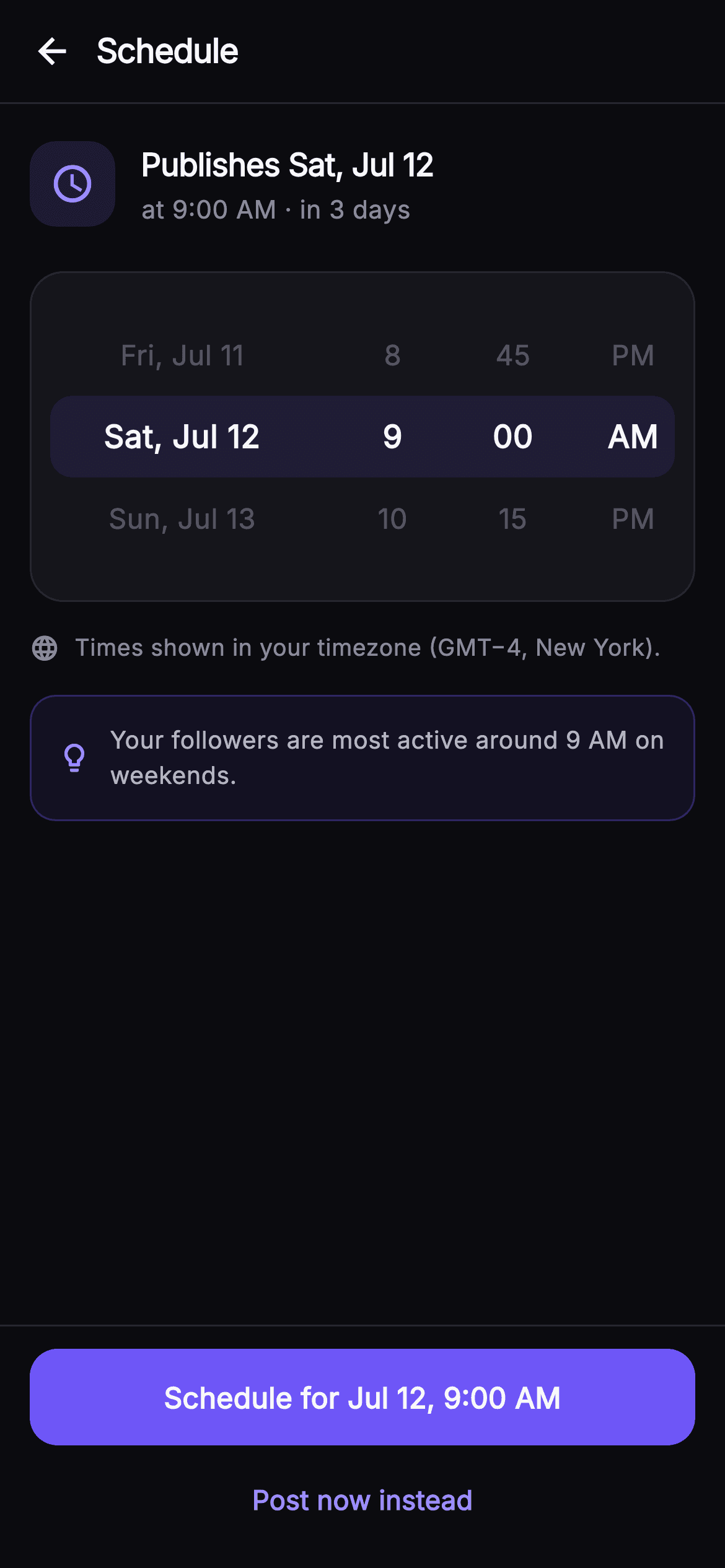
A drop-in Flutter screen that lets users pick a future publish time for a Pulse post. The top bar pairs a back arrow with a bold 'Schedule' title over a hairline divider. Below, a summary row shows a rounded indigo clock chip (Icons.schedule) beside 'Publishes Sat, Jul 12' and a muted subline reading 'at 9:00 AM · in 3 days'. The centerpiece is a faux date/time picker built from a _Picker Stack: a translucent indigo center selection band sits behind a Row of four _Wheel columns (flex 5/2/2/2) for the day, hour, minute, and AM/PM, each rendering three stacked values where the middle row is enlarged and bold in high-contrast white while the outer rows fade to muted grey. A globe row notes 'Times shown in your timezone (GMT−4, New York),' and a tinted indigo hint card with a lightbulb icon surfaces the tip that followers are most active around 9 AM on weekends. Two pinned actions close the screen: a full-width indigo FilledButton labelled 'Schedule for Jul 12, 9:00 AM' (onSchedule) and a secondary 'Post now instead' TextButton (onPostNow). It is self-contained pure Flutter, backend-agnostic, and wired through injected VoidCallback hooks — bundled Inter font, its own dark near-mono theme with the #6E56F7 indigo brand, SafeArea, overflow-proof ListView layout, and no network images.
Full tutorial coming soon.
The step-by-step walkthrough and complete Dart source for this screen haven't been published yet. They'll be free when they are — no sign-up, no payment. In the meantime, browse the screens that already have their tutorial.
What's included
- ✓_Picker widget: a Stack with a translucent indigo center selection band layered behind the wheel row
- ✓Four _Wheel columns (flex 5/2/2/2) for day, hour, minute and AM/PM with an emphasized bold middle row
- ✓Summary row with a rounded indigo clock chip and the 'Publishes Sat, Jul 12 · in 3 days' captions
- ✓Timezone note row (Icons.language globe) plus a lightbulb hint card advising the best posting window
- ✓Pinned _Actions bar: indigo Schedule FilledButton (onSchedule) and secondary Post-now TextButton (onPostNow)
- ✓Bundled Inter font, #0B0B0F dark theme with #6E56F7 brand, SafeArea and overflow-proof ListView
Use cases
- ✓Let creators queue a composed Pulse post for a specific future date and time
- ✓Offer a 'schedule vs post now' fork at the end of a social composer flow
- ✓Surface best-time-to-post guidance driven by follower-activity analytics
- ✓Confirm the chosen publish slot and timezone before a post enters the outbound queue


