Pulse · Edit Photo
Pulse · Edit Photo is a production-ready Social Flutter screen from FlutterKit — free, with full source code.
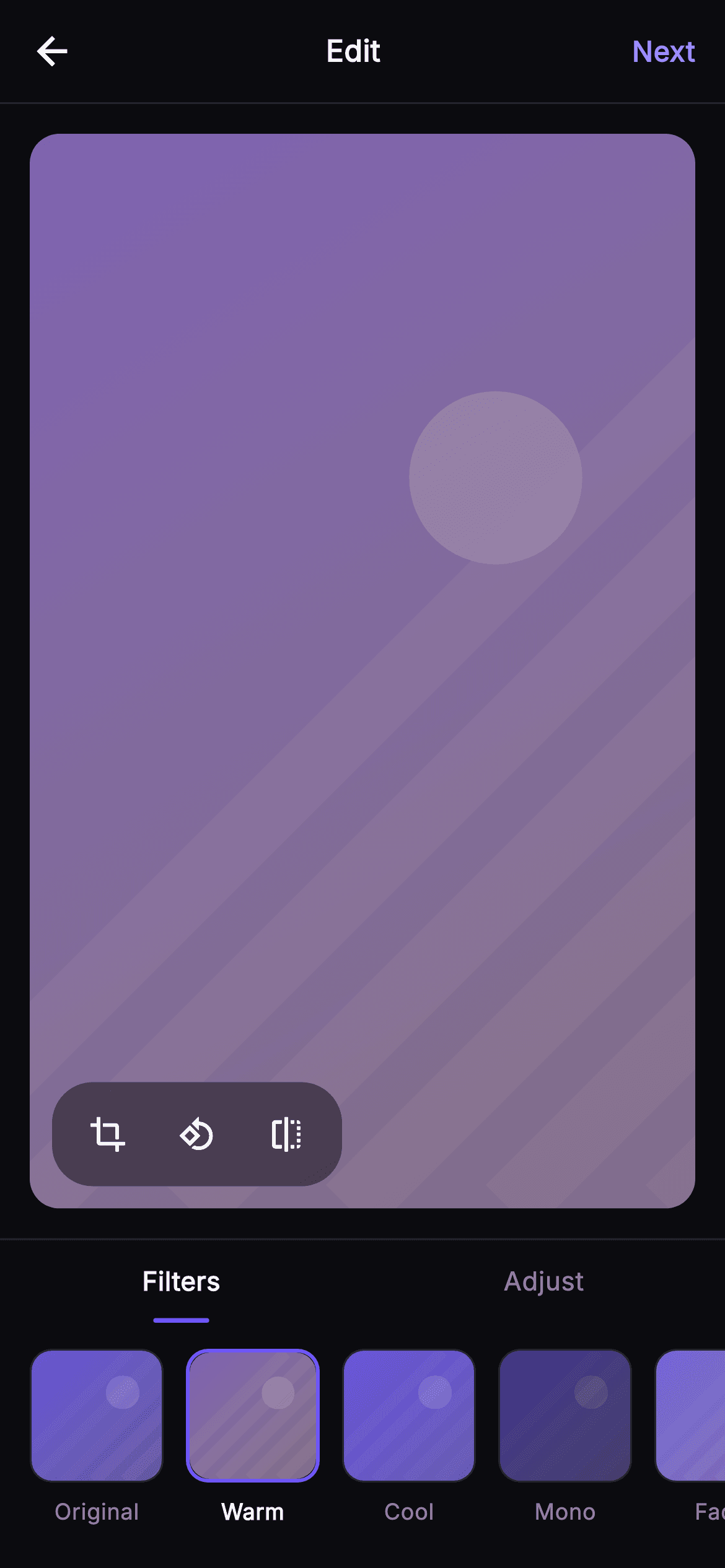
Edit Photo is the photo-editing step of Pulse's post-composer flow, built as one self-contained Flutter file. A 56pt top bar carries a back arrow, a centered 'Edit' title and an indigo 'Next' action (fires onBack and onNext). Below it, a rounded 16px ClipRRect frame fills the space with a _PhotoPainter preview — a diagonal-streak gradient placeholder in Pulse indigo (#6E56F7 → #9B8CFF) that repaints instantly as the active filter tint is composited over it. A floating _CropBar pill (black at 45% opacity) sits bottom-left with crop, rotate-90 and flip _RoundIcon buttons wired to onCrop and onRotate. Under the canvas a _TabSwitch toggles between 'Filters' and 'Adjust', each with an animated indigo underline. Filters mode shows a horizontal _FilterStrip of seven 72px swatches — Original, Warm, Cool, Mono, Fade, Vivid, Dusk — each a miniature _PhotoPainter tinted like the real result, the selected one ringed in brand indigo. Adjust mode swaps in an _AdjustPanel with Brightness, Contrast and Saturation rows, each a _SliderPainter drawing a track, an indigo fill and an accent thumb plus a live 0–100 value. Palette is the Pulse dark near-mono (#0B0B0F bg, #15151B / #1D1D26 surfaces, #26262F hairlines) with #F4F4F7 text, all set in bundled Inter. Pure Flutter with dart: only, SafeArea, overflow-proof, no network images — a backend-agnostic drop-in wired entirely through injected callbacks.
Full tutorial coming soon.
The step-by-step walkthrough and complete Dart source for this screen haven't been published yet. They'll be free when they are — no sign-up, no payment. In the meantime, browse the screens that already have their tutorial.
What's included
- ✓_PhotoPainter: a painted gradient photo placeholder with diagonal streaks, a soft highlight orb, and a live-compositing filter tint overlay
- ✓_FilterStrip of seven named swatches (Original, Warm, Cool, Mono, Fade, Vivid, Dusk), each a mini _PhotoPainter, selected one ringed in indigo
- ✓_TabSwitch segmented control swapping Filters vs Adjust with an animated brand underline and stateful setState toggling
- ✓_AdjustPanel with Brightness/Contrast/Saturation rows driven by _SliderPainter (track, indigo fill, accent thumb, 0–100 readout)
- ✓Floating _CropBar pill with crop, rotate-90 and flip _RoundIcon buttons wired to onCrop and onRotate callbacks
- ✓Bundled Inter font, Pulse dark near-mono + #6E56F7 indigo theme, SafeArea, onBack/onNext hooks, pure Flutter with no network images
Use cases
- ✓The filter-and-crop step of a social post-composer before a user publishes a photo to their feed
- ✓An avatar or cover-photo editor where members tweak brightness and contrast before saving a profile image
- ✓A story or moment-creation flow that lets users apply a warm/cool/mono look then tap Next to add a caption
- ✓A reusable in-app image-touch-up sheet for chat attachments, adjusting saturation before sending a photo


