Pulse · Audience
Pulse · Audience is a production-ready Social Flutter screen from FlutterKit — free, with full source code.
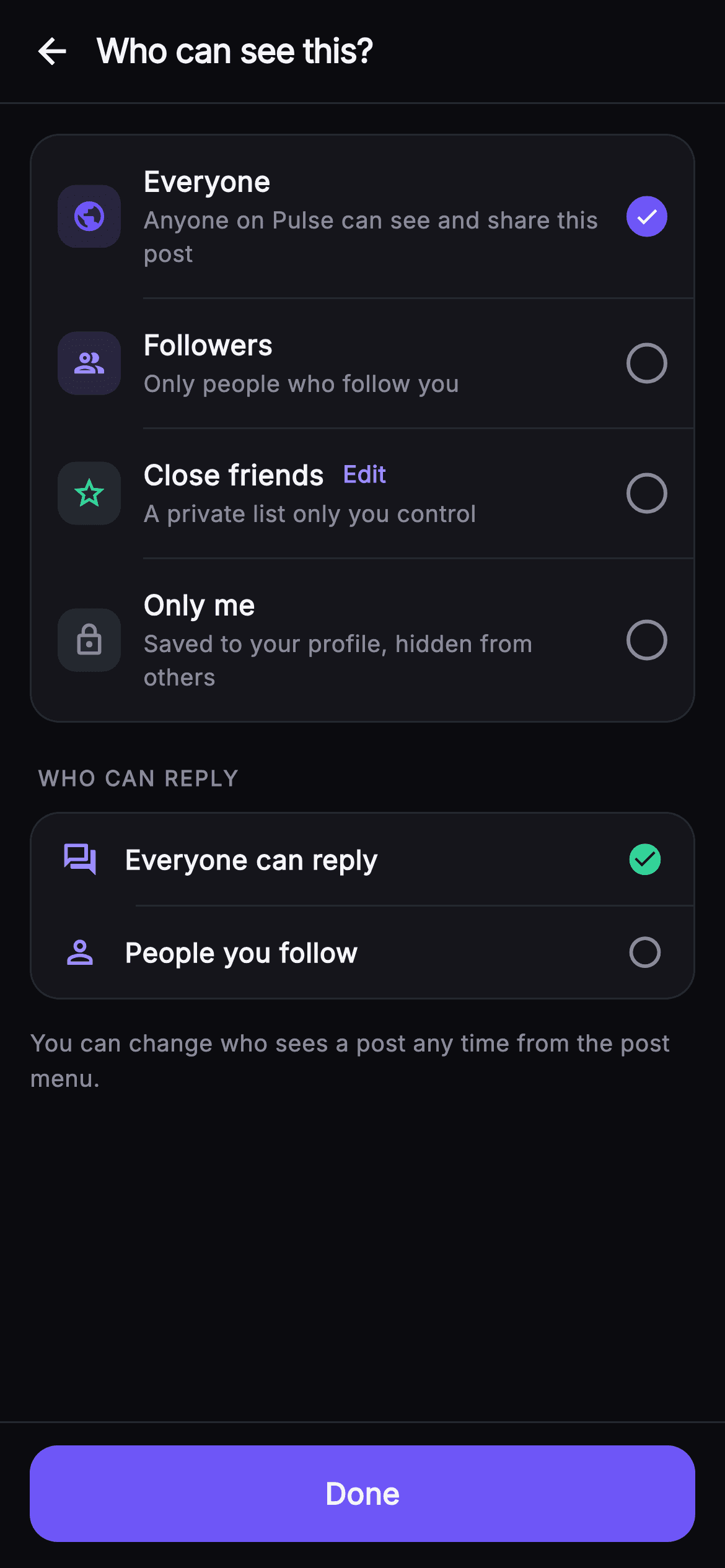
Audience is the "Who can see this?" sheet from Pulse's compose flow, where a poster chooses the visibility of a post before publishing. Below a 56px top bar with a back arrow and the bold "Who can see this?" title, a rounded #15151B surface card holds four selectable _AudienceRow entries: Everyone (public globe, indigo), Followers (group icon, lilac), Close friends (star, emerald, with an inline lilac Edit link), and Only me (lock, muted grey). Each row pairs a soft 16%-alpha tinted icon tile with a bold title and muted subtitle, and a trailing _Radio that fills with the #6E56F7 brand color and a white check when chosen; tapping any row calls setState to move the single selection, and hairline Dividers (indent 60) separate rows. A WHO CAN REPLY label sits above a second card of two _MiniRow items (Everyone can reply, People you follow) that swap an emerald check_circle for an outlined circle to mark the active reply rule, followed by a muted helper line. A fixed-height _DoneBar pins a full-width indigo Done FilledButton to the bottom. Palette is a dark near-mono base (#0B0B0F / #15151B) with indigo #6E56F7, lilac accent #9B8CFF and emerald success #34D399; typography is the bundled Inter font throughout. Fully self-contained pure Flutter — its own dark Theme, SafeArea, overflow-proof ListView, no network images — and backend-agnostic, wired through injected onBack, onDone and onEditCloseFriends callbacks.
Full tutorial coming soon.
The step-by-step walkthrough and complete Dart source for this screen haven't been published yet. They'll be free when they are — no sign-up, no payment. In the meantime, browse the screens that already have their tutorial.
What's included
- ✓_AudienceRow cluster with tinted icon tile, title, muted subtitle and trailing _Radio for four visibility options
- ✓_Radio widget that fills #6E56F7 brand and shows a white check when selected, outlined muted circle when not
- ✓Single-select state via _selected index and setState, driving which audience row is checked
- ✓WHO CAN REPLY section built from _MiniRow widgets swapping emerald check_circle for outlined circle
- ✓Inline lilac Edit link on the Close friends row wired to the onEditCloseFriends callback
- ✓Pinned fixed-height _DoneBar with indigo Done FilledButton plus onBack, onDone hooks and bundled Inter font
Use cases
- ✓Set post visibility (public, followers, close friends, only me) in a social compose flow
- ✓Gate reply permissions on a post between everyone and people you follow
- ✓Launch the close-friends list editor from the inline Edit link during composing
- ✓Reuse as a reusable privacy/visibility picker sheet for stories, notes or profile posts


