Pulse · Add Location
Pulse · Add Location is a production-ready Social Flutter screen from FlutterKit — free, with full source code.
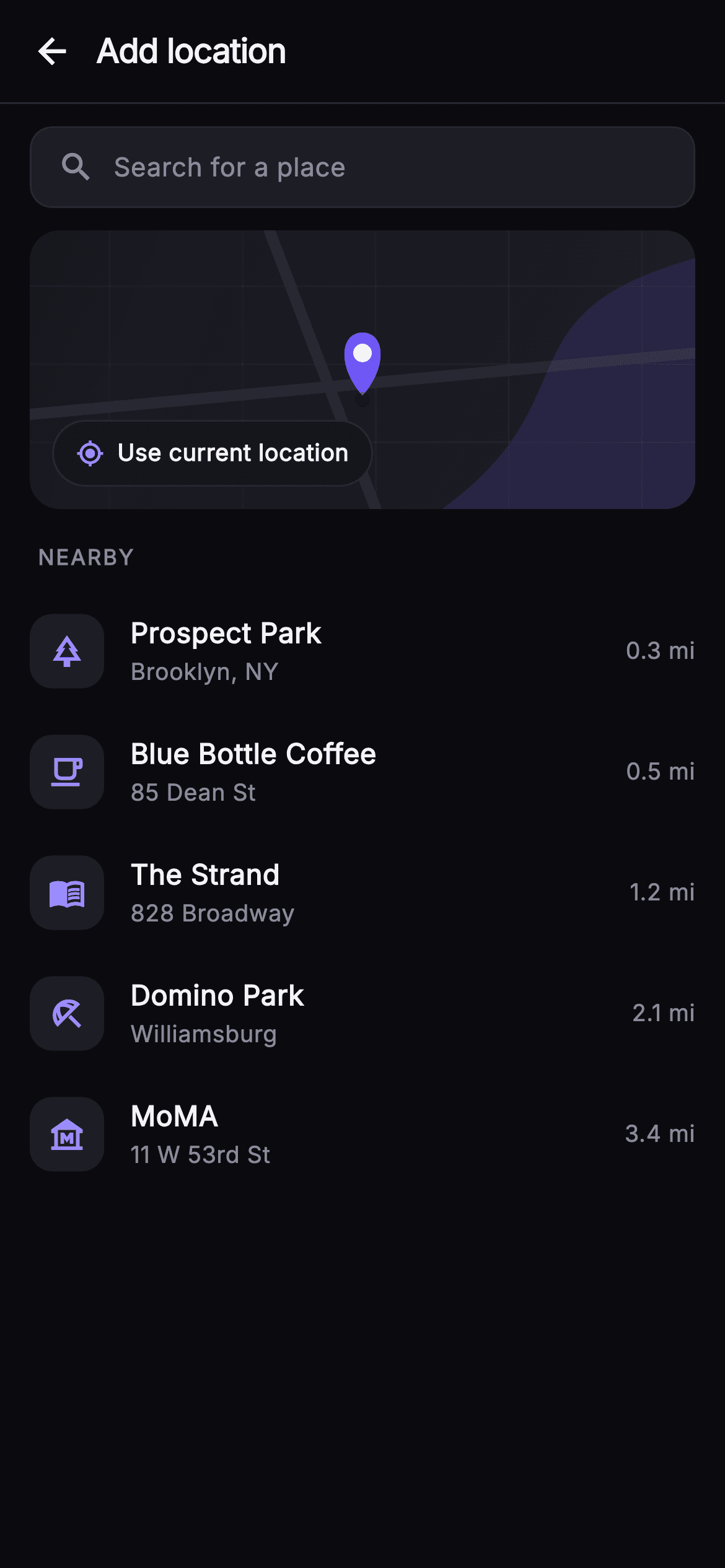
Add Location is the place-tagging step of Pulse's post composer, built as a self-contained pure-Flutter screen. Below a 56px top bar with a back arrow and an 'Add location' title sits a rounded 'Search for a place' field with a leading magnifier icon. Under it, a 150px _MapPainter renders a fully painted map placeholder — a diagonal gradient ground, a faint 0.03-alpha block grid, two rounded roads, an indigo river band and a teardrop center pin with a white dot and a soft drop shadow — so no network tiles or map SDK are ever needed. Pinned to the map's bottom-left is a tappable 'Use current location' chip with a my_location glyph wired to onUseCurrent. A 'NEARBY' section label leads into a ListView of _PlaceRow entries (Prospect Park, Blue Bottle Coffee, The Strand, Domino Park, MoMA) — each a rounded category-icon tile, name and address stack with ellipsis overflow, and a right-aligned distance like '0.3 mi'; tapping fires onPlace with the place name. The palette is Pulse's dark near-mono (#0B0B0F background, #15151B / #1D1D26 surfaces, #26262F hairlines) with an indigo #6E56F7 / #9B8CFF accent and bundled Inter type. Everything is backend-agnostic — swap the static _places list and callbacks for live geocoding — wrapped in SafeArea and overflow-proof at any width.
Full tutorial coming soon.
The step-by-step walkthrough and complete Dart source for this screen haven't been published yet. They'll be free when they are — no sign-up, no payment. In the meantime, browse the screens that already have their tutorial.
What's included
- ✓_MapPainter CustomPainter: gradient ground, block grid, roads, indigo river band, and a teardrop center pin with white dot and drop shadow — no network map tiles
- ✓Tappable 'Use current location' chip pinned bottom-left over the map, wired to the onUseCurrent callback with a my_location glyph
- ✓_PlaceRow cluster: rounded category-icon tile, name + address stack with ellipsis overflow, and right-aligned distance label
- ✓Static _places list (Prospect Park, Blue Bottle Coffee, The Strand, Domino Park, MoMA) each emitting its name through onPlace(String)
- ✓Rounded 'Search for a place' field, 56px back-arrow top bar, and a 'NEARBY' section header, all in bundled Inter over the #0B0B0F dark theme
- ✓Backend-agnostic StatelessWidget with onBack / onUseCurrent / onPlace hooks, SafeArea, and overflow-proof layout
Use cases
- ✓The place-tagging step in a social post composer, letting users attach a venue to a photo or status
- ✓A check-in flow where members mark where they are before sharing to their feed
- ✓Adding a meetup or event location when creating a group post or invite
- ✓Tagging a nearby cafe, park, or venue in a review or recommendation shared with followers


