Pulse · Voice Note
Pulse · Voice Note is a production-ready Social Flutter screen from FlutterKit — free, with full source code.
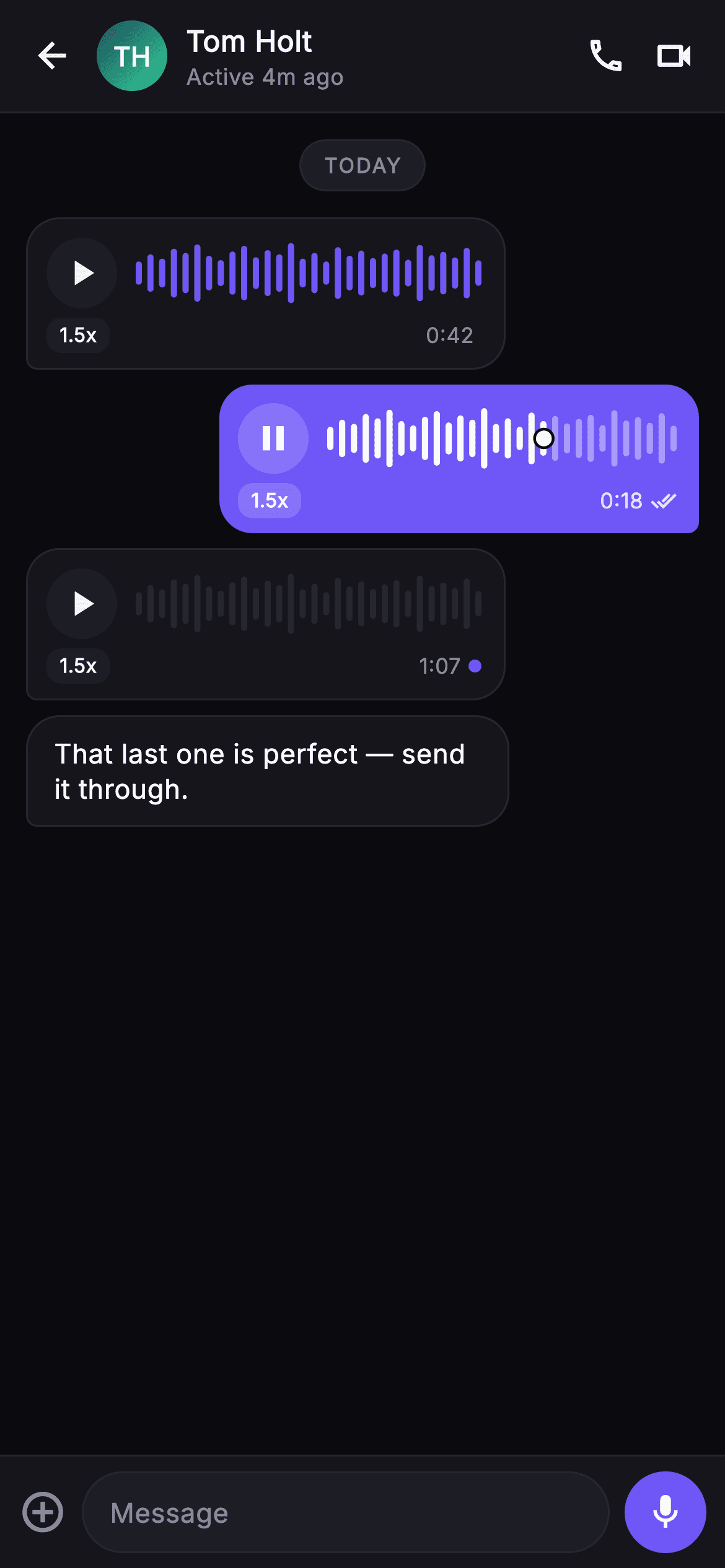
Pulse Voice Note is a drop-in Flutter chat screen built around audio messages. A surface top bar pins a back button, a gradient monogram avatar painted by _MonogramPainter (the 'TH' disc), the contact name 'Tom Holt' with an 'Active 4m ago' presence line, and call plus video icons. Below, a scrolling ListView opens with a rounded 'TODAY' day pill and stacks three voice bubbles: a received (surface, hairline-bordered) note, a sent brand-indigo note in its playing state, and an unlistened received note carrying a small indigo unread dot. Every bubble pairs a circular play/pause control with a _WaveformPainter that draws 30 rounded vertical amplitude bars from a deterministic sample list, splitting them into a played color and an unplayed color at the progress boundary and dropping a ringed scrub knob at that point when playing. Under the wave sits a 1.5x speed pill, the clip duration, and a done_all read tick on sent notes. A trailing received text bubble and a bottom composer with an add icon, a 'Message' field and an indigo mic record button round out the thread. It is self-contained pure Flutter with a bundled Inter font, its own dark near-mono theme accented by indigo #6E56F7, SafeArea top and bottom, and no network images. Backend-agnostic: onBack, onPlay(index) and onRecord are injected callbacks you wire to real audio playback and recording.
Full tutorial coming soon.
The step-by-step walkthrough and complete Dart source for this screen haven't been published yet. They'll be free when they are — no sign-up, no payment. In the meantime, browse the screens that already have their tutorial.
What's included
- ✓_WaveformPainter drawing 30 rounded amplitude bars from a fixed sample list with a played/unplayed color split and a ringed scrub knob
- ✓_MonogramPainter gradient avatar disc rendering centered white 'TH' initials over a teal-green linear gradient
- ✓Sent vs received bubble variants: brand-indigo tail-right sent bubbles and hairline-bordered surface received bubbles
- ✓Per-bubble play/pause disc, 1.5x speed pill, duration, done_all read tick and an unlistened indigo unread dot state
- ✓Bottom composer row with add-circle icon, rounded 'Message' field and an indigo circular mic record button
- ✓Injected onBack, onPlay(int index) and onRecord callbacks plus a bundled Inter font and dark #0B0B0F theme
Use cases
- ✓Ship an audio-message thread inside a social or chat app without building waveform rendering from scratch
- ✓Demo push-to-talk and voice-memo conversations in a messaging product pitch or investor mockup
- ✓Prototype playback UX with speed control, scrub handle and read receipts before wiring a real audio backend
- ✓Reuse the waveform bubble as a standalone voice-note player elsewhere, such as comments or DMs


