Pulse · Recording
Pulse · Recording is a production-ready Social Flutter screen from FlutterKit — free, with full source code.
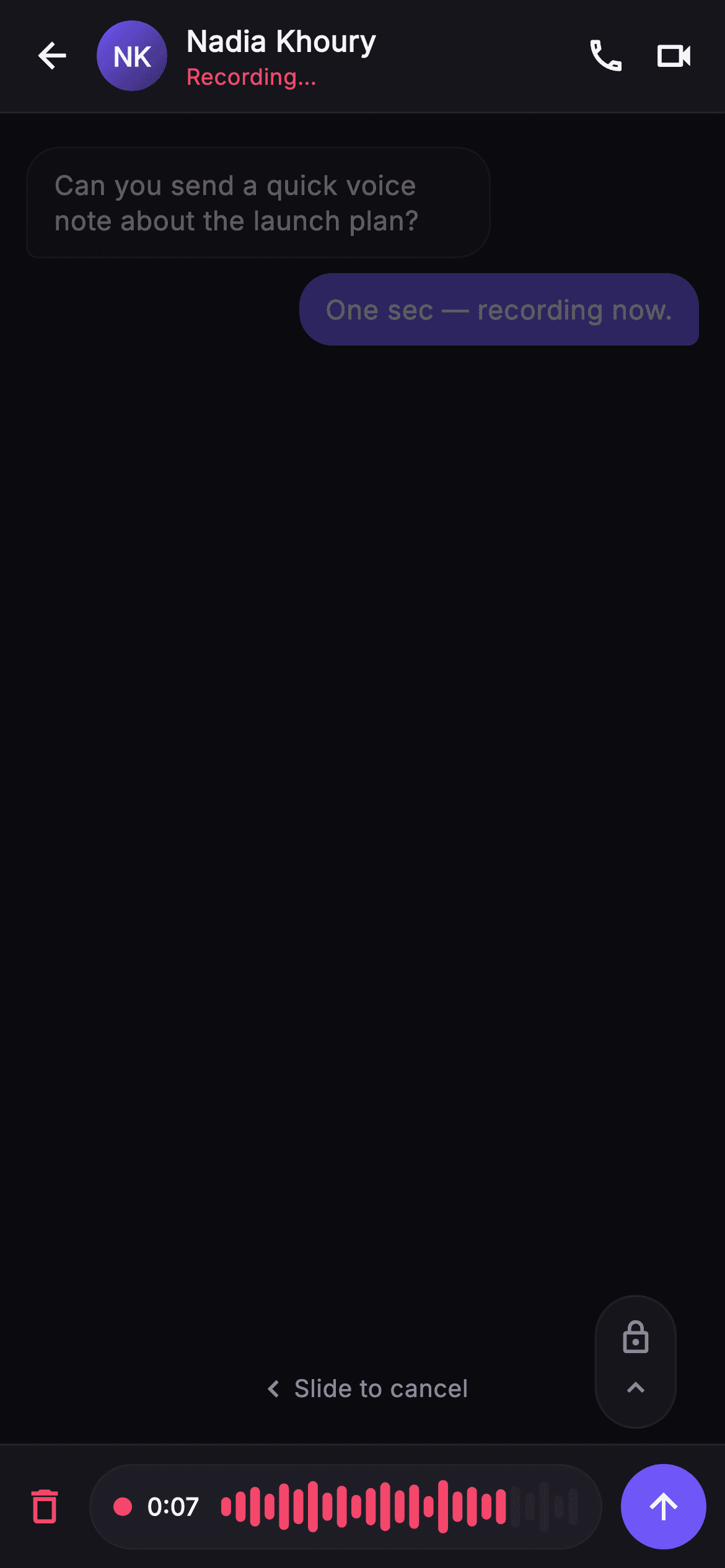
SocialChatRecordingScreen captures the exact moment a voice note is being recorded inside a Pulse conversation. A persistent chat top bar stays put: a back arrow, a _MonogramPainter gradient avatar showing 'NK', the contact name 'Nadia Khoury' with a red 'Recording…' status underneath, plus outlined call and video-call icons. Behind it the message thread — a received bubble and a sent indigo bubble — is dimmed to 35% opacity via an Opacity-wrapped ListView, so context remains legible without competing with the recording UI. A Stack floats two affordances over the dimmed thread: a rounded 44px _lockPill (lock-outline over an up-chevron) hovering above the send button to hand-free lock the recording, and a centered 'Slide to cancel' hint with a chevron. The composer is swapped for a live recording bar: a red delete/cancel icon, a pill containing a red record dot, a '0:07' running timer, and a live amplitude track drawn by _WaveformPainter (rounded red bars whose trailing quarter fades to a hairline tail to imply the incoming signal edge), ending in a circular indigo #6E56F7 send button. Built on Pulse's dark near-mono palette (0xFF0B0B0F background, layered #15151B/#1D1D26 surfaces, #F4476B danger red) with the bundled Inter font. Fully self-contained pure Flutter — own dark Theme, SafeArea top and bottom, overflow-proof, no network images — and backend-agnostic, wired through injected onBack, onCancel, onSend, and onLock callbacks.
Full tutorial coming soon.
The step-by-step walkthrough and complete Dart source for this screen haven't been published yet. They'll be free when they are — no sign-up, no payment. In the meantime, browse the screens that already have their tutorial.
What's included
- ✓_WaveformPainter: rounded red amplitude bars over a 25-sample track, trailing quarter fading to a hairline tail color
- ✓_MonogramPainter avatar: gradient disc with centered 'NK' initials painted in Inter, no image asset needed
- ✓Live recording bar cluster: red record dot, running 0:07 timer, delete/cancel icon, and circular indigo send button
- ✓Floating _lockPill affordance (lock-outline + up-chevron) plus centered 'Slide to cancel' hint over the dimmed thread
- ✓Dimmed conversation backdrop at 35% opacity with received and sent indigo bubbles, keeping thread context visible
- ✓Four injected callbacks — onBack, onCancel, onSend, onLock — and the bundled Inter font on Pulse's dark near-mono theme
Use cases
- ✓Show the active voice-note capture state inside a chat messaging or DM flow
- ✓Prototype push-to-talk and slide-to-cancel voice recording interactions for a social app
- ✓Demonstrate a lock-to-hands-free recording affordance in design reviews or investor demos
- ✓Drop into a Flutter chat product as the recording overlay wired to real mic and upload callbacks


