Pulse · Chat Info
Pulse · Chat Info is a production-ready Social Flutter screen from FlutterKit — free, with full source code.
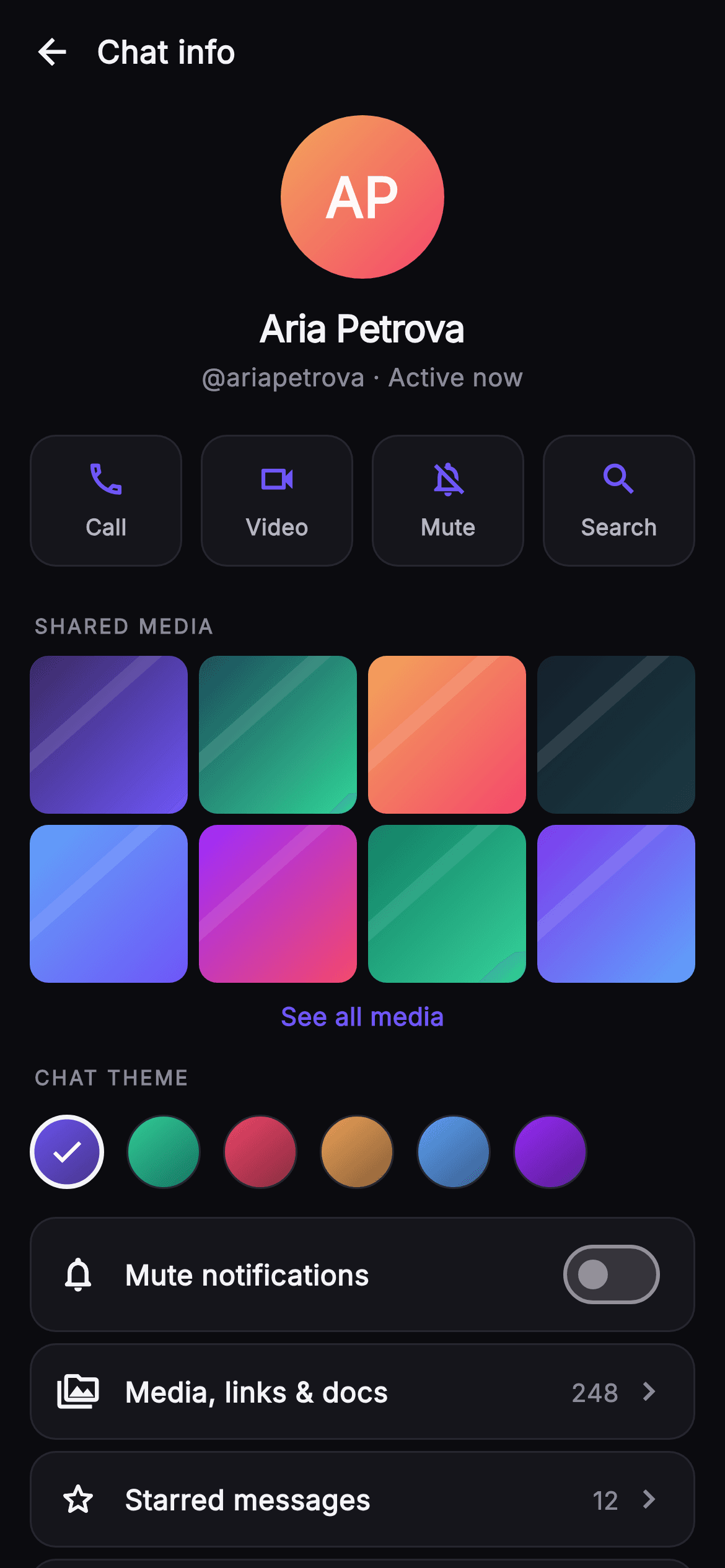
Chat Info is Pulse's dark-mode 1:1 conversation details screen, built top-to-bottom as a scrolling ListView under a compact 'Chat info' top bar with a back button. It opens with a large 88px monogram avatar drawn entirely in code by the _MonogramPainter (a peach-to-rose gradient disc with centered 'AP' initials), followed by the contact name 'Aria Petrova' in heavy Inter and a '@ariapetrova · Active now' handle line — the whole header is tappable to open the full profile. A four-up quick-action row renders Call, Video, Mute and Search as bordered surface tiles with indigo #6E56F7 glyphs, each firing an onAction callback keyed by string. Below, a 'SHARED MEDIA' section lays out an 8-tile 4-column GridView whose thumbnails are painted by _ThumbPainter (two-tone diagonal gradients with a soft light streak), capped by an indigo 'See all media' link. A horizontal 'CHAT THEME' picker shows six gradient swatch circles with a checkmark on the active selection, driven by local setState. Grouped rounded rows follow: a 'Mute notifications' switch (indigo active track) plus nav rows for Media/links/docs (248), Starred messages (12) and end-to-end Encryption, closing with red destructive Block and Report rows. The palette is a near-mono dark stack — #0B0B0F background, #15151B surfaces, #26262F hairlines — accented by the #6E56F7 brand and #F4476B danger. Fully self-contained pure Flutter: bundled Inter font, its own dark theme, SafeArea, overflow-proof layout, no network images, and backend-agnostic via injected onBack, onProfile, onAction and onSeeAllMedia callbacks.
Full tutorial coming soon.
The step-by-step walkthrough and complete Dart source for this screen haven't been published yet. They'll be free when they are — no sign-up, no payment. In the meantime, browse the screens that already have their tutorial.
What's included
- ✓_MonogramPainter: code-drawn gradient avatar disc with centered initials, no image asset needed
- ✓_ThumbPainter shared-media grid: eight 4-column gradient thumbnails with painted light streaks
- ✓Four-up quick-action row (Call, Video, Mute, Search) firing a keyed onAction(String) callback
- ✓Horizontal chat-theme picker of six gradient swatches with active-check state via local setState
- ✓Grouped setting rows: mute-notifications Switch, Media/Starred/Encryption nav rows, red Block & Report
- ✓Bundled Inter font, self-contained dark theme (#0B0B0F/#6E56F7), SafeArea, overflow-proof, no network
Use cases
- ✓The details screen opened from a 1:1 chat header in a messaging or social app
- ✓A contact profile surface exposing shared media, starred messages and encryption status
- ✓A per-conversation settings hub for muting notifications and switching chat theme colors
- ✓A moderation entry point offering Block and Report actions on a direct-message thread


