How to Build a Portfolio Chart Onboarding Slide in Flutter (Full Code + Preview)
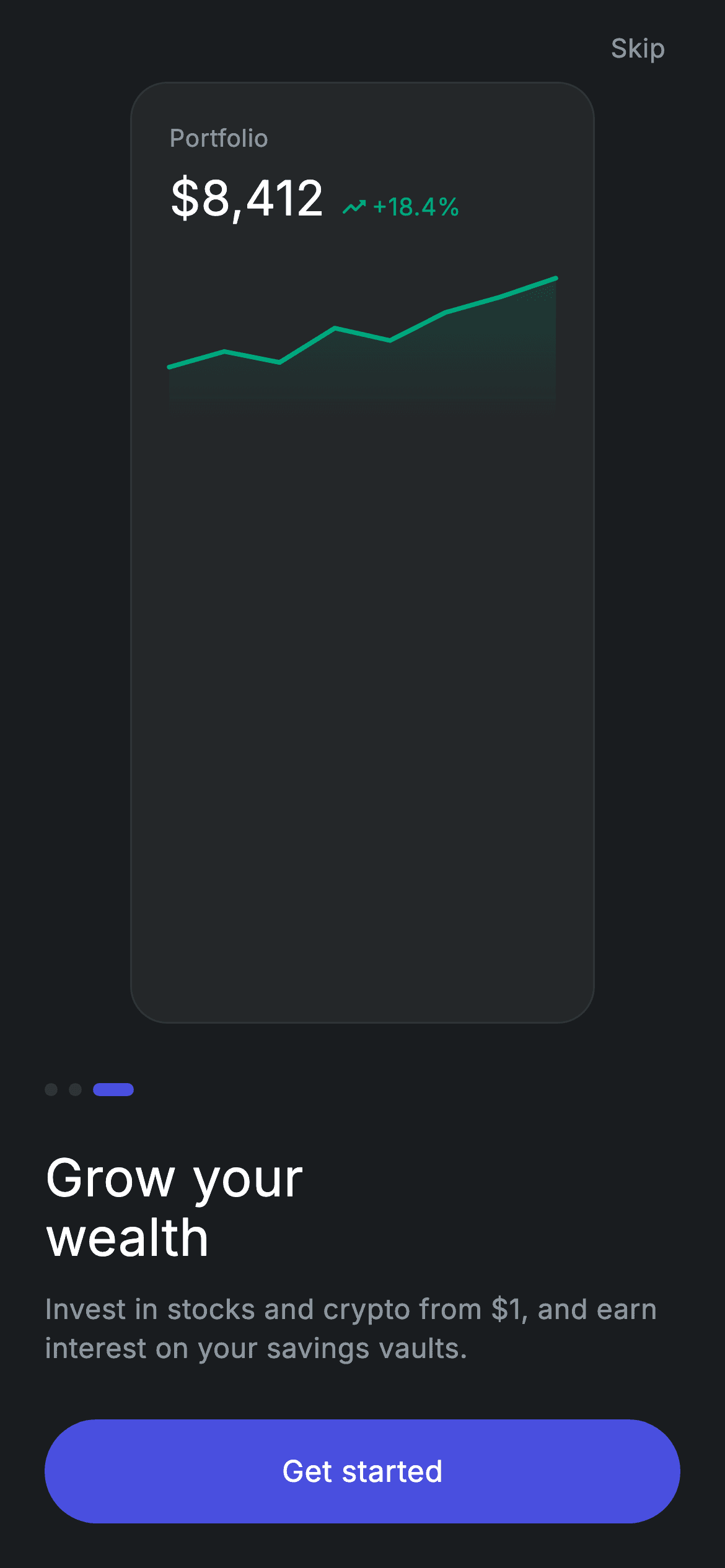
The closing slide of a dark investing onboarding flow, and the one place in the set where CustomPainter earns its keep: the upward line chart with its gradient fill is painted from eight normalised points, no charting package involved. You'll build the portfolio card ($8,412 balance with a green +18.4% trend pill), the painter that draws both the stroke and the fade beneath it, the pill page indicator on its third dot, and a 'Get started' CTA that hands off into the auth flow.
Watch the Flutter UI walkthrough
A short screen recording of Fintech · Onboarding 3 running, if you'd rather see it before you read the code. The written tutorial below covers everything in it.
Can't see the video? Watch it on YouTube.
What you'll build
- ✓A line chart painted with CustomPainter from a list of 0–1 values, scaled to whatever size it's given
- ✓A gradient area fill built by copying the line path and closing it along the bottom edge
- ✓A portfolio card with a baseline-aligned balance and trend pill
- ✓A three-dot indicator where the active dot stretches into a pill
- ✓A forced dark theme and a Material + InkWell pill CTA with a correctly clipped ripple
Step-by-step build
Create the file
Add a new file at lib/fintech_onboarding_3/fintech_onboarding_3_screen.dart in your Flutter project.
Register the bundled fonts
No external packages — this is pure Flutter. It does bundle its design font (Inter), so drop the font file into fonts/ and declare it in pubspec.yaml:
flutter:
  fonts:
    - family: Inter
      fonts:
- asset: fonts/Inter-Regular.ttfBuild it, piece by piece
Here's how the screen goes together. Each block below is a real slice of the code with a plain-English explanation — paste them in order, or grab the whole file from the next section.
Dark tokens and the forced theme
import 'package:flutter/material.dart';

/// Onboarding 3/3 — "Grow your wealth". Self-contained per CONVENTIONS.md: pure
/// Flutter, bundled Inter font, custom-painted chart illustration, forced dark
/// theme so it renders standalone as a route. The final slide's CTA is
/// "Get started" (chains to the get-started screen in the gallery).
class FintechOnboardingThreeScreen extends StatelessWidget {
  const FintechOnboardingThreeScreen({super.key, this.onContinue, this.onSkip});

  final VoidCallback? onContinue;
  final VoidCallback? onSkip;

  static const String _font = 'Inter';
  static const Color _bg = Color(0xFF191C1F);
  static const Color _surface = Color(0xFF242729);
  static const Color _brand = Color(0xFF494FDF);
  static const Color _teal = Color(0xFF00A87E);
  static const Color _muted = Color(0xFF8D969E);
  static const Color _hairline = Color(0xFF2E3235);

  @override
  Widget build(BuildContext context) {
    return Theme(
      data: ThemeData.dark(useMaterial3: true),
      child: Scaffold(
        backgroundColor: _bg,
        body: SafeArea(
          child: Padding(
            padding: const EdgeInsets.fromLTRB(24, 8, 24, 24),
            child: Column(
              crossAxisAlignment: CrossAxisAlignment.stretch,
              children: <Widget>[
Six colour consts define the palette: the #191C1F canvas, a #242729 card surface, the #494FDF brand indigo, a #00A87E teal for anything positive, a muted grey, and a #2E3235 hairline. Wrapping the Scaffold in Theme(data: ThemeData.dark(useMaterial3: true)) forces dark Material styling regardless of the host app's theme, which is what lets this screen render correctly as a standalone route. CrossAxisAlignment.stretch means the headline, body and CTA all span the full 24px-inset width without setting widths individually.
Skip, the chart card, and the CTA
                Align(
                  alignment: Alignment.centerRight,
                  child: GestureDetector(
                    onTap: onSkip,
                    behavior: HitTestBehavior.opaque,
                    child: const Padding(
                      padding: EdgeInsets.all(8),
                      child: Text(
                        'Skip',
                        style: TextStyle(
                          fontFamily: _font,
                          fontSize: 14,
                          fontWeight: FontWeight.w500,
                          letterSpacing: 0.24,
                          color: _muted,
                        ),
                      ),
                    ),
                  ),
                ),
                const Expanded(child: Center(child: _GrowthCard())),
                const SizedBox(height: 32),
                const _Dots(active: 2),
                const SizedBox(height: 28),
                const Text(
                  'Grow your\nwealth',
                  style: TextStyle(
                    fontFamily: _font,
                    fontSize: 28,
                    fontWeight: FontWeight.w500,
                    height: 1.15,
                    letterSpacing: 0.24,
                    color: Colors.white,
                  ),
                ),
                const SizedBox(height: 12),
                const Text(
                  'Invest in stocks and crypto from \$1, and earn interest on '
                  'your savings vaults.',
                  style: TextStyle(
                    fontFamily: _font,
                    fontSize: 15,
                    fontWeight: FontWeight.w400,
                    height: 1.4,
                    letterSpacing: 0.24,
                    color: _muted,
                  ),
                ),
                const SizedBox(height: 28),
                _PrimaryButton(label: 'Get started', onTap: onContinue),
              ],
            ),
          ),
        ),
      ),
    );
  }
}
Skip is a right-aligned GestureDetector with HitTestBehavior.opaque and 8px padding, so the padding is tappable and the small text link gets a real touch target. Expanded(child: Center(child: _GrowthCard())) hands the illustration all the leftover vertical space, anchoring the text block to the bottom on any device. _Dots(active: 2) marks the third of three. Note the subtitle's '\$1' — the backslash escapes the dollar sign so Dart doesn't read it as interpolation. The CTA reads 'Get started' rather than 'Next', because this slide exits the carousel into sign-up.
The portfolio card
/// A portfolio card with an upward line chart — the "grow your wealth" motif.
class _GrowthCard extends StatelessWidget {
  const _GrowthCard();

  @override
  Widget build(BuildContext context) {
    return Container(
      width: 250,
      padding: const EdgeInsets.all(20),
      decoration: BoxDecoration(
        color: FintechOnboardingThreeScreen._surface,
        borderRadius: BorderRadius.circular(20),
        border: Border.all(color: FintechOnboardingThreeScreen._hairline),
      ),
      child: Column(
        crossAxisAlignment: CrossAxisAlignment.start,
        children: <Widget>[
          Text(
            'Portfolio',
            style: TextStyle(
              fontFamily: FintechOnboardingThreeScreen._font,
              fontSize: 13,
              fontWeight: FontWeight.w400,
              letterSpacing: 0.24,
              color: FintechOnboardingThreeScreen._muted,
            ),
          ),
          const SizedBox(height: 4),
          Row(
            crossAxisAlignment: CrossAxisAlignment.end,
            children: <Widget>[
              const Text(
                r'$8,412',
                style: TextStyle(
                  fontFamily: FintechOnboardingThreeScreen._font,
                  fontSize: 26,
                  fontWeight: FontWeight.w500,
                  color: Colors.white,
                ),
              ),
              const SizedBox(width: 8),
              Padding(
                padding: const EdgeInsets.only(bottom: 4),
                child: Row(
                  children: <Widget>[
                    const Icon(Icons.trending_up_rounded,
                        size: 15, color: FintechOnboardingThreeScreen._teal),
                    const SizedBox(width: 2),
                    Text(
                      '+18.4%',
                      style: TextStyle(
                        fontFamily: FintechOnboardingThreeScreen._font,
                        fontSize: 13,
                        fontWeight: FontWeight.w500,
                        color: FintechOnboardingThreeScreen._teal,
                      ),
                    ),
                  ],
                ),
              ),
            ],
          ),
          const SizedBox(height: 18),
          SizedBox(
            height: 84,
            width: double.infinity,
            child: CustomPaint(painter: _ChartPainter()),
          ),
        ],
      ),
    );
  }
}
A fixed 250px-wide Container in the surface colour with a 20px radius and a hairline border. The balance row uses crossAxisAlignment: CrossAxisAlignment.end so the 26px $8,412 and the small +18.4% pill align along their bottoms rather than their centres — that's what makes the percentage read as attached to the number. The pill gets an extra bottom: 4 padding to nudge it onto the balance's optical baseline. The literal is written r'$8,412' as a raw string, since a bare $ would start interpolation. The chart sits in a fixed 84px-tall, full-width SizedBox, because CustomPaint needs bounded constraints to paint into.
The chart painter
class _ChartPainter extends CustomPainter {
  static const List<double> _pts = <double>[
    0.65, 0.55, 0.62, 0.40, 0.48, 0.30, 0.20, 0.08,
  ];

  @override
  void paint(Canvas canvas, Size size) {
    final Path line = Path();
    for (int i = 0; i < _pts.length; i++) {
      final double x = size.width * i / (_pts.length - 1);
      final double y = size.height * _pts[i];
      if (i == 0) {
        line.moveTo(x, y);
      } else {
        line.lineTo(x, y);
      }
    }

    final Path fill = Path.from(line)
      ..lineTo(size.width, size.height)
      ..lineTo(0, size.height)
      ..close();
    canvas.drawPath(
      fill,
      Paint()
        ..shader = const LinearGradient(
          begin: Alignment.topCenter,
          end: Alignment.bottomCenter,
          colors: <Color>[Color(0x3300A87E), Color(0x0000A87E)],
        ).createShader(Offset.zero & size),
    );

    canvas.drawPath(
      line,
      Paint()
        ..color = FintechOnboardingThreeScreen._teal
        ..style = PaintingStyle.stroke
        ..strokeWidth = 2.5
        ..strokeCap = StrokeCap.round
        ..strokeJoin = StrokeJoin.round,
    );
  }

  @override
  bool shouldRepaint(covariant _ChartPainter oldDelegate) => false;
}
_pts is eight doubles between 0 and 1, and they descend (0.65 down to 0.08) because in Flutter's canvas y grows downward — smaller values are higher on screen, so a falling list draws a rising chart. paint() maps each point to x = width * i / (length - 1) and y = height * value, which means the same painter renders correctly at any size. The fill is built with Path.from(line), then lineTo down to the bottom-right, across to bottom-left, and close() — a copy of the stroke closed into a shape. It's painted with a LinearGradient shader from teal at 20% alpha (0x33) down to fully transparent teal (0x00), then the line itself is stroked at 2.5px with round caps and joins. shouldRepaint returns false because the data is const and never changes.
Page dots and the pill button
class _Dots extends StatelessWidget {
  const _Dots({required this.active});

  final int active;

  @override
  Widget build(BuildContext context) {
    return Row(
      children: <Widget>[
        for (int i = 0; i < 3; i++)
          Padding(
            padding: const EdgeInsets.only(right: 6),
            child: Container(
              width: i == active ? 22 : 7,
              height: 7,
              decoration: BoxDecoration(
                color: i == active
                    ? FintechOnboardingThreeScreen._brand
                    : FintechOnboardingThreeScreen._hairline,
                borderRadius: BorderRadius.circular(9999),
              ),
            ),
          ),
      ],
    );
  }
}

class _PrimaryButton extends StatelessWidget {
  const _PrimaryButton({required this.label, required this.onTap});

  final String label;
  final VoidCallback? onTap;

  @override
  Widget build(BuildContext context) {
    return SizedBox(
      height: 56,
      child: Material(
        color: FintechOnboardingThreeScreen._brand,
        borderRadius: BorderRadius.circular(9999),
        child: InkWell(
          borderRadius: BorderRadius.circular(9999),
          onTap: onTap,
          child: Center(
            child: Text(
              label,
              style: const TextStyle(
                fontFamily: FintechOnboardingThreeScreen._font,
                fontSize: 16,
                fontWeight: FontWeight.w500,
                letterSpacing: 0.24,
                color: Colors.white,
              ),
            ),
          ),
        ),
      ),
    );
  }
}
_Dots loops three times and gives the active index a width of 22 against the others' 7, all 7px tall. Because borderRadius is 9999 — larger than half the height — the same widget renders as a circle when narrow and a capsule when wide, with no shape branching. _PrimaryButton uses Material + InkWell rather than a Container and a tap handler, so the CTA gets a genuine Material ripple. The 9999 radius is set on both the Material and the InkWell: the first shapes the fill, the second clips the splash, and forgetting the second is the classic bug that leaves a square ripple on a pill button.
Full code
The complete, ready-to-paste source. Free to use in your projects — one click copies it all.
import 'package:flutter/material.dart';

/// Onboarding 3/3 — "Grow your wealth". Self-contained per CONVENTIONS.md: pure
/// Flutter, bundled Inter font, custom-painted chart illustration, forced dark
/// theme so it renders standalone as a route. The final slide's CTA is
/// "Get started" (chains to the get-started screen in the gallery).
class FintechOnboardingThreeScreen extends StatelessWidget {
  const FintechOnboardingThreeScreen({super.key, this.onContinue, this.onSkip});

  final VoidCallback? onContinue;
  final VoidCallback? onSkip;

  static const String _font = 'Inter';
  static const Color _bg = Color(0xFF191C1F);
  static const Color _surface = Color(0xFF242729);
  static const Color _brand = Color(0xFF494FDF);
  static const Color _teal = Color(0xFF00A87E);
  static const Color _muted = Color(0xFF8D969E);
  static const Color _hairline = Color(0xFF2E3235);

  @override
  Widget build(BuildContext context) {
    return Theme(
      data: ThemeData.dark(useMaterial3: true),
      child: Scaffold(
        backgroundColor: _bg,
        body: SafeArea(
          child: Padding(
            padding: const EdgeInsets.fromLTRB(24, 8, 24, 24),
            child: Column(
              crossAxisAlignment: CrossAxisAlignment.stretch,
              children: <Widget>[
                Align(
                  alignment: Alignment.centerRight,
                  child: GestureDetector(
                    onTap: onSkip,
                    behavior: HitTestBehavior.opaque,
                    child: const Padding(
                      padding: EdgeInsets.all(8),
                      child: Text(
                        'Skip',
                        style: TextStyle(
                          fontFamily: _font,
                          fontSize: 14,
                          fontWeight: FontWeight.w500,
                          letterSpacing: 0.24,
                          color: _muted,
                        ),
                      ),
                    ),
                  ),
                ),
                const Expanded(child: Center(child: _GrowthCard())),
                const SizedBox(height: 32),
                const _Dots(active: 2),
                const SizedBox(height: 28),
                const Text(
                  'Grow your\nwealth',
                  style: TextStyle(
                    fontFamily: _font,
                    fontSize: 28,
                    fontWeight: FontWeight.w500,
                    height: 1.15,
                    letterSpacing: 0.24,
                    color: Colors.white,
                  ),
                ),
                const SizedBox(height: 12),
                const Text(
                  'Invest in stocks and crypto from \$1, and earn interest on '
                  'your savings vaults.',
                  style: TextStyle(
                    fontFamily: _font,
                    fontSize: 15,
                    fontWeight: FontWeight.w400,
                    height: 1.4,
                    letterSpacing: 0.24,
                    color: _muted,
                  ),
                ),
                const SizedBox(height: 28),
                _PrimaryButton(label: 'Get started', onTap: onContinue),
              ],
            ),
          ),
        ),
      ),
    );
  }
}

/// A portfolio card with an upward line chart — the "grow your wealth" motif.
class _GrowthCard extends StatelessWidget {
  const _GrowthCard();

  @override
  Widget build(BuildContext context) {
    return Container(
      width: 250,
      padding: const EdgeInsets.all(20),
      decoration: BoxDecoration(
        color: FintechOnboardingThreeScreen._surface,
        borderRadius: BorderRadius.circular(20),
        border: Border.all(color: FintechOnboardingThreeScreen._hairline),
      ),
      child: Column(
        crossAxisAlignment: CrossAxisAlignment.start,
        children: <Widget>[
          Text(
            'Portfolio',
            style: TextStyle(
              fontFamily: FintechOnboardingThreeScreen._font,
              fontSize: 13,
              fontWeight: FontWeight.w400,
              letterSpacing: 0.24,
              color: FintechOnboardingThreeScreen._muted,
            ),
          ),
          const SizedBox(height: 4),
          Row(
            crossAxisAlignment: CrossAxisAlignment.end,
            children: <Widget>[
              const Text(
                r'$8,412',
                style: TextStyle(
                  fontFamily: FintechOnboardingThreeScreen._font,
                  fontSize: 26,
                  fontWeight: FontWeight.w500,
                  color: Colors.white,
                ),
              ),
              const SizedBox(width: 8),
              Padding(
                padding: const EdgeInsets.only(bottom: 4),
                child: Row(
                  children: <Widget>[
                    const Icon(Icons.trending_up_rounded,
                        size: 15, color: FintechOnboardingThreeScreen._teal),
                    const SizedBox(width: 2),
                    Text(
                      '+18.4%',
                      style: TextStyle(
                        fontFamily: FintechOnboardingThreeScreen._font,
                        fontSize: 13,
                        fontWeight: FontWeight.w500,
                        color: FintechOnboardingThreeScreen._teal,
                      ),
                    ),
                  ],
                ),
              ),
            ],
          ),
          const SizedBox(height: 18),
          SizedBox(
            height: 84,
            width: double.infinity,
            child: CustomPaint(painter: _ChartPainter()),
          ),
        ],
      ),
    );
  }
}

class _ChartPainter extends CustomPainter {
  static const List<double> _pts = <double>[
    0.65, 0.55, 0.62, 0.40, 0.48, 0.30, 0.20, 0.08,
  ];

  @override
  void paint(Canvas canvas, Size size) {
    final Path line = Path();
    for (int i = 0; i < _pts.length; i++) {
      final double x = size.width * i / (_pts.length - 1);
      final double y = size.height * _pts[i];
      if (i == 0) {
        line.moveTo(x, y);
      } else {
        line.lineTo(x, y);
      }
    }

    final Path fill = Path.from(line)
      ..lineTo(size.width, size.height)
      ..lineTo(0, size.height)
      ..close();
    canvas.drawPath(
      fill,
      Paint()
        ..shader = const LinearGradient(
          begin: Alignment.topCenter,
          end: Alignment.bottomCenter,
          colors: <Color>[Color(0x3300A87E), Color(0x0000A87E)],
        ).createShader(Offset.zero & size),
    );

    canvas.drawPath(
      line,
      Paint()
        ..color = FintechOnboardingThreeScreen._teal
        ..style = PaintingStyle.stroke
        ..strokeWidth = 2.5
        ..strokeCap = StrokeCap.round
        ..strokeJoin = StrokeJoin.round,
    );
  }

  @override
  bool shouldRepaint(covariant _ChartPainter oldDelegate) => false;
}

class _Dots extends StatelessWidget {
  const _Dots({required this.active});

  final int active;

  @override
  Widget build(BuildContext context) {
    return Row(
      children: <Widget>[
        for (int i = 0; i < 3; i++)
          Padding(
            padding: const EdgeInsets.only(right: 6),
            child: Container(
              width: i == active ? 22 : 7,
              height: 7,
              decoration: BoxDecoration(
                color: i == active
                    ? FintechOnboardingThreeScreen._brand
                    : FintechOnboardingThreeScreen._hairline,
                borderRadius: BorderRadius.circular(9999),
              ),
            ),
          ),
      ],
    );
  }
}

class _PrimaryButton extends StatelessWidget {
  const _PrimaryButton({required this.label, required this.onTap});

  final String label;
  final VoidCallback? onTap;

  @override
  Widget build(BuildContext context) {
    return SizedBox(
      height: 56,
      child: Material(
        color: FintechOnboardingThreeScreen._brand,
        borderRadius: BorderRadius.circular(9999),
        child: InkWell(
          borderRadius: BorderRadius.circular(9999),
          onTap: onTap,
          child: Center(
            child: Text(
              label,
              style: const TextStyle(
                fontFamily: FintechOnboardingThreeScreen._font,
                fontSize: 16,
                fontWeight: FontWeight.w500,
                letterSpacing: 0.24,
                color: Colors.white,
              ),
            ),
          ),
        ),
      ),
    );
  }
}
Plus bundled 1 binary asset (fonts/images). The CLI and MCP install those for you automatically.
Two faster ways to add it
Copy-paste works, but you can skip it entirely.
1. FlutterKit CLI
One command drops this screen — and its fonts — straight into your project.
$ flutterkit add fintech-onboarding-32. AI agent (MCP)
Connect FlutterKit's MCP server in Claude or Cursor and just ask your agent to install fintech-onboarding-3 — it fetches and writes the files for you.
FAQ
Is this Flutter onboarding screen free to use?
Yes. The full Dart source on this page, including the chart painter, is free for personal and commercial projects. Copy it here, install it with the FlutterKit CLI (flutterkit add fintech-onboarding-3), or have an AI agent add it via MCP.
Can I feed the chart real data?
Yes, and it's a small change: give _ChartPainter a constructor taking the list, normalise your values into 0–1 (remembering that lower means higher on screen), and return true from shouldRepaint when the list differs. The mapping code already scales to any size and any number of points.
Does it need any external packages or images?
Neither — no charting library and no image assets. The chart is a CustomPainter and everything else is a Flutter widget. The only bundled asset is the Inter font, registered in pubspec.yaml as shown in step 2.
Which Flutter version does it target?
It uses ThemeData.dark(useMaterial3: true) and Dart 3 syntax, so Flutter 3.16+ with Dart 3 is the practical floor. This screen has no withValues() calls — the gradient uses baked-in alpha hex values — so it compiles on slightly older SDKs without edits.

