How to Build a Fintech Search Screen in Flutter (Full Code + Preview)
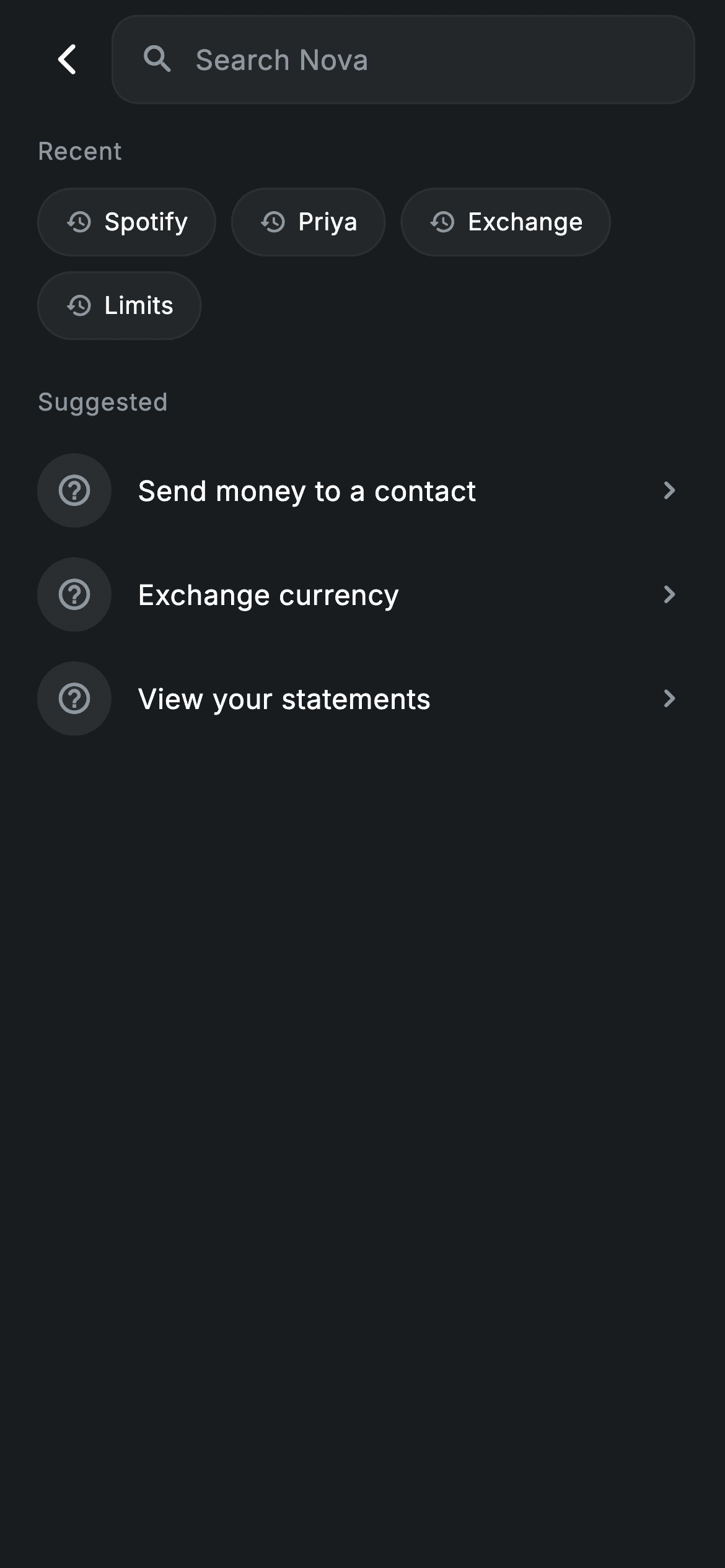
Type one letter into this screen and three sample datasets — people, transactions and help articles — are filtered live and regrouped under their own headings. This tutorial builds that universal search in pure Flutter: a rounded dark search field, a row of Recent chips that fill the query when tapped, result sections that appear only when they have matches, and a 'No results for "…"' state that quotes back what you typed. All of it runs off a single String field and a case-insensitive helper — no controller, no debounce, no backend.
Watch the Flutter UI walkthrough
A short screen recording of Fintech · Search running, if you'd rather see it before you read the code. The written tutorial below covers everything in it.
Can't see the video? Watch it on YouTube.
What you'll build
- ✓A 48px search field on a #242729 surface with a hairline border, rewriting the results on every keystroke
- ✓An empty state that shows tappable Recent chips and a Suggested list instead of a blank page
- ✓Three filtered result groups — avatar rows for people, tinted-icon rows for transactions, chevron rows for help — each rendered only when it has matches
- ✓A 'No results' panel that interpolates the current query back into the message
- ✓An asset-backed avatar that falls back to a tinted initial instead of a broken image box
Step-by-step build
Create the file
Add a new file at lib/fintech_global_search/fintech_global_search_screen.dart in your Flutter project.
Register the bundled fonts
No external packages — this is pure Flutter. It does bundle its design font (Inter), so drop the font file into fonts/ and declare it in pubspec.yaml:
flutter:
  fonts:
    - family: Inter
      fonts:
- asset: fonts/Inter-Regular.ttfBuild it, piece by piece
Here's how the screen goes together. Each block below is a real slice of the code with a plain-English explanation — paste them in order, or grab the whole file from the next section.
Design tokens and the three mock datasets
import 'package:flutter/material.dart';

/// Global Search — search across people, transactions and help. Self-contained
/// per CONVENTIONS.md: pure Flutter, bundled Inter font, forced dark theme.
/// Stateful: typing filters a sample dataset into grouped results.
class FintechGlobalSearchScreen extends StatefulWidget {
  const FintechGlobalSearchScreen({super.key, this.onBack});

  final VoidCallback? onBack;

  @override
  State<FintechGlobalSearchScreen> createState() =>
      _FintechGlobalSearchScreenState();
}

class _FintechGlobalSearchScreenState extends State<FintechGlobalSearchScreen> {
  static const String _font = 'Inter';
  static const Color _bg = Color(0xFF191C1F);
  static const Color _surface = Color(0xFF242729);
  static const Color _brand = Color(0xFF494FDF);
  static const Color _teal = Color(0xFF00A87E);
  static const Color _amber = Color(0xFFEC7E00);
  static const Color _muted = Color(0xFF8D969E);
  static const Color _hairline = Color(0xFF2E3235);

  static const List<({String name, String img})> _people =
      <({String name, String img})>[
    (name: 'Priya Sharma', img: 'lib/screens/fintech/fintech_global_search/images/avatar_5.jpg'),
    (name: 'Arjun Mehta', img: 'lib/screens/fintech/fintech_global_search/images/avatar_8.jpg'),
    (name: 'Sara Collins', img: 'lib/screens/fintech/fintech_global_search/images/avatar_12.jpg'),
  ];
  static const List<({IconData icon, Color tint, String name, String sub})>
      _txns = <({IconData icon, Color tint, String name, String sub})>[
    (icon: Icons.subscriptions_outlined, tint: _amber, name: 'Spotify', sub: 'Jun 10 · -£11.99'),
    (icon: Icons.shopping_bag_outlined, tint: _brand, name: 'Zara', sub: 'Jun 9 · -£59.99'),
    (icon: Icons.work_outline_rounded, tint: _teal, name: 'Salary', sub: 'Jun 8 · +£3,200'),
  ];
  static const List<String> _help = <String>[
    'How do I freeze my card?',
    'Exchange rates and fees',
    'Spending limits explained',
  ];
  static const List<String> _recent = <String>[
    'Spotify', 'Priya', 'Exchange', 'Limits',
  ];

  String _q = '';

  bool _match(String s) => s.toLowerCase().contains(_q.toLowerCase());
The screen is a StatefulWidget because typing changes what it renders. Above the state you get the palette as private consts: _bg (#191C1F) for the canvas, _surface (#242729) for the field and chips, _hairline (#2E3235) for 1px borders, _muted (#8D969E) for secondary text and icons, plus three accents — _brand indigo (#494FDF), _teal (#00A87E) and _amber (#EC7E00). The data is three hard-coded lists typed with Dart records: _people holds (name, img) pairs pointing at bundled avatar JPGs, _txns holds (icon, tint, name, sub) so each transaction carries its own accent colour and a subtitle like 'Jun 10 · -£11.99', and _help plus _recent are plain strings. Records let you model a row without writing a class. The only mutable state is `String _q = ''`, the current query, and `_match` lowercases both the candidate and _q before calling contains() so search is case-insensitive.
Filtering in build() and swapping between two views
  @override
  Widget build(BuildContext context) {
    final bool empty = _q.trim().isEmpty;
    final List<({String name, String img})> people =
        _people.where((p) => empty || _match(p.name)).toList();
    final List<({IconData icon, Color tint, String name, String sub})> txns =
        _txns.where((t) => empty || _match(t.name)).toList();
    final List<String> help = _help.where((h) => empty || _match(h)).toList();

    return Theme(
      data: ThemeData.dark(useMaterial3: true),
      child: Scaffold(
        backgroundColor: _bg,
        body: SafeArea(
          child: Column(
            crossAxisAlignment: CrossAxisAlignment.stretch,
            children: <Widget>[
              _searchBar(context),
              Expanded(
                child: empty
                    ? _recentView()
                    : ListView(
                        physics: const BouncingScrollPhysics(),
                        padding: const EdgeInsets.fromLTRB(20, 8, 20, 24),
                        children: <Widget>[
                          if (people.isEmpty && txns.isEmpty && help.isEmpty)
                            _noResults(),
                          if (people.isNotEmpty) ...<Widget>[
                            _sectionLabel('People'),
                            for (final ({String name, String img}) p in people)
                              _personRow(p),
                            const SizedBox(height: 16),
                          ],
                          if (txns.isNotEmpty) ...<Widget>[
                            _sectionLabel('Transactions'),
                            for (final ({IconData icon, Color tint, String name, String sub}) t in txns)
                              _txnRow(t),
                            const SizedBox(height: 16),
                          ],
                          if (help.isNotEmpty) ...<Widget>[
                            _sectionLabel('Help'),
                            for (final String h in help) _helpRow(h),
                          ],
                        ],
                      ),
              ),
            ],
          ),
        ),
      ),
    );
  }
build() starts by computing `empty` from _q.trim().isEmpty, then filters all three lists in one pass each with `where((p) => empty || _match(p.name))` — the `empty ||` short-circuit means an empty query keeps every row rather than filtering to nothing. Wrapping the Scaffold in `Theme(data: ThemeData.dark(useMaterial3: true))` forces the dark look even if the host app is running a light theme. Inside, a stretched Column pins the search bar to the top and gives the rest to an Expanded that swaps between _recentView() when the query is empty and a ListView of grouped results when it isn't. The grouping uses collection-if with the spread operator: `if (people.isNotEmpty) ...<Widget>[ _sectionLabel('People'), ... ]` means a heading can never appear above zero rows, and a separate `if (people.isEmpty && txns.isEmpty && help.isEmpty)` drops in _noResults(). BouncingScrollPhysics gives the iOS-style overscroll and the 20px side padding lines the rows up with the field above.
The search field
  Widget _searchBar(BuildContext context) {
    return Padding(
      padding: const EdgeInsets.fromLTRB(12, 8, 16, 8),
      child: Row(
        children: <Widget>[
          IconButton(
            onPressed: widget.onBack ?? () => Navigator.of(context).maybePop(),
            icon: const Icon(Icons.arrow_back_ios_new_rounded,
                size: 20, color: Colors.white),
          ),
          Expanded(
            child: Container(
              height: 48,
              decoration: BoxDecoration(
                color: _surface,
                borderRadius: BorderRadius.circular(14),
                border: Border.all(color: _hairline),
              ),
              padding: const EdgeInsets.symmetric(horizontal: 14),
              child: Row(
                children: <Widget>[
                  const Icon(Icons.search_rounded, size: 20, color: _muted),
                  const SizedBox(width: 10),
                  Expanded(
                    child: TextField(
                      autofocus: false,
                      onChanged: (String v) => setState(() => _q = v),
                      cursorColor: _brand,
                      style: const TextStyle(
                        fontFamily: _font,
                        fontSize: 15,
                        color: Colors.white,
                        letterSpacing: 0.24,
                      ),
                      decoration: const InputDecoration(
                        isCollapsed: true,
                        border: InputBorder.none,
                        hintText: 'Search Nova',
                        hintStyle: TextStyle(
                          fontFamily: _font,
                          fontSize: 15,
                          color: _muted,
                          letterSpacing: 0.24,
                        ),
                      ),
                    ),
                  ),
                ],
              ),
            ),
          ),
        ],
      ),
    );
  }
The bar is a Row: an IconButton with arrow_back_ios_new_rounded that calls `widget.onBack ?? () => Navigator.of(context).maybePop()` — so the screen works both when a parent passes a handler and when it's pushed as a route — then an Expanded field. The field itself is a 48px-tall Container filled with _surface, rounded 14 and outlined with a _hairline border, holding a muted search_rounded icon and the TextField. The TextField carries no controller: `onChanged: (v) => setState(() => _q = v)` is the entire wiring, so every keystroke rebuilds the screen with fresh filters. `isCollapsed: true` with `border: InputBorder.none` strips Material's default 48px input padding and underline, which is what lets the text sit perfectly centred inside your own container, and cursorColor is the indigo _brand so the caret matches the palette. The hint reads 'Search Nova' in _muted at the same 15px / 0.24 letterSpacing as the input, so the text doesn't shift when you start typing.
Recent chips, Suggested rows, and the shared section label
  Widget _recentView() {
    return ListView(
      physics: const BouncingScrollPhysics(),
      padding: const EdgeInsets.fromLTRB(20, 8, 20, 24),
      children: <Widget>[
        _sectionLabel('Recent'),
        Wrap(
          spacing: 8,
          runSpacing: 8,
          children: <Widget>[
            for (final String r in _recent)
              GestureDetector(
                onTap: () => setState(() => _q = r),
                child: Container(
                  padding:
                      const EdgeInsets.symmetric(horizontal: 14, vertical: 8),
                  decoration: BoxDecoration(
                    color: _surface,
                    borderRadius: BorderRadius.circular(9999),
                    border: Border.all(color: _hairline),
                  ),
                  child: Row(
                    mainAxisSize: MainAxisSize.min,
                    children: <Widget>[
                      const Icon(Icons.history_rounded,
                          size: 15, color: _muted),
                      const SizedBox(width: 6),
                      Text(
                        r,
                        style: const TextStyle(
                          fontFamily: _font,
                          fontSize: 13,
                          letterSpacing: 0.24,
                          color: Colors.white,
                        ),
                      ),
                    ],
                  ),
                ),
              ),
          ],
        ),
        const SizedBox(height: 24),
        _sectionLabel('Suggested'),
        _helpRow('Send money to a contact'),
        _helpRow('Exchange currency'),
        _helpRow('View your statements'),
      ],
    );
  }

  Widget _sectionLabel(String s) => Padding(
        padding: const EdgeInsets.only(bottom: 10),
        child: Text(
          s,
          style: const TextStyle(
            fontFamily: _font,
            fontSize: 13,
            fontWeight: FontWeight.w500,
            letterSpacing: 0.5,
            color: _muted,
          ),
        ),
      );
_recentView() is what fills the screen before anyone types. A 'Recent' label sits above a Wrap (spacing 8, runSpacing 8) that lays the chips out in rows and reflows them onto a second line automatically. Each chip is a GestureDetector around a pill — `BorderRadius.circular(9999)` is the usual trick for a fully rounded capsule — with a 15px history_rounded icon and a 13px label, and its onTap does `setState(() => _q = r)`, running the search for that term. Worth knowing: because the TextField has no controller, setting _q this way filters the results but does not write the word into the field; add a TextEditingController and set `.text` alongside _q if you want them in sync. Below a 24px gap, a 'Suggested' label heads three _helpRow entries reused straight from the results list. _sectionLabel is the single helper behind all four headings — 13px, weight 500, 0.5 letterSpacing in _muted with 10px of bottom padding — so every group header is identical by construction.
People and transaction result rows
  Widget _personRow(({String name, String img}) p) {
    return Padding(
      padding: const EdgeInsets.symmetric(vertical: 8),
      child: Row(
        children: <Widget>[
          ClipOval(
            child: _Avatar(
                url: p.img, initial: p.name.characters.first, size: 40),
          ),
          const SizedBox(width: 14),
          Expanded(
            child: Text(
              p.name,
              style: const TextStyle(
                fontFamily: _font,
                fontSize: 15,
                fontWeight: FontWeight.w500,
                letterSpacing: 0.24,
                color: Colors.white,
              ),
            ),
          ),
          const Icon(Icons.north_east_rounded, size: 18, color: _muted),
        ],
      ),
    );
  }

  Widget _txnRow(({IconData icon, Color tint, String name, String sub}) t) {
    return Padding(
      padding: const EdgeInsets.symmetric(vertical: 8),
      child: Row(
        children: <Widget>[
          Container(
            width: 40,
            height: 40,
            decoration: BoxDecoration(
              shape: BoxShape.circle,
              color: t.tint.withValues(alpha: 0.16),
            ),
            child: Icon(t.icon, size: 20, color: t.tint),
          ),
          const SizedBox(width: 14),
          Expanded(
            child: Column(
              crossAxisAlignment: CrossAxisAlignment.start,
              children: <Widget>[
                Text(
                  t.name,
                  style: const TextStyle(
                    fontFamily: _font,
                    fontSize: 15,
                    fontWeight: FontWeight.w500,
                    letterSpacing: 0.24,
                    color: Colors.white,
                  ),
                ),
                const SizedBox(height: 2),
                Text(
                  t.sub,
                  style: const TextStyle(
                    fontFamily: _font,
                    fontSize: 12,
                    letterSpacing: 0.24,
                    color: _muted,
                  ),
                ),
              ],
            ),
          ),
        ],
      ),
    );
  }
_personRow takes the (name, img) record and builds a 40px avatar inside a ClipOval, a 14px gap, the name in 15px weight-500 white wrapped in Expanded so long names take the free space, and a trailing north_east_rounded arrow in _muted signalling 'jump to this person'. The initial handed to the avatar comes from `p.name.characters.first`, which walks real user-perceived characters instead of UTF-16 code units — safer than name[0] for emoji or accented scripts. _txnRow follows the same skeleton but swaps the avatar for a 40px circle whose fill is `t.tint.withValues(alpha: 0.16)` with the icon drawn at full t.tint: one colour used at two strengths, which is why Spotify reads amber, Zara indigo and Salary teal without any extra tokens. Its centre column stacks the merchant at 15px weight 500 over the 12px muted 'Jun 9 · -£59.99' subtitle. Both rows use `EdgeInsets.symmetric(vertical: 8)`, so consecutive rows sit a consistent 16px apart.
Help rows, the empty state, and a never-blank avatar
  Widget _helpRow(String h) {
    return Padding(
      padding: const EdgeInsets.symmetric(vertical: 8),
      child: Row(
        children: <Widget>[
          Container(
            width: 40,
            height: 40,
            decoration: BoxDecoration(
              shape: BoxShape.circle,
              color: _muted.withValues(alpha: 0.14),
            ),
            child: const Icon(Icons.help_outline_rounded,
                size: 20, color: _muted),
          ),
          const SizedBox(width: 14),
          Expanded(
            child: Text(
              h,
              style: const TextStyle(
                fontFamily: _font,
                fontSize: 15,
                letterSpacing: 0.24,
                color: Colors.white,
              ),
            ),
          ),
          const Icon(Icons.chevron_right_rounded, size: 20, color: _muted),
        ],
      ),
    );
  }

  Widget _noResults() {
    return Padding(
      padding: const EdgeInsets.only(top: 80),
      child: Column(
        children: <Widget>[
          const Icon(Icons.search_off_rounded, size: 44, color: _muted),
          const SizedBox(height: 12),
          Text(
            'No results for "$_q"',
            style: const TextStyle(
              fontFamily: _font,
              fontSize: 15,
              fontWeight: FontWeight.w500,
              letterSpacing: 0.24,
              color: Colors.white,
            ),
          ),
          const SizedBox(height: 4),
          const Text(
            'Try a name, merchant or topic',
            style: TextStyle(
              fontFamily: _font,
              fontSize: 13,
              letterSpacing: 0.24,
              color: _muted,
            ),
          ),
        ],
      ),
    );
  }
}

/// Network avatar that never renders blank: tinted initial while loading and as
/// a permanent fallback if the request fails.
class _Avatar extends StatelessWidget {
  const _Avatar({required this.url, required this.initial, required this.size});

  final String url;
  final String initial;
  final double size;

  Widget _fallback() => Container(
        width: size,
        height: size,
        color: _FintechGlobalSearchScreenState._brand.withValues(alpha: 0.22),
        alignment: Alignment.center,
        child: Text(
          initial.toUpperCase(),
          style: TextStyle(
            fontFamily: _FintechGlobalSearchScreenState._font,
            fontSize: size * 0.4,
            fontWeight: FontWeight.w500,
            color: _FintechGlobalSearchScreenState._brand,
          ),
        ),
      );

  @override
  Widget build(BuildContext context) {
    return Image.asset(
      url,
      width: size,
      height: size,
      fit: BoxFit.cover,
      gaplessPlayback: true,
      errorBuilder: (BuildContext c, Object e, StackTrace? s) => _fallback(),
    );
  }
}
_helpRow is deliberately neutral — a circle tinted `_muted.withValues(alpha: 0.14)` with help_outline_rounded and a trailing chevron_right_rounded — because it is reused both for filtered Help matches and for the Suggested list on the empty view. _noResults() pushes down 80px, then centres a 44px search_off_rounded icon above the interpolated line `'No results for "$_q"'` and the softer 'Try a name, merchant or topic' hint, so the failure tells the user exactly what was searched and what to try instead. Finally, _Avatar is a small StatelessWidget wrapping Image.asset — note that despite the doc comment, these are bundled JPGs, not network images — with `gaplessPlayback: true` and an errorBuilder that returns _fallback(): a square tinted with _brand at 22% alpha showing the uppercase initial at size * 0.4. Because _Avatar lives in the same file, it can read the state class's private _brand and _font statics directly; Dart privacy is per-library, not per-class.
Full code
The complete, ready-to-paste source. Free to use in your projects — one click copies it all.
import 'package:flutter/material.dart';

/// Global Search — search across people, transactions and help. Self-contained
/// per CONVENTIONS.md: pure Flutter, bundled Inter font, forced dark theme.
/// Stateful: typing filters a sample dataset into grouped results.
class FintechGlobalSearchScreen extends StatefulWidget {
  const FintechGlobalSearchScreen({super.key, this.onBack});

  final VoidCallback? onBack;

  @override
  State<FintechGlobalSearchScreen> createState() =>
      _FintechGlobalSearchScreenState();
}

class _FintechGlobalSearchScreenState extends State<FintechGlobalSearchScreen> {
  static const String _font = 'Inter';
  static const Color _bg = Color(0xFF191C1F);
  static const Color _surface = Color(0xFF242729);
  static const Color _brand = Color(0xFF494FDF);
  static const Color _teal = Color(0xFF00A87E);
  static const Color _amber = Color(0xFFEC7E00);
  static const Color _muted = Color(0xFF8D969E);
  static const Color _hairline = Color(0xFF2E3235);

  static const List<({String name, String img})> _people =
      <({String name, String img})>[
    (name: 'Priya Sharma', img: 'lib/screens/fintech/fintech_global_search/images/avatar_5.jpg'),
    (name: 'Arjun Mehta', img: 'lib/screens/fintech/fintech_global_search/images/avatar_8.jpg'),
    (name: 'Sara Collins', img: 'lib/screens/fintech/fintech_global_search/images/avatar_12.jpg'),
  ];
  static const List<({IconData icon, Color tint, String name, String sub})>
      _txns = <({IconData icon, Color tint, String name, String sub})>[
    (icon: Icons.subscriptions_outlined, tint: _amber, name: 'Spotify', sub: 'Jun 10 · -£11.99'),
    (icon: Icons.shopping_bag_outlined, tint: _brand, name: 'Zara', sub: 'Jun 9 · -£59.99'),
    (icon: Icons.work_outline_rounded, tint: _teal, name: 'Salary', sub: 'Jun 8 · +£3,200'),
  ];
  static const List<String> _help = <String>[
    'How do I freeze my card?',
    'Exchange rates and fees',
    'Spending limits explained',
  ];
  static const List<String> _recent = <String>[
    'Spotify', 'Priya', 'Exchange', 'Limits',
  ];

  String _q = '';

  bool _match(String s) => s.toLowerCase().contains(_q.toLowerCase());

  @override
  Widget build(BuildContext context) {
    final bool empty = _q.trim().isEmpty;
    final List<({String name, String img})> people =
        _people.where((p) => empty || _match(p.name)).toList();
    final List<({IconData icon, Color tint, String name, String sub})> txns =
        _txns.where((t) => empty || _match(t.name)).toList();
    final List<String> help = _help.where((h) => empty || _match(h)).toList();

    return Theme(
      data: ThemeData.dark(useMaterial3: true),
      child: Scaffold(
        backgroundColor: _bg,
        body: SafeArea(
          child: Column(
            crossAxisAlignment: CrossAxisAlignment.stretch,
            children: <Widget>[
              _searchBar(context),
              Expanded(
                child: empty
                    ? _recentView()
                    : ListView(
                        physics: const BouncingScrollPhysics(),
                        padding: const EdgeInsets.fromLTRB(20, 8, 20, 24),
                        children: <Widget>[
                          if (people.isEmpty && txns.isEmpty && help.isEmpty)
                            _noResults(),
                          if (people.isNotEmpty) ...<Widget>[
                            _sectionLabel('People'),
                            for (final ({String name, String img}) p in people)
                              _personRow(p),
                            const SizedBox(height: 16),
                          ],
                          if (txns.isNotEmpty) ...<Widget>[
                            _sectionLabel('Transactions'),
                            for (final ({IconData icon, Color tint, String name, String sub}) t in txns)
                              _txnRow(t),
                            const SizedBox(height: 16),
                          ],
                          if (help.isNotEmpty) ...<Widget>[
                            _sectionLabel('Help'),
                            for (final String h in help) _helpRow(h),
                          ],
                        ],
                      ),
              ),
            ],
          ),
        ),
      ),
    );
  }

  Widget _searchBar(BuildContext context) {
    return Padding(
      padding: const EdgeInsets.fromLTRB(12, 8, 16, 8),
      child: Row(
        children: <Widget>[
          IconButton(
            onPressed: widget.onBack ?? () => Navigator.of(context).maybePop(),
            icon: const Icon(Icons.arrow_back_ios_new_rounded,
                size: 20, color: Colors.white),
          ),
          Expanded(
            child: Container(
              height: 48,
              decoration: BoxDecoration(
                color: _surface,
                borderRadius: BorderRadius.circular(14),
                border: Border.all(color: _hairline),
              ),
              padding: const EdgeInsets.symmetric(horizontal: 14),
              child: Row(
                children: <Widget>[
                  const Icon(Icons.search_rounded, size: 20, color: _muted),
                  const SizedBox(width: 10),
                  Expanded(
                    child: TextField(
                      autofocus: false,
                      onChanged: (String v) => setState(() => _q = v),
                      cursorColor: _brand,
                      style: const TextStyle(
                        fontFamily: _font,
                        fontSize: 15,
                        color: Colors.white,
                        letterSpacing: 0.24,
                      ),
                      decoration: const InputDecoration(
                        isCollapsed: true,
                        border: InputBorder.none,
                        hintText: 'Search Nova',
                        hintStyle: TextStyle(
                          fontFamily: _font,
                          fontSize: 15,
                          color: _muted,
                          letterSpacing: 0.24,
                        ),
                      ),
                    ),
                  ),
                ],
              ),
            ),
          ),
        ],
      ),
    );
  }

  Widget _recentView() {
    return ListView(
      physics: const BouncingScrollPhysics(),
      padding: const EdgeInsets.fromLTRB(20, 8, 20, 24),
      children: <Widget>[
        _sectionLabel('Recent'),
        Wrap(
          spacing: 8,
          runSpacing: 8,
          children: <Widget>[
            for (final String r in _recent)
              GestureDetector(
                onTap: () => setState(() => _q = r),
                child: Container(
                  padding:
                      const EdgeInsets.symmetric(horizontal: 14, vertical: 8),
                  decoration: BoxDecoration(
                    color: _surface,
                    borderRadius: BorderRadius.circular(9999),
                    border: Border.all(color: _hairline),
                  ),
                  child: Row(
                    mainAxisSize: MainAxisSize.min,
                    children: <Widget>[
                      const Icon(Icons.history_rounded,
                          size: 15, color: _muted),
                      const SizedBox(width: 6),
                      Text(
                        r,
                        style: const TextStyle(
                          fontFamily: _font,
                          fontSize: 13,
                          letterSpacing: 0.24,
                          color: Colors.white,
                        ),
                      ),
                    ],
                  ),
                ),
              ),
          ],
        ),
        const SizedBox(height: 24),
        _sectionLabel('Suggested'),
        _helpRow('Send money to a contact'),
        _helpRow('Exchange currency'),
        _helpRow('View your statements'),
      ],
    );
  }

  Widget _sectionLabel(String s) => Padding(
        padding: const EdgeInsets.only(bottom: 10),
        child: Text(
          s,
          style: const TextStyle(
            fontFamily: _font,
            fontSize: 13,
            fontWeight: FontWeight.w500,
            letterSpacing: 0.5,
            color: _muted,
          ),
        ),
      );

  Widget _personRow(({String name, String img}) p) {
    return Padding(
      padding: const EdgeInsets.symmetric(vertical: 8),
      child: Row(
        children: <Widget>[
          ClipOval(
            child: _Avatar(
                url: p.img, initial: p.name.characters.first, size: 40),
          ),
          const SizedBox(width: 14),
          Expanded(
            child: Text(
              p.name,
              style: const TextStyle(
                fontFamily: _font,
                fontSize: 15,
                fontWeight: FontWeight.w500,
                letterSpacing: 0.24,
                color: Colors.white,
              ),
            ),
          ),
          const Icon(Icons.north_east_rounded, size: 18, color: _muted),
        ],
      ),
    );
  }

  Widget _txnRow(({IconData icon, Color tint, String name, String sub}) t) {
    return Padding(
      padding: const EdgeInsets.symmetric(vertical: 8),
      child: Row(
        children: <Widget>[
          Container(
            width: 40,
            height: 40,
            decoration: BoxDecoration(
              shape: BoxShape.circle,
              color: t.tint.withValues(alpha: 0.16),
            ),
            child: Icon(t.icon, size: 20, color: t.tint),
          ),
          const SizedBox(width: 14),
          Expanded(
            child: Column(
              crossAxisAlignment: CrossAxisAlignment.start,
              children: <Widget>[
                Text(
                  t.name,
                  style: const TextStyle(
                    fontFamily: _font,
                    fontSize: 15,
                    fontWeight: FontWeight.w500,
                    letterSpacing: 0.24,
                    color: Colors.white,
                  ),
                ),
                const SizedBox(height: 2),
                Text(
                  t.sub,
                  style: const TextStyle(
                    fontFamily: _font,
                    fontSize: 12,
                    letterSpacing: 0.24,
                    color: _muted,
                  ),
                ),
              ],
            ),
          ),
        ],
      ),
    );
  }

  Widget _helpRow(String h) {
    return Padding(
      padding: const EdgeInsets.symmetric(vertical: 8),
      child: Row(
        children: <Widget>[
          Container(
            width: 40,
            height: 40,
            decoration: BoxDecoration(
              shape: BoxShape.circle,
              color: _muted.withValues(alpha: 0.14),
            ),
            child: const Icon(Icons.help_outline_rounded,
                size: 20, color: _muted),
          ),
          const SizedBox(width: 14),
          Expanded(
            child: Text(
              h,
              style: const TextStyle(
                fontFamily: _font,
                fontSize: 15,
                letterSpacing: 0.24,
                color: Colors.white,
              ),
            ),
          ),
          const Icon(Icons.chevron_right_rounded, size: 20, color: _muted),
        ],
      ),
    );
  }

  Widget _noResults() {
    return Padding(
      padding: const EdgeInsets.only(top: 80),
      child: Column(
        children: <Widget>[
          const Icon(Icons.search_off_rounded, size: 44, color: _muted),
          const SizedBox(height: 12),
          Text(
            'No results for "$_q"',
            style: const TextStyle(
              fontFamily: _font,
              fontSize: 15,
              fontWeight: FontWeight.w500,
              letterSpacing: 0.24,
              color: Colors.white,
            ),
          ),
          const SizedBox(height: 4),
          const Text(
            'Try a name, merchant or topic',
            style: TextStyle(
              fontFamily: _font,
              fontSize: 13,
              letterSpacing: 0.24,
              color: _muted,
            ),
          ),
        ],
      ),
    );
  }
}

/// Network avatar that never renders blank: tinted initial while loading and as
/// a permanent fallback if the request fails.
class _Avatar extends StatelessWidget {
  const _Avatar({required this.url, required this.initial, required this.size});

  final String url;
  final String initial;
  final double size;

  Widget _fallback() => Container(
        width: size,
        height: size,
        color: _FintechGlobalSearchScreenState._brand.withValues(alpha: 0.22),
        alignment: Alignment.center,
        child: Text(
          initial.toUpperCase(),
          style: TextStyle(
            fontFamily: _FintechGlobalSearchScreenState._font,
            fontSize: size * 0.4,
            fontWeight: FontWeight.w500,
            color: _FintechGlobalSearchScreenState._brand,
          ),
        ),
      );

  @override
  Widget build(BuildContext context) {
    return Image.asset(
      url,
      width: size,
      height: size,
      fit: BoxFit.cover,
      gaplessPlayback: true,
      errorBuilder: (BuildContext c, Object e, StackTrace? s) => _fallback(),
    );
  }
}
Plus bundled 4 binary assets (fonts/images). The CLI and MCP install those for you automatically.
Two faster ways to add it
Copy-paste works, but you can skip it entirely.
1. FlutterKit CLI
One command drops this screen — and its fonts — straight into your project.
$ flutterkit add fintech-global-search2. AI agent (MCP)
Connect FlutterKit's MCP server in Claude or Cursor and just ask your agent to install fintech-global-search — it fetches and writes the files for you.
FAQ
Can I ship this search screen in a commercial app?
Yes. The full Dart on this page is free to copy and use in personal or commercial projects. You can paste it, run `flutterkit add fintech-global-search` with the CLI, or have an AI agent install it through MCP. Swap _people, _txns and _help for your own data source and the rest of the screen keeps working unchanged.
Do I need a search package or any dependency for this?
No — it's pure Flutter on the material library, with no debouncing package and no search plugin. Filtering is a `where()` call over in-memory lists in build(). The only bundled assets are the Inter font and the three avatar JPGs; register both in pubspec.yaml as shown in step 2, or let the CLI/MCP install copy them for you.
What Flutter SDK does this screen need?
Flutter 3.27+ / Dart 3, on two counts. The tinted icon circles use `Color.withValues(alpha: 0.16)`, and the datasets are typed with Dart 3 record syntax like `({String name, String img})`. On an older SDK, replace every withValues(alpha: x) with withOpacity(x), and if you're pre-Dart-3, turn each record list into a tiny class with the same field names — the row builders read `p.name`, `t.tint`, `t.sub` and so on, so nothing else changes.


