How to Build a Fintech Cashflow Screen in Flutter (Full Code + Preview)
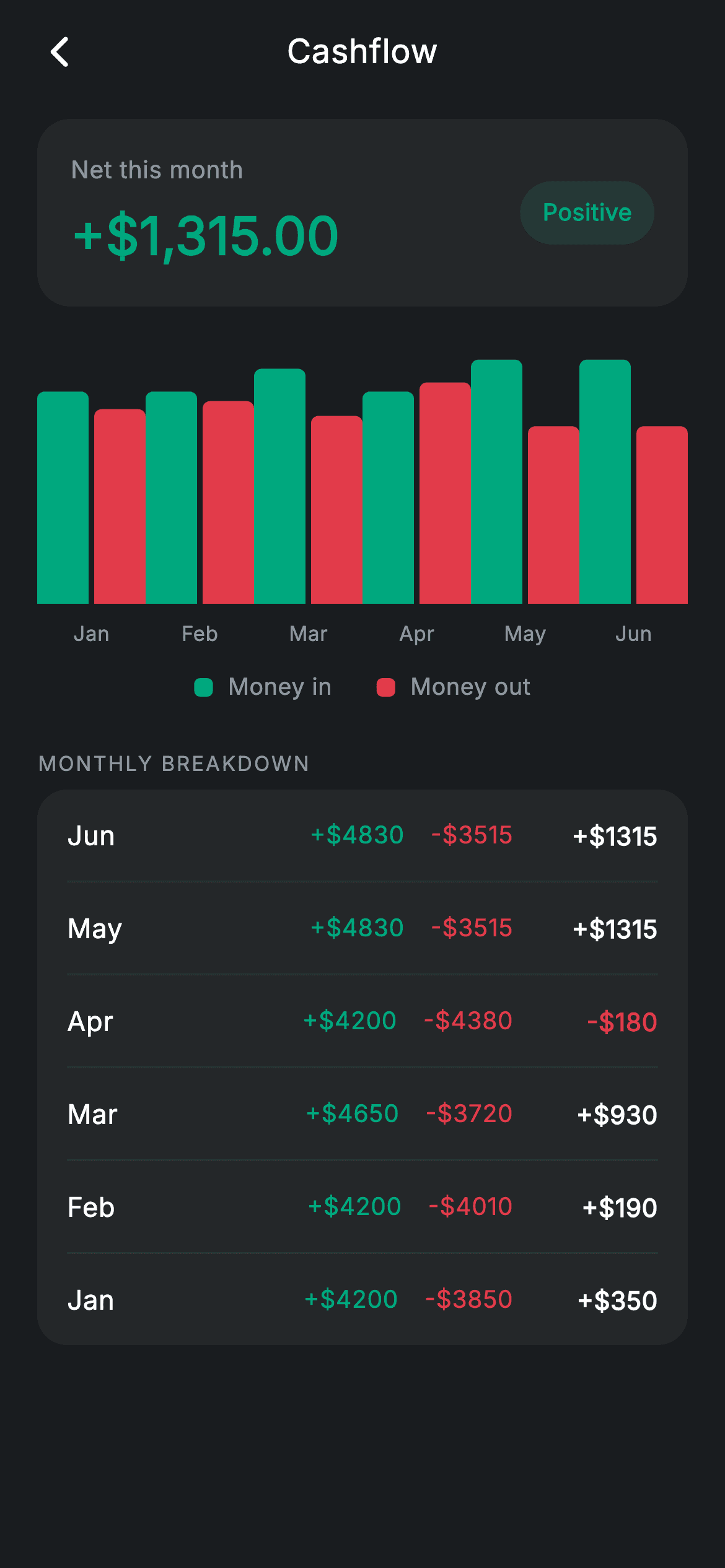
Most cashflow charts in Flutter start with a charting package, a controller, and a build-size bump — all to draw twelve rectangles. This tutorial builds a Revolut-style cashflow screen with none of that: a paired money-in vs money-out bar chart made from `Expanded`, `FractionallySizedBox`, and rounded `Container`s, a 'Net this month' summary card with a positive pill, and a monthly breakdown list that computes each month's net on the fly. You end up with one self-contained, dark-themed Dart file you can drop straight into any finance app.
Watch the Flutter UI walkthrough
A short screen recording of Fintech · Cashflow running, if you'd rather see it before you read the code. The written tutorial below covers everything in it.
Can't see the video? Watch it on YouTube.
What you'll build
- ✓A paired bar chart comparing income and spend across six months, built from plain widgets with zero chart dependencies
- ✓A 'Net this month' summary card showing +$1,315.00 in teal beside a tinted 'Positive' status pill
- ✓A monthly breakdown card that lists months newest-first and derives each net from income minus outgoing at build time
- ✓A reusable `_bar` helper that scales any value against a $5,000 ceiling with `FractionallySizedBox`
- ✓A forced dark theme with a six-colour Revolut-inspired palette and the bundled Inter font
Step-by-step build
Create the file
Add a new file at lib/fintech_cashflow/fintech_cashflow_screen.dart in your Flutter project.
Register the bundled fonts
No external packages — this is pure Flutter. It does bundle its design font (Inter), so drop the font file into fonts/ and declare it in pubspec.yaml:
flutter:
  fonts:
    - family: Inter
      fonts:
- asset: fonts/Inter-Regular.ttfBuild it, piece by piece
Here's how the screen goes together. Each block below is a real slice of the code with a plain-English explanation — paste them in order, or grab the whole file from the next section.
One list of month records drives the whole screen
import 'package:flutter/material.dart';

/// Cashflow — money in vs out over time (Revolut-inspired design system).
///
/// Self-contained per CONVENTIONS.md: pure Flutter only, the exact design font
/// (Inter) is bundled under `fonts/`, the paired bar chart is built from plain
/// widgets (no charting package, no network), and the screen forces its own
/// dark theme. A net summary and per-month breakdown complete the picture.
class FintechCashflowScreen extends StatelessWidget {
  const FintechCashflowScreen({super.key, this.onBack});

  final VoidCallback? onBack;

  static const String _font = 'Inter';
  static const Color _bg = Color(0xFF191C1F);
  static const Color _surface = Color(0xFF242729);
  static const Color _teal = Color(0xFF00A87E);
  static const Color _red = Color(0xFFE23B4A);
  static const Color _muted = Color(0xFF8D969E);
  static const Color _hairline = Color(0xFF2E3235);

  static const List<_Month> _months = <_Month>[
    _Month('Jan', 4200, 3850),
    _Month('Feb', 4200, 4010),
    _Month('Mar', 4650, 3720),
    _Month('Apr', 4200, 4380),
    _Month('May', 4830, 3515),
    _Month('Jun', 4830, 3515),
  ];

  static const double _maxVal = 5000;
`FintechCashflowScreen` is a `StatelessWidget` with a single `onBack` callback — nothing on this screen mutates, so there is no state class to maintain. The palette is six `static const Color`s: a near-black `_bg` (0xFF191C1F), a lighter `_surface` for cards, `_teal` for money in, `_red` for money out, plus `_muted` and `_hairline` for secondary text and dividers. The interesting decision is `_months`: six `_Month(label, income, outgoing)` records are the only data on the screen — the chart, the legend maths, and the breakdown list are all projections of this one list. `_maxVal = 5000` is the shared chart ceiling every bar is scaled against, so bar heights stay comparable across months.
Forcing dark mode and laying out the scroll
  @override
  Widget build(BuildContext context) {
    return Theme(
      data: ThemeData.dark(useMaterial3: true),
      child: Scaffold(
        backgroundColor: _bg,
        body: SafeArea(
          child: Column(
            children: <Widget>[
              _buildAppBar(),
              Expanded(
                child: ListView(
                  physics: const BouncingScrollPhysics(),
                  padding: const EdgeInsets.fromLTRB(20, 8, 20, 24),
                  children: <Widget>[
                    _buildNet(),
                    const SizedBox(height: 24),
                    _buildChart(),
                    const SizedBox(height: 12),
                    _buildLegend(),
                    const SizedBox(height: 24),
                    _sectionLabel('Monthly breakdown'),
                    const SizedBox(height: 6),
                    Container(
                      padding: const EdgeInsets.symmetric(horizontal: 16),
                      decoration: BoxDecoration(
                        color: _surface,
                        borderRadius: BorderRadius.circular(16),
                      ),
                      child: Column(
                        children: <Widget>[
                          for (int i = _months.length - 1; i >= 0; i--) ...<Widget>[
                            if (i != _months.length - 1)
                              const Divider(height: 1, color: _hairline),
                            _MonthRow(month: _months[i]),
                          ],
                        ],
                      ),
                    ),
                  ],
                ),
              ),
            ],
          ),
        ),
      ),
    );
  }
The build wraps everything in `Theme(data: ThemeData.dark(useMaterial3: true))`, so the screen renders dark even inside a light-themed host app — it carries its own theme rather than inheriting one. Inside a `SafeArea`, the app bar stays fixed while an `Expanded` `ListView` with `BouncingScrollPhysics` scrolls the net card, chart, legend, and breakdown. The breakdown card uses a reversed collection-for — `for (int i = _months.length - 1; i >= 0; i--)` — so June appears first, matching how people read a finance history (most recent month on top), and the `if (i != _months.length - 1)` guard inserts a 1px `_hairline` `Divider` between rows but never above the first one.
A hand-balanced app bar
  Widget _buildAppBar() {
    return Padding(
      padding: const EdgeInsets.fromLTRB(8, 4, 8, 4),
      child: Row(
        children: <Widget>[
          IconButton(
            onPressed: onBack,
            icon: const Icon(Icons.arrow_back_ios_new_rounded,
                size: 20, color: Colors.white),
          ),
          const Expanded(
            child: Text(
              'Cashflow',
              textAlign: TextAlign.center,
              style: TextStyle(
                fontFamily: _font,
                fontSize: 18,
                fontWeight: FontWeight.w500,
                letterSpacing: 0.24,
                color: Colors.white,
              ),
            ),
          ),
          const SizedBox(width: 48),
        ],
      ),
    );
  }
Rather than a Material `AppBar`, the header is a plain `Row`: an `IconButton` firing `onBack`, an `Expanded` centred 'Cashflow' title, and a trailing `SizedBox(width: 48)`. That 48px box is the whole trick — it mirrors the standard `IconButton` footprint on the left, so `textAlign: TextAlign.center` lands the title on the true horizontal centre of the screen instead of drifting right. The title is 18px `w500` Inter with a subtle 0.24 letter-spacing that every text style on this screen repeats.
The net summary card and its status pill
  Widget _buildNet() {
    return Container(
      padding: const EdgeInsets.all(18),
      decoration: BoxDecoration(
        color: _surface,
        borderRadius: BorderRadius.circular(18),
      ),
      child: Row(
        children: <Widget>[
          Column(
            crossAxisAlignment: CrossAxisAlignment.start,
            children: const <Widget>[
              Text(
                'Net this month',
                style: TextStyle(
                  fontFamily: _font,
                  fontSize: 13,
                  letterSpacing: 0.24,
                  color: _muted,
                ),
              ),
              SizedBox(height: 6),
              Text(
                r'+$1,315.00',
                style: TextStyle(
                  fontFamily: _font,
                  fontSize: 28,
                  fontWeight: FontWeight.w600,
                  letterSpacing: 0.24,
                  color: _teal,
                ),
              ),
            ],
          ),
          const Spacer(),
          Container(
            padding: const EdgeInsets.symmetric(horizontal: 12, vertical: 8),
            decoration: BoxDecoration(
              color: _teal.withValues(alpha: 0.16),
              borderRadius: BorderRadius.circular(9999),
            ),
            child: const Text(
              'Positive',
              style: TextStyle(
                fontFamily: _font,
                fontSize: 12.5,
                fontWeight: FontWeight.w600,
                letterSpacing: 0.24,
                color: _teal,
              ),
            ),
          ),
        ],
      ),
    );
  }
`_buildNet` is a `_surface` container with 18px padding and an 18px corner radius holding a two-line column — a 13px `_muted` 'Net this month' label over the 28px `w600` figure — pushed apart from a status pill by a `Spacer`. The amount string is a raw literal (`r'+$1,315.00'`) so the dollar sign is not read as Dart interpolation, and it renders in `_teal` because the month is positive. The pill's background is `_teal.withValues(alpha: 0.16)` with a `borderRadius` of 9999 — a tint of the same hue as its 'Positive' text, so the badge reads as a state of the number rather than a separate element.
A paired bar chart with no charting package
  Widget _buildChart() {
    return SizedBox(
      height: 160,
      child: Row(
        crossAxisAlignment: CrossAxisAlignment.end,
        children: <Widget>[
          for (final _Month m in _months)
            Expanded(
              child: Column(
                children: <Widget>[
                  Expanded(
                    child: Row(
                      crossAxisAlignment: CrossAxisAlignment.end,
                      mainAxisAlignment: MainAxisAlignment.center,
                      children: <Widget>[
                        _bar(m.income / _maxVal, _teal),
                        const SizedBox(width: 3),
                        _bar(m.outgoing / _maxVal, _red),
                      ],
                    ),
                  ),
                  const SizedBox(height: 8),
                  Text(
                    m.label,
                    style: const TextStyle(
                      fontFamily: _font,
                      fontSize: 11,
                      letterSpacing: 0.24,
                      color: _muted,
                    ),
                  ),
                ],
              ),
            ),
        ],
      ),
    );
  }

  Widget _bar(double frac, Color color) {
    return Expanded(
      child: Align(
        alignment: Alignment.bottomCenter,
        child: FractionallySizedBox(
          heightFactor: frac.clamp(0.02, 1),
          child: Container(
            decoration: BoxDecoration(
              color: color,
              borderRadius: const BorderRadius.vertical(top: Radius.circular(4)),
            ),
          ),
        ),
      ),
    );
  }
The chart is a 160px-tall `Row` with `crossAxisAlignment: CrossAxisAlignment.end`, one `Expanded` column per month so six months always share the width evenly. Each column stacks a bottom-aligned pair of bars — `_bar(m.income / _maxVal, _teal)` and `_bar(m.outgoing / _maxVal, _red)` separated by a 3px gap — above the 11px month label. `_bar` does the actual scaling: an `Align(alignment: Alignment.bottomCenter)` holding a `FractionallySizedBox` whose `heightFactor` is `frac.clamp(0.02, 1)`, so bars grow up from the baseline and a zero-value month still shows a 2% sliver instead of vanishing. Only the top corners get a 4px radius, keeping the baseline flat.
Legend dots and a spaced-caps section label
  Widget _buildLegend() {
    return Row(
      mainAxisAlignment: MainAxisAlignment.center,
      children: <Widget>[
        _legendDot(_teal, 'Money in'),
        const SizedBox(width: 24),
        _legendDot(_red, 'Money out'),
      ],
    );
  }

  Widget _legendDot(Color color, String label) {
    return Row(
      mainAxisSize: MainAxisSize.min,
      children: <Widget>[
        Container(
          width: 10,
          height: 10,
          decoration: BoxDecoration(
            color: color,
            borderRadius: BorderRadius.circular(3),
          ),
        ),
        const SizedBox(width: 8),
        Text(
          label,
          style: const TextStyle(
            fontFamily: _font,
            fontSize: 12.5,
            letterSpacing: 0.24,
            color: _muted,
          ),
        ),
      ],
    );
  }

  Widget _sectionLabel(String text) {
    return Text(
      text.toUpperCase(),
      style: const TextStyle(
        fontFamily: _font,
        fontSize: 11,
        fontWeight: FontWeight.w500,
        letterSpacing: 1.0,
        color: _muted,
      ),
    );
  }
`_buildLegend` centres two `_legendDot` rows 24px apart, each a 10px square with a 3px corner radius beside 12.5px `_muted` text — 'Money in' in `_teal`, 'Money out' in `_red`, the same hues the bars use, so the mapping needs no explanation. `mainAxisSize: MainAxisSize.min` keeps each dot-label pair hugging its content so the outer `mainAxisAlignment: MainAxisAlignment.center` can do the positioning. `_sectionLabel` upper-cases its text at 11px with `letterSpacing: 1.0`, the classic spaced-caps treatment that separates 'MONTHLY BREAKDOWN' from the data below without stealing visual weight.
The month model and a net computed at build time
class _Month {
  const _Month(this.label, this.income, this.outgoing);
  final String label;
  final double income;
  final double outgoing;
}

class _MonthRow extends StatelessWidget {
  const _MonthRow({required this.month});

  final _Month month;

  @override
  Widget build(BuildContext context) {
    final double net = month.income - month.outgoing;
    final bool positive = net >= 0;
    return Padding(
      padding: const EdgeInsets.symmetric(vertical: 14),
      child: Row(
        children: <Widget>[
          SizedBox(
            width: 44,
            child: Text(
              month.label,
              style: const TextStyle(
                fontFamily: FintechCashflowScreen._font,
                fontSize: 14.5,
                fontWeight: FontWeight.w500,
                letterSpacing: 0.24,
                color: Colors.white,
              ),
            ),
          ),
          const Spacer(),
          Text(
            '+\$${month.income.toStringAsFixed(0)}',
            style: const TextStyle(
              fontFamily: FintechCashflowScreen._font,
              fontSize: 13,
              letterSpacing: 0.24,
              color: FintechCashflowScreen._teal,
            ),
          ),
          const SizedBox(width: 14),
          Text(
            '-\$${month.outgoing.toStringAsFixed(0)}',
            style: const TextStyle(
              fontFamily: FintechCashflowScreen._font,
              fontSize: 13,
              letterSpacing: 0.24,
              color: FintechCashflowScreen._red,
            ),
          ),
          const SizedBox(width: 14),
          SizedBox(
            width: 64,
            child: Text(
              '${positive ? '+' : '-'}\$${net.abs().toStringAsFixed(0)}',
              textAlign: TextAlign.right,
              style: TextStyle(
                fontFamily: FintechCashflowScreen._font,
                fontSize: 13.5,
                fontWeight: FontWeight.w600,
                letterSpacing: 0.24,
                color: positive ? Colors.white : FintechCashflowScreen._red,
              ),
            ),
          ),
        ],
      ),
    );
  }
}
`_Month` is a three-field const value class — `label`, `income`, `outgoing` — deliberately storing no net, because `_MonthRow` derives it in build: `final double net = month.income - month.outgoing;` and `final bool positive = net >= 0;`. That keeps the data honest (a stored net could drift out of sync with its parts). The row lays out a fixed 44px month label, a `Spacer`, then income in `_teal` with a `+` prefix, outgoing in `_red` with a `-`, and the net right-aligned in a fixed 64px `SizedBox` so amounts line up down the column. The sign logic is `'${positive ? '+' : '-'}\$${net.abs().toStringAsFixed(0)}'` — the value is shown as an absolute with an explicit sign, and only a negative net turns the text `_red`; a positive net stays white so the column doesn't shout.
Full code
The complete, ready-to-paste source. Free to use in your projects — one click copies it all.
import 'package:flutter/material.dart';

/// Cashflow — money in vs out over time (Revolut-inspired design system).
///
/// Self-contained per CONVENTIONS.md: pure Flutter only, the exact design font
/// (Inter) is bundled under `fonts/`, the paired bar chart is built from plain
/// widgets (no charting package, no network), and the screen forces its own
/// dark theme. A net summary and per-month breakdown complete the picture.
class FintechCashflowScreen extends StatelessWidget {
  const FintechCashflowScreen({super.key, this.onBack});

  final VoidCallback? onBack;

  static const String _font = 'Inter';
  static const Color _bg = Color(0xFF191C1F);
  static const Color _surface = Color(0xFF242729);
  static const Color _teal = Color(0xFF00A87E);
  static const Color _red = Color(0xFFE23B4A);
  static const Color _muted = Color(0xFF8D969E);
  static const Color _hairline = Color(0xFF2E3235);

  static const List<_Month> _months = <_Month>[
    _Month('Jan', 4200, 3850),
    _Month('Feb', 4200, 4010),
    _Month('Mar', 4650, 3720),
    _Month('Apr', 4200, 4380),
    _Month('May', 4830, 3515),
    _Month('Jun', 4830, 3515),
  ];

  static const double _maxVal = 5000;

  @override
  Widget build(BuildContext context) {
    return Theme(
      data: ThemeData.dark(useMaterial3: true),
      child: Scaffold(
        backgroundColor: _bg,
        body: SafeArea(
          child: Column(
            children: <Widget>[
              _buildAppBar(),
              Expanded(
                child: ListView(
                  physics: const BouncingScrollPhysics(),
                  padding: const EdgeInsets.fromLTRB(20, 8, 20, 24),
                  children: <Widget>[
                    _buildNet(),
                    const SizedBox(height: 24),
                    _buildChart(),
                    const SizedBox(height: 12),
                    _buildLegend(),
                    const SizedBox(height: 24),
                    _sectionLabel('Monthly breakdown'),
                    const SizedBox(height: 6),
                    Container(
                      padding: const EdgeInsets.symmetric(horizontal: 16),
                      decoration: BoxDecoration(
                        color: _surface,
                        borderRadius: BorderRadius.circular(16),
                      ),
                      child: Column(
                        children: <Widget>[
                          for (int i = _months.length - 1; i >= 0; i--) ...<Widget>[
                            if (i != _months.length - 1)
                              const Divider(height: 1, color: _hairline),
                            _MonthRow(month: _months[i]),
                          ],
                        ],
                      ),
                    ),
                  ],
                ),
              ),
            ],
          ),
        ),
      ),
    );
  }

  Widget _buildAppBar() {
    return Padding(
      padding: const EdgeInsets.fromLTRB(8, 4, 8, 4),
      child: Row(
        children: <Widget>[
          IconButton(
            onPressed: onBack,
            icon: const Icon(Icons.arrow_back_ios_new_rounded,
                size: 20, color: Colors.white),
          ),
          const Expanded(
            child: Text(
              'Cashflow',
              textAlign: TextAlign.center,
              style: TextStyle(
                fontFamily: _font,
                fontSize: 18,
                fontWeight: FontWeight.w500,
                letterSpacing: 0.24,
                color: Colors.white,
              ),
            ),
          ),
          const SizedBox(width: 48),
        ],
      ),
    );
  }

  Widget _buildNet() {
    return Container(
      padding: const EdgeInsets.all(18),
      decoration: BoxDecoration(
        color: _surface,
        borderRadius: BorderRadius.circular(18),
      ),
      child: Row(
        children: <Widget>[
          Column(
            crossAxisAlignment: CrossAxisAlignment.start,
            children: const <Widget>[
              Text(
                'Net this month',
                style: TextStyle(
                  fontFamily: _font,
                  fontSize: 13,
                  letterSpacing: 0.24,
                  color: _muted,
                ),
              ),
              SizedBox(height: 6),
              Text(
                r'+$1,315.00',
                style: TextStyle(
                  fontFamily: _font,
                  fontSize: 28,
                  fontWeight: FontWeight.w600,
                  letterSpacing: 0.24,
                  color: _teal,
                ),
              ),
            ],
          ),
          const Spacer(),
          Container(
            padding: const EdgeInsets.symmetric(horizontal: 12, vertical: 8),
            decoration: BoxDecoration(
              color: _teal.withValues(alpha: 0.16),
              borderRadius: BorderRadius.circular(9999),
            ),
            child: const Text(
              'Positive',
              style: TextStyle(
                fontFamily: _font,
                fontSize: 12.5,
                fontWeight: FontWeight.w600,
                letterSpacing: 0.24,
                color: _teal,
              ),
            ),
          ),
        ],
      ),
    );
  }

  Widget _buildChart() {
    return SizedBox(
      height: 160,
      child: Row(
        crossAxisAlignment: CrossAxisAlignment.end,
        children: <Widget>[
          for (final _Month m in _months)
            Expanded(
              child: Column(
                children: <Widget>[
                  Expanded(
                    child: Row(
                      crossAxisAlignment: CrossAxisAlignment.end,
                      mainAxisAlignment: MainAxisAlignment.center,
                      children: <Widget>[
                        _bar(m.income / _maxVal, _teal),
                        const SizedBox(width: 3),
                        _bar(m.outgoing / _maxVal, _red),
                      ],
                    ),
                  ),
                  const SizedBox(height: 8),
                  Text(
                    m.label,
                    style: const TextStyle(
                      fontFamily: _font,
                      fontSize: 11,
                      letterSpacing: 0.24,
                      color: _muted,
                    ),
                  ),
                ],
              ),
            ),
        ],
      ),
    );
  }

  Widget _bar(double frac, Color color) {
    return Expanded(
      child: Align(
        alignment: Alignment.bottomCenter,
        child: FractionallySizedBox(
          heightFactor: frac.clamp(0.02, 1),
          child: Container(
            decoration: BoxDecoration(
              color: color,
              borderRadius: const BorderRadius.vertical(top: Radius.circular(4)),
            ),
          ),
        ),
      ),
    );
  }

  Widget _buildLegend() {
    return Row(
      mainAxisAlignment: MainAxisAlignment.center,
      children: <Widget>[
        _legendDot(_teal, 'Money in'),
        const SizedBox(width: 24),
        _legendDot(_red, 'Money out'),
      ],
    );
  }

  Widget _legendDot(Color color, String label) {
    return Row(
      mainAxisSize: MainAxisSize.min,
      children: <Widget>[
        Container(
          width: 10,
          height: 10,
          decoration: BoxDecoration(
            color: color,
            borderRadius: BorderRadius.circular(3),
          ),
        ),
        const SizedBox(width: 8),
        Text(
          label,
          style: const TextStyle(
            fontFamily: _font,
            fontSize: 12.5,
            letterSpacing: 0.24,
            color: _muted,
          ),
        ),
      ],
    );
  }

  Widget _sectionLabel(String text) {
    return Text(
      text.toUpperCase(),
      style: const TextStyle(
        fontFamily: _font,
        fontSize: 11,
        fontWeight: FontWeight.w500,
        letterSpacing: 1.0,
        color: _muted,
      ),
    );
  }
}

class _Month {
  const _Month(this.label, this.income, this.outgoing);
  final String label;
  final double income;
  final double outgoing;
}

class _MonthRow extends StatelessWidget {
  const _MonthRow({required this.month});

  final _Month month;

  @override
  Widget build(BuildContext context) {
    final double net = month.income - month.outgoing;
    final bool positive = net >= 0;
    return Padding(
      padding: const EdgeInsets.symmetric(vertical: 14),
      child: Row(
        children: <Widget>[
          SizedBox(
            width: 44,
            child: Text(
              month.label,
              style: const TextStyle(
                fontFamily: FintechCashflowScreen._font,
                fontSize: 14.5,
                fontWeight: FontWeight.w500,
                letterSpacing: 0.24,
                color: Colors.white,
              ),
            ),
          ),
          const Spacer(),
          Text(
            '+\$${month.income.toStringAsFixed(0)}',
            style: const TextStyle(
              fontFamily: FintechCashflowScreen._font,
              fontSize: 13,
              letterSpacing: 0.24,
              color: FintechCashflowScreen._teal,
            ),
          ),
          const SizedBox(width: 14),
          Text(
            '-\$${month.outgoing.toStringAsFixed(0)}',
            style: const TextStyle(
              fontFamily: FintechCashflowScreen._font,
              fontSize: 13,
              letterSpacing: 0.24,
              color: FintechCashflowScreen._red,
            ),
          ),
          const SizedBox(width: 14),
          SizedBox(
            width: 64,
            child: Text(
              '${positive ? '+' : '-'}\$${net.abs().toStringAsFixed(0)}',
              textAlign: TextAlign.right,
              style: TextStyle(
                fontFamily: FintechCashflowScreen._font,
                fontSize: 13.5,
                fontWeight: FontWeight.w600,
                letterSpacing: 0.24,
                color: positive ? Colors.white : FintechCashflowScreen._red,
              ),
            ),
          ),
        ],
      ),
    );
  }
}
Plus bundled 1 binary asset (fonts/images). The CLI and MCP install those for you automatically.
Two faster ways to add it
Copy-paste works, but you can skip it entirely.
1. FlutterKit CLI
One command drops this screen — and its fonts — straight into your project.
$ flutterkit add fintech-cashflow2. AI agent (MCP)
Connect FlutterKit's MCP server in Claude or Cursor and just ask your agent to install fintech-cashflow — it fetches and writes the files for you.
FAQ
Can I use this cashflow screen in a commercial Flutter app?
Yes. FlutterKit screens are free to use, including commercially. You can ship this cashflow screen in a client project, a paid fintech app, or an internal tool without attribution.
Which packages does this screen need?
None. The paired bar chart is built entirely from `Row`, `Expanded`, `Align`, and `FractionallySizedBox` — no fl_chart or other charting dependency, and no network calls. The only asset is the Inter font, which ships bundled with the screen under `fonts/` and is referenced by the `_font` constant.
What Flutter version does this code require?
Flutter 3.27 or newer, because the status pill uses `Color.withValues(alpha: 0.16)`, which replaced the deprecated `withOpacity`. On an older SDK, swap that one call to `_teal.withOpacity(0.16)`. The `super.key` constructor parameter also assumes Dart 2.17+, which any recent Flutter includes.
How do I feed the chart real transaction data?
Replace the `static const _months` list with a list you build from your backend — one `_Month(label, income, outgoing)` per period — and pass it into the widget as a constructor parameter instead of a static. Also compute `_maxVal` from the data (for example `months.map((m) => max(m.income, m.outgoing)).reduce(max)`) so the tallest bar always reaches full height; with the hard-coded 5000 ceiling, a big month would clamp and a quiet year would look flat.
Why does the monthly breakdown list run newest-first while the chart runs oldest-first?
They serve different reading modes. The chart's `for (final _Month m in _months)` keeps chronological order because a trend only makes sense left-to-right in time. The breakdown card iterates backwards (`for (int i = _months.length - 1; i >= 0; i--)`) so June sits at the top — when you scan a list of months you want the most recent one without scrolling, the same convention banking apps use for statements.


