How to Build a Fintech Budget Detail Screen in Flutter (Full Code + Preview)
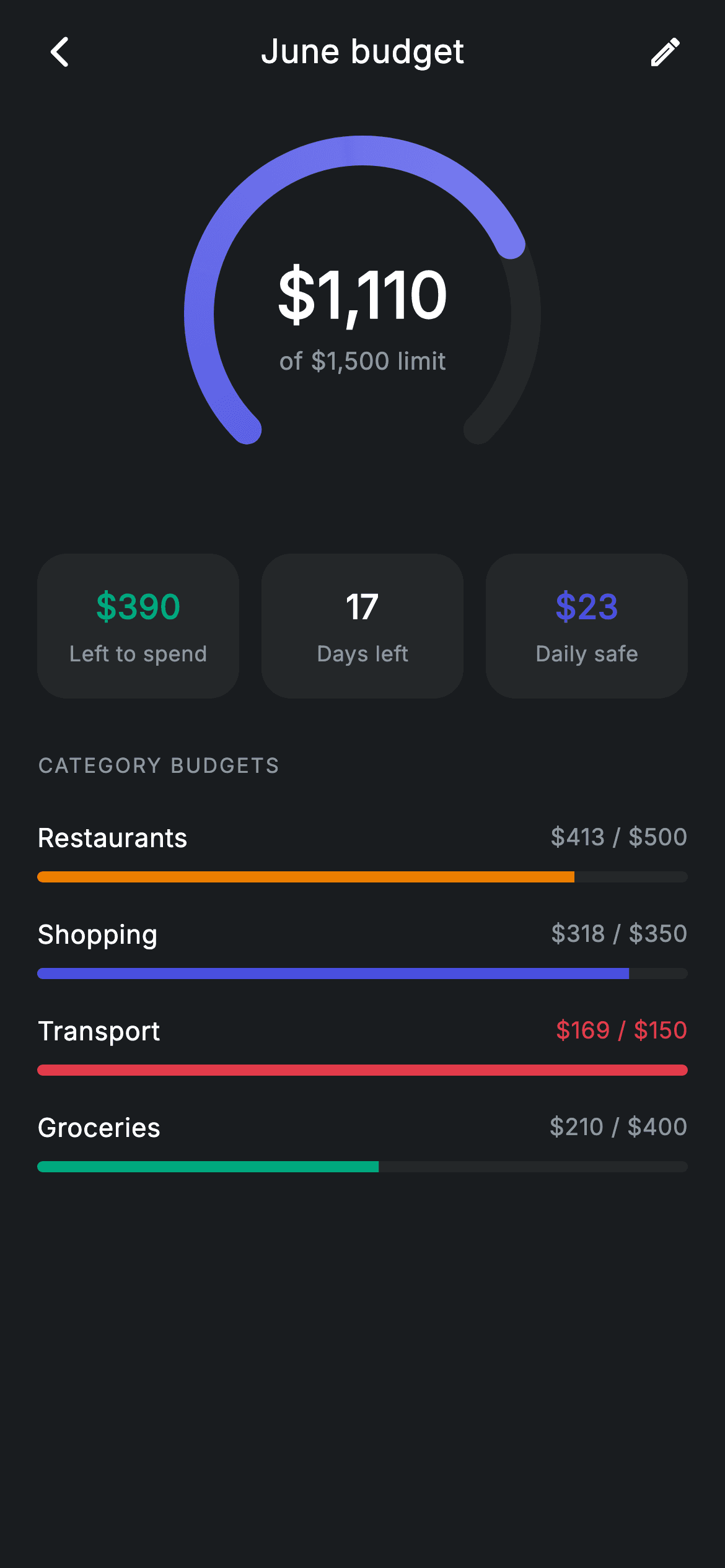
Seeing '$412 spent' means nothing without a limit next to it — budgets only work when spend and headroom sit on the same screen. This tutorial builds a Revolut-style monthly budget detail in Flutter: a custom-painted 270° gauge showing $1,110 against a $1,500 limit, a stat row for money left, days remaining and a daily safe-to-spend figure, and four category sub-budgets whose progress bars flip to red when a category runs over. Everything is pure Flutter — one CustomPainter, a LinearProgressIndicator per row, no charting package, no network.
Watch the Flutter UI walkthrough
A short screen recording of Fintech · Budget Detail running, if you'd rather see it before you read the code. The written tutorial below covers everything in it.
Can't see the video? Watch it on YouTube.
What you'll build
- ✓A 270° arc gauge painted with a rounded sweep-gradient stroke over a dark track
- ✓A centred spend readout ('$1,110 of $1,500 limit') stacked inside the gauge
- ✓A three-card stat row for 'Left to spend', 'Days left' and 'Daily safe'
- ✓Category sub-budget rows driven by a tiny const data class, each with its own tinted progress bar
- ✓Over-limit handling that recolours a category's bar and amount red the moment spend passes its cap
Step-by-step build
Create the file
Add a new file at lib/fintech_budget_detail/fintech_budget_detail_screen.dart in your Flutter project.
Register the bundled fonts
No external packages — this is pure Flutter. It does bundle its design font (Inter), so drop the font file into fonts/ and declare it in pubspec.yaml:
flutter:
  fonts:
    - family: Inter
      fonts:
- asset: fonts/Inter-Regular.ttfBuild it, piece by piece
Here's how the screen goes together. Each block below is a real slice of the code with a plain-English explanation — paste them in order, or grab the whole file from the next section.
Palette, callbacks, and budgets as const data
import 'package:flutter/material.dart';

/// Budget detail — progress against a monthly budget (Revolut-inspired design).
///
/// Self-contained per CONVENTIONS.md: pure Flutter only, the exact design font
/// (Inter) is bundled under `fonts/`, the progress gauge is custom-painted (no
/// charting package, no network), and the screen forces its own dark theme. Per
/// category sub-budgets show their own progress bars.
class FintechBudgetDetailScreen extends StatelessWidget {
  const FintechBudgetDetailScreen({
    super.key,
    this.onBack,
    this.onEdit,
  });

  final VoidCallback? onBack;
  final VoidCallback? onEdit;

  static const String _font = 'Inter';
  static const Color _bg = Color(0xFF191C1F);
  static const Color _surface = Color(0xFF242729);
  static const Color _brand = Color(0xFF494FDF);
  static const Color _teal = Color(0xFF00A87E);
  static const Color _amber = Color(0xFFEC7E00);
  static const Color _red = Color(0xFFE23B4A);
  static const Color _muted = Color(0xFF8D969E);

  static const List<_Sub> _subs = <_Sub>[
    _Sub('Restaurants', 412.80, 500, _amber),
    _Sub('Shopping', 318.40, 350, _brand),
    _Sub('Transport', 168.90, 150, _red),
    _Sub('Groceries', 210.00, 400, _teal),
  ];
`FintechBudgetDetailScreen` is a `StatelessWidget` taking only `onBack` and `onEdit` — the screen displays a computed month, so there is nothing to mutate locally. Seven static colour constants define the dark palette: `_bg` at `0xFF191C1F`, a slightly lighter `_surface` for cards and the gauge track, the indigo `_brand` `0xFF494FDF`, plus `_teal`, `_amber` and `_red` used as semantic tints. The four sub-budgets live in a `static const List<_Sub>`, each holding a name, spent amount, limit and tint — note `_Sub('Transport', 168.90, 150, _red)` is deliberately over its limit so the over-budget path is visible in the preview.
Forcing a dark theme and laying out the scroll
  @override
  Widget build(BuildContext context) {
    return Theme(
      data: ThemeData.dark(useMaterial3: true),
      child: Scaffold(
        backgroundColor: _bg,
        body: SafeArea(
          child: Column(
            children: <Widget>[
              _buildAppBar(),
              Expanded(
                child: ListView(
                  physics: const BouncingScrollPhysics(),
                  padding: const EdgeInsets.fromLTRB(20, 8, 20, 24),
                  children: <Widget>[
                    _buildGauge(),
                    const SizedBox(height: 24),
                    _buildStats(),
                    const SizedBox(height: 28),
                    _sectionLabel('Category budgets'),
                    const SizedBox(height: 12),
                    for (final _Sub s in _subs) _SubRow(sub: s),
                  ],
                ),
              ),
            ],
          ),
        ),
      ),
    );
  }
`build` wraps the `Scaffold` in `Theme(data: ThemeData.dark(useMaterial3: true))`, so the screen stays dark no matter what the host app's theme is — important for a drop-in component. Inside `SafeArea`, a `Column` pins `_buildAppBar()` at the top while an `Expanded` `ListView` with `BouncingScrollPhysics` scrolls the gauge, stats and category section. The category rows are emitted with a collection-for — `for (final _Sub s in _subs) _SubRow(sub: s)` — so adding a fifth budget means adding one line to the `_subs` list, not new widget code.
A minimal app bar built from a Row
  Widget _buildAppBar() {
    return Padding(
      padding: const EdgeInsets.fromLTRB(8, 4, 8, 4),
      child: Row(
        children: <Widget>[
          IconButton(
            onPressed: onBack,
            icon: const Icon(Icons.arrow_back_ios_new_rounded,
                size: 20, color: Colors.white),
          ),
          const Expanded(
            child: Text(
              'June budget',
              textAlign: TextAlign.center,
              style: TextStyle(
                fontFamily: _font,
                fontSize: 18,
                fontWeight: FontWeight.w500,
                letterSpacing: 0.24,
                color: Colors.white,
              ),
            ),
          ),
          IconButton(
            onPressed: onEdit,
            icon: const Icon(Icons.edit_outlined, size: 20, color: Colors.white),
          ),
        ],
      ),
    );
  }
The header skips `AppBar` entirely: a `Padding` around a `Row` holds a back `IconButton`, an `Expanded` centred 'June budget' title, and an edit `IconButton`. Because the title is `Expanded` with `textAlign: TextAlign.center` and the two icon buttons are the same size, the text lands optically centred without any `Stack` tricks. Both icons are 20px and pure white, and the title sits at 18px `w500` with the file's house `letterSpacing: 0.24` — every text style in this screen carries that same tracking for a consistent typographic voice.
Stacking the readout inside the gauge
  Widget _buildGauge() {
    return SizedBox(
      height: 210,
      child: Center(
        child: SizedBox(
          width: 200,
          height: 200,
          child: Stack(
            alignment: Alignment.center,
            children: <Widget>[
              CustomPaint(
                size: const Size(200, 200),
                painter: _GaugePainter(progress: 0.74),
              ),
              Column(
                mainAxisSize: MainAxisSize.min,
                children: const <Widget>[
                  Text(
                    r'$1,110',
                    style: TextStyle(
                      fontFamily: _font,
                      fontSize: 34,
                      fontWeight: FontWeight.w600,
                      letterSpacing: 0.24,
                      color: Colors.white,
                    ),
                  ),
                  SizedBox(height: 2),
                  Text(
                    r'of $1,500 limit',
                    style: TextStyle(
                      fontFamily: _font,
                      fontSize: 13,
                      letterSpacing: 0.24,
                      color: _muted,
                    ),
                  ),
                ],
              ),
            ],
          ),
        ),
      ),
    );
  }
`_buildGauge` centres a fixed 200×200 `Stack` inside a 210px-tall band: a `CustomPaint` running `_GaugePainter(progress: 0.74)` behind, and a `Column` with the numbers in front. Layering text over the painter with `Alignment.center` is much simpler than making the painter draw its own text. The `$1,110` figure is 34px `w600` white while `of $1,500 limit` drops to 13px `_muted`, so the eye reads the amount first and the context second. Both strings are raw literals (`r'$1,110'`) — the `r` prefix stops Dart treating `$` as interpolation.
The three-stat summary row
  Widget _buildStats() {
    return Row(
      children: <Widget>[
        Expanded(child: _stat(r'$390', 'Left to spend', _teal)),
        const SizedBox(width: 12),
        Expanded(child: _stat('17', 'Days left', Colors.white)),
        const SizedBox(width: 12),
        Expanded(child: _stat(r'$23', 'Daily safe', _brand)),
      ],
    );
  }

  Widget _stat(String value, String label, Color color) {
    return Container(
      padding: const EdgeInsets.symmetric(vertical: 16),
      decoration: BoxDecoration(
        color: _surface,
        borderRadius: BorderRadius.circular(16),
      ),
      child: Column(
        children: <Widget>[
          Text(
            value,
            style: TextStyle(
              fontFamily: _font,
              fontSize: 18,
              fontWeight: FontWeight.w600,
              letterSpacing: 0.24,
              color: color,
            ),
          ),
          const SizedBox(height: 4),
          Text(
            label,
            style: const TextStyle(
              fontFamily: _font,
              fontSize: 11.5,
              letterSpacing: 0.24,
              color: _muted,
            ),
          ),
        ],
      ),
    );
  }
`_buildStats` puts three `Expanded` cards in a `Row` with 12px gaps, all built by one `_stat(value, label, color)` helper so the cards can never drift apart in style. The value colour is semantic: '$390' left to spend is `_teal` (good news), '17' days is plain white (neutral fact), and the '$23' daily safe figure is `_brand` indigo, tying it to the gauge's fill colour since both express the same budget. Each card is just a `_surface` `Container` with a 16px radius and vertical padding — no border, letting the background contrast do the separation.
Section label and the _Sub value class
  Widget _sectionLabel(String text) {
    return Text(
      text.toUpperCase(),
      style: const TextStyle(
        fontFamily: _font,
        fontSize: 11,
        fontWeight: FontWeight.w500,
        letterSpacing: 1.0,
        color: _muted,
      ),
    );
  }
}

class _Sub {
  const _Sub(this.name, this.spent, this.limit, this.tint);
  final String name;
  final double spent;
  final double limit;
  final Color tint;
}
`_sectionLabel` uppercases its text and sets 11px `w500` with `letterSpacing: 1.0` in `_muted` — the wide tracking is what makes a tiny all-caps label read as a section heading rather than shouting. `_Sub` is a four-field const class (`name`, `spent`, `limit`, `tint`) with no methods; keeping the maths out of the model and in the row widget means the same class could later be filled from an API response unchanged.
Sub-budget rows that flag overspend
class _SubRow extends StatelessWidget {
  const _SubRow({required this.sub});

  final _Sub sub;

  @override
  Widget build(BuildContext context) {
    final double frac = (sub.spent / sub.limit).clamp(0, 1);
    final bool over = sub.spent > sub.limit;
    final Color barColor =
        over ? FintechBudgetDetailScreen._red : sub.tint;
    return Padding(
      padding: const EdgeInsets.symmetric(vertical: 9),
      child: Column(
        children: <Widget>[
          Row(
            children: <Widget>[
              Text(
                sub.name,
                style: const TextStyle(
                  fontFamily: FintechBudgetDetailScreen._font,
                  fontSize: 14,
                  fontWeight: FontWeight.w500,
                  letterSpacing: 0.24,
                  color: Colors.white,
                ),
              ),
              const Spacer(),
              Text(
                '\$${sub.spent.toStringAsFixed(0)} / \$${sub.limit.toStringAsFixed(0)}',
                style: TextStyle(
                  fontFamily: FintechBudgetDetailScreen._font,
                  fontSize: 12.5,
                  fontWeight: FontWeight.w500,
                  letterSpacing: 0.24,
                  color: over
                      ? FintechBudgetDetailScreen._red
                      : FintechBudgetDetailScreen._muted,
                ),
              ),
            ],
          ),
          const SizedBox(height: 8),
          ClipRRect(
            borderRadius: BorderRadius.circular(9999),
            child: LinearProgressIndicator(
              value: frac,
              minHeight: 6,
              backgroundColor: FintechBudgetDetailScreen._surface,
              valueColor: AlwaysStoppedAnimation<Color>(barColor),
            ),
          ),
        ],
      ),
    );
  }
}
`_SubRow` derives everything from its `_Sub`: `frac` is `(sub.spent / sub.limit).clamp(0, 1)` so an overspent bar fills completely instead of overflowing, and `over` compares spend to limit separately so the state survives the clamp. When `over` is true both the bar and the '$169 / $150' amount switch to `_red`, overriding the category's own tint — Transport demonstrates this. The bar itself is a `LinearProgressIndicator` at `minHeight: 6` with the track set to `_surface`, wrapped in a `ClipRRect` with radius 9999 because the indicator has no rounding of its own. Amounts are formatted with `toStringAsFixed(0)` — whole dollars only, matching the compact 12.5px trailing text.
Painting the 270° gauge
/// Paints a 270° arc gauge with a rounded progress sweep over a track.
class _GaugePainter extends CustomPainter {
  _GaugePainter({required this.progress});

  final double progress;

  static const double _start = 2.3562; // 135°
  static const double _full = 4.7124; // 270°

  @override
  void paint(Canvas canvas, Size size) {
    final Offset center = size.center(Offset.zero);
    final double radius = size.width / 2 - 12;
    final Rect rect = Rect.fromCircle(center: center, radius: radius);

    final Paint track = Paint()
      ..color = const Color(0xFF242729)
      ..style = PaintingStyle.stroke
      ..strokeWidth = 16
      ..strokeCap = StrokeCap.round;
    canvas.drawArc(rect, _start, _full, false, track);

    final Paint fill = Paint()
      ..shader = const SweepGradient(
        colors: <Color>[Color(0xFF494FDF), Color(0xFF7C80F0)],
      ).createShader(rect)
      ..style = PaintingStyle.stroke
      ..strokeWidth = 16
      ..strokeCap = StrokeCap.round;
    canvas.drawArc(rect, _start, _full * progress.clamp(0, 1), false, fill);
  }

  @override
  bool shouldRepaint(covariant _GaugePainter oldDelegate) =>
      oldDelegate.progress != progress;
}
`_GaugePainter` draws two arcs on the same `Rect.fromCircle`, whose radius is `size.width / 2 - 12` — the 12px inset keeps the 16px round-capped stroke from clipping at the edges. The constants `_start = 2.3562` (135°) and `_full = 4.7124` (270°) open the arc downward, leaving a symmetric gap at the bottom where a full circle would feel closed. The track paints in flat `0xFF242729`; the fill reuses the same geometry but swaps in a `SweepGradient` shader from `0xFF494FDF` to a lighter `0xFF7C80F0`, sweeping only `_full * progress.clamp(0, 1)` radians. `shouldRepaint` compares `progress`, so the painter only redraws when the value actually changes.
Full code
The complete, ready-to-paste source. Free to use in your projects — one click copies it all.
import 'package:flutter/material.dart';

/// Budget detail — progress against a monthly budget (Revolut-inspired design).
///
/// Self-contained per CONVENTIONS.md: pure Flutter only, the exact design font
/// (Inter) is bundled under `fonts/`, the progress gauge is custom-painted (no
/// charting package, no network), and the screen forces its own dark theme. Per
/// category sub-budgets show their own progress bars.
class FintechBudgetDetailScreen extends StatelessWidget {
  const FintechBudgetDetailScreen({
    super.key,
    this.onBack,
    this.onEdit,
  });

  final VoidCallback? onBack;
  final VoidCallback? onEdit;

  static const String _font = 'Inter';
  static const Color _bg = Color(0xFF191C1F);
  static const Color _surface = Color(0xFF242729);
  static const Color _brand = Color(0xFF494FDF);
  static const Color _teal = Color(0xFF00A87E);
  static const Color _amber = Color(0xFFEC7E00);
  static const Color _red = Color(0xFFE23B4A);
  static const Color _muted = Color(0xFF8D969E);

  static const List<_Sub> _subs = <_Sub>[
    _Sub('Restaurants', 412.80, 500, _amber),
    _Sub('Shopping', 318.40, 350, _brand),
    _Sub('Transport', 168.90, 150, _red),
    _Sub('Groceries', 210.00, 400, _teal),
  ];

  @override
  Widget build(BuildContext context) {
    return Theme(
      data: ThemeData.dark(useMaterial3: true),
      child: Scaffold(
        backgroundColor: _bg,
        body: SafeArea(
          child: Column(
            children: <Widget>[
              _buildAppBar(),
              Expanded(
                child: ListView(
                  physics: const BouncingScrollPhysics(),
                  padding: const EdgeInsets.fromLTRB(20, 8, 20, 24),
                  children: <Widget>[
                    _buildGauge(),
                    const SizedBox(height: 24),
                    _buildStats(),
                    const SizedBox(height: 28),
                    _sectionLabel('Category budgets'),
                    const SizedBox(height: 12),
                    for (final _Sub s in _subs) _SubRow(sub: s),
                  ],
                ),
              ),
            ],
          ),
        ),
      ),
    );
  }

  Widget _buildAppBar() {
    return Padding(
      padding: const EdgeInsets.fromLTRB(8, 4, 8, 4),
      child: Row(
        children: <Widget>[
          IconButton(
            onPressed: onBack,
            icon: const Icon(Icons.arrow_back_ios_new_rounded,
                size: 20, color: Colors.white),
          ),
          const Expanded(
            child: Text(
              'June budget',
              textAlign: TextAlign.center,
              style: TextStyle(
                fontFamily: _font,
                fontSize: 18,
                fontWeight: FontWeight.w500,
                letterSpacing: 0.24,
                color: Colors.white,
              ),
            ),
          ),
          IconButton(
            onPressed: onEdit,
            icon: const Icon(Icons.edit_outlined, size: 20, color: Colors.white),
          ),
        ],
      ),
    );
  }

  Widget _buildGauge() {
    return SizedBox(
      height: 210,
      child: Center(
        child: SizedBox(
          width: 200,
          height: 200,
          child: Stack(
            alignment: Alignment.center,
            children: <Widget>[
              CustomPaint(
                size: const Size(200, 200),
                painter: _GaugePainter(progress: 0.74),
              ),
              Column(
                mainAxisSize: MainAxisSize.min,
                children: const <Widget>[
                  Text(
                    r'$1,110',
                    style: TextStyle(
                      fontFamily: _font,
                      fontSize: 34,
                      fontWeight: FontWeight.w600,
                      letterSpacing: 0.24,
                      color: Colors.white,
                    ),
                  ),
                  SizedBox(height: 2),
                  Text(
                    r'of $1,500 limit',
                    style: TextStyle(
                      fontFamily: _font,
                      fontSize: 13,
                      letterSpacing: 0.24,
                      color: _muted,
                    ),
                  ),
                ],
              ),
            ],
          ),
        ),
      ),
    );
  }

  Widget _buildStats() {
    return Row(
      children: <Widget>[
        Expanded(child: _stat(r'$390', 'Left to spend', _teal)),
        const SizedBox(width: 12),
        Expanded(child: _stat('17', 'Days left', Colors.white)),
        const SizedBox(width: 12),
        Expanded(child: _stat(r'$23', 'Daily safe', _brand)),
      ],
    );
  }

  Widget _stat(String value, String label, Color color) {
    return Container(
      padding: const EdgeInsets.symmetric(vertical: 16),
      decoration: BoxDecoration(
        color: _surface,
        borderRadius: BorderRadius.circular(16),
      ),
      child: Column(
        children: <Widget>[
          Text(
            value,
            style: TextStyle(
              fontFamily: _font,
              fontSize: 18,
              fontWeight: FontWeight.w600,
              letterSpacing: 0.24,
              color: color,
            ),
          ),
          const SizedBox(height: 4),
          Text(
            label,
            style: const TextStyle(
              fontFamily: _font,
              fontSize: 11.5,
              letterSpacing: 0.24,
              color: _muted,
            ),
          ),
        ],
      ),
    );
  }

  Widget _sectionLabel(String text) {
    return Text(
      text.toUpperCase(),
      style: const TextStyle(
        fontFamily: _font,
        fontSize: 11,
        fontWeight: FontWeight.w500,
        letterSpacing: 1.0,
        color: _muted,
      ),
    );
  }
}

class _Sub {
  const _Sub(this.name, this.spent, this.limit, this.tint);
  final String name;
  final double spent;
  final double limit;
  final Color tint;
}

class _SubRow extends StatelessWidget {
  const _SubRow({required this.sub});

  final _Sub sub;

  @override
  Widget build(BuildContext context) {
    final double frac = (sub.spent / sub.limit).clamp(0, 1);
    final bool over = sub.spent > sub.limit;
    final Color barColor =
        over ? FintechBudgetDetailScreen._red : sub.tint;
    return Padding(
      padding: const EdgeInsets.symmetric(vertical: 9),
      child: Column(
        children: <Widget>[
          Row(
            children: <Widget>[
              Text(
                sub.name,
                style: const TextStyle(
                  fontFamily: FintechBudgetDetailScreen._font,
                  fontSize: 14,
                  fontWeight: FontWeight.w500,
                  letterSpacing: 0.24,
                  color: Colors.white,
                ),
              ),
              const Spacer(),
              Text(
                '\$${sub.spent.toStringAsFixed(0)} / \$${sub.limit.toStringAsFixed(0)}',
                style: TextStyle(
                  fontFamily: FintechBudgetDetailScreen._font,
                  fontSize: 12.5,
                  fontWeight: FontWeight.w500,
                  letterSpacing: 0.24,
                  color: over
                      ? FintechBudgetDetailScreen._red
                      : FintechBudgetDetailScreen._muted,
                ),
              ),
            ],
          ),
          const SizedBox(height: 8),
          ClipRRect(
            borderRadius: BorderRadius.circular(9999),
            child: LinearProgressIndicator(
              value: frac,
              minHeight: 6,
              backgroundColor: FintechBudgetDetailScreen._surface,
              valueColor: AlwaysStoppedAnimation<Color>(barColor),
            ),
          ),
        ],
      ),
    );
  }
}

/// Paints a 270° arc gauge with a rounded progress sweep over a track.
class _GaugePainter extends CustomPainter {
  _GaugePainter({required this.progress});

  final double progress;

  static const double _start = 2.3562; // 135°
  static const double _full = 4.7124; // 270°

  @override
  void paint(Canvas canvas, Size size) {
    final Offset center = size.center(Offset.zero);
    final double radius = size.width / 2 - 12;
    final Rect rect = Rect.fromCircle(center: center, radius: radius);

    final Paint track = Paint()
      ..color = const Color(0xFF242729)
      ..style = PaintingStyle.stroke
      ..strokeWidth = 16
      ..strokeCap = StrokeCap.round;
    canvas.drawArc(rect, _start, _full, false, track);

    final Paint fill = Paint()
      ..shader = const SweepGradient(
        colors: <Color>[Color(0xFF494FDF), Color(0xFF7C80F0)],
      ).createShader(rect)
      ..style = PaintingStyle.stroke
      ..strokeWidth = 16
      ..strokeCap = StrokeCap.round;
    canvas.drawArc(rect, _start, _full * progress.clamp(0, 1), false, fill);
  }

  @override
  bool shouldRepaint(covariant _GaugePainter oldDelegate) =>
      oldDelegate.progress != progress;
}
Plus bundled 1 binary asset (fonts/images). The CLI and MCP install those for you automatically.
Two faster ways to add it
Copy-paste works, but you can skip it entirely.
1. FlutterKit CLI
One command drops this screen — and its fonts — straight into your project.
$ flutterkit add fintech-budget-detail2. AI agent (MCP)
Connect FlutterKit's MCP server in Claude or Cursor and just ask your agent to install fintech-budget-detail — it fetches and writes the files for you.
FAQ
Is this budget detail screen free to use commercially?
Yes. FlutterKit screens are free to use, including in commercial apps — copy the code from this page or install it with `flutterkit add fintech-budget-detail`, ship it in a paid fintech product, and no attribution or sign-up is required.
Do I need any packages or fonts for this screen?
No pub packages at all — the gauge is a hand-written `CustomPainter` and the bars are stock `LinearProgressIndicator`s. The only asset is the Inter font, which ships bundled with the screen under `fonts/` and is referenced via the `_font` constant, so there is no google_fonts dependency and no network fetch.
Which Flutter version does this need?
Flutter 3.0 or newer. The constructor uses super parameters (`super.key`), which need Dart 2.17, and the theme is built with `ThemeData.dark(useMaterial3: true)`. There is no `Color.withValues` in this file, so nothing here requires the 3.22+ colour API.
How do I drive the gauge and stats from real budget data?
Add `spent`, `limit` and a `DateTime` for the period end to the constructor, then compute `progress` as `spent / limit` for `_GaugePainter`, 'Left to spend' as `limit - spent`, 'Days left' from the date, and 'Daily safe' as the remainder divided by days left. Replace the raw `r'$1,110'` literals with interpolated strings — once you interpolate, drop the `r` prefix. Feed `_subs` from your category totals; `_SubRow` already handles the over-limit case.
Can I change the gauge's sweep, thickness or colours?
Yes — `_start` and `_full` are radians, so a half-circle gauge is `_start: 3.1416, _full: 3.1416`; keep `_start` equal to π plus half of the bottom gap for symmetry. Stroke weight is the two `strokeWidth: 16` values (change both, and revisit the `- 12` radius inset if you go much thicker), and the fill colours live in the `SweepGradient` list.


