How to Build an Order History Screen in Flutter (Full Code + Preview)
Order history is a filtered, sorted list — and this screen shows how to do both without a state-management package. Three chips (All / Upcoming / Past) drive one string of state; a getter filters and sorts the orders on every build so upcoming deliveries float to the top and the rest fall in reverse-id order. Each row gets a rounded status tile whose icon and colour come from a switch on the order's status: blue clock for upcoming, green check for delivered, grey cross for skipped.
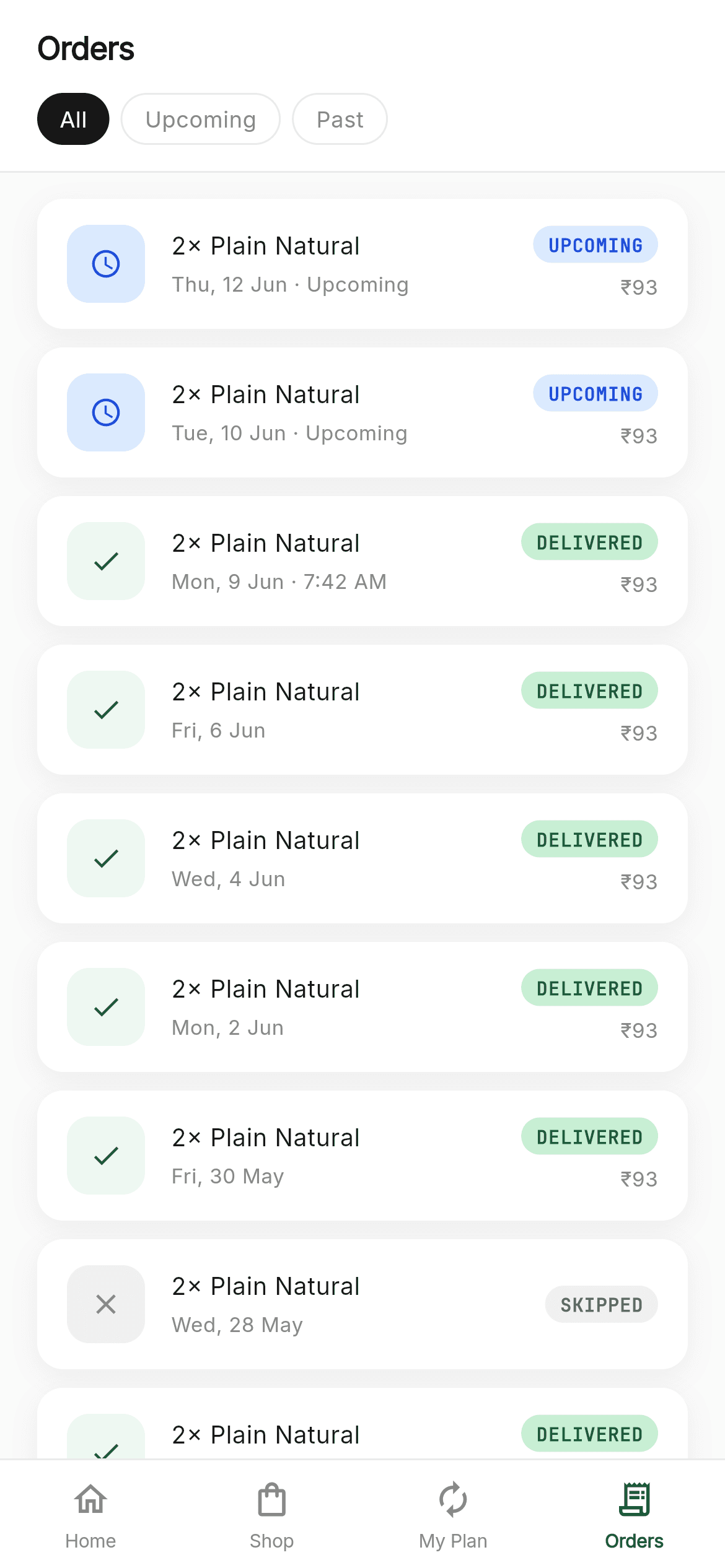
What you'll build
- ✓A filter + sort pipeline expressed as one getter, so the list is always derived rather than stored
- ✓Filter chips that animate their fill and invert their text colour when selected
- ✓Status-driven icon tiles using Dart 3's arrow-free switch statement — no break needed
- ✓A conditional amount that only renders when the order actually cost something
- ✓A four-tab bottom nav with Orders active, in the bundled Inter and JetBrains Mono fonts
Step-by-step build
Create the file
Add a new file at lib/coconeer_orders/coconeer_orders_screen.dart in your Flutter project.
Register the bundled fonts
No external packages — this is pure Flutter. It does bundle its design fonts (Inter, JetBrainsMono), so drop the font files into fonts/ and declare them in pubspec.yaml:
flutter:
  fonts:
    - family: Inter
      fonts:
        - asset: fonts/Inter-Regular.ttf
    - family: JetBrainsMono
      fonts:
- asset: fonts/JetBrainsMono-Regular.ttfBuild it, piece by piece
Here's how the screen goes together. Each block below is a real slice of the code with a plain-English explanation — paste them in order, or grab the whole file from the next section.
One string of state, and the sort getter
import 'package:flutter/material.dart';

import 'widgets/coco_common.dart';

/// CocoNeer — Orders. A delivery history: filter tabs (All / Upcoming / Past)
/// over a list of order rows with status icons, badges and amounts, plus the
/// shared bottom navigation.
///
/// Self-contained, pure Flutter. Bundles its exact design fonts (Inter +
/// JetBrains Mono); uses no images. Renders standalone when pushed as a route.
///
/// [onTabSelected] fires with the tapped bottom-nav index. No-op by default; the
/// preview gallery wires it to switch between the CocoNeer screens.
class CoconeerOrdersScreen extends StatefulWidget {
  const CoconeerOrdersScreen({super.key, this.onTabSelected});

  final ValueChanged<int>? onTabSelected;

  @override
  State<CoconeerOrdersScreen> createState() => _CoconeerOrdersScreenState();
}

class _CoconeerOrdersScreenState extends State<CoconeerOrdersScreen> {
  String _filter = 'all';

  List<CocoOrder> get _sorted {
    final List<CocoOrder> list = kMockOrders.where((CocoOrder o) {
      if (_filter == 'all') return true;
      if (_filter == 'upcoming') return o.status == 'upcoming';
      return o.status != 'upcoming';
    }).toList();
    list.sort((CocoOrder a, CocoOrder b) {
      if (a.status == 'upcoming' && b.status != 'upcoming') return -1;
      if (b.status == 'upcoming' && a.status != 'upcoming') return 1;
      return b.id.compareTo(a.id);
    });
    return list;
  }
The screen imports only material.dart and the shared coco_common.dart design-system file. Its entire state is _filter, a single String. The interesting part is _sorted, a getter rather than a stored list: it filters kMockOrders by the current filter — note that 'past' means anything not upcoming, so cancelled and delivered both qualify — then sorts with a comparator that pushes upcoming orders to the top and otherwise orders by descending id. Because it's a getter, the list can never fall out of sync with _filter; there's no cached copy to invalidate.
Header and the separated list
  @override
  Widget build(BuildContext context) {
    final List<CocoOrder> orders = _sorted;
    return Scaffold(
      backgroundColor: C.canvas,
      body: SafeArea(
        bottom: false,
        child: Column(
          children: <Widget>[
            _header(),
            Expanded(
              child: ListView.separated(
                physics: const BouncingScrollPhysics(),
                padding: const EdgeInsets.fromLTRB(20, 14, 20, 24),
                itemCount: orders.length,
                separatorBuilder: (BuildContext context, int index) => const SizedBox(height: 10),
                itemBuilder: (BuildContext context, int i) => _orderCard(orders[i]),
              ),
            ),
          ],
        ),
      ),
      bottomNavigationBar: CocoBottomNav(currentIndex: 3, onTabSelected: widget.onTabSelected),
    );
  }
build() calls the getter once into a local, then renders a Column of header plus an Expanded ListView.separated. Using separatorBuilder to return a plain SizedBox(height: 10) rather than putting margins on the cards is what gives even gaps between rows with no doubled spacing at the ends. BouncingScrollPhysics gives the iOS rubber-band feel, and the padding leaves 24px at the bottom so the last card clears the nav. CocoBottomNav receives currentIndex: 3 to light the Orders tab, and passes the widget's callback straight through.
The filter chips
  Widget _header() {
    final List<List<String>> tabs = <List<String>>[
      <String>['all', 'All'],
      <String>['upcoming', 'Upcoming'],
      <String>['delivered', 'Past'],
    ];
    return Container(
      padding: const EdgeInsets.fromLTRB(20, 14, 20, 14),
      decoration: const BoxDecoration(
        color: Color(0xFFFFFFFF),
        border: Border(bottom: BorderSide(color: C.hairline)),
      ),
      child: Column(
        crossAxisAlignment: CrossAxisAlignment.start,
        children: <Widget>[
          Text('Orders', style: sans(size: 17, weight: FontWeight.w600, letterSpacing: -0.4)),
          const SizedBox(height: 12),
          Row(
            children: <Widget>[
              for (int i = 0; i < tabs.length; i++) ...<Widget>[
                if (i > 0) const SizedBox(width: 6),
                _filterChip(tabs[i][0], tabs[i][1]),
              ],
            ],
          ),
        ],
      ),
    );
  }

  Widget _filterChip(String val, String label) {
    final bool sel = _filter == val;
    return GestureDetector(
      onTap: () => setState(() => _filter = val),
      child: AnimatedContainer(
        duration: const Duration(milliseconds: 150),
        height: 28,
        padding: const EdgeInsets.symmetric(horizontal: 12),
        alignment: Alignment.center,
        decoration: BoxDecoration(
          color: sel ? C.ink : Colors.white,
          borderRadius: BorderRadius.circular(9999),
          border: sel ? null : Border.all(color: C.hairline),
        ),
        child: Text(label, style: sans(size: 12, weight: FontWeight.w500, color: sel ? Colors.white : C.muted)),
      ),
    );
  }
The header is a white Container with only a bottom border — Border(bottom: BorderSide(...)) — which is the cheapest way to draw a divider under a header without a separate widget. The three tabs are a List<List<String>> of value/label pairs, rendered by a for-with-spread loop where if (i > 0) inserts a 6px gap before all but the first, so there's no trailing space. Each _filterChip is an AnimatedContainer that transitions over 150ms between ink-filled-with-white-text when selected and white-with-hairline-border when not. borderRadius: BorderRadius.circular(9999) is the standard 'always a pill' trick: any radius larger than half the height gives a full capsule.
Status-driven icons and the order row
  Widget _orderCard(CocoOrder order) {
    late Color bg;
    late Widget icon;
    switch (order.status) {
      case 'upcoming':
        bg = const Color(0xFFDBEAFE);
        icon = const Icon(Icons.schedule, size: 18, color: Color(0xFF1D4ED8));
      case 'delivered':
        bg = C.greenSoft;
        icon = const Icon(Icons.check, size: 18, color: C.green);
      default:
        bg = const Color(0xFFF0F0F0);
        icon = const Icon(Icons.close, size: 18, color: C.muted);
    }

    return Container(
      padding: const EdgeInsets.symmetric(horizontal: 16, vertical: 14),
      decoration: BoxDecoration(
        color: Colors.white,
        borderRadius: BorderRadius.circular(14),
        boxShadow: <BoxShadow>[
          BoxShadow(color: Colors.black.withValues(alpha: 0.05), blurRadius: 12, offset: const Offset(0, 4)),
        ],
      ),
      child: Row(
        children: <Widget>[
          Container(
            width: 42,
            height: 42,
            decoration: BoxDecoration(color: bg, borderRadius: BorderRadius.circular(12)),
            child: icon,
          ),
          const SizedBox(width: 14),
          Expanded(
            child: Column(
              crossAxisAlignment: CrossAxisAlignment.start,
              children: <Widget>[
                Text(order.items, style: sans(size: 13, weight: FontWeight.w500)),
                const SizedBox(height: 3),
                Text(order.date, style: sans(size: 11, color: C.muted), maxLines: 1, overflow: TextOverflow.ellipsis),
              ],
            ),
          ),
          const SizedBox(width: 12),
          Column(
            crossAxisAlignment: CrossAxisAlignment.end,
            children: <Widget>[
              StatusBadge(status: order.status),
              if (order.amount > 0) ...<Widget>[
                const SizedBox(height: 5),
                Text('₹${order.amount}', style: sans(size: 11, color: C.muted)),
              ],
            ],
          ),
        ],
      ),
    );
  }
}
The card starts with a switch on order.status that assigns both a background colour and an Icon widget to late variables — this is Dart 3's pattern-style switch, where each case ends without a break and there's no fallthrough. Upcoming gets a pale blue tile with a clock, delivered gets soft green with a check, and the default (skipped or cancelled) gets grey with a cross. The row itself is a 42px rounded tile, the item line and date in an Expanded with ellipsis on the date, and a right-aligned column holding the StatusBadge. The amount uses a conditional spread — if (order.amount > 0) ...<Widget>[...] — so a skipped order shows a badge with no ₹0 underneath it.
Full code
The complete, ready-to-paste source (2 files). Free to use in your projects — one click copies it all.
import 'package:flutter/material.dart';

import 'widgets/coco_common.dart';

/// CocoNeer — Orders. A delivery history: filter tabs (All / Upcoming / Past)
/// over a list of order rows with status icons, badges and amounts, plus the
/// shared bottom navigation.
///
/// Self-contained, pure Flutter. Bundles its exact design fonts (Inter +
/// JetBrains Mono); uses no images. Renders standalone when pushed as a route.
///
/// [onTabSelected] fires with the tapped bottom-nav index. No-op by default; the
/// preview gallery wires it to switch between the CocoNeer screens.
class CoconeerOrdersScreen extends StatefulWidget {
  const CoconeerOrdersScreen({super.key, this.onTabSelected});

  final ValueChanged<int>? onTabSelected;

  @override
  State<CoconeerOrdersScreen> createState() => _CoconeerOrdersScreenState();
}

class _CoconeerOrdersScreenState extends State<CoconeerOrdersScreen> {
  String _filter = 'all';

  List<CocoOrder> get _sorted {
    final List<CocoOrder> list = kMockOrders.where((CocoOrder o) {
      if (_filter == 'all') return true;
      if (_filter == 'upcoming') return o.status == 'upcoming';
      return o.status != 'upcoming';
    }).toList();
    list.sort((CocoOrder a, CocoOrder b) {
      if (a.status == 'upcoming' && b.status != 'upcoming') return -1;
      if (b.status == 'upcoming' && a.status != 'upcoming') return 1;
      return b.id.compareTo(a.id);
    });
    return list;
  }

  @override
  Widget build(BuildContext context) {
    final List<CocoOrder> orders = _sorted;
    return Scaffold(
      backgroundColor: C.canvas,
      body: SafeArea(
        bottom: false,
        child: Column(
          children: <Widget>[
            _header(),
            Expanded(
              child: ListView.separated(
                physics: const BouncingScrollPhysics(),
                padding: const EdgeInsets.fromLTRB(20, 14, 20, 24),
                itemCount: orders.length,
                separatorBuilder: (BuildContext context, int index) => const SizedBox(height: 10),
                itemBuilder: (BuildContext context, int i) => _orderCard(orders[i]),
              ),
            ),
          ],
        ),
      ),
      bottomNavigationBar: CocoBottomNav(currentIndex: 3, onTabSelected: widget.onTabSelected),
    );
  }

  Widget _header() {
    final List<List<String>> tabs = <List<String>>[
      <String>['all', 'All'],
      <String>['upcoming', 'Upcoming'],
      <String>['delivered', 'Past'],
    ];
    return Container(
      padding: const EdgeInsets.fromLTRB(20, 14, 20, 14),
      decoration: const BoxDecoration(
        color: Color(0xFFFFFFFF),
        border: Border(bottom: BorderSide(color: C.hairline)),
      ),
      child: Column(
        crossAxisAlignment: CrossAxisAlignment.start,
        children: <Widget>[
          Text('Orders', style: sans(size: 17, weight: FontWeight.w600, letterSpacing: -0.4)),
          const SizedBox(height: 12),
          Row(
            children: <Widget>[
              for (int i = 0; i < tabs.length; i++) ...<Widget>[
                if (i > 0) const SizedBox(width: 6),
                _filterChip(tabs[i][0], tabs[i][1]),
              ],
            ],
          ),
        ],
      ),
    );
  }

  Widget _filterChip(String val, String label) {
    final bool sel = _filter == val;
    return GestureDetector(
      onTap: () => setState(() => _filter = val),
      child: AnimatedContainer(
        duration: const Duration(milliseconds: 150),
        height: 28,
        padding: const EdgeInsets.symmetric(horizontal: 12),
        alignment: Alignment.center,
        decoration: BoxDecoration(
          color: sel ? C.ink : Colors.white,
          borderRadius: BorderRadius.circular(9999),
          border: sel ? null : Border.all(color: C.hairline),
        ),
        child: Text(label, style: sans(size: 12, weight: FontWeight.w500, color: sel ? Colors.white : C.muted)),
      ),
    );
  }

  Widget _orderCard(CocoOrder order) {
    late Color bg;
    late Widget icon;
    switch (order.status) {
      case 'upcoming':
        bg = const Color(0xFFDBEAFE);
        icon = const Icon(Icons.schedule, size: 18, color: Color(0xFF1D4ED8));
      case 'delivered':
        bg = C.greenSoft;
        icon = const Icon(Icons.check, size: 18, color: C.green);
      default:
        bg = const Color(0xFFF0F0F0);
        icon = const Icon(Icons.close, size: 18, color: C.muted);
    }

    return Container(
      padding: const EdgeInsets.symmetric(horizontal: 16, vertical: 14),
      decoration: BoxDecoration(
        color: Colors.white,
        borderRadius: BorderRadius.circular(14),
        boxShadow: <BoxShadow>[
          BoxShadow(color: Colors.black.withValues(alpha: 0.05), blurRadius: 12, offset: const Offset(0, 4)),
        ],
      ),
      child: Row(
        children: <Widget>[
          Container(
            width: 42,
            height: 42,
            decoration: BoxDecoration(color: bg, borderRadius: BorderRadius.circular(12)),
            child: icon,
          ),
          const SizedBox(width: 14),
          Expanded(
            child: Column(
              crossAxisAlignment: CrossAxisAlignment.start,
              children: <Widget>[
                Text(order.items, style: sans(size: 13, weight: FontWeight.w500)),
                const SizedBox(height: 3),
                Text(order.date, style: sans(size: 11, color: C.muted), maxLines: 1, overflow: TextOverflow.ellipsis),
              ],
            ),
          ),
          const SizedBox(width: 12),
          Column(
            crossAxisAlignment: CrossAxisAlignment.end,
            children: <Widget>[
              StatusBadge(status: order.status),
              if (order.amount > 0) ...<Widget>[
                const SizedBox(height: 5),
                Text('₹${order.amount}', style: sans(size: 11, color: C.muted)),
              ],
            ],
          ),
        ],
      ),
    );
  }
}
Plus bundled 2 binary assets (fonts/images). The CLI and MCP install those for you automatically.
Two faster ways to add it
Copy-paste works, but you can skip it entirely.
1. FlutterKit CLI
One command drops this screen — and its fonts — straight into your project.
$ flutterkit add coconeer-orders2. AI agent (MCP)
Connect FlutterKit's MCP server in Claude or Cursor and just ask your agent to install coconeer-orders — it fetches and writes the files for you.
FAQ
Is this Flutter order history screen free to use?
Yes. The full Dart source on this page, including the shared CocoNeer design-system file, is free for personal and commercial projects. Install it with the FlutterKit CLI (flutterkit add coconeer-orders) or have an AI agent add it via MCP.
How do I load real orders?
Replace kMockOrders in the _sorted getter with your fetched list — from a FutureBuilder, a StreamBuilder over Firestore, or whatever state you already have. The filter and sort logic operates on any List<CocoOrder>, and the row widget reads nothing outside the order it's given.
Does it need any external packages or images?
Neither. It's pure Flutter on the material library with no image assets — every status glyph is a Material icon. The bundled assets are two fonts, Inter and JetBrains Mono, registered in pubspec.yaml as shown in step 2.
Which Flutter version does it target?
It uses Dart 3 switch statements without break and Color.withValues() for the card shadow, so it targets Flutter 3.22+ (Dart 3). On an older SDK, swap withValues(alpha: 0.05) for withOpacity(0.05) and add break statements to the switch.

