How to Build a Subscription Checkout Screen in Flutter (Full Code + Preview)
This is one of the few screens in the library with real logic in it. It's the CocoNeer checkout: an order-summary card that computes its own price from the chosen plan, product and cadence; a delivery form with three controllers and live validation; a three-way time-slot picker; and a Confirm button that stays disabled until every field has content. Confirm swaps the entire body for a green-check success state and fires a callback 2.2 seconds later. You'll build the validation, the timer, and the disposal that keeps it leak-free.
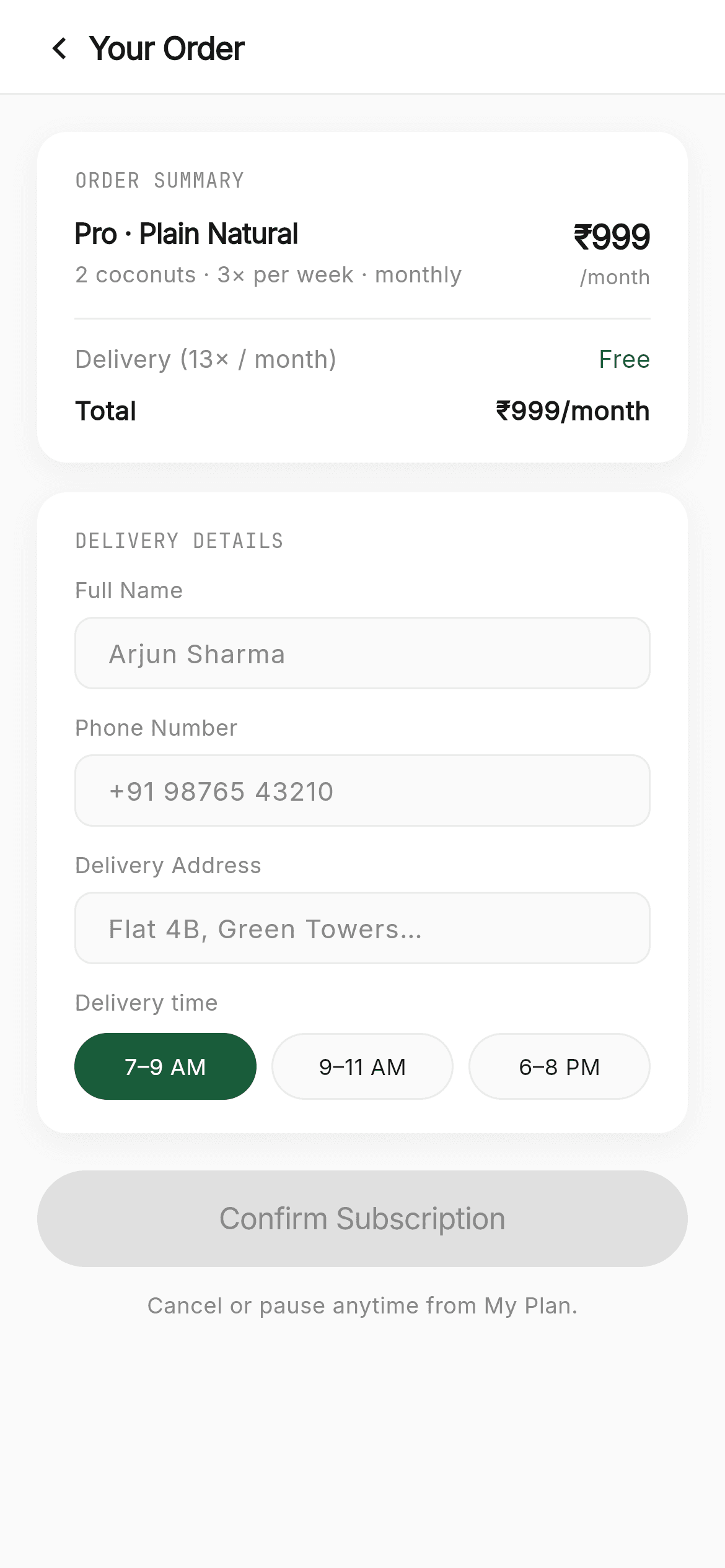
What you'll build
- ✓Live form validation from a getter over three TextEditingControllers, with the CTA disabled until it passes
- ✓An order summary whose price is computed at build time from plan × product × cadence
- ✓A time-slot pill row where the selected pill animates its fill in 150ms
- ✓A whole-screen success state swapped in by one boolean, with a Timer that fires a callback afterwards
- ✓Correct dispose() of three controllers and a timer — the part most tutorials skip
Step-by-step build
Create the file
Add a new file at lib/coconeer_cart/coconeer_cart_screen.dart in your Flutter project.
Register the bundled fonts
No external packages — this is pure Flutter. It does bundle its design fonts (Inter, JetBrainsMono), so drop the font files into fonts/ and declare them in pubspec.yaml:
flutter:
  fonts:
    - family: Inter
      fonts:
        - asset: fonts/Inter-Regular.ttf
    - family: JetBrainsMono
      fonts:
- asset: fonts/JetBrainsMono-Regular.ttfBuild it, piece by piece
Here's how the screen goes together. Each block below is a real slice of the code with a plain-English explanation — paste them in order, or grab the whole file from the next section.
Controllers, validation, and the confirm flow
import 'dart:async';

import 'package:flutter/material.dart';

import 'widgets/coco_common.dart';

/// CocoNeer — Cart / checkout. An order-summary card, a delivery-details form
/// (name, phone, address, time slot) with live validation, and a confirm flow
/// that resolves to a success state. A sub-flow screen: it has a back button in
/// the header and no bottom navigation.
///
/// Self-contained, pure Flutter. Bundles its exact design fonts (Inter +
/// JetBrains Mono); uses no images. Renders standalone when pushed as a route.
///
/// The selection ([productIndex], [planIndex], [cadence]) is passed in (a
/// realistic default makes it render standalone). [onBack] pops; [onSubscribed]
/// fires after the success animation. The gallery wires these from Shop → Cart →
/// My Plan.
class CoconeerCartScreen extends StatefulWidget {
  const CoconeerCartScreen({
    super.key,
    this.productIndex = 0,
    this.planIndex = 1,
    this.cadence = 'monthly',
    this.onBack,
    this.onSubscribed,
  });

  final int productIndex;
  final int planIndex;
  final String cadence;
  final VoidCallback? onBack;
  final VoidCallback? onSubscribed;

  @override
  State<CoconeerCartScreen> createState() => _CoconeerCartScreenState();
}

class _CoconeerCartScreenState extends State<CoconeerCartScreen> {
  final TextEditingController _name = TextEditingController();
  final TextEditingController _phone = TextEditingController();
  final TextEditingController _address = TextEditingController();
  String _slot = '7–9 AM';
  bool _done = false;
  Timer? _timer;

  bool get _isValid =>
      _name.text.trim().isNotEmpty && _phone.text.trim().isNotEmpty && _address.text.trim().isNotEmpty;

  void _confirm() {
    if (!_isValid) return;
    setState(() => _done = true);
    _timer = Timer(const Duration(milliseconds: 2200), () {
      if (mounted) widget.onSubscribed?.call();
    });
  }

  @override
  void dispose() {
    _timer?.cancel();
    _name.dispose();
    _phone.dispose();
    _address.dispose();
    super.dispose();
  }
dart:async brings in Timer; coco_common.dart brings the shared design system. The widget takes productIndex, planIndex and cadence with realistic defaults so it renders standalone, plus optional onBack and onSubscribed callbacks. The State holds three TextEditingControllers, the chosen _slot, a _done flag and a nullable Timer. _isValid is a getter, not a stored field — it recomputes on every build from the three controllers' trimmed text, so there's no stale validation state to keep in sync. _confirm guards on _isValid, flips _done, and starts a 2200ms Timer whose callback checks mounted before calling onSubscribed — that mounted check is what prevents a crash if the user navigates away mid-animation. dispose() cancels the timer and disposes all three controllers; skipping either leaks.
Computing the price and branching on state
  @override
  Widget build(BuildContext context) {
    final CocoProduct product = kProducts[widget.productIndex];
    final CocoPlan plan = kPlans[widget.planIndex];
    final int price = cocoPrice(plan, product, widget.cadence);
    final String cadLabel = widget.cadence == 'weekly' ? '/week' : '/month';

    return Scaffold(
      backgroundColor: C.canvas,
      body: SafeArea(
        bottom: false,
        child: _done
            ? _success()
            : Column(
                children: <Widget>[
                  CocoHeader(title: 'Your Order', onBack: widget.onBack),
                  Expanded(
                    child: SingleChildScrollView(
                      physics: const BouncingScrollPhysics(),
                      padding: const EdgeInsets.all(20),
                      child: Column(
                        crossAxisAlignment: CrossAxisAlignment.start,
                        children: <Widget>[
                          _summaryCard(product, plan, price, cadLabel),
                          const SizedBox(height: 16),
                          _deliveryForm(),
                          const SizedBox(height: 20),
                          CocoPillButton(
                            label: 'Confirm Subscription',
                            onTap: _isValid ? _confirm : null,
                            enabled: _isValid,
                            height: 52,
                            fontSize: 16,
                            expand: true,
                          ),
                          const SizedBox(height: 12),
                          Center(child: Text('Cancel or pause anytime from My Plan.', style: sans(size: 12, color: C.muted))),
                        ],
                      ),
                    ),
                  ),
                ],
              ),
      ),
    );
  }
build() starts by resolving data: the product and plan are looked up from the shared kProducts / kPlans tables by index, cocoPrice() derives the number from all three inputs, and cadLabel picks '/week' or '/month'. Then the body is a single ternary — _done ? _success() : Column(...) — which replaces the entire screen rather than pushing a route. That's a deliberate choice for a confirmation moment: no navigation animation, no back button to an already-submitted form. In the form branch, CocoHeader carries the title and back action, and the CTA's onTap is _isValid ? _confirm : null, with enabled: _isValid so the button also looks disabled, not just behaves that way.
The success state
  Widget _success() {
    return Container(
      alignment: Alignment.center,
      padding: const EdgeInsets.all(40),
      child: Column(
        mainAxisSize: MainAxisSize.min,
        children: <Widget>[
          Container(
            width: 76,
            height: 76,
            decoration: const BoxDecoration(color: C.greenSoft, shape: BoxShape.circle),
            child: const Icon(Icons.check, size: 36, color: C.green),
          ),
          const SizedBox(height: 24),
          Text("You're subscribed!", style: sans(size: 26, weight: FontWeight.w600, letterSpacing: -1)),
          const SizedBox(height: 10),
          SizedBox(
            width: 260,
            child: Text('First delivery tomorrow, $_slot. Welcome to CocoNeer.',
                textAlign: TextAlign.center, style: sans(size: 14, color: C.muted, height: 20 / 14)),
          ),
        ],
      ),
    );
  }
The success view is deliberately tiny: a 76px pale-green circle holding a 36px check, a 26px headline with letterSpacing: -1 (negative tracking, which tightens large type so it doesn't look loose), and one line of reassurance. That line interpolates the chosen $_slot, so it tells the user exactly when their first delivery lands rather than a generic thank-you. The message is width-capped in a SizedBox(width: 260) so it breaks into balanced lines instead of stretching across a tablet, and mainAxisSize: MainAxisSize.min keeps the column centred rather than filling the screen.
The order summary card
  Widget _summaryCard(CocoProduct product, CocoPlan plan, int price, String cadLabel) {
    return _card(
      child: Column(
        crossAxisAlignment: CrossAxisAlignment.start,
        children: <Widget>[
          const Eyebrow('Order Summary'),
          Row(
            crossAxisAlignment: CrossAxisAlignment.start,
            children: <Widget>[
              Expanded(
                child: Column(
                  crossAxisAlignment: CrossAxisAlignment.start,
                  children: <Widget>[
                    Text('${plan.name} · ${product.name}',
                        style: sans(size: 15, weight: FontWeight.w600, letterSpacing: -0.3)),
                    const SizedBox(height: 3),
                    Text('${plan.coconuts} coconut${plan.coconuts > 1 ? 's' : ''} · 3× per week · ${widget.cadence}',
                        style: sans(size: 12, color: C.muted)),
                  ],
                ),
              ),
              Column(
                crossAxisAlignment: CrossAxisAlignment.end,
                children: <Widget>[
                  Text('₹$price', style: sans(size: 18, weight: FontWeight.w600, letterSpacing: -0.6)),
                  Text(cadLabel, style: sans(size: 11, color: C.muted)),
                ],
              ),
            ],
          ),
          const SizedBox(height: 14),
          const Divider(height: 1, color: C.hairline),
          const SizedBox(height: 12),
          Row(
            mainAxisAlignment: MainAxisAlignment.spaceBetween,
            children: <Widget>[
              Flexible(
                child: Text('Delivery (13× / ${widget.cadence == 'weekly' ? 'week' : 'month'})',
                    style: sans(size: 13, color: C.muted), maxLines: 1, overflow: TextOverflow.ellipsis),
              ),
              const SizedBox(width: 12),
              Text('Free', style: sans(size: 13, weight: FontWeight.w500, color: C.green)),
            ],
          ),
          const SizedBox(height: 8),
          Row(
            mainAxisAlignment: MainAxisAlignment.spaceBetween,
            children: <Widget>[
              Text('Total', style: sans(size: 14, weight: FontWeight.w600)),
              const SizedBox(width: 12),
              Flexible(
                child: Text('₹$price$cadLabel',
                    style: sans(size: 14, weight: FontWeight.w600),
                    maxLines: 1, overflow: TextOverflow.ellipsis, textAlign: TextAlign.right),
              ),
            ],
          ),
        ],
      ),
    );
  }
The summary is a Row with the plan/product description in an Expanded on the left and a right-aligned price Column, then a hairline Divider, then two more rows for the delivery fee and total. Two details are worth copying. First, the pluralisation is inline: 'coconut${plan.coconuts > 1 ? 's' : ''}' — no intl package needed for a single English string. Second, every value cell is wrapped in Flexible with maxLines: 1 and ellipsis, because a long price plus a long label is exactly how a summary row overflows on a narrow phone. The 'Free' delivery line is coloured green, the only colour in an otherwise monochrome card.
The delivery form and slot picker
  Widget _deliveryForm() {
    final List<List<dynamic>> fields = <List<dynamic>>[
      <dynamic>['Full Name', _name, 'Arjun Sharma', TextInputType.text],
      <dynamic>['Phone Number', _phone, '+91 98765 43210', TextInputType.phone],
      <dynamic>['Delivery Address', _address, 'Flat 4B, Green Towers…', TextInputType.text],
    ];
    return _card(
      child: Column(
        crossAxisAlignment: CrossAxisAlignment.start,
        children: <Widget>[
          const Eyebrow('Delivery Details'),
          for (final List<dynamic> f in fields)
            Padding(
              padding: const EdgeInsets.only(bottom: 12),
              child: Column(
                crossAxisAlignment: CrossAxisAlignment.start,
                children: <Widget>[
                  Text(f[0] as String, style: sans(size: 12, color: C.muted)),
                  const SizedBox(height: 6),
                  _input(f[1] as TextEditingController, f[2] as String, f[3] as TextInputType),
                ],
              ),
            ),
          Text('Delivery time', style: sans(size: 12, color: C.muted)),
          const SizedBox(height: 8),
          Row(
            children: <Widget>[
              for (int i = 0; i < 3; i++) ...<Widget>[
                if (i > 0) const SizedBox(width: 8),
                Expanded(child: _slotButton(<String>['7–9 AM', '9–11 AM', '6–8 PM'][i])),
              ],
            ],
          ),
        ],
      ),
    );
  }
The three fields are declared as a List<List<dynamic>> table — label, controller, hint, keyboard type — and a collection-for loop renders each with its label above it. It's terse, though it does trade compile-time type safety for brevity, which is why each element is cast on use. Below, the time-slot row uses the for-with-spread pattern: if (i > 0) inserts an 8px gap before every item except the first, so there's no trailing space to unbalance the row. Each slot is Expanded, giving three equal thirds regardless of label length.
Inputs and the animated slot pill
  Widget _input(TextEditingController c, String hint, TextInputType type) {
    return TextField(
      controller: c,
      keyboardType: type,
      onChanged: (_) => setState(() {}),
      style: sans(size: 14, color: C.ink),
      decoration: InputDecoration(
        hintText: hint,
        hintStyle: sans(size: 14, color: C.muted),
        isDense: true,
        contentPadding: const EdgeInsets.symmetric(horizontal: 14, vertical: 13),
        filled: true,
        fillColor: C.canvas,
        enabledBorder: OutlineInputBorder(
          borderRadius: BorderRadius.circular(10),
          borderSide: const BorderSide(color: C.hairline),
        ),
        focusedBorder: OutlineInputBorder(
          borderRadius: BorderRadius.circular(10),
          borderSide: const BorderSide(color: C.green, width: 1.5),
        ),
      ),
    );
  }

  Widget _slotButton(String s) {
    final bool sel = _slot == s;
    return GestureDetector(
      onTap: () => setState(() => _slot = s),
      child: AnimatedContainer(
        duration: const Duration(milliseconds: 150),
        height: 36,
        alignment: Alignment.center,
        decoration: BoxDecoration(
          color: sel ? C.green : C.canvas,
          borderRadius: BorderRadius.circular(100),
          border: sel ? null : Border.all(color: C.hairline),
        ),
        child: FittedBox(
          fit: BoxFit.scaleDown,
          child: Text(s, style: sans(size: 12, weight: FontWeight.w500, color: sel ? Colors.white : C.ink)),
        ),
      ),
    );
  }

  Widget _card({required Widget child}) {
    return Container(
      width: double.infinity,
      padding: const EdgeInsets.fromLTRB(20, 18, 20, 18),
      decoration: BoxDecoration(
        color: Colors.white,
        borderRadius: BorderRadius.circular(16),
        boxShadow: <BoxShadow>[
          BoxShadow(color: Colors.black.withValues(alpha: 0.05), blurRadius: 12, offset: const Offset(0, 4)),
        ],
      ),
      child: child,
    );
  }
}
_input's key line is onChanged: (_) => setState(() {}) — it ignores the value and just triggers a rebuild, which re-evaluates the _isValid getter and re-enables the Confirm button as soon as the last field gets text. The field uses OutlineInputBorder twice: a hairline enabledBorder and a 1.5px green focusedBorder, so focus is visible without a colour change on the fill. _slotButton is an AnimatedContainer that transitions between green-filled and outlined over 150ms, with FittedBox(fit: BoxFit.scaleDown) shrinking the label rather than overflowing if the pill is narrow. _card is the shared surface: white, 16px radius, black at 5% alpha blurred 12px — a shadow light enough to read as paper.
Full code
The complete, ready-to-paste source (2 files). Free to use in your projects — one click copies it all.
import 'dart:async';

import 'package:flutter/material.dart';

import 'widgets/coco_common.dart';

/// CocoNeer — Cart / checkout. An order-summary card, a delivery-details form
/// (name, phone, address, time slot) with live validation, and a confirm flow
/// that resolves to a success state. A sub-flow screen: it has a back button in
/// the header and no bottom navigation.
///
/// Self-contained, pure Flutter. Bundles its exact design fonts (Inter +
/// JetBrains Mono); uses no images. Renders standalone when pushed as a route.
///
/// The selection ([productIndex], [planIndex], [cadence]) is passed in (a
/// realistic default makes it render standalone). [onBack] pops; [onSubscribed]
/// fires after the success animation. The gallery wires these from Shop → Cart →
/// My Plan.
class CoconeerCartScreen extends StatefulWidget {
  const CoconeerCartScreen({
    super.key,
    this.productIndex = 0,
    this.planIndex = 1,
    this.cadence = 'monthly',
    this.onBack,
    this.onSubscribed,
  });

  final int productIndex;
  final int planIndex;
  final String cadence;
  final VoidCallback? onBack;
  final VoidCallback? onSubscribed;

  @override
  State<CoconeerCartScreen> createState() => _CoconeerCartScreenState();
}

class _CoconeerCartScreenState extends State<CoconeerCartScreen> {
  final TextEditingController _name = TextEditingController();
  final TextEditingController _phone = TextEditingController();
  final TextEditingController _address = TextEditingController();
  String _slot = '7–9 AM';
  bool _done = false;
  Timer? _timer;

  bool get _isValid =>
      _name.text.trim().isNotEmpty && _phone.text.trim().isNotEmpty && _address.text.trim().isNotEmpty;

  void _confirm() {
    if (!_isValid) return;
    setState(() => _done = true);
    _timer = Timer(const Duration(milliseconds: 2200), () {
      if (mounted) widget.onSubscribed?.call();
    });
  }

  @override
  void dispose() {
    _timer?.cancel();
    _name.dispose();
    _phone.dispose();
    _address.dispose();
    super.dispose();
  }

  @override
  Widget build(BuildContext context) {
    final CocoProduct product = kProducts[widget.productIndex];
    final CocoPlan plan = kPlans[widget.planIndex];
    final int price = cocoPrice(plan, product, widget.cadence);
    final String cadLabel = widget.cadence == 'weekly' ? '/week' : '/month';

    return Scaffold(
      backgroundColor: C.canvas,
      body: SafeArea(
        bottom: false,
        child: _done
            ? _success()
            : Column(
                children: <Widget>[
                  CocoHeader(title: 'Your Order', onBack: widget.onBack),
                  Expanded(
                    child: SingleChildScrollView(
                      physics: const BouncingScrollPhysics(),
                      padding: const EdgeInsets.all(20),
                      child: Column(
                        crossAxisAlignment: CrossAxisAlignment.start,
                        children: <Widget>[
                          _summaryCard(product, plan, price, cadLabel),
                          const SizedBox(height: 16),
                          _deliveryForm(),
                          const SizedBox(height: 20),
                          CocoPillButton(
                            label: 'Confirm Subscription',
                            onTap: _isValid ? _confirm : null,
                            enabled: _isValid,
                            height: 52,
                            fontSize: 16,
                            expand: true,
                          ),
                          const SizedBox(height: 12),
                          Center(child: Text('Cancel or pause anytime from My Plan.', style: sans(size: 12, color: C.muted))),
                        ],
                      ),
                    ),
                  ),
                ],
              ),
      ),
    );
  }

  Widget _success() {
    return Container(
      alignment: Alignment.center,
      padding: const EdgeInsets.all(40),
      child: Column(
        mainAxisSize: MainAxisSize.min,
        children: <Widget>[
          Container(
            width: 76,
            height: 76,
            decoration: const BoxDecoration(color: C.greenSoft, shape: BoxShape.circle),
            child: const Icon(Icons.check, size: 36, color: C.green),
          ),
          const SizedBox(height: 24),
          Text("You're subscribed!", style: sans(size: 26, weight: FontWeight.w600, letterSpacing: -1)),
          const SizedBox(height: 10),
          SizedBox(
            width: 260,
            child: Text('First delivery tomorrow, $_slot. Welcome to CocoNeer.',
                textAlign: TextAlign.center, style: sans(size: 14, color: C.muted, height: 20 / 14)),
          ),
        ],
      ),
    );
  }

  Widget _summaryCard(CocoProduct product, CocoPlan plan, int price, String cadLabel) {
    return _card(
      child: Column(
        crossAxisAlignment: CrossAxisAlignment.start,
        children: <Widget>[
          const Eyebrow('Order Summary'),
          Row(
            crossAxisAlignment: CrossAxisAlignment.start,
            children: <Widget>[
              Expanded(
                child: Column(
                  crossAxisAlignment: CrossAxisAlignment.start,
                  children: <Widget>[
                    Text('${plan.name} · ${product.name}',
                        style: sans(size: 15, weight: FontWeight.w600, letterSpacing: -0.3)),
                    const SizedBox(height: 3),
                    Text('${plan.coconuts} coconut${plan.coconuts > 1 ? 's' : ''} · 3× per week · ${widget.cadence}',
                        style: sans(size: 12, color: C.muted)),
                  ],
                ),
              ),
              Column(
                crossAxisAlignment: CrossAxisAlignment.end,
                children: <Widget>[
                  Text('₹$price', style: sans(size: 18, weight: FontWeight.w600, letterSpacing: -0.6)),
                  Text(cadLabel, style: sans(size: 11, color: C.muted)),
                ],
              ),
            ],
          ),
          const SizedBox(height: 14),
          const Divider(height: 1, color: C.hairline),
          const SizedBox(height: 12),
          Row(
            mainAxisAlignment: MainAxisAlignment.spaceBetween,
            children: <Widget>[
              Flexible(
                child: Text('Delivery (13× / ${widget.cadence == 'weekly' ? 'week' : 'month'})',
                    style: sans(size: 13, color: C.muted), maxLines: 1, overflow: TextOverflow.ellipsis),
              ),
              const SizedBox(width: 12),
              Text('Free', style: sans(size: 13, weight: FontWeight.w500, color: C.green)),
            ],
          ),
          const SizedBox(height: 8),
          Row(
            mainAxisAlignment: MainAxisAlignment.spaceBetween,
            children: <Widget>[
              Text('Total', style: sans(size: 14, weight: FontWeight.w600)),
              const SizedBox(width: 12),
              Flexible(
                child: Text('₹$price$cadLabel',
                    style: sans(size: 14, weight: FontWeight.w600),
                    maxLines: 1, overflow: TextOverflow.ellipsis, textAlign: TextAlign.right),
              ),
            ],
          ),
        ],
      ),
    );
  }

  Widget _deliveryForm() {
    final List<List<dynamic>> fields = <List<dynamic>>[
      <dynamic>['Full Name', _name, 'Arjun Sharma', TextInputType.text],
      <dynamic>['Phone Number', _phone, '+91 98765 43210', TextInputType.phone],
      <dynamic>['Delivery Address', _address, 'Flat 4B, Green Towers…', TextInputType.text],
    ];
    return _card(
      child: Column(
        crossAxisAlignment: CrossAxisAlignment.start,
        children: <Widget>[
          const Eyebrow('Delivery Details'),
          for (final List<dynamic> f in fields)
            Padding(
              padding: const EdgeInsets.only(bottom: 12),
              child: Column(
                crossAxisAlignment: CrossAxisAlignment.start,
                children: <Widget>[
                  Text(f[0] as String, style: sans(size: 12, color: C.muted)),
                  const SizedBox(height: 6),
                  _input(f[1] as TextEditingController, f[2] as String, f[3] as TextInputType),
                ],
              ),
            ),
          Text('Delivery time', style: sans(size: 12, color: C.muted)),
          const SizedBox(height: 8),
          Row(
            children: <Widget>[
              for (int i = 0; i < 3; i++) ...<Widget>[
                if (i > 0) const SizedBox(width: 8),
                Expanded(child: _slotButton(<String>['7–9 AM', '9–11 AM', '6–8 PM'][i])),
              ],
            ],
          ),
        ],
      ),
    );
  }

  Widget _input(TextEditingController c, String hint, TextInputType type) {
    return TextField(
      controller: c,
      keyboardType: type,
      onChanged: (_) => setState(() {}),
      style: sans(size: 14, color: C.ink),
      decoration: InputDecoration(
        hintText: hint,
        hintStyle: sans(size: 14, color: C.muted),
        isDense: true,
        contentPadding: const EdgeInsets.symmetric(horizontal: 14, vertical: 13),
        filled: true,
        fillColor: C.canvas,
        enabledBorder: OutlineInputBorder(
          borderRadius: BorderRadius.circular(10),
          borderSide: const BorderSide(color: C.hairline),
        ),
        focusedBorder: OutlineInputBorder(
          borderRadius: BorderRadius.circular(10),
          borderSide: const BorderSide(color: C.green, width: 1.5),
        ),
      ),
    );
  }

  Widget _slotButton(String s) {
    final bool sel = _slot == s;
    return GestureDetector(
      onTap: () => setState(() => _slot = s),
      child: AnimatedContainer(
        duration: const Duration(milliseconds: 150),
        height: 36,
        alignment: Alignment.center,
        decoration: BoxDecoration(
          color: sel ? C.green : C.canvas,
          borderRadius: BorderRadius.circular(100),
          border: sel ? null : Border.all(color: C.hairline),
        ),
        child: FittedBox(
          fit: BoxFit.scaleDown,
          child: Text(s, style: sans(size: 12, weight: FontWeight.w500, color: sel ? Colors.white : C.ink)),
        ),
      ),
    );
  }

  Widget _card({required Widget child}) {
    return Container(
      width: double.infinity,
      padding: const EdgeInsets.fromLTRB(20, 18, 20, 18),
      decoration: BoxDecoration(
        color: Colors.white,
        borderRadius: BorderRadius.circular(16),
        boxShadow: <BoxShadow>[
          BoxShadow(color: Colors.black.withValues(alpha: 0.05), blurRadius: 12, offset: const Offset(0, 4)),
        ],
      ),
      child: child,
    );
  }
}
Plus bundled 2 binary assets (fonts/images). The CLI and MCP install those for you automatically.
Two faster ways to add it
Copy-paste works, but you can skip it entirely.
1. FlutterKit CLI
One command drops this screen — and its fonts — straight into your project.
$ flutterkit add coconeer-cart2. AI agent (MCP)
Connect FlutterKit's MCP server in Claude or Cursor and just ask your agent to install coconeer-cart — it fetches and writes the files for you.
FAQ
Is this Flutter checkout screen free to use?
Yes. The full Dart source on this page, including the shared CocoNeer design-system file, is free for personal and commercial projects. Install it with the FlutterKit CLI (flutterkit add coconeer-cart) or have an AI agent add it via MCP.
How strict is the validation?
Deliberately loose — _isValid only checks that all three fields have non-whitespace text. Tighten it by adding a phone regex or a minimum address length to that one getter; because the button reads the getter directly, nothing else needs changing.
Does it need any external packages?
No — it's pure Flutter, and dart:async's Timer ships with the SDK. There are no images at all. The bundled assets are two fonts, Inter and JetBrains Mono, registered in pubspec.yaml as shown in step 2.
Which Flutter version does it target?
It uses Color.withValues() for the card shadows, so Flutter 3.22+ (Dart 3). On an older SDK, swap withValues(alpha: 0.05) for withOpacity(0.05).

