How to Build a Subscription Dashboard in Flutter (Full Code + Preview)
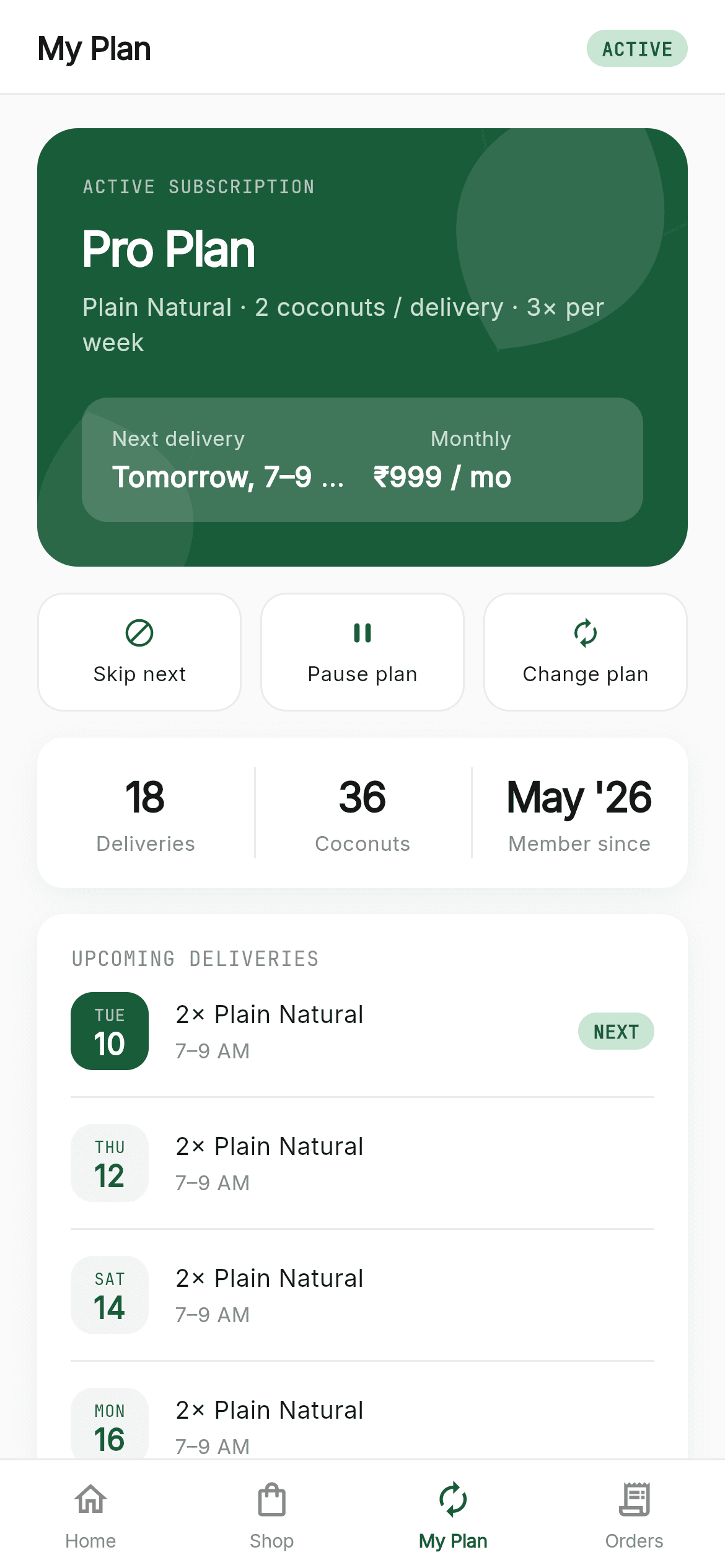
A subscriber dashboard has to answer 'what am I paying for, when's the next one, and how do I change it?' on one screen. This tutorial builds the CocoNeer 'My Plan' page: a deep-green hero card with custom-painted leaf motifs bleeding past its own edges, a translucent sub-panel showing next delivery and monthly price, a Skip / Pause / Change action row, a three-up stats card split by hairlines, and an upcoming-delivery schedule with a NEXT badge. It's a StatelessWidget — all the data comes in from outside.
What you'll build
- ✓A hero card where decorative leaves are positioned off-canvas and clipped by ClipRRect
- ✓Dart 3 inline record types used as a lightweight data model — no extra classes to declare
- ✓A three-up stats row where the dividers are left borders applied to every cell but the first
- ✓A delivery schedule with date tiles that invert their colours for the next delivery
- ✓Translucent white overlays (16%, 75%, 65%) that keep the hero card to a single colour
Step-by-step build
Create the file
Add a new file at lib/coconeer_plan/coconeer_plan_screen.dart in your Flutter project.
Register the bundled fonts
No external packages — this is pure Flutter. It does bundle its design fonts (Inter, JetBrainsMono), so drop the font files into fonts/ and declare them in pubspec.yaml:
flutter:
  fonts:
    - family: Inter
      fonts:
        - asset: fonts/Inter-Regular.ttf
    - family: JetBrainsMono
      fonts:
- asset: fonts/JetBrainsMono-Regular.ttfBuild it, piece by piece
Here's how the screen goes together. Each block below is a real slice of the code with a plain-English explanation — paste them in order, or grab the whole file from the next section.
Records as a data model
import 'package:flutter/material.dart';

import 'widgets/coco_common.dart';

/// CocoNeer — My Plan. The subscriber dashboard: an active-subscription hero
/// card with leaf motifs, quick actions (Skip / Pause / Change plan), a stats
/// row, an upcoming-delivery schedule, and the shared bottom navigation.
///
/// Self-contained, pure Flutter. Bundles its exact design fonts (Inter +
/// JetBrains Mono); uses no images. Renders standalone when pushed as a route.
///
/// [onTabSelected] fires with the tapped bottom-nav index; "Change plan" routes
/// to Shop (index 1). No-op by default; the gallery wires it to switch screens.
class CoconeerPlanScreen extends StatelessWidget {
  const CoconeerPlanScreen({super.key, this.onTabSelected});

  final ValueChanged<int>? onTabSelected;

  static const List<({String day, String date, String time, bool next})> _upcoming =
      <({String day, String date, String time, bool next})>[
    (day: 'Tue', date: '10', time: '7–9 AM', next: true),
    (day: 'Thu', date: '12', time: '7–9 AM', next: false),
    (day: 'Sat', date: '14', time: '7–9 AM', next: false),
    (day: 'Mon', date: '16', time: '7–9 AM', next: false),
  ];
The screen is stateless with one optional onTabSelected callback. Its schedule data is declared as List<({String day, String date, String time, bool next})> — a Dart 3 record type with named fields, written inline. That's the notable choice here: it gives the same field-name readability as a small class, with compile-time type checking, without declaring a class at all. Perfect for data that never leaves this file; you'd still write a real class for anything you deserialise or pass across screens.
Assembling the dashboard
  @override
  Widget build(BuildContext context) {
    const CocoPlan plan = CocoPlan(
      id: 'pro', name: 'Pro', coconuts: 2, tagline: '', weeklyPrice: 279,
      monthlyPrice: 999, featured: true, features: <String>[],
    );
    const CocoProduct product = CocoProduct(id: 'plain', name: 'Plain Natural', tagline: '', priceMultiplier: 1);

    return Scaffold(
      backgroundColor: C.canvas,
      body: SafeArea(
        bottom: false,
        child: Column(
          children: <Widget>[
            _header(),
            Expanded(
              child: SingleChildScrollView(
                physics: const BouncingScrollPhysics(),
                padding: const EdgeInsets.fromLTRB(20, 18, 20, 24),
                child: Column(
                  crossAxisAlignment: CrossAxisAlignment.start,
                  children: <Widget>[
                    _activePlanCard(plan, product),
                    const SizedBox(height: 14),
                    _quickActions(),
                    const SizedBox(height: 14),
                    _stats(),
                    const SizedBox(height: 14),
                    _upcomingDeliveries(),
                  ],
                ),
              ),
            ),
          ],
        ),
      ),
      bottomNavigationBar: CocoBottomNav(currentIndex: 2, onTabSelected: onTabSelected),
    );
  }

  Widget _header() {
    return Container(
      padding: const EdgeInsets.fromLTRB(20, 14, 20, 12),
      decoration: const BoxDecoration(
        color: Color(0xFFFFFFFF),
        border: Border(bottom: BorderSide(color: C.hairline)),
      ),
      child: Row(
        mainAxisAlignment: MainAxisAlignment.spaceBetween,
        children: <Widget>[
          Text('My Plan', style: sans(size: 17, weight: FontWeight.w600, letterSpacing: -0.4)),
          const StatusBadge(status: 'active'),
        ],
      ),
    );
  }
build() constructs a const CocoPlan and CocoProduct locally — in a real app these come from your subscription API, and making them const here just keeps the screen renderable standalone. The layout is a header plus an Expanded scroll view holding four cards spaced 14px apart. The header is a white Container with only a bottom BorderSide, the cheapest way to draw a divider under a title bar, and it pairs 'My Plan' with a StatusBadge showing 'active'. CocoBottomNav gets currentIndex: 2 to light the My Plan tab.
The hero card and its off-canvas leaves
  Widget _activePlanCard(CocoPlan plan, CocoProduct product) {
    return ClipRRect(
      borderRadius: BorderRadius.circular(22),
      child: Stack(
        children: <Widget>[
          const Positioned.fill(child: ColoredBox(color: C.green)),
          const Positioned(top: -38, right: -20, child: LeafDecor(size: 178, color: Colors.white, opacity: 0.10, rotate: 26)),
          const Positioned(bottom: -44, left: -26, child: LeafDecor(size: 136, color: Colors.white, opacity: 0.07, rotate: -14)),
          Padding(
            padding: const EdgeInsets.all(24),
            child: Column(
              crossAxisAlignment: CrossAxisAlignment.start,
              mainAxisSize: MainAxisSize.min,
              children: <Widget>[
                Text('ACTIVE SUBSCRIPTION',
                    style: mono(size: 10, color: Colors.white.withValues(alpha: 0.65), letterSpacing: 0.6)),
                const SizedBox(height: 8),
                Text('${plan.name} Plan',
                    style: sans(size: 26, weight: FontWeight.w600, color: Colors.white, letterSpacing: -1)),
                const SizedBox(height: 4),
                Text('${product.name} · ${plan.coconuts} coconuts / delivery · 3× per week',
                    style: sans(size: 13, color: Colors.white.withValues(alpha: 0.75))),
                const SizedBox(height: 20),
                Container(
                  padding: const EdgeInsets.symmetric(horizontal: 16, vertical: 14),
                  decoration: BoxDecoration(
                    color: Colors.white.withValues(alpha: 0.16),
                    borderRadius: BorderRadius.circular(14),
                  ),
                  child: Row(
                    crossAxisAlignment: CrossAxisAlignment.start,
                    children: <Widget>[
                      Expanded(child: _miniStat('Next delivery', 'Tomorrow, 7–9 AM', CrossAxisAlignment.start)),
                      const SizedBox(width: 12),
                      Flexible(child: _miniStat('Monthly', '₹999 / mo', CrossAxisAlignment.end)),
                    ],
                  ),
                ),
              ],
            ),
          ),
        ],
      ),
    );
  }
This is the most interesting layout in the file. ClipRRect with a 22px radius wraps a Stack, and inside it the two LeafDecor widgets are positioned with negative offsets — top: -38, right: -20 and bottom: -44, left: -26 — so they hang outside the card's bounds and the ClipRRect slices them off at the rounded edge. That's how you get decorative motifs that feel like they continue past the card rather than sitting politely inside it. Their opacity (0.10 and 0.07) keeps them as texture rather than content. The sub-panel is Colors.white.withValues(alpha: 0.16) over the green, so the whole card stays one colour with layered transparency instead of a second palette entry.
Mini stats and the quick-action row
  Widget _miniStat(String label, String value, CrossAxisAlignment align) {
    return Column(
      crossAxisAlignment: align,
      mainAxisSize: MainAxisSize.min,
      children: <Widget>[
        Text(label, style: sans(size: 11, color: Colors.white.withValues(alpha: 0.7)), maxLines: 1, overflow: TextOverflow.ellipsis),
        const SizedBox(height: 2),
        Text(value, style: sans(size: 15, weight: FontWeight.w600, color: Colors.white), maxLines: 1, overflow: TextOverflow.ellipsis),
      ],
    );
  }

  Widget _quickActions() {
    final List<({String label, IconData icon, int? tab})> actions = <({String label, IconData icon, int? tab})>[
      (label: 'Skip next', icon: Icons.block, tab: null),
      (label: 'Pause plan', icon: Icons.pause_rounded, tab: null),
      (label: 'Change plan', icon: Icons.autorenew, tab: 1),
    ];
    return Row(
      children: <Widget>[
        for (int i = 0; i < actions.length; i++) ...<Widget>[
          if (i > 0) const SizedBox(width: 10),
          Expanded(
            child: GestureDetector(
              onTap: actions[i].tab == null ? null : () => onTabSelected?.call(actions[i].tab!),
              child: Container(
                height: 64,
                decoration: BoxDecoration(
                  color: Colors.white,
                  borderRadius: BorderRadius.circular(14),
                  border: Border.all(color: C.hairline),
                ),
                child: Column(
                  mainAxisAlignment: MainAxisAlignment.center,
                  children: <Widget>[
                    Icon(actions[i].icon, size: 18, color: C.green),
                    const SizedBox(height: 5),
                    Text(actions[i].label, style: sans(size: 11, weight: FontWeight.w500, color: C.ink)),
                  ],
                ),
              ),
            ),
          ),
        ],
      ],
    );
  }
_miniStat takes a CrossAxisAlignment so the same widget renders left-aligned for 'Next delivery' and right-aligned for 'Monthly' — one widget, two alignments, no duplication. Both lines carry maxLines: 1 and ellipsis, essential in a two-column panel where one long value would otherwise wrap and break the alignment. _quickActions uses the record type again for its three actions, and the tab field is nullable: Skip and Pause pass null (no navigation yet, wire them to your API), while Change plan passes 1 and routes to the Shop tab. The onTap ternary means the two unwired actions get a genuinely null handler rather than an empty closure that would still show a tap ripple.
The three-up stats card
  Widget _stats() {
    const List<List<String>> stats = <List<String>>[
      <String>['18', 'Deliveries'],
      <String>['36', 'Coconuts'],
      <String>["May '26", 'Member since'],
    ];
    return Container(
      padding: const EdgeInsets.symmetric(vertical: 16),
      decoration: BoxDecoration(
        color: Colors.white,
        borderRadius: BorderRadius.circular(14),
        boxShadow: <BoxShadow>[
          BoxShadow(color: Colors.black.withValues(alpha: 0.05), blurRadius: 12, offset: const Offset(0, 4)),
        ],
      ),
      child: Row(
        children: <Widget>[
          for (int i = 0; i < stats.length; i++)
            Expanded(
              child: DecoratedBox(
                decoration: BoxDecoration(
                  border: i > 0 ? const Border(left: BorderSide(color: C.hairline)) : null,
                ),
                child: Column(
                  children: <Widget>[
                    Text(stats[i][0], style: sans(size: 22, weight: FontWeight.w600, color: C.ink, letterSpacing: -0.8)),
                    const SizedBox(height: 2),
                    Text(stats[i][1], style: sans(size: 11, color: C.muted)),
                  ],
                ),
              ),
            ),
        ],
      ),
    );
  }
Three stats, each in an Expanded so they take exactly a third regardless of content width. The divider trick is worth stealing: instead of inserting VerticalDivider widgets between cells, each cell is wrapped in a DecoratedBox whose decoration is Border(left: ...) only when i > 0. That gives two hairlines between three cells with no extra children and no fencepost arithmetic. The numbers are 22px semibold with letterSpacing: -0.8 — negative tracking again, tightening large figures — over 11px muted labels.
The delivery schedule
  Widget _upcomingDeliveries() {
    return Container(
      padding: const EdgeInsets.fromLTRB(18, 16, 18, 16),
      decoration: BoxDecoration(
        color: Colors.white,
        borderRadius: BorderRadius.circular(14),
        boxShadow: <BoxShadow>[
          BoxShadow(color: Colors.black.withValues(alpha: 0.05), blurRadius: 12, offset: const Offset(0, 4)),
        ],
      ),
      child: Column(
        crossAxisAlignment: CrossAxisAlignment.start,
        children: <Widget>[
          const Eyebrow('Upcoming Deliveries'),
          for (int i = 0; i < _upcoming.length; i++) ...<Widget>[
            _deliveryRow(_upcoming[i]),
            if (i < _upcoming.length - 1) ...<Widget>[
              const SizedBox(height: 14),
              const Divider(height: 1, color: C.hairline),
              const SizedBox(height: 14),
            ],
          ],
        ],
      ),
    );
  }

  Widget _deliveryRow(({String day, String date, String time, bool next}) d) {
    return Row(
      children: <Widget>[
        Container(
          width: 42,
          height: 42,
          decoration: BoxDecoration(
            color: d.next ? C.green : C.greenSoft,
            borderRadius: BorderRadius.circular(12),
          ),
          child: Column(
            mainAxisAlignment: MainAxisAlignment.center,
            children: <Widget>[
              Text(d.day.toUpperCase(), style: mono(size: 9, color: d.next ? Colors.white70 : C.green)),
              Text(d.date, style: sans(size: 16, weight: FontWeight.w700, color: d.next ? Colors.white : C.green, height: 1.1)),
            ],
          ),
        ),
        const SizedBox(width: 14),
        Expanded(
          child: Column(
            crossAxisAlignment: CrossAxisAlignment.start,
            children: <Widget>[
              Text('2× Plain Natural', style: sans(size: 13, weight: FontWeight.w500)),
              const SizedBox(height: 2),
              Text(d.time, style: sans(size: 11, color: C.muted)),
            ],
          ),
        ),
        if (d.next)
          Container(
            padding: const EdgeInsets.symmetric(horizontal: 8, vertical: 3),
            decoration: BoxDecoration(color: C.greenLight, borderRadius: BorderRadius.circular(9999)),
            child: Text('NEXT', style: mono(size: 10, weight: FontWeight.w600, color: C.green)),
          ),
      ],
    );
  }
}
_upcomingDeliveries loops the record list and inserts a padded Divider between rows but never after the last, using if (i < _upcoming.length - 1) with a spread. Each _deliveryRow leads with a 42px rounded date tile whose colours invert on the next delivery: solid green with white text when d.next, pale green with green text otherwise — the same shape carrying two states. The day abbreviation uses the mono font at 9px while the date number uses the sans at 16px bold with height: 1.1 to pull the two lines tight inside a small tile. A NEXT pill in mono renders only for the next delivery, via a bare if in the children list.
Full code
The complete, ready-to-paste source (2 files). Free to use in your projects — one click copies it all.
import 'package:flutter/material.dart';

import 'widgets/coco_common.dart';

/// CocoNeer — My Plan. The subscriber dashboard: an active-subscription hero
/// card with leaf motifs, quick actions (Skip / Pause / Change plan), a stats
/// row, an upcoming-delivery schedule, and the shared bottom navigation.
///
/// Self-contained, pure Flutter. Bundles its exact design fonts (Inter +
/// JetBrains Mono); uses no images. Renders standalone when pushed as a route.
///
/// [onTabSelected] fires with the tapped bottom-nav index; "Change plan" routes
/// to Shop (index 1). No-op by default; the gallery wires it to switch screens.
class CoconeerPlanScreen extends StatelessWidget {
  const CoconeerPlanScreen({super.key, this.onTabSelected});

  final ValueChanged<int>? onTabSelected;

  static const List<({String day, String date, String time, bool next})> _upcoming =
      <({String day, String date, String time, bool next})>[
    (day: 'Tue', date: '10', time: '7–9 AM', next: true),
    (day: 'Thu', date: '12', time: '7–9 AM', next: false),
    (day: 'Sat', date: '14', time: '7–9 AM', next: false),
    (day: 'Mon', date: '16', time: '7–9 AM', next: false),
  ];

  @override
  Widget build(BuildContext context) {
    const CocoPlan plan = CocoPlan(
      id: 'pro', name: 'Pro', coconuts: 2, tagline: '', weeklyPrice: 279,
      monthlyPrice: 999, featured: true, features: <String>[],
    );
    const CocoProduct product = CocoProduct(id: 'plain', name: 'Plain Natural', tagline: '', priceMultiplier: 1);

    return Scaffold(
      backgroundColor: C.canvas,
      body: SafeArea(
        bottom: false,
        child: Column(
          children: <Widget>[
            _header(),
            Expanded(
              child: SingleChildScrollView(
                physics: const BouncingScrollPhysics(),
                padding: const EdgeInsets.fromLTRB(20, 18, 20, 24),
                child: Column(
                  crossAxisAlignment: CrossAxisAlignment.start,
                  children: <Widget>[
                    _activePlanCard(plan, product),
                    const SizedBox(height: 14),
                    _quickActions(),
                    const SizedBox(height: 14),
                    _stats(),
                    const SizedBox(height: 14),
                    _upcomingDeliveries(),
                  ],
                ),
              ),
            ),
          ],
        ),
      ),
      bottomNavigationBar: CocoBottomNav(currentIndex: 2, onTabSelected: onTabSelected),
    );
  }

  Widget _header() {
    return Container(
      padding: const EdgeInsets.fromLTRB(20, 14, 20, 12),
      decoration: const BoxDecoration(
        color: Color(0xFFFFFFFF),
        border: Border(bottom: BorderSide(color: C.hairline)),
      ),
      child: Row(
        mainAxisAlignment: MainAxisAlignment.spaceBetween,
        children: <Widget>[
          Text('My Plan', style: sans(size: 17, weight: FontWeight.w600, letterSpacing: -0.4)),
          const StatusBadge(status: 'active'),
        ],
      ),
    );
  }

  Widget _activePlanCard(CocoPlan plan, CocoProduct product) {
    return ClipRRect(
      borderRadius: BorderRadius.circular(22),
      child: Stack(
        children: <Widget>[
          const Positioned.fill(child: ColoredBox(color: C.green)),
          const Positioned(top: -38, right: -20, child: LeafDecor(size: 178, color: Colors.white, opacity: 0.10, rotate: 26)),
          const Positioned(bottom: -44, left: -26, child: LeafDecor(size: 136, color: Colors.white, opacity: 0.07, rotate: -14)),
          Padding(
            padding: const EdgeInsets.all(24),
            child: Column(
              crossAxisAlignment: CrossAxisAlignment.start,
              mainAxisSize: MainAxisSize.min,
              children: <Widget>[
                Text('ACTIVE SUBSCRIPTION',
                    style: mono(size: 10, color: Colors.white.withValues(alpha: 0.65), letterSpacing: 0.6)),
                const SizedBox(height: 8),
                Text('${plan.name} Plan',
                    style: sans(size: 26, weight: FontWeight.w600, color: Colors.white, letterSpacing: -1)),
                const SizedBox(height: 4),
                Text('${product.name} · ${plan.coconuts} coconuts / delivery · 3× per week',
                    style: sans(size: 13, color: Colors.white.withValues(alpha: 0.75))),
                const SizedBox(height: 20),
                Container(
                  padding: const EdgeInsets.symmetric(horizontal: 16, vertical: 14),
                  decoration: BoxDecoration(
                    color: Colors.white.withValues(alpha: 0.16),
                    borderRadius: BorderRadius.circular(14),
                  ),
                  child: Row(
                    crossAxisAlignment: CrossAxisAlignment.start,
                    children: <Widget>[
                      Expanded(child: _miniStat('Next delivery', 'Tomorrow, 7–9 AM', CrossAxisAlignment.start)),
                      const SizedBox(width: 12),
                      Flexible(child: _miniStat('Monthly', '₹999 / mo', CrossAxisAlignment.end)),
                    ],
                  ),
                ),
              ],
            ),
          ),
        ],
      ),
    );
  }

  Widget _miniStat(String label, String value, CrossAxisAlignment align) {
    return Column(
      crossAxisAlignment: align,
      mainAxisSize: MainAxisSize.min,
      children: <Widget>[
        Text(label, style: sans(size: 11, color: Colors.white.withValues(alpha: 0.7)), maxLines: 1, overflow: TextOverflow.ellipsis),
        const SizedBox(height: 2),
        Text(value, style: sans(size: 15, weight: FontWeight.w600, color: Colors.white), maxLines: 1, overflow: TextOverflow.ellipsis),
      ],
    );
  }

  Widget _quickActions() {
    final List<({String label, IconData icon, int? tab})> actions = <({String label, IconData icon, int? tab})>[
      (label: 'Skip next', icon: Icons.block, tab: null),
      (label: 'Pause plan', icon: Icons.pause_rounded, tab: null),
      (label: 'Change plan', icon: Icons.autorenew, tab: 1),
    ];
    return Row(
      children: <Widget>[
        for (int i = 0; i < actions.length; i++) ...<Widget>[
          if (i > 0) const SizedBox(width: 10),
          Expanded(
            child: GestureDetector(
              onTap: actions[i].tab == null ? null : () => onTabSelected?.call(actions[i].tab!),
              child: Container(
                height: 64,
                decoration: BoxDecoration(
                  color: Colors.white,
                  borderRadius: BorderRadius.circular(14),
                  border: Border.all(color: C.hairline),
                ),
                child: Column(
                  mainAxisAlignment: MainAxisAlignment.center,
                  children: <Widget>[
                    Icon(actions[i].icon, size: 18, color: C.green),
                    const SizedBox(height: 5),
                    Text(actions[i].label, style: sans(size: 11, weight: FontWeight.w500, color: C.ink)),
                  ],
                ),
              ),
            ),
          ),
        ],
      ],
    );
  }

  Widget _stats() {
    const List<List<String>> stats = <List<String>>[
      <String>['18', 'Deliveries'],
      <String>['36', 'Coconuts'],
      <String>["May '26", 'Member since'],
    ];
    return Container(
      padding: const EdgeInsets.symmetric(vertical: 16),
      decoration: BoxDecoration(
        color: Colors.white,
        borderRadius: BorderRadius.circular(14),
        boxShadow: <BoxShadow>[
          BoxShadow(color: Colors.black.withValues(alpha: 0.05), blurRadius: 12, offset: const Offset(0, 4)),
        ],
      ),
      child: Row(
        children: <Widget>[
          for (int i = 0; i < stats.length; i++)
            Expanded(
              child: DecoratedBox(
                decoration: BoxDecoration(
                  border: i > 0 ? const Border(left: BorderSide(color: C.hairline)) : null,
                ),
                child: Column(
                  children: <Widget>[
                    Text(stats[i][0], style: sans(size: 22, weight: FontWeight.w600, color: C.ink, letterSpacing: -0.8)),
                    const SizedBox(height: 2),
                    Text(stats[i][1], style: sans(size: 11, color: C.muted)),
                  ],
                ),
              ),
            ),
        ],
      ),
    );
  }

  Widget _upcomingDeliveries() {
    return Container(
      padding: const EdgeInsets.fromLTRB(18, 16, 18, 16),
      decoration: BoxDecoration(
        color: Colors.white,
        borderRadius: BorderRadius.circular(14),
        boxShadow: <BoxShadow>[
          BoxShadow(color: Colors.black.withValues(alpha: 0.05), blurRadius: 12, offset: const Offset(0, 4)),
        ],
      ),
      child: Column(
        crossAxisAlignment: CrossAxisAlignment.start,
        children: <Widget>[
          const Eyebrow('Upcoming Deliveries'),
          for (int i = 0; i < _upcoming.length; i++) ...<Widget>[
            _deliveryRow(_upcoming[i]),
            if (i < _upcoming.length - 1) ...<Widget>[
              const SizedBox(height: 14),
              const Divider(height: 1, color: C.hairline),
              const SizedBox(height: 14),
            ],
          ],
        ],
      ),
    );
  }

  Widget _deliveryRow(({String day, String date, String time, bool next}) d) {
    return Row(
      children: <Widget>[
        Container(
          width: 42,
          height: 42,
          decoration: BoxDecoration(
            color: d.next ? C.green : C.greenSoft,
            borderRadius: BorderRadius.circular(12),
          ),
          child: Column(
            mainAxisAlignment: MainAxisAlignment.center,
            children: <Widget>[
              Text(d.day.toUpperCase(), style: mono(size: 9, color: d.next ? Colors.white70 : C.green)),
              Text(d.date, style: sans(size: 16, weight: FontWeight.w700, color: d.next ? Colors.white : C.green, height: 1.1)),
            ],
          ),
        ),
        const SizedBox(width: 14),
        Expanded(
          child: Column(
            crossAxisAlignment: CrossAxisAlignment.start,
            children: <Widget>[
              Text('2× Plain Natural', style: sans(size: 13, weight: FontWeight.w500)),
              const SizedBox(height: 2),
              Text(d.time, style: sans(size: 11, color: C.muted)),
            ],
          ),
        ),
        if (d.next)
          Container(
            padding: const EdgeInsets.symmetric(horizontal: 8, vertical: 3),
            decoration: BoxDecoration(color: C.greenLight, borderRadius: BorderRadius.circular(9999)),
            child: Text('NEXT', style: mono(size: 10, weight: FontWeight.w600, color: C.green)),
          ),
      ],
    );
  }
}
Plus bundled 2 binary assets (fonts/images). The CLI and MCP install those for you automatically.
Two faster ways to add it
Copy-paste works, but you can skip it entirely.
1. FlutterKit CLI
One command drops this screen — and its fonts — straight into your project.
$ flutterkit add coconeer-plan2. AI agent (MCP)
Connect FlutterKit's MCP server in Claude or Cursor and just ask your agent to install coconeer-plan — it fetches and writes the files for you.
FAQ
Is this Flutter subscription dashboard free to use?
Yes. The full Dart source on this page, including the shared CocoNeer design-system file, is free for personal and commercial projects. Install it with the FlutterKit CLI (flutterkit add coconeer-plan) or have an AI agent add it via MCP.
How do I connect it to real subscription data?
The screen already takes its plan and product as values — replace the const CocoPlan / CocoProduct in build() with data from your billing API, and swap the const _upcoming record list for your schedule. Because the widget is stateless, wrapping it in a FutureBuilder or StreamBuilder is enough; nothing inside needs to change.
Does it need any external packages or images?
Neither. The leaf motifs are drawn in Flutter by the LeafDecor widget rather than shipped as images, so there are no image assets at all. The bundled assets are two fonts, Inter and JetBrains Mono, registered in pubspec.yaml as shown in step 2.
Which Flutter version does it target?
It uses Dart 3 record types and Color.withValues(), so it needs Flutter 3.22+ with Dart 3. Records have no pre-Dart-3 equivalent, so on an older SDK you'd convert them to small classes as well as swapping withValues(alpha: x) for withOpacity(x).

