How to Build a Subscription Plan Picker in Flutter (Full Code + Preview)
Any recurring-billing product needs a 'Choose Your Plan' screen where a price updates the moment the user changes their mind. This tutorial builds exactly that in Flutter: a two-button coconut-type selector, a Weekly/Monthly pill toggle with a 'Save 10%' badge, three tappable radio plan cards (Starter, Pro, Family) that expand to show a feature checklist, and a sticky bottom bar whose total recalculates live from the current selection. By the end you'll understand how three pieces of state drive one computed price across the whole screen.
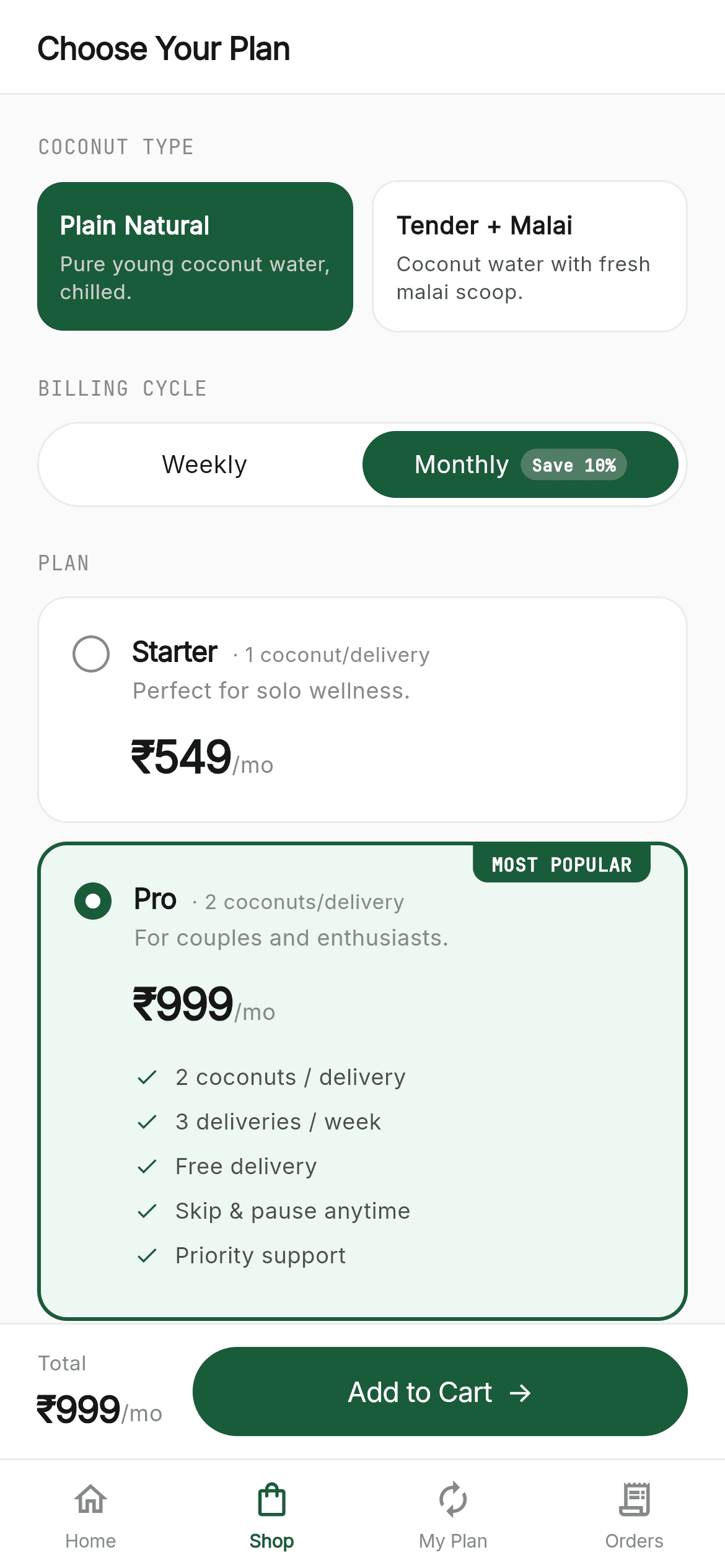
What you'll build
- ✓A coconut-type selector where two AnimatedContainer buttons swap between green (selected) and white
- ✓A Weekly/Monthly pill toggle carrying a 'Save 10%' savings badge
- ✓Three radio-style plan cards that expand a feature checklist only when selected
- ✓A sticky total bar whose ₹ price recomputes live from product, plan, and cadence
- ✓Live pricing driven by a single cocoPrice() helper plus the shared CocoNeer green kit and bundled Inter + JetBrains Mono fonts
Step-by-step build
Create the file
Add a new file at lib/coconeer_shop/coconeer_shop_screen.dart in your Flutter project.
Register the bundled fonts
No external packages — this is pure Flutter. It does bundle its design fonts (Inter, JetBrainsMono), so drop the font files into fonts/ and declare them in pubspec.yaml:
flutter:
  fonts:
    - family: Inter
      fonts:
        - asset: fonts/Inter-Regular.ttf
    - family: JetBrainsMono
      fonts:
- asset: fonts/JetBrainsMono-Regular.ttfBuild it, piece by piece
Here's how the screen goes together. Each block below is a real slice of the code with a plain-English explanation — paste them in order, or grab the whole file from the next section.
Imports, the widget, and three pieces of selection state
import 'package:flutter/material.dart';

import 'widgets/coco_common.dart';

/// CocoNeer — Shop. The plan picker: a coconut-type selector (Plain / Tender +
/// Malai), a Weekly/Monthly billing toggle with a savings badge, three
/// expandable plan cards (Starter / Pro / Family) with live pricing, a sticky
/// total bar, and the shared bottom navigation.
///
/// Self-contained, pure Flutter. Bundles its exact design fonts (Inter +
/// JetBrains Mono); uses no images. Renders standalone when pushed as a route.
///
/// [onTabSelected] fires with the tapped bottom-nav index. [onCheckout] fires
/// the current (productIndex, planIndex, cadence) selection when "Add to Cart"
/// is tapped. Both are no-ops by default; the preview gallery wires them to
/// switch tabs and push the Cart screen.
class CoconeerShopScreen extends StatefulWidget {
  const CoconeerShopScreen({super.key, this.onTabSelected, this.onCheckout});

  final ValueChanged<int>? onTabSelected;
  final void Function(int productIndex, int planIndex, String cadence)? onCheckout;

  @override
  State<CoconeerShopScreen> createState() => _CoconeerShopScreenState();
}

class _CoconeerShopScreenState extends State<CoconeerShopScreen> {
  int _productIdx = 0;
  int _planIdx = 1;
  String _cadence = 'monthly';
The file imports Flutter's material library and the shared coco_common.dart kit (which supplies the C color palette, the sans/mono text helpers, the data lists, and widgets like CocoHeader and CocoBottomNav). CoconeerShopScreen is a StatefulWidget because the user's choices change, and it takes two optional callbacks: onTabSelected for the bottom nav and onCheckout for the Add-to-Cart action. The State declares the only three variables that matter: _productIdx (starts at 0), _planIdx (starts at 1, so 'Pro' is pre-selected), and _cadence ('monthly'). Every price on the screen is derived from these three.
build(): computing the live price and laying out the screen
  @override
  Widget build(BuildContext context) {
    final CocoProduct product = kProducts[_productIdx];
    final CocoPlan plan = kPlans[_planIdx];
    final int price = cocoPrice(plan, product, _cadence);
    final String suffix = _cadence == 'weekly' ? '/wk' : '/mo';

    return Scaffold(
      backgroundColor: C.canvas,
      body: SafeArea(
        bottom: false,
        child: Column(
          children: <Widget>[
            const CocoHeader(title: 'Choose Your Plan'),
            Expanded(
              child: Stack(
                children: <Widget>[
                  SingleChildScrollView(
                    physics: const BouncingScrollPhysics(),
                    padding: const EdgeInsets.fromLTRB(20, 20, 20, 100),
                    child: Column(
                      crossAxisAlignment: CrossAxisAlignment.start,
                      children: <Widget>[
                        const Eyebrow('Coconut type'),
                        _productSelector(),
                        const SizedBox(height: 22),
                        const Eyebrow('Billing cycle'),
                        _cadenceToggle(),
                        const SizedBox(height: 22),
                        const Eyebrow('Plan'),
                        for (int i = 0; i < kPlans.length; i++) ...<Widget>[
                          if (i > 0) const SizedBox(height: 10),
                          _planCard(i, product),
                        ],
                      ],
                    ),
                  ),
                  Positioned(left: 0, right: 0, bottom: 0, child: _totalBar(price, suffix)),
                ],
              ),
            ),
          ],
        ),
      ),
      bottomNavigationBar: CocoBottomNav(currentIndex: 1, onTabSelected: widget.onTabSelected),
    );
  }
build() first turns the three state values into concrete data: it looks up the chosen product and plan from kProducts/kPlans, calls cocoPrice(plan, product, _cadence) to get the current price, and picks the '/wk' or '/mo' suffix. The Scaffold is painted with C.canvas (#FAFAFA) and its SafeArea sets bottom: false so content can run under the nav bar. A Column holds a fixed CocoHeader titled 'Choose Your Plan' above an Expanded Stack: a BouncingScrollPhysics SingleChildScrollView (with 100px of bottom padding to clear the total bar) stacks the Eyebrow labels and selectors, while a Positioned _totalBar is pinned to the bottom. CocoBottomNav is given currentIndex: 1 so the Shop tab is highlighted.
The coconut-type selector: two toggle buttons
  Widget _productSelector() {
    return Row(
      children: <Widget>[
        for (int i = 0; i < kProducts.length; i++) ...<Widget>[
          if (i > 0) const SizedBox(width: 10),
          Expanded(child: _productButton(i)),
        ],
      ],
    );
  }

  Widget _productButton(int i) {
    final CocoProduct p = kProducts[i];
    final bool sel = _productIdx == i;
    return GestureDetector(
      onTap: () => setState(() => _productIdx = i),
      child: AnimatedContainer(
        duration: const Duration(milliseconds: 150),
        padding: const EdgeInsets.symmetric(horizontal: 12, vertical: 14),
        decoration: BoxDecoration(
          color: sel ? C.green : Colors.white,
          borderRadius: BorderRadius.circular(14),
          border: sel ? null : Border.all(color: C.hairline),
        ),
        child: Column(
          crossAxisAlignment: CrossAxisAlignment.start,
          mainAxisSize: MainAxisSize.min,
          children: <Widget>[
            Text(p.name, style: sans(size: 13, weight: FontWeight.w600, color: sel ? Colors.white : C.ink)),
            const SizedBox(height: 3),
            Text(p.tagline, style: sans(size: 11, color: sel ? Colors.white70 : C.body, height: 15 / 11)),
          ],
        ),
      ),
    );
  }
_productSelector() builds a Row that loops over kProducts, wrapping each option in Expanded (so the two buttons split the width evenly) with a 10px SizedBox gap between them. _productButton() is a GestureDetector whose onTap calls setState to set _productIdx. Its AnimatedContainer transitions over 150ms: when selected it fills with C.green and drops its border; when not, it's white with a C.hairline border. Inside, a Column shows the product name in 13px semibold and its tagline in 11px, flipping the text to white on the selected (green) button and to C.ink/C.body otherwise.
The Weekly / Monthly toggle with a savings badge
  Widget _cadenceToggle() {
    final List<List<String?>> opts = <List<String?>>[
      <String?>['weekly', 'Weekly', null],
      <String?>['monthly', 'Monthly', 'Save 10%'],
    ];
    return Container(
      padding: const EdgeInsets.all(4),
      decoration: BoxDecoration(
        color: Colors.white,
        borderRadius: BorderRadius.circular(100),
        border: Border.all(color: C.hairline),
      ),
      child: Row(
        children: opts.map((List<String?> o) {
          final String val = o[0]!;
          final bool sel = _cadence == val;
          return Expanded(
            child: GestureDetector(
              onTap: () => setState(() => _cadence = val),
              child: AnimatedContainer(
                duration: const Duration(milliseconds: 150),
                height: 36,
                alignment: Alignment.center,
                decoration: BoxDecoration(
                  color: sel ? C.green : Colors.transparent,
                  borderRadius: BorderRadius.circular(100),
                ),
                child: FittedBox(
                  fit: BoxFit.scaleDown,
                  child: Padding(
                    padding: const EdgeInsets.symmetric(horizontal: 8),
                    child: Row(
                      mainAxisSize: MainAxisSize.min,
                      mainAxisAlignment: MainAxisAlignment.center,
                      children: <Widget>[
                        Text(o[1]!, style: sans(size: 13, weight: FontWeight.w500, color: sel ? Colors.white : C.ink)),
                        if (o[2] != null) ...<Widget>[
                          const SizedBox(width: 6),
                          Container(
                            padding: const EdgeInsets.symmetric(horizontal: 6, vertical: 2),
                            decoration: BoxDecoration(
                              color: sel ? Colors.white.withValues(alpha: 0.22) : C.greenLight,
                              borderRadius: BorderRadius.circular(9999),
                            ),
                            child: Text(o[2]!, style: mono(size: 9, weight: FontWeight.w600, color: sel ? Colors.white : C.green)),
                          ),
                        ],
                      ],
                    ),
                  ),
                ),
              ),
            ),
          );
        }).toList(),
      ),
    );
  }
_cadenceToggle() defines a small options list where each entry is [value, label, optional badge] — only 'Monthly' carries the 'Save 10%' badge. It renders a white pill-shaped Container (borderRadius 100) with 4px inner padding, then maps the options into two Expanded segments. Each segment is a GestureDetector that sets _cadence, and its 36px AnimatedContainer fills with C.green when active or stays transparent otherwise, creating a sliding-highlight effect. A FittedBox keeps the label plus badge from overflowing; the badge itself is a rounded chip whose background is Colors.white.withValues(alpha: 0.22) on the active side or C.greenLight otherwise, with the text set in the mono font.
A radio plan card that expands its features when picked
  Widget _planCard(int i, CocoProduct product) {
    final CocoPlan p = kPlans[i];
    final int pp = cocoPrice(p, product, _cadence);
    final bool sel = _planIdx == i;
    final String suffix = _cadence == 'weekly' ? '/wk' : '/mo';

    return GestureDetector(
      onTap: () => setState(() => _planIdx = i),
      child: AnimatedContainer(
        duration: const Duration(milliseconds: 150),
        decoration: BoxDecoration(
          color: sel ? C.greenSoft : Colors.white,
          borderRadius: BorderRadius.circular(16),
          border: Border.all(color: sel ? C.green : C.hairline, width: sel ? 2 : 1),
        ),
        child: Stack(
          children: <Widget>[
            Padding(
              padding: const EdgeInsets.all(18),
              child: Row(
                crossAxisAlignment: CrossAxisAlignment.start,
                children: <Widget>[
                  Container(
                    width: 20,
                    height: 20,
                    margin: const EdgeInsets.only(top: 2),
                    decoration: BoxDecoration(
                      color: sel ? C.green : Colors.white,
                      shape: BoxShape.circle,
                      border: sel ? null : Border.all(color: C.muted, width: 1.5),
                    ),
                    alignment: Alignment.center,
                    child: sel
                        ? Container(width: 8, height: 8, decoration: const BoxDecoration(color: Colors.white, shape: BoxShape.circle))
                        : null,
                  ),
                  const SizedBox(width: 12),
                  Expanded(
                    child: Column(
                      crossAxisAlignment: CrossAxisAlignment.start,
                      children: <Widget>[
                        Row(
                          crossAxisAlignment: CrossAxisAlignment.baseline,
                          textBaseline: TextBaseline.alphabetic,
                          children: <Widget>[
                            Flexible(
                              flex: 0,
                              child: Text(p.name,
                                  style: sans(size: 15, weight: FontWeight.w600, letterSpacing: -0.3),
                                  overflow: TextOverflow.ellipsis),
                            ),
                            const SizedBox(width: 8),
                            Flexible(
                              child: Text('· ${p.coconuts} ${p.coconuts > 1 ? 'coconuts' : 'coconut'}/delivery',
                                  style: sans(size: 11, color: C.muted), overflow: TextOverflow.ellipsis),
                            ),
                          ],
                        ),
                        const SizedBox(height: 2),
                        Text(p.tagline, style: sans(size: 12, color: C.muted)),
                        const SizedBox(height: 10),
                        Row(
                          crossAxisAlignment: CrossAxisAlignment.baseline,
                          textBaseline: TextBaseline.alphabetic,
                          children: <Widget>[
                            Text('₹$pp', style: sans(size: 24, weight: FontWeight.w600, color: C.ink, letterSpacing: -1)),
                            Text(suffix, style: sans(size: 12, color: C.muted)),
                          ],
                        ),
                        if (sel) ...<Widget>[
                          const SizedBox(height: 14),
                          for (final String f in p.features)
                            Padding(
                              padding: const EdgeInsets.only(bottom: 7),
                              child: Row(
                                children: <Widget>[
                                  const Icon(Icons.check, size: 14, color: C.green),
                                  const SizedBox(width: 8),
                                  Expanded(child: Text(f, style: sans(size: 12, color: C.body))),
                                ],
                              ),
                            ),
                        ],
                      ],
                    ),
                  ),
                ],
              ),
            ),
            if (p.featured)
              Positioned(
                top: 0,
                right: 18,
                child: Container(
                  padding: const EdgeInsets.symmetric(horizontal: 10, vertical: 3),
                  decoration: const BoxDecoration(
                    color: C.green,
                    borderRadius: BorderRadius.vertical(bottom: Radius.circular(8)),
                  ),
                  child: Text('MOST POPULAR', style: mono(size: 10, weight: FontWeight.w600, color: Colors.white, letterSpacing: 0.3)),
                ),
              ),
          ],
        ),
      ),
    );
  }
_planCard() is the heart of the screen. It computes that card's own price with cocoPrice() and whether it's selected, then wraps everything in a GestureDetector that sets _planIdx. The AnimatedContainer turns C.greenSoft with a 2px green border when selected (otherwise white with a 1px hairline). A 20px circle on the left acts as the radio dot — filled green with a white center when chosen. The body shows the plan name, a '· N coconuts/delivery' line that pluralises correctly, the tagline, and a large 24px ₹ price with its /wk or /mo suffix. Crucially, the feature checklist (each a green Icons.check beside its label) only renders inside an `if (sel)` block, so an unselected card stays compact. A 'MOST POPULAR' badge is Positioned at the top-right for any plan whose featured flag is true (the Pro plan).
The sticky total bar and Add-to-Cart button
  Widget _totalBar(int price, String suffix) {
    return Container(
      decoration: const BoxDecoration(
        color: Color(0xFFFFFFFF),
        border: Border(top: BorderSide(color: C.hairline)),
      ),
      padding: const EdgeInsets.fromLTRB(20, 12, 20, 12),
      child: Row(
        children: <Widget>[
          Column(
            crossAxisAlignment: CrossAxisAlignment.start,
            mainAxisSize: MainAxisSize.min,
            children: <Widget>[
              Text('Total', style: sans(size: 11, color: C.muted)),
              const SizedBox(height: 2),
              Row(
                crossAxisAlignment: CrossAxisAlignment.baseline,
                textBaseline: TextBaseline.alphabetic,
                children: <Widget>[
                  Text('₹$price', style: sans(size: 20, weight: FontWeight.w600, letterSpacing: -0.8)),
                  Text(suffix, style: sans(size: 12, color: C.muted)),
                ],
              ),
            ],
          ),
          const SizedBox(width: 16),
          Expanded(
            child: CocoPillButton(
              label: 'Add to Cart  →',
              onTap: () => widget.onCheckout?.call(_productIdx, _planIdx, _cadence),
              height: 48,
              expand: true,
            ),
          ),
        ],
      ),
    );
  }
}
_totalBar() is the fixed footer pinned by the Positioned in build(). It's a white Container with a single top hairline border and holds a Row: on the left a small Column labels 'Total' above the running ₹price (20px semibold) with its cadence suffix — this is the same computed value from build(), so it updates the instant any selector changes. On the right, an Expanded CocoPillButton labelled 'Add to Cart →' fills the remaining width; its onTap fires widget.onCheckout with the current (_productIdx, _planIdx, _cadence) tuple, handing the full selection to whatever screen you push next.
Full code
The complete, ready-to-paste source (2 files). Free to use in your projects — one click copies it all.
import 'package:flutter/material.dart';

import 'widgets/coco_common.dart';

/// CocoNeer — Shop. The plan picker: a coconut-type selector (Plain / Tender +
/// Malai), a Weekly/Monthly billing toggle with a savings badge, three
/// expandable plan cards (Starter / Pro / Family) with live pricing, a sticky
/// total bar, and the shared bottom navigation.
///
/// Self-contained, pure Flutter. Bundles its exact design fonts (Inter +
/// JetBrains Mono); uses no images. Renders standalone when pushed as a route.
///
/// [onTabSelected] fires with the tapped bottom-nav index. [onCheckout] fires
/// the current (productIndex, planIndex, cadence) selection when "Add to Cart"
/// is tapped. Both are no-ops by default; the preview gallery wires them to
/// switch tabs and push the Cart screen.
class CoconeerShopScreen extends StatefulWidget {
  const CoconeerShopScreen({super.key, this.onTabSelected, this.onCheckout});

  final ValueChanged<int>? onTabSelected;
  final void Function(int productIndex, int planIndex, String cadence)? onCheckout;

  @override
  State<CoconeerShopScreen> createState() => _CoconeerShopScreenState();
}

class _CoconeerShopScreenState extends State<CoconeerShopScreen> {
  int _productIdx = 0;
  int _planIdx = 1;
  String _cadence = 'monthly';

  @override
  Widget build(BuildContext context) {
    final CocoProduct product = kProducts[_productIdx];
    final CocoPlan plan = kPlans[_planIdx];
    final int price = cocoPrice(plan, product, _cadence);
    final String suffix = _cadence == 'weekly' ? '/wk' : '/mo';

    return Scaffold(
      backgroundColor: C.canvas,
      body: SafeArea(
        bottom: false,
        child: Column(
          children: <Widget>[
            const CocoHeader(title: 'Choose Your Plan'),
            Expanded(
              child: Stack(
                children: <Widget>[
                  SingleChildScrollView(
                    physics: const BouncingScrollPhysics(),
                    padding: const EdgeInsets.fromLTRB(20, 20, 20, 100),
                    child: Column(
                      crossAxisAlignment: CrossAxisAlignment.start,
                      children: <Widget>[
                        const Eyebrow('Coconut type'),
                        _productSelector(),
                        const SizedBox(height: 22),
                        const Eyebrow('Billing cycle'),
                        _cadenceToggle(),
                        const SizedBox(height: 22),
                        const Eyebrow('Plan'),
                        for (int i = 0; i < kPlans.length; i++) ...<Widget>[
                          if (i > 0) const SizedBox(height: 10),
                          _planCard(i, product),
                        ],
                      ],
                    ),
                  ),
                  Positioned(left: 0, right: 0, bottom: 0, child: _totalBar(price, suffix)),
                ],
              ),
            ),
          ],
        ),
      ),
      bottomNavigationBar: CocoBottomNav(currentIndex: 1, onTabSelected: widget.onTabSelected),
    );
  }

  Widget _productSelector() {
    return Row(
      children: <Widget>[
        for (int i = 0; i < kProducts.length; i++) ...<Widget>[
          if (i > 0) const SizedBox(width: 10),
          Expanded(child: _productButton(i)),
        ],
      ],
    );
  }

  Widget _productButton(int i) {
    final CocoProduct p = kProducts[i];
    final bool sel = _productIdx == i;
    return GestureDetector(
      onTap: () => setState(() => _productIdx = i),
      child: AnimatedContainer(
        duration: const Duration(milliseconds: 150),
        padding: const EdgeInsets.symmetric(horizontal: 12, vertical: 14),
        decoration: BoxDecoration(
          color: sel ? C.green : Colors.white,
          borderRadius: BorderRadius.circular(14),
          border: sel ? null : Border.all(color: C.hairline),
        ),
        child: Column(
          crossAxisAlignment: CrossAxisAlignment.start,
          mainAxisSize: MainAxisSize.min,
          children: <Widget>[
            Text(p.name, style: sans(size: 13, weight: FontWeight.w600, color: sel ? Colors.white : C.ink)),
            const SizedBox(height: 3),
            Text(p.tagline, style: sans(size: 11, color: sel ? Colors.white70 : C.body, height: 15 / 11)),
          ],
        ),
      ),
    );
  }

  Widget _cadenceToggle() {
    final List<List<String?>> opts = <List<String?>>[
      <String?>['weekly', 'Weekly', null],
      <String?>['monthly', 'Monthly', 'Save 10%'],
    ];
    return Container(
      padding: const EdgeInsets.all(4),
      decoration: BoxDecoration(
        color: Colors.white,
        borderRadius: BorderRadius.circular(100),
        border: Border.all(color: C.hairline),
      ),
      child: Row(
        children: opts.map((List<String?> o) {
          final String val = o[0]!;
          final bool sel = _cadence == val;
          return Expanded(
            child: GestureDetector(
              onTap: () => setState(() => _cadence = val),
              child: AnimatedContainer(
                duration: const Duration(milliseconds: 150),
                height: 36,
                alignment: Alignment.center,
                decoration: BoxDecoration(
                  color: sel ? C.green : Colors.transparent,
                  borderRadius: BorderRadius.circular(100),
                ),
                child: FittedBox(
                  fit: BoxFit.scaleDown,
                  child: Padding(
                    padding: const EdgeInsets.symmetric(horizontal: 8),
                    child: Row(
                      mainAxisSize: MainAxisSize.min,
                      mainAxisAlignment: MainAxisAlignment.center,
                      children: <Widget>[
                        Text(o[1]!, style: sans(size: 13, weight: FontWeight.w500, color: sel ? Colors.white : C.ink)),
                        if (o[2] != null) ...<Widget>[
                          const SizedBox(width: 6),
                          Container(
                            padding: const EdgeInsets.symmetric(horizontal: 6, vertical: 2),
                            decoration: BoxDecoration(
                              color: sel ? Colors.white.withValues(alpha: 0.22) : C.greenLight,
                              borderRadius: BorderRadius.circular(9999),
                            ),
                            child: Text(o[2]!, style: mono(size: 9, weight: FontWeight.w600, color: sel ? Colors.white : C.green)),
                          ),
                        ],
                      ],
                    ),
                  ),
                ),
              ),
            ),
          );
        }).toList(),
      ),
    );
  }

  Widget _planCard(int i, CocoProduct product) {
    final CocoPlan p = kPlans[i];
    final int pp = cocoPrice(p, product, _cadence);
    final bool sel = _planIdx == i;
    final String suffix = _cadence == 'weekly' ? '/wk' : '/mo';

    return GestureDetector(
      onTap: () => setState(() => _planIdx = i),
      child: AnimatedContainer(
        duration: const Duration(milliseconds: 150),
        decoration: BoxDecoration(
          color: sel ? C.greenSoft : Colors.white,
          borderRadius: BorderRadius.circular(16),
          border: Border.all(color: sel ? C.green : C.hairline, width: sel ? 2 : 1),
        ),
        child: Stack(
          children: <Widget>[
            Padding(
              padding: const EdgeInsets.all(18),
              child: Row(
                crossAxisAlignment: CrossAxisAlignment.start,
                children: <Widget>[
                  Container(
                    width: 20,
                    height: 20,
                    margin: const EdgeInsets.only(top: 2),
                    decoration: BoxDecoration(
                      color: sel ? C.green : Colors.white,
                      shape: BoxShape.circle,
                      border: sel ? null : Border.all(color: C.muted, width: 1.5),
                    ),
                    alignment: Alignment.center,
                    child: sel
                        ? Container(width: 8, height: 8, decoration: const BoxDecoration(color: Colors.white, shape: BoxShape.circle))
                        : null,
                  ),
                  const SizedBox(width: 12),
                  Expanded(
                    child: Column(
                      crossAxisAlignment: CrossAxisAlignment.start,
                      children: <Widget>[
                        Row(
                          crossAxisAlignment: CrossAxisAlignment.baseline,
                          textBaseline: TextBaseline.alphabetic,
                          children: <Widget>[
                            Flexible(
                              flex: 0,
                              child: Text(p.name,
                                  style: sans(size: 15, weight: FontWeight.w600, letterSpacing: -0.3),
                                  overflow: TextOverflow.ellipsis),
                            ),
                            const SizedBox(width: 8),
                            Flexible(
                              child: Text('· ${p.coconuts} ${p.coconuts > 1 ? 'coconuts' : 'coconut'}/delivery',
                                  style: sans(size: 11, color: C.muted), overflow: TextOverflow.ellipsis),
                            ),
                          ],
                        ),
                        const SizedBox(height: 2),
                        Text(p.tagline, style: sans(size: 12, color: C.muted)),
                        const SizedBox(height: 10),
                        Row(
                          crossAxisAlignment: CrossAxisAlignment.baseline,
                          textBaseline: TextBaseline.alphabetic,
                          children: <Widget>[
                            Text('₹$pp', style: sans(size: 24, weight: FontWeight.w600, color: C.ink, letterSpacing: -1)),
                            Text(suffix, style: sans(size: 12, color: C.muted)),
                          ],
                        ),
                        if (sel) ...<Widget>[
                          const SizedBox(height: 14),
                          for (final String f in p.features)
                            Padding(
                              padding: const EdgeInsets.only(bottom: 7),
                              child: Row(
                                children: <Widget>[
                                  const Icon(Icons.check, size: 14, color: C.green),
                                  const SizedBox(width: 8),
                                  Expanded(child: Text(f, style: sans(size: 12, color: C.body))),
                                ],
                              ),
                            ),
                        ],
                      ],
                    ),
                  ),
                ],
              ),
            ),
            if (p.featured)
              Positioned(
                top: 0,
                right: 18,
                child: Container(
                  padding: const EdgeInsets.symmetric(horizontal: 10, vertical: 3),
                  decoration: const BoxDecoration(
                    color: C.green,
                    borderRadius: BorderRadius.vertical(bottom: Radius.circular(8)),
                  ),
                  child: Text('MOST POPULAR', style: mono(size: 10, weight: FontWeight.w600, color: Colors.white, letterSpacing: 0.3)),
                ),
              ),
          ],
        ),
      ),
    );
  }

  Widget _totalBar(int price, String suffix) {
    return Container(
      decoration: const BoxDecoration(
        color: Color(0xFFFFFFFF),
        border: Border(top: BorderSide(color: C.hairline)),
      ),
      padding: const EdgeInsets.fromLTRB(20, 12, 20, 12),
      child: Row(
        children: <Widget>[
          Column(
            crossAxisAlignment: CrossAxisAlignment.start,
            mainAxisSize: MainAxisSize.min,
            children: <Widget>[
              Text('Total', style: sans(size: 11, color: C.muted)),
              const SizedBox(height: 2),
              Row(
                crossAxisAlignment: CrossAxisAlignment.baseline,
                textBaseline: TextBaseline.alphabetic,
                children: <Widget>[
                  Text('₹$price', style: sans(size: 20, weight: FontWeight.w600, letterSpacing: -0.8)),
                  Text(suffix, style: sans(size: 12, color: C.muted)),
                ],
              ),
            ],
          ),
          const SizedBox(width: 16),
          Expanded(
            child: CocoPillButton(
              label: 'Add to Cart  →',
              onTap: () => widget.onCheckout?.call(_productIdx, _planIdx, _cadence),
              height: 48,
              expand: true,
            ),
          ),
        ],
      ),
    );
  }
}
Plus bundled 2 binary assets (fonts/images). The CLI and MCP install those for you automatically.
Two faster ways to add it
Copy-paste works, but you can skip it entirely.
1. FlutterKit CLI
One command drops this screen — and its fonts — straight into your project.
$ flutterkit add coconeer-shop2. AI agent (MCP)
Connect FlutterKit's MCP server in Claude or Cursor and just ask your agent to install coconeer-shop — it fetches and writes the files for you.
FAQ
Is this plan-picker screen free to use?
Yes. The full Dart on this page is free to copy into your own apps, personal or commercial. Paste it directly, install it with the FlutterKit CLI (flutterkit add coconeer-shop), or add it via MCP with an AI agent.
Does it need any external packages?
No — it's pure Flutter, built entirely on the material library. The screen relies on the shared coco_common.dart kit (colors, text helpers, and the product/plan data), which ships in the same folder. The only assets are the two bundled fonts, Inter and JetBrains Mono, which you register in pubspec.yaml; the CLI and MCP copy those font files for you.
Which Flutter version does it target?
It uses the modern Color.withValues() API (for example the savings-badge tint) and super parameters, so it targets Flutter 3.22+ (Dart 3). On an older SDK, swap Colors.white.withValues(alpha: 0.22) for Colors.white.withOpacity(0.22) and it will compile.

