How to Build a Food Delivery Home Screen in Flutter (Full Code + Preview)
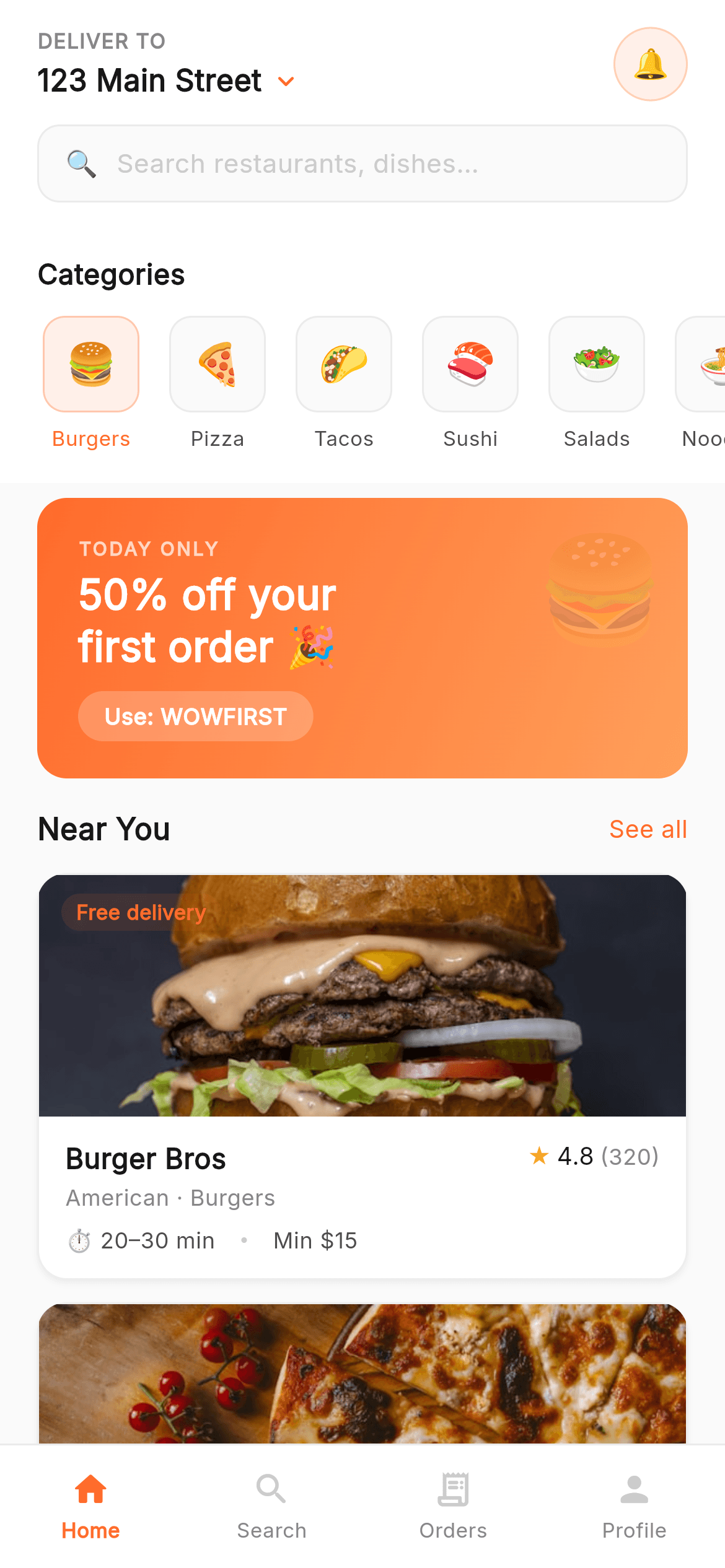
The home screen is where a food-delivery app earns its taps. In this tutorial you'll build one in pure Flutter: a 'Deliver to' header with a notification bell and a tappable search bar, a horizontally scrolling category rail with an active pill, a warm orange gradient promo banner, and a 'Near You' list of restaurant cards that load real network food photos with an emoji fallback. Each card shows a promo tag, a star rating with review count, and an ETA / minimum-order meta row, all sitting above a four-tab bottom navigation.
What you'll build
- ✓A 'Deliver to' location header with a peach notification bell and a search bar that routes to the Search tab
- ✓A horizontally scrolling category rail whose first tile shows an active accent-tinted state
- ✓A full-width orange gradient promo banner with a faded emoji and a 'WOWFIRST' code chip
- ✓Restaurant cards with real network food photos (graceful emoji fallback), a promo tag, star rating, and ETA / min-order meta
- ✓A shared four-tab bottom navigation with Home highlighted, plus the bundled Inter font
Step-by-step build
Create the file
Add a new file at lib/wow_food_home/wow_food_home_screen.dart in your Flutter project.
Register the bundled fonts
No external packages — this is pure Flutter. It does bundle its design font (Inter), so drop the font file into fonts/ and declare it in pubspec.yaml:
flutter:
  fonts:
    - family: Inter
      fonts:
- asset: fonts/Inter-Regular.ttfBuild it, piece by piece
Here's how the screen goes together. Each block below is a real slice of the code with a plain-English explanation — paste them in order, or grab the whole file from the next section.
Imports, the screen class, and its data
import 'package:flutter/material.dart';

import 'widgets/wow_common.dart';

/// Wow Food — Home. The landing screen of a fast-food delivery app: a
/// "deliver to" header with search, a horizontally scrolling category rail, a
/// warm gradient promo banner, a "Near You" restaurant list, and the shared
/// bottom navigation.
///
/// Self-contained, pure Flutter. Bundles its exact design font (Inter); food
/// imagery is emoji, so it uses no image assets. Renders standalone when pushed
/// as a route.
///
/// [onTabSelected] fires with the tapped bottom-nav index (0 Home · 1 Search ·
/// 2 Orders · 3 Profile); the search bar routes to Search (index 1).
/// [onOpenRestaurant] fires when a restaurant card is tapped. Both are no-ops by
/// default; the preview gallery wires them to switch between the Wow Food screens.
class WowFoodHomeScreen extends StatelessWidget {
  const WowFoodHomeScreen({super.key, this.onTabSelected, this.onOpenRestaurant});

  final ValueChanged<int>? onTabSelected;
  final VoidCallback? onOpenRestaurant;

  static const List<({String emoji, String label})> _categories = <({String emoji, String label})>[
    (emoji: '🍔', label: 'Burgers'),
    (emoji: '🍕', label: 'Pizza'),
    (emoji: '🌮', label: 'Tacos'),
    (emoji: '🍣', label: 'Sushi'),
    (emoji: '🥗', label: 'Salads'),
    (emoji: '🍜', label: 'Noodles'),
    (emoji: '🍟', label: 'Fries'),
    (emoji: '🍰', label: 'Desserts'),
  ];

  static const List<_Restaurant> _restaurants = <_Restaurant>[
    _Restaurant(name: 'Burger Bros', cuisine: 'American · Burgers', rating: 4.8, count: 320, time: '20–30', min: 15, promo: 'Free delivery', emoji: '🍔', bg: Color(0xFFFFF0E8), photo: 'https://images.unsplash.com/photo-1568901346375-23c9450c58cd?w=600&q=80&fit=crop'),
    _Restaurant(name: 'Pizza Palace', cuisine: 'Italian · Pizza', rating: 4.6, count: 215, time: '25–35', min: 12, promo: null, emoji: '🍕', bg: Color(0xFFFFF5F0), photo: 'https://images.unsplash.com/photo-1513104890138-7c749659a591?w=600&q=80&fit=crop'),
    _Restaurant(name: 'Taco Town', cuisine: 'Mexican · Tacos', rating: 4.7, count: 180, time: '15–25', min: 10, promo: '20% off', emoji: '🌮', bg: Color(0xFFFFFBF0), photo: 'https://images.unsplash.com/photo-1551504734-5ee1c4a1479b?w=600&q=80&fit=crop'),
    _Restaurant(name: 'Sushi Spot', cuisine: 'Japanese · Sushi', rating: 4.9, count: 410, time: '30–40', min: 20, promo: null, emoji: '🍣', bg: Color(0xFFF0F8FF), photo: 'https://images.unsplash.com/photo-1579584425555-c3ce17fd4351?w=600&q=80&fit=crop'),
  ];
The screen imports Flutter's material library and the local widgets/wow_common.dart, which holds the shared palette (the C class and the kAccent orange), the Inter sans() text helper, and reusable widgets. WowFoodHomeScreen is a StatelessWidget because nothing here changes at runtime — the data is fixed. It exposes two optional callbacks, onTabSelected and onOpenRestaurant, so the parent can react to nav taps and card taps. The content itself lives in two const lists: _categories, a list of records with an emoji and label each (Burgers, Pizza, Tacos…), and _restaurants, four _Restaurant objects carrying name, cuisine, rating, ETA, promo, a background color, and a photo URL.
The scrolling scaffold and bottom nav
  @override
  Widget build(BuildContext context) {
    return Scaffold(
      backgroundColor: C.soft,
      body: SafeArea(
        bottom: false,
        child: SingleChildScrollView(
          physics: const BouncingScrollPhysics(),
          child: Column(
            crossAxisAlignment: CrossAxisAlignment.start,
            children: <Widget>[
              _header(),
              _categoriesSection(),
              const SizedBox(height: 8),
              _promo(),
              _nearYou(),
            ],
          ),
        ),
      ),
      bottomNavigationBar: WowBottomNav(currentIndex: 0, onTabSelected: onTabSelected),
    );
  }
build() returns a Scaffold painted with C.soft (#FAFAFA) so the white sections stand out against a faint grey page. SafeArea uses bottom: false because the bottom nav will handle the home indicator itself. A SingleChildScrollView with BouncingScrollPhysics makes the whole page scroll with an iOS-style bounce, and its Column stacks the sections top to bottom: _header(), _categoriesSection(), an 8px gap, _promo(), then _nearYou(). The bottomNavigationBar is the shared WowBottomNav with currentIndex: 0, which highlights the Home tab in the accent orange.
The 'Deliver to' header and search bar
  Widget _header() {
    return Container(
      color: C.canvas,
      padding: const EdgeInsets.fromLTRB(20, 14, 20, 12),
      child: Column(
        crossAxisAlignment: CrossAxisAlignment.start,
        children: <Widget>[
          Row(
            children: <Widget>[
              Expanded(
                child: Column(
                  crossAxisAlignment: CrossAxisAlignment.start,
                  mainAxisSize: MainAxisSize.min,
                  children: <Widget>[
                    Text('DELIVER TO', style: sans(size: 11, weight: FontWeight.w600, color: C.mute, letterSpacing: 0.6)),
                    const SizedBox(height: 2),
                    Row(
                      mainAxisSize: MainAxisSize.min,
                      children: <Widget>[
                        Flexible(
                          child: Text('123 Main Street',
                              style: sans(size: 16, weight: FontWeight.w600, color: C.ink), overflow: TextOverflow.ellipsis),
                        ),
                        const SizedBox(width: 4),
                        const Icon(Icons.keyboard_arrow_down_rounded, size: 18, color: kAccent),
                      ],
                    ),
                  ],
                ),
              ),
              const SizedBox(width: 12),
              Container(
                width: 40,
                height: 40,
                alignment: Alignment.center,
                decoration: BoxDecoration(
                  color: C.peach,
                  shape: BoxShape.circle,
                  border: Border.all(color: const Color(0xFFFFCFB3)),
                ),
                child: Text('🔔', style: emojiStyle(16)),
              ),
            ],
          ),
          const SizedBox(height: 12),
          GestureDetector(
            onTap: () => onTabSelected?.call(1),
            child: Container(
              padding: const EdgeInsets.symmetric(horizontal: 14, vertical: 10),
              decoration: BoxDecoration(
                color: C.g100,
                borderRadius: BorderRadius.circular(R.lg),
                border: Border.all(color: C.hairline),
              ),
              child: Row(
                children: <Widget>[
                  Text('🔍', style: emojiStyle(14)),
                  const SizedBox(width: 10),
                  Expanded(
                    child: Text('Search restaurants, dishes…',
                        style: sans(size: 14, color: C.g400), maxLines: 1, overflow: TextOverflow.ellipsis),
                  ),
                ],
              ),
            ),
          ),
        ],
      ),
    );
  }
_header() is a white (C.canvas) Container. A Row puts the address block on the left inside an Expanded — the small muted 'DELIVER TO' label over '123 Main Street' in 16px semibold, with a downward chevron in the accent color hinting it's changeable. On the right sits a 40×40 circular notification bell on a C.peach fill with a soft peach border. Below, the search bar is a GestureDetector whose onTap calls onTabSelected?.call(1) to jump to the Search tab; it's styled as a rounded g100 field with a hairline border, a magnifier emoji, and 'Search restaurants, dishes…' placeholder text in the light C.g400 grey.
The category rail
  Widget _categoriesSection() {
    return Container(
      color: C.canvas,
      padding: const EdgeInsets.only(top: 16),
      child: Column(
        crossAxisAlignment: CrossAxisAlignment.start,
        children: <Widget>[
          Padding(
            padding: const EdgeInsets.fromLTRB(20, 0, 20, 12),
            child: Text('Categories', style: sans(size: 15, weight: FontWeight.w600, color: C.ink)),
          ),
          SingleChildScrollView(
            scrollDirection: Axis.horizontal,
            physics: const BouncingScrollPhysics(),
            padding: const EdgeInsets.fromLTRB(20, 0, 20, 16),
            child: Row(
              children: <Widget>[
                for (int i = 0; i < _categories.length; i++) ...<Widget>[
                  if (i > 0) const SizedBox(width: 10),
                  _category(_categories[i], i == 0),
                ],
              ],
            ),
          ),
        ],
      ),
    );
  }

  Widget _category(({String emoji, String label}) cat, bool active) {
    return SizedBox(
      width: 58,
      child: Column(
        children: <Widget>[
          Container(
            width: 52,
            height: 52,
            alignment: Alignment.center,
            decoration: BoxDecoration(
              color: active ? kAccent.withValues(alpha: 0x1A / 255) : C.g100,
              borderRadius: BorderRadius.circular(R.lg),
              border: Border.all(color: active ? kAccent.withValues(alpha: 0x50 / 255) : C.hairline),
            ),
            child: Text(cat.emoji, style: emojiStyle(22)),
          ),
          const SizedBox(height: 6),
          Text(cat.label,
              style: sans(size: 11, weight: FontWeight.w500, color: active ? kAccent : C.body),
              maxLines: 1, overflow: TextOverflow.ellipsis),
        ],
      ),
    );
  }
_categoriesSection() adds a 'Categories' heading, then a horizontal SingleChildScrollView holding a Row built with a for-loop that inserts a 10px SizedBox between tiles. Each tile comes from _category(), and the first one is marked active (i == 0). _category() is a 58px-wide Column: a 52×52 rounded Container whose fill and border switch on the active flag — an accent tint via kAccent.withValues(alpha: 0x1A / 255) when active, otherwise the plain C.g100 with a hairline border — the food emoji centered inside, and the label beneath colored kAccent when active or C.body otherwise. This is the classic 'selected chip' pattern driven purely by a boolean.
The gradient promo banner
  Widget _promo() {
    return Container(
      width: double.infinity,
      margin: const EdgeInsets.fromLTRB(20, 0, 20, 16),
      constraints: const BoxConstraints(minHeight: 100),
      decoration: BoxDecoration(
        borderRadius: BorderRadius.circular(R.xl),
        gradient: const LinearGradient(
          begin: Alignment.topLeft,
          end: Alignment.bottomRight,
          colors: <Color>[kAccent, Color(0xFFFF9F5A)],
        ),
      ),
      child: ClipRRect(
        borderRadius: BorderRadius.circular(R.xl),
        child: Stack(
          children: <Widget>[
            Positioned(
              right: 12,
              top: 10,
              child: Opacity(opacity: 0.22, child: Text('🍔', style: emojiStyle(56))),
            ),
            Padding(
              padding: const EdgeInsets.fromLTRB(22, 20, 22, 20),
              child: Column(
                crossAxisAlignment: CrossAxisAlignment.start,
                mainAxisSize: MainAxisSize.min,
                children: <Widget>[
                  Text('TODAY ONLY',
                      style: sans(size: 10, weight: FontWeight.w700, color: Colors.white.withValues(alpha: 0.7), letterSpacing: 1.2)),
                  const SizedBox(height: 4),
                  Text('50% off your\nfirst order 🎉',
                      style: sans(size: 22, weight: FontWeight.w700, color: Colors.white, height: 1.25)),
                  const SizedBox(height: 10),
                  Container(
                    padding: const EdgeInsets.symmetric(horizontal: 14, vertical: 5),
                    decoration: BoxDecoration(
                      color: Colors.white.withValues(alpha: 0.22),
                      borderRadius: BorderRadius.circular(R.full),
                    ),
                    child: Text('Use: WOWFIRST', style: sans(size: 12, weight: FontWeight.w600, color: Colors.white)),
                  ),
                ],
              ),
            ),
          ],
        ),
      ),
    );
  }
_promo() is a full-width Container with a diagonal LinearGradient running top-left to bottom-right from kAccent to a lighter #FF9F5A, rounded to R.xl (16px). A ClipRRect clips its contents to those rounded corners so the Stack inside stays inside the rounded box. In the Stack, a large burger emoji is Positioned top-right at 0.22 opacity as a subtle decoration, while the Padding holds the copy: a spaced-out 'TODAY ONLY' kicker in translucent white, a bold two-line '50% off your first order 🎉' headline (the \n forces the break), and a rounded 'Use: WOWFIRST' chip on a semi-transparent white fill.
The 'Near You' restaurant cards
  Widget _nearYou() {
    return Padding(
      padding: const EdgeInsets.fromLTRB(20, 0, 20, 20),
      child: Column(
        crossAxisAlignment: CrossAxisAlignment.start,
        children: <Widget>[
          SectionTitle('Near You', action: 'See all', onAction: onOpenRestaurant),
          for (int i = 0; i < _restaurants.length; i++) ...<Widget>[
            if (i > 0) const SizedBox(height: 12),
            _restaurantCard(_restaurants[i]),
          ],
        ],
      ),
    );
  }

  Widget _restaurantCard(_Restaurant r) {
    return GestureDetector(
      onTap: onOpenRestaurant,
      child: Container(
        decoration: cardDecoration(),
        clipBehavior: Clip.antiAlias,
        child: Column(
          crossAxisAlignment: CrossAxisAlignment.start,
          children: <Widget>[
            SizedBox(
              height: 130,
              child: Stack(
                children: <Widget>[
                  Positioned.fill(child: FoodPhoto(url: r.photo, bg: r.bg, emoji: r.emoji)),
                  if (r.promo != null) Positioned(top: 10, left: 12, child: Tag(r.promo!)),
                ],
              ),
            ),
            Padding(
              padding: const EdgeInsets.fromLTRB(14, 12, 14, 12),
              child: Column(
                crossAxisAlignment: CrossAxisAlignment.start,
                children: <Widget>[
                  Row(
                    crossAxisAlignment: CrossAxisAlignment.start,
                    children: <Widget>[
                      Expanded(
                        child: Column(
                          crossAxisAlignment: CrossAxisAlignment.start,
                          children: <Widget>[
                            Text(r.name, style: sans(size: 15, weight: FontWeight.w600, color: C.ink), maxLines: 1, overflow: TextOverflow.ellipsis),
                            const SizedBox(height: 2),
                            Text(r.cuisine, style: sans(size: 12, color: C.mute), maxLines: 1, overflow: TextOverflow.ellipsis),
                          ],
                        ),
                      ),
                      const SizedBox(width: 10),
                      Rating(value: r.rating, count: r.count),
                    ],
                  ),
                  const SizedBox(height: 6),
                  Align(
                    alignment: Alignment.centerLeft,
                    child: FittedBox(
                      fit: BoxFit.scaleDown,
                      alignment: Alignment.centerLeft,
                      child: Row(
                        mainAxisSize: MainAxisSize.min,
                        children: <Widget>[
                          Text('⏱ ${r.time} min', style: sans(size: 12, color: C.body)),
                          const SizedBox(width: 14),
                          Container(width: 3, height: 3, decoration: const BoxDecoration(color: C.g400, shape: BoxShape.circle)),
                          const SizedBox(width: 14),
                          Text('Min \$${r.min}', style: sans(size: 12, color: C.body)),
                        ],
                      ),
                    ),
                  ),
                ],
              ),
            ),
          ],
        ),
      ),
    );
  }
_nearYou() lays out a SectionTitle ('Near You' with a 'See all' action wired to onOpenRestaurant) and a for-loop of restaurant cards separated by 12px gaps. _restaurantCard() wraps each card in a GestureDetector and a Container using the shared cardDecoration() (white surface, soft shadow, hairline border) with clipBehavior: Clip.antiAlias so the photo corners stay rounded. The top 130px is a Stack: a FoodPhoto fills it (a network Image.network that falls back to a colored emoji tile while loading or on error), with the promo Tag Positioned over it when present. Below, a Row pairs the name and cuisine with the star Rating, and a FittedBox keeps the '⏱ time min' and 'Min $x' meta row on one line even on narrow screens.
Full code
The complete, ready-to-paste source (2 files). Free to use in your projects — one click copies it all.
import 'package:flutter/material.dart';

import 'widgets/wow_common.dart';

/// Wow Food — Home. The landing screen of a fast-food delivery app: a
/// "deliver to" header with search, a horizontally scrolling category rail, a
/// warm gradient promo banner, a "Near You" restaurant list, and the shared
/// bottom navigation.
///
/// Self-contained, pure Flutter. Bundles its exact design font (Inter); food
/// imagery is emoji, so it uses no image assets. Renders standalone when pushed
/// as a route.
///
/// [onTabSelected] fires with the tapped bottom-nav index (0 Home · 1 Search ·
/// 2 Orders · 3 Profile); the search bar routes to Search (index 1).
/// [onOpenRestaurant] fires when a restaurant card is tapped. Both are no-ops by
/// default; the preview gallery wires them to switch between the Wow Food screens.
class WowFoodHomeScreen extends StatelessWidget {
  const WowFoodHomeScreen({super.key, this.onTabSelected, this.onOpenRestaurant});

  final ValueChanged<int>? onTabSelected;
  final VoidCallback? onOpenRestaurant;

  static const List<({String emoji, String label})> _categories = <({String emoji, String label})>[
    (emoji: '🍔', label: 'Burgers'),
    (emoji: '🍕', label: 'Pizza'),
    (emoji: '🌮', label: 'Tacos'),
    (emoji: '🍣', label: 'Sushi'),
    (emoji: '🥗', label: 'Salads'),
    (emoji: '🍜', label: 'Noodles'),
    (emoji: '🍟', label: 'Fries'),
    (emoji: '🍰', label: 'Desserts'),
  ];

  static const List<_Restaurant> _restaurants = <_Restaurant>[
    _Restaurant(name: 'Burger Bros', cuisine: 'American · Burgers', rating: 4.8, count: 320, time: '20–30', min: 15, promo: 'Free delivery', emoji: '🍔', bg: Color(0xFFFFF0E8), photo: 'https://images.unsplash.com/photo-1568901346375-23c9450c58cd?w=600&q=80&fit=crop'),
    _Restaurant(name: 'Pizza Palace', cuisine: 'Italian · Pizza', rating: 4.6, count: 215, time: '25–35', min: 12, promo: null, emoji: '🍕', bg: Color(0xFFFFF5F0), photo: 'https://images.unsplash.com/photo-1513104890138-7c749659a591?w=600&q=80&fit=crop'),
    _Restaurant(name: 'Taco Town', cuisine: 'Mexican · Tacos', rating: 4.7, count: 180, time: '15–25', min: 10, promo: '20% off', emoji: '🌮', bg: Color(0xFFFFFBF0), photo: 'https://images.unsplash.com/photo-1551504734-5ee1c4a1479b?w=600&q=80&fit=crop'),
    _Restaurant(name: 'Sushi Spot', cuisine: 'Japanese · Sushi', rating: 4.9, count: 410, time: '30–40', min: 20, promo: null, emoji: '🍣', bg: Color(0xFFF0F8FF), photo: 'https://images.unsplash.com/photo-1579584425555-c3ce17fd4351?w=600&q=80&fit=crop'),
  ];

  @override
  Widget build(BuildContext context) {
    return Scaffold(
      backgroundColor: C.soft,
      body: SafeArea(
        bottom: false,
        child: SingleChildScrollView(
          physics: const BouncingScrollPhysics(),
          child: Column(
            crossAxisAlignment: CrossAxisAlignment.start,
            children: <Widget>[
              _header(),
              _categoriesSection(),
              const SizedBox(height: 8),
              _promo(),
              _nearYou(),
            ],
          ),
        ),
      ),
      bottomNavigationBar: WowBottomNav(currentIndex: 0, onTabSelected: onTabSelected),
    );
  }

  Widget _header() {
    return Container(
      color: C.canvas,
      padding: const EdgeInsets.fromLTRB(20, 14, 20, 12),
      child: Column(
        crossAxisAlignment: CrossAxisAlignment.start,
        children: <Widget>[
          Row(
            children: <Widget>[
              Expanded(
                child: Column(
                  crossAxisAlignment: CrossAxisAlignment.start,
                  mainAxisSize: MainAxisSize.min,
                  children: <Widget>[
                    Text('DELIVER TO', style: sans(size: 11, weight: FontWeight.w600, color: C.mute, letterSpacing: 0.6)),
                    const SizedBox(height: 2),
                    Row(
                      mainAxisSize: MainAxisSize.min,
                      children: <Widget>[
                        Flexible(
                          child: Text('123 Main Street',
                              style: sans(size: 16, weight: FontWeight.w600, color: C.ink), overflow: TextOverflow.ellipsis),
                        ),
                        const SizedBox(width: 4),
                        const Icon(Icons.keyboard_arrow_down_rounded, size: 18, color: kAccent),
                      ],
                    ),
                  ],
                ),
              ),
              const SizedBox(width: 12),
              Container(
                width: 40,
                height: 40,
                alignment: Alignment.center,
                decoration: BoxDecoration(
                  color: C.peach,
                  shape: BoxShape.circle,
                  border: Border.all(color: const Color(0xFFFFCFB3)),
                ),
                child: Text('🔔', style: emojiStyle(16)),
              ),
            ],
          ),
          const SizedBox(height: 12),
          GestureDetector(
            onTap: () => onTabSelected?.call(1),
            child: Container(
              padding: const EdgeInsets.symmetric(horizontal: 14, vertical: 10),
              decoration: BoxDecoration(
                color: C.g100,
                borderRadius: BorderRadius.circular(R.lg),
                border: Border.all(color: C.hairline),
              ),
              child: Row(
                children: <Widget>[
                  Text('🔍', style: emojiStyle(14)),
                  const SizedBox(width: 10),
                  Expanded(
                    child: Text('Search restaurants, dishes…',
                        style: sans(size: 14, color: C.g400), maxLines: 1, overflow: TextOverflow.ellipsis),
                  ),
                ],
              ),
            ),
          ),
        ],
      ),
    );
  }

  Widget _categoriesSection() {
    return Container(
      color: C.canvas,
      padding: const EdgeInsets.only(top: 16),
      child: Column(
        crossAxisAlignment: CrossAxisAlignment.start,
        children: <Widget>[
          Padding(
            padding: const EdgeInsets.fromLTRB(20, 0, 20, 12),
            child: Text('Categories', style: sans(size: 15, weight: FontWeight.w600, color: C.ink)),
          ),
          SingleChildScrollView(
            scrollDirection: Axis.horizontal,
            physics: const BouncingScrollPhysics(),
            padding: const EdgeInsets.fromLTRB(20, 0, 20, 16),
            child: Row(
              children: <Widget>[
                for (int i = 0; i < _categories.length; i++) ...<Widget>[
                  if (i > 0) const SizedBox(width: 10),
                  _category(_categories[i], i == 0),
                ],
              ],
            ),
          ),
        ],
      ),
    );
  }

  Widget _category(({String emoji, String label}) cat, bool active) {
    return SizedBox(
      width: 58,
      child: Column(
        children: <Widget>[
          Container(
            width: 52,
            height: 52,
            alignment: Alignment.center,
            decoration: BoxDecoration(
              color: active ? kAccent.withValues(alpha: 0x1A / 255) : C.g100,
              borderRadius: BorderRadius.circular(R.lg),
              border: Border.all(color: active ? kAccent.withValues(alpha: 0x50 / 255) : C.hairline),
            ),
            child: Text(cat.emoji, style: emojiStyle(22)),
          ),
          const SizedBox(height: 6),
          Text(cat.label,
              style: sans(size: 11, weight: FontWeight.w500, color: active ? kAccent : C.body),
              maxLines: 1, overflow: TextOverflow.ellipsis),
        ],
      ),
    );
  }

  Widget _promo() {
    return Container(
      width: double.infinity,
      margin: const EdgeInsets.fromLTRB(20, 0, 20, 16),
      constraints: const BoxConstraints(minHeight: 100),
      decoration: BoxDecoration(
        borderRadius: BorderRadius.circular(R.xl),
        gradient: const LinearGradient(
          begin: Alignment.topLeft,
          end: Alignment.bottomRight,
          colors: <Color>[kAccent, Color(0xFFFF9F5A)],
        ),
      ),
      child: ClipRRect(
        borderRadius: BorderRadius.circular(R.xl),
        child: Stack(
          children: <Widget>[
            Positioned(
              right: 12,
              top: 10,
              child: Opacity(opacity: 0.22, child: Text('🍔', style: emojiStyle(56))),
            ),
            Padding(
              padding: const EdgeInsets.fromLTRB(22, 20, 22, 20),
              child: Column(
                crossAxisAlignment: CrossAxisAlignment.start,
                mainAxisSize: MainAxisSize.min,
                children: <Widget>[
                  Text('TODAY ONLY',
                      style: sans(size: 10, weight: FontWeight.w700, color: Colors.white.withValues(alpha: 0.7), letterSpacing: 1.2)),
                  const SizedBox(height: 4),
                  Text('50% off your\nfirst order 🎉',
                      style: sans(size: 22, weight: FontWeight.w700, color: Colors.white, height: 1.25)),
                  const SizedBox(height: 10),
                  Container(
                    padding: const EdgeInsets.symmetric(horizontal: 14, vertical: 5),
                    decoration: BoxDecoration(
                      color: Colors.white.withValues(alpha: 0.22),
                      borderRadius: BorderRadius.circular(R.full),
                    ),
                    child: Text('Use: WOWFIRST', style: sans(size: 12, weight: FontWeight.w600, color: Colors.white)),
                  ),
                ],
              ),
            ),
          ],
        ),
      ),
    );
  }

  Widget _nearYou() {
    return Padding(
      padding: const EdgeInsets.fromLTRB(20, 0, 20, 20),
      child: Column(
        crossAxisAlignment: CrossAxisAlignment.start,
        children: <Widget>[
          SectionTitle('Near You', action: 'See all', onAction: onOpenRestaurant),
          for (int i = 0; i < _restaurants.length; i++) ...<Widget>[
            if (i > 0) const SizedBox(height: 12),
            _restaurantCard(_restaurants[i]),
          ],
        ],
      ),
    );
  }

  Widget _restaurantCard(_Restaurant r) {
    return GestureDetector(
      onTap: onOpenRestaurant,
      child: Container(
        decoration: cardDecoration(),
        clipBehavior: Clip.antiAlias,
        child: Column(
          crossAxisAlignment: CrossAxisAlignment.start,
          children: <Widget>[
            SizedBox(
              height: 130,
              child: Stack(
                children: <Widget>[
                  Positioned.fill(child: FoodPhoto(url: r.photo, bg: r.bg, emoji: r.emoji)),
                  if (r.promo != null) Positioned(top: 10, left: 12, child: Tag(r.promo!)),
                ],
              ),
            ),
            Padding(
              padding: const EdgeInsets.fromLTRB(14, 12, 14, 12),
              child: Column(
                crossAxisAlignment: CrossAxisAlignment.start,
                children: <Widget>[
                  Row(
                    crossAxisAlignment: CrossAxisAlignment.start,
                    children: <Widget>[
                      Expanded(
                        child: Column(
                          crossAxisAlignment: CrossAxisAlignment.start,
                          children: <Widget>[
                            Text(r.name, style: sans(size: 15, weight: FontWeight.w600, color: C.ink), maxLines: 1, overflow: TextOverflow.ellipsis),
                            const SizedBox(height: 2),
                            Text(r.cuisine, style: sans(size: 12, color: C.mute), maxLines: 1, overflow: TextOverflow.ellipsis),
                          ],
                        ),
                      ),
                      const SizedBox(width: 10),
                      Rating(value: r.rating, count: r.count),
                    ],
                  ),
                  const SizedBox(height: 6),
                  Align(
                    alignment: Alignment.centerLeft,
                    child: FittedBox(
                      fit: BoxFit.scaleDown,
                      alignment: Alignment.centerLeft,
                      child: Row(
                        mainAxisSize: MainAxisSize.min,
                        children: <Widget>[
                          Text('⏱ ${r.time} min', style: sans(size: 12, color: C.body)),
                          const SizedBox(width: 14),
                          Container(width: 3, height: 3, decoration: const BoxDecoration(color: C.g400, shape: BoxShape.circle)),
                          const SizedBox(width: 14),
                          Text('Min \$${r.min}', style: sans(size: 12, color: C.body)),
                        ],
                      ),
                    ),
                  ),
                ],
              ),
            ),
          ],
        ),
      ),
    );
  }
}

class _Restaurant {
  const _Restaurant({
    required this.name,
    required this.cuisine,
    required this.rating,
    required this.count,
    required this.time,
    required this.min,
    required this.promo,
    required this.emoji,
    required this.bg,
    required this.photo,
  });

  final String name;
  final String cuisine;
  final double rating;
  final int count;
  final String time;
  final int min;
  final String? promo;
  final String emoji;
  final Color bg;
  final String photo;
}
Plus bundled 1 binary asset (fonts/images). The CLI and MCP install those for you automatically.
Two faster ways to add it
Copy-paste works, but you can skip it entirely.
1. FlutterKit CLI
One command drops this screen — and its fonts — straight into your project.
$ flutterkit add wow-food-home2. AI agent (MCP)
Connect FlutterKit's MCP server in Claude or Cursor and just ask your agent to install wow-food-home — it fetches and writes the files for you.
FAQ
Is this food delivery home screen free to use?
Yes — the full Dart source on this page is free to copy into your own apps, personal or commercial. Paste it directly, install it with the FlutterKit CLI (flutterkit add wow-food-home), or have an AI agent add it for you via MCP.
Does it need any external packages?
No — it's pure Flutter, built entirely on the material library, and the restaurant photos load through the built-in Image.network with an emoji fallback, so there's no image or networking package to add. The only bundled asset is the Inter font, which you register in pubspec.yaml as shown in step 2; the CLI and MCP install the font file for you.
Which Flutter version does it target?
It uses modern APIs like Color.withValues() (for the accent-tinted category tiles and the translucent whites in the promo banner) and super parameters, so it targets Flutter 3.22+ (Dart 3). On an older SDK, swap each withValues(alpha: x) for the equivalent withOpacity(x) — for example kAccent.withValues(alpha: 0x1A / 255) becomes kAccent.withOpacity(0.10) — and it will compile.

