How to Build a Crypto Market Filters Sheet in Flutter (Full Code + Preview)
A markets tab with hundreds of pairs is useless until the trader can narrow it down, and a filter panel that mixes single and multi-select controls without making the difference obvious just produces confused taps. This tutorial builds Aurum's filters sheet in Flutter: a radio-style sort list, quote-currency chips that toggle independently, a Spot/Futures/Margin segmented control, single-pick 24h change chips, and a pinned Reset and Apply bar, all over a tap-to-dismiss scrim and driven by four small state fields.
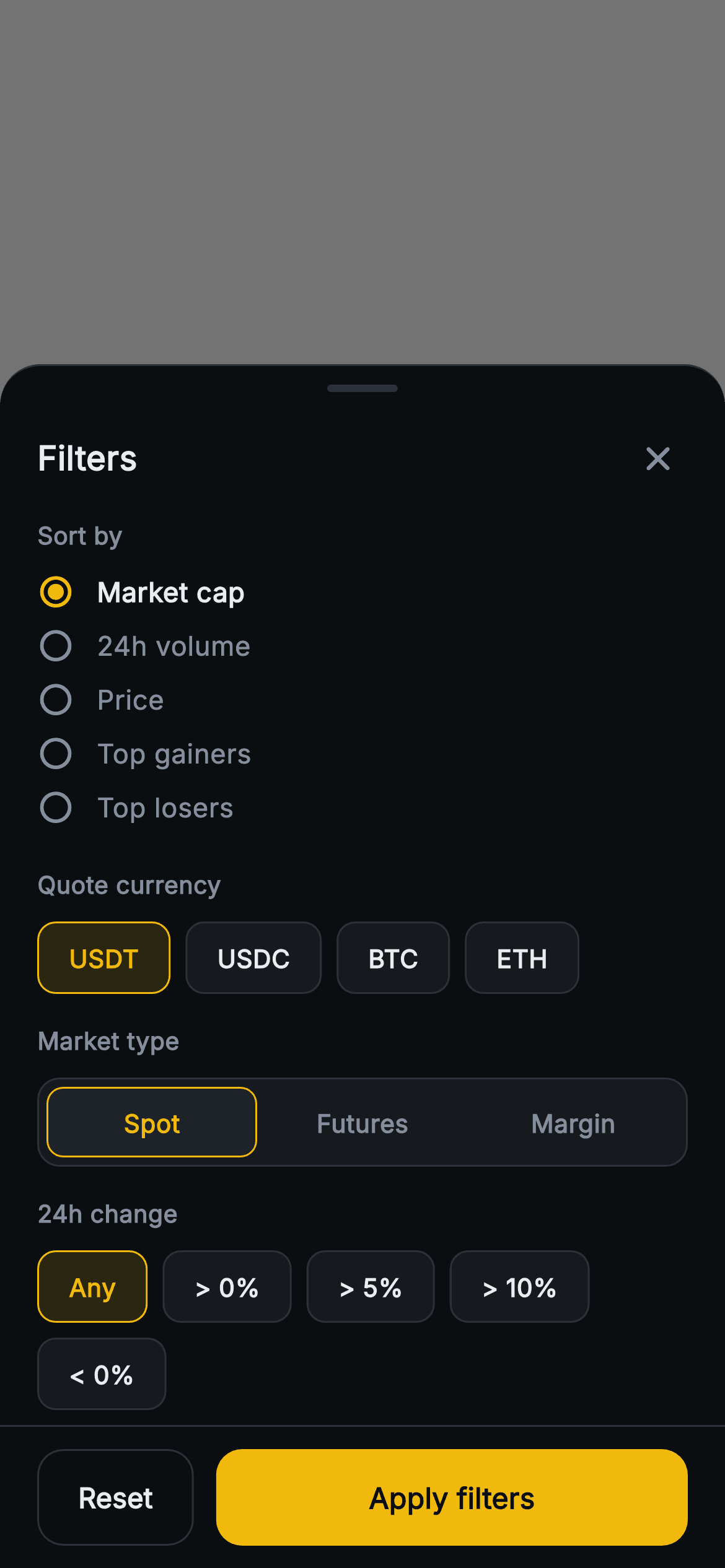
What you'll build
- ✓A bottom sheet with a dimmed scrim whose empty upper area closes the panel on tap
- ✓A five-row Sort by radio list driven by one int index, with the chosen row brightened and bolded
- ✓Quote-currency chips backed by a Set so USDT, USDC, BTC and ETH toggle independently
- ✓One reusable _Chip widget serving both the multi-select quote row and the single-select 24h change row
- ✓A Reset that restores defaults in one setState and an Apply button that outranks it by width and fill
Step-by-step build
Create the file
Add a new file at lib/web3_markets_filters/web3_markets_filters_screen.dart in your Flutter project.
Register the bundled fonts
No external packages — this is pure Flutter. It does bundle its design font (Inter), so drop the font file into fonts/ and declare it in pubspec.yaml:
flutter:
  fonts:
    - family: Inter
      fonts:
- asset: fonts/Inter-Regular.ttfBuild it, piece by piece
Here's how the screen goes together. Each block below is a real slice of the code with a plain-English explanation — paste them in order, or grab the whole file from the next section.
Option lists, four state fields and the reset
import 'package:flutter/material.dart';

/// Web3 markets — Filters sheet. A modal-style filter panel: sort-by rows,
/// quote-currency chips, market-type segmented control, a 24h-change range
/// selector, and a pinned reset/apply bar. Self-contained per CONVENTIONS.md:
/// pure Flutter, bundled Inter font, no glyphs, forced dark theme so it renders
/// standalone as a route (drawn as a rounded sheet over a scrim).
class Web3MarketsFiltersScreen extends StatefulWidget {
  const Web3MarketsFiltersScreen({
    super.key,
    this.onApply,
    this.onReset,
    this.onClose,
  });

  final VoidCallback? onApply;
  final VoidCallback? onReset;
  final VoidCallback? onClose;

  @override
  State<Web3MarketsFiltersScreen> createState() =>
      _Web3MarketsFiltersScreenState();
}

class _Web3MarketsFiltersScreenState extends State<Web3MarketsFiltersScreen> {
  static const String _font = 'Inter';
  static const Color _bg = Color(0xFF0B0E11);
  static const Color _surface = Color(0xFF161A1E);
  static const Color _surfaceAlt = Color(0xFF1E2329);
  static const Color _brand = Color(0xFFF0B90B);
  static const Color _text = Color(0xFFEAECEF);
  static const Color _muted = Color(0xFF848E9C);
  static const Color _hairline = Color(0xFF2B3139);

  static const List<String> _sorts = <String>[
    'Market cap', '24h volume', 'Price', 'Top gainers', 'Top losers',
  ];
  static const List<String> _quotes = <String>['USDT', 'USDC', 'BTC', 'ETH'];
  static const List<String> _types = <String>['Spot', 'Futures', 'Margin'];
  static const List<String> _ranges = <String>[
    'Any', '> 0%', '> 5%', '> 10%', '< 0%',
  ];

  int _sort = 0;
  final Set<String> _quote = <String>{'USDT'};
  int _type = 0;
  int _range = 0;

  void _reset() {
    setState(() {
      _sort = 0;
      _quote
        ..clear()
        ..add('USDT');
      _type = 0;
      _range = 0;
    });
    widget.onReset?.call();
  }
The sheet exposes three `VoidCallback`s — `onApply`, `onReset`, `onClose` — and keeps every choice internal. Each control's options live in a `static const List<String>` (`_sorts`, `_quotes`, `_types`, `_ranges`) so the widgets below are generated from data rather than written out row by row. The state is deliberately mixed: `_sort`, `_type` and `_range` are plain ints because each picks exactly one option, while `_quote` is a `Set<String>` seeded with 'USDT' because several quote currencies can be active at once. Picking the right container per control is what makes the toggle logic trivial later. `_reset` puts everything back inside a single `setState` — note it uses `..clear()..add('USDT')` on the final Set rather than reassigning it — and only then fires `onReset`, so the host is told after the UI already shows defaults.
Scrim, sheet surface, grab handle and title row
  @override
  Widget build(BuildContext context) {
    return Theme(
      data: ThemeData.dark(useMaterial3: true),
      child: Scaffold(
        backgroundColor: Colors.black.withValues(alpha: 0.55),
        body: SafeArea(
          child: Column(
            children: <Widget>[
              Expanded(
                child: GestureDetector(
                  onTap: widget.onClose,
                  behavior: HitTestBehavior.opaque,
                ),
              ),
              Container(
                decoration: const BoxDecoration(
                  color: _bg,
                  borderRadius: BorderRadius.vertical(top: Radius.circular(22)),
                  border: Border(top: BorderSide(color: _hairline)),
                ),
                child: Column(
                  mainAxisSize: MainAxisSize.min,
                  children: <Widget>[
                    const SizedBox(height: 10),
                    Container(
                      width: 38,
                      height: 4,
                      decoration: BoxDecoration(
                        color: _hairline,
                        borderRadius: BorderRadius.circular(2),
                      ),
                    ),
                    Padding(
                      padding: const EdgeInsets.fromLTRB(20, 12, 12, 4),
                      child: Row(
                        children: <Widget>[
                          const Text(
                            'Filters',
                            style: TextStyle(
                              fontFamily: _font,
                              fontSize: 18,
                              fontWeight: FontWeight.w700,
                              color: _text,
                            ),
                          ),
                          const Spacer(),
                          IconButton(
                            onPressed: widget.onClose,
                            icon: const Icon(Icons.close_rounded,
                                size: 22, color: _muted),
                          ),
                        ],
                      ),
                    ),
Instead of being launched through `showModalBottomSheet`, the panel draws its own modal: the `Scaffold` background is `Colors.black.withValues(alpha: 0.55)`, and the top of the body `Column` is an `Expanded` `GestureDetector` with `HitTestBehavior.opaque` wired to `onClose`. Without the opaque behaviour that empty area would have no hit-testable child and taps would fall straight through. Because the Expanded takes all leftover height, the sheet below sizes to its content and rises from the bottom naturally. The sheet itself is a `Container` with a 22px top-only radius and a hairline top border, then a 38x4 grab handle at 2px radius — a visual cue only, there is no drag-to-dismiss. The header row puts an 18px w700 'Filters' title against a muted `close_rounded` `IconButton`, giving a second, explicit way to dismiss.
A sheet body that scrolls only when it must, and the sort radios
                    Flexible(
                      child: ListView(
                        shrinkWrap: true,
                        padding: const EdgeInsets.fromLTRB(20, 4, 20, 8),
                        children: <Widget>[
                          _label('Sort by'),
                          const SizedBox(height: 10),
                          ...List<Widget>.generate(_sorts.length, (int i) {
                            final bool sel = i == _sort;
                            return Padding(
                              padding: const EdgeInsets.only(bottom: 8),
                              child: GestureDetector(
                                onTap: () => setState(() => _sort = i),
                                behavior: HitTestBehavior.opaque,
                                child: Row(
                                  children: <Widget>[
                                    Icon(
                                      sel
                                          ? Icons.radio_button_checked_rounded
                                          : Icons.radio_button_off_rounded,
                                      size: 20,
                                      color: sel ? _brand : _muted,
                                    ),
                                    const SizedBox(width: 12),
                                    Text(
                                      _sorts[i],
                                      style: TextStyle(
                                        fontFamily: _font,
                                        fontSize: 14.5,
                                        fontWeight: sel
                                            ? FontWeight.w600
                                            : FontWeight.w500,
                                        color: sel ? _text : _muted,
                                      ),
                                    ),
                                  ],
                                ),
                              ),
                            );
                          }),
The body is a `ListView` with `shrinkWrap: true` wrapped in `Flexible`, not `Expanded`. That pairing is the key layout trick: on a tall phone the list measures its children and the sheet stays exactly as high as its content, but on a short screen `Flexible` caps it at the space left over and the list starts scrolling while the action bar stays pinned. The Sort by section uses `List<Widget>.generate` spread into the children, one row per `_sorts` entry. Each row compares `i == _sort`, swaps between `radio_button_checked_rounded` in brand gold and `radio_button_off_rounded` in muted grey, and lifts the label from w500 muted to w600 near-white. Using icons rather than `Radio` widgets avoids Material's own padding and theming, and the opaque `GestureDetector` makes the whole row width tappable.
Multi-select quotes, segmented type and single-select range
                          const SizedBox(height: 14),
                          _label('Quote currency'),
                          const SizedBox(height: 10),
                          Wrap(
                            spacing: 8,
                            runSpacing: 8,
                            children: _quotes.map((String q) {
                              final bool sel = _quote.contains(q);
                              return _Chip(
                                label: q,
                                selected: sel,
                                onTap: () => setState(() {
                                  sel ? _quote.remove(q) : _quote.add(q);
                                }),
                              );
                            }).toList(),
                          ),
                          const SizedBox(height: 16),
                          _label('Market type'),
                          const SizedBox(height: 10),
                          _Segmented(
                            options: _types,
                            index: _type,
                            onChanged: (int i) => setState(() => _type = i),
                          ),
                          const SizedBox(height: 16),
                          _label('24h change'),
                          const SizedBox(height: 10),
                          Wrap(
                            spacing: 8,
                            runSpacing: 8,
                            children:
                                List<Widget>.generate(_ranges.length, (int i) {
                              return _Chip(
                                label: _ranges[i],
                                selected: _range == i,
                                onTap: () => setState(() => _range = i),
                              );
                            }),
                          ),
                        ],
                      ),
                    ),
Three sections share one rhythm: a `_label`, a 10px gap, the control, then 14-16px before the next label. Quote currency maps `_quotes` into `_Chip`s inside a `Wrap` with 8px spacing and run spacing, so the chips reflow to a second line on narrow widths. The tap handler is the Set toggle `sel ? _quote.remove(q) : _quote.add(q)` — no list scanning, no duplicates possible. There is no guard against deselecting every quote, so an empty Set is a reachable state you may want to block. Market type hands `_types`, `_type` and a setter closure to `_Segmented`, which keeps that widget stateless. The 24h change row reuses `_Chip` but passes `selected: _range == i` and assigns the index on tap, so the identical chip behaves as single-select purely because of what its parent feeds it.
The pinned Reset and Apply bar
                    const Divider(height: 1, thickness: 1, color: _hairline),
                    SafeArea(
                      top: false,
                      child: Padding(
                        padding: const EdgeInsets.fromLTRB(20, 12, 20, 12),
                        child: Row(
                          children: <Widget>[
                            SizedBox(
                              height: 52,
                              child: OutlinedButton(
                                onPressed: _reset,
                                style: OutlinedButton.styleFrom(
                                  side: const BorderSide(color: _hairline),
                                  shape: RoundedRectangleBorder(
                                    borderRadius: BorderRadius.circular(14),
                                  ),
                                  padding: const EdgeInsets.symmetric(
                                      horizontal: 22),
                                ),
                                child: const Text(
                                  'Reset',
                                  style: TextStyle(
                                    fontFamily: _font,
                                    fontSize: 15,
                                    fontWeight: FontWeight.w600,
                                    color: _text,
                                  ),
                                ),
                              ),
                            ),
                            const SizedBox(width: 12),
                            Expanded(
                              child: SizedBox(
                                height: 52,
                                child: FilledButton(
                                  onPressed: widget.onApply,
                                  style: FilledButton.styleFrom(
                                    backgroundColor: _brand,
                                    shape: RoundedRectangleBorder(
                                      borderRadius: BorderRadius.circular(14),
                                    ),
                                  ),
                                  child: const Text(
                                    'Apply filters',
                                    style: TextStyle(
                                      fontFamily: _font,
                                      fontSize: 15.5,
                                      fontWeight: FontWeight.w700,
                                      color: _bg,
                                    ),
                                  ),
                                ),
                              ),
                            ),
                          ],
                        ),
                      ),
                    ),
                  ],
                ),
              ),
            ],
          ),
        ),
      ),
    );
  }
A 1px `Divider` in the hairline colour marks where scrolling content ends and the fixed bar begins. The bar is wrapped in `SafeArea(top: false)` so the buttons clear the home indicator without adding space above them. Both buttons are 52px tall with a 14px radius, but they are not equals: Reset is an `OutlinedButton` with a hairline border sized only by its 22px horizontal padding, while Apply sits in `Expanded` and takes every remaining pixel as a gold `FilledButton` with 15.5px w700 text in the background colour. Width and fill together tell the trader which action finishes the job. Reset calls the local `_reset`, which clears state first; Apply passes straight through to `widget.onApply` without touching state, so the chosen values are never handed to the callback.
Section labels and the shared chip
  Widget _label(String s) => Text(
        s,
        style: const TextStyle(
          fontFamily: _font,
          fontSize: 13,
          fontWeight: FontWeight.w700,
          color: _muted,
        ),
      );
}

class _Chip extends StatelessWidget {
  const _Chip({
    required this.label,
    required this.selected,
    required this.onTap,
  });

  final String label;
  final bool selected;
  final VoidCallback onTap;

  @override
  Widget build(BuildContext context) {
    return GestureDetector(
      onTap: onTap,
      behavior: HitTestBehavior.opaque,
      child: Container(
        padding: const EdgeInsets.symmetric(horizontal: 16, vertical: 9),
        decoration: BoxDecoration(
          color: selected
              ? _Web3MarketsFiltersScreenState._brand.withValues(alpha: 0.14)
              : _Web3MarketsFiltersScreenState._surface,
          borderRadius: BorderRadius.circular(10),
          border: Border.all(
            color: selected
                ? _Web3MarketsFiltersScreenState._brand
                : _Web3MarketsFiltersScreenState._hairline,
          ),
        ),
        child: Text(
          label,
          style: TextStyle(
            fontFamily: _Web3MarketsFiltersScreenState._font,
            fontSize: 13.5,
            fontWeight: FontWeight.w600,
            color: selected
                ? _Web3MarketsFiltersScreenState._brand
                : _Web3MarketsFiltersScreenState._text,
          ),
        ),
      ),
    );
  }
}
`_label` is a one-line helper returning 13px w700 muted text, which keeps the four headings identical without a separate widget class. `_Chip` is a `StatelessWidget` with `label`, `selected` and `onTap`, and it reaches back into the state class for colours via `_Web3MarketsFiltersScreenState._brand` and friends — legal because they are static constants in the same library. A selected chip gets a gold fill at `withValues(alpha: 0.14)`, a solid gold border and gold text; an unselected one sits on the `#161A1E` surface with a hairline border and near-white text. Keeping a 1px border in both states, only changing its colour, means the chip never shifts by a pixel when toggled. Padding of 16 by 9 with a 10px radius gives a comfortable tap target.
A segmented control built from Expanded cells
class _Segmented extends StatelessWidget {
  const _Segmented({
    required this.options,
    required this.index,
    required this.onChanged,
  });

  final List<String> options;
  final int index;
  final ValueChanged<int> onChanged;

  @override
  Widget build(BuildContext context) {
    return Container(
      padding: const EdgeInsets.all(4),
      decoration: BoxDecoration(
        color: _Web3MarketsFiltersScreenState._surface,
        borderRadius: BorderRadius.circular(12),
        border: Border.all(color: _Web3MarketsFiltersScreenState._hairline),
      ),
      child: Row(
        children: List<Widget>.generate(options.length, (int i) {
          final bool sel = i == index;
          return Expanded(
            child: GestureDetector(
              onTap: () => onChanged(i),
              behavior: HitTestBehavior.opaque,
              child: Container(
                height: 38,
                alignment: Alignment.center,
                decoration: BoxDecoration(
                  color: sel
                      ? _Web3MarketsFiltersScreenState._surfaceAlt
                      : Colors.transparent,
                  borderRadius: BorderRadius.circular(9),
                  border: Border.all(
                    color: sel
                        ? _Web3MarketsFiltersScreenState._brand
                        : Colors.transparent,
                  ),
                ),
                child: Text(
                  options[i],
                  style: TextStyle(
                    fontFamily: _Web3MarketsFiltersScreenState._font,
                    fontSize: 13.5,
                    fontWeight: FontWeight.w600,
                    color: sel
                        ? _Web3MarketsFiltersScreenState._brand
                        : _Web3MarketsFiltersScreenState._muted,
                  ),
                ),
              ),
            ),
          );
        }),
      ),
    );
  }
}
`_Segmented` is a hand-built alternative to Material's `SegmentedButton`. The outer `Container` is the track: `_surface` fill, hairline border, 12px radius and 4px inner padding. Inside, a `Row` generates one `Expanded` cell per option, so Spot, Futures and Margin always split the width evenly regardless of label length. Each cell is a 38px `Container`; the active one gets the raised `#1E2329` fill plus a gold border at a tighter 9px radius, which nests visually inside the track's 12px corners. Inactive cells still declare a transparent border so their text sits at exactly the same position as the selected cell's. Selection is reported through a `ValueChanged<int>` rather than stored, which is why the parent's `_type` field remains the single source of truth.
Full code
The complete, ready-to-paste source. Free to use in your projects — one click copies it all.
import 'package:flutter/material.dart';
/// Web3 markets — Filters sheet. A modal-style filter panel: sort-by rows,
/// quote-currency chips, market-type segmented control, a 24h-change range
/// selector, and a pinned reset/apply bar. Self-contained per CONVENTIONS.md:
/// pure Flutter, bundled Inter font, no glyphs, forced dark theme so it renders
/// standalone as a route (drawn as a rounded sheet over a scrim).
class Web3MarketsFiltersScreen extends StatefulWidget {
const Web3MarketsFiltersScreen({
super.key,
this.onApply,
this.onReset,
this.onClose,
});
final VoidCallback? onApply;
final VoidCallback? onReset;
final VoidCallback? onClose;
@override
State<Web3MarketsFiltersScreen> createState() =>
_Web3MarketsFiltersScreenState();
}
class _Web3MarketsFiltersScreenState extends State<Web3MarketsFiltersScreen> {
static const String _font = 'Inter';
static const Color _bg = Color(0xFF0B0E11);
static const Color _surface = Color(0xFF161A1E);
static const Color _surfaceAlt = Color(0xFF1E2329);
static const Color _brand = Color(0xFFF0B90B);
static const Color _text = Color(0xFFEAECEF);
static const Color _muted = Color(0xFF848E9C);
static const Color _hairline = Color(0xFF2B3139);
static const List<String> _sorts = <String>[
'Market cap', '24h volume', 'Price', 'Top gainers', 'Top losers',
];
static const List<String> _quotes = <String>['USDT', 'USDC', 'BTC', 'ETH'];
static const List<String> _types = <String>['Spot', 'Futures', 'Margin'];
static const List<String> _ranges = <String>[
'Any', '> 0%', '> 5%', '> 10%', '< 0%',
];
int _sort = 0;
final Set<String> _quote = <String>{'USDT'};
int _type = 0;
int _range = 0;
void _reset() {
setState(() {
_sort = 0;
_quote
..clear()
..add('USDT');
_type = 0;
_range = 0;
});
widget.onReset?.call();
}
@override
Widget build(BuildContext context) {
return Theme(
data: ThemeData.dark(useMaterial3: true),
child: Scaffold(
backgroundColor: Colors.black.withValues(alpha: 0.55),
body: SafeArea(
child: Column(
children: <Widget>[
Expanded(
child: GestureDetector(
onTap: widget.onClose,
behavior: HitTestBehavior.opaque,
),
),
Container(
decoration: const BoxDecoration(
color: _bg,
borderRadius: BorderRadius.vertical(top: Radius.circular(22)),
border: Border(top: BorderSide(color: _hairline)),
),
child: Column(
mainAxisSize: MainAxisSize.min,
children: <Widget>[
const SizedBox(height: 10),
Container(
width: 38,
height: 4,
decoration: BoxDecoration(
color: _hairline,
borderRadius: BorderRadius.circular(2),
),
),
Padding(
padding: const EdgeInsets.fromLTRB(20, 12, 12, 4),
child: Row(
children: <Widget>[
const Text(
'Filters',
style: TextStyle(
fontFamily: _font,
fontSize: 18,
fontWeight: FontWeight.w700,
color: _text,
),
),
const Spacer(),
IconButton(
onPressed: widget.onClose,
icon: const Icon(Icons.close_rounded,
size: 22, color: _muted),
),
],
),
),
Flexible(
child: ListView(
shrinkWrap: true,
padding: const EdgeInsets.fromLTRB(20, 4, 20, 8),
children: <Widget>[
_label('Sort by'),
const SizedBox(height: 10),
...List<Widget>.generate(_sorts.length, (int i) {
final bool sel = i == _sort;
return Padding(
padding: const EdgeInsets.only(bottom: 8),
child: GestureDetector(
onTap: () => setState(() => _sort = i),
behavior: HitTestBehavior.opaque,
child: Row(
children: <Widget>[
Icon(
sel
? Icons.radio_button_checked_rounded
: Icons.radio_button_off_rounded,
size: 20,
color: sel ? _brand : _muted,
),
const SizedBox(width: 12),
Text(
_sorts[i],
style: TextStyle(
fontFamily: _font,
fontSize: 14.5,
fontWeight: sel
? FontWeight.w600
: FontWeight.w500,
color: sel ? _text : _muted,
),
),
],
),
),
);
}),
const SizedBox(height: 14),
_label('Quote currency'),
const SizedBox(height: 10),
Wrap(
spacing: 8,
runSpacing: 8,
children: _quotes.map((String q) {
final bool sel = _quote.contains(q);
return _Chip(
label: q,
selected: sel,
onTap: () => setState(() {
sel ? _quote.remove(q) : _quote.add(q);
}),
);
}).toList(),
),
const SizedBox(height: 16),
_label('Market type'),
const SizedBox(height: 10),
_Segmented(
options: _types,
index: _type,
onChanged: (int i) => setState(() => _type = i),
),
const SizedBox(height: 16),
_label('24h change'),
const SizedBox(height: 10),
Wrap(
spacing: 8,
runSpacing: 8,
children:
List<Widget>.generate(_ranges.length, (int i) {
return _Chip(
label: _ranges[i],
selected: _range == i,
onTap: () => setState(() => _range = i),
);
}),
),
],
),
),
const Divider(height: 1, thickness: 1, color: _hairline),
SafeArea(
top: false,
child: Padding(
padding: const EdgeInsets.fromLTRB(20, 12, 20, 12),
child: Row(
children: <Widget>[
SizedBox(
height: 52,
child: OutlinedButton(
onPressed: _reset,
style: OutlinedButton.styleFrom(
side: const BorderSide(color: _hairline),
shape: RoundedRectangleBorder(
borderRadius: BorderRadius.circular(14),
),
padding: const EdgeInsets.symmetric(
horizontal: 22),
),
child: const Text(
'Reset',
style: TextStyle(
fontFamily: _font,
fontSize: 15,
fontWeight: FontWeight.w600,
color: _text,
),
),
),
),
const SizedBox(width: 12),
Expanded(
child: SizedBox(
height: 52,
child: FilledButton(
onPressed: widget.onApply,
style: FilledButton.styleFrom(
backgroundColor: _brand,
shape: RoundedRectangleBorder(
borderRadius: BorderRadius.circular(14),
),
),
child: const Text(
'Apply filters',
style: TextStyle(
fontFamily: _font,
fontSize: 15.5,
fontWeight: FontWeight.w700,
color: _bg,
),
),
),
),
),
],
),
),
),
],
),
),
],
),
),
),
);
}
Widget _label(String s) => Text(
s,
style: const TextStyle(
fontFamily: _font,
fontSize: 13,
fontWeight: FontWeight.w700,
color: _muted,
),
);
}
class _Chip extends StatelessWidget {
const _Chip({
required this.label,
required this.selected,
required this.onTap,
});
final String label;
final bool selected;
final VoidCallback onTap;
@override
Widget build(BuildContext context) {
return GestureDetector(
onTap: onTap,
behavior: HitTestBehavior.opaque,
child: Container(
padding: const EdgeInsets.symmetric(horizontal: 16, vertical: 9),
decoration: BoxDecoration(
color: selected
? _Web3MarketsFiltersScreenState._brand.withValues(alpha: 0.14)
: _Web3MarketsFiltersScreenState._surface,
borderRadius: BorderRadius.circular(10),
border: Border.all(
color: selected
? _Web3MarketsFiltersScreenState._brand
: _Web3MarketsFiltersScreenState._hairline,
),
),
child: Text(
label,
style: TextStyle(
fontFamily: _Web3MarketsFiltersScreenState._font,
fontSize: 13.5,
fontWeight: FontWeight.w600,
color: selected
? _Web3MarketsFiltersScreenState._brand
: _Web3MarketsFiltersScreenState._text,
),
),
),
);
}
}
class _Segmented extends StatelessWidget {
const _Segmented({
required this.options,
required this.index,
required this.onChanged,
});
final List<String> options;
final int index;
final ValueChanged<int> onChanged;
@override
Widget build(BuildContext context) {
return Container(
padding: const EdgeInsets.all(4),
decoration: BoxDecoration(
color: _Web3MarketsFiltersScreenState._surface,
borderRadius: BorderRadius.circular(12),
border: Border.all(color: _Web3MarketsFiltersScreenState._hairline),
),
child: Row(
children: List<Widget>.generate(options.length, (int i) {
final bool sel = i == index;
return Expanded(
child: GestureDetector(
onTap: () => onChanged(i),
behavior: HitTestBehavior.opaque,
child: Container(
height: 38,
alignment: Alignment.center,
decoration: BoxDecoration(
color: sel
? _Web3MarketsFiltersScreenState._surfaceAlt
: Colors.transparent,
borderRadius: BorderRadius.circular(9),
border: Border.all(
color: sel
? _Web3MarketsFiltersScreenState._brand
: Colors.transparent,
),
),
child: Text(
options[i],
style: TextStyle(
fontFamily: _Web3MarketsFiltersScreenState._font,
fontSize: 13.5,
fontWeight: FontWeight.w600,
color: sel
? _Web3MarketsFiltersScreenState._brand
: _Web3MarketsFiltersScreenState._muted,
),
),
),
),
);
}),
),
);
}
}
Plus bundled 1 binary asset (fonts/images). The CLI and MCP install those for you automatically.
Two faster ways to add it
Copy-paste works, but you can skip it entirely.
1. FlutterKit CLI
One command drops this screen — and its fonts — straight into your project.
$ flutterkit add web3-markets-filters2. AI agent (MCP)
Connect FlutterKit's MCP server in Claude or Cursor and just ask your agent to install web3-markets-filters — it fetches and writes the files for you.
FAQ
Can I ship this market filters sheet in a commercial exchange app?
Yes. It is free for personal and commercial apps alike — copy it from this page, add it with the CLI command, or fetch it over MCP. There is no licence key to configure and no attribution to include.
Does the sheet depend on any packages or fonts I need to add?
No third-party packages. The radios, chips and segmented control are built from Material icons, `GestureDetector` and `BoxDecoration`. The only asset is the bundled Inter font, referenced as `fontFamily: 'Inter'`; remove that line if you prefer the platform default.
What Flutter version is required?
Flutter 3.22 or later, because the scrim and selected chips use `Color.withValues(alpha: ...)`. On an older SDK replace those calls with `withOpacity(0.55)` and `withOpacity(0.14)`. The constructors also use `super.key`, which needs Dart 2.17; expand to `{Key? key} : super(key: key)` if you are below that.
How do I get the selected filters out when Apply is tapped?
As written, `onApply` is a `VoidCallback` and the selections stay private to the state class, so your markets list never receives them. Change it to something like `ValueChanged<MarketFilters>`, build that object from `_sorts[_sort]`, `Set.of(_quote)`, `_types[_type]` and `_ranges[_range]`, and call it from the Apply button. Add matching initial-value parameters so the sheet reopens showing the filters already in effect.
Why does it draw its own scrim instead of using showModalBottomSheet?
So it renders as a complete, previewable route on its own. The dark overlay and the tap-to-close area are just a Scaffold background and an `Expanded` `GestureDetector`. If you would rather use `showModalBottomSheet`, lift out the rounded `Container` and its contents, drop the Scaffold and the top `Expanded`, and let the framework supply the barrier and drag handling.


