How to Build a Crypto Allocation Donut Chart Screen in Flutter (Full Code + Preview)
A portfolio total tells a crypto holder how much they own, but not how concentrated that money is. This tutorial builds Aurum's allocation screen in Flutter, the page that answers 'how much of this is Bitcoin?' at a glance. You paint a 220px donut ring from four fractions with a CustomPainter, float the total inside its hole, and list each coin below with a tinted badge, a share bar and a percentage formatted from the same number that sized its arc.
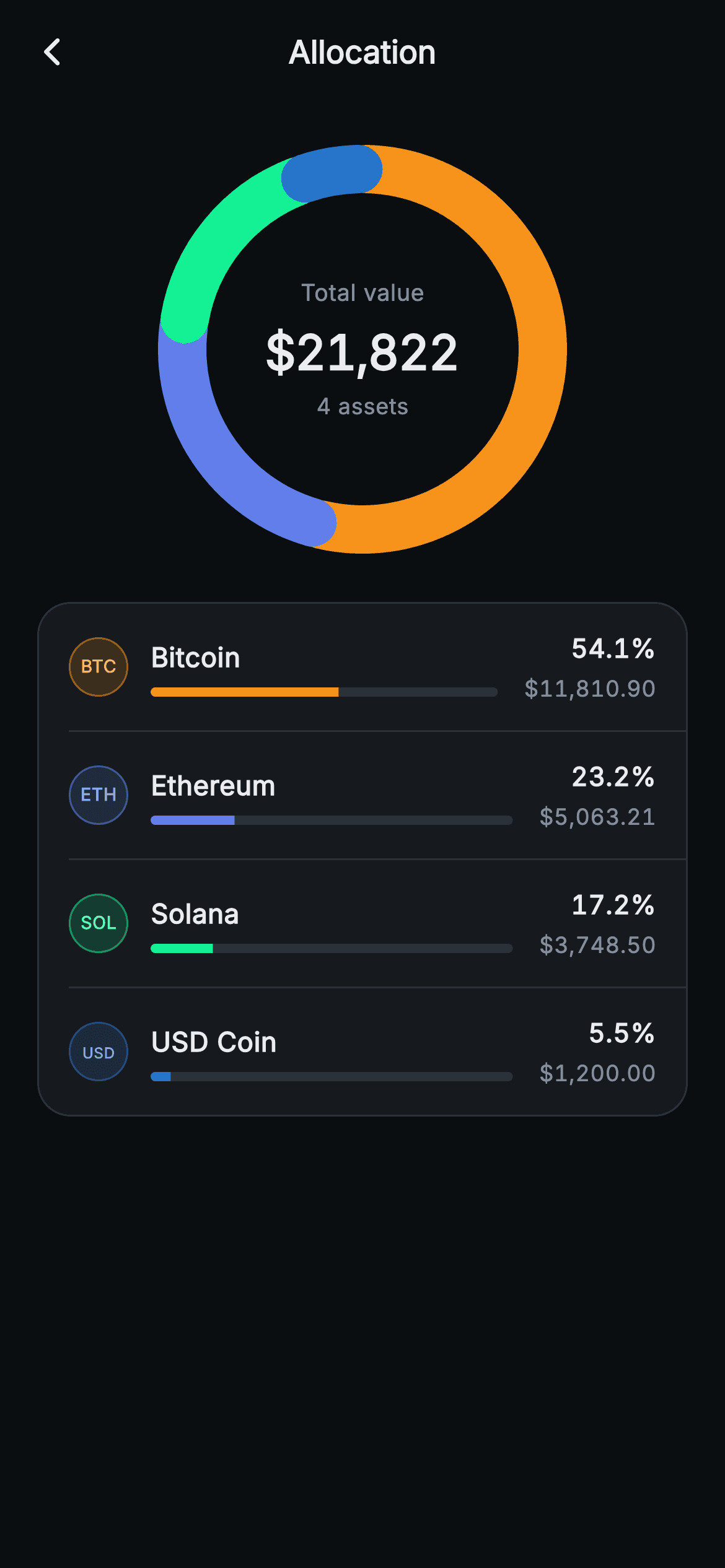
What you'll build
- ✓A _DonutPainter ring that turns four fractions into round-capped 26px arcs laid clockwise from twelve o'clock over a #1E2329 track
- ✓A 'Total value' / $21,822 / '4 assets' label stack passed as the CustomPaint child so it sits centred in the ring's 168px hole
- ✓A legend card whose rows derive the 54.1% text, the LinearProgressIndicator fill and the donut sweep from one fraction field
- ✓Tappable legend rows that report the coin's ticker through onAssetTap, separated by 16px-indented hairline Dividers
Step-by-step build
Create the file
Add a new file at lib/web3_home_allocation/web3_home_allocation_screen.dart in your Flutter project.
Register the bundled fonts
No external packages — this is pure Flutter. It does bundle its design font (Inter), so drop the font file into fonts/ and declare it in pubspec.yaml:
flutter:
  fonts:
    - family: Inter
      fonts:
- asset: fonts/Inter-Regular.ttfBuild it, piece by piece
Here's how the screen goes together. Each block below is a real slice of the code with a plain-English explanation — paste them in order, or grab the whole file from the next section.
Four slices that must add up to one
import 'dart:math' as math;

import 'package:flutter/material.dart';

/// Web3 home — Allocation. A painted donut allocation ring with a centred total
/// and a legend list of percent-per-asset. Self-contained per CONVENTIONS.md:
/// pure Flutter, bundled Inter font, donut custom-painted + painted ticker
/// badges (no network image / no glyphs), forced dark theme so it renders
/// standalone as a route.
class Web3HomeAllocationScreen extends StatelessWidget {
  const Web3HomeAllocationScreen({super.key, this.onBack, this.onAssetTap});

  final VoidCallback? onBack;
  final ValueChanged<String>? onAssetTap;

  static const String _font = 'Inter';
  static const Color _bg = Color(0xFF0B0E11);
  static const Color _surface = Color(0xFF161A1E);
  static const Color _text = Color(0xFFEAECEF);
  static const Color _muted = Color(0xFF848E9C);
  static const Color _hairline = Color(0xFF2B3139);

  static const List<_Slice> _slices = <_Slice>[
    _Slice('BTC', 'Bitcoin', 0.541, r'$11,810.90', Color(0xFFF7931A)),
    _Slice('ETH', 'Ethereum', 0.232, r'$5,063.21', Color(0xFF627EEA)),
    _Slice('SOL', 'Solana', 0.172, r'$3,748.50', Color(0xFF14F195)),
    _Slice('USDC', 'USD Coin', 0.055, r'$1,200.00', Color(0xFF2775CA)),
  ];
The file imports `dart:math` for exactly one thing: `math.pi`, which the painter needs to convert fractions into radians. `Web3HomeAllocationScreen` is a `StatelessWidget` with only two optional callbacks, `onBack` and `onAssetTap`, because nothing on this screen changes after it is built. The data that drives it is `_slices`, four `const _Slice` records each holding a ticker, a name, a `fraction`, a preformatted dollar string and a brand tint (`#F7931A` Bitcoin orange, `#627EEA` Ethereum blue, `#14F195` Solana green, `#2775CA` USDC blue). The fractions 0.541 + 0.232 + 0.172 + 0.055 sum to exactly 1.000, and they agree with the dollar strings: $11,810.90 out of a $21,822.61 total really is 54.1%. That consistency is handwritten, though. Nothing in the code computes one from the other, so with live data you derive the fractions yourself.
Staging the ring and its centre label
  @override
  Widget build(BuildContext context) {
    return Theme(
      data: ThemeData.dark(useMaterial3: true),
      child: Scaffold(
        backgroundColor: _bg,
        appBar: _appBar(),
        body: SafeArea(
          top: false,
          child: ListView(
            padding: const EdgeInsets.fromLTRB(20, 12, 20, 24),
            children: <Widget>[
              SizedBox(
                height: 240,
                child: Center(
                  child: SizedBox(
                    width: 220,
                    height: 220,
                    child: CustomPaint(
                      painter: _DonutPainter(
                        slices: _slices
                            .map((_Slice s) => _DonutSeg(s.fraction, s.tint))
                            .toList(),
                      ),
                      child: const Center(
                        child: Column(
                          mainAxisSize: MainAxisSize.min,
                          children: <Widget>[
                            Text(
                              'Total value',
                              style: TextStyle(
                                fontFamily: _font,
                                fontSize: 12.5,
                                color: _muted,
                              ),
                            ),
                            SizedBox(height: 4),
                            Text(
                              r'$21,822',
                              style: TextStyle(
                                fontFamily: _font,
                                fontSize: 26,
                                fontWeight: FontWeight.w700,
                                letterSpacing: -0.5,
                                fontFeatures: <FontFeature>[
                                  FontFeature.tabularFigures(),
                                ],
                                color: _text,
                              ),
                            ),
                            SizedBox(height: 2),
                            Text(
                              '4 assets',
                              style: TextStyle(
                                fontFamily: _font,
                                fontSize: 12,
                                color: _muted,
                              ),
                            ),
                          ],
                        ),
                      ),
                    ),
                  ),
                ),
              ),
After the usual dark `Theme` wrapper and a `SafeArea(top: false)` (the AppBar already owns the top inset), the `ListView` opens with a 240px `SizedBox` that centres a fixed 220 by 220 box. That extra 20px of vertical room is breathing space between the ring and the AppBar and legend. The painter receives `_slices.map((_Slice s) => _DonutSeg(s.fraction, s.tint)).toList()`, so it only ever sees a fraction and a colour and knows nothing about tickers or dollars. The centre text is passed as the `CustomPaint`'s `child`, not stacked on top, because `CustomPaint` draws `painter` behind its child and sizes the child to the same box. A `Center` then places the `MainAxisSize.min` column in the middle of the ring. The column holds muted 12.5px 'Total value', a 26px `w700` '$21,822' with `letterSpacing: -0.5` and tabular figures, and a 12px '4 assets'. The ring's inner hole is 220 minus two 26px strokes, or 168px across, which comfortably fits the six-character total. Note the cents from $21,822.61 are dropped on purpose, since a headline inside a chart is a rounded figure.
The legend card and a sub-page AppBar
              const SizedBox(height: 16),
              Container(
                decoration: BoxDecoration(
                  color: _surface,
                  borderRadius: BorderRadius.circular(18),
                  border: Border.all(color: _hairline),
                ),
                child: Column(
                  children: <Widget>[
                    for (int i = 0; i < _slices.length; i++) ...<Widget>[
                      _LegendRow(
                        slice: _slices[i],
                        onTap: () => onAssetTap?.call(_slices[i].ticker),
                      ),
                      if (i != _slices.length - 1)
                        const Divider(
                            height: 1, thickness: 1, indent: 16, color: _hairline),
                    ],
                  ],
                ),
              ),
            ],
          ),
        ),
      ),
    );
  }

  PreferredSizeWidget _appBar() {
    return AppBar(
      backgroundColor: _bg,
      elevation: 0,
      centerTitle: true,
      leading: IconButton(
        onPressed: onBack,
        icon: const Icon(Icons.arrow_back_ios_new_rounded,
            size: 18, color: _text),
      ),
      title: const Text(
        'Allocation',
        style: TextStyle(
          fontFamily: _font,
          fontSize: 17,
          fontWeight: FontWeight.w700,
          color: _text,
        ),
      ),
    );
  }
}
The legend lives in one `_surface` Container with an 18px radius and a `_hairline` border, and its rows are emitted by a collection-for that spreads a `_LegendRow` plus `if (i != _slices.length - 1)` a `Divider`. That condition keeps a divider between rows and never under the last one. Each divider is `height: 1, thickness: 1, indent: 16`, and that 16px matches the row's horizontal padding, so the line starts under the badge's left edge and runs out to the card's right edge. The tap closure, `() => onAssetTap?.call(_slices[i].ticker)`, is built per row and hands back the ticker string, not an index or the `_Slice`, so the host can route to a coin page without importing this file's private model. Only the legend is interactive. The donut has no hit-testing, so tapping a segment does nothing. `_appBar()` has a centred 17px 'Allocation' title and an `arrow_back_ios_new_rounded` leading button wired to `onBack`. There is no bottom navigation, because this is a drill-down from the wallet home rather than a tab.
The slice model and the row's ticker badge
class _Slice {
  const _Slice(this.ticker, this.name, this.fraction, this.value, this.tint);

  final String ticker;
  final String name;
  final double fraction;
  final String value;
  final Color tint;
}

class _LegendRow extends StatelessWidget {
  const _LegendRow({required this.slice, required this.onTap});

  final _Slice slice;
  final VoidCallback onTap;

  @override
  Widget build(BuildContext context) {
    return Material(
      color: Colors.transparent,
      child: InkWell(
        onTap: onTap,
        child: Padding(
          padding: const EdgeInsets.symmetric(horizontal: 16, vertical: 14),
          child: Row(
            children: <Widget>[
              Container(
                width: 32,
                height: 32,
                decoration: BoxDecoration(
                  color: slice.tint.withValues(alpha: 0.16),
                  shape: BoxShape.circle,
                  border: Border.all(color: slice.tint.withValues(alpha: 0.5)),
                ),
                alignment: Alignment.center,
                child: Text(
                  slice.ticker.length <= 3
                      ? slice.ticker
                      : slice.ticker.substring(0, 3),
                  style: TextStyle(
                    fontFamily: Web3HomeAllocationScreen._font,
                    fontSize: slice.ticker.length >= 4 ? 8 : 9.5,
                    fontWeight: FontWeight.w700,
                    color: Color.lerp(slice.tint, Colors.white, 0.35),
                  ),
                ),
              ),
`_Slice` is a five-field const class with a positional constructor, which keeps the four-line data table at the top of the file readable. `_LegendRow` takes a non-nullable `VoidCallback`. The nullable screen-level callback is absorbed by the `?.call` in the parent's closure, so the row never has to null-check. `Material(color: Colors.transparent)` around the `InkWell` gives the ripple a surface to draw on above the card colour. Inside the 16 by 14 padding, the badge is a 32px circle filled with the slice tint at 16% alpha and ringed at 50%. Its label is the tint lightened 35% toward white with `Color.lerp`, so each coin keeps its identity while staying readable on its own wash. Two guards keep long tickers inside the circle: anything over three characters is cut with `substring(0, 3)`, and four-plus-character tickers drop from 9.5px to 8px. In this data that means the USDC badge reads 'USD', which you may want to override, because in a wallet that is easy to mistake for fiat dollars.
One fraction, three readouts
              const SizedBox(width: 12),
              Expanded(
                child: Column(
                  crossAxisAlignment: CrossAxisAlignment.start,
                  children: <Widget>[
                    Text(
                      slice.name,
                      style: const TextStyle(
                        fontFamily: Web3HomeAllocationScreen._font,
                        fontSize: 14.5,
                        fontWeight: FontWeight.w600,
                        color: Web3HomeAllocationScreen._text,
                      ),
                    ),
                    const SizedBox(height: 6),
                    ClipRRect(
                      borderRadius: BorderRadius.circular(3),
                      child: LinearProgressIndicator(
                        value: slice.fraction,
                        minHeight: 5,
                        backgroundColor: Web3HomeAllocationScreen._hairline,
                        valueColor: AlwaysStoppedAnimation<Color>(slice.tint),
                      ),
                    ),
                  ],
                ),
              ),
              const SizedBox(width: 14),
              Column(
                crossAxisAlignment: CrossAxisAlignment.end,
                children: <Widget>[
                  Text(
                    '${(slice.fraction * 100).toStringAsFixed(1)}%',
                    style: const TextStyle(
                      fontFamily: Web3HomeAllocationScreen._font,
                      fontSize: 14,
                      fontWeight: FontWeight.w700,
                      fontFeatures: <FontFeature>[FontFeature.tabularFigures()],
                      color: Web3HomeAllocationScreen._text,
                    ),
                  ),
                  const SizedBox(height: 3),
                  Text(
                    slice.value,
                    style: const TextStyle(
                      fontFamily: Web3HomeAllocationScreen._font,
                      fontSize: 12,
                      fontFeatures: <FontFeature>[FontFeature.tabularFigures()],
                      color: Web3HomeAllocationScreen._muted,
                    ),
                  ),
                ],
              ),
            ],
          ),
        ),
      ),
    );
  }
}
The middle of the row is an `Expanded` column with the coin name at 14.5px `w600` above a share bar. The bar is a stock `LinearProgressIndicator` given `value: slice.fraction`, `minHeight: 5`, a `_hairline` background and `AlwaysStoppedAnimation<Color>(slice.tint)`. That last argument is how you hand the widget a fixed colour, since `valueColor` expects an `Animation`. A `ClipRRect` with a 3px radius rounds the bar's ends, which the indicator does not do on its own. The right-hand column formats the same field as text: `'${(slice.fraction * 100).toStringAsFixed(1)}%'`, so 0.541 becomes '54.1%', and the one-decimal rounding also hides floating-point noise like 0.232 * 100 = 23.200000000000003. Below it, the dollar value is 12px muted. Both numbers use `FontFeature.tabularFigures()` with `CrossAxisAlignment.end`, so the decimal points line up down the card. The bar measures share of the whole portfolio, not share of the largest holding. BTC's bar is about half full rather than full, so the bars read in the same units as the ring above them.
_DonutPainter: track, start angle and the gap that round caps swallow
class _DonutSeg {
  const _DonutSeg(this.fraction, this.color);

  final double fraction;
  final Color color;
}

class _DonutPainter extends CustomPainter {
  const _DonutPainter({required this.slices});

  final List<_DonutSeg> slices;

  @override
  void paint(Canvas canvas, Size size) {
    final Offset c = Offset(size.width / 2, size.height / 2);
    final double r = size.width / 2;
    const double stroke = 26;
    final Rect rect = Rect.fromCircle(center: c, radius: r - stroke / 2);

    // Track.
    canvas.drawArc(
      rect,
      0,
      2 * math.pi,
      false,
      Paint()
        ..style = PaintingStyle.stroke
        ..strokeWidth = stroke
        ..color = const Color(0xFF1E2329),
    );

    double start = -math.pi / 2;
    const double gap = 0.045;
    for (final _DonutSeg s in slices) {
      final double sweep = 2 * math.pi * s.fraction - gap;
      canvas.drawArc(
        rect,
        start + gap / 2,
        sweep,
        false,
        Paint()
          ..style = PaintingStyle.stroke
          ..strokeWidth = stroke
          ..strokeCap = StrokeCap.round
          ..color = s.color,
      );
      start += 2 * math.pi * s.fraction;
    }
  }

  @override
  bool shouldRepaint(_DonutPainter oldDelegate) => oldDelegate.slices != slices;
}
The painter strokes arcs instead of filling wedges, so the hole is simply unpainted canvas and needs no clipping. The arc rectangle is `Rect.fromCircle(center: c, radius: r - stroke / 2)`, which is 97px on a 220px canvas. A stroke is centred on its path, so pulling the radius in by half the 26px stroke keeps the ring's outer edge exactly at the box edge. A full `2 * math.pi` arc in `#1E2329` paints the track first. The segments start at `-math.pi / 2` because Flutter measures angles clockwise from three o'clock, and minus a quarter turn moves the start to twelve o'clock, the convention every reader expects. For each segment, `sweep = 2π × fraction − gap`, with the arc drawn from `start + gap / 2`. Then `start` advances by the full, un-shortened `2π × fraction`, so the gaps never accumulate drift and the ring still closes exactly. There is a catch here. `StrokeCap.round` adds a 13px half-disc beyond each end of an arc, while the 0.045 rad gap is only about 4.4px at this radius. The caps overlap, and each later segment's rounded head sits on top of the previous segment's tail, USDC's over BTC's at twelve o'clock included. The result is pebble-like joins rather than visible slots. `shouldRepaint` compares list identity, and because `build` creates a fresh list every time, any rebuild repaints. On this stateless screen that is cheap.
Full code
The complete, ready-to-paste source. Free to use in your projects — one click copies it all.
import 'dart:math' as math;

import 'package:flutter/material.dart';

/// Web3 home — Allocation. A painted donut allocation ring with a centred total
/// and a legend list of percent-per-asset. Self-contained per CONVENTIONS.md:
/// pure Flutter, bundled Inter font, donut custom-painted + painted ticker
/// badges (no network image / no glyphs), forced dark theme so it renders
/// standalone as a route.
class Web3HomeAllocationScreen extends StatelessWidget {
  const Web3HomeAllocationScreen({super.key, this.onBack, this.onAssetTap});

  final VoidCallback? onBack;
  final ValueChanged<String>? onAssetTap;

  static const String _font = 'Inter';
  static const Color _bg = Color(0xFF0B0E11);
  static const Color _surface = Color(0xFF161A1E);
  static const Color _text = Color(0xFFEAECEF);
  static const Color _muted = Color(0xFF848E9C);
  static const Color _hairline = Color(0xFF2B3139);

  static const List<_Slice> _slices = <_Slice>[
    _Slice('BTC', 'Bitcoin', 0.541, r'$11,810.90', Color(0xFFF7931A)),
    _Slice('ETH', 'Ethereum', 0.232, r'$5,063.21', Color(0xFF627EEA)),
    _Slice('SOL', 'Solana', 0.172, r'$3,748.50', Color(0xFF14F195)),
    _Slice('USDC', 'USD Coin', 0.055, r'$1,200.00', Color(0xFF2775CA)),
  ];

  @override
  Widget build(BuildContext context) {
    return Theme(
      data: ThemeData.dark(useMaterial3: true),
      child: Scaffold(
        backgroundColor: _bg,
        appBar: _appBar(),
        body: SafeArea(
          top: false,
          child: ListView(
            padding: const EdgeInsets.fromLTRB(20, 12, 20, 24),
            children: <Widget>[
              SizedBox(
                height: 240,
                child: Center(
                  child: SizedBox(
                    width: 220,
                    height: 220,
                    child: CustomPaint(
                      painter: _DonutPainter(
                        slices: _slices
                            .map((_Slice s) => _DonutSeg(s.fraction, s.tint))
                            .toList(),
                      ),
                      child: const Center(
                        child: Column(
                          mainAxisSize: MainAxisSize.min,
                          children: <Widget>[
                            Text(
                              'Total value',
                              style: TextStyle(
                                fontFamily: _font,
                                fontSize: 12.5,
                                color: _muted,
                              ),
                            ),
                            SizedBox(height: 4),
                            Text(
                              r'$21,822',
                              style: TextStyle(
                                fontFamily: _font,
                                fontSize: 26,
                                fontWeight: FontWeight.w700,
                                letterSpacing: -0.5,
                                fontFeatures: <FontFeature>[
                                  FontFeature.tabularFigures(),
                                ],
                                color: _text,
                              ),
                            ),
                            SizedBox(height: 2),
                            Text(
                              '4 assets',
                              style: TextStyle(
                                fontFamily: _font,
                                fontSize: 12,
                                color: _muted,
                              ),
                            ),
                          ],
                        ),
                      ),
                    ),
                  ),
                ),
              ),
              const SizedBox(height: 16),
              Container(
                decoration: BoxDecoration(
                  color: _surface,
                  borderRadius: BorderRadius.circular(18),
                  border: Border.all(color: _hairline),
                ),
                child: Column(
                  children: <Widget>[
                    for (int i = 0; i < _slices.length; i++) ...<Widget>[
                      _LegendRow(
                        slice: _slices[i],
                        onTap: () => onAssetTap?.call(_slices[i].ticker),
                      ),
                      if (i != _slices.length - 1)
                        const Divider(
                            height: 1, thickness: 1, indent: 16, color: _hairline),
                    ],
                  ],
                ),
              ),
            ],
          ),
        ),
      ),
    );
  }

  PreferredSizeWidget _appBar() {
    return AppBar(
      backgroundColor: _bg,
      elevation: 0,
      centerTitle: true,
      leading: IconButton(
        onPressed: onBack,
        icon: const Icon(Icons.arrow_back_ios_new_rounded,
            size: 18, color: _text),
      ),
      title: const Text(
        'Allocation',
        style: TextStyle(
          fontFamily: _font,
          fontSize: 17,
          fontWeight: FontWeight.w700,
          color: _text,
        ),
      ),
    );
  }
}

class _Slice {
  const _Slice(this.ticker, this.name, this.fraction, this.value, this.tint);

  final String ticker;
  final String name;
  final double fraction;
  final String value;
  final Color tint;
}

class _LegendRow extends StatelessWidget {
  const _LegendRow({required this.slice, required this.onTap});

  final _Slice slice;
  final VoidCallback onTap;

  @override
  Widget build(BuildContext context) {
    return Material(
      color: Colors.transparent,
      child: InkWell(
        onTap: onTap,
        child: Padding(
          padding: const EdgeInsets.symmetric(horizontal: 16, vertical: 14),
          child: Row(
            children: <Widget>[
              Container(
                width: 32,
                height: 32,
                decoration: BoxDecoration(
                  color: slice.tint.withValues(alpha: 0.16),
                  shape: BoxShape.circle,
                  border: Border.all(color: slice.tint.withValues(alpha: 0.5)),
                ),
                alignment: Alignment.center,
                child: Text(
                  slice.ticker.length <= 3
                      ? slice.ticker
                      : slice.ticker.substring(0, 3),
                  style: TextStyle(
                    fontFamily: Web3HomeAllocationScreen._font,
                    fontSize: slice.ticker.length >= 4 ? 8 : 9.5,
                    fontWeight: FontWeight.w700,
                    color: Color.lerp(slice.tint, Colors.white, 0.35),
                  ),
                ),
              ),
              const SizedBox(width: 12),
              Expanded(
                child: Column(
                  crossAxisAlignment: CrossAxisAlignment.start,
                  children: <Widget>[
                    Text(
                      slice.name,
                      style: const TextStyle(
                        fontFamily: Web3HomeAllocationScreen._font,
                        fontSize: 14.5,
                        fontWeight: FontWeight.w600,
                        color: Web3HomeAllocationScreen._text,
                      ),
                    ),
                    const SizedBox(height: 6),
                    ClipRRect(
                      borderRadius: BorderRadius.circular(3),
                      child: LinearProgressIndicator(
                        value: slice.fraction,
                        minHeight: 5,
                        backgroundColor: Web3HomeAllocationScreen._hairline,
                        valueColor: AlwaysStoppedAnimation<Color>(slice.tint),
                      ),
                    ),
                  ],
                ),
              ),
              const SizedBox(width: 14),
              Column(
                crossAxisAlignment: CrossAxisAlignment.end,
                children: <Widget>[
                  Text(
                    '${(slice.fraction * 100).toStringAsFixed(1)}%',
                    style: const TextStyle(
                      fontFamily: Web3HomeAllocationScreen._font,
                      fontSize: 14,
                      fontWeight: FontWeight.w700,
                      fontFeatures: <FontFeature>[FontFeature.tabularFigures()],
                      color: Web3HomeAllocationScreen._text,
                    ),
                  ),
                  const SizedBox(height: 3),
                  Text(
                    slice.value,
                    style: const TextStyle(
                      fontFamily: Web3HomeAllocationScreen._font,
                      fontSize: 12,
                      fontFeatures: <FontFeature>[FontFeature.tabularFigures()],
                      color: Web3HomeAllocationScreen._muted,
                    ),
                  ),
                ],
              ),
            ],
          ),
        ),
      ),
    );
  }
}

class _DonutSeg {
  const _DonutSeg(this.fraction, this.color);

  final double fraction;
  final Color color;
}

class _DonutPainter extends CustomPainter {
  const _DonutPainter({required this.slices});

  final List<_DonutSeg> slices;

  @override
  void paint(Canvas canvas, Size size) {
    final Offset c = Offset(size.width / 2, size.height / 2);
    final double r = size.width / 2;
    const double stroke = 26;
    final Rect rect = Rect.fromCircle(center: c, radius: r - stroke / 2);

    // Track.
    canvas.drawArc(
      rect,
      0,
      2 * math.pi,
      false,
      Paint()
        ..style = PaintingStyle.stroke
        ..strokeWidth = stroke
        ..color = const Color(0xFF1E2329),
    );

    double start = -math.pi / 2;
    const double gap = 0.045;
    for (final _DonutSeg s in slices) {
      final double sweep = 2 * math.pi * s.fraction - gap;
      canvas.drawArc(
        rect,
        start + gap / 2,
        sweep,
        false,
        Paint()
          ..style = PaintingStyle.stroke
          ..strokeWidth = stroke
          ..strokeCap = StrokeCap.round
          ..color = s.color,
      );
      start += 2 * math.pi * s.fraction;
    }
  }

  @override
  bool shouldRepaint(_DonutPainter oldDelegate) => oldDelegate.slices != slices;
}
Plus bundled 1 binary asset (fonts/images). The CLI and MCP install those for you automatically.
Two faster ways to add it
Copy-paste works, but you can skip it entirely.
1. FlutterKit CLI
One command drops this screen — and its fonts — straight into your project.
$ flutterkit add web3-home-allocation2. AI agent (MCP)
Connect FlutterKit's MCP server in Claude or Cursor and just ask your agent to install web3-home-allocation — it fetches and writes the files for you.
FAQ
Is this allocation screen free to use in a commercial wallet app?
Yes. Copy the screen and its donut painter from this page, add it with the CLI, or fetch it over MCP, then ship it in a product you charge for. You don't need a licence key or an account, and you don't need to credit anyone.
Do I need a chart library or extra fonts for the donut?
No. The ring is a plain `CustomPainter` using `canvas.drawArc`, the share bars are Flutter's own `LinearProgressIndicator`, and the only import beyond Material is `dart:math` for pi. No third-party packages are needed. The Inter typeface is bundled with the screen at lib/web3_home_allocation/fonts/Inter.ttf and referenced through `fontFamily: 'Inter'`.
What Flutter version does it target?
Flutter 3.22 or later, since the badge fill and border use `Color.withValues(alpha: ...)`. On an earlier SDK, write `withOpacity(0.16)` and `withOpacity(0.5)` instead. The constructors use `super.key` super parameters, which need Dart 2.17 or newer. On an older toolchain, change them to `{Key? key} : super(key: key)`.
How do I compute the fractions from real balances?
Sum the fiat value of every holding, divide each by that total, and sort descending so the largest arc starts at twelve o'clock. Guard a zero total, and derive the '$21,822' headline and '4 assets' label from the same list instead of leaving them as literals. Watch tiny holdings. Any fraction below 0.045 / 2π, about 0.72%, gives a negative sweep and draws backwards, so clamp it with `math.max(0, sweep)` or merge dust into an 'Other' slice.
The code defines a gap between segments, so why can't I see one?
Because `StrokeCap.round` extends each 26px-wide arc by 13px at both ends, which is far more than the 0.045 rad (about 4.4px) gap. Adjacent caps overlap, and the later slice's rounded head covers the earlier slice's tail. For true slots, switch to `StrokeCap.butt`. To keep round ends, widen the gap to at least stroke ÷ radius (26 / 97 ≈ 0.27 rad) plus the spacing you want, accepting that very small slices will then nearly vanish.


