Pulse · Edit Highlight
Pulse · Edit Highlight is a production-ready Social Flutter screen from FlutterKit — free, with full source code.
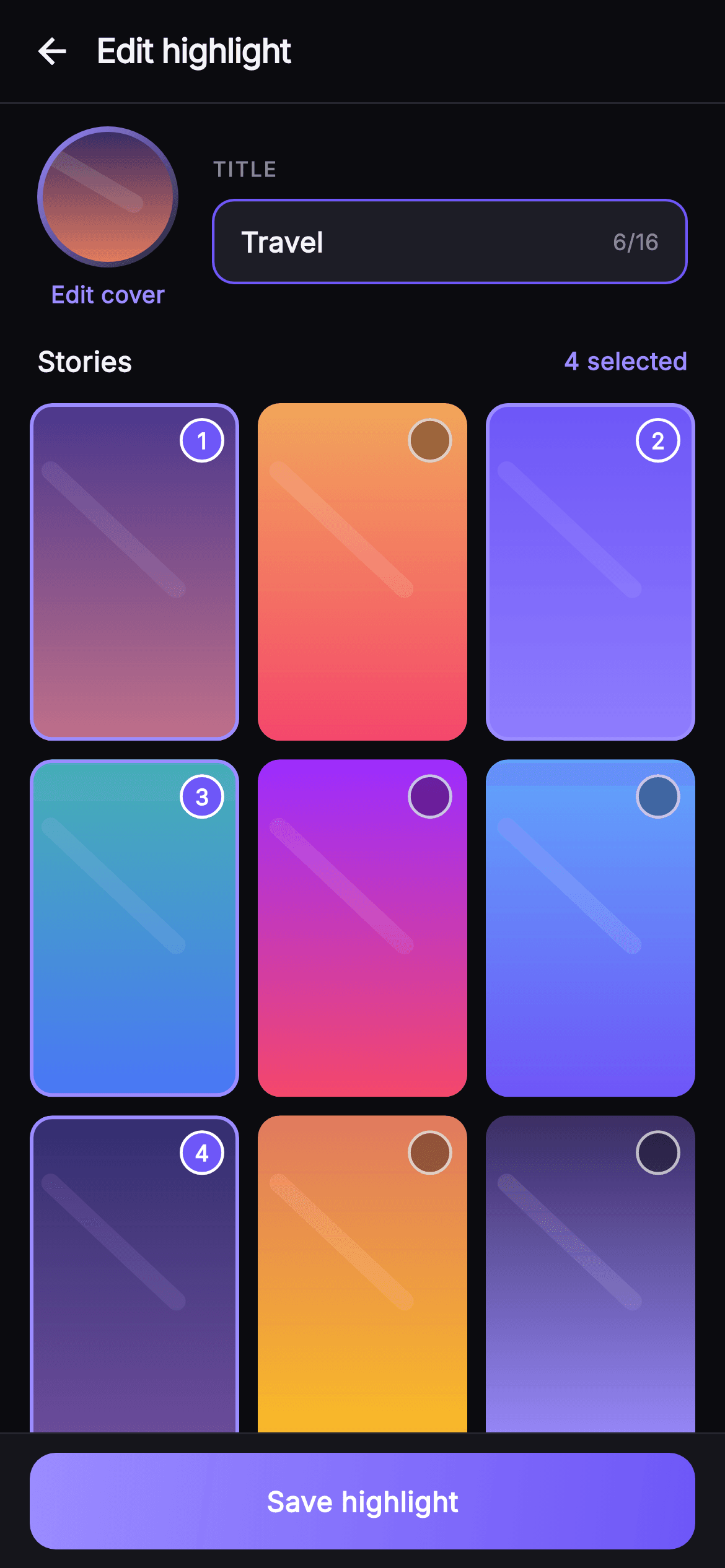
Edit Highlight is the configuration screen a user hits before saving a story highlight in Pulse. Below a hairline-bordered 'Edit highlight' top bar with a back arrow, a header row pairs a 76px circular cover preview — a gradient-ringed ClipOval painted by _CellPainter, tappable via an accent 'Edit cover' link — with an uppercase 'TITLE' label and a brand-outlined field reading 'Travel' and a live '6/16' character counter. A 'Stories' row shows a live '4 selected' count that tracks state, feeding a 3-column SliverGrid of archived story cells at a 0.62 aspect ratio. Each _StoryCell is a rounded gradient tile painted by _CellPainter (vertical gradient plus a soft diagonal light streak); tapping toggles selection, drawing an indigo overlay, an accent border, and a filled circular badge stamped with its 1-based selection order. A pinned _SaveBar at the bottom swaps between a gradient 'Save highlight' button when anything is selected and a disabled 'Select stories to save' state when the set is empty. Built on Pulse's dark near-mono palette (#0B0B0F background, #15151B / #1D1D26 surfaces) with the #6E56F7 indigo brand and #9B8CFF accent, bundled Inter typography. Self-contained pure Flutter: own dark Theme, SafeArea top and bottom, overflow-proof scrolling, no network images, and backend-agnostic — wired through injected onBack, onEditCover, and onSave callbacks.
Full tutorial coming soon.
The step-by-step walkthrough and complete Dart source for this screen haven't been published yet. They'll be free when they are — no sign-up, no payment. In the meantime, browse the screens that already have their tutorial.
What's included
- ✓_CellPainter CustomPainter rendering every gradient tile and the round cover preview with a soft diagonal white light streak
- ✓3-column SliverGrid of _StoryCell tiles at 0.62 aspect ratio with tap-to-toggle selection state held in a Set<int>
- ✓Numbered selection badges that stamp each chosen cell's 1-based order plus an indigo overlay and accent border
- ✓Circular gradient cover preview with a tappable accent 'Edit cover' link and a brand-outlined 'Travel' title field with a 6/16 counter
- ✓Pinned _SaveBar that flips between gradient 'Save highlight' and disabled 'Select stories to save' based on the live selected count
- ✓Injected onBack, onEditCover, and onSave callbacks plus a bundled Inter font and self-contained dark Theme
Use cases
- ✓Let users assemble and name a new story highlight from their archived stories before publishing it to their profile
- ✓Edit an existing highlight — swap the cover, rename it, and add or remove stories with ordered selection badges
- ✓Power an Instagram-style highlight reel curation flow inside a social or creator app's profile section
- ✓Serve as a reusable multi-select grid picker pattern for choosing and ordering media into a titled collection


