Pulse · New Message
Pulse · New Message is a production-ready Social Flutter screen from FlutterKit — free, with full source code.
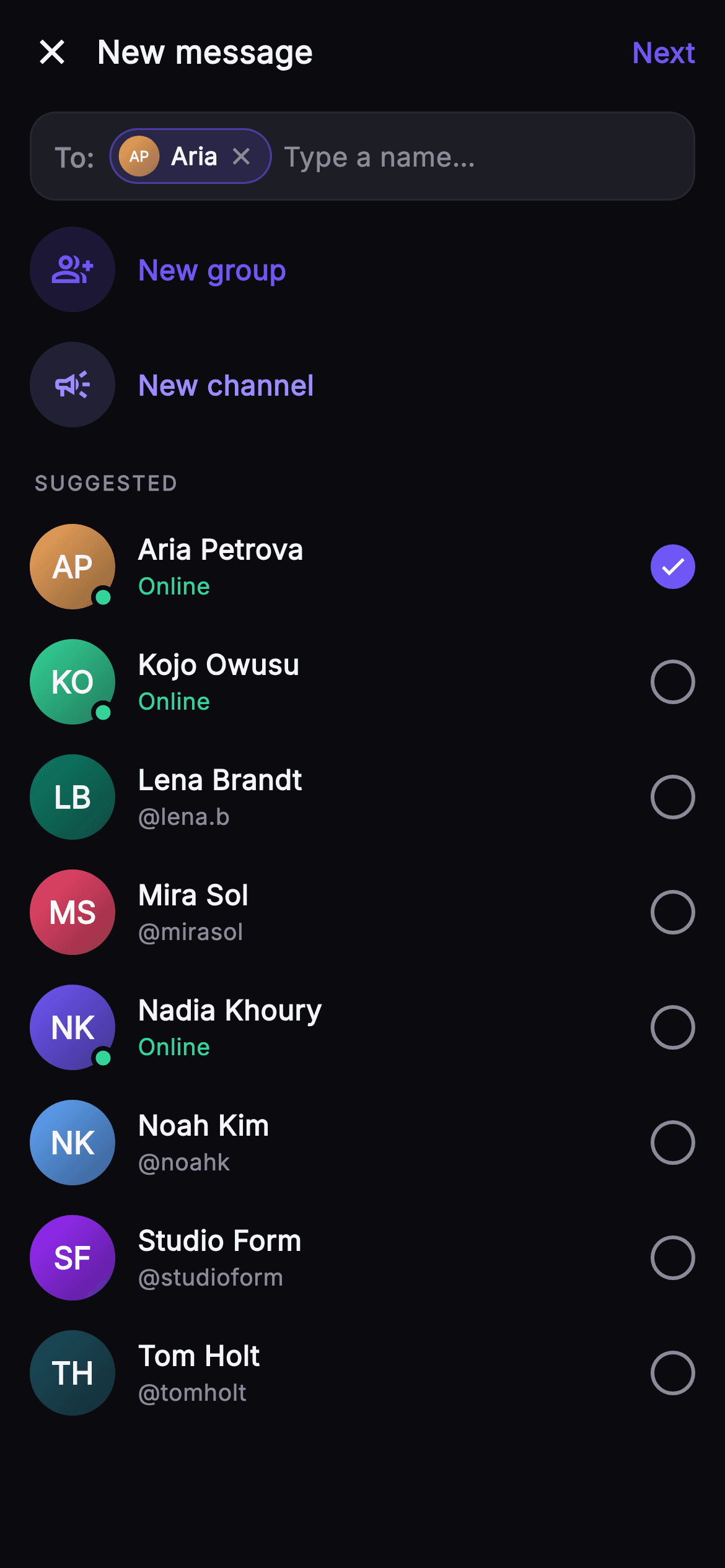
Pulse New Message is the recipient-picker screen that kicks off a fresh conversation, built as pure, self-contained Flutter. A compact top bar pairs a close (X) icon with the bold 'New message' title and a 'Next' action that stays muted grey while no one is picked and switches to indigo #6E56F7 the moment a recipient is selected, reporting the chosen count through onNext. Below it sits a rounded, hairline-bordered 'To:' field where every selected person renders as an indigo-tinted chip — a painted monogram avatar, first name, and a tappable close glyph to deselect — laid out in a Wrap alongside a 'Type a name…' caret placeholder. Two circular quick-action rows follow: 'New group' (group_add icon, indigo) and 'New channel' (campaign icon, lighter accent), each firing its own callback. Under a spaced-out SUGGESTED label, a scrolling list shows each contact with a gradient monogram avatar drawn by the _MonogramPainter (a tinted disc plus centered white initials), the person's name, an Online/@handle subtitle in mint or muted grey, a mint online dot for those who are active, and a right-hand circular checkbox that fills solid indigo with a white check when selected. Tapping a row or a chip toggles membership in a single selection Set, keeping the To field, checkboxes, and Next state in sync. The palette is a near-mono dark base (#0B0B0F background, #1D1D26 surface) with indigo brand and mint success accents; typography is the bundled Inter family throughout. Everything is wrapped in a Theme + SafeArea, is overflow-proof via ListView and Wrap, uses no network images, and is backend-agnostic — recipients, groups, and next all flow through injected callbacks so you drop it onto any messaging stack.
Full tutorial coming soon.
The step-by-step walkthrough and complete Dart source for this screen haven't been published yet. They'll be free when they are — no sign-up, no payment. In the meantime, browse the screens that already have their tutorial.
What's included
- ✓_MonogramPainter CustomPainter that draws a topLeft-to-bottomRight gradient avatar disc with centered white initials, reused in both chips and rows
- ✓Rounded 'To:' field using a Wrap of removable indigo recipient chips plus a 'Type a name…' caret placeholder
- ✓Single Set-based selection model that toggles from row taps or chip close taps and keeps checkboxes, chips, and Next in sync
- ✓Circular quick-action rows for New group (group_add) and New channel (campaign), each wired to its own callback
- ✓Person rows with mint online dots, Online/@handle subtitles, and a fill-on-select indigo circular checkbox with white check
- ✓Injected callback hooks (onBack, onNewGroup, onNewChannel, onNext<int>) and the bundled Inter font on a self-contained dark theme
Use cases
- ✓The recipient picker that opens when a user taps compose to start a new direct message
- ✓Entry point for spinning up a new group chat or broadcast channel from the messages tab
- ✓Multi-select audience builder for sharing a post or link into one or more conversations
- ✓Invite/add-people flow reused to select members when creating a team space or thread


