Pulse · Group Settings
Pulse · Group Settings is a production-ready Social Flutter screen from FlutterKit — free, with full source code.
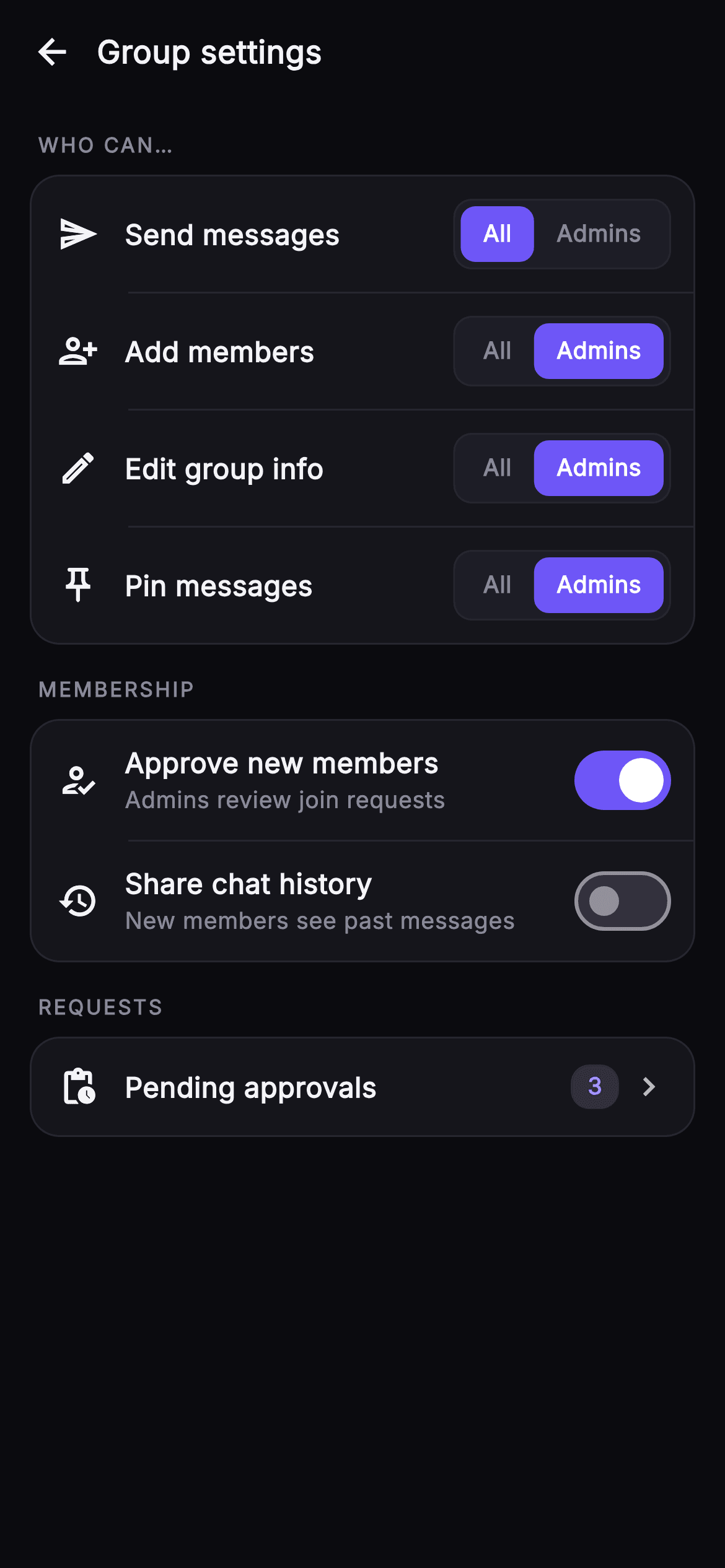
Group Settings is the admin control panel for a Pulse group chat, built as a scrolling ListView of grouped cards under sticky uppercase section labels. The top bar pairs a back arrow IconButton with a bold 'Group settings' title. The first 'WHO CAN...' card stacks four selector rows — Send messages, Add members, Edit group info, Pin messages — each with a leading outlined icon, a label, and a two-chip segmented control that flips between 'All' members and 'Admins' only, the active chip filled indigo #6E56F7 with white text. The 'MEMBERSHIP' card holds two toggle rows with title plus muted subtitle — Approve new members (Admins review join requests) and Share chat history (New members see past messages) — driven by native Switch widgets tinted indigo. A final 'REQUESTS' card is a tappable Pending approvals row with a pill count badge and a chevron. Rows are separated by indented hairline dividers and framed in rounded surface cards over a near-black #0B0B0F canvas. State lives in six booleans, each row updating via setState. It is self-contained pure Flutter: bundled Inter font, its own dark theme, SafeArea, overflow-proof, no network images, and backend-agnostic — wired through injected onBack and onApprovals callbacks so you drop it onto any permission model.
Full tutorial coming soon.
The step-by-step walkthrough and complete Dart source for this screen haven't been published yet. They'll be free when they are — no sign-up, no payment. In the meantime, browse the screens that already have their tutorial.
What's included
- ✓Four _selectorRow permission rows with a two-chip _segment / _segChip All-vs-Admins control filled indigo when active
- ✓Two _toggleRow membership switches (Approve new members, Share chat history) with title, muted subtitle, and native Switch
- ✓Tappable _approvalsRow with an accent-tinted pill count badge ('3') and chevron, firing the onApprovals callback
- ✓Grouped _card containers under uppercase _label section headers (WHO CAN, MEMBERSHIP, REQUESTS) with indented hairline _divider rows
- ✓Six-boolean setState-driven state for each selector and toggle, plus onBack/onApprovals injected callback hooks
- ✓Bundled Inter font, dark near-mono palette with #6E56F7 brand, SafeArea, ListView scroll, fully overflow-proof
Use cases
- ✓Admin permissions panel for a group or community chat controlling who can post, invite, edit info, and pin
- ✓Moderation settings surface where owners gate join approval and past-message visibility for new members
- ✓Entry point to a pending join-requests queue via the count-badged Pending approvals row
- ✓Reusable settings pattern for any team space or channel needing All-vs-Admins role scoping toggles


