Pulse · Topic Feed
Pulse · Topic Feed is a production-ready Social Flutter screen from FlutterKit — free, with full source code.
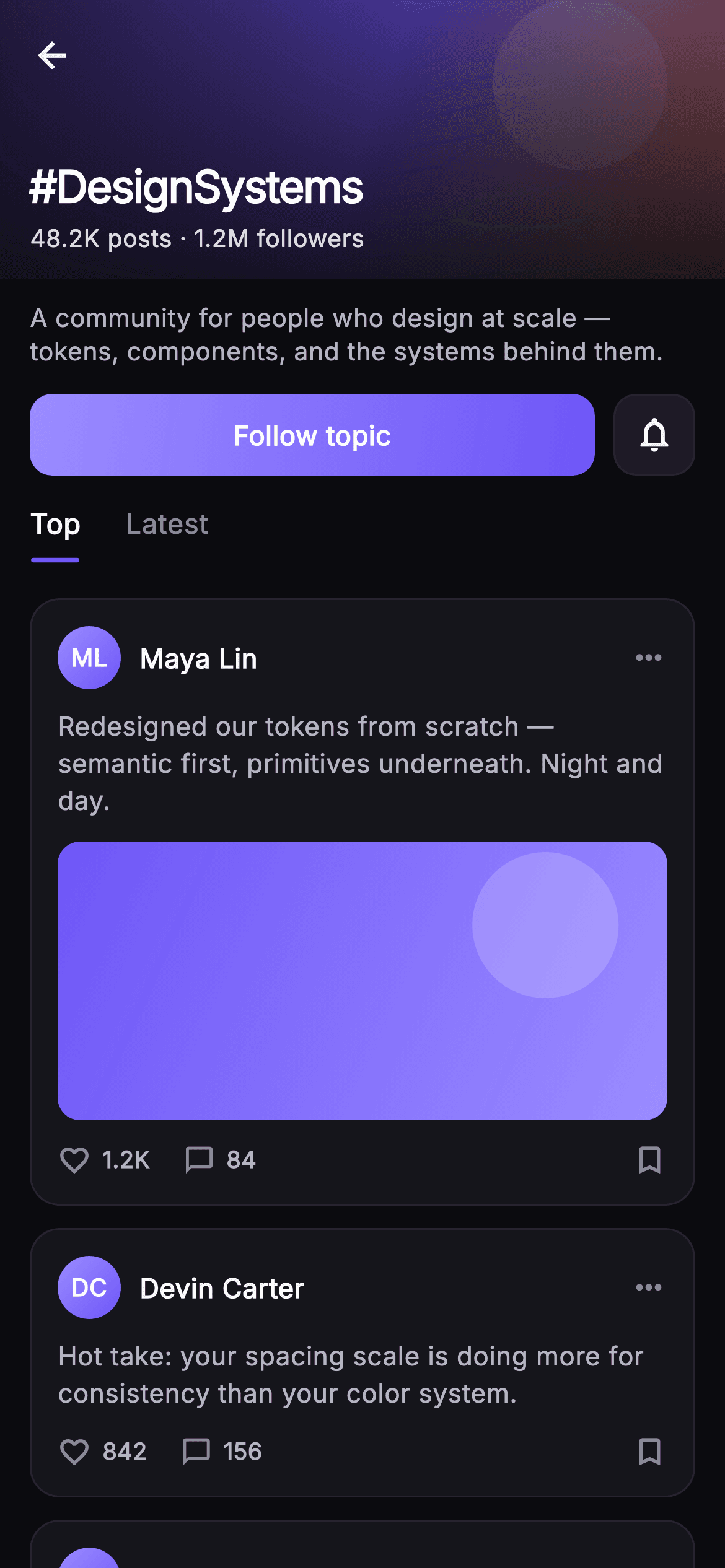
Topic Feed is the drill-down page for one hashtag topic in the Pulse social app. It opens with a 150px painted cover banner drawn by the _BannerPainter CustomPainter — a diagonal indigo-to-warm gradient with a soft translucent light disc — dimmed under a top-to-bottom black scrim so the overlaid title stays legible. On the banner sit a back IconButton, the topic title '#DesignSystems' in heavy Inter, and a '48.2K posts · 1.2M followers' stat line. Below, a one-line topic description, then an action row: a full-width Follow-topic button that gradient-fills when unfollowed and flips to an outlined 'Following' pill on tap, paired with a 44px notification-bell square. A pinned SliverPersistentHeader (_TabBarDelegate) keeps the Top / Latest tab bar stuck to the top while the feed scrolls, moving an indigo underline to the active tab. The feed itself is a SliverList of _PostCard widgets: a gradient initials avatar, author name, more-horiz menu, post text, an optional painted media block (each reusing _BannerPainter with per-post colors), and a like / comment tally row with a bookmark. Everything is wired to injected callbacks — onBack, onFollow(bool) and onPost(int) — making it backend-agnostic. Self-contained pure Flutter: bundled Inter font, its own dark near-mono theme with the #6E56F7 indigo brand accent, SafeArea, and an overflow-proof sliver layout with no network images.
Full tutorial coming soon.
The step-by-step walkthrough and complete Dart source for this screen haven't been published yet. They'll be free when they are — no sign-up, no payment. In the meantime, browse the screens that already have their tutorial.
What's included
- ✓_BannerPainter CustomPainter reused for the cover banner and per-post media, painting a diagonal gradient plus a soft white light disc from an optional color list
- ✓Pinned _TabBarDelegate SliverPersistentHeader with Top / Latest tabs and an indigo active-tab underline that stays stuck while the feed scrolls
- ✓Stateful Follow-topic toggle that switches between a gradient-filled button and an outlined 'Following' pill, firing onFollow(bool)
- ✓_PostCard cluster: gradient initials avatar, author name, post text, optional painted media, and a like/comment tally row with bookmark, tapping fires onPost(int)
- ✓Painted 150px cover banner with black scrim, back button, #DesignSystems title and posts/followers stat line
- ✓Bundled Inter font and a self-contained dark near-mono theme (#0B0B0F bg, #6E56F7 brand) with SafeArea and callback hooks onBack/onFollow/onPost
Use cases
- ✓The topic/hashtag detail page a user lands on after tapping a trending tag in a social app's explore surface
- ✓A community or interest hub where members follow a subject and browse its Top vs Latest posts
- ✓A drop-in feed template for any topic-centric content app — dev communities, design forums, niche interest networks
- ✓A reference implementation of a pinned sliver tab bar over a painted-banner header for Flutter teams building feed screens


