Pulse · Call Banner
Pulse · Call Banner is a production-ready Social Flutter screen from FlutterKit — free, with full source code.
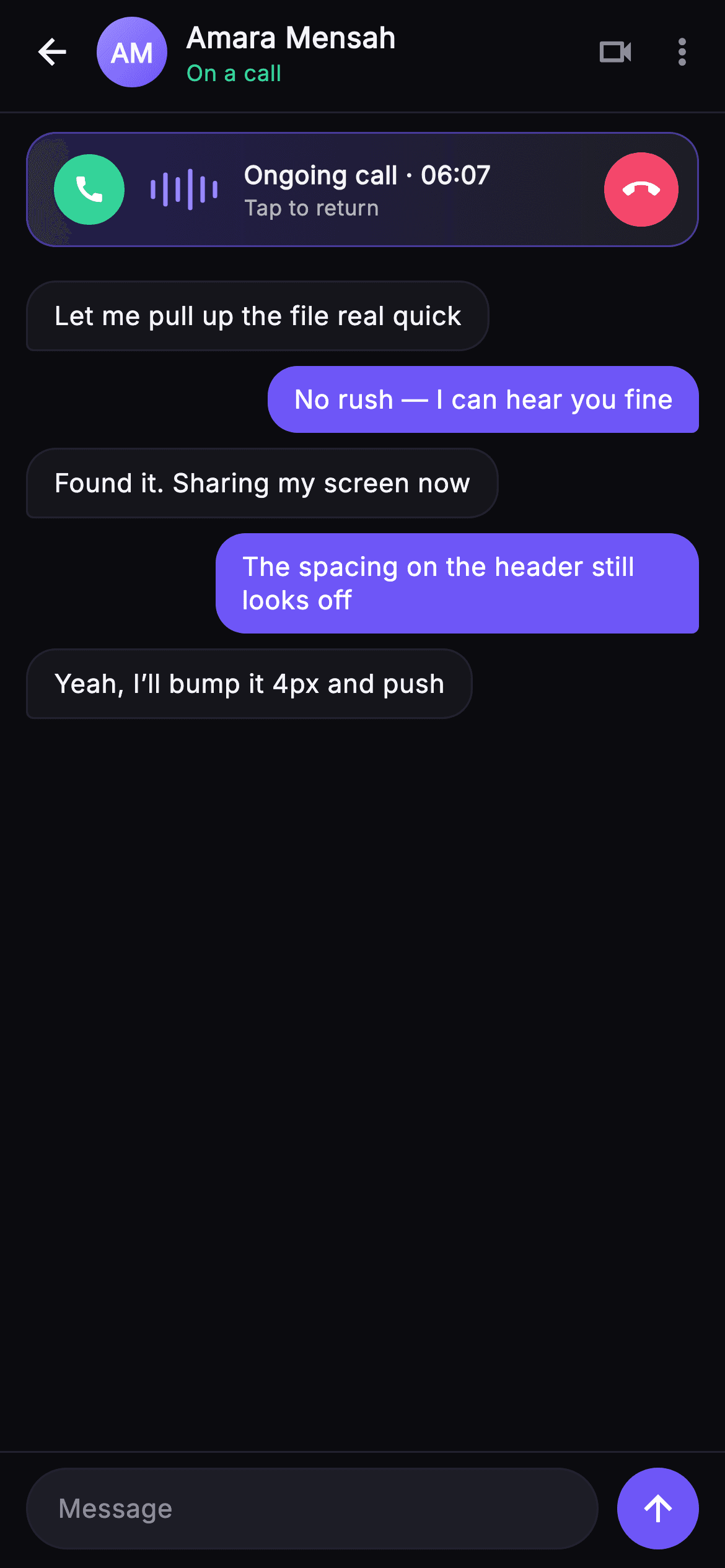
Pulse's Call Banner (Minimized) is the state where a voice call keeps running while the user browses the chat thread underneath. From the top: a chat header with a back IconButton, a painted gradient monogram avatar (AM), the contact name 'Amara Mensah' and a green 'On a call' status line, plus muted video and overflow icons. Directly below sits the signature call pill — a GestureDetector wrapping a rounded, indigo-bordered banner with an indigo-to-surface LinearGradient, a green circular call icon, a live waveform glyph, an 'Ongoing call · 06:07' duration with a 'Tap to return' sub-label, and a red circular call_end button. Tapping the pill body fires onReturn; tapping the red button fires onEnd. Beneath, an Expanded ListView renders the chat backdrop as left/right message bubbles (received in dark surface with hairline border, sent in indigo #6E56F7), and a pinned composer with a 'Message' field and an indigo send button closes the screen. The waveform is drawn by _WavePainter (six rounded bars of varied height around a center line) and the avatar by _MonogramPainter (gradient disc plus centered initials). It is self-contained pure Flutter — bundled Inter font, its own near-black #0B0B0F dark theme, SafeArea, overflow-proof, no network images — and backend-agnostic, wired entirely through injected onBack, onReturn and onEnd callbacks.
Full tutorial coming soon.
The step-by-step walkthrough and complete Dart source for this screen haven't been published yet. They'll be free when they are — no sign-up, no payment. In the meantime, browse the screens that already have their tutorial.
What's included
- ✓Floating call pill: gradient GestureDetector banner with green call icon, duration and 'Tap to return' hint
- ✓_WavePainter — a live audio-waveform glyph of six rounded bars of varied height around a center line
- ✓_MonogramPainter — gradient disc avatar with centered white initials for the header
- ✓Injected onBack, onReturn and onEnd callback hooks — no hardcoded navigation or call logic
- ✓Chat backdrop ListView of left/right bubbles: dark received bubbles, indigo #6E56F7 sent bubbles
- ✓Bundled Inter font and a self-contained #0B0B0F dark theme with pinned composer and SafeArea
Use cases
- ✓Persist an ongoing voice call while the user keeps texting in a chat or DM app
- ✓Provide a tap-to-return shortcut back to the full in-call screen from any thread
- ✓Show live call status and running duration inline above a conversation
- ✓Offer a one-tap hang-up affordance without leaving the messaging surface


