Aurum · Security
Aurum · Security is a production-ready Web3 Flutter screen from FlutterKit — free, with full source code.
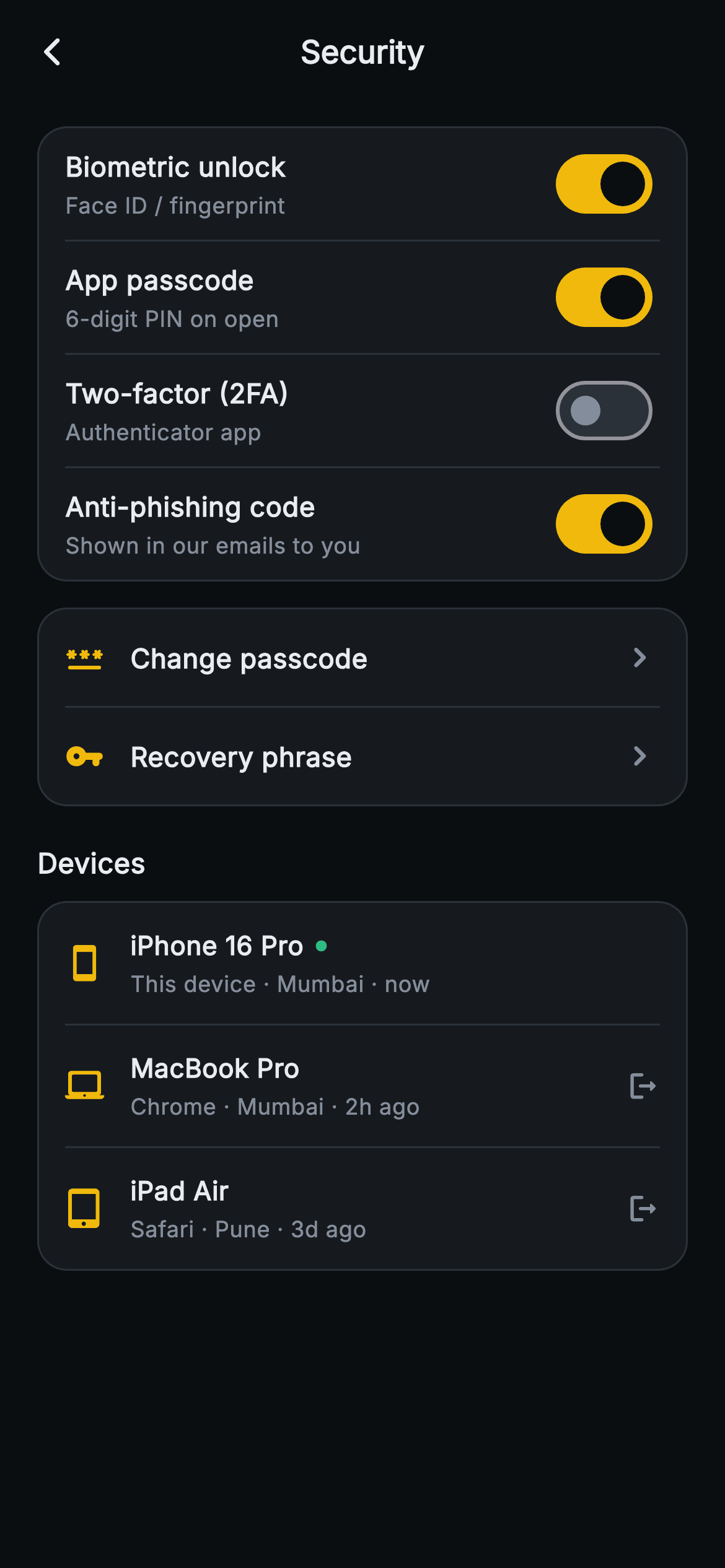
The Aurum Security screen is the hardening hub of a Binance-styled crypto wallet, rendered on a near-black 0xFF0B0E11 canvas with a centered "Security" AppBar and a back chevron wired to an onBack callback. The first rounded surface card groups four Switch rows — Biometric unlock (Face ID / fingerprint), App passcode (6-digit PIN on open), Two-factor (2FA) via authenticator app, and Anti-phishing code shown in emails — each with a bold title, muted subtitle, and an amber 0xFFF0B90B active track; local bool state flips instantly via setState. A second card holds two nav rows, Change passcode and Recovery phrase, with gold leading icons and a trailing chevron. Below a "Devices" heading, a third card lists active sessions (iPhone 16 Pro with a green "this device" dot, MacBook Pro, iPad Air) showing client, city and last-seen, with a logout icon on remote devices. Built in pure Flutter: a reusable _group card with hairline Dividers, _switchRow and _navRow helpers, bundled Inter font, forced dark Theme, no network images or glyph emoji — fully backend-agnostic through callbacks.
Full tutorial coming soon.
The step-by-step walkthrough and complete Dart source for this screen haven't been published yet. They'll be free when they are — no sign-up, no payment. In the meantime, browse the screens that already have their tutorial.
What's included
- ✓web3_settings_security_screen.dart — a single self-contained StatefulWidget with forced dark Theme and bundled Inter font
- ✓Four Switch rows (biometric, passcode, 2FA, anti-phishing) with amber active tracks and instant setState toggling
- ✓Reusable _group card builder that stitches rows together with indented hairline Dividers on a rounded surface
- ✓_navRow helper for Change passcode and Recovery phrase with gold leading icons and trailing chevrons
- ✓Active-device list driven by a _devices data array: per-device icon, client/city/last-seen line, green current-device dot, logout icon on remote sessions
- ✓onBack VoidCallback and ValueChanged toggle handlers keeping the screen fully backend-agnostic
Use cases
- ✓Security settings hub for a crypto wallet or Web3 exchange app
- ✓Account-protection screen in a fintech or banking app with 2FA and biometrics
- ✓Active-sessions / device-management page for any app with remote sign-out
- ✓Privacy and login-security center for a high-trust consumer product


