Aurum · ID Document
Aurum · ID Document is a production-ready Web3 Flutter screen from FlutterKit — free, with full source code.
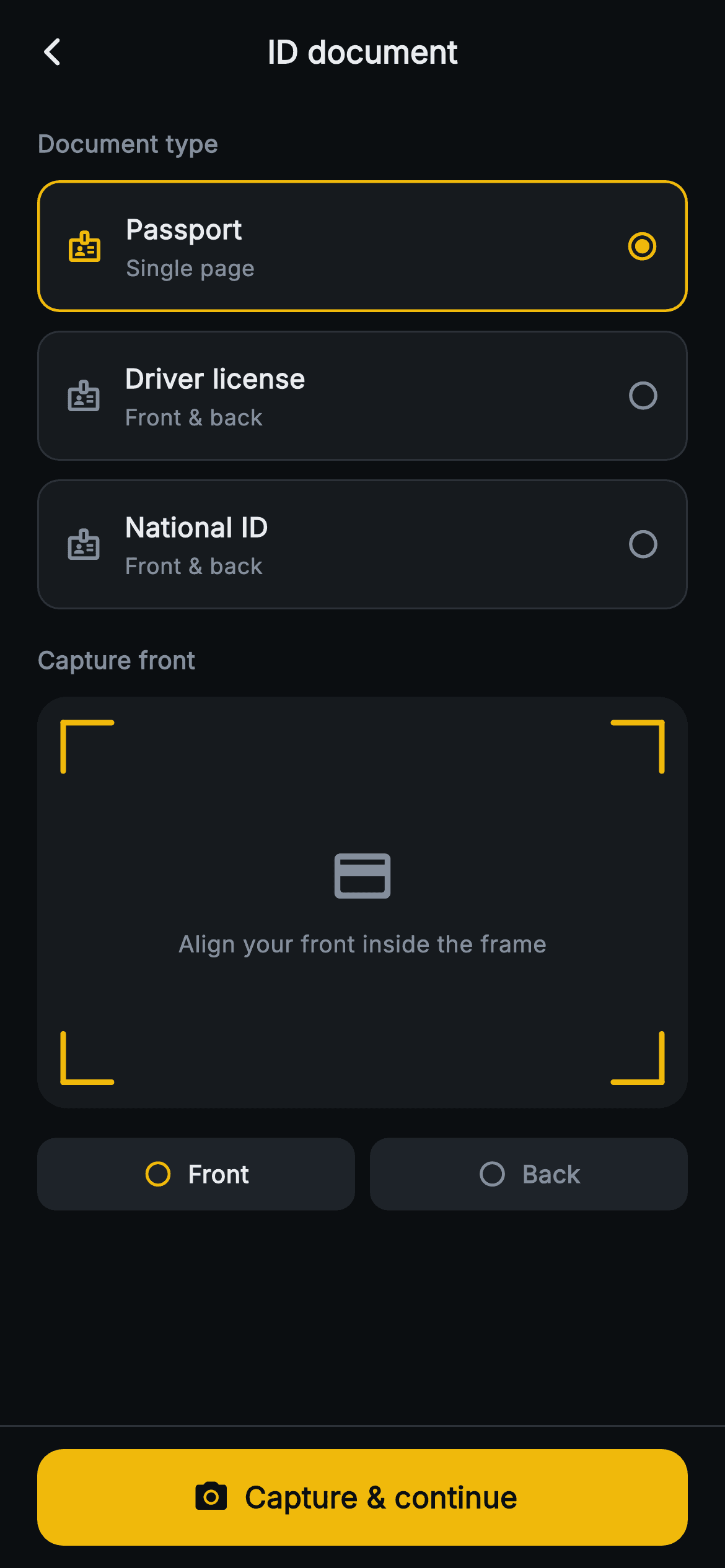
The "ID document" step of Aurum's KYC flow, drawn in the exchange dark palette (#0B0E11 ground, amber #F0B90B accents, Inter type). A "Document type" section lists three selectable cards — Passport (single page), Driver license (front & back) and National ID (front & back) — each a GestureDetector-wrapped Container with a badge icon, title, subtitle and a radio dot; the chosen card gets an amber 1.5px border and filled radio. Below, a "Capture front" label sits over a 1.58-aspect capture frame: a CustomPainter (_CardFramePainter) paints a rounded surface with four amber corner brackets and centers a credit-card icon plus "Align your front inside the frame" hint. Two pill step-dots ("Front", "Back") track progress, and a pinned amber "Capture front / Capture & continue" FilledButton.icon advances. Logic is real: choosing a two-sided doc flips the label, icon, hint and button text to the back step before firing onNext; single-page docs continue immediately. Pure Flutter, bundled Inter, no network images or glyph graphics, backend-agnostic via onBack/onNext callbacks.
Full tutorial coming soon.
The step-by-step walkthrough and complete Dart source for this screen haven't been published yet. They'll be free when they are — no sign-up, no payment. In the meantime, browse the screens that already have their tutorial.
What's included
- ✓Web3KycDocumentScreen StatefulWidget with onBack/onNext callbacks and a forced ThemeData.dark route
- ✓Three tappable document-type cards (Passport, Driver license, National ID) with badge icon, subtitle and amber selection radio
- ✓_CardFramePainter CustomPainter drawing a rounded capture surface with four amber corner brackets — no network image
- ✓Front/back capture flow that flips label, icon, hint text and button between 'Capture front' and 'Capture & continue'
- ✓Two-segment Front/Back step indicator using check-circle and amber/grey states
- ✓Pinned amber FilledButton.icon capture bar with SafeArea, plus Inter font and the exchange dark color tokens
Use cases
- ✓Crypto exchange or Web3 wallet KYC onboarding where users upload a government ID
- ✓Fintech or neobank account-opening identity-verification document capture step
- ✓Trading or DeFi app raising withdrawal limits via tiered identity checks
- ✓Any regulated app needing a passport / license / national ID scan-and-confirm screen


