Pulse · Tag Results
Pulse · Tag Results is a production-ready Social Flutter screen from FlutterKit — free, with full source code.
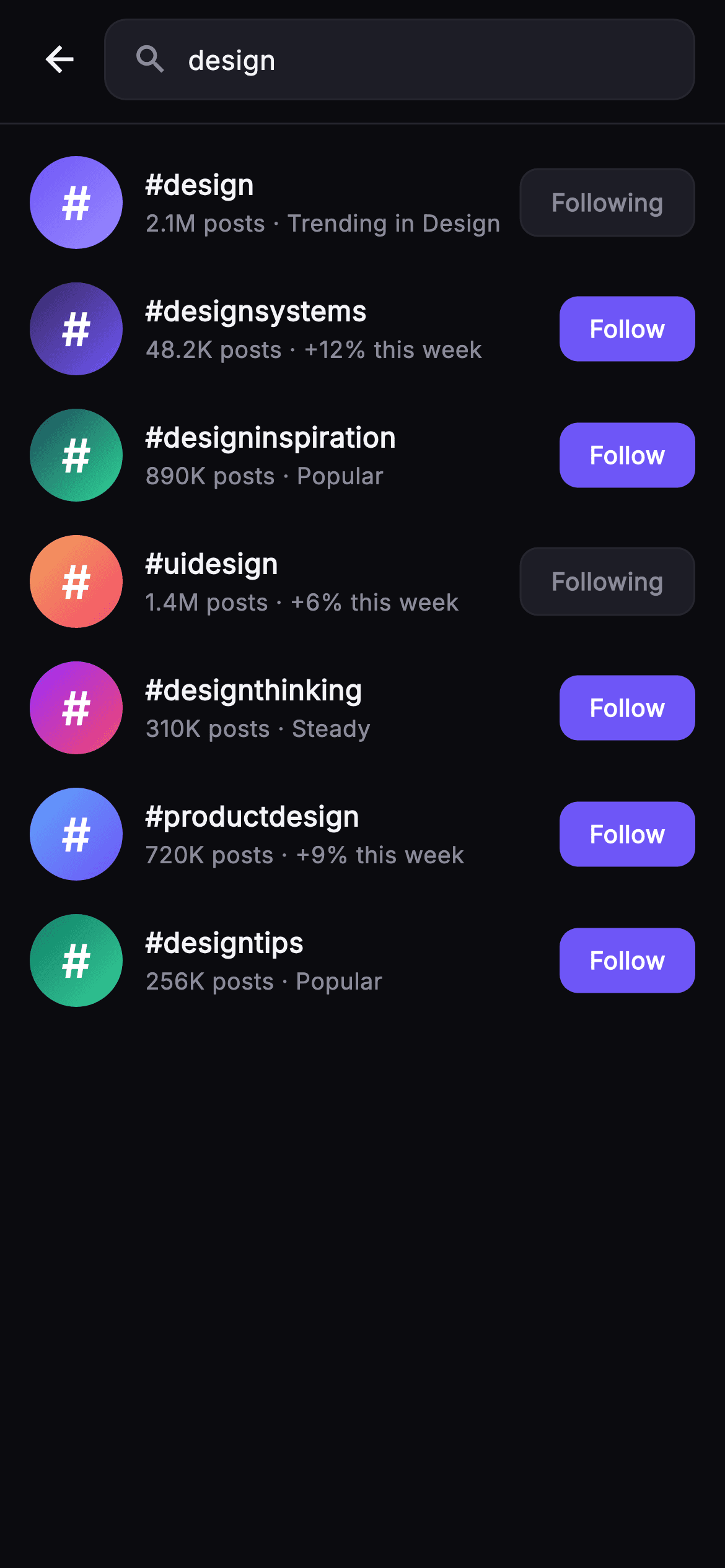
Tag Results is the hashtag tab of Pulse's search flow, showing the matches for a query as a clean vertical feed. At the top, a _Field header pins a back IconButton beside a filled, rounded search box that echoes the active query ('design') with a muted magnifier glyph, separated from the list by a single hairline border. Below it an Expanded ListView.builder renders seven _TagRow items: a 50x50 circular badge painted with a per-tag diagonal LinearGradient (indigo, teal, sunset-orange, magenta) carrying a bold white '#', then the tag name in heavy Inter weight, and a muted subline that joins the post count with a short momentum note like 'Trending in Design', '+12% this week', 'Popular', or 'Steady'. On the right sits a Follow / Following pill whose look flips with state — solid indigo #6E56F7 for Follow, a dark _surfaceAlt chip with a hairline border for Following. Tapping a row fires onTag with the hashtag; tapping the pill toggles local membership in a _following Set via setState and calls onFollow, so the button updates instantly without any backend. Long tag names ellipsize, keeping every row single-line and overflow-proof. The screen is self-contained pure Flutter: its own near-mono dark theme (background #0B0B0F, high-contrast #F4F4F7 text, #8A8A99 muted), the bundled Inter font, a ThemeData.dark shell, and SafeArea. It ships no network images and is fully backend-agnostic, driven only through the injected onBack, onTag, and onFollow callbacks.
Full tutorial coming soon.
The step-by-step walkthrough and complete Dart source for this screen haven't been published yet. They'll be free when they are — no sign-up, no payment. In the meantime, browse the screens that already have their tutorial.
What's included
- ✓_TagRow widget: gradient circle badge, tag title, post-count-plus-momentum subline, and a trailing state pill
- ✓Per-tag diagonal LinearGradient badges (indigo, teal, orange-to-red, magenta) rendering a bold white '#'
- ✓Follow / Following pill that flips between solid indigo #6E56F7 and a hairline-bordered dark chip on toggle
- ✓Local _following Set with setState _toggle so follow state persists in-screen with no backend
- ✓_Field search header: back IconButton plus a filled rounded query box echoing the 'design' term
- ✓Injected onBack, onTag, and onFollow callbacks, bundled Inter font, dark theme, SafeArea, ellipsized single-line rows
Use cases
- ✓Hashtag tab of a social app's search results, letting users browse and follow trending tags
- ✓Topic-discovery surface showing post volume and weekly momentum for each tag
- ✓Follow-management list where users curate the hashtags feeding their home feed
- ✓Onboarding step that suggests popular tags to follow before a user's feed is populated


