Pulse · Edit Profile
Pulse · Edit Profile is a production-ready Social Flutter screen from FlutterKit — free, with full source code.
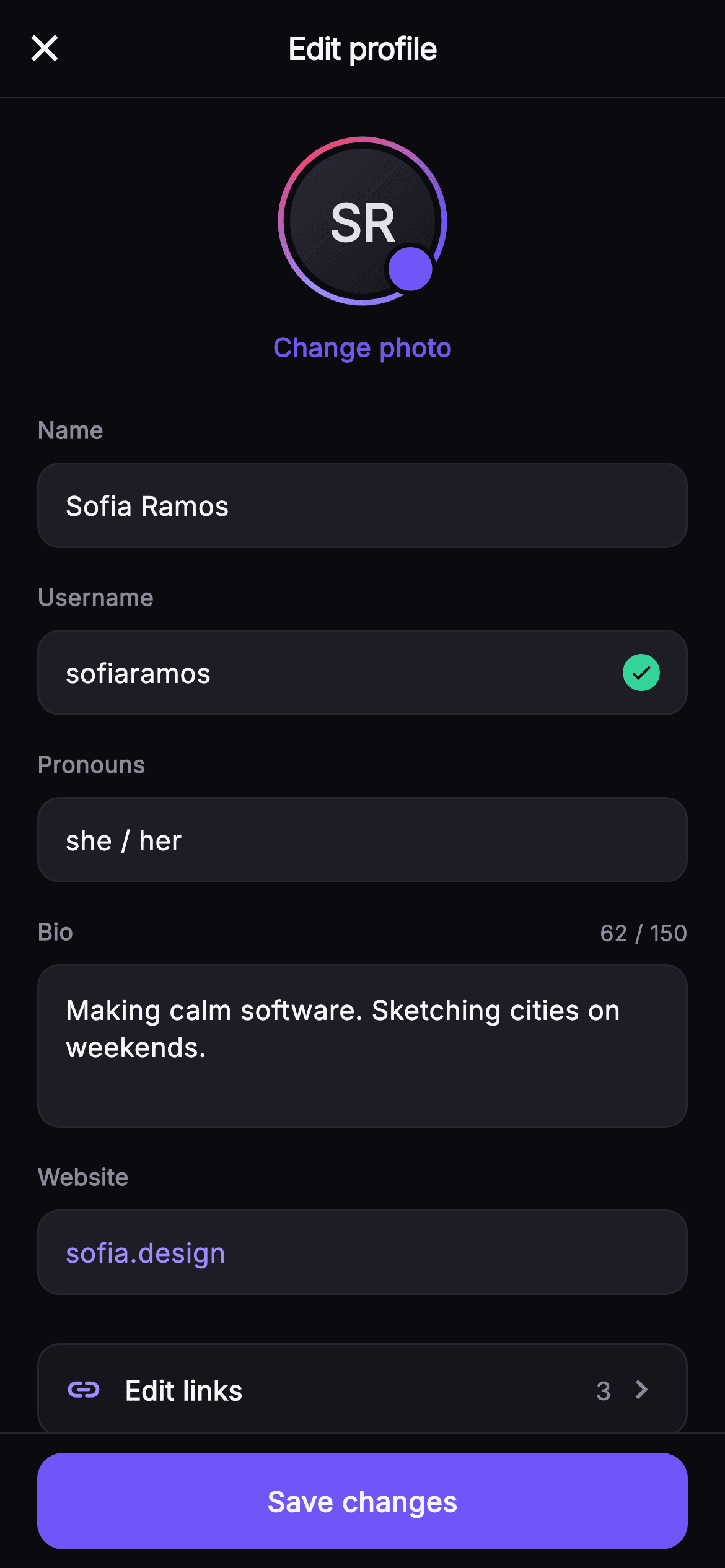
The Pulse Edit Profile screen is a drop-in form for editing a user's public identity, laid out as a close-topped bar reading "Edit profile", a scrolling body, and a pinned save bar. At the top of the ListView sits a centered avatar rendered entirely by the custom _RingAvatarPainter: a 92px sweep-gradient ring (indigo #6E56F7 to #9B8CFF to a pink #F4476B), a dark radial inner disc with the initials "SR", and a small indigo camera badge, with a tappable "Change photo" label beneath in the brand color. Below come labelled field rows built by a shared _field helper: Name, Username (with a green #34D399 verified check chip), Pronouns, and Website (value tinted in the #9B8CFF accent). A dedicated _bioField adds a taller multiline box with a live "62 / 150" character counter in the label row. An "Edit links" navigation row shows a link icon, a count of 3 and a chevron, followed by a "PROFILE INFORMATION" caption and two _navRow entries (Switch to professional account, Personal information settings). A fixed-height Save changes button pinned in its own top-bordered bar closes it out. Every action is wired through injected callbacks — onBack, onSave, onChangePhoto, onLinks — so it is backend-agnostic. It is self-contained pure Flutter: bundled Inter font, its own dark near-mono theme (#0B0B0F background, #15151B / #1D1D26 surfaces, #26262F hairlines) with indigo accents, SafeArea top and bottom, and overflow-proof rows with no network images.
Full tutorial coming soon.
The step-by-step walkthrough and complete Dart source for this screen haven't been published yet. They'll be free when they are — no sign-up, no payment. In the meantime, browse the screens that already have their tutorial.
What's included
- ✓_RingAvatarPainter: painter-drawn 92px sweep-gradient ring, radial inner disc with initials, and indigo camera badge
- ✓Shared _field helper rendering Name, Username, Pronouns and Website rows with label + rounded #1D1D26 input box
- ✓Verified state: a green #34D399 circular check chip that appears in the Username field when verified is true
- ✓_bioField multiline box with a live '62 / 150' character counter in its label row
- ✓_linksRow 'Edit links' nav tile with link icon, a count badge of 3 and chevron, plus two _navRow settings rows
- ✓Four injected callbacks (onBack, onSave, onChangePhoto, onLinks) and a pinned fixed-height Save changes bar; bundled Inter font
Use cases
- ✓The identity-editing screen behind a social app's profile 'Edit' button for name, bio and pronouns
- ✓Onboarding step where a new member sets their username, avatar and bio before entering the feed
- ✓Creator-account settings surface exposing Change photo, Edit links and a switch-to-professional-account row
- ✓Account management flow letting users update their website and verified username in a dark chat product


